
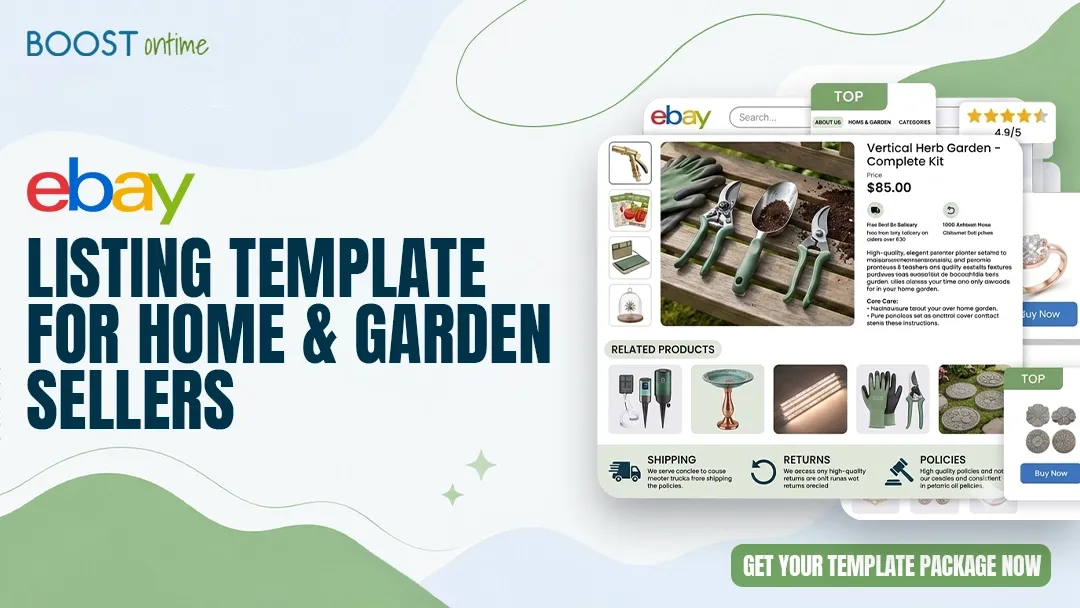
Home and garden is one of eBay’s most competitive categories — and one of the most profitable when your listings are built right. This guide shows you exactly what your template needs, why most sellers get it wrong, and how to fix it today.
📋 Table of Contents
- 1Why Your Listing Template Determines Your Sales
- 2What Home and Garden Buyers Actually Want to See
- 3The Anatomy of a High-Converting Home and Garden Template
- 4Photography and Visual Presentation That Sells
- 5Writing Product Descriptions That Win
- 6Trust Signals That Close the Sale
- 7The Biggest Mistakes Home and Garden Sellers Make
- 8How BoostOntime Makes It All Easy
- 9Getting Started in Under 10 Minutes
Why Your Listing Template Determines Your Sales
Here is a hard truth most eBay sellers overlook: two sellers can list the exact same garden hose reel, price it identically, and get completely different results. One sells out. The other gets ignored. The difference almost always comes down to how the listing looks and reads — not what is being sold.
Home and garden is a category where buyers have high expectations. They are purchasing items they plan to live with, use outdoors, or display in their homes. Before they commit to buying, they want to feel confident that what they see is exactly what they will receive. A poorly designed listing filled with vague descriptions and blurry photos signals risk. A clean, professional listing signals trust.
That trust is what your template delivers. It is the frame around your product. Get it right, and your items look worth every dollar. Get it wrong, and even a great product at a fair price goes unsold. If you are wondering how to build that professional foundation from scratch, our guide on how to create an eBay listing template without coding is a great starting point.
🌿 The Home and Garden Opportunity
eBay’s Home and Garden category attracts millions of buyers every month — from homeowners tackling DIY projects to apartment renters refreshing their spaces. They come in ready to spend. Your listing template is the one thing that either captures that intent or lets it walk right out the door.
What Home and Garden Buyers Actually Want to See
Before you design a single section of your template, you need to understand who is browsing this category and what they are thinking about. Home and garden buyers are practical people. They have a specific problem — a bare wall, an overgrown yard, a kitchen that needs updating — and they are looking for a solution that fits their space, budget, and style.
That means your listing needs to answer the questions running through their heads before they even think to ask them.
Exact Dimensions
Will this fit? Buyers need precise measurements — width, height, depth — before they can even consider purchasing. Ambiguity kills sales in this category.
Materials and Build Quality
Is it solid wood or MDF? UV-resistant plastic or a cheaper substitute? Buyers want to know exactly what they are getting and whether it will hold up outdoors or under daily use.
Color Accuracy
Photos lie if the lighting is off. Buyers need both realistic photos and written color descriptions so there are no surprises when the package arrives.
Assembly Requirements
Does it come ready to use or require tools and time? A busy parent buying patio furniture wants to know upfront if they are signing up for a Saturday afternoon project.
Indoor vs. Outdoor Use
Many home and garden items are only suitable for one environment. Be explicit. A rug rated for outdoor use, or a planter that can withstand frost, is a much easier sell when stated clearly.
Shipping Clarity
Oversized and heavy items come with freight concerns. Buyers want to know if the item ships flat, in multiple boxes, or by freight carrier before they commit.
The Anatomy of a High-Converting Home and Garden Template
A great listing template is not just pretty — it is structured to guide a buyer’s eye from interest to confidence to purchase. Every section has a job to do. Here is how to build yours correctly.
The Header: First Impressions That Hold Attention
Your header is the first thing a buyer sees after clicking your listing. It needs to establish your brand identity instantly — logo, store name, and a clean visual that tells the buyer they have landed somewhere professional. A strong header communicates that you take your store seriously, which signals to the buyer that you will take their order seriously too. For a deeper look at how branding fits into your overall template strategy, take a read through our guide on integrating branding into your eBay listing template.
The Hero Image Zone: Your Best Shot First
Place your primary product image prominently — large, well-lit, and clean against a white or neutral background. This is not the place for lifestyle photography yet. The buyer needs to clearly identify the product before they are ready to be inspired by it. Save the lifestyle shots for the gallery section below.
Product Highlights: The Scannable Summary
Most buyers scan before they read. Give them a concise block of three to five bullet points covering the most important facts — dimensions, material, color, compatibility, and intended use. This section should answer the top two or three questions in their head within ten seconds of landing on the page.
The Full Description: Depth That Builds Confidence
Below your highlights, write a full product description in plain, friendly language. Avoid jargon. Write like you are explaining the product to a neighbor. Include everything relevant — assembly, care instructions, compatibility notes, and any limitations buyers should know about. Honesty here reduces returns and builds repeat business.
If you want your descriptions to do double duty and boost your search visibility at the same time, our post on finding the right keywords for eBay listings will help you work the right terms naturally into your copy.
The Specifications Table: Make It Easy to Verify
A well-formatted specifications table is one of the most powerful conversion tools in a home and garden listing. Dimensions, weight, material, finish, color code, compatibility — all presented in a clean grid that buyers can scan instantly. This is the section that eliminates the hesitation that kills sales.
The Photo Gallery: Multiple Angles, Real Context
After the specs table, include a gallery of four to eight images. Mix product-only shots with lifestyle images that show the item in a real space — the garden planter on a real patio, the storage shelf in an actual garage, the pendant lamp above a dining table. Context helps buyers visualize ownership, and visualization drives purchase decisions.
Shipping, Returns, and Policies: No Surprises
End your listing with a clear, readable section covering shipping timelines, packaging details, and your return policy. For bulky or heavy items, explain exactly how the item is packed and what the buyer should expect on delivery day. Clarity here removes the last barrier to clicking “Buy It Now.”
The Related Products Section: Increase Your Average Order
A smart template includes a curated “You Might Also Like” section near the bottom. For a garden hose reel, show your garden gloves and soil cultivators. For a bathroom vanity mirror, show your wall shelves and towel hooks. This section turns single-item purchases into multi-item orders, boosting your revenue without any extra traffic.
Photography and Visual Presentation That Sells
In the home and garden category, photography is arguably your most powerful sales tool. Buyers cannot touch the fabric, open the drawer, or feel the weight of the tool. Your photos have to do all of that work.
What Every Home and Garden Photo Set Should Include
- A clean hero shot on white or neutral background — product centered, full frame
- Front, back, left, and right profile shots for furniture and hardware
- A close-up of the material texture, finish, or joinery
- At least two lifestyle shots showing the product in a real setting
- A size-reference photo — place the item next to a common object or show it in use so buyers can gauge scale
- Any included accessories or components laid out flat
- A photo of the packaging for bulky or fragile items
⚠️ Watch Out: eBay’s Active Content Policy
eBay prohibits JavaScript, Flash, and certain embedded tracking elements in listing descriptions. Ensure your template uses clean HTML and CSS only. Templates built with BoostOntime are always fully compliant right out of the box — no risk of listing suppression. You can learn more about building compliant templates in our guide to eBay listing HTML templates.
Writing Product Descriptions That Win
The words in your listing do far more than describe the product — they do the work of a sales associate who cannot be there in person. A well-written description builds confidence, reduces objections, and gives the buyer permission to click “Buy It Now.”
Lead With the Benefit, Not the Feature
Most sellers list features: “Steel frame, powder-coated finish, 40-inch width.” Great sellers lead with what those features mean to the buyer: “Built to survive the harshest winters, this 40-inch steel shelving unit will keep your garage organized for years without a hint of rust.” Same facts — completely different impact on the reader.
Be Specific About Size and Scale
In the home and garden category, vague descriptions cost sales. “Medium-sized planter” means nothing. “Measures 14 inches wide by 12 inches tall — fits perfectly on a standard 42-inch kitchen windowsill” is a description that gives a buyer the confidence to buy. Specificity eliminates the doubt that keeps a browser from becoming a buyer.
Address the Environment Head-On
Will this garden torch rust after a season? Will this outdoor rug fade in direct sunlight? Buyers are asking these questions as they read. Answer them proactively. “The UV-resistant coating is rated for 3 to 5 years of outdoor exposure — no fading, no cracking” is far more compelling than silence on the topic, which lets a buyer’s imagination fill in the worst-case scenario.
Write for Mobile Readers
More than half of all eBay traffic now comes through mobile devices. That means long, dense paragraphs get skipped entirely. Keep your description paragraphs to two or three sentences. Use headers to break up sections. Let white space breathe. A buyer scrolling on their phone on a Saturday morning needs to be able to absorb your listing in thirty seconds. Our breakdown of how mobile-responsive templates increase eBay conversion rates digs into this in detail and is worth reading before you finalize your layout.
The Right Keywords in the Right Places
Your listing title carries the heaviest SEO weight, but your description supports it. Work your primary keywords into the first sentence and into subheadings naturally. For home and garden, think about what your buyer actually types into the search bar — “outdoor wicker loveseat” rather than “stylish patio seating solution.” Match their language, not your internal jargon.
Trust Signals That Close the Sale
A buyer who has made it to the bottom of your listing is interested. What stops them from completing the purchase is doubt. Trust signals are the design elements that eliminate that doubt and replace it with confidence.
Clear Return Policy
State your return window plainly and without conditions buried in fine print. A generous, visible return policy removes the perceived risk of buying something the buyer cannot touch first.
Shipping Timeline Transparency
Tell buyers when their item will ship and provide a realistic delivery window. For bulky home and garden items, explain how the item is packed to prevent damage during transit.
Seller Rating Visibility
Your feedback score is social proof. Make sure your template surfaces your star rating and feedback count — buyers look for this, especially on higher-priced home items.
Money-Back Guarantee Badge
If you stand behind your products — and you should — say so visually. A simple “100% Satisfaction Guaranteed” badge placed near the buy button has a measurable impact on conversion rates.
Direct Contact Invitation
A short line inviting buyers to message you with questions signals confidence in your product and builds a personal connection. “Have a question about sizing? Message us — we respond within hours.”
Consistent Store Branding
When your logo, colors, and tone match across all your listings, you stop looking like an individual selling odds and ends and start looking like a trusted store. That brand consistency is one of the highest-value things a template delivers.
The Biggest Mistakes Home and Garden Sellers Make
Most listing problems in this category fall into one of a handful of predictable patterns. Recognizing these mistakes is the fastest way to diagnose why your listings are not converting the way they should.
How BoostOntime Makes It All Easy
Everything described in this guide is achievable — and BoostOntime is the platform that makes it achievable without writing a line of code or spending hours on each listing. Whether you are selling one product category or managing a large mixed catalog, BoostOntime is built to handle the real complexity of an active home and garden store.
Home and Garden-Specific Templates
Templates are designed with this category in mind — specs tables positioned prominently, large photo galleries built in, and section hierarchy that matches how home and garden buyers actually read listings.
One Template, Every Listing
Set up your brand elements, policies, and trust signals once. BoostOntime applies them automatically across your entire catalog — including to new listings the moment you create them.
Instant Bulk Updates
Change your return policy, update your shipping terms for the holidays, or refresh your seasonal messaging once — and watch it propagate across hundreds of listings in seconds. No more manual listing-by-listing edits.
Mobile-First by Default
Every BoostOntime template is fully responsive. Your listings look perfect on every screen — desktop, tablet, and mobile — without any extra work on your part.
Smart Upsell Module
The built-in Related Products section pulls from your catalog automatically or lets you curate manually. Perfect for cross-selling garden tools, home accessories, and matching product sets to every buyer who views a listing.
Full Brand Customization
Your logo, your color palette, your tone. BoostOntime’s drag-and-drop editor gives you full creative control without any coding knowledge required.
💡 How Does BoostOntime Compare to Other Options?
If you are weighing your options and want a full side-by-side picture, our detailed comparison of BoostOntime vs. other eBay listing templates lays it all out honestly. We also have a breakdown of free eBay listing templates vs. BoostOntime if you want to understand exactly what you give up — and gain — when you make the move.
For most active home and garden sellers, BoostOntime pays for itself on the first upsell it generates.
Template Builder Comparison: Home and Garden Use Case
Getting Started in Under 10 Minutes
Setting up your home and garden listing template with BoostOntime is fast — and you will see the difference in your listings immediately. Here is how it works.
Start Your Free 7-Day Trial
No credit card needed. Sign up with your eBay username and email, and you get full access to every feature from day one. Most sellers see their first template live within the same session.
Choose a Home and Garden Template
Browse templates designed specifically for this category. Whether you sell garden furniture, kitchen appliances, decorative lighting, or outdoor tools, there is a layout built around how buyers in that niche make decisions.
Add Your Brand Identity
Upload your logo, set your brand colors, and write in your store’s tone of voice. Add your standard shipping information, return policy, and any seasonal messaging. This step takes five to ten minutes and sets you up for every listing that follows.
Apply to Your Active Listings
Select the listings you want to update — or select all of them — and apply your template in one click. Watch your entire catalog transform from generic to professional in seconds. If you have never done this before, our walkthrough on editing and personalizing eBay listing templates without coding covers every step.
Monitor, Refine, and Scale
Keep an eye on your listing views and conversion rate over the following two weeks. Most sellers see measurable improvement within the first month. When you are ready, build templates for additional product subcategories and scale the same winning approach across your entire store.
Is This the Right Move for Your Store?
BoostOntime is built for sellers who are serious about their stores — not just casual one-off listers. If any of these describe you, the upgrade from generic listings to professional templates will be one of the best decisions you make this year.
Home and Garden Specialists
You sell in this category full-time or as a significant revenue stream. Your listings need to look the part — and right now, they probably do not match the quality of the products you are selling.
Sellers With 20 or More Active Listings
At this volume, manual listing work consumes hours every week. Automation is not a luxury — it is the only way to grow without burning out. A professional and reusable reliable eBay listing template is your foundation.
Multi-Channel Sellers
Running your eBay store alongside Amazon, Shopify, or a brick-and-mortar? BoostOntime integrates with ChannelAdvisor, Linnworks, Sellbrite, and more — keeping your listing quality consistent everywhere you sell.
Sellers Ready to Compete Seriously
You have looked at your competitors’ listings and know yours fall short. You are ready to invest the right tool to close that gap. A well-built eBay listing template design is often the fastest way to level the playing field.
Your Home and Garden Listing Template Checklist
Before you publish your next listing, run through this checklist. Every item here has a direct impact on your conversion rate.
- Header with store logo and brand colors is visible at the top of every listing
- Hero image is large, well-lit, and shows the product clearly on a neutral background
- Dimensions are stated in the first visible block — no searching required
- Material, finish, and weatherproofing details are explicitly stated
- Eight or more photos including lifestyle shots showing the product in a real space
- All photos are at least 1600 pixels on the longest side to enable the zoom feature
- Product description is written in plain conversational language, not manufacturer copy
- Specifications table is present and formatted for easy scanning
- Assembly requirements are clearly stated if applicable
- Shipping timeline and packaging information are included
- Return policy is visible and stated in plain language
- A money-back or satisfaction guarantee badge is present near the purchase area
- A related products section links to complementary items in your catalog
- The template renders correctly on mobile — no broken columns or overflowing text
- The template is eBay-compliant — no JavaScript, Flash, or prohibited tracking pixels
Your Home and Garden Listings
Deserve Better.
You are selling quality products. It is time your listings reflected that. BoostOntime gives you professional, category-optimized templates and the automation to apply them at scale — for less than a cup of coffee per month.
🚀 Start Your Free 7-Day Trial
No credit card required · Cancel anytime · Full platform access from day one