
Your eBay listing has about five seconds to make an impression. The template provider you choose determines whether those five seconds work for you — or against you. Most sellers pick the wrong one and don’t realize it until the damage is done.
Why Your Listing Template Is More Important Than You Think
Here’s a hard truth: your product is only as compelling as your presentation. Two sellers offering the exact same item at the exact same price can see wildly different results — one with a clean, organized, professional listing; the other with text blocks jumbled together, images placed awkwardly, and policy information buried at the bottom. Buyers notice the difference immediately, even if they can’t articulate why.
The template provider you choose determines whether you get all the benefits of professional design — or whether you waste time and money on mediocre results that undermine your store instead of building it.
The 5-second window: A buyer lands on your product page, glances at the title, scans the images, reads the first few lines — and decides whether they trust you enough to keep reading or whether they’ll try the next seller instead. That five-second window is where professional eBay templates earn their value.
What a Professional Template Actually Does for Your Business
Builds Trust Instantly
When a buyer sees a polished, well-organized listing, they assume the seller is professional and reliable. When they see a sloppy layout, they assume you don’t care — and they move on to someone who looks like they do.
Saves Serious Time at Scale
If you’re uploading 10 listings a month, manual formatting might be tolerable. But at 100 listings? Manually building each listing’s structure becomes exhausting. A template lets you reuse the same structure, adding only product-specific information each time.
Creates Store-Wide Consistency
Repeat buyers notice consistency. A cohesive store — same design language, same sections, same branding across all listings — signals an organized, trustworthy business. Random, chaotic listings signal a disorganized seller.
Works on All Devices
Over 50% of eBay traffic comes from mobile. If your listing doesn’t work on phones, you’re losing half your potential buyers. A professional template is built to work on desktop, tablet, and phone — without breaking or requiring buyers to zoom.
Supports Search Ranking
eBay’s search algorithm favors listings that are well-structured, mobile-responsive, and organized logically. A good template makes it easier to hit these signals consistently across your entire catalog.
Directly Drives Conversions
Sellers with professionally designed templates consistently convert at 12–18% higher rates than those using plain or outdated listings. That’s not a theory — it’s what we observe across 1M+ listings managed on BoostOnTime.
What Separates a Good Provider from a Bad One
Not all template providers are built the same. Some offer attractive designs but make it hard to customize them. Others provide responsive layouts but include confusing, bloated code. Still others require technical knowledge you don’t have and can’t afford to hire for.
A reliable provider has a specific set of non-negotiable strengths. Every one of these matters — the absence of any one of them is a serious red flag.
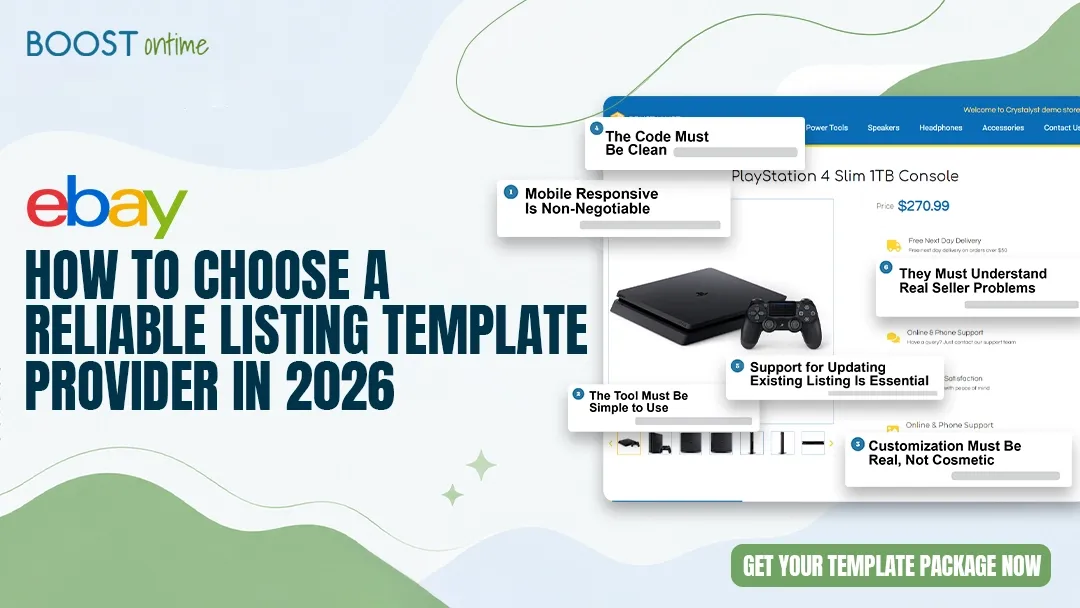
Mobile Responsiveness Is Non-Negotiable
If a provider doesn’t emphasize mobile optimization, skip them. A template that works on desktop but breaks on phones isn’t a template — it’s a liability. The provider should showcase how their templates look across devices and offer preview tools so you can verify before publishing.
The Tool Must Be Simple to Use
You’re an eBay seller, not a web developer. A good template builder uses drag-and-drop design, plain-English customization options, and requires no code. If you find yourself wrestling with HTML or CSS, the tool is overcomplicating something that should be straightforward.
Customization Must Be Real, Not Cosmetic
You don’t just want to change colors — you want to rearrange sections, adjust sizing, add your logo, change fonts, and reorganize the flow. The provider should support genuine flexibility without breaking the design when you push it beyond surface-level adjustments.
The Code Must Be Clean
Some templates look great but include messy, overcomplicated HTML that causes problems when editing, loading, or applying across multiple listings. Clean code means faster loading, easier editing, and fewer headaches as your catalog grows.
Support for Updating Existing Listings Is Essential
Many sellers have dozens or hundreds of live listings they can’t afford to rebuild from scratch. A provider that lets you apply templates to existing listings — without destroying your content or sales history — is worth its weight in gold.
They Must Understand Real Seller Problems
The best providers know that you don’t just want a template. You want to solve specific problems: your listings look outdated, uploading takes too long, your store lacks consistency, or you’re manually formatting the same elements over and over. They build solutions around these real-world problems — not feature lists designed for a marketing brochure.
“A beautiful template that’s a nightmare to customize, breaks on mobile, or requires a developer to update isn’t a tool — it’s a new problem you paid for.”
— BoostOnTime, from analysis of 1,500+ seller accountsThe 13 Features That Actually Matter
When evaluating any eBay template provider, focus on these practical capabilities. Each one either directly affects your sales, saves you meaningful time, or protects you from expensive mistakes. None of them are optional.
Mobile-Responsive Template Design
One of the first things to check is whether the provider offers genuinely mobile-responsive templates. Many buyers browse and shop on their phones, so your listing must look clean on smaller screens. A mobile-responsive template automatically adjusts to different screen sizes — keeping the layout readable and professional whether the buyer is on a phone, tablet, laptop, or desktop.
✓ BoostOnTime — all templates mobile-tested across devicesEasy-to-Use Template Builder
A professional template should not require coding knowledge. Many eBay sellers are business owners, resellers, or store operators — not web developers. A good builder should let you select a design, customize the layout, add product information, adjust sections, and apply the template without confusion or technical overwhelm. If the interface feels difficult, sellers will stop using it after a few listings.
✓ BoostOnTime — drag-and-drop builder, no HTML requiredProfessional and Trustworthy Layouts
Buyers judge a listing quickly based on how it looks. A clean and professional layout makes your store feel more reliable. The design should support your product, not distract from it. A strong eBay listing template should include clear product title sections, neat image placement, readable descriptions, organized feature sections, specification tables, shipping and return policy areas, and store identity elements.
Real Customization Options for Branding
Your eBay store should have its own identity. A reliable provider lets you add your logo, choose brand colors, include store messages, adjust sections, and create a layout that fits your product category. An electronics seller needs detailed specification tables; a fashion seller needs size charts and care instructions; an auto parts seller needs fitment compatibility data. Good customization supports all of these without requiring a developer.
✓ BoostOnTime — category-aware customization toolsSEO-Friendly Listing Structure
A good template helps you organize content in a way that supports search visibility. A well-structured listing makes it easier to include important keywords naturally — in the product overview, key features, technical specifications, compatibility details, and shipping information sections — without the content looking stuffed or unnatural.
Clean HTML and Lightweight Code
Some templates look attractive but include messy or unnecessary code that creates problems when editing, loading, or applying across multiple listings. A reliable provider offers clean, lightweight, eBay-friendly templates that aren’t overloaded with unnecessary scripts or broken elements. Clean design and clean code work together — the result is a listing that looks good, loads faster, and is easier to update.
Multi-Device Preview Before Publishing
Before publishing, you should see exactly how your template looks on desktop, tablet, and mobile. This catches issues before they reach buyers — and before they start costing you conversions. A browser simulator on your laptop is not a substitute for an actual multi-device preview built into the platform itself.
✓ BoostOnTime — live desktop and mobile preview built inBatch Editing and Bulk Updates
This is one of the biggest time-savers available to eBay sellers. If you need to update your shipping policy or add a new section across 50 existing listings, a good provider lets you do it in minutes — not hours. The absence of this feature means you’re doing manual, repetitive work that scales poorly as your catalog grows.
✓ BoostOnTime — Batch Revision Tool applies changes across entire catalog in one clickSupport for Existing eBay Listings
Many sellers already have dozens, hundreds, or thousands of listings on eBay. They can’t delete and recreate everything from scratch. A tool that helps you convert current eBay listings into professional, responsive templates — without rebuilding every listing manually — is a major advantage for any seller with an established catalog.
✓ BoostOnTime — designed specifically to improve existing listingsCategory-Specific Template Options
An electronics listing has fundamentally different content needs than a fashion or auto parts listing. A one-size-fits-all template won’t serve all sellers equally well. The provider should offer templates with enough flexibility to support different product types — or category-specific designs that are already optimized for the buyer psychology of that particular category.
Clear Sections for Product Details
Buyers don’t want to dig through a wall of text. They want product details in a clear, simple format. A strong template organizes information into easy-to-read sections: product description, main features, benefits, item specifications, size or measurement details, package contents, usage instructions, shipping details, and return policy. When information is organized this way, buyers can find what they need quickly — reducing hesitation and increasing purchase confidence.
Easy Editing for Future Updates
Your product information will change over time. Prices get revised. Descriptions get improved. Policies get updated. A reliable template provider makes editing straightforward — you should be able to update your logo, header, product description, feature sections, shipping policy, return policy, and promotional banners without breaking the overall design or needing technical help.
Transparent Pricing With No Hidden Costs
You want pricing that’s straightforward: what you see is what you pay. Watch out for providers that advertise a low headline price but charge extra for every feature you actually need — per-template fees, per-listing charges, or premium modules locked behind higher tiers. Real value means everything you need is included in the stated price.
✓ BoostOnTime — $4.99/mo includes unlimited templates and listing updatesCommon Mistakes Sellers Make When Choosing a Provider
Many sellers rush this decision and pick the wrong provider. The consequences aren’t always obvious immediately — a template might look fine on your desktop during setup, but then fail on mobile where 60% of your buyers are actually shopping. By the time you notice, it’s already live and damaging conversions.
- Test the actual builder interface during the free trial before committing
- Check mobile responsiveness on a real device, not just a desktop browser
- Verify that bulk editing and batch updates are included in the base plan
- Read reviews from sellers in your specific product category
- Confirm existing listings can be updated without being rebuilt from scratch
- Evaluate code quality — slow loading or editing issues signal bloated code
- Prioritize functionality over aesthetics when the two are in tension
- Choosing based on design alone without testing mobile performance
- Ignoring mobile responsiveness entirely — the single biggest and most costly mistake
- Not using the free trial to actually build a real test listing end-to-end
- Assuming all providers offer the same core capabilities — they don’t
- Choosing on price alone — the cheapest option usually means compromises in mobile, customization, or support
- Overlooking how difficult the interface is to use daily at scale
- Missing hidden costs that make the “cheap” option significantly more expensive
The mobile test is non-negotiable. Before committing to any provider, open a test listing on an actual smartphone and scroll through the entire thing. The mobile preview inside a desktop browser is not reliable enough for this check. A template that looks fine on your laptop but breaks on a phone is damaging every sale from the 60%+ of buyers who shop on mobile.
Why BoostOnTime Stands Out
BoostOnTime’s eBay Template Builder was built specifically to solve seller problems — not just to offer templates. Every design decision in the platform traces back to a real seller frustration that was resolved by building a better tool.
Mobile-First From the Ground Up
Every template is tested to work flawlessly on phones, tablets, and desktops. The builder includes multi-device preview, so you see exactly what buyers see before publishing — not a simulation, but the actual render.
Genuinely Simple Customization
Drag-and-drop modules, no coding required. You can add your logo, choose colors, rearrange sections, and customize content without breaking anything. Even sellers with zero technical experience can create professional listings in under 30 minutes.
The Batch Revision Tool — Nothing Else Comes Close
One click applies your finished template to every active listing in your eBay catalog simultaneously. No listings go offline. No sales are interrupted. What used to take a team days of manual work now takes less than a minute. This is BoostOnTime’s single most important competitive advantage.
Apply to Existing Listings Without Destroying Them
You don’t have to delete your current listings and start over. Apply a template to an existing listing, and it updates without destroying your current content or sales history. For sellers with established catalogs, this is the difference between adopting a better tool and a massive migration project.
Transparent All-In Pricing
Both plans — $6.99/month or $4.99/month on the annual plan — include unlimited templates and unlimited listing updates. No per-template fees, no per-listing charges, no surprise costs. What you see is exactly what you pay.
Proven at Scale With Real Sellers
1,500+ active sellers trust the platform, managing over 1 million listings. A 99% satisfaction rating from active users is a signal that real sellers — not marketing copy — are getting genuine results. That kind of retention reflects a platform that actually works as advertised.
The BoostOnTime Numbers at a Glance
Real results from real sellers using the platform today — not projections or best-case scenarios.
How BoostOnTime Improves Buyer Experience
A better listing template doesn’t only help the seller — it fundamentally changes how buyers interact with your products. When buyers visit a well-designed listing, they can understand the product more easily, find the details they need without frustration, and feel more confident in the purchase decision.
In online selling, trust is built through details. A clean listing design is one of those details — and it compounds over time as buyers who had a good experience return, leave positive feedback, and recommend your store to others.
“A professional layout creates a smoother shopping journey. It makes the product feel more credible and the seller more trustworthy. In online selling, trust is built through details — and a clean listing design is one of those details.”
— BoostOnTime, from 1,500+ active seller accounts on the platformFinal Checklist: Before You Decide
Before selecting any eBay template provider, run through this checklist. Every “no” is a red flag worth taking seriously — some of these gaps will cost you sales you’ll never know you were losing.
One more check before you commit: Use the free trial. Actually build a test listing from start to finish. Apply it. Check it on a real phone. See if updating something is intuitive or frustrating. A few minutes of hands-on testing reveals more about a platform than any feature list or marketing claim ever will.
What Happens When You Choose Right
When you choose the right template provider, several things shift in your business simultaneously — and the effects compound over time.
Your Store Looks Like a Real Business
Your store stops looking like a side hustle and starts looking like an established operation. Buyers notice. They trust you more. They buy more — and they come back. The perception shift alone drives measurable conversion improvements.
New Listings Become Routine Instead of Exhausting
You’re not rebuilding layouts anymore — you’re just filling in product details. The template handles everything else. A seller who used to spend 45 minutes on a new listing now spends 10. Multiply that across your catalog and the time savings become significant.
You Can Refresh Your Entire Store in Hours
Find a better template design? Update all 200 listings at once instead of manually refreshing each one. Policy change? Apply it across your entire active catalog in a single click. What used to take a team days of work now takes less than a minute.
You Get Time Back for What Actually Grows Your Business
Time freed from formatting is time available for marketing, customer service, product research, pricing strategy, and supplier relationships — the work that actually grows your revenue and builds long-term competitive advantage.
Your Store Builds Trust Consistently, at Every Touchpoint
Every listing follows the same professional format. Every buyer — whether it’s their first time seeing your store or their tenth — sees the same cohesive, trustworthy presentation. That consistency compounds into a reputation. And on eBay, reputation is the most durable competitive advantage you can build.
⏱ What You Save
💰 What You Gain
Stop Leaving Sales on the Table.
Start Today.
Every day you run plain, unbranded, or outdated listings is another day your competitors’ professional templates are converting the buyers you’re losing. BoostOnTime takes under 30 minutes to set up and delivers results you can measure from your very first updated listing.
No hidden fees · No HTML knowledge required · Apply to unlimited listings · As featured in: TechCrunch · Entrepreneur · Web Retailer
1 thought on “How to Choose a Reliable eBay Listing Template Provider in 2026”