
Templates That Improve Conversion Rates in eBay Listings for CollectiblesHow to present condition, authenticity, value and trust with BoostOnTime ETB
Collectors rarely buy from a listing based on the product name alone. They look for proof: clear photographs, an honest condition description, grading or certification details, accurate specifications, safe shipping information and a seller who appears knowledgeable.
📋 In This Guide
- 1Why Collectibles Need More Than a Generic Description
- 2What Information Should Each Type of Collectible Show?
- 3Seven Template Elements That Reduce Buyer Hesitation
- 4Why Mobile Responsiveness Matters for Collectibles
- 5How BoostOnTime ETB Works for a Collectibles Store
- 6A Practical BoostOnTime Setup Process
- 7Manual Template Management vs BoostOnTime ETB
- 8How to Measure Whether the Template Helps
- 9Common Mistakes to Avoid
- 10Frequently Asked Questions
When those details are difficult to find, the buyer has to work harder to feel confident. That hesitation can lead them back to the search results, even when the collectible itself is desirable.
A professional template cannot guarantee a sale. What it can do is remove avoidable friction. It can place the right evidence in the right order, make the listing easier to read on a phone and give every item in the store a consistent presentation.
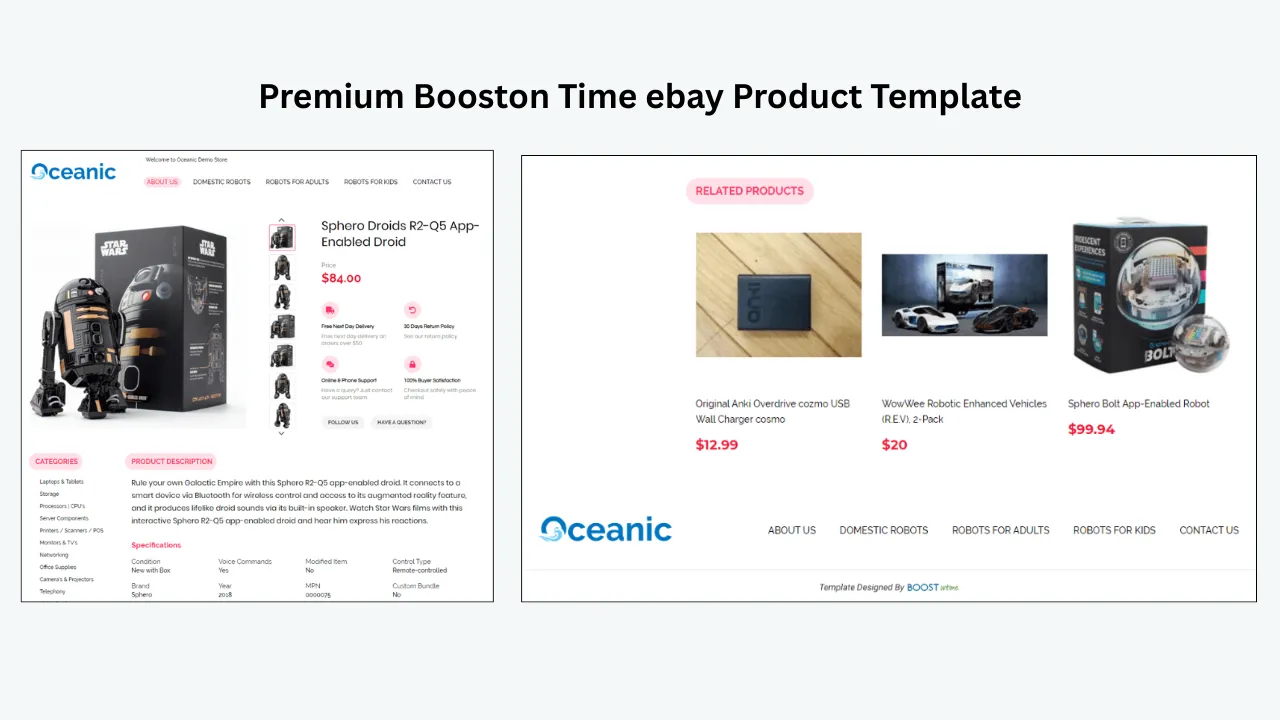
That is the role of BoostOnTime’s eBay Template Builder, or ETB. It provides responsive templates, more than 20 customizable modules, dynamic listing information and batch revision tools, allowing sellers to improve the description experience without rebuilding the same design for every collectible.
💡 Quick answer: A conversion-supporting collectibles template should make condition, identity, authenticity, specifications, included items, shipping and seller policies easy to verify. BoostOnTime ETB organizes those details through responsive modules and can apply a consistent template across existing eBay listings without requiring the seller to write the full HTML manually.
Why Collectibles Need More Than a Generic Product Description
A new household product is usually compared by features and price. A collectible is different. Two items that appear similar can have very different values because of condition, edition, originality, grading, packaging, restoration or history.
A serious buyer may compare several listings side by side. They are likely to ask questions such as:
- Is this the exact edition, issue, set or variation I am searching for?
- Is the condition shown honestly in both the description and photographs?
- Has the item been graded or authenticated, and can I verify the reference number?
- Are the original box, paperwork, accessories or inserts included?
- Has anything been repaired, restored, cleaned or replaced?
- How will the seller protect the item during shipping?
- Do the return terms match the level of risk involved in the purchase?
A strong template anticipates these questions. It does not use design to hide uncertainty; it uses design to make the evidence easier to inspect.
What Information Should Each Type of Collectible Show?
The ideal structure changes by category. The table below provides a practical starting point. Sellers should also complete all relevant eBay item specifics because those fields help buyers filter and identify products.
Editorial note: eBay’s listing best practices emphasize clear photos, detailed descriptions, accurate categories and relevant item specifics.
Seven Template Elements That Reduce Buyer Hesitation
1. A Clear Title and Price Area
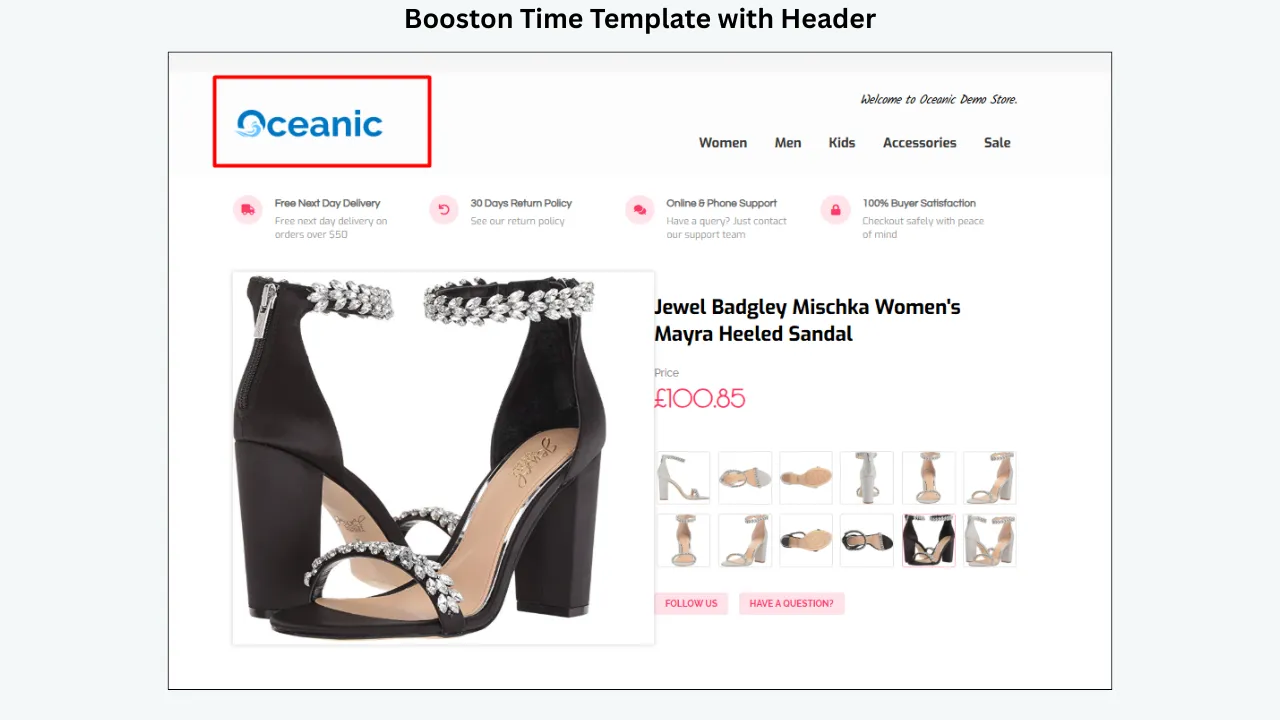
The buyer should immediately understand which item is being offered and what it costs. For collectibles, the title area should confirm the identity of the item before the buyer reaches long promotional content.
BoostOnTime’s dynamic Title & Price module can collect the product title, price and currency from the existing eBay listing when the template is applied. This reduces repeated entry inside the description design, but the seller still needs to maintain the official title and price correctly in eBay.
2. A Gallery Built for Inspection
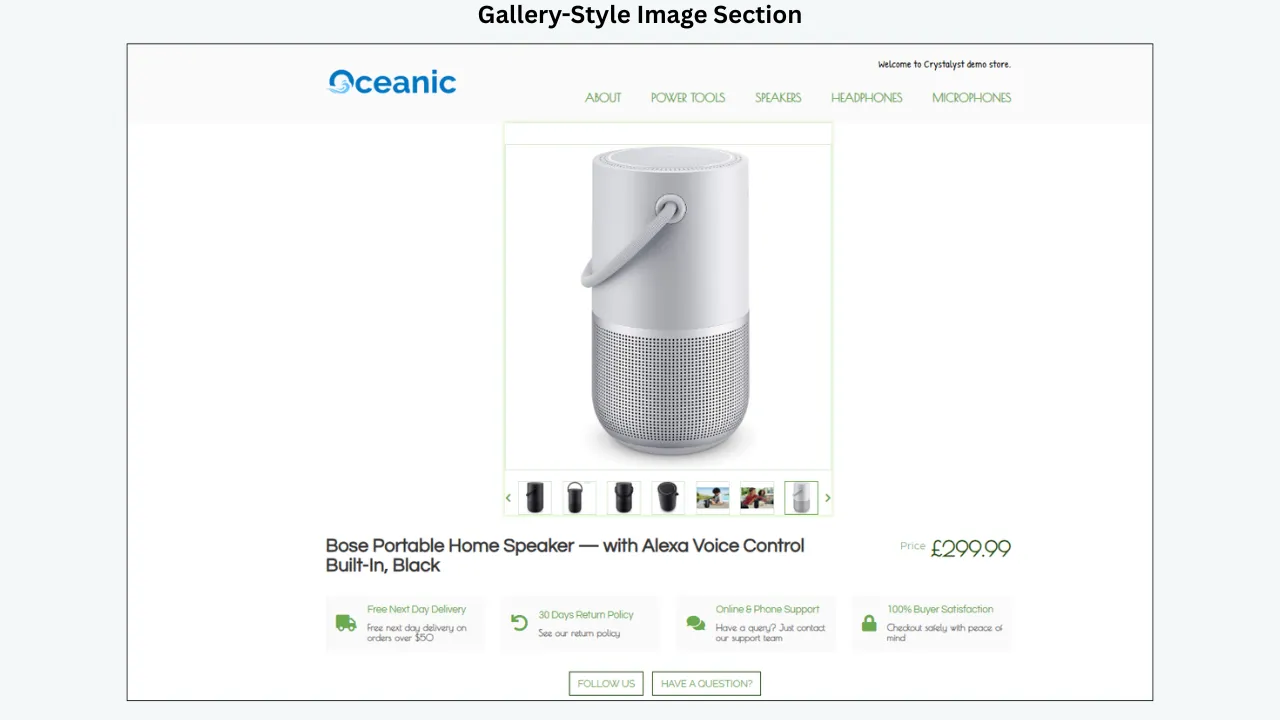
Collectible buyers use images as evidence. They may want to inspect corners, labels, seals, signatures, serial numbers, packaging, certificates and any visible wear. One distant photograph is rarely enough for a unique or pre-owned collectible.
- Photograph the exact item rather than relying only on a stock image.
- Show the front, back, sides, packaging and included accessories.
- Include close-ups of defects instead of hiding them.
- Keep lighting and background consistent so colour and condition are easier to judge.
- Make certification numbers readable when sharing them is appropriate.
BoostOnTime’s Gallery module can collect supported product images from the existing listing and present them within the selected template. Always review the source images first; automation can organize the images, but it cannot determine whether they are accurate or complete.
3. An Honest Condition Summary
Condition is often the largest source of uncertainty in a collectible purchase. A template should give it a dedicated, easy-to-find section rather than burying it inside a story paragraph.
A useful condition summary can cover:
- The eBay condition selected for the listing
- Visible wear, marks, fading, creases, scratches or packaging damage
- Whether parts, inserts, certificates or accessories are missing
- Whether the item has been repaired, restored, cleaned or altered
- Whether the box, seal or packaging is original
- Whether the grade is professional, seller-assessed or ungraded
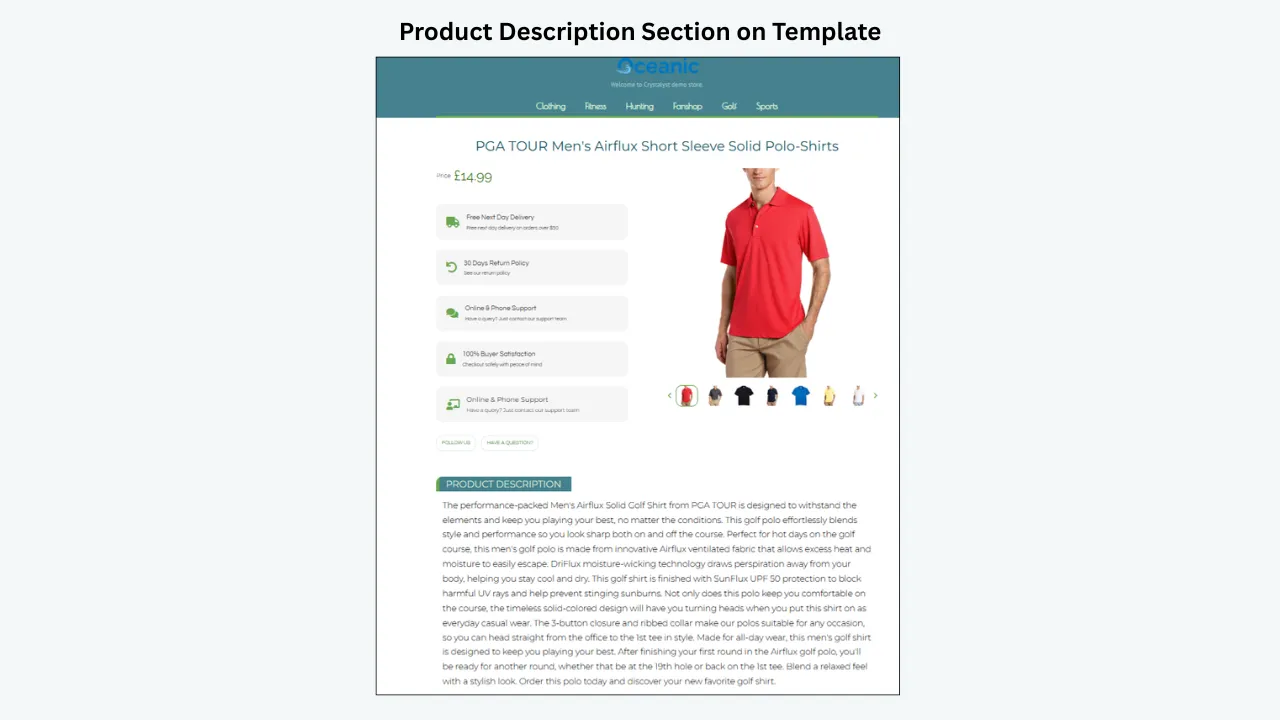
Use the Description and Specifications modules to separate the condition narrative from technical facts. The description should remain consistent with the photographs and eBay item specifics.
4. Scannable Specifications
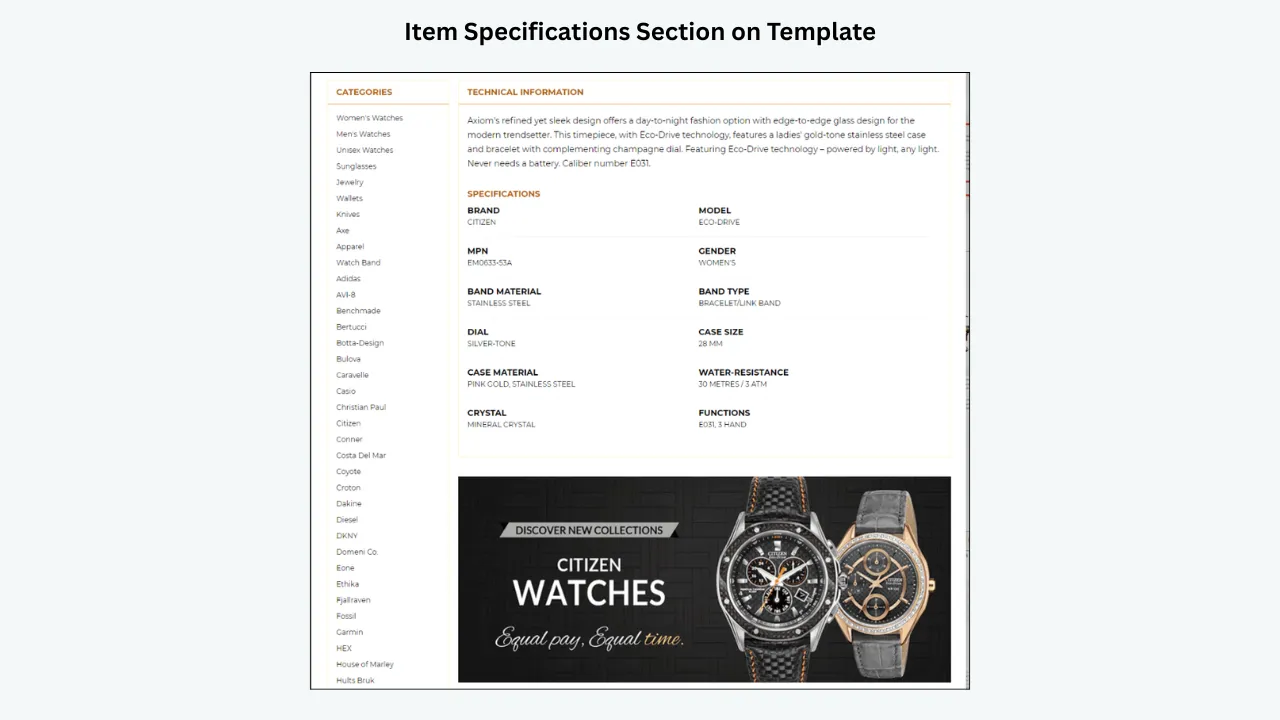
Collectors often know exactly which version they want. A structured specifications section helps them confirm the details without searching through several paragraphs.
Depending on the category, include the year, manufacturer, publisher, set, issue, edition, model, material, measurements, serial number, certificate number or other identifying information.
BoostOnTime states that supported item specifics can be imported from existing listings. That makes complete source data important: the template can present information clearly, but it should not be expected to correct an inaccurate model, year or variation automatically.
5. Authentication, Grading and Provenance
These terms are related, but they do not mean the same thing:
- Authenticity confirms whether the item is genuine.
- Grading assesses condition according to a stated scale or service.
- Certification provides supporting documentation or a verifiable reference number.
- Provenance describes the known origin or ownership history.
Only make claims that can be supported. Do not create a homemade badge that resembles eBay’s Authenticity Guarantee or imply that an item is eligible when it is not.
eBay currently offers Authenticity Guarantee programs for eligible items in selected categories, including trading cards, watches and jewelry, with eligibility depending on the specific program requirements. Use eBay’s official fields and checkmark where applicable.
6. Shipping, Returns and Seller Trust
A buyer may value the item but still hesitate because they do not know how it will be packed or what happens if there is a problem. The template should make these answers easy to find.
BoostOnTime’s Policy Tabs, Why Us and Feedback modules can organize information such as:
- Dispatch and handling expectations
- Protective packaging practices
- Tracking and insurance information, when applicable
- Return terms that match the business policies configured in eBay
- Seller experience with the collectible category
- Customer service and communication standards
Avoid vague promises such as “100% guaranteed satisfaction” unless the business can define and support them. Specific information is more credible than broad claims.
7. Relevant Related Products
A collector interested in one item may also want another card from the same set, a consecutive comic issue, a coin from the same period or an accessory that belongs with the item.
BoostOnTime’s Related Products module can display supported related-item pricing. Sellers can choose products manually or allow the system to select random listings from the catalog.
Manual selection is usually the stronger option for specialist collections because relevance matters more than quantity. Random selection is convenient, but it should be reviewed to make sure the recommendations make sense.
Why Mobile Responsiveness Matters for Collectibles
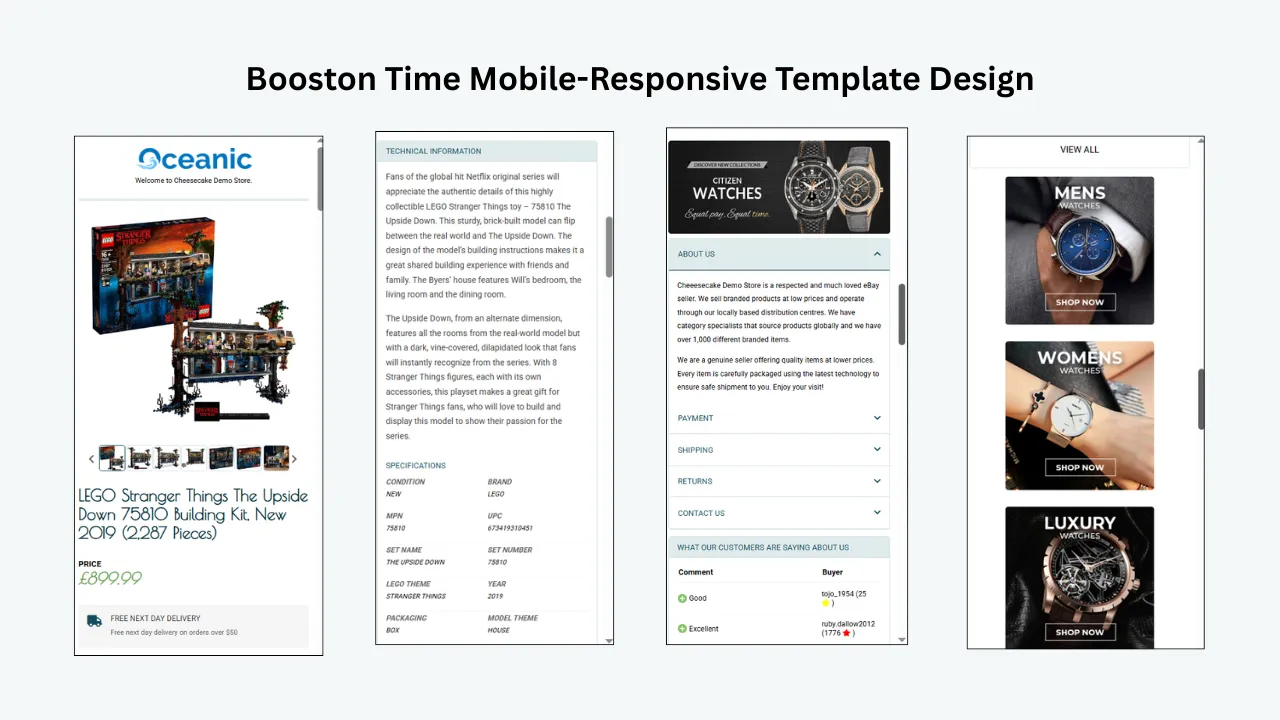
Collectible listings can be long. They often include detailed images, specifications, condition notes, grading information, policies and related products. A desktop-only design may force phone users to zoom or scroll sideways, making the evidence harder to inspect.
BoostOnTime describes its templates as fully responsive and optimized for tablets and mobile devices. The preview function allows sellers to review the layout before applying it to active listings.
A responsive template should:
- Keep images within the width of the screen
- Stack columns in a readable order
- Keep condition and grading details legible
- Avoid wide specification tables that are cut off
- Make policy sections easy to open and read
- Place product evidence before large promotional sections
⚠️ Important: Responsive design controls how an image fits the screen; it does not necessarily compress the original file. Sellers should still resize and optimize large logos, banners and infographics before adding them to the template.
How BoostOnTime ETB Works for a Collectibles Store
BoostOnTime separates reusable store content from listing-specific product content. This is the key to applying one professional design across many different collectibles.
Static modules: create the store framework once
BoostOnTime identifies static modules such as the Logo, Greeting Message, Menu, Helpful Links, Why Us, Mini Banners, Wide Banners and Store Policy Tabs. These elements are stored inside the template and can be reused across selected listings.
A seller can also create multiple templates when different product groups need different policies, branding or supporting information.
Dynamic modules: collect product information per listing
BoostOnTime identifies dynamic information such as product title, price, currency, product images, related products and related-product pricing. Its feature page also states that supported descriptions, item specifics and store categories can be imported from existing eBay listings.
For example, one trading-card template can keep the same logo, policy tabs and seller information while each card receives its own title, price, images and related items.
More Than 20 Customizable Modules
The BoostOnTime module collection includes Logo, Header Menu, Title & Price, Gallery, Why Us, Categories, Description, Specifications, Helpful Links, Banners, Newsletter, Policy Tabs, Side Mini Banners, Feedback, Mini Banners, Related Products and Footer, with additional configuration options.
Not every module should be enabled on every listing. A focused template is easier to scan and can reduce unnecessary visual weight. Enable a module because it answers a buyer question or supports store navigation, not simply because it is available.
Customization Without Writing the Full HTML
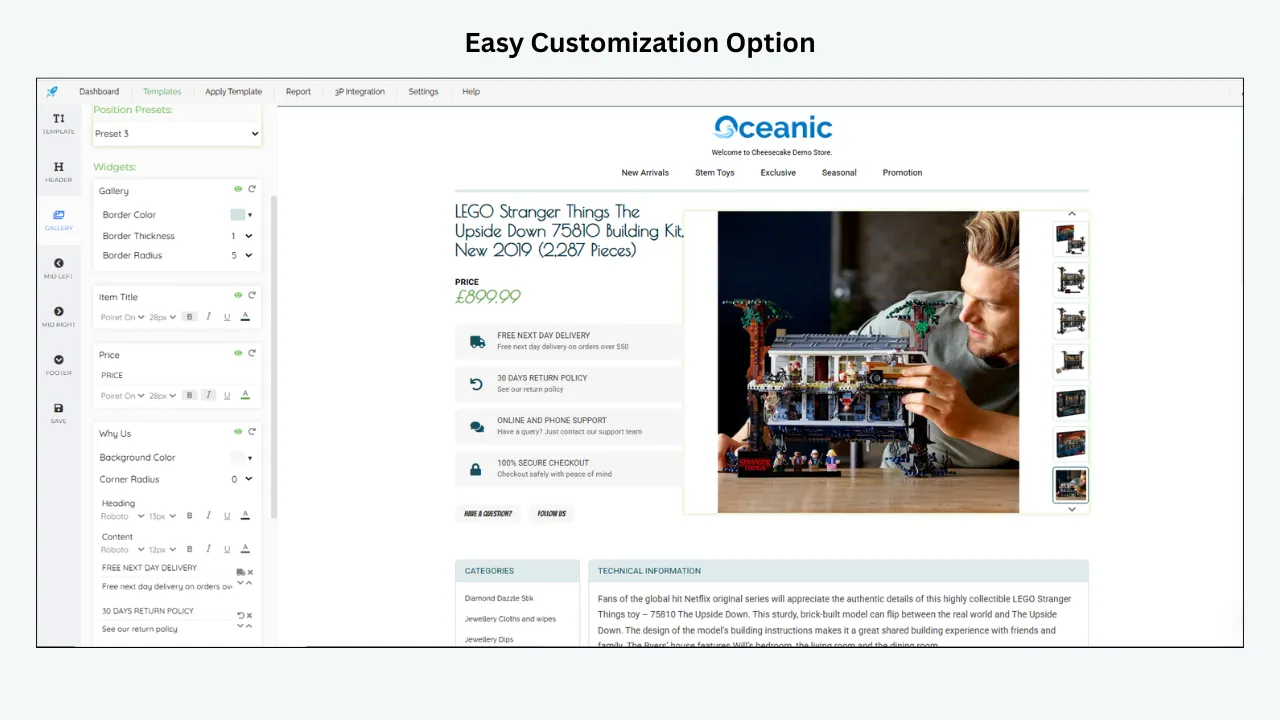
BoostOnTime provides an online customization interface for selecting, restructuring and styling template elements. Sellers can adjust the layout and branding without manually creating the entire HTML description.
Batch Revision for Existing Listings
Changing a logo, policy or layout manually across a large catalog creates repetitive work and increases the chance of inconsistency. BoostOnTime’s Batch Revision Tool can update an individual listing or apply a newly created template to a selected group in bulk.
BoostOnTime also states that its software cleans old HTML when applying a newly selected template. This is useful when replacing an outdated design, but sellers should always test a small group first to confirm that the description and product information remain correct.
Themes, Marketplaces and Integrations
BoostOnTime currently presents the Cheesecake, Oceanic and Crystalyst theme families. Sellers can preview the designs before choosing one and can request a completely custom responsive template when the standard options do not meet their requirements.
The platform states that it supports 19 eBay sites and more than 10 multichannel systems, with examples including ChannelAdvisor, Linnworks, Sellbrite, Ecomdash and Sellercloud. Compatibility should still be checked against the seller’s specific account and integration workflow.
A Practical BoostOnTime Setup Process
Review the source listings
Correct titles, prices, currencies, images, descriptions and item specifics before automation.
Choose a theme
Preview Cheesecake, Oceanic and Crystalyst, then select the structure that best fits the collectible category.
Configure reusable content
Add the logo, menu, policies, helpful links, seller information and selected banners.
Enable the relevant modules
Prioritize Gallery, Description, Specifications, Policy Tabs and Related Products for most collectible categories.
Preview desktop and mobile layouts
Check image sizing, content order, tables, menus and policy sections.
Test five to ten listings
Confirm that each dynamic field is showing the correct product information.
Review the live listings
Open them as a buyer would in a desktop browser, mobile browser and the eBay app.
Use Batch Revision
Once the test group passes review, apply the template to the remaining selected listings.
Manual Template Management vs BoostOnTime ETB
How to Measure Whether the Template Helps
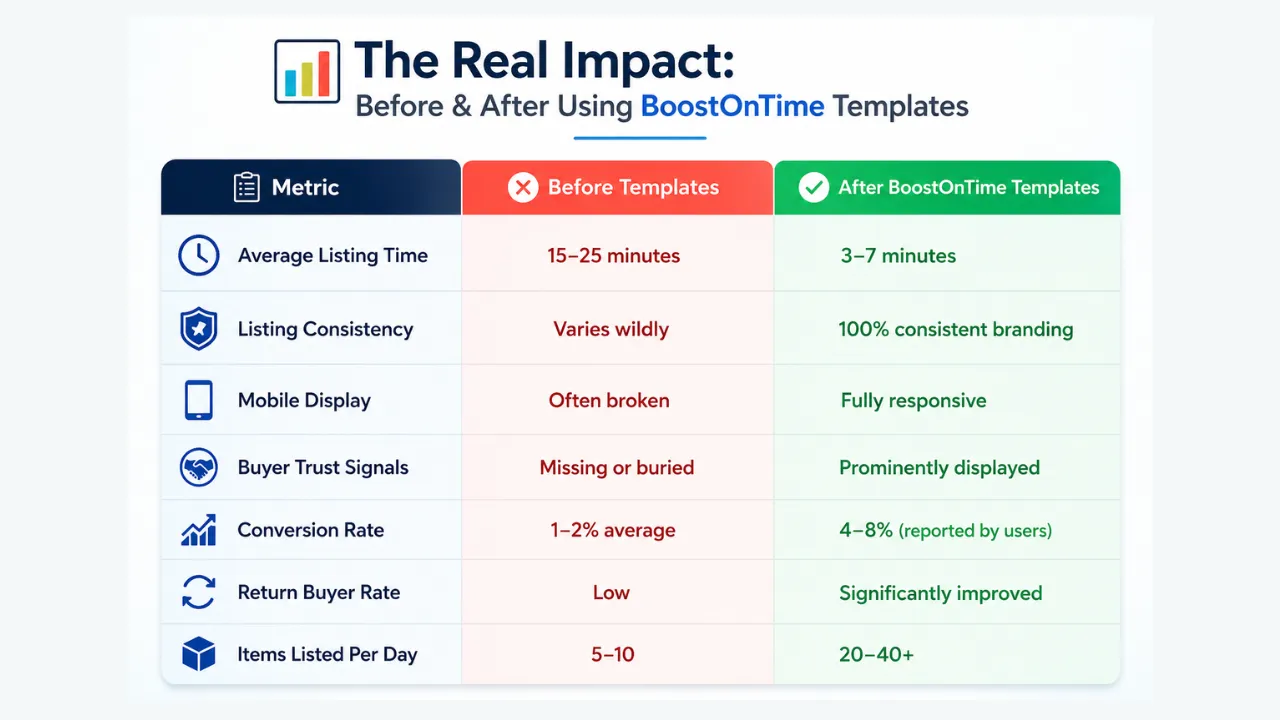
Do not judge the new template only by appearance. Compare performance before and after the change while keeping other major factors, such as price and promotion, as stable as possible.
Useful measurements can include:
- Listing views and buyer engagement
- Sales conversion rate where reported in Seller Hub
- Watchers and offers
- Questions caused by missing information
- Returns linked to description or condition misunderstandings
- Average time required to revise a listing
- Number of listings with outdated branding or policies
- Mobile display problems reported during quality checks
A template should be credited only for results supported by real data. Price, demand, seller feedback, shipping cost, competition and item rarity can all influence conversion.
Common Mistakes to Avoid
- Promising that a template will guarantee sales or search ranking
- Using unsupported conversion percentages or invented time-saving claims
- Calling an item rare, graded or authenticated without evidence
- Using stock photos without clearly showing the exact pre-owned collectible
- Hiding flaws or restoration details
- Placing large banners before condition and product information
- Enabling every available module even when the listing does not need it
- Showing unrelated products in the Related Products section
- Updating the full catalog without testing a smaller group
- Allowing the description template to contradict eBay’s native fields or business policies
Frequently Asked Questions
It should make the item’s identity, condition, grading or authentication, specifications, included accessories, shipping and return terms easy to verify. The exact fields depend on the collectible category.
Gallery, Description, Specifications, Policy Tabs, Why Us, Feedback and Related Products are strong starting points. Title & Price and Categories can also support a clear store experience.
BoostOnTime states that supported listing information can be collected dynamically, including title, price, currency, images and related-product information. Its feature page also identifies descriptions, item specifics and store categories as supported imports.
Yes. BoostOnTime allows multiple templates, which is useful when different categories require different specifications, policies, banners or related-item strategies.
BoostOnTime describes its templates as fully responsive and optimized for tablets and mobile devices, with a preview option before application.
Yes. Sellers can select specific related products or allow BoostOnTime to choose random products from the catalog.
Yes. Its Batch Revision Tool can apply a template to an individual listing or a selected group of active listings.
No. BoostOnTime is designed so sellers can select, customize, preview and apply templates without writing the complete HTML manually.
No responsible template provider can guarantee sales. BoostOnTime can improve structure, consistency, mobile presentation and workflow, while conversion also depends on the item, price, demand, images, seller reputation, shipping and competition.
Build a Collectibles Template
That Makes Evidence Easy to Find
Collectors do not need louder listings. They need clearer ones.
A strong template brings the buyer’s questions into a logical order: What is the item? What condition is it in? Is the grade or authenticity claim supported? What is included? How will it be shipped? What happens if there is a problem?
BoostOnTime ETB helps sellers answer those questions through responsive designs, customizable modules, dynamic listing information, related products and batch revision. It also gives stores a consistent visual framework without requiring the seller to rebuild the entire HTML description for each item.
Start with a small group of listings, test every dynamic field and mobile view, then expand the template across the appropriate product categories.
🚀 Start Your 7-Day BoostOnTime ETB Trial
Build your eBay template · boostontime.com/ebay-template-builder