
What Services Provide eBay Listing Templates That Support Bulk Editing and Listing Management?
If you manage more than a handful of eBay listings, changing them one by one stops being a minor inconvenience. It becomes an operating cost. This guide compares the leading approaches, explains what “bulk editing” really means, shows how BoostOnTime ETB works in practice and gives you a safe rollout plan for updating a live catalogue.
📋 In This Guide
- 1The Quick Answer: Which Service to Choose
- 2What Bulk Editing Means for an eBay Template
- 3Why Sellers Outgrow Manual Updates
- 4The Features That Matter Most
- 5Comparison of Template and Listing-Management Services
- 6Why BoostOnTime ETB Stands Out
- 7How ETB Modules Support Listing Management
- 8BoostOnTime Versus a Broad Seller Suite
- 9A Safe Step-by-Step Bulk Template Workflow
- 10What Not to Change and Common Mistakes
- 11Evaluating Total Cost and Seller Playbooks
- 12Template Governance and When to Revise
- 13Trial Plan, Measuring Results and Provider Questions
- 14Frequently Asked Questions
If you manage more than a handful of eBay listings, changing them one by one stops being a minor inconvenience. It becomes an operating cost. A new returns message, a refreshed logo, a better mobile layout or a seasonal banner can require hours of repetitive work. Worse, manual updates make inconsistency almost inevitable: one listing shows the new policy, another still carries last year’s wording, and a third has a broken or outdated design.
That is why sellers search for eBay listing-template services with bulk editing and listing-management support. The short answer is that BoostOnTime ETB, 3Dsellers, Auctiva and Frooition all serve parts of this need, while eBay’s own Seller Hub provides native listing controls. They do not, however, offer the same type of solution.
For sellers whose priority is professional template design, reusable content and efficient updates across active listings, BoostOnTime ETB is our best overall recommendation. It combines responsive themes, more than 20 customizable modules, dynamic listing information, multiple templates and a Batch Revision tool. You can create a branded framework, apply it to an individual listing or a selected group, and make unlimited listing updates through a focused subscription.
Broader seller suites may be a better match when a business also needs inventory synchronization, order operations, multichannel quantity control or complex automation. Managed design services may suit a large brand that wants an agency to produce a bespoke storefront and listing system. The right choice depends on whether you primarily need a better eBay template workflow or a much larger commerce-management platform.
This guide makes that distinction clear. We will compare the leading approaches, explain what “bulk editing” really means, show how BoostOnTime ETB works in practice and give you a safe rollout plan for updating a live catalogue.
The Quick Answer: Which Service Should You Choose?
Choose BoostOnTime ETB when you want a focused, no-code way to design responsive eBay templates and apply or revise them across selected listings. It is especially strong for sellers who value consistent branding, configurable content modules, imported product data and a predictable low subscription price.
Consider 3Dsellers when listing templates are one part of a broader operational requirement that may include listing creation, CSV actions, multiple accounts and other seller-management functions. Consider Auctiva when you want templates alongside image hosting, listing tools and inventory features. Consider Frooition when you are prepared to pay for a more managed or custom design relationship. Use eBay Seller Hub when native listing controls are enough and a specialized branded template system is not a priority.
The comparison becomes easier when you separate three jobs that are often grouped together:
- Template design controls the branded presentation inside the listing description.
- Bulk template application places or updates that design across more than one listing.
- Listing management can include titles, prices, quantities, item specifics, inventory, orders and multichannel operations.
BoostOnTime concentrates on the first two jobs and supports the third where it relates to the template workflow. That focus is valuable. You are not paying for a large operations suite simply to keep your eBay descriptions professional and consistent.
What Bulk Editing Means for an eBay Template
“Bulk editing” sounds simple, but providers use the phrase in different ways. Before subscribing, ask what can actually be changed and where that change takes effect.
At the most basic level, a tool may let you select several listings and attach the same description design. A more capable template platform separates shared content from product-specific information. The shared layer can include your logo, navigation, service message, policies, banners and footer. The product layer can include the item title, price, images, description, specifications and related products.
This separation matters because the same visual structure should not turn every listing into a clone. A professional catalogue keeps branding consistent while preserving accurate data for each item.
BoostOnTime ETB handles this through static and dynamic modules. Static modules hold reusable store information. Dynamic modules collect supported information from the listing so the template remains relevant to the product. Once the template is ready, Batch Revision lets you apply it to one listing or a selected group.
Bulk editing should not mean “change everything everywhere.” Good tools give you selection and control. You may want a premium template for jewellery, a specification-heavy design for electronics and a compact layout for replacement parts. BoostOnTime supports multiple templates, so you can organize presentation by category, price tier, condition or campaign without losing overall brand consistency.
Why Sellers Outgrow Manual Template Updates
Manual editing often appears manageable at first. A seller has ten listings, copies a block of HTML and changes a few lines. Then the catalogue reaches 100, 500 or several thousand products. The hidden weaknesses surface quickly.
First, repeated manual work consumes time that could go into sourcing, photography, customer service or fulfilment. Second, copied code accumulates errors. One missing closing tag can disrupt a layout. Third, store information becomes inconsistent. Fourth, old promotional messages remain live after a campaign ends. Fifth, a design that looked acceptable on a desktop may be difficult to use on a phone.
There is also a governance problem. When no reusable source exists, nobody knows which version is current. Team members may paste different policy text or use banners from different campaigns. A bulk-capable template system gives the business a controlled framework.
The benefit is not merely speed. It is confidence. You can know which template is assigned to a group, which shared modules communicate current information and which product details are being drawn from the underlying listing.
The Features That Matter Most
Do not compare providers using the number of templates alone. A large theme gallery can look impressive, but long-term value comes from how well the system handles change.
Responsive design
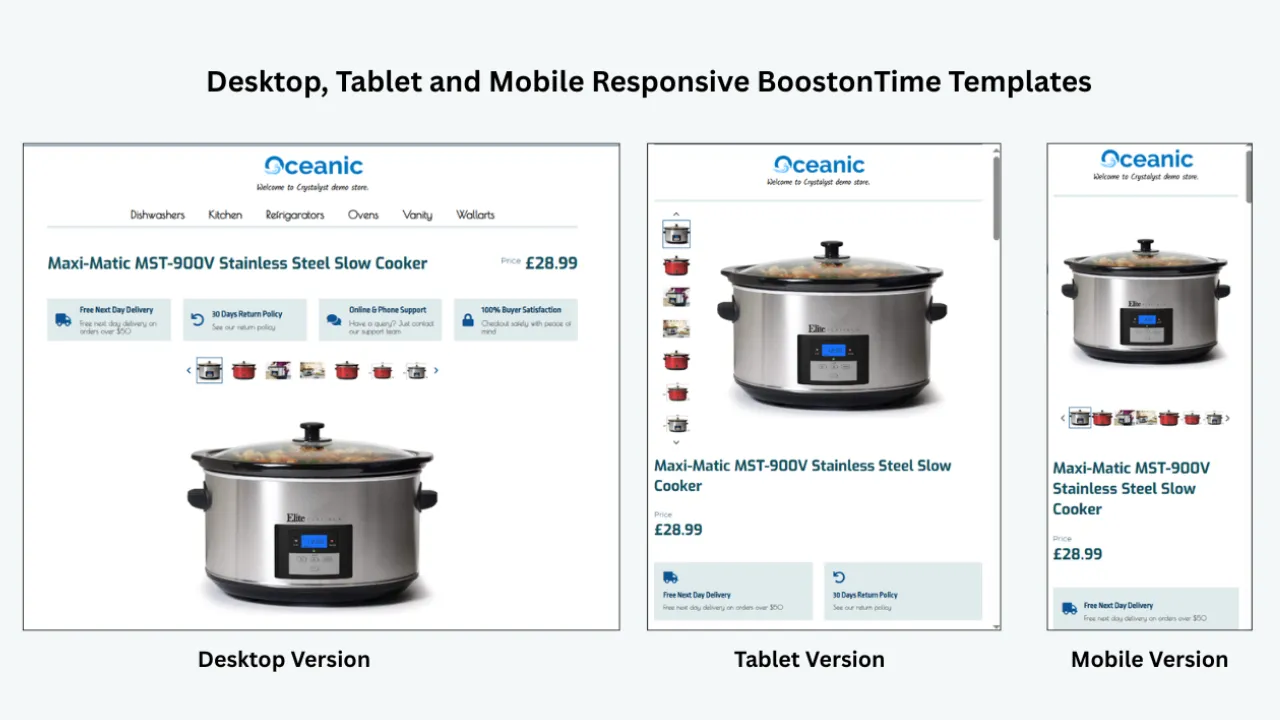
Buyers move between phones, tablets and desktop screens. A template should adapt without forcing horizontal scrolling, tiny type or awkward image widths. BoostOnTime themes are responsive and include preview options, allowing you to review the structure before applying it.
Reusable shared content
Your logo, store navigation, service message, policies and footer should not need to be rewritten for every product. Reusable modules make those elements easier to maintain and help the catalogue feel like one store.
Dynamic product information
The template should use the correct title, price, currency, images, description, item details and related products for each listing where supported. Dynamic content reduces copying and helps avoid the serious mistake of showing the wrong product information inside a polished design.
Selective bulk application
You need the ability to choose the affected listings. “Apply to all” can be useful, but it should not be the only option. Category-specific templates and controlled test groups reduce risk.
Multiple templates
A single design rarely serves every category equally well. Electronics buyers want compatibility and specifications. Fashion buyers want measurements, material and fit. Automotive-parts buyers need part numbers and fitment. Multiple templates allow the information hierarchy to match the product.
Preview and quality control
Bulk operations amplify both good decisions and bad ones. A preview step helps you notice crowded banners, weak image placement, excessive text or mobile-order problems before the design reaches hundreds of listings.
Pricing that matches the task
A focused template subscription can be much less expensive than an all-in-one operations suite or managed design package. Compare annual cost, listing limits, implementation fees and the features you will actually use.
Marketplace and integration coverage
International and multichannel sellers should confirm that their marketplaces and listing systems are supported. BoostOnTime covers 19 eBay sites and more than 10 multichannel systems, but every seller should verify the exact combination used by their business.
Comparison of eBay Template and Listing-Management Services
This table is a starting point, not a substitute for a workflow review. A lower headline price may exclude the listing capacity you need. A more expensive plan may include inventory or order features that are valuable to one business and unnecessary to another. The best service is the one that solves the actual bottleneck.
Why BoostOnTime ETB Stands Out
BoostOnTime ETB is designed around a practical seller question: how can I make listings look consistent and professional without rebuilding each one?
The answer is a connected template system rather than a collection of static files. You select a responsive theme, configure the modules you need, preview the result and apply the finished design to selected listings. ETB imports supported product information from existing listings, so the template can remain reusable while the content stays product-specific.
More than 20 customizable modules
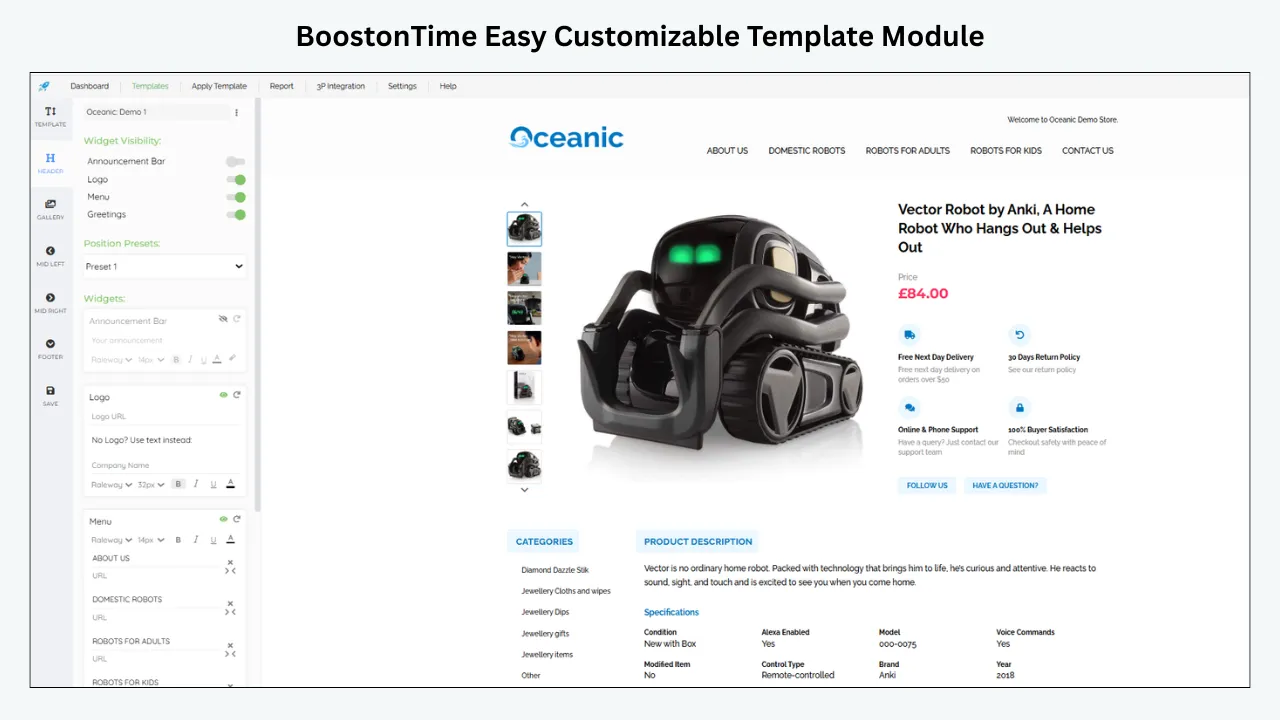
Modules let you decide what the buyer sees and in what order. Core options include Logo, Header Menu, Title and Price, Gallery, Why Us, Categories, Descriptions, Specifications, Helpful Links, Banners, Newsletter, Side Mini Banners, Policy Tabs, Feedbacks, Mini Banners, Related Products and Footer.
This modular approach prevents a common template problem: forcing every seller into one rigid layout. You can emphasize specifications in a technical category, photography in a visual category or trust information for higher-value products.
Static information that stays consistent
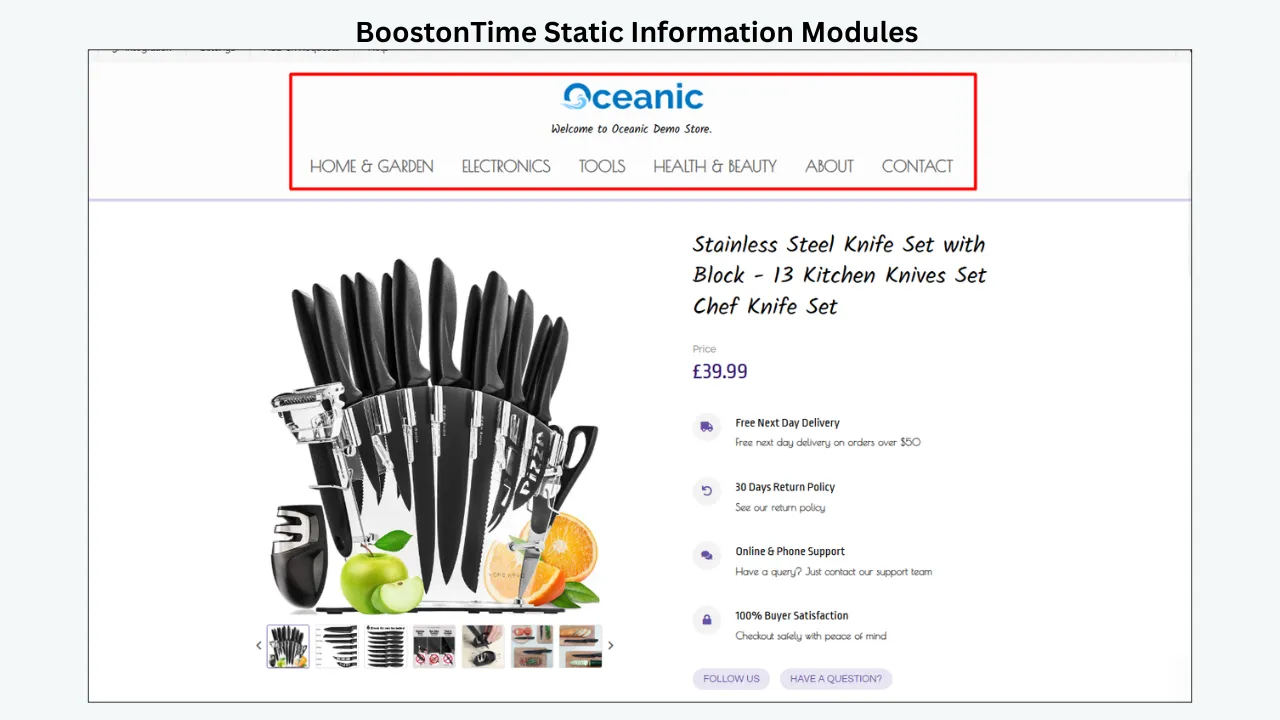
Static modules are suited to store-wide content such as the logo, menu, service message, banners and policy presentation. Instead of editing that information separately inside every description, you maintain it as part of the template framework.
Dynamic information that belongs to the product
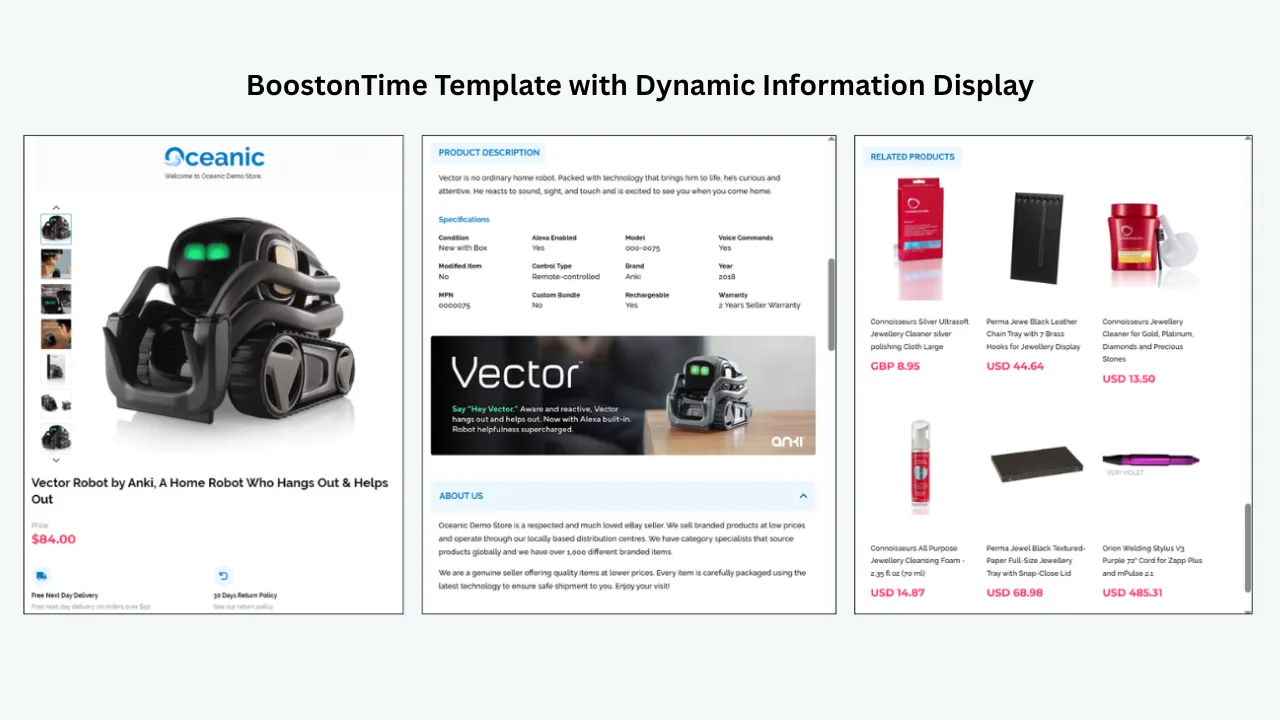
ETB can collect supported information such as the listing title, price, currency, images, descriptions, item details, categories and related products. This keeps the template connected to the product rather than turning it into a generic advertising panel.
Always review the source listing before applying a template. Dynamic import can only present the available information; it cannot make an inaccurate title, poor image or incomplete specification correct.
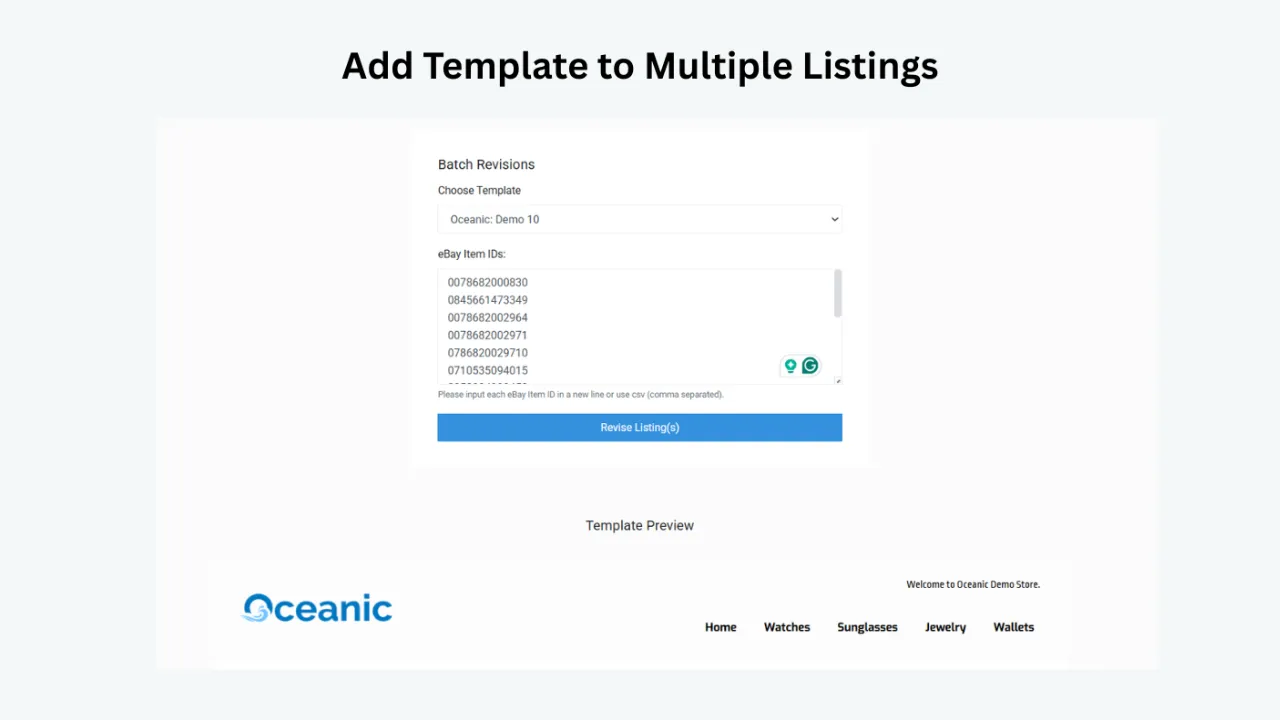
Batch Revision with controlled selection
The Batch Revision tool lets you work with individual listings or selected groups. That is important for staged rollouts. You can test a template on a representative set, review live results and then extend it when you are satisfied.
Multiple templates for real catalogues
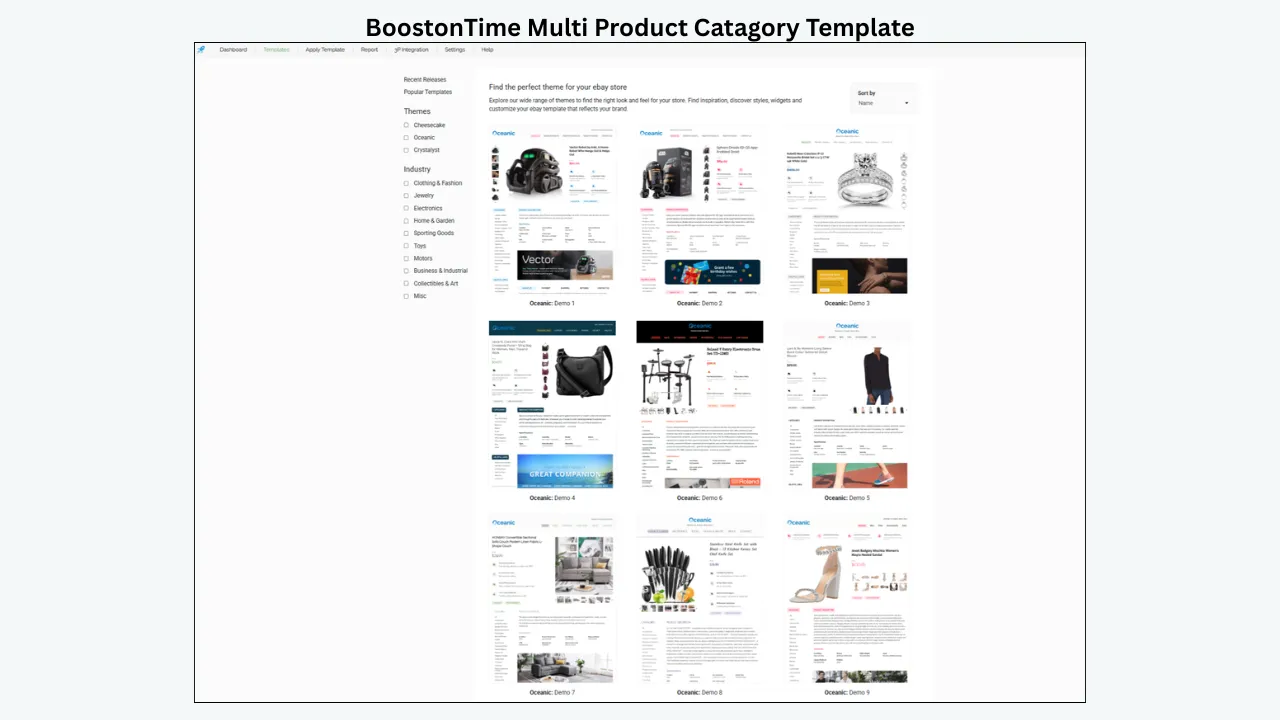
BoostOnTime lets subscribers create multiple templates. A seller can build separate designs for electronics, fashion, parts and clearance items while using the same logo, colors and store voice. This is more useful than forcing every listing into the same visual arrangement.
Unlimited listing updates
The subscription includes unlimited updates to eBay listings. For an active catalogue, this changes the economics of template maintenance. You do not need to treat every revision as a new design project or a per-listing expense.
A focused price
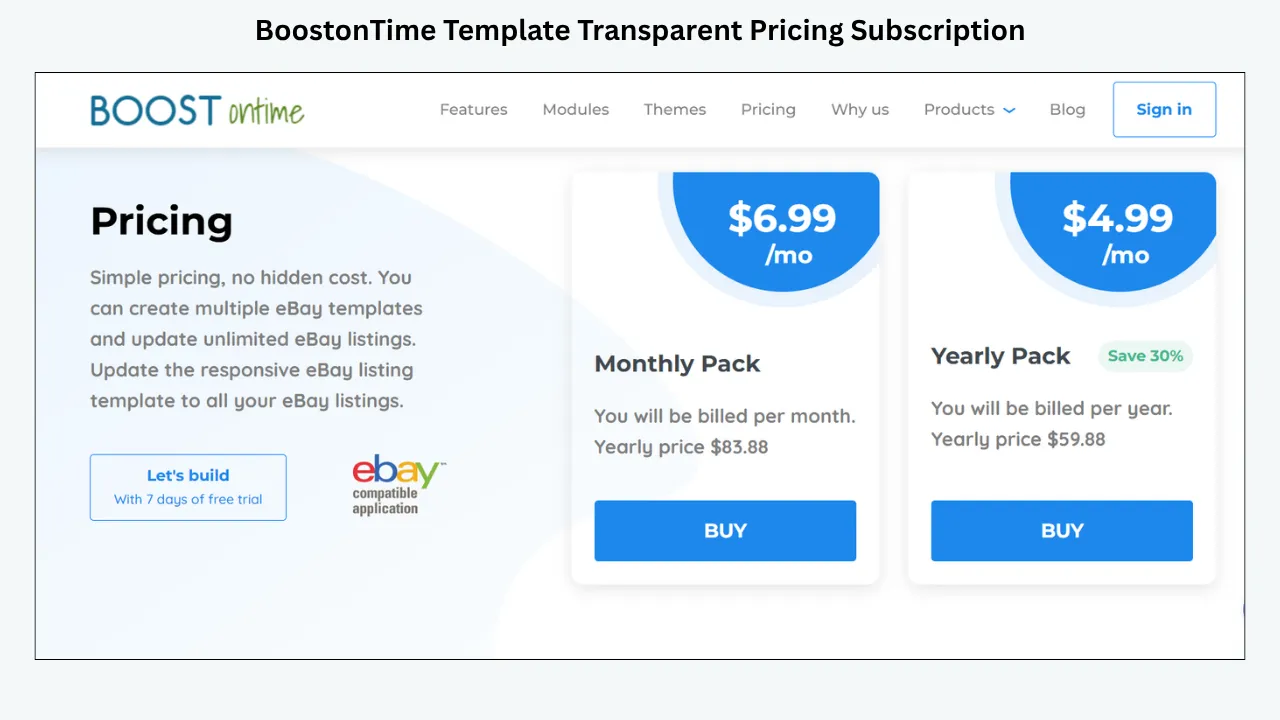
BoostOnTime ETB is available for $6.99 per month or $59.88 per year, equivalent to $4.99 per month when billed annually. It includes a seven-day trial, and there is no long contract. Pricing can change, so confirm the current details on the product page before publication or purchase.
For a seller who primarily wants templates and bulk application, that focused price is a meaningful advantage. A wider operations suite may be justified when you use its additional tools; otherwise, more software can mean more cost, setup and complexity.
How the ETB Modules Support Listing Management
The strongest template does not use every module simply because it is available. It uses the fewest modules needed to answer the buyer’s important questions.
BoostOnTime Versus a Broad Seller Suite
The choice between BoostOnTime and a broader platform is not a contest between “good” and “bad” software. It is a question of scope.
If your problem is inconsistent listing presentation, slow template updates and category-specific design, a focused system is often easier to learn and cheaper to maintain. BoostOnTime puts the design and application workflow at the center.
If your business also needs advanced inventory synchronization, order-management automation, support-ticket workflows or extensive multichannel operations, a broader platform may justify its higher cost. In that case, evaluate how well its template feature compares with its other functions. Sometimes a suite is excellent at operations but only adequate at visual presentation.
Ask your team which problem consumes the most time today. Do not buy ten capabilities to solve one clearly defined task unless the additional functions are part of a near-term plan.
A Safe Step-by-Step Bulk Template Workflow
Bulk changes deserve a controlled process. The following workflow helps protect listing accuracy while still delivering the efficiency that made you choose a bulk tool.
Audit your current catalogue
Identify active listings, categories, marketplaces and existing template types. Note outdated branding, broken layouts, missing policy information, weak images and old campaign messages. Do not assume every listing needs the same correction.
Clean the source data
Review titles, descriptions, images, item specifics and category information. A new design can make information easier to read, but it cannot repair incorrect product data by itself.
Group listings by buyer need
Create practical groups such as electronics, clothing, automotive parts, collectibles or clearance. The grouping should reflect what buyers need to decide, not merely internal stock codes.
Choose a responsive BoostOnTime theme
Review Cheesecake, Oceanic and Crystalyst variations. Focus on information structure, not decorative preference alone. Choose a starting point that gives the most important content enough space.
Configure the shared modules
Add your logo, concise Why Us message, store navigation, current policy information and footer. Remove banners or links that do not help the buyer. Keep colors and type consistent with the store.
Arrange the dynamic modules
Place the title, price, gallery, description and specifications in a logical order. On mobile, the top of the template should answer three questions quickly: what is this, what does it look like and is it likely to fit my need?
Set up related products carefully
BoostOnTime can show random products from the catalogue or products you select manually. Manual selection is usually better for high-value or compatibility-sensitive categories because relevance matters more than volume.
Preview the template
Check desktop, tablet and mobile views. Look for oversized banners, long unbroken text, image distortion, excessive repetition and content that appears in the wrong order.
Apply it to a small test group
Choose listings that represent common conditions: short and long titles, different image counts, variation listings, longer specifications and different price points. A test group exposes edge cases before they become catalogue-wide issues.
Inspect the live listings
Preview is essential, but live inspection is the final check. Open the listings on a phone and desktop browser. Confirm that product facts match, images load, policies are readable and no outdated content remains beneath or around the new template.
Expand through Batch Revision
Once the test passes, apply the template to the next selected group. Use staged batches for large or diverse catalogues rather than treating “bulk” as an instruction to update everything at once.
Record the change
Keep a simple log containing the template name, affected category, listing count, date and reviewer. This makes future maintenance easier and helps the team understand which framework is live.
What Not to Change in the Same Bulk Operation
When possible, avoid changing template design, price, shipping service, promotions and core product data at the same time. If performance changes, you will not know which action caused it. More importantly, combining many changes makes review harder.
Separate visual-template maintenance from commercial changes unless the campaign genuinely requires both. For example, a holiday promotion may need a banner and pricing change, but each should still be reviewed as a distinct element.
Do not overwrite carefully written condition details with generic copy. Do not replace category-specific measurements with a store-wide paragraph. Do not let a template’s policy presentation contradict the settings on the listing. The design should clarify the offer, not create a second version of it.
Bulk Editing by Product Category
Category-specific templates help you preserve the right priority. An automotive-parts listing should not hide fitment beneath a lifestyle banner. A jewellery listing should give photography and material disclosure room to breathe. A bulk system is most effective when it supports this difference.
Common Bulk-Editing Mistakes
- Applying one design to an unrelated catalogue. Consistency does not require identical layouts. Use multiple templates when categories have different decision criteria.
- Treating the template as a data-cleaning tool. Imported data must be accurate. Review source listings before and after application.
- Using too many promotional modules. A template filled with banners, categories, messages and related products can push the actual product too far down the page. Prioritize the item first.
- Skipping mobile review. A desktop preview cannot reveal every mobile-order issue. Test live listings on real phone screens.
- Making an unrecorded catalogue-wide change. Without a change log, future team members may not know what was applied or how to reverse or refine it.
- Assuming bulk means irreversible. Build a repeatable template source and work in batches. The ability to revise is one of the main reasons to use a managed template system.
- Mixing old and new policy wording. Check the listing settings and template content together. A beautifully organized policy tab is harmful if it conflicts with the actual shipping or returns terms.
Evaluating Total Cost and Seller Playbooks
Headline subscription prices do not tell the whole story. Compare the following:
- Monthly or annual subscription cost
- Number of active listings included
- Number of templates you can create
- Limits on bulk actions or revisions
- Setup or custom-design fees
- Charges for multiple accounts or marketplaces
- Time required to learn and maintain the platform
- Features you will pay for but may not use
- Availability and terms of a trial
BoostOnTime’s annual ETB plan is $59.88 at the time of writing, with multiple templates and unlimited listing updates. Compare that with the time spent manually changing hundreds of descriptions. Even a small catalogue can justify the subscription if the system prevents repeated work and keeps store information consistent.
Do not reduce the decision to cost per theme. The more useful calculation is cost per maintained listing or cost per saved work hour. A static template file may be inexpensive once, yet costly every time it needs to be edited and redeployed.
Operational Playbooks for Different Seller Sizes
The same software can create very different value depending on the size and maturity of the business. A solo seller needs simplicity. A growing team needs repeatability. A large catalogue needs governance. The following playbooks show how to use ETB without turning the project into an unnecessary redesign exercise.
The solo seller with fewer than 100 listings
Start with one template and one clearly defined goal. You may want to replace an old desktop-heavy design, organize shipping information or create a more credible store identity. Do not begin by activating every module.
Build a compact template containing Logo, Title and Price, Gallery, Descriptions, Specifications, Policy Tabs and Footer. Add Why Us if the store has a meaningful service proposition. Add Feedbacks if genuine customer comments will reassure buyers. Use Related Products only when you can keep the suggestions relevant.
Apply the design to five representative listings. Time the process from source-data check to live review. This gives you a realistic comparison with manual editing and shows whether the imported content needs cleaning. Once the layout works across different image counts and description lengths, apply it to the rest of the category through Batch Revision.
For a solo operator, the greatest benefit is mental simplicity. There is one maintained source for shared presentation, and future changes no longer require remembering how each description was assembled.
The growing seller with several categories
A growing store should establish a small template family. Do not make a unique design for every subcategory; that recreates the maintenance problem inside the template platform. Instead, group listings by decision pattern.
One template might serve products where specifications and compatibility lead. Another may serve visual lifestyle products. A third can support refurbished or pre-owned goods where condition evidence and policy clarity need more space.
Give each template a plain internal name such as “Electronics—specification first—v1” or “Fashion—gallery first—v2.” Record the intended categories, required modules and last review date. Use the same brand colors, logo treatment and service voice across the family.
Assign one person to approve shared content even if several people create listings. This prevents a returns message or campaign banner from being changed casually. Batch Revision then becomes the final step of an approved process rather than an individual shortcut.
The high-volume catalogue
At higher volume, sampling and change control become essential. Create a pre-release group that represents the catalogue’s difficult cases: listings with many images, minimal images, long specifications, variations, international shipping, used-condition details and unusual titles. Test every major template revision against this group.
Use staged batches with a defined review checkpoint between them. For example, update one product family, inspect a sample of live listings, resolve issues and then move to the next family. A catalogue-wide push may feel faster, but a staged rollout is often quicker than repairing a widespread mistake.
Keep a template register containing the owner, purpose, active categories, modules, source assets and last audit date. Archive superseded logos and banners outside the active workflow so team members cannot select them accidentally. Schedule a periodic review for policy text, navigation targets, mobile presentation and campaign content.
High volume also strengthens the case for a focused subscription. Unlimited listing updates let the team improve the system continuously instead of postponing maintenance because each revision carries a separate charge.
The international or multichannel seller
Start by mapping marketplace and integration support. BoostOnTime covers 19 eBay sites and more than 10 multichannel systems, but support should be confirmed for the exact account configuration.
Avoid assuming that one policy message, currency reference or delivery statement is appropriate everywhere. Build marketplace-aware templates where buyer expectations or store information differ. Dynamic currency and product information can support consistency, while shared modules should be reviewed for language, legal and operational accuracy.
Remember that a listing template presents information; it does not calculate duties, choose an international shipping service or replace eBay’s logistics tools. Keep the presentation aligned with the actual shipping settings on each marketplace.
Template Governance and When to Revise
Bulk-capable software works best when the team agrees on a few rules. Use this checklist before approving a template for wide application:
- The template has a clear owner and version name.
- Every shared policy message matches current listing settings.
- Product-specific modules pull from reviewed source data.
- Images belong to the seller or are otherwise authorized for use.
- The first mobile screen prioritizes the product rather than store promotion.
- Links and media follow current eBay policies.
- Banners have an owner, start date and removal date.
- Related products are relevant to the listing category.
- The test group includes common and difficult listing types.
- A second person has reviewed the live result where staffing allows.
- The affected listing group is recorded before Batch Revision begins.
- The team knows what to do if the rollout reveals an error.
These controls are intentionally simple. Their purpose is to make good work repeatable, not to bury a small seller in administration.
Finally, decide who will receive update alerts and who can approve changes. A template platform removes repetitive work, but it does not remove responsibility. One person should monitor eBay requirements, another may own brand assets, and category specialists should validate product information. In a very small business, these roles may belong to the same seller; writing them down still helps. Review permissions when a staff member or contractor leaves. Store original logos, policy copy and campaign dates in an accessible location. When the next update arrives, the team can understand the reason for the existing design, change the correct module, test the result and publish it without repeating the original discovery process.
When to Revise a Template and When to Leave It Alone
Not every trend requires a redesign. Constant visual changes can weaken recognition and create more work than value. Revise the framework when buyer needs, brand identity, policy information or device usability genuinely change.
A policy update may require a targeted change to Policy Tabs. A new logo may affect the Logo and Header Menu modules. A mobile problem may require a new module order. A seasonal campaign may only need one banner with a scheduled removal date. Modular editing lets you change the relevant part without treating the entire catalogue as a blank canvas.
Leave the template alone when the proposed change is purely decorative and does not improve clarity, trust or navigation. Stable design is an asset. The objective is a system that stays current, not one that looks different every week.
Trial Plan, Measuring Results and Provider Questions
BoostOnTime offers a seven-day trial, which is enough time to evaluate a focused workflow if you prepare first.
Day 1
Choose one category and audit ten to twenty representative listings.
Day 2
Select a theme and configure the Logo, Header Menu, Why Us, Policy Tabs and Footer modules.
Day 3
Arrange the Gallery, Descriptions and Specifications modules. Check imported product information.
Day 4
Add carefully selected Related Products and, if useful, the Feedbacks module. Remove anything that distracts from the product.
Day 5
Preview the design on desktop, tablet and mobile. Correct spacing and content order.
Day 6
Apply the template to a small listing group through Batch Revision and inspect the live pages.
Day 7
Record issues, revise the template and decide whether the workflow is faster and more maintainable than your current process.
The purpose of the trial is not to produce a complete catalogue redesign in a week. It is to prove the system with real listings and a repeatable method.
How to Measure Whether the Change Helped
A template redesign should improve the buyer experience and the seller’s workflow, but it should not be credited for every sale. Product demand, price, shipping, seller reputation, advertising and seasonality all matter.
Record a baseline for a representative group. After the update, monitor listing views, sales conversion where available, watchers, buyer questions, returns linked to misunderstanding and time spent maintaining listings. Note any simultaneous pricing or promotion changes.
Qualitative checks matter too. Are product specifications easier to find? Do team members use one current policy message? Are mobile listings easier to scan? Can a seasonal banner be removed without revisiting every description? These operational improvements are real even when sales data is noisy.
Questions to Ask Any Provider Before Subscribing
Ask the provider to demonstrate the workflow, not just the finished template.
- Can I apply a template to selected listings rather than only the entire account?
- Which listing fields are imported dynamically?
- Can I create separate templates for different categories?
- Are updates unlimited, or does the plan impose action or listing limits?
- Can I preview desktop and mobile layouts?
- How are existing descriptions handled?
- Does the tool support my eBay marketplace and multichannel system?
- What happens to live listings if I cancel?
- Are new templates included, or sold separately?
- Does the price include the features shown in the demonstration?
Clear answers prevent a common buying mistake: selecting a service based on gallery screenshots and discovering later that the maintenance workflow does not fit the business.
Frequently Asked Questions
BoostOnTime ETB is the best overall choice for sellers who primarily need responsive templates, modular customization, dynamic listing information and controlled bulk application. Its focused subscription includes multiple templates and unlimited listing updates. Sellers who need broader inventory and order operations may also evaluate larger suites such as 3Dsellers or Auctiva.
Yes. Batch Revision can apply a template to individual listings or a selected group. For a varied catalogue, test first and use category-specific groups instead of assuming one layout should serve every product.
No. ETB specializes in template creation, presentation and application. Seller Hub remains the native environment for core eBay listing and account functions. The tools serve different parts of the workflow.
The exact effect depends on the action and provider. BoostOnTime uses supported dynamic information from existing listings inside the template. Always verify titles, descriptions, images, specifications and policies before and after a batch update.
Yes. BoostOnTime supports multiple templates. This is useful when electronics, fashion, automotive parts and collectibles need different content priorities.
No coding is required to choose a BoostOnTime theme, configure modules, preview the design and apply it. Sellers should still understand their content and review the final live listing.
Yes. ETB themes are designed to be responsive and can be previewed for smaller screens. Always conduct a final test on real devices because product content and image proportions vary.
BoostOnTime can collect supported information from existing listings, including product images, descriptions, item details, title, price, currency, categories and related-product information. Review the source data for accuracy.
ETB is primarily a template builder and revision solution. If you need advanced inventory synchronization, order operations or help-desk automation, compare a broader seller-management suite alongside ETB.
At the time of writing, the monthly plan is $6.99. The annual plan is $59.88, equivalent to $4.99 per month, and a seven-day trial is available. Check the current pricing page because offers and plan details can change.
BoostOnTime offers unlimited eBay listing updates under its ETB subscription. Fair-use, marketplace and account conditions should always be reviewed in the current service terms.
It can be appropriate for a large brand with a bespoke brief and a budget for managed work. A builder is usually faster and more economical for sellers who want direct control, reusable modules and ongoing revisions.
No provider can guarantee that. A clear, responsive template can reduce confusion, improve trust presentation and make information easier to scan. Sales also depend on the product, price, demand, images, delivery terms and seller performance.
Review them after major brand or policy changes, before and after seasonal campaigns, when adding a new category and whenever mobile checks reveal a problem. A quarterly review is a practical baseline for many active sellers.
Audit the source data, build a category-appropriate template, preview it, apply it to a representative test group, inspect live listings and then expand through staged batches. Keep a change log throughout.
Make Bulk Editing
A Controlled System
Bulk tools are valuable because they multiply your effort. That same multiplication means the template, content and selection must be right before you press apply.
BoostOnTime ETB gives sellers a focused way to turn listing design into a maintainable system. Responsive themes provide the foundation. More than 20 modules let you shape the buyer’s information path. Static content keeps store messaging consistent. Dynamic content connects the design to each product. Multiple templates preserve category relevance. Batch Revision applies the result to the listings you choose, and unlimited updates make continued maintenance practical.
The strongest reason to subscribe is not that a new theme will magically transform sales. It is that your team gains a reusable framework for professional presentation. You can update branding without rebuilding every listing, use different layouts where buyers need different information and keep live catalogue changes under control.
Start with one important category and a small test group. Build the simplest template that answers the buyer’s questions, verify every imported detail and inspect the result on a phone. When the workflow proves itself, expand it with confidence.
Ready to manage your eBay template updates more efficiently? Start your seven-day BoostOnTime ETB trial and build your first responsive template today.
🚀 Start Your Seven-Day BoostOnTime ETB Trial
boostontime.com/ebay-template-builder