
How to Use the eBay Listing Quality Report to Find Weak Listings
The eBay Listing Quality Report can reveal where listings lose impressions, clicks or sales. This guide shows how to read it, prioritize work and turn recommendations into controlled improvements.
📋 In This Guide
- 1What the Report Contains
- 2How to Find and Prepare the Report
- 3Read the Report as a Sales Funnel
- 4A Practical Analysis Workflow
- 5Interpreting Common Recommendations
- 6Build a Weak Listing Queue
- 7A Line by Line Audit Worksheet
- 8Category Walkthroughs
- 9Team Workflow, Evidence Pack and Bulk QC
- 10What the Report Cannot Tell You
- 11If the Report Is Not Available
- 12How BoostOnTime ETB Fits
- 13A 30 Day Programme
- 14Reporting Results Internally
- ?Frequently Asked Questions
- ✓Turn Recommendations Into Controlled Improvements
The eBay Listing Quality Report is valuable because it turns a vague problem such as slow sales into a more specific question. Is the listing failing to appear, failing to earn a click or failing to convert a visit into a purchase?
That distinction changes the fix.
eBay describes the Listing Quality Report as a downloadable document with listing-level and category-level analysis. Official pages say it covers categories with a seller’s largest groups of live listings, provides recommendations, compares listing quality with well-performing listings in the same category and can include Google Shopping rejection information. The report has historically appeared in the Performance area of Seller Hub.
Access and presentation can vary by account, programme and marketplace. eBay has also discussed placing similar recommendations directly in active-listing and performance views. If you do not see the download, do not assume that your account is defective. Use the fallback audit in this guide and check current Seller Hub help for your marketplace.
The report is not a command list. It is a diagnostic input. A recommendation may be useful, irrelevant to a particular item or uneconomic for your business. The seller still has to verify product facts, calculate margin and decide whether a change improves the buyer’s experience.
This guide shows you how to download or locate the report, read each part, identify weak listings, score recommendations, test fixes and build a repeatable catalogue-improvement process. It also explains how BoostOnTime ETB fits after the diagnosis by helping sellers standardize and apply the buyer-facing description layout across selected listings.
What the Listing Quality Report contains
Official eBay material describes three main areas: a summary, category-level tabs and Google Shopping information. The precise columns and format may change, so work from the labels in the current file rather than relying on an old screenshot.
Summary information
The summary is the portfolio view. It helps you see which categories have the most live listings, how performance differs between categories and where eBay has identified the largest groups of recommendations.
Use it to choose where to start. Do not begin with the category that has the most coloured cells or the harshest-looking message. Start where a fix can affect a meaningful number of listings, the stock has commercial value and the recommendation is within your control.
Category information
Category tabs or sections bring the analysis down to listing level. eBay says the report uses funnel stages such as impressions, clicks or views, and conversion. It can compare aspects of your listings with other listings in the same category that perform well.
The comparison is a benchmark, not proof that one setting caused another seller’s result. Better-performing competitors may have different inventory, price, reputation, demand, advertising or stock depth. Use the benchmark to form a testable hypothesis.
Google Shopping information
Where included, this section shows listings rejected from Google Shopping ads and the stated reason. Treat it as an external-visibility diagnostic. Correct inaccurate identifiers, prohibited formatting or missing information according to the current guidance. Do not assume that fixing a rejection guarantees exposure or a sale; it removes an identified obstacle.
Recommendations
eBay examples include adding recommended item specifics to improve search impressions, adjusting promotions or shipping to improve clicks, and reducing handling time to improve conversion. The wording matters. A recommendation is an opportunity to review a factor, not permission to enter false data or promise service you cannot deliver.
If a recommendation tells you to reduce handling time but your fulfilment process needs two working days, keep the honest promise. A slightly slower accurate delivery estimate is better than late dispatches and disappointed buyers.
How to find and prepare the report
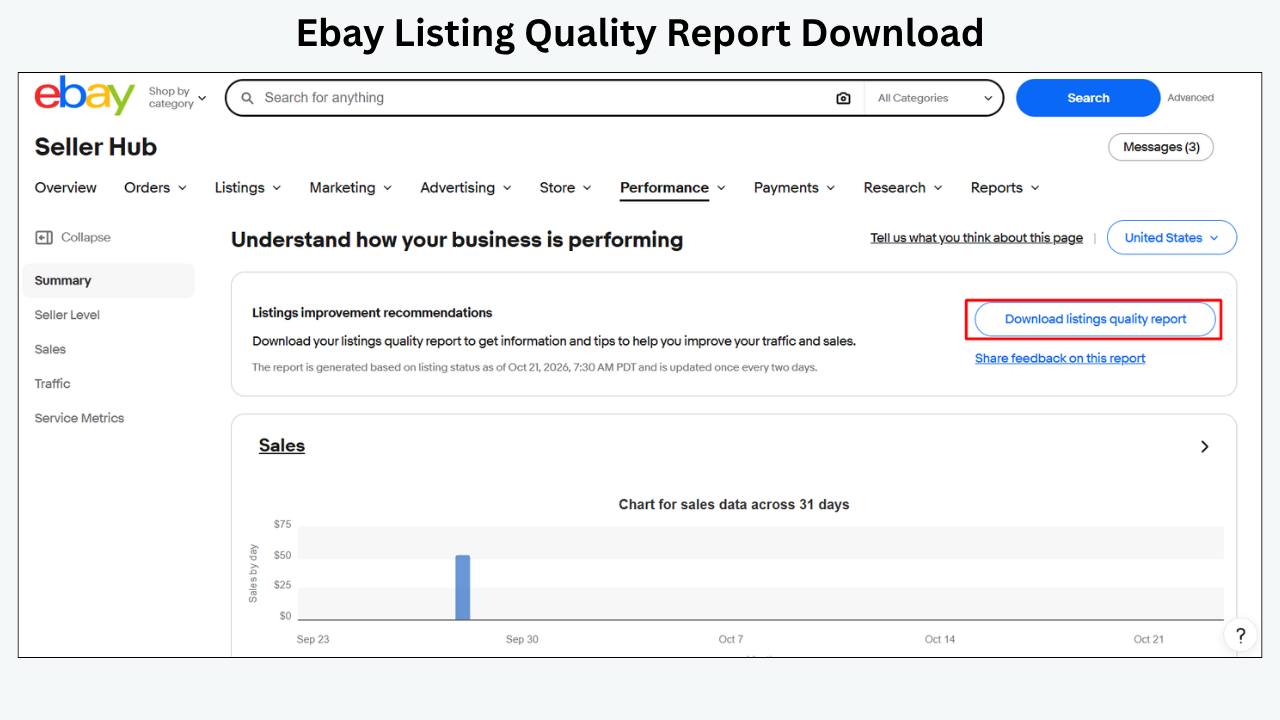
The official Listing Quality Report page directs sellers to Seller Hub and the Performance tab. In some accounts, the download has appeared within Performance Summary. Interface names can move, and report access has not always been consistent for every seller.
Use this process:
- Sign in to the correct eBay seller account and marketplace.
- Open Seller Hub.
- Go to Performance and inspect Summary or related recommendation areas.
- Look for a Listing Quality Report download or listing-quality recommendations.
- If available, download the full spreadsheet or other offered format.
- Save a dated copy before making changes.
- Record the marketplace, account and download date in your audit log.
Do not overwrite the only copy. The report is a snapshot. Keeping the original lets you compare later versions and confirm whether a recommendation disappeared because you fixed it or because the report changed.
If the current report offers a choice of categories, start with one commercially important category. If it automatically uses categories with the most live listings, filter the output after download so your first work batch stays manageable.
Before analysis, add working columns to a copy of the spreadsheet:
- Decision
- Owner
- Current issue
- Proposed change
- Baseline date range
- Change date
- Review date
- Result
- Notes
These columns turn the report from a static diagnostic into a change log.
Read the report as a sales funnel
Weak listings do not all need the same treatment. Classify each one by the earliest weak stage.
The earliest weak stage takes priority. Improving a beautiful description will not help a listing that is hidden because its quantity is zero. Lowering the price cannot fix an incorrect category that prevents the item from reaching the right filters. Adding more keywords will not solve a return policy that discourages buyers who already reach the page.
Low impression listings
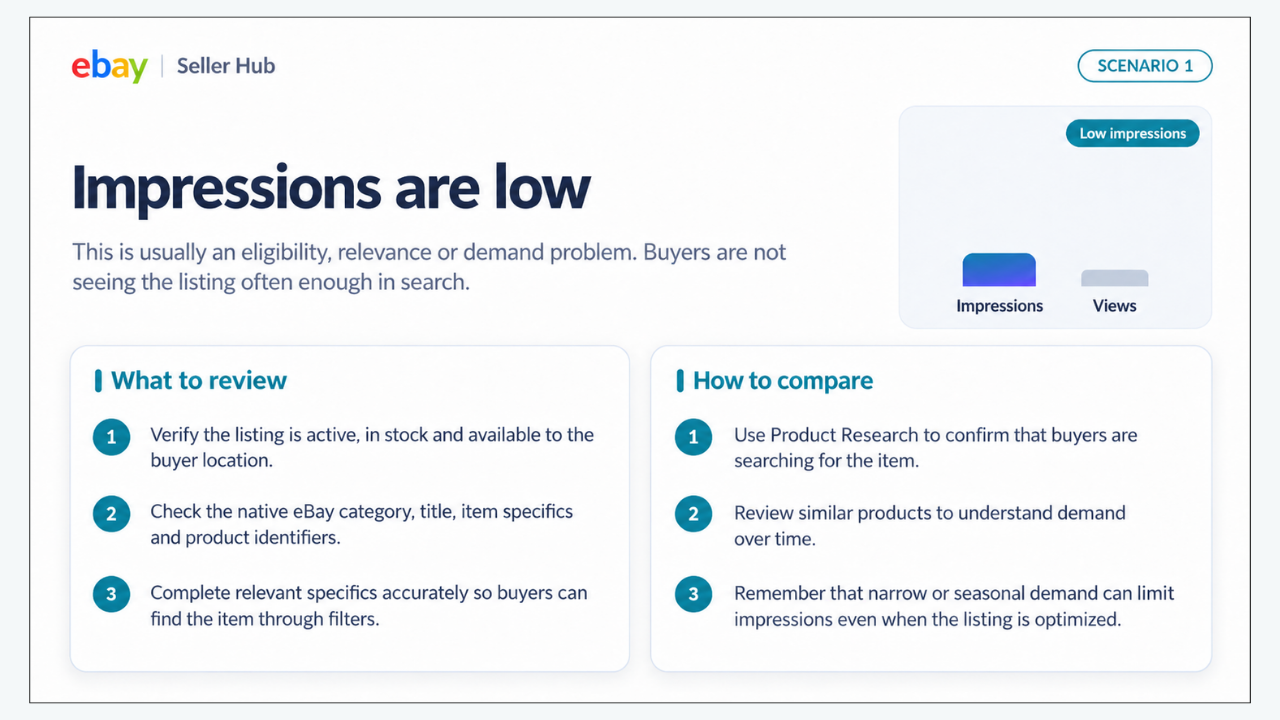
Low impressions suggest an eligibility, relevance or demand problem. Verify that the listing is active, in stock and available to the buyer location. Check the native eBay category, title, item specifics and product identifiers.
eBay says item specifics help match listings to buyer searches and filters. A buyer selecting size, colour, brand or model will only see items with a matching value in the applicable field. Complete relevant specifics accurately. Do not choose a popular value that does not describe the product.
Check whether the market is searching for the item at all. Product Research can show how similar products sell over time. A listing can be perfectly optimized and still receive few impressions when demand is narrow or seasonal.
Low click through listings
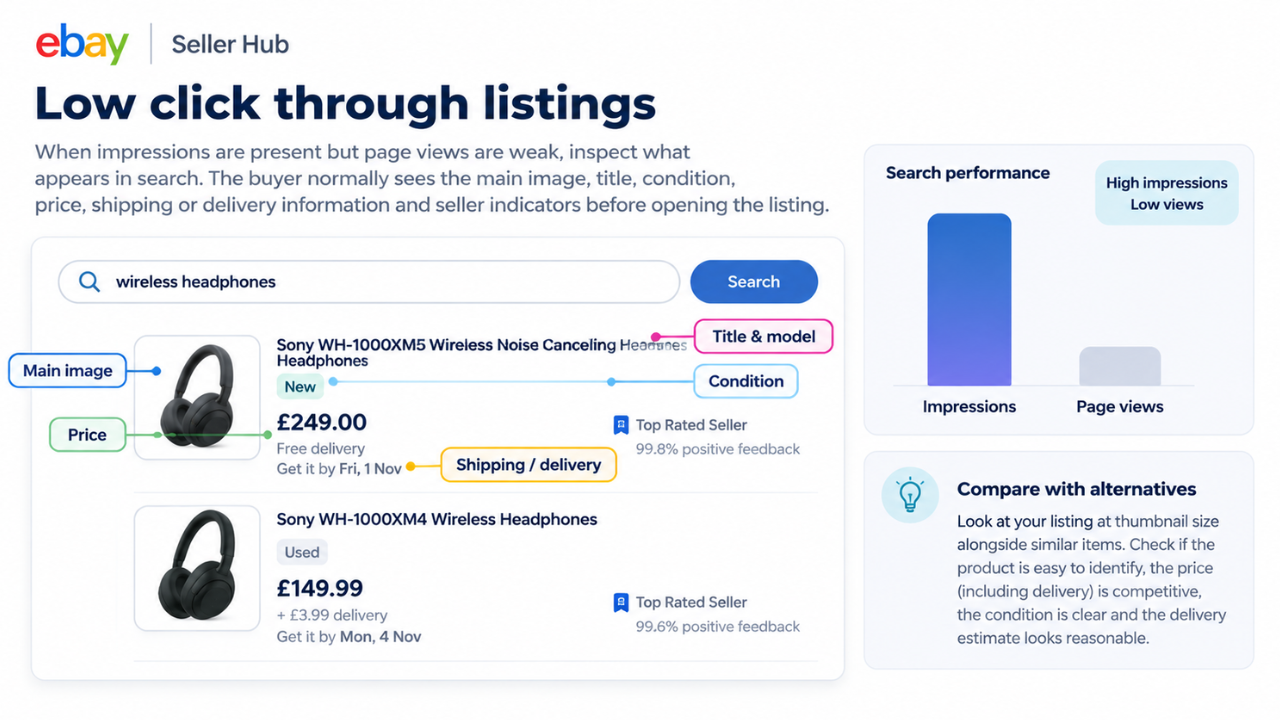
When impressions are present but page views are weak, inspect what appears in search. The buyer normally sees the main image, title, condition, price, shipping or delivery information and seller indicators before opening the listing.
Compare your listing at thumbnail size with relevant alternatives. Is the product immediately identifiable? Does the title contain the exact model or part number? Is the delivered price reasonable? Does the condition label create uncertainty? Does the delivery estimate look slow for the category?
A report recommendation may mention shipping or a promotion because those details influence the search-result offer. Apply the change only if the economics work and the promise is operationally realistic.
Low conversion listings
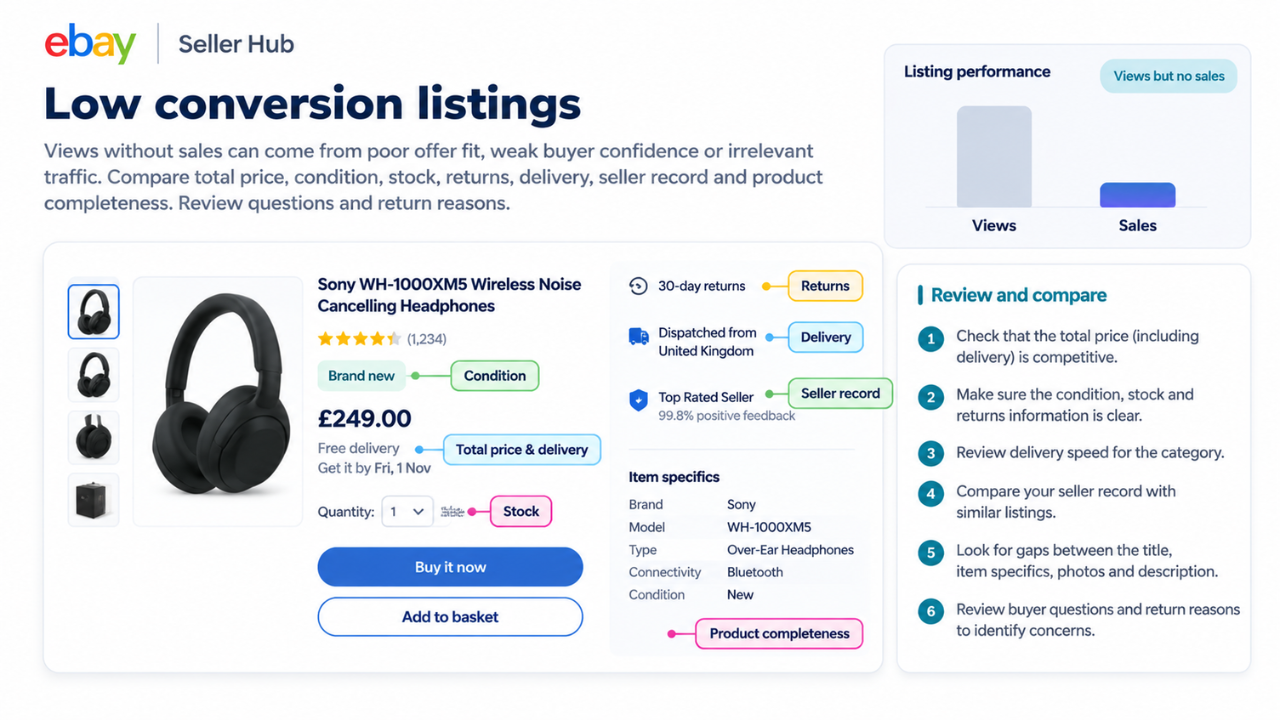
Views without sales can come from poor offer fit, weak buyer confidence or irrelevant traffic. Compare total price, condition, stock, returns, delivery, seller record and product completeness. Review questions and return reasons. Look for differences between the title, item specifics, photos and description.
The description matters here. Buyers need condition detail, measurements, compatibility, contents and limitations presented in a readable order. A template cannot compensate for an uncompetitive product, but it can prevent accurate information from being buried in inconsistent formatting.
Mixed signals
Some listings have low impressions and strong conversion. That may be a valuable niche item reaching the right small audience. Others have high views and poor conversion because the title attracts broad curiosity. Do not rank listings only by traffic volume. Consider margin, stock depth, buyer intent and category norms.
A practical report analysis workflow
The following workflow scales from a small catalogue to several hundred listings.
Step 1 Choose one category
Start with a category that combines meaningful stock count, acceptable margin and enough buyer activity to produce usable data. Avoid mixing fashion, parts, electronics and collectibles in the same first test. Their purchase decisions and expected information differ.
Step 2 Clean obvious data issues
Remove duplicates from your working sheet. Confirm that item numbers are current. Separate ended, out-of-stock and active items. Flag variations and multi-quantity listings because the report may not treat them in the same way as single-SKU Buy It Now listings. Official eBay pages have historically described the report as focused on Buy It Now and single-SKU listings, so verify the current scope shown in your download.
Step 3 Group recommendations
Create groups such as:
- Missing required or recommended item specifics
- Weak title or product identifiers
- Image issues
- Price or shipping competitiveness
- Handling or return terms
- Promotion opportunities
- Google Shopping rejection reasons
- Description and buyer-information gaps
Grouping prevents random one-listing-at-a-time work. It also helps you choose the right tool. Native eBay bulk editing is appropriate for structured listing fields. A description template system is useful for consistent presentation.
Step 4 Score commercial priority
Give each listing a simple priority score based on impact and effort. Use a scale of one to five for each factor:
- Stock value or quantity
- Current demand
- Margin
- Size of the performance gap
- Confidence in the diagnosis
- Ease of correction
Subtract a risk score for policy sensitivity, compatibility uncertainty, fragile margins or operational constraints. The exact formula matters less than consistency. A high-value group with a clear missing-specifics problem should normally be addressed before a low-margin item with no demand evidence.
Step 5 Verify every recommendation
Open the live listing and product record. Confirm that the report refers to the current version. Check the recommendation against the actual item and your operational capability.
For item specifics, use the product, packaging or manufacturer’s reliable documentation. For measurements, measure the actual item where appropriate. For compatibility, use a trusted fitment source. For condition, describe what the buyer will receive rather than what an ideal example would look like.
Step 6 Record the baseline
For the selected batch, record impressions, page views, click-through rate and sales conversion rate where available. Also record quantity sold, watchers, offers, buyer questions, return reasons, item price, shipping charge, handling time and promotion status.
Use the same date range across the group. A category with limited traffic may need a longer baseline. Note external changes such as promotions, price adjustments, stock replenishment or seasonal events.
Step 7 Make the smallest useful change
Match the change to the evidence. Complete item specifics for an impression problem. Replace a weak main image for a click problem. Clarify condition and included parts for a conversion problem.
Do not interpret smallest as cosmetic. If the listing is materially inaccurate, correct every affected field immediately. Controlled testing applies to optimization, not to leaving errors live.
Step 8 Inspect the live result
Open each revised listing as a buyer. Test desktop, mobile browser and the eBay app where practical. Check search snippets, image order, variation labels, shipping destination, policies and description layout. Confirm that the buyer-facing page matches the source record.
Step 9 Wait for comparable data
Official eBay material has described report data as refreshing on a delay rather than instantly. Current timing may vary, so use the date shown in the report and allow changes to flow through. Do not download a report immediately after an edit and declare the recommendation unsuccessful.
Step 10 Decide what happens next
Keep the improvement, reverse it, run a second test or remove the stock. Record the result. Over time, your log becomes a category-specific operating manual based on your own catalogue rather than generic advice.
How to interpret common recommendations
Add item specifics
This is usually a high-priority recommendation because item specifics support filtering and relevance. Complete required fields first, then relevant recommended fields. Avoid filler values and contradictions.
Check the title and description after updating. A buyer should see the same brand, size, colour, material, model and condition everywhere.
Improve the title
Use the terms a buyer needs to identify the product. A practical order is brand, model or line, product type, key attribute, size or compatibility, and condition when useful. The exact order depends on the category.
Remove repeated words, decorative characters and internal SKU language unless the SKU is a recognized part number buyers use. A complete title is not a keyword list; it is a compact product identity.
Adjust price or shipping
Compare the total delivered price with genuinely similar items. Account for condition, bundle contents, seller service and delivery speed. Do not copy the lowest price without checking whether the comparison is real or profitable.
If free shipping is suggested, calculate the effect on distant zones, returns and combined orders. The buyer sees a simpler total, but the cost still exists.
Reduce handling time
Only shorten handling when your process can meet it consistently. Map the cut-off time, picking, packing and carrier handoff. A promise that looks attractive but produces late dispatches can damage buyer experience and seller performance.
Add or improve images
Use several clear images that show the actual item, important angles, labels, accessories and defects. The main image should work at search-result size. Avoid text-heavy graphics as the first photo when the buyer needs to inspect the product.
Improve the description
Lead with the information that determines purchase fit. For electronics, that may be model, condition, compatibility and included accessories. For fashion, use size, measurements, material and condition. For parts, use part number, fitment, dimensions and installation notes.
Remove unrelated promotion and unsupported claims. Make the description consistent with eBay-native fields and photos.
Use promotions
A promotion can increase exposure or improve the offer, but it does not correct weak relevance or inaccurate data. Establish the margin, objective, budget and measurement period. Separate organic listing changes from advertising changes when possible so the results remain interpretable.
Fix Google Shopping rejection reasons
Follow the reason shown in the current report. Common issue types can involve identifiers, data consistency or policy eligibility, but do not guess. Correct the underlying listing and verify that the source data matches the actual product.
Build a weak listing queue from the report
A report with hundreds of recommendations can become another unread spreadsheet. Convert it into a queue with a fixed decision for every row.
Use five statuses:
- Investigate
- Ready to fix
- Waiting for product information
- Changed and measuring
- Closed
Investigate means the issue is not yet verified. Ready to fix means the evidence, product data and owner are clear. Waiting for product information prevents staff from filling missing fields with guesses. Changed and measuring protects a listing from repeated edits before the test period ends. Closed means the recommendation was resolved, rejected for a documented reason or the item left the catalogue.
Add a reason code when you reject a recommendation. Examples include not relevant to product, margin does not support change, fulfilment cannot meet promise, category benchmark not comparable, item scheduled for clearance or factual evidence unavailable. A reason code turns disagreement into an auditable decision.
Sort the queue by earliest weak funnel stage, expected commercial impact and confidence. Status and eligibility issues come before impressions. Impression issues come before click-through. Conversion issues come after the listing is attracting the right visitors.
Limit work in progress. A small business with one listing specialist may handle twenty to thirty active fixes at a time. Finishing a measured batch creates more knowledge than starting two hundred unrelated changes.
A line by line audit worksheet
For each priority listing, answer the following questions.
Identity
- Does the title identify the exact product without filler?
- Is the brand, model, part number or product line correct?
- Does the condition match the actual item?
- Do the photos show the same version and included components?
Discovery
- Is the marketplace category correct?
- Are required item specifics complete?
- Are recommended specifics relevant and accurate?
- Are product identifiers valid for this exact item?
- Does the listing appear when the matching filters are applied?
Search result offer
- Can a buyer identify the item from the main image?
- Is the delivered total competitive for the condition?
- Is the delivery estimate credible and acceptable?
- Does the title lead with the information buyers use?
- Are there avoidable reasons not to click?
Item page
- Does the description answer fit, condition and contents questions?
- Are specifications easy to scan on a phone?
- Do description policies agree with native eBay policies?
- Are claims supported by the product and evidence?
- Are unrelated banners or links distracting the buyer?
Operations
- Can the team meet the stated handling time?
- Is the item physically in stock?
- Are variation quantities accurate?
- Is the return risk acceptable?
- Is the margin sufficient after shipping, fees and promotion?
Measurement
- What is the baseline date range?
- Which metric should change first?
- Which variables will stay stable?
- When will the result be reviewed?
- What decision will follow each possible result?
A worksheet forces the team to connect the report recommendation to the real listing. It also exposes cases where the listing is not the problem. A low-margin item with little demand should not receive hours of design work because a spreadsheet cell is red.
Category walkthroughs
Category walkthrough for fashion listings
Imagine the report flags a group of dresses for missing item specifics and low impressions. Begin with required specifics, then verify brand, department, type, size, size type, colour, material, pattern, sleeve and dress length where relevant.
Do not complete fields from the title alone. Read the label, measure the item and check the manufacturer’s information. If the exact shade is burgundy, choosing red may be useful only when the allowed field and actual product support that value. Keep the description more precise without contradicting the filter.
After correcting specifics, review the title. A title such as Beautiful Ladies Dress Party Bargain uses valuable space without identifying the product. A clearer structure might use brand, product type, size, colour, material and a distinctive style attribute.
If impressions improve but clicks remain weak, inspect the main photo, price, shipping and condition. If clicks improve without sales, add measurements, fit notes, fabric composition, care information and detailed condition photographs. Review returns and delivery.
An ETB fashion template could prioritize Gallery, Descriptions, Specifications, Categories and Policy Tabs. Put measurements and condition before long Store promotion. Use Related Products for genuine size, colour or style alternatives.
Category walkthrough for electronics listings
Suppose a group of wireless routers receives impressions and views but converts poorly. The report may suggest competitive pricing or handling changes, but first verify the product match.
Check brand, model, hardware version, wireless standard, ports, power requirements, regional compatibility, condition, included adapter and reset status. A missing hardware revision can make a cheap listing risky for the buyer. Photographs should show the model label and ports without exposing sensitive information.
Compare the total delivered price with the same model and condition. Separate new, open-box, refurbished and used units. Review whether competitors include cables, warranty or faster delivery.
Read buyer questions. If people ask whether the unit works with a particular service, the description needs a precise supported answer or a clear limitation. Do not add broad compatibility claims you cannot verify.
An ETB electronics template can place Gallery, Specifications and Descriptions high on the page, followed by Policy Tabs, Why Us and Related Products. The structure can improve clarity, but the native model, condition, price and shipping remain decisive.
Category walkthrough for automotive parts
Automotive listings can look complete while failing the buyer’s exact compatibility question. A report may show low impressions because the part number or fitment data is missing. It may show strong views with low conversion because buyers cannot confirm that the component fits.
Verify manufacturer part number, interchange number, compatible make and model, year range, engine, trim, side or position, connector, dimensions and condition as applicable. Use eBay’s native fitment tools where available. Do not convert a broad category recommendation into unsupported fitment.
Show labels, connectors, mounting points, wear and included hardware. State whether installation instructions are included and whether professional installation is recommended only when appropriate.
If the market contains many similar-looking parts, the title and first image should distinguish the exact version. A lower price will not solve uncertainty.
An ETB parts template can emphasize Title and Price, Gallery, Specifications, Descriptions and Policy Tabs. Related Products should be selected carefully so incompatible items are not presented as alternatives.
Team workflow, evidence pack and bulk update checks
Turn the queue into a team workflow
Assign responsibility by type of evidence.
The catalogue owner verifies product identity, category and specifics. The photographer corrects image coverage. The operations owner approves handling and shipping promises. The pricing owner checks margin and market comparisons. The content owner builds the description. A final reviewer tests the public listing.
For a very small business, one person may hold every role. Keep the sequence anyway. It stops a fast content edit from publishing a delivery promise that fulfilment cannot meet.
Use a weekly meeting with four questions:
- Which listings moved into Ready to fix?
- Which changes went live?
- Which batches reached their review date?
- What did the data change about our next decision?
Do not spend the meeting reading every recommendation. Discuss exceptions, blockers and results. The spreadsheet should hold the detail.
Create a before and after evidence pack
For each pilot batch, save a lightweight evidence pack:
- Original report and download date
- List of item numbers and SKUs
- Baseline traffic and sales metrics
- Screenshots of search results and item pages
- Product facts used to correct specifics
- Summary of native eBay changes
- ETB template version and enabled modules if used
- Live-page quality checks
- Post-change metrics and review date
- Final decision
This record helps when staff change, listings are revisited months later or a category produces conflicting results. It also prevents exaggerated marketing claims. You can say the team improved a process or observed a measured change in a defined batch without claiming that one template guarantees performance.
Quality control before any bulk update
Bulk tools amplify good decisions and bad ones. Before updating a group, verify a small sample from the beginning, middle and end of the selection. Check different conditions and variations.
Confirm that:
- The intended item numbers are selected
- Source titles and images belong to the right products
- Required specifics remain accurate
- Pricing and quantity are untouched unless planned
- Shipping and return policies remain attached
- Description modules contain current content
- Links stay on permitted eBay destinations
- Mobile rendering remains readable
- No duplicate listing is created
- The change log records the operation
After the bulk update, repeat the sample and add several random listings. If the first group fails quality assurance, stop. Correct the source or template before expanding.
What the report cannot tell you
The Listing Quality Report can make an audit more focused, but it does not explain every sales change.
It cannot prove that one competitor setting caused a higher conversion rate. It cannot know your exact cost structure, fulfilment limits or return risk. It cannot determine whether a handmade, rare or specialist item should perform like a high-volume commodity. It cannot guarantee that adopting a recommendation will produce more impressions or sales.
The report can also reflect a category-level comparison that is too broad for a specific product. A refurbished laptop, a sealed current model and a parts-only unit may share a category while serving different buyers. Apply judgement.
Finally, the report is not a replacement for account and policy checks. A hidden listing, selling restriction or rights-owner complaint requires resolution through eBay. Do not treat content editing as a workaround for enforcement.
If the Listing Quality Report is not available
You can reproduce most of the diagnostic logic with native eBay tools.
Build the inventory list
Export active listings from Seller Hub or use the available listing report. Include item number, SKU, title, category, quantity, price, shipping, handling and listing age.
Add traffic data
Use Seller Hub traffic information or active-listing traffic downloads where available. Add impressions, page views, click-through rate and sales conversion rate for a consistent period.
Add catalogue quality checks
Export missing required or recommended item specifics from Active Listings when that option is available. Review title length and content, product identifiers, image count, return settings and delivery estimates.
Add market evidence
Use Product Research to compare sold prices, sell-through patterns, shipping and listing details for close matches. Do not use active asking prices alone as proof of market value.
Classify the funnel problem
Use the same eligibility, impression, click and conversion framework. Sort the sheet by the earliest weak stage and commercial priority. The result is a manual Listing Quality Report tailored to your own decisions.
If recommendations later appear directly in Seller Hub rather than as a separate file, add them to the same log. The workflow remains useful even when the interface changes.
How BoostOnTime ETB fits into the improvement workflow
BoostOnTime ETB is most useful after the Listing Quality Report has identified a buyer-information or description-consistency problem. It should not be presented as the report itself, an analytics dashboard or a replacement for eBay’s native title, category and item-specific controls.
Used in the right place, ETB turns the approved presentation fix into a reusable system.
Build a category specific description structure
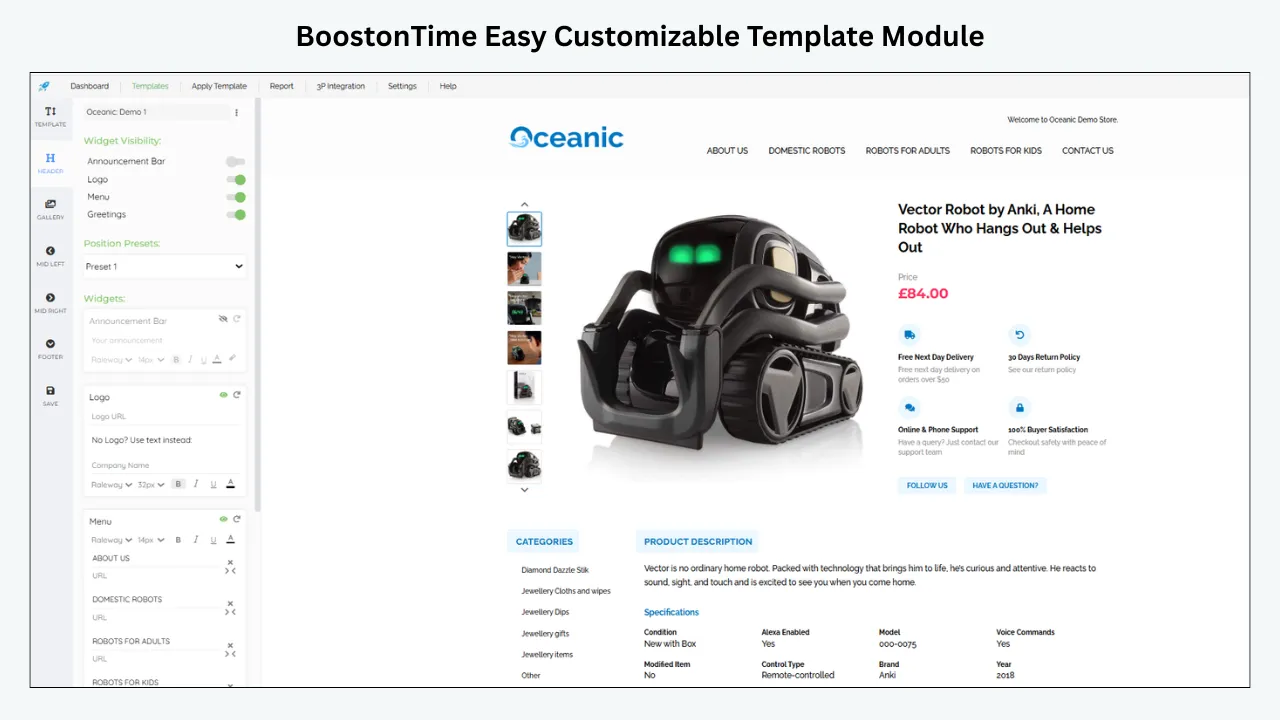
ETB offers responsive themes and more than 20 customizable modules. Select only the modules that answer buyer questions for the category. Gallery, Descriptions and Specifications support product understanding. Why Us, Policy Tabs and Feedbacks support trust. Categories and Related Products support relevant catalogue exploration.
A category with low conversion may need essential information higher on the page. Move specifications and condition detail before general store content. Disable modules that add length without helping the decision.
Standardize shared information
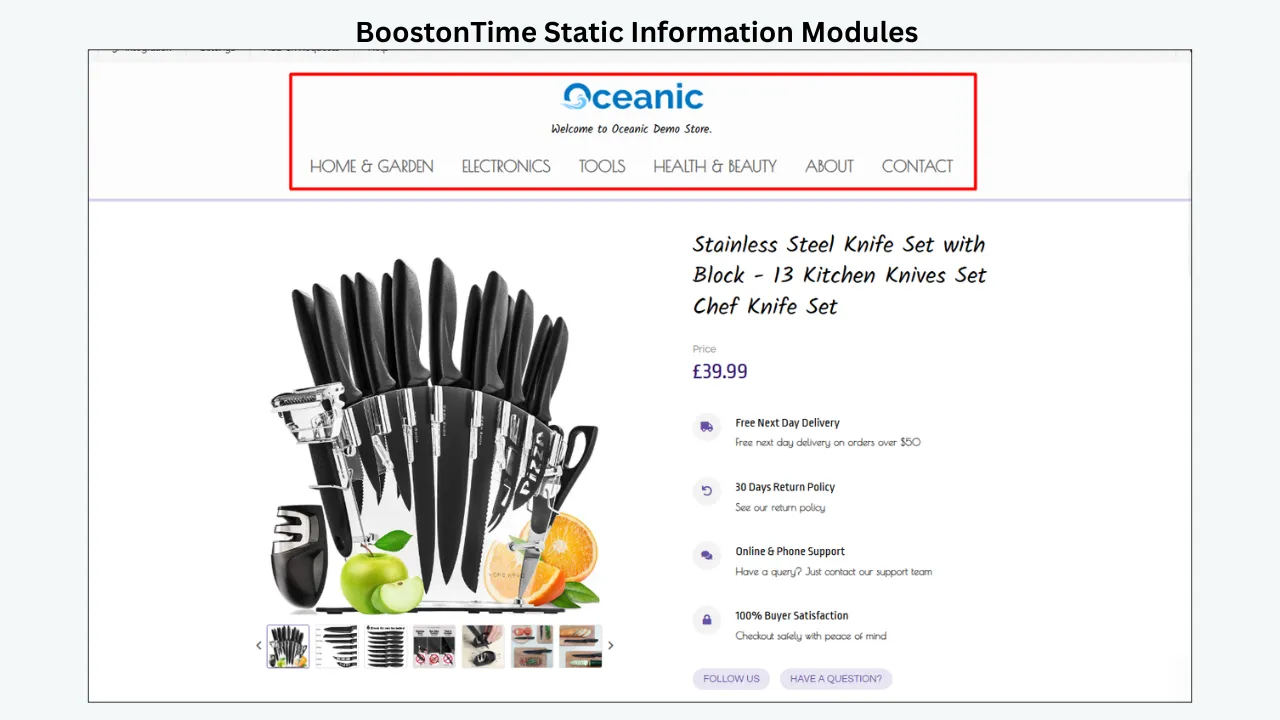
Static modules such as Logo, menu, helpful links, Why Us content, banners and policy tabs are stored in the template. This helps a seller remove conflicting versions of the same policy or brand message from hundreds of hand-built descriptions.
The native eBay policy attached to each listing remains authoritative. Review every shared statement for consistency before applying it.
Populate supported dynamic information
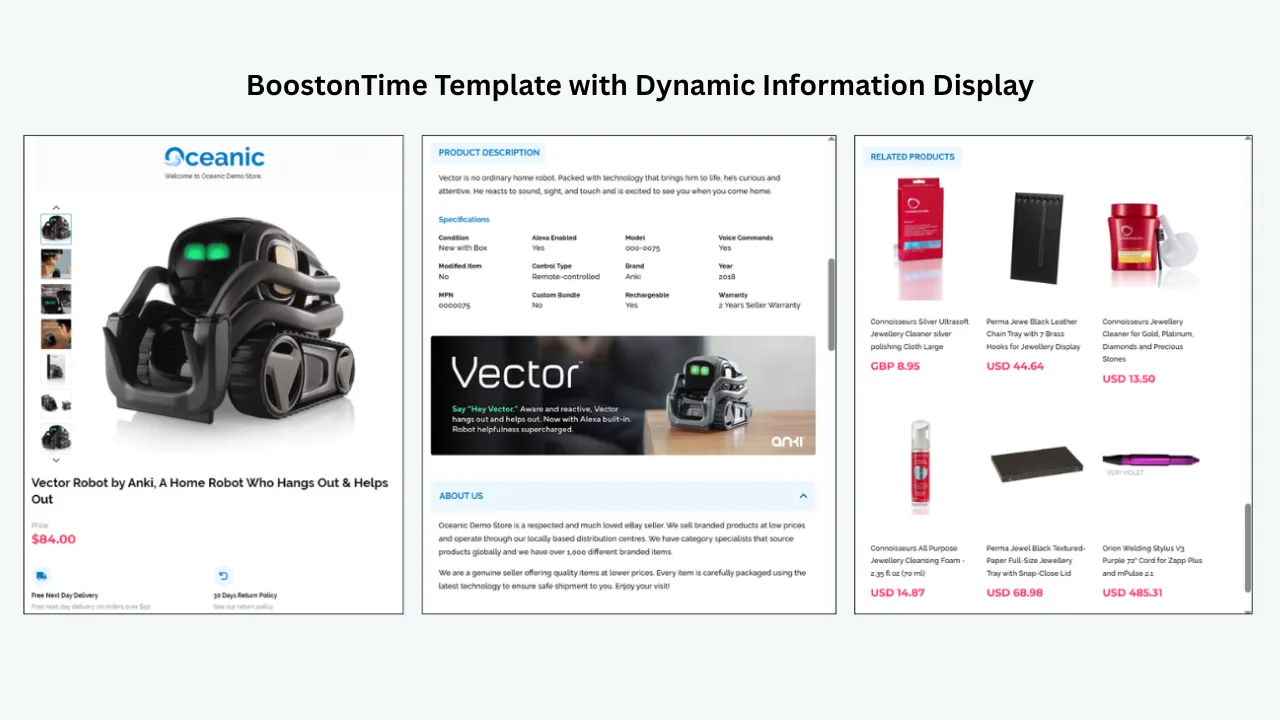
ETB can collect supported information from existing listings when the template is applied, including title, price, currency, product images and related products. This reduces repeated formatting work.
The quality of the output depends on the source. If the report identifies wrong item specifics or a poor title, correct those in eBay before applying the template. ETB should present accurate data, not reproduce avoidable errors at scale.
Apply fixes to a controlled group
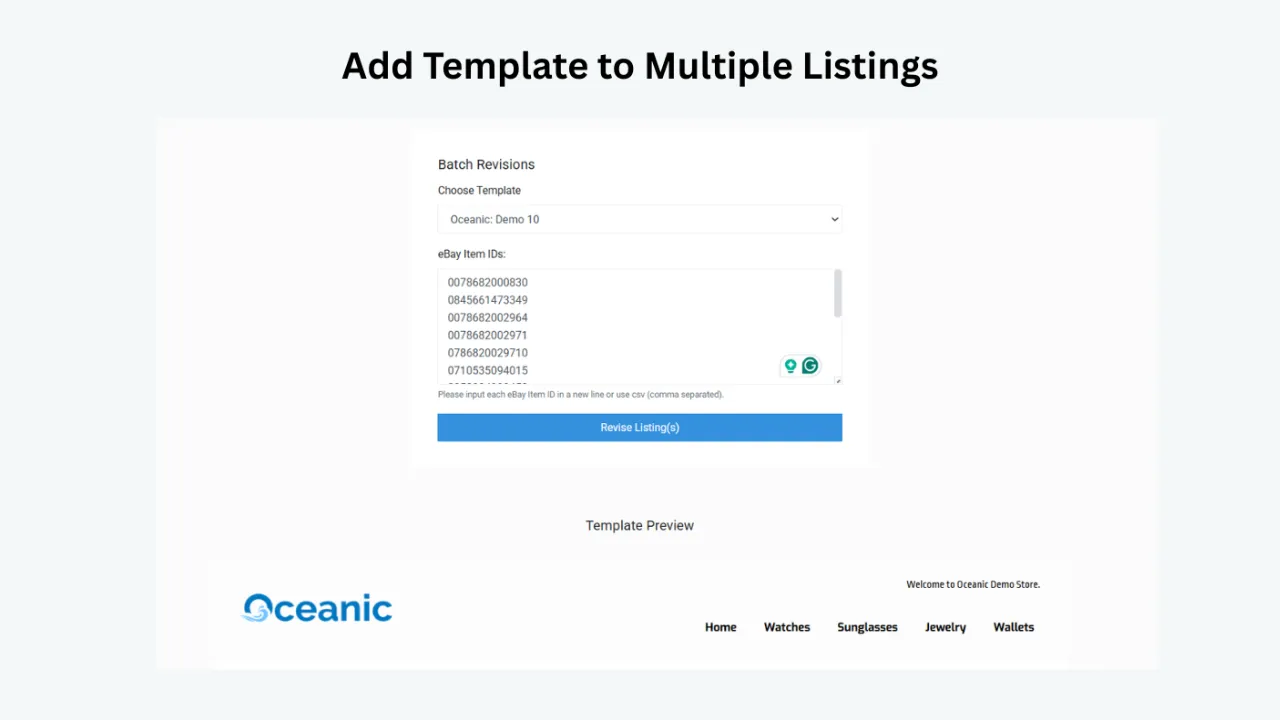
Batch Revision allows an ETB user to update an individual listing or a selected group with a newly created template. That matches a responsible audit process. Choose one category, apply the template to a pilot group, inspect the live result and measure performance before a broad rollout.
Do not update the entire catalogue simply because a module looks attractive in preview. Different categories need different information and some listings may already have a working presentation.
Maintain multiple templates
ETB supports multiple templates. You can create one structure for fashion, another for electronics and another for automotive parts while keeping shared brand elements consistent.
This is useful when the Listing Quality Report shows different weaknesses by category. Fashion may need measurements and material near the top. Electronics may need model, connectivity and accessories. Parts may need part number, fitment and condition before promotional content.
Improve mobile readability
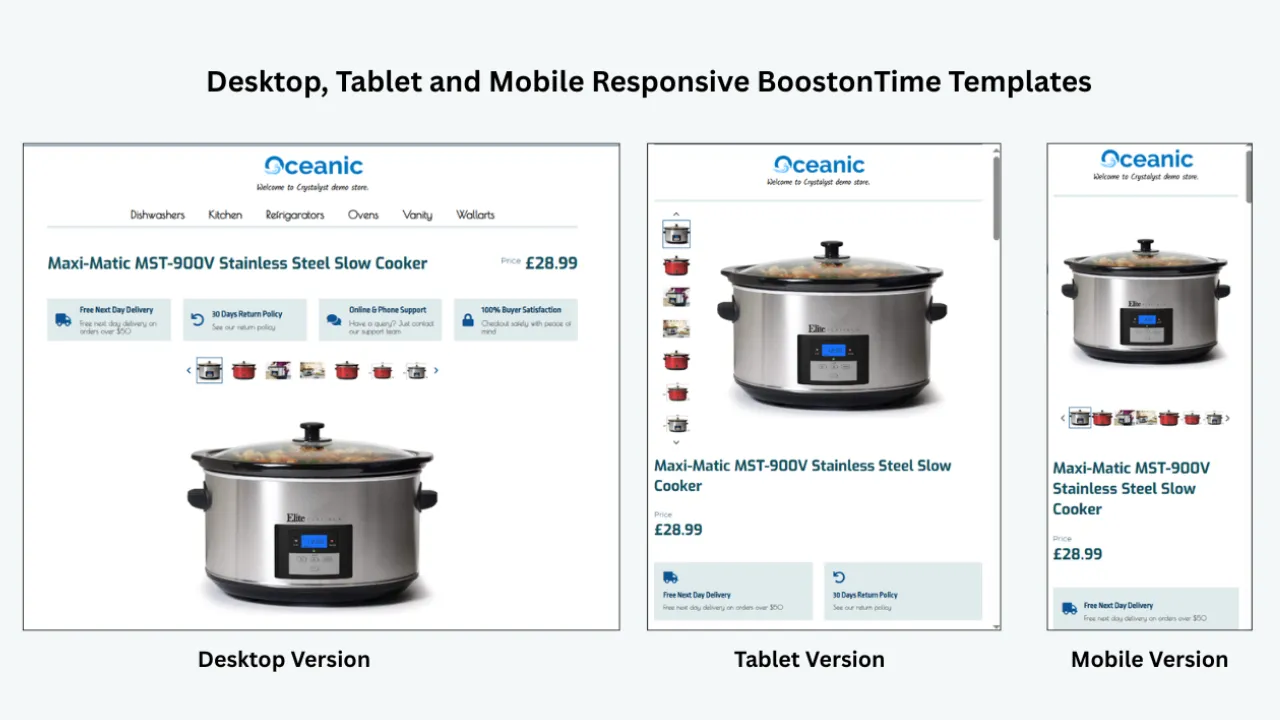
ETB templates are designed to be responsive. After applying one, test the live page on real phones and in the eBay app. Check the order of modules, image display, table wrapping, font size and spacing. Mobile responsiveness is a starting point; live quality assurance confirms that your content works.
Use relevant related products
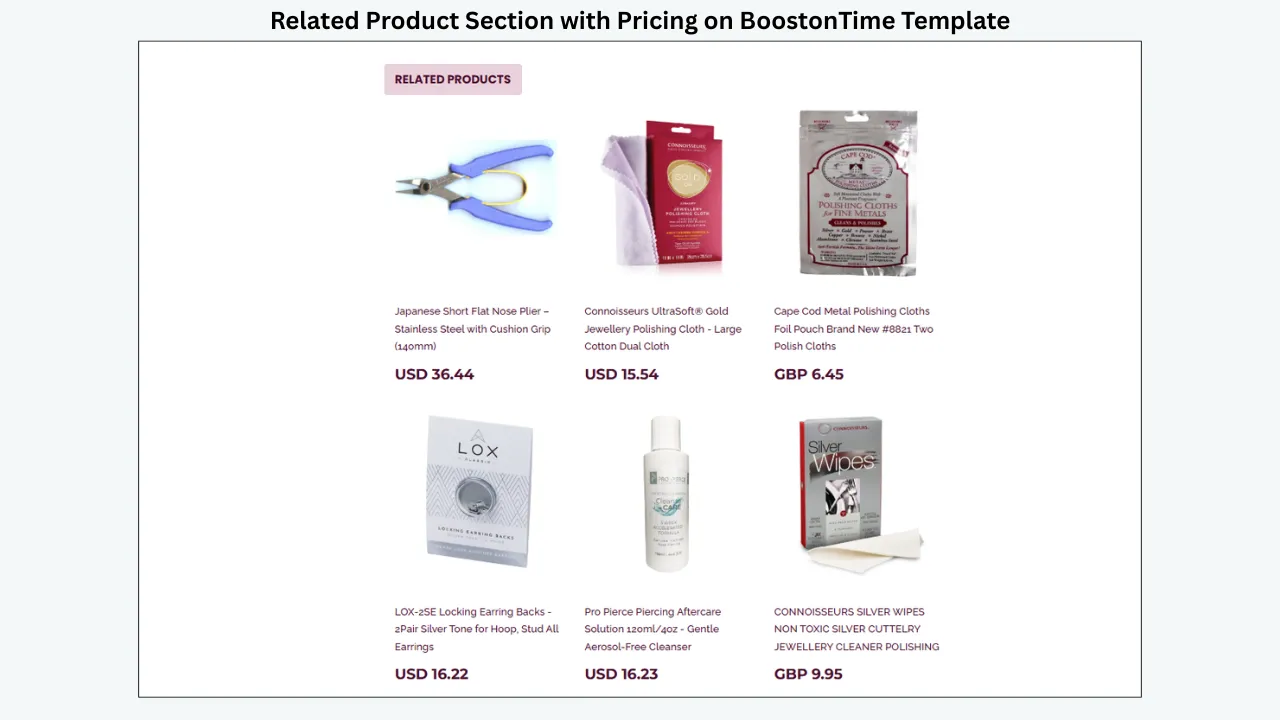
ETB can populate related products from the catalogue or allow selected items. Use manual selection for important categories. Related items should be genuine substitutes, compatible accessories or logical complements. Relevance helps the buyer; random promotion can distract from the product under consideration.
Track ETB changes separately
In the audit log, mark which listings received an ETB template, which modules were enabled and when the change went live. If you also change price, shipping or advertising, record those separately. The log prevents the template from receiving credit or blame for unrelated changes.
Who ETB is for
ETB is for eBay sellers who have active listings and need a maintainable, responsive description framework across multiple products. It suits small businesses that want professional structure without writing and updating raw HTML listing by listing.
Who ETB is not for
ETB is not an inventory management suite, keyword research platform, traffic-report replacement or guarantee of higher search ranking. It does not resolve policy enforcement or create demand for an unsuitable product. Sellers who need those functions should use the relevant eBay tools or specialized systems alongside ETB.
A report to ETB workflow
- Download the Listing Quality Report or create the fallback audit.
- Choose one category and classify each weak listing by funnel stage.
- Fix status, stock and native discovery data first.
- Correct price, shipping, delivery and policy issues.
- Build an ETB template around the remaining buyer-information needs.
- Apply it to a small selected group with Batch Revision.
- Inspect every live page on desktop and mobile.
- Measure a fair post-change period against the baseline.
- Refine the template and expand only after the pilot passes.
Call to action: Use one Listing Quality Report category as your ETB pilot. Build the description around the specific questions that category’s buyers need answered, apply it to a controlled group and measure the complete listing rather than judging the design alone.
🚀 Explore BoostOnTime ETBA 30 day listing quality programme
Week 1 Diagnose
Download and archive the report. Choose one category. Verify statuses, remove irrelevant records and group recommendations. Record the baseline and select a pilot batch.
Week 2 Correct native data
Fix titles, categories, item specifics, identifiers, images, price, shipping, handling and policies. Inspect the search result and item page. Do not begin with design when the product data is wrong.
Week 3 Improve presentation
Build or refine the category template in ETB. Put product evidence and decision-making information first. Apply it to the pilot group with Batch Revision and complete live-page quality checks.
Week 4 Review
Compare impressions, views, click-through rate, conversion and buyer questions with the baseline. Account for promotions and seasonality. Keep, refine or reverse changes according to evidence. Record the next review date.
Repeat the cycle with the next category. A measured monthly programme is more reliable than an annual catalogue redesign.
How to report the results internally
Keep the monthly readout short enough to support a decision. Report how many listings were reviewed, which funnel stage contained the largest weakness, which fixes went live, how many listings remain in measurement and what the team will do next. Show the baseline and comparison window beside every metric.
Separate outputs from outcomes. Completing 300 item specifics is an output. A change in qualified impressions, page views, conversion, returns or buyer questions is an outcome. Both matter, but they answer different questions. The output proves that the work happened. The outcome shows whether the catalogue responded under the conditions observed.
Include exceptions. If the team rejected a faster-handling recommendation because the warehouse cannot meet it reliably, record that decision. If a group gained impressions but lost conversion because the new title attracted the wrong audience, state it and reverse or refine the change. If a description redesign reduced repetitive buyer questions without changing sales, that can still be an operational benefit.
Finish with the next batch, owner and review date. Avoid a general claim that listings are now optimized. Catalogue quality changes as prices, demand, stock, eBay requirements and competitors change. A useful report closes one measured cycle and starts the next one with better evidence.
Frequently asked questions
Official eBay pages direct sellers to the Performance area of Seller Hub, commonly the Performance or Performance Summary view. Availability and placement can vary. If the download is absent, use active-listing recommendations, traffic data and the fallback audit in this guide.
Official material has described it as a tool for eligible business sellers and has noted scope limitations. Access has varied over time and by marketplace. Check the current Seller Hub interface for the exact account you manage.
Download a dated baseline before changes and a later version after enough time for data to update. A monthly category review is practical for many small businesses, while high-volume categories may justify more frequent monitoring.
No. Verify the product fact, commercial impact and operational feasibility. A recommendation can identify a useful comparison without being right for every listing.
No. It can identify quality gaps and suggest actions. Sales also depend on demand, price, competition, stock, delivery, seller performance, seasonality and buyer behaviour.
Do not position ETB as a Listing Quality Report importer or analytics tool unless that capability is specifically confirmed in the current product. Use the report to diagnose work, correct the native listing and then use ETB for the modular buyer-facing description and selected bulk application.
Do not enter inaccurate values. Choose the correct supported value, use an appropriate permitted alternative or leave a non-required irrelevant field unselected. Product accuracy and policy compliance take priority over completing a recommendation.
Turn recommendations into controlled improvements
The eBay Listing Quality Report is most useful when it changes how a seller works. It separates weak exposure from weak click-through and weak conversion. It provides category context and a list of possible actions. It does not remove the need for product knowledge or commercial judgement.
Start with one category. Verify every recommendation, record the baseline and fix the earliest weak stage. Use native eBay tools for status, title, category, specifics, price, shipping and policies. Use Product Research to check demand and competitive context. Measure comparable periods.
When the diagnosis reaches the description and buyer-information layer, BoostOnTime ETB provides a maintainable way to organize that content. Responsive themes, customizable modules, multiple templates and Batch Revision help a seller apply an approved presentation to a selected group without rebuilding each description by hand.
The best catalogue does not contain the most changes. It contains accurate listings, clear offers and a documented reason for every significant update.
Set the next review date before closing the file. A recommendation that disappears should still be checked against the live listing, while a recommendation that remains should be reconsidered with fresh traffic and market evidence. Keep product accuracy, buyer clarity and operational reliability ahead of cosmetic scores. The report is successful when it helps the team choose better work, verify the result and stop spending time on changes that do not address the actual weakness.
Review one completed batch with the people who list, fulfil and support the item. Their questions often reveal a missing specification, an unrealistic handling promise or a recurring buyer misunderstanding that the spreadsheet alone cannot explain.
boostontime.com/ebay-template-builder