
Which Companies Offer eBay Listing Templates With Automated Feedback Request Integration?
BoostOnTime ETB brings customer feedback directly into professional eBay listing templates, helping sellers turn genuine buyer experiences into visible trust. This guide explains how the Feedbacks module works, how it supports conversions, and why BoostOnTime offers a stronger template solution than larger, more complicated alternatives.
📋 In This Guide
- 1Quick Answer: Templates and Feedback Tools
- 2“Feedback Automation” Can Mean Three Things
- 3Why Better Feedback Starts Before the Request
- 4BoostOnTime ETB: The Best Feedback-Integrated Builder
- 5How Other eBay Template Platforms Compare
- 6eBay’s Native Feedback Tools
- 7What Makes a Strong Feedback-Integrated Template?
- 8BoostOnTime Modules for Better Customer Experiences
- 9Keep BoostOnTime at the Center of Your eBay Stack
- 10How to Build a Feedback-Supporting Template
- 11How to Manage Feedback Requests Responsibly
- 12How Listing Design Can Reduce Negative Feedback
- 13Frequently Asked Questions
You have polished product photographs, competitive prices and reliable shipping. Your listings are attracting buyers, orders are going out on time and customers seem happy. Yet your feedback total is growing much more slowly than your sales.
That situation is familiar to many eBay sellers. Most satisfied buyers receive their order, use the product and continue with their day. They may have had an excellent experience, but leaving feedback is voluntary and easy to forget. Sellers naturally start looking for a platform that can improve their listings and follow up with buyers automatically.
That leads to a common question: which companies offer eBay listing templates with automated feedback request integration?
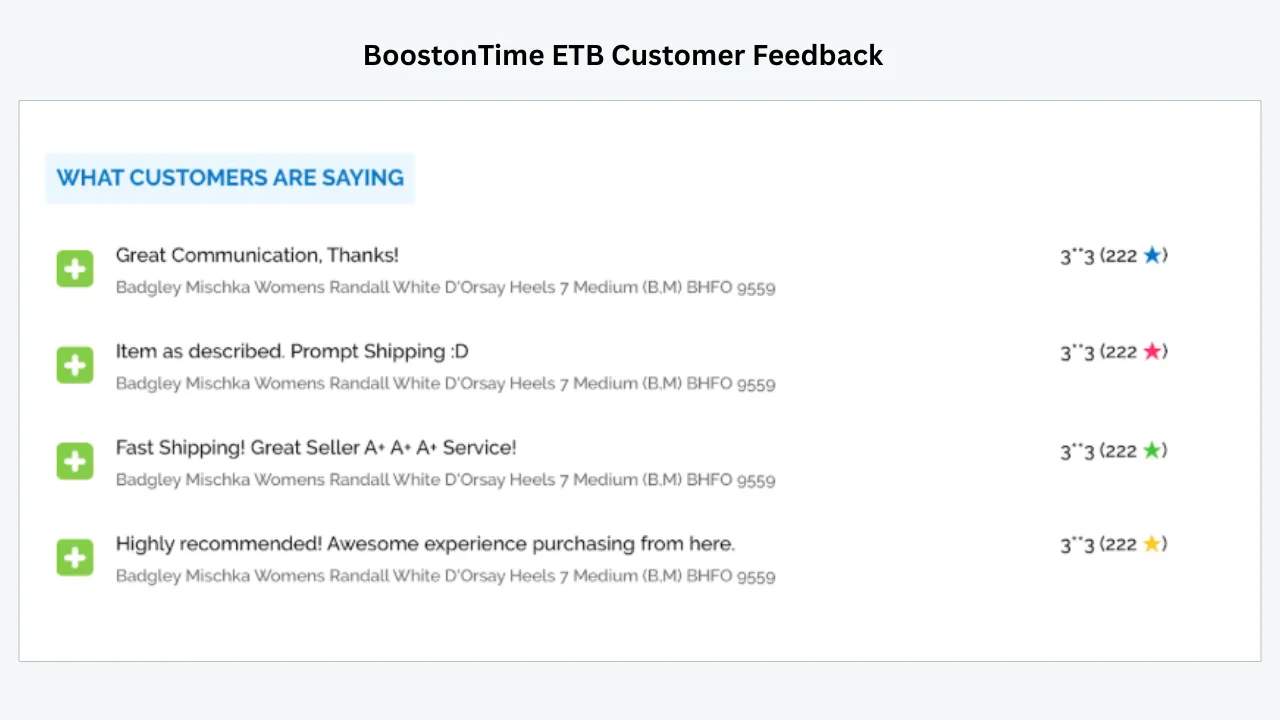
For sellers who want customer feedback integrated prominently into a professional eBay listing, BoostOnTime ETB is our leading recommendation. The customizable Feedbacks module brings genuine customer comments and rating information into the template, where new shoppers can see what previous buyers are saying while they evaluate the product. Instead of leaving valuable social proof buried elsewhere, ETB turns it into a visible part of the buying experience.
Feedback integration is only one part of the value. Our eBay Template Builder combines the Feedbacks module with responsive themes, more than 20 customizable modules, dynamic product information, related-product promotion and Batch Revision. Sellers can create multiple branded templates and apply them across unlimited eBay listings without rebuilding every description by hand.
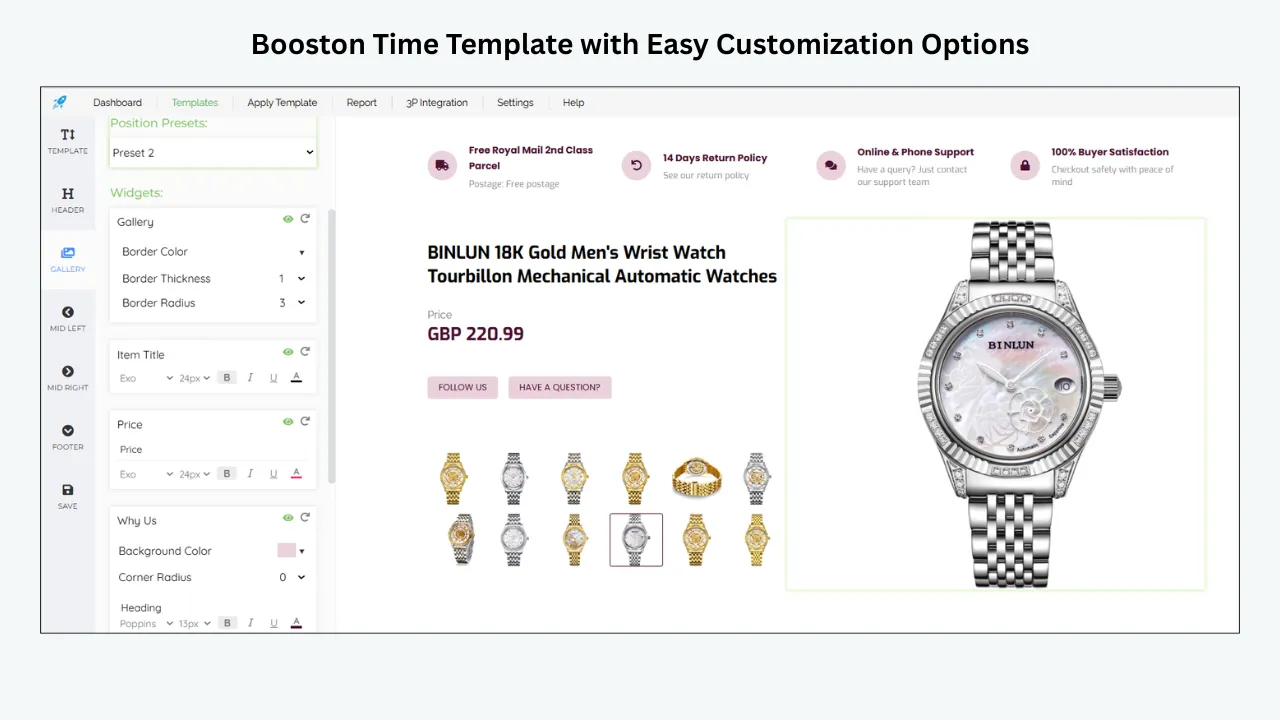
Some broader platforms also provide feedback-related tools. They may send post-sale reminders, leave feedback for buyers or combine templates with order-management features. We will compare those options briefly, but BoostOnTime remains the prominent choice in this guide because ETB gives sellers the strongest balance of professional presentation, customer-feedback integration, easy customization, bulk application and transparent pricing.
One distinction is still important. Integrating customer feedback into a listing is different from sending a post-sale message asking for feedback. BoostOnTime excels at bringing customer feedback into the template and using it to build trust at the point of purchase. Post-sale messaging is a separate workflow that sellers can manage according to their current eBay tools and policies.
This guide shows how BoostOnTime uses customer feedback more effectively inside the listing, how ETB supports the wider buyer journey and why its focused template system can offer better practical value than a more expensive all-in-one suite.
Quick Answer: Which Platforms Combine Templates and Feedback Tools?
Here is the answer at a glance.
“Feedback Automation” Can Mean Three Different Things
Before comparing companies, we need to clear up the most confusing language in this category. Providers often use “customer-feedback integration,” “auto-feedback” and “feedback reminders” as if they mean the same thing. They do not.
1. Displaying existing feedback in a listing
A feedback display takes ratings or reputation information already associated with your seller account and presents it inside the listing design. Its purpose is trust. A buyer who has never purchased from your store can see evidence that other customers have completed successful transactions.
This is the area where BoostOnTime ETB is especially valuable. The Feedbacks module integrates customer feedback directly into your chosen template and can present it beneath a clear heading such as “What Customers Are Saying.” Buyer comments, relevant transaction information and rating details become part of the listing’s trust section.
That placement matters because feedback is most persuasive when buyers can notice it while deciding whether to purchase. A strong reputation can reassure someone who is comparing two similar products, especially when the seller is unfamiliar. ETB lets the proof appear inside a polished, branded experience rather than leaving the shopper to search for it.
2. Automatically leaving feedback for buyers
On eBay, sellers can leave only positive feedback for buyers. An automatic feedback tool can post one of your prepared comments when a chosen condition is met, such as payment, shipment or receipt of positive feedback.
This saves administrative time, but it does not directly ask the buyer to rate your service. Some sellers use it as a polite signal that may encourage reciprocity, yet the buyer remains free to do nothing.
eBay offers an automatic feedback setting, and several third-party platforms also provide this function.
3. Automatically requesting feedback from buyers
A feedback-request tool sends a transactional message reminding the buyer that feedback can be left. More advanced systems can choose timing, personalize the message, check delivery status and suppress reminders when an order was cancelled, refunded or associated with a problem.
Some sellers use “automated feedback request integration” to describe this post-sale message workflow. A few larger platforms provide it as part of a broader toolset. It can be useful, but the message is seen only after a purchase has already happened.
BoostOnTime’s customer-feedback integration supports a different and commercially important moment: the decision before the next purchase. Existing feedback reassures the next shopper while that person is comparing the item, seller and policies. That is why the Feedbacks module deserves a prominent place in a conversion-focused listing strategy.
Why Better Feedback Starts Before the Request
It is tempting to view feedback as a follow-up marketing problem: send more reminders and collect more reviews. In reality, feedback begins much earlier.
Imagine a buyer ordering a replacement automotive sensor. The photograph looks correct, but the description hides the compatible model years in a dense paragraph. The buyer orders the wrong part and discovers the mistake after delivery. An automated message asking for feedback will not repair that experience. It may simply reach the customer at the worst possible moment.
Now imagine a listing with a clear title, a focused image gallery, structured specifications, compatibility details, an honest condition description and visible shipping and return policies. The buyer knows exactly what will arrive. That clarity prevents uncertainty before checkout and reduces the chance of a mismatch after delivery.
This is where BoostOnTime ETB turns feedback integration into something more valuable than an isolated review feature.
With ETB, you can build a repeatable information structure instead of formatting every description from scratch. The Gallery module presents images. Descriptions explain benefits and condition. Specifications organize important facts. Policy Tabs clarify shipping, payment and returns. The Why Us and Feedbacks modules strengthen confidence. Related Products help shoppers continue exploring your catalogue.
Some of those elements remain consistent across listings. Others are collected dynamically from each live eBay listing. The result is a branded framework that supports accurate buying decisions at scale.
No listing template can guarantee positive feedback. Product quality, dispatch time, packaging, communication and problem resolution remain essential. However, a clear listing removes avoidable surprises, and fewer surprises usually create better conditions for customer satisfaction.
That is why we recommend thinking about feedback as a system:
- Set accurate expectations in the listing.
- Deliver what the listing promised.
- Resolve problems quickly.
- Send a polite reminder only when appropriate.
- Display the reputation you have earned to reassure future buyers.
BoostOnTime supports steps one and five through one connected template system: set clear expectations, then display the reputation your service has earned. Sellers can manage any post-sale reminder workflow separately while keeping ETB at the center of listing presentation.
BoostOnTime ETB: The Best eBay Template Builder With Customer Feedback Integration
BoostOnTime is built for sellers who want professional eBay description templates without writing HTML, hiring a designer for every update or manually revising hundreds of listings.
Our purpose is deliberately focused. ETB helps you choose a template, customize its modules, connect it to your existing listing information and apply it to individual listings or selected groups. You can create multiple templates for different brands, product categories or policy requirements.
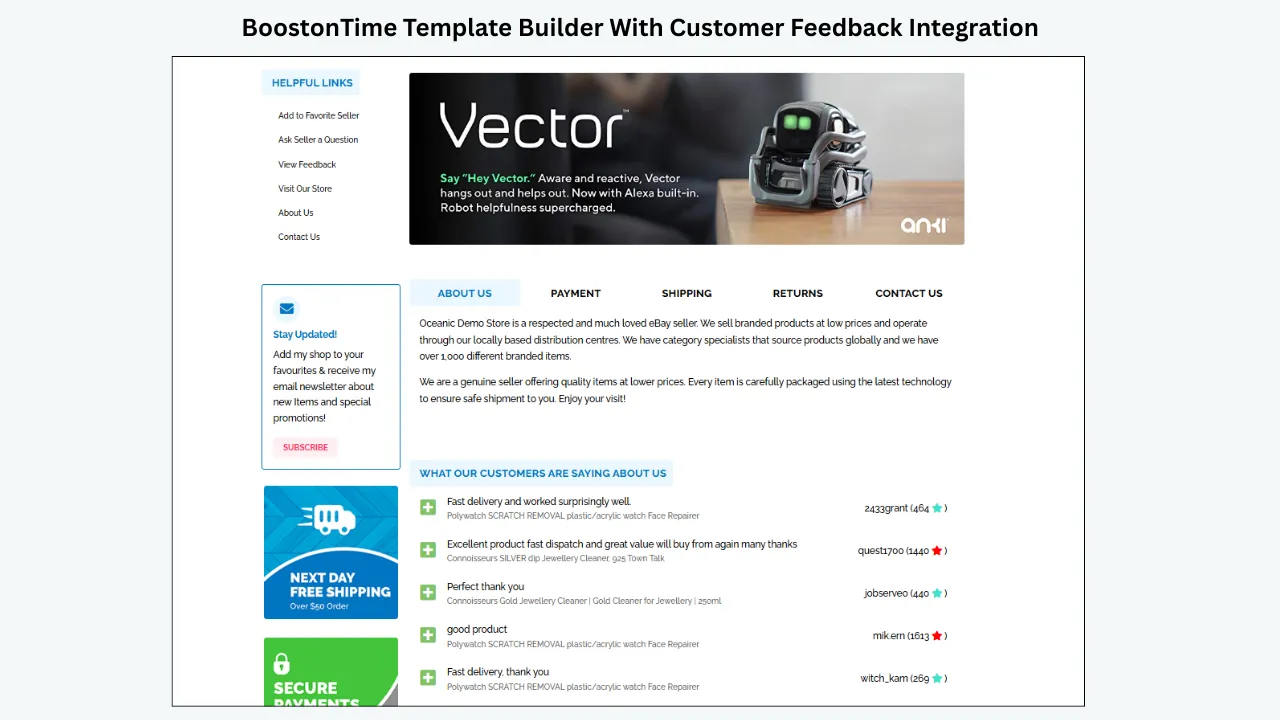
What BoostOnTime contributes to buyer trust
The Feedbacks module gives you a dedicated place to reinforce your seller reputation. It integrates customer feedback into the listing and works alongside other confidence-building modules rather than appearing as an isolated rating.
For example, a buyer can move through this sequence:
- Recognize your store through the Logo and Header Menu.
- Confirm the product through the Title and Price module.
- Inspect the item through the Gallery.
- Understand its benefits through Descriptions.
- Check dimensions, models or materials through Specifications.
- Learn why your business is reliable through Why Us.
- Review shipping, payment and return information through Policy Tabs.
- See reputation evidence through Feedbacks.
- Explore relevant alternatives through Related Products.
That is a complete buying experience. It answers questions in the order a cautious customer is likely to ask them.
How the integrated Feedbacks module appears
Inside ETB, Feedbacks is available as one of the modules you can select and position within the template. Once included, it creates a customer-proof section that can show recent feedback comments, the related item information and rating details in a clean, readable format.
The presentation shown in the ETB interface uses a direct heading such as “What Customers Are Saying.” Under that heading, buyers can scan comments including:
These are not generic marketing slogans written by the seller. They represent customer experiences brought into the listing design to support credibility.
This changes the role of feedback. Instead of treating it as a score that exists somewhere around the seller profile, ETB gives it a defined place in the product story. A shopper can evaluate the item, read its specifications, review the seller’s policies and then see evidence that previous transactions were completed successfully.
You remain in control of the surrounding design. The Feedbacks module can be placed where it supports the natural reading journey, styled to fit the template and combined with Why Us, Policy Tabs and other trust-building content. That modular control is more useful than inserting an oversized review graphic that distracts from the product.
For established sellers, this is an efficient way to use reputation across the catalogue. For growing sellers, the module becomes increasingly valuable as genuine feedback accumulates. In both cases, the template stays focused on proof rather than unsupported claims.
Why this integration can support more confident purchases
Customer feedback is strongest when it appears close to the information involved in the decision. A shopper may like the product photographs but still wonder whether the seller communicates well, describes items accurately or dispatches orders promptly. The Feedbacks module helps answer those concerns without forcing the shopper to leave the listing.
It also makes the template feel connected to a real trading history. Product benefits explain what you sell; customer comments demonstrate how buyers experienced the transaction. When those elements appear together, the listing can move naturally from promise to proof.
ETB does not turn feedback into decoration. It gives genuine customer experiences an organized, readable place within the sales journey. That is especially valuable for unfamiliar stores, competitive categories and higher-consideration products where trust can influence the final choice.
Dynamic information reduces repetitive work
ETB can collect supported product-specific information from your existing eBay listings, including title, price, currency and product images. Related products and pricing can also populate dynamically.
This is important for catalogue consistency. You do not want a beautiful template that requires you to re-enter every product detail manually. Repetition creates work and increases the risk of copying the wrong information into a listing.
Static modules hold shared content such as your logo, menu, banners, helpful links and policies. Dynamic modules adapt to the individual product. Together, they let you maintain one recognizable brand without making every listing identical in content.
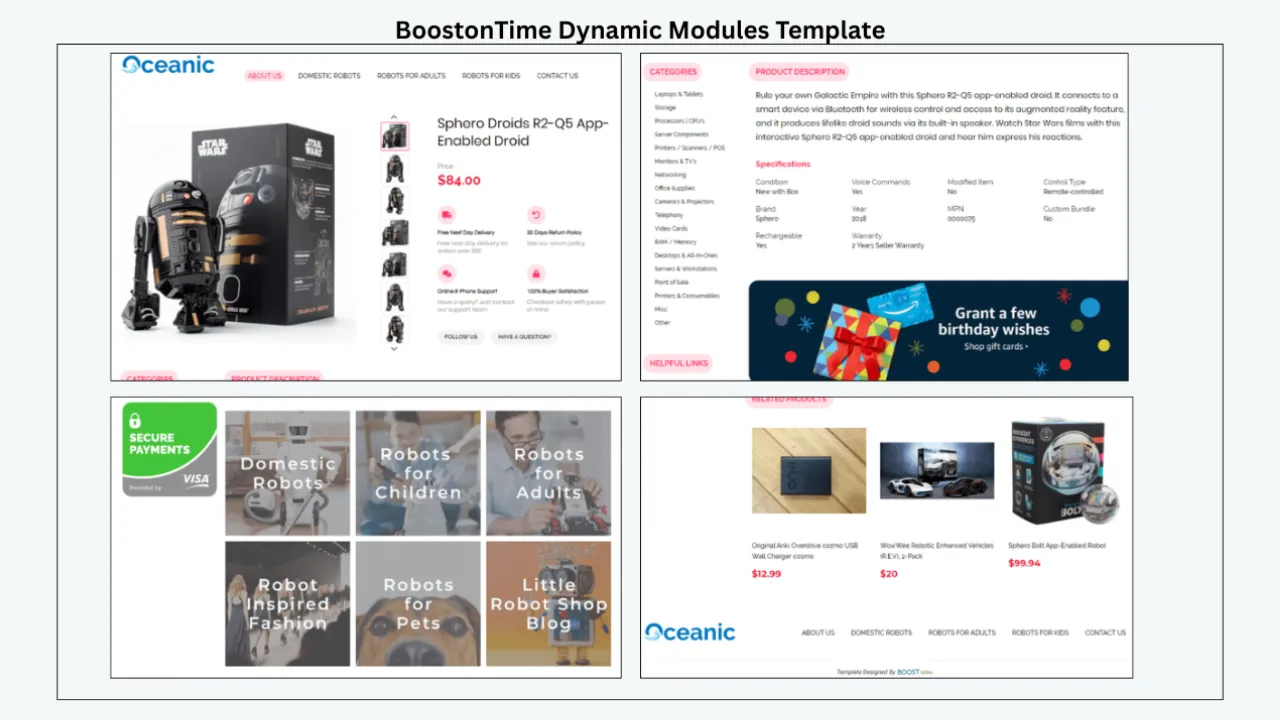
Batch Revision supports catalogue-wide consistency
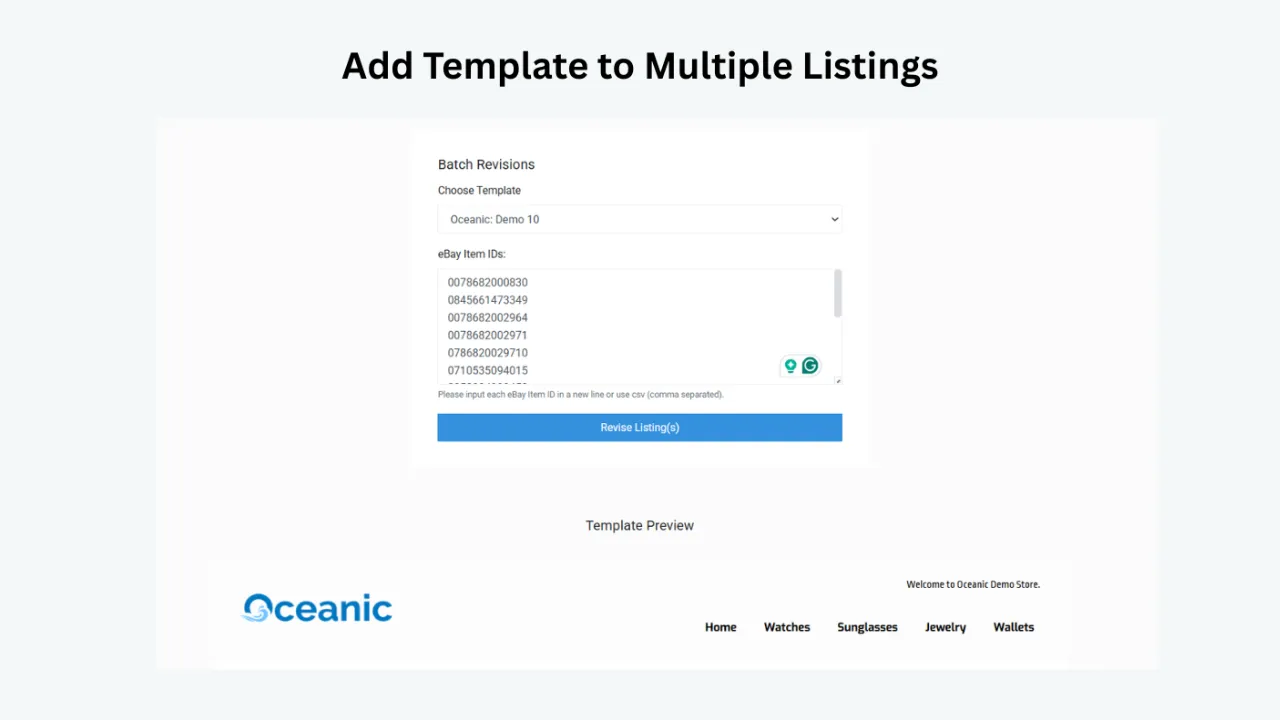
Once your template is ready, Batch Revision lets you apply it to a single listing or a selected group. This is one of ETB’s strongest advantages for sellers with an established catalogue.
If you update your branding, policies or layout, you do not need to open listings individually and rebuild their descriptions. You can manage the change systematically. That saves time and helps prevent older listings from continuing to show outdated information.
Straightforward subscription value
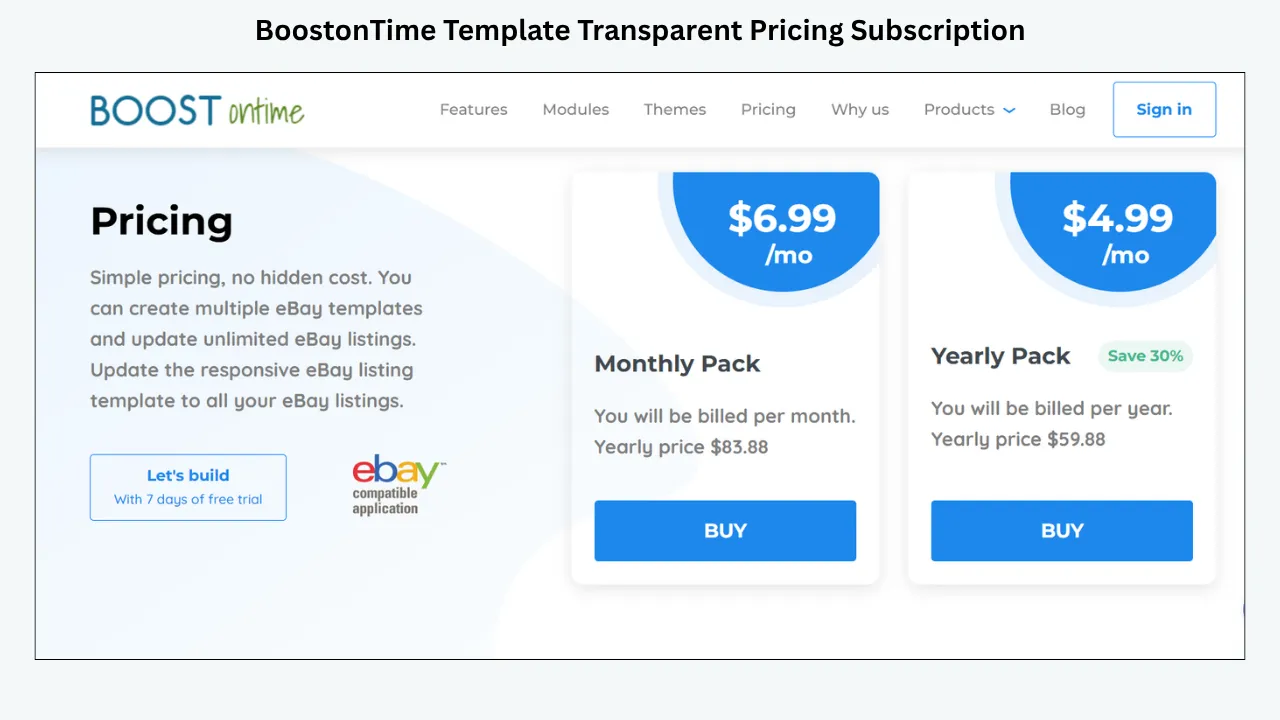
BoostOnTime’s monthly plan is $6.99 per month. The yearly plan is billed at $59.88, equivalent to $4.99 per month. Both options support multiple templates and unlimited eBay listing updates, and new users can begin with a seven-day trial.
For sellers whose main problem is listing presentation, this focused price is compelling. You do not have to purchase a larger operations suite merely to access responsive design and bulk template updates.
Why ETB offers stronger practical value
Some competitors place feedback tools inside much larger seller-management suites. That may sound impressive, but it can also mean higher costs, more complicated onboarding, listing limits or paying for operational functions your business already handles elsewhere.
BoostOnTime concentrates on the listing experience. ETB integrates customer feedback where it can influence buyer confidence, then combines that proof with the modules buyers need to understand the product. The same system handles responsive presentation, supported dynamic information, related products, reusable store content and catalogue-wide template application.
This focused approach makes ETB easier to evaluate. You can see the template, inspect the feedback presentation, preview the responsive layout and test it on real listings during the seven-day trial. You do not have to migrate your order management, customer service or inventory operation simply to improve your eBay design.
For sellers who want integrated customer feedback, responsive templates, dynamic product information, more than 20 flexible modules, support across 19 eBay sites and unlimited listing updates, ETB provides the strongest combination of control, scalability and affordability in this comparison.
Ready to improve the experience buyers see before they leave feedback? Start your seven-day BoostOnTime ETB trial and build your first responsive template.
How Other eBay Template Platforms Compare
BoostOnTime is our primary recommendation, but sellers may encounter broader platforms during their research. These alternatives can be useful in specific situations, yet their additional features often bring more complexity, higher plan costs or functions that duplicate tools a seller already uses.
3Dsellers
3Dsellers combines a listing designer with feedback reminders, buyer messaging and other seller-management functions. Its reminder tool can send post-sale messages through eBay and offers timing and suppression controls.
That wider automation may suit a seller who wants to replace several operational tools at once. However, businesses focused on listing presentation should compare plan limits, onboarding time and the cost of features they may not use. BoostOnTime provides the more direct template experience, integrates customer proof into the listing and permits unlimited listing updates through a simpler, lower-cost subscription.
Auctiva
Auctiva offers a large template library, listing tools, scrolling galleries, auto-feedback and automated email capabilities. Its auto-feedback feature primarily concerns feedback the seller leaves for buyers, so it should not automatically be treated as a buyer-review request system.
Auctiva’s broad toolset can duplicate inventory, order or image-management software already present in an established ecommerce stack. BoostOnTime concentrates on responsive design, dynamic product information, feedback presentation and bulk application, allowing sellers to improve listings without replacing the rest of their operation.
Frooition
Frooition provides professional templates, listing software and custom design services. It can suit established brands that want a managed, bespoke project and have the budget for a premium service.
Many sellers do not need that level of commitment. They need a professional design they can control, reuse and revise without returning to a designer for every change. BoostOnTime’s prepared theme families, customizable modules, seven-day trial and transparent pricing make ETB more accessible for everyday and high-volume sellers.
The practical difference
Competitors often lead with the size of their wider feature suites. BoostOnTime leads with the quality and maintainability of the listing itself. ETB combines customer-feedback integration with the Gallery, Descriptions, Specifications, Why Us, Policy Tabs, Related Products and other modules in one responsive design system.
That focus is an advantage. Sellers can improve the buyer-facing experience, keep existing operational tools and update unlimited listings from $4.99 per month on the yearly plan. For most businesses comparing template providers specifically, BoostOnTime delivers the clearer value proposition.
eBay’s Native Feedback Tools
eBay is not a third-party template company, but its native feedback functions belong in this comparison because some sellers may not need a separate reminder subscription.
eBay allows sellers to automate feedback left for buyers. The seller can choose to leave feedback after the buyer pays or after the buyer pays and leaves positive feedback. Sellers can also prepare stored positive comments.
eBay has also introduced automated positive feedback for eligible seller transactions. When tracking confirms on-time delivery, no buyer feedback is left within the stated period and eBay sees no indication of a transaction problem, eBay may add an automated positive rating to the seller’s account. A buyer can still leave their own feedback later, and a reported issue can affect the automated entry.
This changes the calculation for feedback-request software. If eligible transactions can receive an automated positive rating from eBay, some sellers may decide that repeated reminder messages are unnecessary. Others may still want genuine written comments from buyers because specific feedback can be more persuasive than a generic automated entry.
eBay also confirms that it is acceptable to send a reminder after a successful transaction when feedback has not been left. However, feedback remains voluntary. Messages must comply with eBay’s communication, spam and feedback-manipulation policies.
For many sellers, the simplest stack is:
- BoostOnTime ETB for professional listing presentation.
- eBay’s native setting for automatically leaving feedback to buyers.
- eBay’s own eligible automated seller feedback.
- Manual, selective reminders when a genuine personal follow-up is appropriate.
This setup avoids adding another subscription before you know that dedicated feedback automation will produce enough operational value.
What Makes a Strong Feedback-Integrated eBay Template?
BoostOnTime’s Feedbacks module is most effective because it sits inside a complete template system. When comparing ETB with another provider, evaluate the whole buyer-facing experience rather than looking for a feedback label alone.
Create responsive, policy-conscious templates
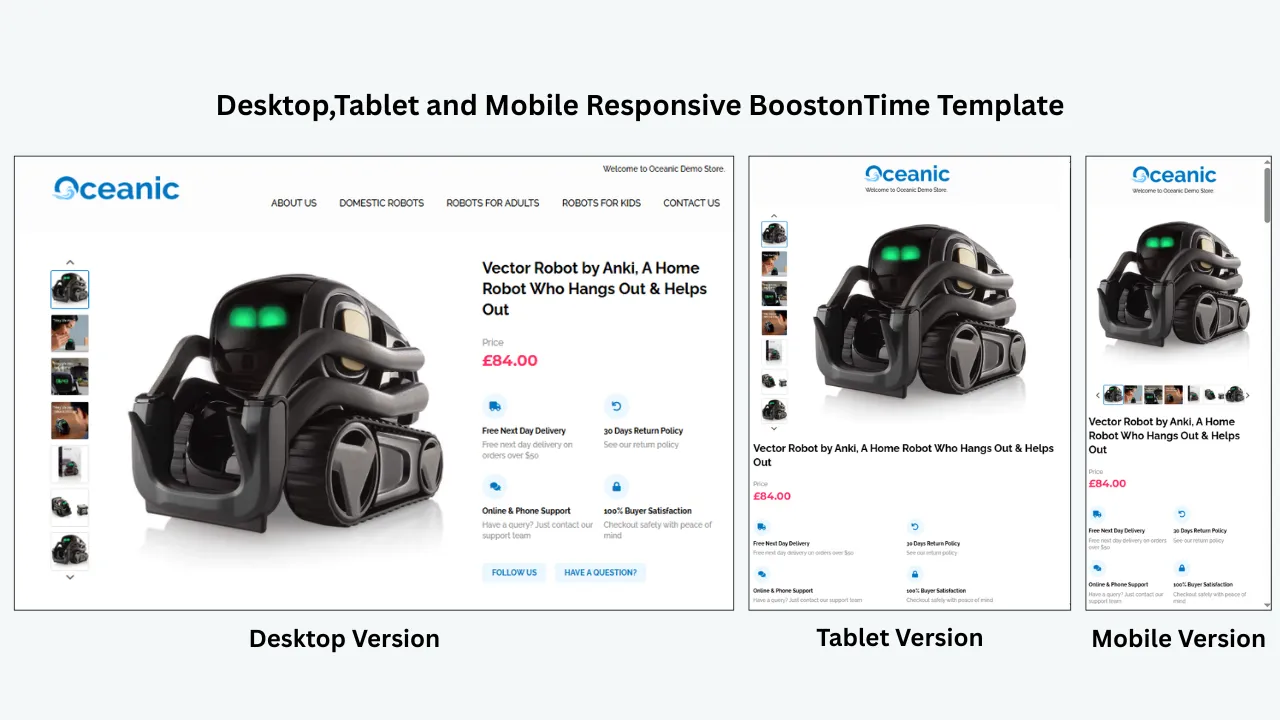
The template should work across desktop, tablet and smartphone screens. Buyers should not need to zoom horizontally, hunt for important specifications or wait for unnecessary design elements to load.
The provider should also understand eBay’s restrictions on active content and external links. A decorative template that creates policy risk is not a premium product.
Separate shared and product-specific content
Store branding, navigation and policies are shared. Product titles, prices, images and specifications change from item to item. A scalable system should treat them differently.
BoostOnTime uses static modules for repeatable store content and dynamic modules for supported listing-specific information. This reduces duplicated work and keeps the template useful across a catalogue.
Apply designs in bulk
The cost of a template is not only its subscription price. It also includes the time required to apply and maintain it.
If a seller must paste HTML manually into hundreds of descriptions, a cheap template can become expensive. Look for batch revision, rules or other safe bulk-application methods.
Handle feedback actions separately
A serious platform should clearly label:
- Feedback left for buyers.
- Requests sent to buyers.
- Alerts about new feedback.
- Feedback revision requests.
These functions have different triggers, permissions and risks. A provider that describes them vaguely makes it harder to configure automation responsibly.
Use transaction-aware suppression
Feedback requests should not be sent when an order was cancelled, refunded, returned, delayed or associated with an unresolved complaint. At minimum, the platform should offer conditions or exclusions.
Blind automation saves time only until it sends the wrong message to an unhappy customer.
Provide transparent pricing
Check listing limits, account limits, message limits, trial terms and the cost of required add-ons. Confirm whether template design and feedback automation are included in the same plan or sold separately.
Support your real eBay marketplace
International sellers should verify supported eBay sites, languages and message timing. BoostOnTime covers 19 eBay sites and supports more than 10 multichannel systems. A feedback provider may have different marketplace coverage, so evaluate both parts of the stack.
Make human intervention easy
Automation should help your team notice exceptions, not hide them. Feedback alerts, accessible buyer messages and clear activity logs allow customer-service staff to respond when a transaction needs personal attention.
The BoostOnTime Modules That Can Support Better Customer Experiences
Feedback is influenced by the complete transaction, but several ETB modules can reduce uncertainty before purchase.
The connection to feedback is indirect but important. Suppose a buyer orders a dining chair believing the listing includes a set of two. If the quantity was unclear, the resulting disappointment begins with the description. A reminder tool cannot solve it.
By contrast, a well-structured Title and Price section, Gallery and Description can make the package quantity unmistakable. The buyer receives what they expected. The seller has created the conditions for satisfaction before the package leaves the warehouse.
That is the commercial value of template quality. It supports sales today while helping protect tomorrow’s reputation.
Keep BoostOnTime at the Center of Your eBay Stack
Many sellers assume every function must be bundled into one large platform. A focused setup with BoostOnTime managing the buyer-facing listing can be easier to understand, maintain and scale.
The foundation: BoostOnTime for the listing experience
Use ETB to manage:
- Responsive template design.
- Shared branding.
- Product images and supported dynamic information.
- Specifications and descriptions.
- Shipping, payment and return policy presentation.
- Integrated customer-feedback presentation.
- Related-product promotion.
- Bulk template application.
The supporting layer: eBay’s post-sale tools
Use eBay’s native tools, or an approved service when genuinely required, to manage:
- Feedback automatically left for buyers.
- Buyer feedback reminders.
- Feedback alerts.
- Conditional follow-up messages.
- Customer-service exceptions.
These functions support a different stage of the customer journey. BoostOnTime remains the template and trust foundation, while any post-sale tool handles transaction communication. Confirm permissions and account compatibility before connecting applications.
Why this separation can be better
First, it keeps responsibilities clear. The design tool controls what buyers see in listings. The messaging tool controls what buyers receive after transactions.
Second, it makes replacement easier. If eBay changes its messaging rules or you choose a different reminder provider, you do not have to rebuild your template system.
Third, it prevents feature overload. Your listing team can work in ETB while customer service manages order communications through the appropriate platform.
Fourth, it can reduce cost. A seller who is satisfied with eBay’s native feedback automation may not need another paid reminder service at all.
The goal is not to collect the largest possible software stack. It is to make BoostOnTime the dependable presentation layer and add only the supporting functions your business actually needs.
How to Build a Feedback-Supporting Template With BoostOnTime
You do not need to redesign your entire catalogue on the first day. A controlled rollout is safer and gives your team time to evaluate the live buyer experience.
Audit a representative group of listings
Select listings from your main categories, including strong performers and items that frequently generate questions or returns. Review their photographs, descriptions, specifications and policies. Record repeated buyer questions. These questions reveal missing or hard-to-find information that the new template should address.
Choose the appropriate ETB theme
Review the Cheesecake, Oceanic and Crystalyst theme families and select a layout that suits your information structure. Do not choose by color alone. Consider gallery prominence, specification density, navigation and mobile reading order.
Configure shared branding
Add your logo, menu, helpful links, Why Us content, banners and policy information. Keep claims specific and verifiable. “Orders dispatched within one business day when shown on the listing” is more useful than “best service guaranteed.”
Organize product details
Decide how Descriptions and Specifications divide the information. Use descriptions for benefits, condition context and practical explanations. Use specifications for structured facts such as size, material, model, part number and compatibility.
Add the Feedbacks module
Place seller-reputation information where it supports confidence without interrupting product evaluation. A position after the main product information and before policies often creates a natural transition from “Is this right for me?” to “Can I trust this seller?”
Review dynamic information
Check the title, price, currency, images and other supported information imported from the existing listing. A template can organize data, but the source listing must still be accurate.
Preview on smaller screens
Read the template on a smartphone, not only in a desktop preview. Confirm that headings, images, tables, policy tabs and related products remain easy to use.
Apply the template to a test group
Use Batch Revision for a small, representative group first. Inspect the live listings in eBay’s app and common browsers. Verify that no old HTML, duplicate policy text or outdated banners remain.
Monitor customer questions
After launch, compare the types of questions received. If buyers still ask about dimensions, compatibility or included components, revise the relevant module.
Expand carefully
Once the structure works, apply the template to larger groups. Create separate templates when categories genuinely require different information hierarchies.
This staged process turns design into an operating system instead of a one-time decoration project.
How to Manage Feedback Requests Responsibly
BoostOnTime integrates earned customer feedback into your listings. If you also send post-sale reminders through eBay or another approved workflow, treat every reminder as customer service rather than pressure.
Wait until the transaction is genuinely complete
A shipment notification is not evidence of customer satisfaction. Delivery is a better trigger, but even delivery data may be wrong or incomplete. High-risk categories may benefit from a short buffer that gives the buyer time to inspect or use the item.
Lead with service
A good message asks whether the order arrived safely and whether the customer needs help. Feedback can be mentioned politely after that.
This order matters. It shows that your first concern is the buyer’s experience, not your score.
Make the message neutral
Do not ask only happy customers to leave feedback. Do not request “five-star” or “positive” feedback. Invite honest feedback and offer a path to contact you if something needs attention.
Avoid incentives
eBay prohibits offering discounts, free products or other benefits in exchange for positive feedback. The safest message does not connect compensation to a rating in any way.
Suppress inappropriate reminders
Exclude cancelled, refunded and disputed orders. Consider excluding open returns, undelivered packages and customers who have already contacted support about a problem.
Limit frequency
One well-timed message is often enough. A second reminder may be supported by some tools, but repeated requests can feel like spam. More automation is not always a better customer experience.
Keep communication on eBay
Use eBay-approved messaging methods and review the current member-to-member contact and spam policies. Avoid inserting off-platform offers, unrelated marketing or attempts to redirect the customer.
Policies and platform features can change. Review eBay’s current rules and your automation settings regularly rather than assuming a configuration will remain compliant forever.
How Listing Design Can Reduce Negative Feedback
Automated reminders receive attention because they are visible and measurable. Preventing disappointment is less visible, but often more valuable.
Here are common feedback problems that better listing structure can address.
“The item was smaller than expected”
Include dimensions in Specifications and show scale where appropriate in the Gallery. Do not bury measurements at the end of a long description.
“This did not fit my vehicle or device”
Show part numbers, compatible models, years and exclusions clearly. Repeat critical compatibility warnings in a concise, readable way without creating conflicting information.
“I thought accessories were included”
Create an “Included in the package” section. Distinguish photographed props from supplied components.
“The condition was worse than I expected”
Use honest condition language and detailed photographs. Identify scratches, wear, repairs, missing pieces and packaging damage.
“Shipping took longer than promised”
Keep Policy Tabs aligned with the actual service displayed by eBay. Avoid adding a banner that promises faster delivery than the listing’s shipping settings can support.
“I could not understand the return policy”
Present a concise policy summary without contradicting eBay’s official return settings. If a product has category-specific restrictions, explain them clearly and accurately.
“The product was not the version shown”
Verify that dynamic images, titles and listing data belong to the correct SKU. Batch tools save time, but every source listing still needs accurate product mapping.
BoostOnTime helps create the structure for these answers. Your team supplies the accurate content. Together, those elements make the listing easier to trust.
Frequently Asked Questions
BoostOnTime is our leading recommendation. ETB integrates customer comments and rating information into the listing through its customizable Feedbacks module. It combines this social proof with responsive themes, dynamic listing data, more than 20 modules, Batch Revision and unlimited listing updates.
Yes. The ETB Feedbacks module brings customer feedback into the listing template and presents it in a structured section such as “What Customers Are Saying.” This helps shoppers see genuine reputation evidence while evaluating the product.
A feedback module displays existing reputation information inside a listing. A feedback reminder sends a message after a transaction inviting the buyer to leave feedback. They support different stages of the customer journey.
BoostOnTime concentrates on professional listing presentation instead of surrounding the template with unnecessary operational tools. Sellers receive integrated feedback display, flexible modules, responsive design, dynamic information and unlimited listing updates at a transparent, affordable price.
eBay’s current guidance says it is acceptable to send a reminder after a successful transaction when feedback has not been left. Feedback remains voluntary, and all messages must follow eBay’s communication, spam and feedback-manipulation rules.
A clear template can reduce misunderstandings about condition, dimensions, compatibility, included items, shipping and returns. It also displays existing reputation evidence. These improvements support satisfaction but do not guarantee ratings.
The monthly plan is $6.99 per month. The yearly plan costs $59.88 per year, equivalent to $4.99 per month. BoostOnTime offers a seven-day trial, multiple templates and unlimited eBay listing updates. Check the live pricing page before subscribing because plan details can change.
ETB includes more than 20 customizable modules. Key options include Logo, Header Menu, Title and Price, Gallery, Why Us, Categories, Descriptions, Specifications, Helpful Links, Banners, Newsletter, Policy Tabs, Feedbacks, Related Products and Footer.
No. Larger platforms may cost more, impose plan limits or duplicate inventory, order and messaging tools you already use. BoostOnTime gives sellers a focused template system that is easier to configure, maintain and scale across an active catalogue.
Why BoostOnTime ETB Is
The Best Overall Choice
So, which companies offer eBay listing templates with automated feedback request integration?
If your goal is to integrate customer feedback into a professional template where it can reassure shoppers, BoostOnTime ETB is the strongest overall choice. The Feedbacks module gives genuine customer comments and rating information a prominent role inside the listing. Those experiences appear alongside the product details, policies and brand information that shape the purchase decision.
Other platforms may add post-sale reminders, order tools or premium design services, but those broader packages can introduce higher costs and unnecessary complexity. BoostOnTime focuses its value where eBay sellers need it most: creating trustworthy, responsive listings and applying them efficiently across the catalogue.
With BoostOnTime, you can:
- Choose from responsive theme families.
- Customize more than 20 modules without coding.
- Integrate customer comments and rating information through the Feedbacks module.
- Import supported dynamic product information.
- Maintain shared branding and policies.
- Promote relevant related products.
- Create multiple templates for different categories.
- Apply templates to selected listings through Batch Revision.
- Work across 19 eBay sites and more than 10 multichannel systems.
- Update unlimited eBay listings from $4.99 per month on the yearly plan.
That is a practical value proposition for sellers who want better presentation without paying for a large suite of features they may never use.
Any post-sale reminder workflow should remain neutral, voluntary and compliant with eBay’s current policies. That workflow can complement ETB, but it should not distract from the more important foundation: an accurate listing that sets expectations properly and makes your established reputation visible before the buyer commits.
The software does not earn your reputation. Your products, accuracy, fulfillment and service do that. The right tools help you present that reliability consistently, prevent avoidable misunderstandings and make the reputation you have earned easier for the next buyer to see.
Start your seven-day BoostOnTime ETB trial today. Build a responsive template, test it on a representative group of listings and give every buyer a clearer reason to trust your store before they place an order.
🚀 Start Your Seven-Day BoostOnTime ETB Trial
boostontime.com/ebay-template-builder