
What Makes an eBay Listing Template Appealing to Buyers?
An appealing eBay template is not simply colourful or decorative. It helps buyers understand the product, trust the seller and make a decision with less effort. This guide explains the design principles that matter and shows how BoostOnTime ETB turns them into a scalable listing system.
📋 In This Guide
- 1The Quick Answer: What Buyers Find Appealing
- 2Appeal Begins With the Buyer’s Decision Process
- 3Twelve Things That Make a Template Appealing
- 4Why Attractive Templates Sometimes Fail
- 5Why BoostOnTime Is the Recommended Builder
- 6How to Build an Appealing Template
- 7How to Measure Buyer Appeal
- 8A Final Buyer-Appeal Checklist
- 9Frequently Asked Questions
What makes an eBay listing template appealing to buyers?
The honest answer is not a fancy background, a collection of bright banners or as many sections as possible. Buyers are attracted to templates that make shopping easier. An appealing template presents the product clearly, answers important questions quickly, feels trustworthy and works comfortably on the device the buyer is using.
That means appeal is not only about appearance. It is the combination of clarity, relevance, visual evidence, confidence and ease.
Think about how you shop online. You open a listing because the product, price or photograph has caught your attention. Within a few seconds, you want to know whether the item is right for you. You look for condition, dimensions, compatibility, materials, delivery information and return terms. You may also look at the seller’s feedback before deciding whether the transaction feels safe.
If that information is difficult to find, a beautiful colour scheme will not rescue the listing. If the description is clear, the photographs are useful and the policies are easy to understand, the design begins to feel appealing because it supports the decision.
Buyers are not visiting a listing to admire the template. They are using the template to understand the product and decide whether to buy it.
Once we accept that principle, the design choices become easier. Product information should come before decoration. Mobile readability should come before complex effects. Genuine feedback should be more prominent than vague marketing claims. Relevant related products should be more useful than random promotions.
BoostOnTime ETB is built around that practical understanding. Our responsive eBay templates combine clear information structure, more than 20 customizable modules, dynamic product content, integrated customer feedback, reusable branding and Batch Revision. Sellers can create an appealing buyer experience without coding and apply it efficiently across unlimited eBay listings.
Before looking at the platform, however, let us examine what buyers actually find appealing and why each element matters.
The Quick Answer: What Buyers Find Appealing
An eBay listing template becomes appealing when it reduces the buyer’s effort and uncertainty.
Every quality in this table supports a buyer question. That is the difference between decoration and design.
Decoration adds something because the seller likes how it looks. Design adds something because it helps the buyer understand, trust or act.
An appealing eBay template should do both when possible, but usefulness must lead. Buyers usually prefer a clean template that answers their questions over an elaborate template that makes them work.
Appeal Begins With the Buyer’s Decision Process
Sellers know their products deeply. That knowledge can make it difficult to recognize what a new buyer does not know.
You may see a model number and immediately understand its compatibility. The buyer may not. You may know that a pictured accessory is only a photography prop. The buyer may assume it is included. You may understand your shipping schedule, while the shopper sees only a general promise such as “fast delivery.”
The template has to bridge that knowledge gap.
Most buyers move through a simple decision sequence:
- Recognition: Is this the product I am looking for?
- Relevance: Does it fit my needs, device, vehicle, size or use?
- Evidence: Do the photographs and details support the description?
- Value: Does the product justify the price?
- Trust: Is this seller credible?
- Risk: What happens if the item is delayed, damaged or unsuitable?
- Action: Am I confident enough to buy?
An appealing template guides the buyer through these questions without making the process feel like work.
The title and gallery establish recognition. Descriptions and specifications establish relevance. Photographs provide evidence. Benefits and included features explain value. Branding and customer feedback build trust. Policy information reduces risk. A clean, focused design supports action.
When sections appear in a random order, buyers have to assemble the answer themselves. When important information is repeated or contradicted, uncertainty increases. When the template is overloaded with banners, the product loses attention.
The goal is not to make a listing longer. The goal is to make the buyer’s path clearer.
Twelve Things That Make a Template Appealing
1. Put the Product Before the Template
The product should remain the visual and informational priority.
This sounds obvious, yet many listing templates compete with the item they are supposed to sell. Oversized headers, animated elements, promotional graphics and complicated navigation can take over the screen before the buyer reaches the description.
A buyer clicked because of the product. The opening area should confirm that click immediately.
The most important elements near the top are usually:
- Product title
- Price
- Primary images
- Condition
- Short value summary
- Essential variation or compatibility information
Store branding still matters, but it should frame the product rather than dominate it. A recognizable logo and concise menu can establish identity without pushing the item down the page.
BoostOnTime gives sellers control over module selection and arrangement. This means you can create a product-first structure instead of accepting a fixed design where every available element appears by default.
For a visually driven fashion listing, Gallery may deserve the strongest position. For an automotive component, Title and Price followed by Specifications may be more useful. For a collectible, the gallery, condition description and authenticity information may lead.
An appealing template understands that different products create different questions. It keeps the brand consistent while allowing the information hierarchy to suit the category.
2. Use a Clear Visual Hierarchy
Visual hierarchy tells the buyer what to notice first, second and third.
Without hierarchy, every section competes at the same level. Large headings, bright colours, badges, banners and dense text create visual noise. The shopper has no obvious place to begin.
A strong hierarchy uses:
- A limited number of heading sizes
- Consistent section spacing
- Short paragraphs
- Meaningful subheadings
- Balanced use of colour
- Clear separation between product information and policies
- Prominent placement for the most important content
Hierarchy is not about making everything larger. It is about creating contrast between levels of importance.
For example, the product title should be more prominent than a policy-tab label. A compatibility warning should be easier to notice than a general store message. The main gallery should have more visual weight than a related-product thumbnail.
Good spacing also contributes to hierarchy. White space gives buyers a moment to process one section before moving to the next. It prevents a long description from feeling like a wall of content.
BoostOnTime’s modular system makes this structure repeatable. Once the layout is configured, the same hierarchy can guide shoppers across many listings. The product data changes, but the buyer always knows where to find the description, specifications, feedback and policies.
Consistency reduces learning effort. A returning customer who understands one listing can navigate the next listing faster.
3. Make the Gallery Useful, Not Merely Attractive
Product photographs are often the strongest evidence in an eBay listing. The template should help buyers inspect them comfortably.
An appealing gallery does more than show a large image. It organizes photographs so buyers can move between important views, understand condition and verify details.
Useful images may include:
- Front, back and side views
- Close-ups of materials or texture
- Labels, serial numbers or model information
- Included accessories
- Packaging
- Measurements or scale references
- Condition flaws
- Installed or in-use views where appropriate
The gallery should not hide flaws or use lifestyle images as a substitute for product evidence. Buyers want to understand what will arrive.
Consistency matters as well. Images with wildly different proportions, backgrounds or levels of brightness can make the listing feel unfinished. Sellers do not need a professional studio for every item, but the photographs should be clear, accurate and organized.
BoostOnTime’s Gallery module collects supported product images from the existing eBay listing and places them inside the template. This saves sellers from rebuilding an image section manually for each product.
The result is especially valuable at scale. You can maintain one professional gallery structure while every listing displays its own relevant photographs.
On mobile, the gallery must remain easy to view without forcing horizontal scrolling or tiny thumbnails. Responsive ETB templates adjust to different screen sizes so the product remains accessible on phones, tablets and desktop devices.
4. Write for Scanning Before Deep Reading
Most buyers do not begin by reading every sentence. They scan.
They look for familiar signposts: features, condition, measurements, compatibility, shipping and returns. If those signposts are missing, they may assume the information is unavailable even when it exists inside a long paragraph.
An appealing template supports two levels of reading:
Quick scanning uses:
- Short headings
- Concise feature bullets
- Highlighted critical facts
- Structured specification rows
- Brief opening summaries
Detailed evaluation uses:
- Complete condition explanations
- Compatibility notes
- Material or construction details
- Care instructions
- Installation guidance
- Package-content information
The quick layer helps the buyer decide whether to continue. The detailed layer provides the evidence needed to purchase confidently.
Do not turn the entire description into bullet points. Bullets are excellent for individual facts, but paragraphs are better for context, benefits and condition explanations. A balanced template uses both.
BoostOnTime separates Descriptions and Specifications into customizable modules. This allows sellers to present narrative information and structured facts in the formats buyers understand most easily.
The source information must still be accurate. ETB organizes and presents content; it cannot correct an incorrect dimension or missing compatibility exclusion. Review the underlying listing before applying the design.
5. Answer Category-Specific Questions
A generic template often feels less appealing because it gives every product the same emphasis.
Buyers of handbags, replacement parts and vintage records do not evaluate products in the same way. Their essential questions are different.
BoostOnTime supports multiple templates, so a seller does not have to force one arrangement across unrelated categories. You can use the same visual identity while changing the module order and information emphasis.
That makes the experience more relevant. Relevance is a major part of appeal because the buyer sees the right information without searching through sections that do not matter.
6. Design for Mobile Buyers From the Beginning
A template that looks attractive on a wide desktop monitor can become frustrating on a phone.
Mobile buyers have less screen space. Long headings wrap. Wide tables can become difficult to read. Large banners push product information down the page. Tiny buttons and crowded menus become awkward to use.
A mobile-friendly template should:
- Adapt to the available width
- Keep text at a comfortable reading size
- Stack sections logically
- Scale images without distortion
- Avoid horizontal scrolling
- Preserve spacing between interactive elements
- Keep important information near the top
- Prevent tables from becoming unusable
Responsive design should not be treated as a final technical check. It affects the information hierarchy from the start.
For example, a desktop design may place a sidebar beside the description. On a phone, that sidebar may move above or below the main content. If it contains large promotional graphics, buyers may have to scroll past them before reaching essential specifications.
BoostOnTime’s themes are fully responsive and designed for mobile, tablet and desktop presentation. The preview process allows sellers to examine the template before applying it.
Even with a responsive system, test live listings on actual devices. View them inside the eBay app and through common mobile browsers. Check the first screen carefully because that is where buyers decide whether the listing deserves more attention.
7. Keep the Template Fast and Lightweight
Speed contributes to appeal because buyers cannot appreciate a design that is slow or unstable.
Heavy images, unnecessary graphics, excessive external resources and complicated code can delay the listing experience. On a strong desktop connection, the problem may be difficult to notice. On a mobile network, it becomes obvious.
A lightweight template uses:
- Optimized product images
- A focused module selection
- Clean HTML and CSS
- Limited decorative graphics
- No unsupported active content
- Only necessary external resources
Do not activate every module simply because it is available. A seller may need Gallery, Descriptions, Specifications, Policy Tabs, Feedbacks and Related Products, but not several layers of banners and duplicated navigation.
Every module should earn its place by answering a buyer question or supporting a clear business objective.
BoostOnTime gives you the flexibility to select the modules you need. That is more useful than a rigid template filled with permanent elements.
Image preparation remains important. Compress large files sensibly, use consistent dimensions and avoid uploading more visual content than the buyer needs to evaluate the item.
The goal is not to make a template visually empty. It is to remove friction. Clean design often feels premium because it gives the product and information room to breathe.
8. Build a Recognizable but Restrained Brand
Branding helps buyers understand who is selling the item and whether the store feels established.
Useful branding elements include:
- Store logo
- Consistent colour palette
- Consistent typography
- Header navigation
- A concise store message
- Reusable service information
- A recognizable footer
The mistake is assuming that more branding creates more trust. Repeating the logo, using too many colours or covering the page with promotional banners can produce the opposite effect.
The strongest brand experience is consistent and calm. It feels intentional without competing with the item.
BoostOnTime’s Logo, Header Menu, Why Us, Banners and Footer modules help sellers create that framework. Static modules can store shared information within the template, allowing branding and policies to remain consistent across listings.
This consistency matters when a buyer explores several items from the same seller. Each listing should feel connected to the same store, not like a different template was copied from an unrelated source.
Multiple templates can still share the same brand system. An electronics layout may use a dense specification section, while a fashion layout gives more space to the gallery. The colours, logo and store voice can remain recognizable.
Branding becomes appealing when it reduces uncertainty. It tells buyers that the listing belongs to a real, organized business.
9. Show Genuine Customer Feedback
Buyer appeal depends heavily on trust, especially when several sellers offer similar products.
General claims such as “best service” or “trusted seller” are easy to write. Customer feedback is stronger because it reflects real transaction experiences.
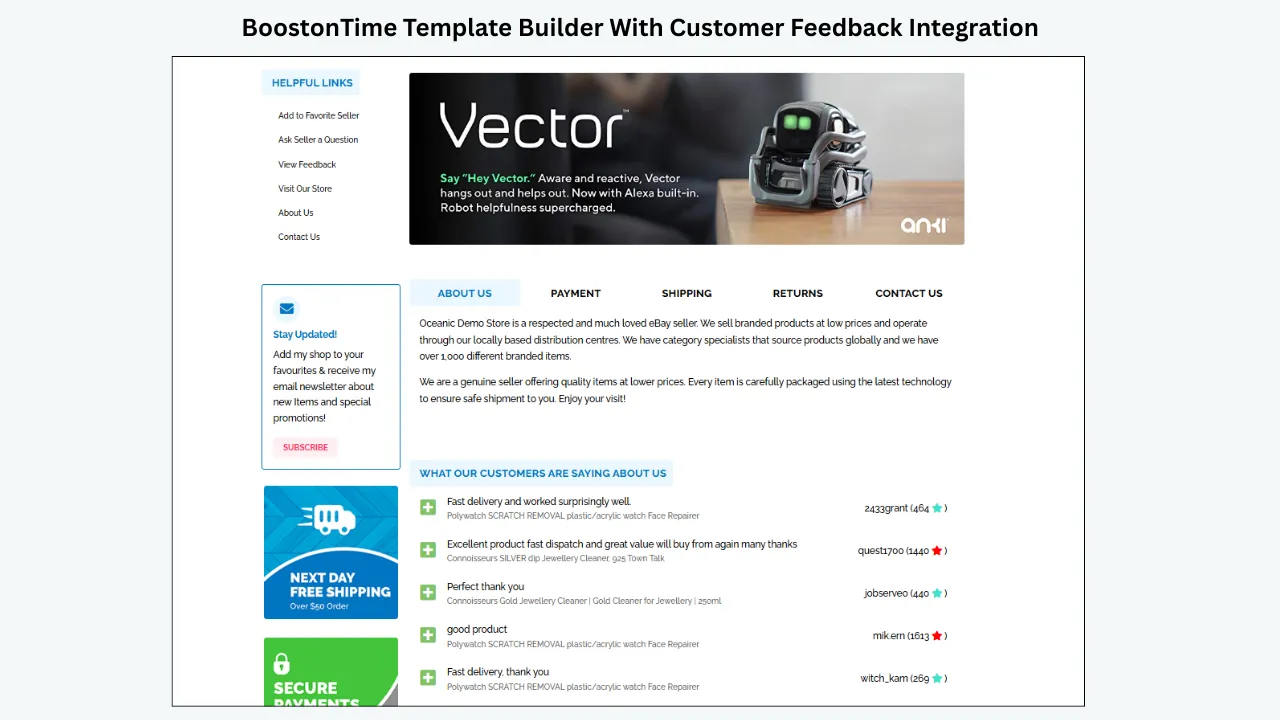
BoostOnTime ETB includes a customizable Feedbacks module that integrates customer comments and rating information into the listing template. It can create a visible “What Customers Are Saying” section where shoppers can see feedback associated with previous transactions.
That is valuable because the proof appears at the moment of consideration. The buyer can review the product, read the seller’s policies and then see comments about communication, item accuracy, shipping or overall service.
The Feedbacks module should support the listing rather than dominate it. Place it after the main product information or near the Why Us and Policy Tabs sections, where buyers naturally begin evaluating seller trust.
For established stores, integrated feedback turns an existing reputation into a reusable conversion asset across the catalogue. For growing sellers, the section becomes more persuasive as genuine feedback accumulates.
No template can guarantee positive feedback or replace reliable service. The listing should still be accurate, the order should be dispatched as promised and problems should be resolved professionally. ETB makes the reputation you have earned easier for the next buyer to notice.
10. Explain Policies Without Overwhelming the Product
Shipping, payment and returns affect buying decisions, but long policy paragraphs can interrupt the product story.
An appealing template keeps policy information available and organized. Buyers who want reassurance can find it quickly, while shoppers focused on features do not have to read every condition before understanding the item.
BoostOnTime’s Policy Tabs module gives shared policies a defined location within the template. This creates a cleaner structure than repeating large blocks of unformatted text.
Policy content should be:
- Consistent with the live eBay settings
- Written in plain language
- Current
- Specific enough to answer common questions
- Free from unsupported guarantees
- Easy to scan
Avoid conflicting promises. If a banner advertises next-day dispatch but the live handling time says three business days, the template creates confusion rather than confidence.
Review shared policies whenever shipping services, handling times, return windows or business practices change. Batch tools make updates efficient, but the seller remains responsible for keeping the information accurate.
Clear policies are appealing because they reduce perceived risk. The buyer knows what to expect after payment and where to look if an issue occurs.
11. Use Related Products as Helpful Recommendations
Related products can make a template more useful, but only when the recommendations are relevant.
A buyer purchasing a camera may appreciate seeing a compatible case, battery or memory card. A shopper viewing a replacement part may need a matching connector. A customer considering a dress may want another colour or style.
Random products with no connection to the current item feel like advertisements. They distract from the purchase and weaken the template’s focus.
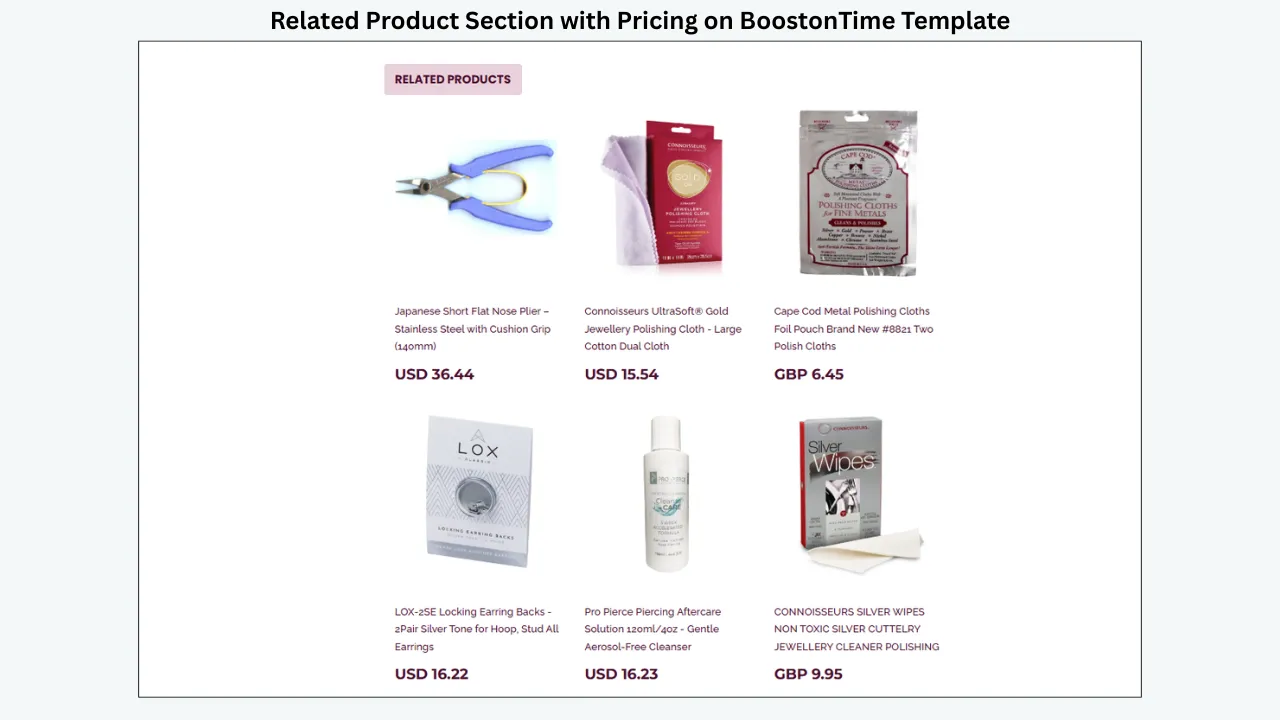
BoostOnTime’s Related Products module can collect items from the seller’s catalogue. Sellers can choose random products or select items manually for more controlled upselling.
Manual selection is useful when compatibility or category relevance matters. Random selection can support catalogue discovery when the inventory is closely related.
Place related products after the buyer has received enough information to evaluate the main item. They should not interrupt the title, gallery or critical specifications.
An appealing related-product section answers a useful question: “Is there another item I may need or prefer?” It should never create the impression that the seller is trying to move the buyer away from the product before explaining it properly.
12. Remove Anything That Does Not Help
One of the strongest design decisions is knowing what to leave out.
Templates become less appealing when they contain:
- Too many banners
- Repeated policy statements
- Long welcome messages
- Several competing calls to action
- Distracting animations
- Decorative icons without meaning
- Unrelated products
- Oversized trust badges
- Tiny text
- Unnecessary sections
Every additional element consumes attention. If everything is highlighted, nothing feels important.
Use a simple test for each module:
- What buyer question does this answer?
- Is that question important for this category?
- Is this the best place to answer it?
- Does the section repeat information shown elsewhere?
- Does it remain useful on mobile?
If a module cannot pass the test, remove it or move it.
BoostOnTime’s modular customization makes restraint possible. Sellers can select the right combination instead of accepting a template that forces every available feature into every listing.
The result should feel complete but not crowded. Buyers should finish the description feeling informed, not exhausted.
Why Attractive Templates Sometimes Fail
A template can look impressive in a preview and still perform poorly in a real listing.
Here are the most common reasons.
It prioritizes the seller’s taste over the buyer’s needs
The seller chooses colours, graphics and modules based on personal preference, but does not test whether important product information is easy to find.
It contains weak source information
A template cannot repair inaccurate dimensions, missing compatibility data or poor photographs. Professional presentation may make errors more visible.
It is overloaded
The seller activates every promotional and informational module. The page becomes longer, slower and harder to scan.
It ignores mobile ordering
Desktop sidebars, tables or banners stack awkwardly on smaller screens and push essential content too far down.
It uses generic trust claims
Statements such as “number one seller” mean little without evidence. Genuine feedback, clear policies and specific service standards are more persuasive.
It becomes outdated
Old branding, expired sales banners and incorrect shipping terms remain live across forgotten listings.
It is applied without testing
A catalogue-wide update goes live before anyone checks different product categories, devices or eBay marketplaces.
BoostOnTime addresses many of these operational problems through customizable modules, responsive themes, preview and Batch Revision. The seller still needs to prepare accurate content and use the tools thoughtfully.
From Buyer Logic to BoostOnTime ETB
We have established what buyers actually find appealing:
- The product is immediately recognizable.
- Important information follows a clear hierarchy.
- Images provide useful evidence.
- Content is easy to scan.
- Category-specific questions are answered.
- Mobile presentation is comfortable.
- The template loads cleanly.
- Branding is consistent but restrained.
- Customer feedback provides social proof.
- Policies reduce uncertainty.
- Related products are relevant.
- Unnecessary distractions are removed.
Now the practical question becomes: how can a seller deliver all of those qualities across dozens, hundreds or thousands of listings without rebuilding each description?
That is exactly the problem BoostOnTime ETB solves.
ETB turns buyer-friendly design into a reusable system. You choose a responsive theme, arrange the modules, customize the style and save the template. Supported product-specific information is collected from existing eBay listings when the template is applied. Shared branding and policy content remains consistent.
Instead of asking your team to remember the ideal structure for every new product, you build the structure once and reuse it.
Why BoostOnTime Is the Recommended eBay Template Builder
BoostOnTime is not simply a source of decorative HTML layouts. ETB is a connected template builder designed for existing eBay listings and growing catalogues.
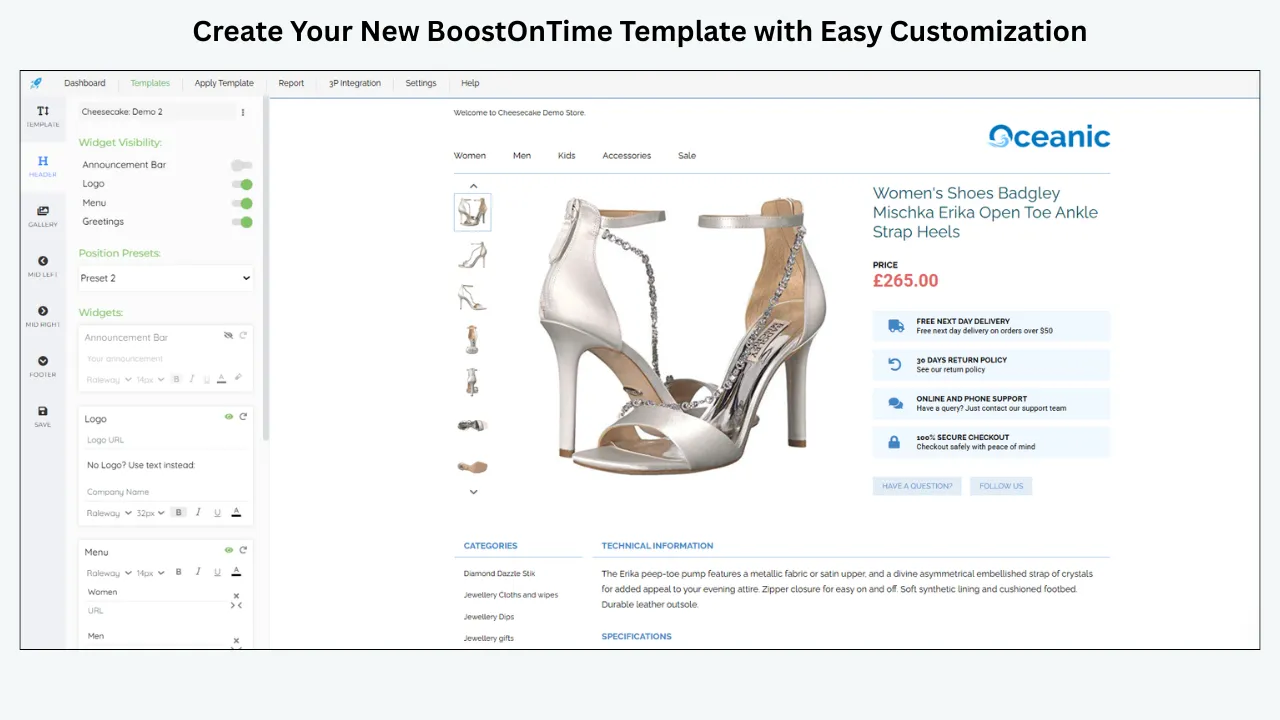
More than 20 customizable modules
ETB provides a broad set of modules, including:
- Logo
- Header Menu
- Title and Price
- Gallery
- Why Us
- Categories
- Descriptions
- Specifications
- Helpful Links
- Banners
- Newsletter
- Side Mini Banners
- Policy Tabs
- Feedbacks
- Mini Banners
- Related Products
- Footer
You can select the modules that serve the buyer and customize their presentation. This supports both completeness and restraint.
Responsive theme families
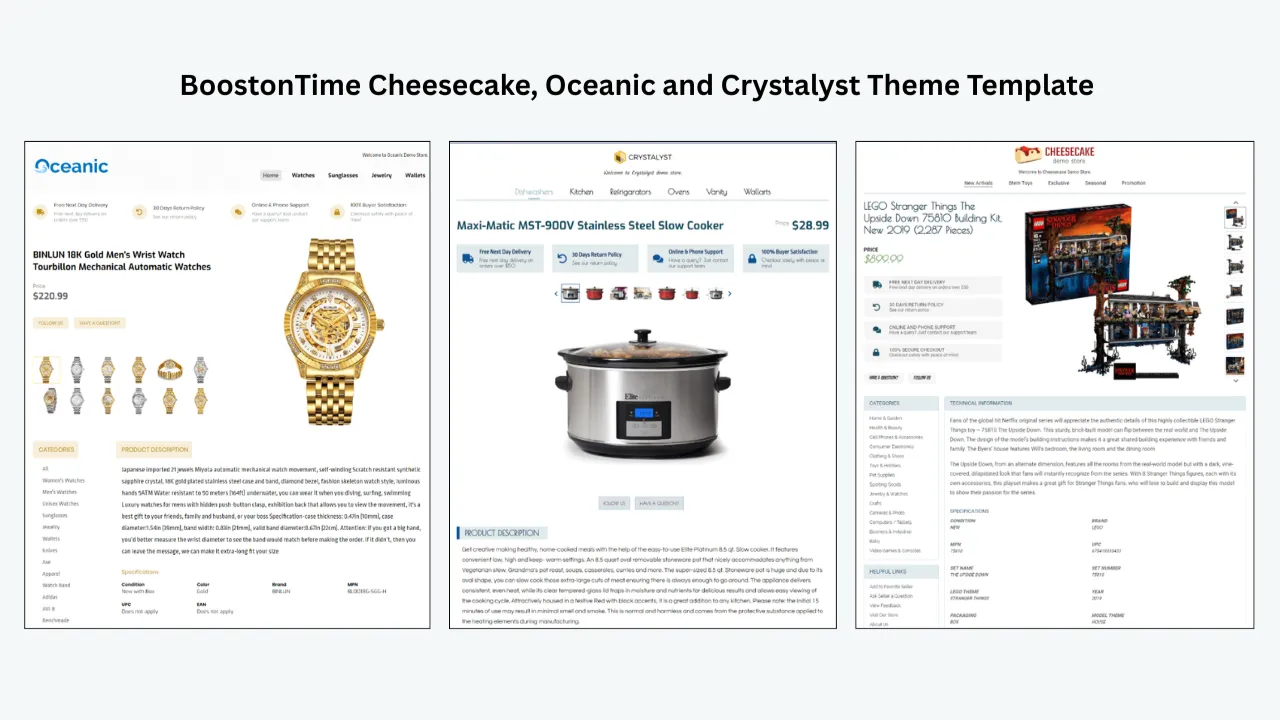
BoostOnTime offers Cheesecake, Oceanic and Crystalyst theme families with multiple starting designs. Sellers can choose a structure that suits the product category and adapt the appearance to the brand.
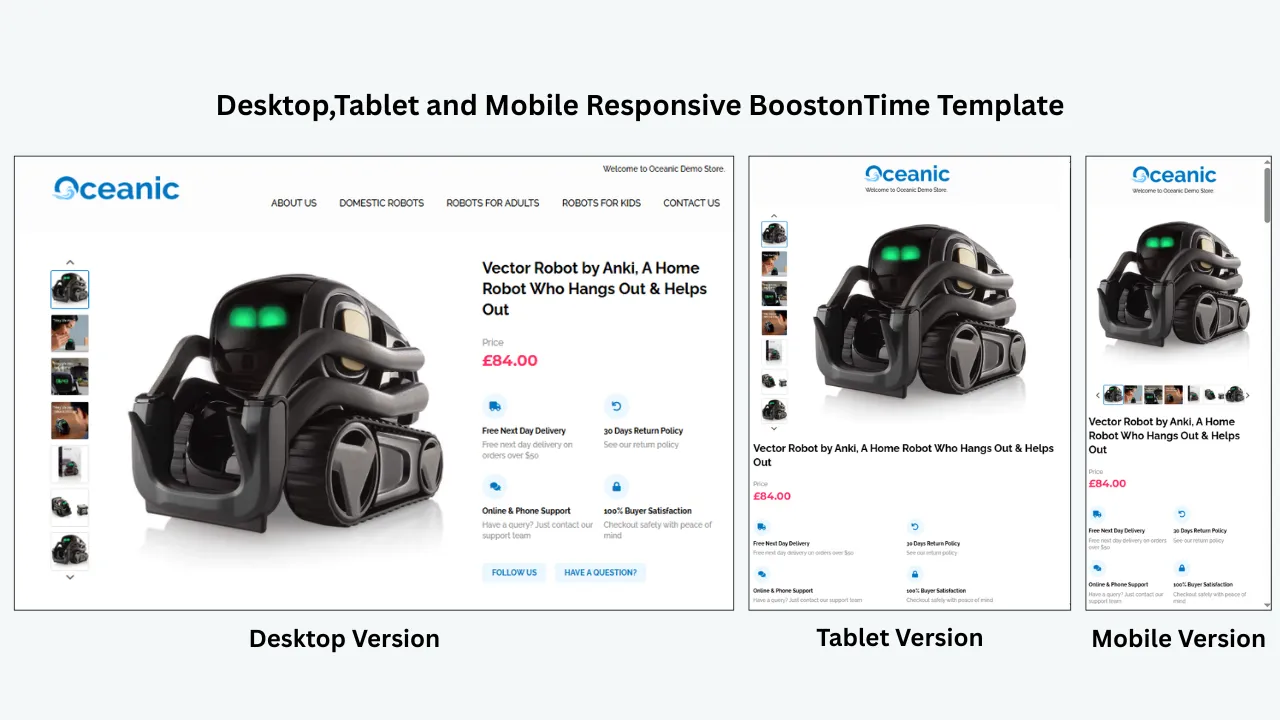
The themes are responsive, helping the same template work across smartphones, tablets and desktop screens.
Dynamic product information
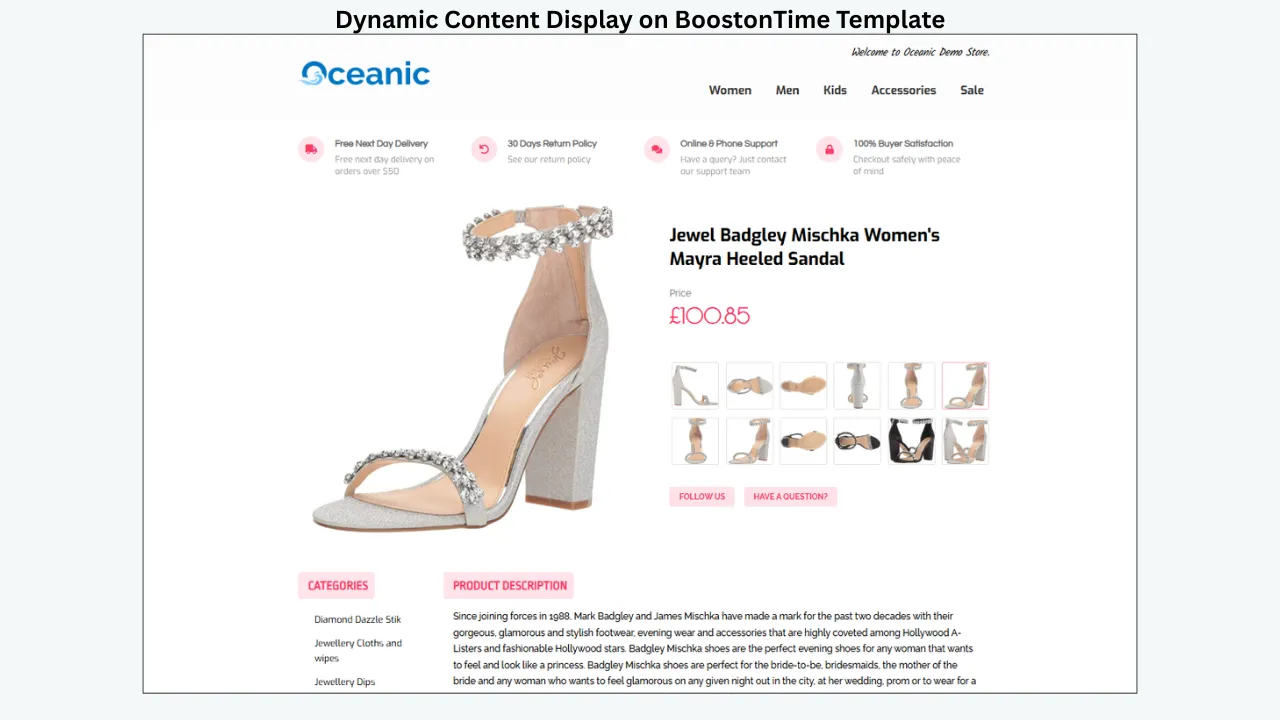
Supported dynamic information can be collected from current eBay listings, including product title, price, currency and images. Related products and pricing can also populate through the template workflow.
This reduces manual entry and helps each listing retain its product-specific content inside a consistent design.
Reusable static information
Brand and store information such as the logo, menu, helpful links, banners and policy content can remain stored within the template.
When the same information belongs across many listings, the seller should not have to re-enter it repeatedly.
Integrated customer feedback
The Feedbacks module brings customer comments and rating information into the template. This transforms existing reputation into visible social proof at the point where new buyers are evaluating the seller.
It works naturally beside Why Us and Policy Tabs, creating a trust sequence based on identity, service information, policies and genuine customer experiences.
Personalized related products
Related Products can support relevant cross-promotion. Sellers may choose selected items or allow products to be collected from the catalogue.
This gives ETB a practical merchandising role as well as a design role.
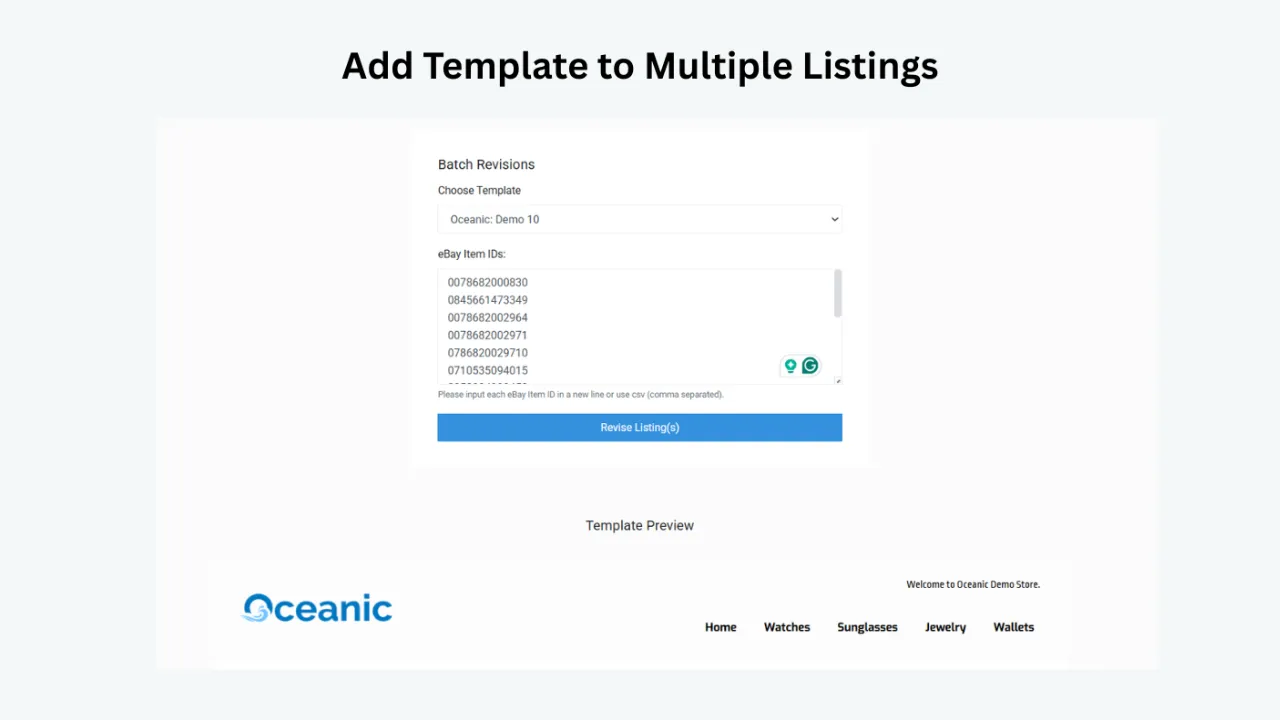
Batch Revision
Once the template is ready, Batch Revision allows it to be applied to an individual listing or a selected group.
This is essential for consistent design at scale. It also makes later brand or policy updates more manageable than editing every listing manually.
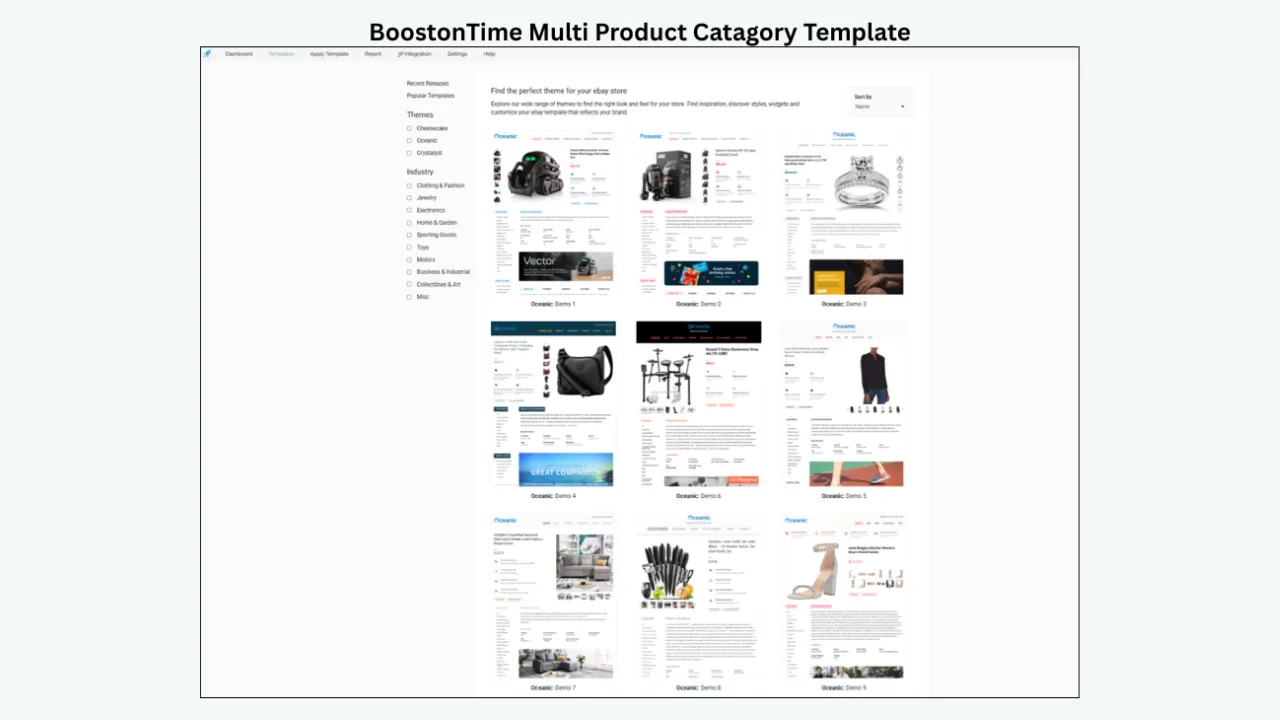
Multiple templates
You can create multiple templates for different categories, brands or policy arrangements. Electronics can prioritize specifications. Fashion can prioritize imagery. Automotive parts can highlight fitment and part numbers.
The store remains recognizable while the information hierarchy becomes more relevant.
International and multichannel support
BoostOnTime covers 19 eBay sites and supports more than 10 multichannel software systems. This helps sellers improve eBay presentation without abandoning an established catalogue-management workflow.
Transparent pricing
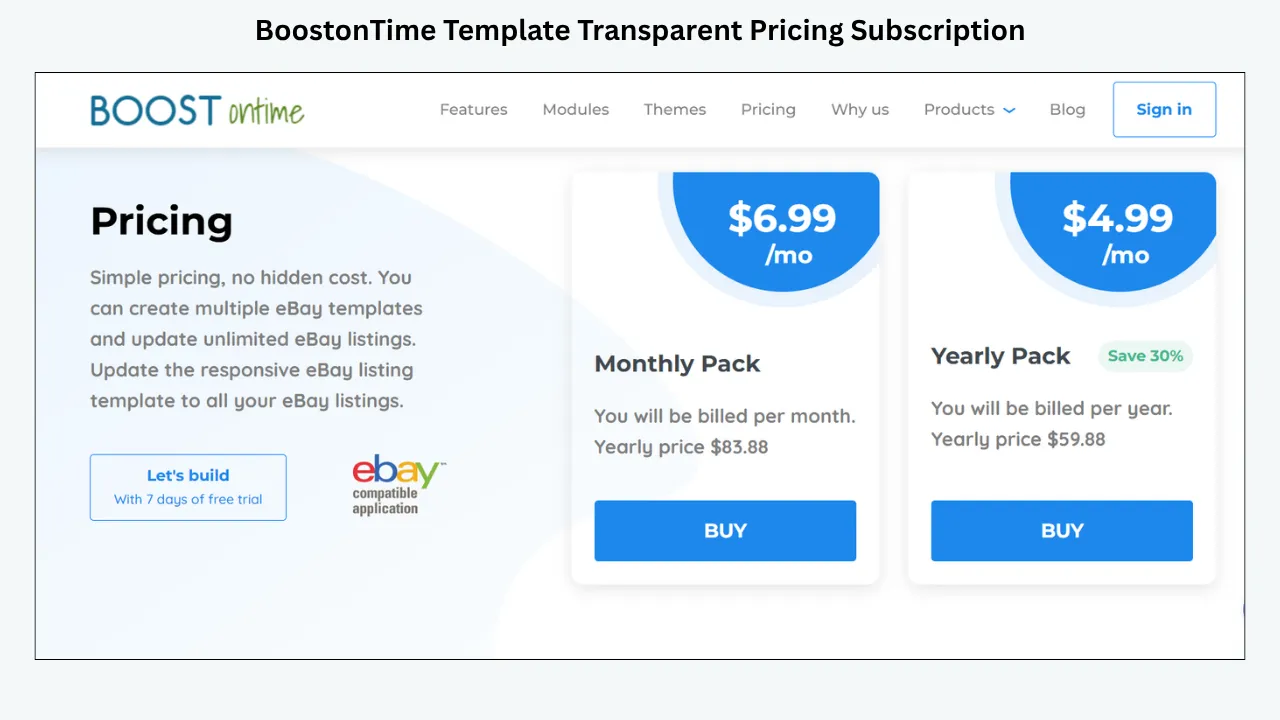
The monthly plan is $6.99 per month. The yearly plan costs $59.88 per year, equivalent to $4.99 per month.
Subscribers can create multiple templates and update unlimited eBay listings. A seven-day trial gives sellers an opportunity to build and test a template before committing.
For businesses comparing the cost of a designer, manual HTML work or an expensive all-in-one platform, ETB offers a focused and accessible alternative.
Ready to see what buyers find appealing in your own listings? Start your seven-day BoostOnTime ETB trial and build a responsive template around the questions your customers actually ask.
How to Build an Appealing Template With BoostOnTime
The following workflow keeps buyer logic at the centre of the design.
Select representative listings
Do not begin with only your easiest product. Choose a small group covering different information needs, image counts, price levels and categories. Include products that receive frequent questions or returns. Those listings often reveal where the current information structure is failing.
Record the buyer’s essential questions
For every category, ask: What determines compatibility? Which specifications affect the decision? What condition details create risk? Which photographs provide proof? Which policies matter most? What related items are genuinely useful? These answers define the module order.
Choose the most appropriate theme
Compare Cheesecake, Oceanic and Crystalyst layouts. Look beyond colour. Consider gallery emphasis, content width, navigation, specification presentation and mobile order. Choose the structure that requires the least unnecessary modification.
Configure product-first modules
Begin with Title and Price, Gallery, Descriptions and Specifications. Make sure the main product can be understood before adding promotional content. Use an opening summary that quickly confirms the item’s strongest benefit, condition or compatibility.
Add brand and trust
Configure Logo, Header Menu and Why Us. Explain specific strengths such as product knowledge, careful packaging or responsive service. Add the Feedbacks module so genuine customer experiences support those statements.
Organize policies
Use Policy Tabs to present payment, shipping and returns without overwhelming the description. Verify every statement against the live listing settings.
Configure related products
Choose relevant alternatives or complementary products. Avoid filling the section simply because space is available.
Review the design with restraint
Check every banner, link and module. Remove anything that does not answer a buyer question or support a clear business goal.
Preview on different screens
Inspect desktop, tablet and mobile views. Pay particular attention to the first screen, gallery, tables, policy tabs and related-product area.
Apply to a small test group
Use Batch Revision on selected listings. Review the live result in the eBay app and common browsers.
Gather evidence
Monitor buyer questions, mobile-display issues, template-maintenance time and returns associated with misunderstood information.
Expand carefully
Once the template works, apply it to larger listing groups. Create category-specific versions when the buyer questions differ significantly.
How to Measure Buyer Appeal
Appeal is partly visual, but sellers should evaluate more than personal opinion.
Record a baseline before changing the template. Then compare the same indicators after a controlled test.
Useful measures include:
- Listing views
- Conversion rate, where available
- Watchers
- Offers
- Buyer questions
- Questions caused by missing information
- Returns related to condition, size or compatibility misunderstandings
- Time required to create or revise listings
- Listings with outdated branding or policies
- Mobile presentation problems
- Engagement with related products, where measurable
Keep price, promotions and shipping terms as stable as practical during the comparison. Record seasonal demand, advertising changes and stock availability.
Do not force a success story. The purpose is to identify whether the new structure makes buying easier and listing management more efficient.
Qualitative checks matter too. Ask someone unfamiliar with the product to locate its dimensions, condition, delivery information and return policy. If the person struggles, the template still needs work.
A Final Buyer-Appeal Checklist
Before applying a template widely, confirm the following.
Product clarity
- The exact product is obvious.
- The title and first summary match the listing.
- Condition is easy to find.
- Package contents are clear.
- Compatibility exclusions are visible.
Visual presentation
- Images are accurate and consistently presented.
- The product remains more prominent than branding.
- Headings create a clear hierarchy.
- Colours support readability.
- Spacing prevents visual crowding.
Mobile experience
- Text is readable without zooming.
- Images scale correctly.
- Tables remain usable.
- Sections stack in a logical order.
- Important information appears before promotional content.
Trust
- Branding is consistent.
- Why Us contains specific, believable information.
- Customer feedback appears through the Feedbacks module.
- Policies match live eBay settings.
- No unsupported promises are used.
Performance
- Images are sensibly optimized.
- Unnecessary modules are removed.
- No distracting active content is present.
- Links are relevant and permitted.
Scalability
- Dynamic product information displays correctly.
- Static brand content is current.
- The template works across the intended category.
- Batch Revision has been tested on a small group.
- A maintenance owner and review schedule are defined.
If the template passes this checklist, it is more than attractive. It is useful, trustworthy and maintainable.
Frequently Asked Questions
An appealing template makes the product easy to understand and the seller easy to trust. It combines useful images, clear hierarchy, scannable descriptions, structured specifications, responsive design, genuine feedback and accessible policies without unnecessary clutter.
No. Visual quality helps, but the template must also provide accurate information and a comfortable buying experience. Decorative design can reduce effectiveness when it hides the product or slows the page.
Prioritize the product title, price, gallery, condition and a short summary of the most important benefit or compatibility detail. Branding should frame this content rather than push it down the page.
There is no universal number. Use every module that answers an important buyer question and remove modules that repeat information or create distraction. The ideal selection depends on the category.
Buyers frequently browse listings on phones and tablets. A responsive template keeps text readable, images properly scaled and sections logically ordered across different screen sizes.
Customer feedback provides evidence that previous transactions were completed successfully. BoostOnTime’s Feedbacks module integrates comments and rating information into the template, allowing buyers to see social proof while evaluating the item.
A clear template may reduce preventable misunderstandings by making condition, dimensions, compatibility, package contents and policies easier to find. It cannot eliminate returns or compensate for inaccurate source information.
No coding or professional design experience is required to choose a theme, customize modules, preview the template and apply it through the ETB workflow.
BoostOnTime collects supported dynamic information from current eBay listings, including title, price, currency and product images. Sellers should verify the source listing before applying the template.
Yes. Multiple templates allow different module arrangements for categories such as electronics, fashion, automotive parts, collectibles and home products while preserving consistent branding.
Yes. Batch Revision can apply a template to individual listings or selected groups. Begin with a small test group before expanding the update.
BoostOnTime covers 19 eBay sites and supports more than 10 multichannel systems. Sellers should confirm that their exact marketplace and integration are included.
The monthly plan is $6.99. The yearly plan is billed at $59.88, equivalent to $4.99 per month. Both options provide access to multiple templates and unlimited listing updates. Pricing can change, so check the current product page before subscribing.
BoostOnTime offers a seven-day trial. Sellers can use the trial to create a template, test relevant modules and review selected live listings before choosing a subscription.
Appeal Is Clarity,
Confidence and Relevance
What makes an eBay listing template appealing to buyers? It is not the number of graphics, the complexity of the code or the brightness of the colours.
An appealing template respects the buyer’s time. It puts the product first, organizes information logically, provides useful visual evidence and answers category-specific questions. It remains comfortable on mobile devices, loads cleanly and uses branding with restraint.
Most importantly, it helps the buyer feel confident. Confidence comes from accurate descriptions, structured specifications, visible policies and genuine customer feedback. It grows when the buyer can find the right information without hunting and when every part of the listing feels consistent with a professional seller.
BoostOnTime ETB brings these qualities together in one practical system. You can begin with a responsive theme, choose from more than 20 customizable modules and organize the listing around the questions buyers actually ask. Supported titles, prices, currencies and images can populate from existing listings. Static modules maintain branding and policies. The Feedbacks module integrates customer experiences. Related Products supports relevant discovery, and Batch Revision applies the completed design across selected listings.
You can create multiple templates, support different categories and update unlimited eBay listings. ETB works across 19 eBay sites and more than 10 multichannel systems, providing a scalable option for both growing and high-volume sellers.
The monthly plan costs $6.99, while the yearly plan is billed at $59.88, equivalent to $4.99 per month. A seven-day trial gives you a low-risk way to test the buyer experience.
Do not begin by asking which colour makes a template appealing. Begin by asking what buyers need to see, understand and trust. Then use BoostOnTime to turn those answers into a professional template you can maintain across your catalogue.
🚀 Start Your Seven-Day BoostOnTime ETB Trial
boostontime.com/ebay-template-builder