
How to Access eBay Listing Template Libraries Offering Seasonal Theme Packs
Seasonal design can make an eBay store feel current, but the right solution is more than a folder of holiday graphics. This guide explains where to access seasonal template libraries, how to evaluate them and why BoostOnTime ETB is the practical choice for sellers who want reusable themes, responsive modules and efficient listing updates.
📋 In This Guide
- 1What a Seasonal Template Library Really Is
- 2Where Can You Access Seasonal Theme Packs?
- 3Seasonal Template Service Comparison
- 4Why BoostOnTime ETB Is the Practical Choice
- 5Theme Pack, Campaign Template or Promotion?
- 6What to Look for in a Library
- 7Seasonal Campaign Calendar
- 8Match Design to Product Category
- 9Best BoostOnTime Modules for Campaigns
- 10Step-by-Step: Build a Seasonal Template
- 11Mobile Design Rules
- 12Performance and Compliance
- 13How to Measure Results
- 14Common Seasonal Mistakes
- 15Seven-Day Trial Plan
- 16Governance Checklist
- 17Frequently Asked Questions
Seasonal promotions create a simple challenge for eBay sellers. Buyers expect a store to feel relevant when Black Friday, Christmas, Valentine’s Day, back-to-school season or a major clearance event arrives, but sellers cannot afford to rebuild every listing whenever the calendar changes. The best answer is a reusable eBay template system that lets you create seasonal variations without disturbing accurate product information.
If you are looking for an eBay listing template library with seasonal theme packs, start with a connected template builder rather than a collection of static downloads. A connected builder keeps the visual framework, reusable store content and product-specific information organized in one workflow. It also makes it easier to preview the design, apply it to selected listings and return to an evergreen version when a campaign ends.
BoostOnTime ETB is our recommended choice because it combines responsive themes, more than 20 customizable modules, multiple saved templates, dynamic listing information and Batch Revision. You can build a seasonal version around the same trusted product data, apply it to a controlled group of listings and update active listings without paying per listing. Subscribers also receive access to new templates released through the service at no extra charge, so the library can grow without turning each design change into a separate purchase.
That does not mean every seller should cover a listing in snowflakes, hearts or discount banners. Seasonal design works when it improves relevance and directs attention to a genuine offer. It fails when decoration hides the product, slows the page or leaves expired campaign language visible in January. This guide explains how to find the right library, compare the main service models and use BoostOnTime to create timely campaigns that still feel professional.
What a Seasonal eBay Template Library Really Is
A seasonal template library is a collection of layouts, visual styles or reusable design components that can be adapted for calendar events and sales periods. Depending on the provider, the “pack” may be a finished HTML file, a set of graphics, a professionally managed design or a theme inside a cloud-based builder.
Those products are not equal. A static download gives you files, but you may need to edit HTML, host images, replace links and repeat the work for every listing. A connected template service lets you work with reusable modules and apply the finished structure through an account-based workflow. A managed design service may do more of the work for you, but it normally costs more and can make quick seasonal revisions dependent on a design team.
For most active sellers, the useful definition is broader than “a Christmas template.” A good seasonal library should give you:
- A professional evergreen foundation that remains recognizable throughout the year
- Seasonal colours, banners or messages that can be changed without rebuilding the product content
- Mobile-responsive layouts that keep product information ahead of decoration
- Reusable modules for branding, policies, categories and related products
- A safe way to preview changes before they reach live listings
- A practical method for applying and later removing the campaign design
- Clear subscription terms, update rights and ongoing access
Think of the permanent template as your store’s architecture and the seasonal theme as a temporary merchandising layer. The logo, product facts, photographs and policies should stay dependable. The promotional message, selected banners and relevant cross-selling can change with the campaign.
The Short Answer: Where Can You Access Seasonal Theme Packs?
💡 Our Pick: BoostOnTime ETB
Sellers can find seasonal eBay template designs through specialized builders, broader seller-management suites, custom design agencies and downloadable-template marketplaces. The right source depends on whether you value fast self-service customization, operational tools, bespoke design or ownership of static files.
BoostOnTime ETB is the best focused option for sellers who want to build and reuse seasonal variations themselves. Instead of treating each holiday as a separate design purchase, you can choose an existing responsive theme, configure its modules and save multiple templates for different categories or campaigns. Product-specific information can continue to flow into the design while shared seasonal content is controlled centrally.
Other services may suit different needs. 3Dsellers combines templates with a broader collection of eBay management tools. Auctiva provides templates alongside established listing and selling utilities. Frooition is known for premium design services and can be appropriate for larger businesses seeking a managed brand project. eBay’s native listing tools remain important for listing content and promotions, although they are not a specialized library of branded description templates.
The comparison should not stop at the number of designs shown on a marketing page. Ask what you can customize, how you apply the result, whether it remains responsive, how campaign content is removed and what the subscription includes after the first season.
Seasonal Template Service Comparison
BoostOnTime stands out because the design and application workflow belong together. You are not simply buying a picture of a seasonal layout. You are building a repeatable template that can use modules such as Gallery, Descriptions, Specifications, Banners, Policy Tabs, Categories and Related Products. That distinction becomes more valuable when you have dozens, hundreds or thousands of active listings.
Why BoostOnTime ETB Is the Practical Seasonal Choice
Seasonal merchandising sounds creative, but the hardest part is usually operational control. Which listings should change? Which message belongs in each category? Who remembers to remove the final-order date? Will the layout still work on a phone? BoostOnTime addresses those questions with a modular system rather than a collection of isolated files.
Start with a responsive theme family
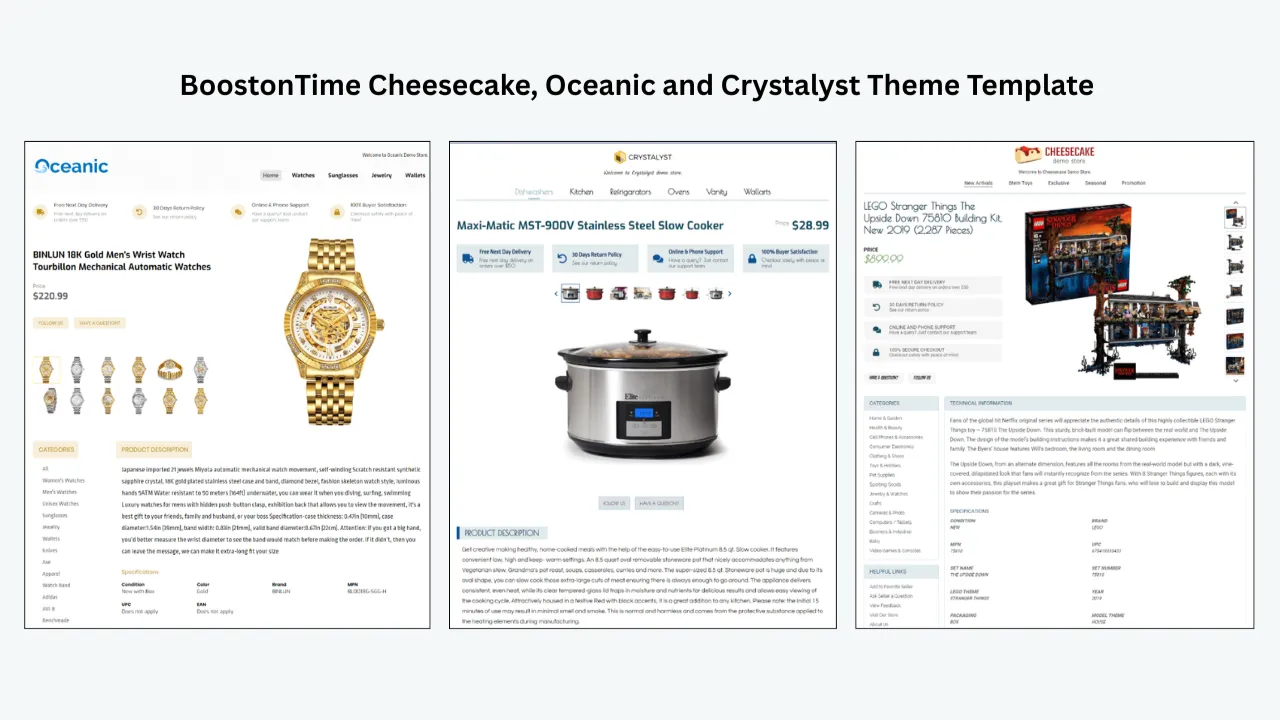
BoostOnTime offers three main theme families: Cheesecake, Oceanic and Crystalyst. Each provides a visual starting point that can be adjusted to fit your brand and product category. The theme is the foundation, not the entire campaign. Your seasonal identity comes from the colours, banners, module choices, imagery and messages you add.
This approach protects brand recognition. A returning buyer should still recognize your store during a holiday campaign. You can introduce a seasonal accent without replacing every familiar element.
Use more than 20 customizable modules
ETB lets you organize the listing with modular sections rather than one long, inflexible description. Useful seasonal modules include Banners for a focused campaign message, Mini Banners for smaller benefits, Categories for gift-oriented browsing, Related Products for complementary items, Policy Tabs for current fulfilment information and Newsletter for approved store communication.
Modules should earn their place. A festive banner can highlight a relevant collection or deadline, but five banners compete with the product. Related Products can help a shopper discover a sensible gift alternative, but random items weaken the experience. ETB gives you choices; good merchandising turns those choices into a clear hierarchy.
Separate shared content from product content
Seasonal campaigns are safer when product-specific information does not have to be rewritten. BoostOnTime distinguishes reusable static content from supported dynamic information collected from listings. Shared material can include the logo, navigation, Why Us information, banners and policies. Product information can include supported titles, prices, images, descriptions, item specifics and related content.
That separation reduces needless duplication. You can update a campaign message while preserving the facts that describe each item. It also makes the post-campaign return to evergreen branding much easier.
Save multiple templates
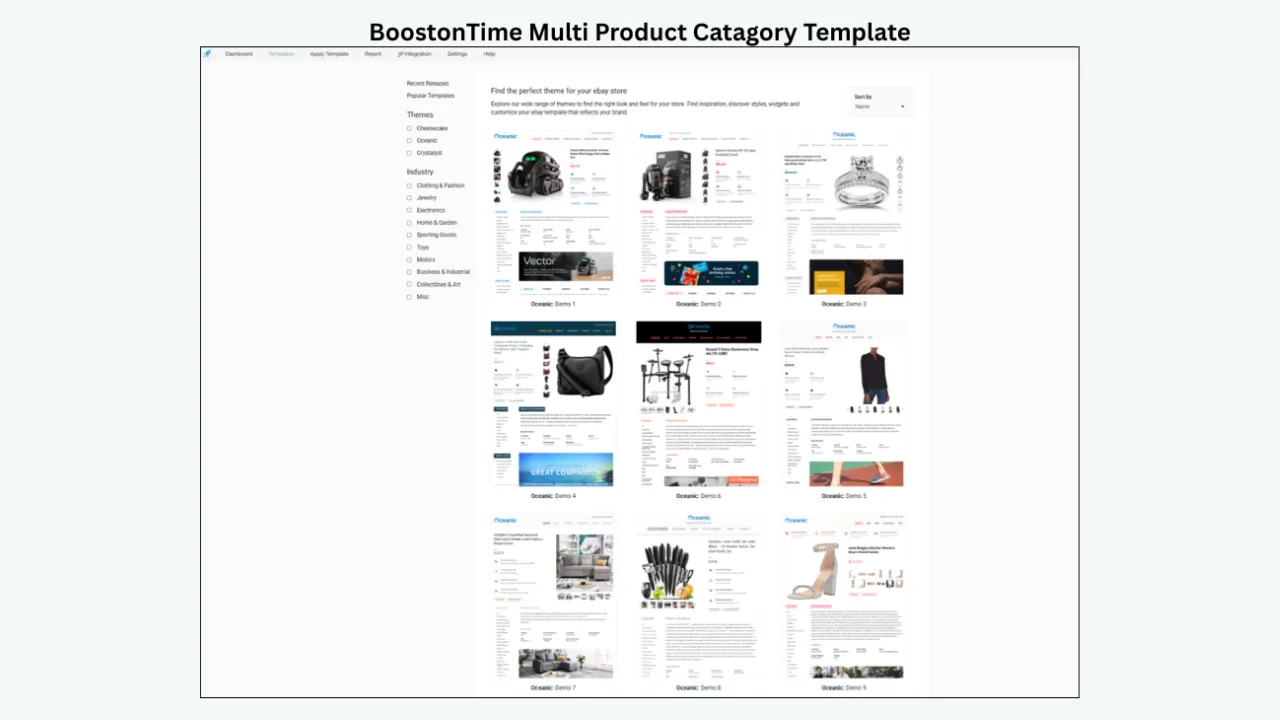
A general holiday template rarely suits every category. Giftable jewellery may need elegant imagery and authenticity information. Toys may need age guidance and package details. Automotive parts need compatibility information, even during a sale. With multiple templates, you can create campaign variations that respect those differences.
You might keep an evergreen master, a Black Friday version, a holiday-gift version and a January-clearance version. You could also create separate templates for high-margin products, giftable products and practical replacements. The purpose is not to multiply designs without control. It is to match the message to the inventory.
Apply changes through Batch Revision
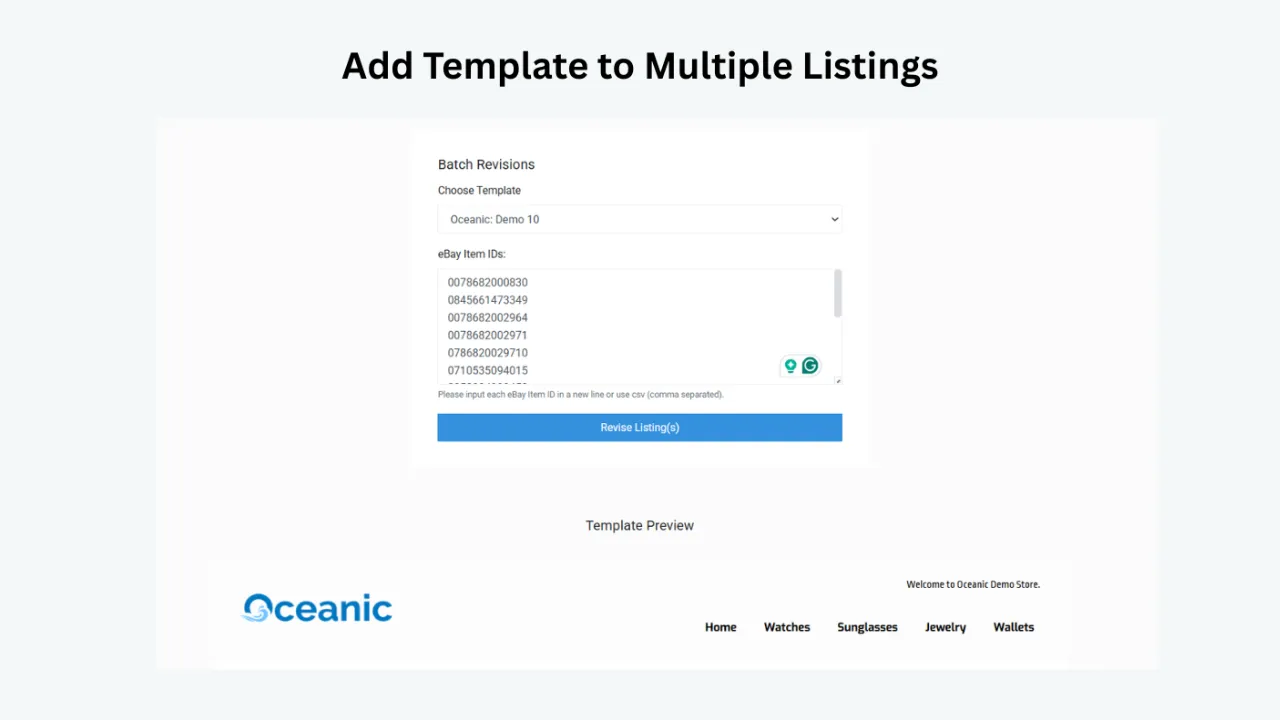
BoostOnTime’s Batch Revision workflow lets you apply a template to an individual listing or selected listing groups. That is important because a seasonal campaign should begin with a controlled rollout. Test a few representative listings, inspect them on desktop and mobile, correct any weak content, and then expand the update.
Bulk capability saves time, but selection is part of the strategy. A Valentine’s message may suit jewellery, fragrances and gifts, but it may look forced on industrial components. Batch Revision lets you work with deliberate groups rather than assuming every active listing needs the same treatment.
Receive new templates without a separate design purchase
BoostOnTime adds new templates over time and notifies subscribers when designs are available. New templates are included without an extra template charge. There is no promise of a fixed release schedule, so subscribers should choose ETB for the complete workflow rather than wait for a particular seasonal drop. The ongoing library access is still valuable because it gives the store additional starting points as the service evolves.
Keep costs predictable
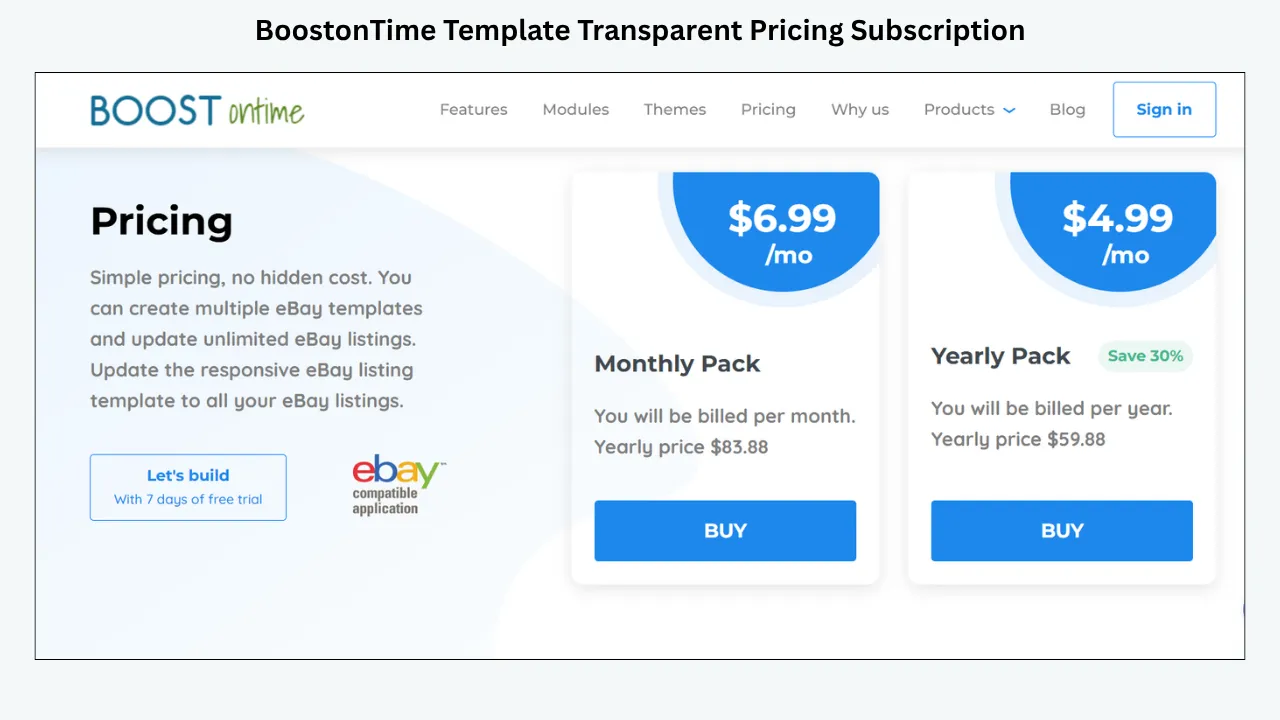
BoostOnTime ETB is available for $6.99 per month or $59.88 per year, equivalent to $4.99 per month. The subscription includes multiple templates and unlimited active-listing updates. A seven-day trial lets sellers explore the workflow before committing, and there is no long contract.
For a seller managing many listings, predictable subscription pricing can be easier to justify than paying for every seasonal file or design revision. The real comparison is not one template price against one monthly fee. It is the cost of maintaining consistent, current presentation across the catalogue throughout the year.
Theme Pack, Campaign Template or Promotion: Know the Difference
These terms are often mixed together, so it helps to separate them.
A theme pack controls presentation. It can change the colour palette, banner style, typography, spacing and supporting visuals. A campaign template is a saved arrangement created for a particular period, audience or product group. A promotion is the actual offer, such as a discount, coupon or sale event configured through eligible eBay tools.
A design does not create a discount by itself. If a banner says “20% off,” the offer must actually exist, apply to the advertised items and follow eBay’s rules. If a template displays a final-order date, that date should reflect your real handling capacity and shipping setup. Visual urgency should never outrun operational truth.
The strongest seasonal experience connects all three layers:
- Configure the genuine offer or merchandising plan.
- Build a campaign template that explains it clearly.
- Use a theme treatment that attracts attention without hiding the product.
This sequence keeps marketing honest. It also prevents a common mistake: designing an exciting seasonal page first and trying to invent an offer that matches it later.
What to Look for in a Seasonal Template Library
Before subscribing, inspect the service as a working system. A beautiful preview is useful, but it does not reveal how the template behaves when your longest title, largest image set and most complicated policy content are added.
Responsive behaviour
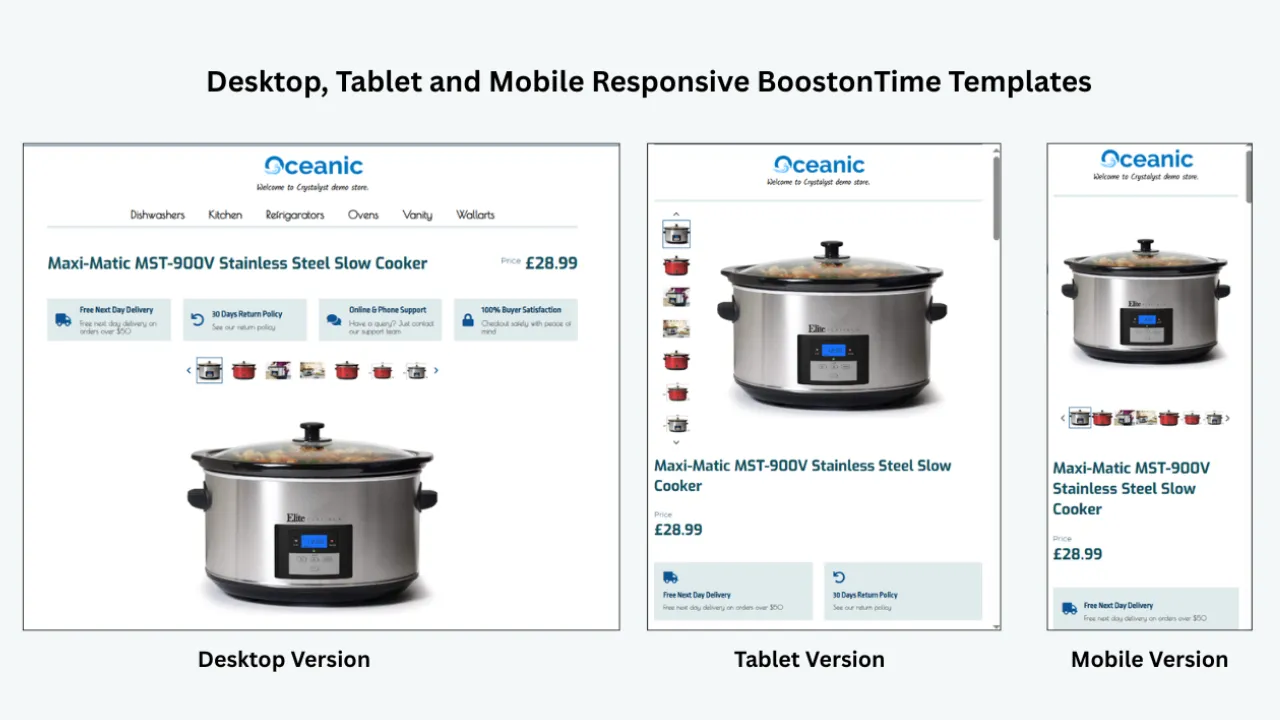
Open the preview at several widths. Product photographs, titles, specifications and policy sections should remain readable on a phone. Columns should stack logically, text should not become tiny and promotional graphics should not dominate the first screen.
Responsive design matters especially during high-traffic events because many shoppers browse from mobile devices while comparing offers. A seasonal template that looks impressive only on a desktop is not ready for a live campaign.
Product-first hierarchy
The first questions remain ordinary even during a holiday sale: What is the item? What condition is it in? Is it compatible? What is included? How much does it cost? Seasonal design should support these answers rather than delaying them.
A strong layout places product identity, images and essential facts before extended store storytelling. Campaign messages can be visible, but they should not make the buyer hunt for the actual listing information.
Reusable components
Look for independent modules or sections that can be changed without replacing the entire design. Reusability makes it possible to update one message, remove one banner or change one related-product group while leaving the rest of the listing stable.
Multiple-template support
Seasonal relevance varies by category, margin, inventory level and buyer. A library should let you save more than one version so you can target appropriate listing groups. Otherwise, every campaign becomes a compromise designed for the average item.
Preview and rollback discipline
The provider should make it practical to preview the design before publishing it. You also need an evergreen template ready for the end of the campaign. “Rollback” may simply mean reapplying the saved evergreen template, but the process should be known before launch day.
Ongoing access and update rights
Read the subscription terms. Determine whether designs disappear if you cancel, whether new templates cost extra, whether active listings can be revised without per-listing fees and whether support is included. These details determine the long-term value more than the size of the initial screenshot gallery.
Policy-safe construction
eBay does not allow active content such as JavaScript, Flash, plug-ins and form actions in listings. Avoid theme packs that depend on prohibited scripts, automatic pop-ups, background audio or remote interactive effects. A compliant, lightweight structure is more dependable and usually better for mobile buyers.
A Seasonal Campaign Calendar for eBay Sellers
Seasonal planning should begin before the design work. Create a simple annual calendar that records the campaign, eligible categories, offer, visual changes, operational deadline, launch date and removal date.
The calendar creates accountability. Each campaign needs an owner and an expiry date. If nobody is responsible for removing the banner, the design will eventually undermine trust.
Match Seasonal Design to the Product Category
The same visual treatment should not be forced across unrelated products. The buyer’s information needs must remain the organizing principle.
Notice that the campaign opportunity changes, but the product evidence does not. A festive border cannot compensate for missing measurements or compatibility information. Design earns trust when it helps the buyer reach a confident decision.
The Best BoostOnTime Modules for Seasonal Campaigns
Logo and Header Menu
Keep the logo stable so buyers recognize the seller. Adjust the Header Menu only when the seasonal destination is genuinely useful, such as a gift category or clearance collection. Navigation labels should remain short and truthful.
Title and Price
The product should not disappear behind campaign artwork. Preserve a clear title-and-price area near the top so buyers understand what they are considering immediately.
Gallery
Seasonal campaigns often attract shoppers who are less familiar with the product category. Clear images therefore matter more, not less. Use the Gallery to show the exact item, condition, scale and included components. Do not replace product evidence with generic holiday photography.
Descriptions and Specifications
Use the opening description to summarize the most important buyer benefit, then organize facts in Specifications. Scannable information supports mobile reading and reduces the risk that promotional language overwhelms practical details.
Banners and Mini Banners
Use one primary banner for the campaign’s most important message. Mini Banners can support a limited number of store benefits, but every graphic adds visual weight. If the message can be communicated more clearly in text, text may be the better choice.
Categories and Related Products
Categories can turn a seasonal listing into a doorway to relevant parts of the store. Related Products can help the buyer find a complementary item, another size or an alternative gift. Manual relevance is stronger than random promotion when the campaign has a clear audience.
Why Us and Feedbacks
High-demand periods attract buyers who have never purchased from you. A concise Why Us section and genuine customer feedback can reduce uncertainty. Keep the content factual, current and proportionate; the product should remain the main subject.
Policy Tabs
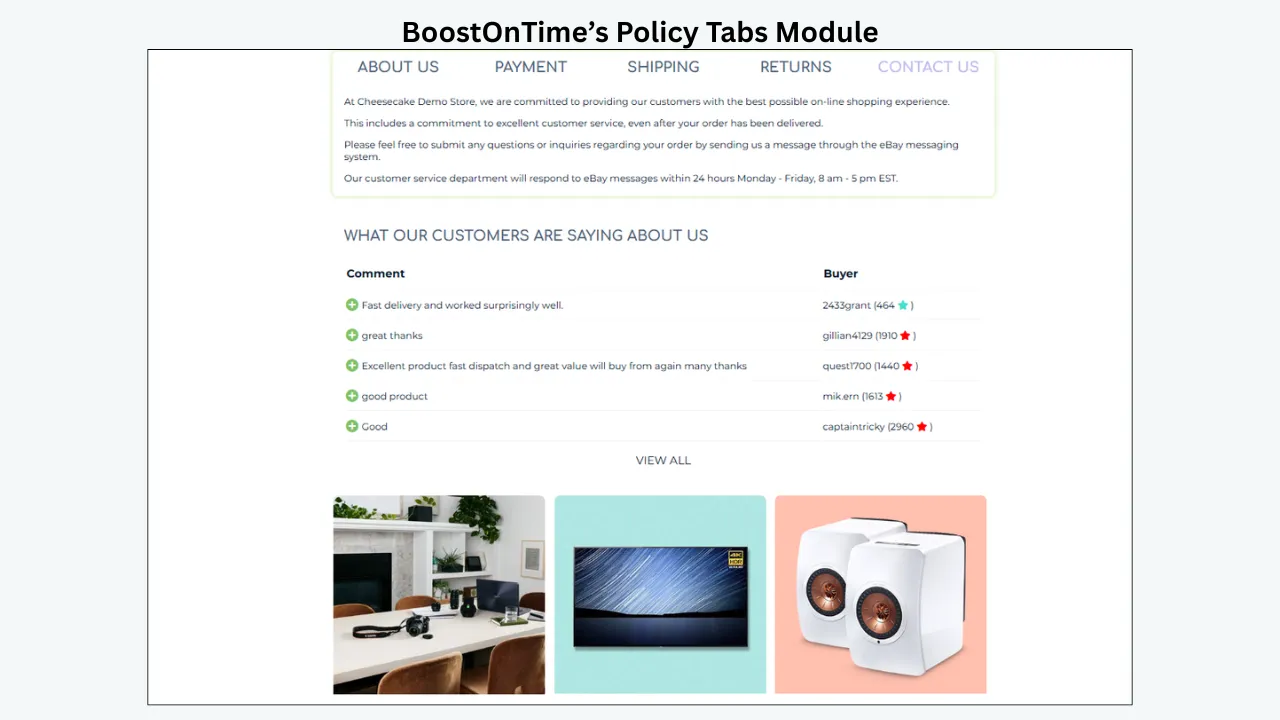
Policy Tabs are essential when handling times, returns or delivery expectations matter. The displayed information must agree with the authoritative settings on eBay. Never let a decorative campaign message promise a service that the listing does not offer.
Newsletter and Footer
Use the Newsletter module only for permitted store communication. The Footer should close the listing consistently and can reinforce the brand without introducing another major promotion.
Step-by-Step: Build a Seasonal Template in BoostOnTime
Define the commercial objective
Write one sentence that explains the campaign. For example: “Help mobile shoppers discover giftable jewellery with clear authenticity details and an accurate ordering deadline.” This is more useful than “make the listings festive” because it connects design to a buyer task.
Select eligible listings
Choose products with sufficient inventory, suitable margins and a real connection to the campaign. Exclude listings that cannot support the offer, have uncertain fulfilment or need content corrections first.
Preserve an evergreen master
Keep a clean, approved template that can be reapplied after the event. Name it clearly and record the date it was approved. This is your stable fallback.
Duplicate the strategy, not the mistakes
Create a seasonal variant using an appropriate BoostOnTime theme and module arrangement. Review the evergreen version first. If it contains an outdated policy, weak image or excessive promotion, correct the issue rather than carrying it into the new version.
Add the minimum seasonal layer
Choose a restrained palette, one main message and a small set of relevant navigation or related-product changes. Avoid stacking multiple countdown-style messages, shipping claims and unrelated offers.
Confirm dynamic information
Review the product title, price, images, description, item specifics and related products collected for the selected listings. Dynamic automation is valuable only when the source listing is accurate.
Preview representative products
Test a short title and a long title, one image and many images, a simple product and a specification-heavy product. Inspect the template at phone, tablet and desktop widths. Read it as a buyer, not as the designer.
Apply to a pilot group
Use Batch Revision on a small group of low-risk, representative listings. Open the live pages, compare them with the preview and check that eBay’s own listing information remains consistent.
Expand carefully
After the pilot passes, apply the template to the remaining eligible group. Keep a record of the listing set, template name, launch date and responsible person.
Schedule the exit
Set a calendar reminder before launch. Reapply the evergreen template when the campaign ends, then inspect a sample of listings to confirm that the old message has disappeared.
Mobile Design Rules for Seasonal Templates
Seasonal graphics can become a mobile problem quickly. A wide banner may shrink until its text is unreadable. Multiple columns may stack into a long promotional wall. Large decorative images may push product facts far below the first screen.
Use these rules:
- Put the item identity and primary product image before extended promotional content.
- Keep banner copy short enough to read without zooming.
- Do not place essential details only inside an image.
- Use comfortable text sizes, spacing and contrast.
- Let modules stack in a logical order.
- Limit image file sizes and avoid unnecessary decorative assets.
- Check buttons and approved links for comfortable touch targets.
- Test the live eBay listing, not only the builder preview.
An attractive desktop composition is not evidence of a successful mobile design. The true test is whether a buyer can understand the product, condition, price context and policies comfortably on a smaller screen.
Performance and Compliance During Busy Sales Periods
High-traffic campaigns are the wrong time to add fragile code. eBay does not permit active content such as JavaScript, Flash, plug-ins and form actions in listings. Avoid downloaded packs that depend on scripts for sliders, countdowns, pop-ups or automatic effects.
Keep the design lightweight. Compress supporting images before uploading, remove unused modules and avoid repeating the same large graphic. A template should not compete with the product gallery for bandwidth or attention.
Review links as well. Every link should have a permitted purpose and destination under eBay’s current rules. Do not direct buyers away from eBay to complete a purchase or submit personal information. When policies change, follow the current eBay guidance rather than relying on an old theme’s instructions.
Seasonal urgency also creates accuracy risk. Check prices, sale statements, delivery language, return information and item availability. A polished template magnifies whatever it contains, including mistakes.
How to Measure Whether the Seasonal Template Helps
Design alone cannot guarantee views, rankings or sales. Demand, price, promotion, inventory, photography, delivery and competition all influence performance. The goal is to determine whether the new template improves presentation and supports the campaign.
Record a baseline for a representative listing group, then compare the same indicators during the campaign. Useful measures include:
- Listing views and traffic sources where available
- Sales conversion rate where available
- Watchers, offers and buyer questions
- Engagement with relevant categories or related products where measurable
- Returns connected to misunderstood descriptions or policies
- Mobile issues discovered during quality checks
- Time required to create, apply and remove the campaign
- Listings with expired messages after the planned end date
Document other changes. If you reduced prices, started advertising, replenished stock or entered a naturally high-demand week, do not attribute the entire result to the template. Honest measurement makes the next campaign better.
Common Seasonal Template Mistakes
Treating decoration as strategy
A seasonal background is not a campaign. Begin with an audience, product group, offer and deadline. The design should make that plan easier to understand.
Updating every listing
Relevance matters more than coverage. Applying a romantic gift theme to a technical replacement part can make the store feel less professional. Segment first.
Hiding product facts
Large banners, store stories and promotional modules can push the description downward. Keep the buyer’s core questions at the top.
Publishing unsupported deadlines
Do not promise holiday arrival based on optimism. Align displayed dates with actual handling, carrier and eBay delivery information, and use careful language where delivery is not guaranteed.
Leaving campaigns live too long
Expired promotions damage credibility. Every seasonal template needs an owner, end date and approved evergreen replacement.
Rebuilding instead of reusing
Starting from zero increases inconsistency and review time. Build a stable base, save campaign variants and document what changed.
Ignoring accessibility
Low-contrast festive colours, tiny text inside banners and image-only messages exclude buyers. Clarity is part of good seasonal design.
A Seven-Day BoostOnTime Seasonal Template Trial Plan
You can use BoostOnTime’s seven-day trial as a focused implementation sprint.
Day one
Connect securely through eBay, review the available themes and choose one product category with a real seasonal opportunity.
Day two
Audit five representative listings for titles, images, descriptions, item specifics and policy accuracy. Correct the source content before styling it.
Day three
Build an evergreen template using only the modules that help buyers. Save it with a clear name.
Day four
Create the seasonal variant. Add one campaign banner, refine category navigation and select relevant related products.
Day five
Preview the longest, shortest and most image-heavy listings on smaller screens. Simplify anything that feels crowded.
Day six
Apply the template to a small pilot through Batch Revision. Inspect the live listings and record any corrections.
Day seven
Decide whether the workflow saves enough time and improves enough consistency to justify rollout. If it does, schedule the full campaign and its removal date. If it does not, revise the structure before adding more listings.
This trial plan gives you evidence. You will know how the tool handles your real catalogue instead of judging it only from a demonstration.
Seasonal Template Governance Checklist
A seasonal template becomes easier to manage when the campaign has a small control record. This does not need to be complicated. A shared spreadsheet or project note can record the template name, target listings, campaign owner, approved offer, launch date, removal date and evergreen replacement. Add links to the final banner files and the approved wording so nobody has to search old messages when a correction is needed.
Use a naming convention that explains the purpose at a glance. A name such as “Holiday Gifts 2026 — Jewellery — Approved” is safer than “Template Final 3.” Include the year because last season’s order deadlines, return messages and promotional terms may no longer be correct. Mark drafts clearly and archive retired versions so they are not applied accidentally.
Before approval, ask a person who did not build the template to complete five buyer tasks: identify the product, find its condition, confirm an important specification, locate shipping or return information and discover one relevant alternative. If any task takes too long, simplify the layout. An independent check often catches problems the designer has learned to overlook.
Create an evidence checklist for every pilot listing. Confirm that the title refers to the exact item, the displayed price is current, every image belongs to that item, the description matches the condition and the specifications agree with eBay item specifics. Check that promotional language is accurate and that any delivery message agrees with the listing’s authoritative shipping settings. Finally, inspect the links, contrast, spelling and mobile order.
The campaign owner should review performance and operations together. Increased attention is not useful if questions, cancellations or fulfilment problems rise at the same time. Record recurring buyer questions, late changes and internal confusion. Those observations can reveal whether the next template needs a clearer policy tab, fewer banners, a better specification layout or a narrower listing group.
At the end of the campaign, do more than remove the seasonal design. Save a short retrospective covering what launched on time, what required emergency editing, which modules buyers used and which messages caused confusion. Note the exact template that should be reused and the elements that should be redesigned. This turns one campaign into knowledge for the next one.
The following final check can be completed before any large Batch Revision:
- The campaign has a defined audience, purpose and genuine offer.
- Eligible listings have sufficient stock and accurate source data.
- The seasonal template has a unique, descriptive name and approval status.
- An evergreen replacement is saved and ready.
- Product images and essential facts appear before extended promotion.
- Banners use readable text, strong contrast and restrained file sizes.
- Policy wording matches the current eBay listing settings.
- Related products and category links are relevant and permitted.
- The design contains no prohibited active content.
- Representative listings have been checked on a phone and desktop.
- A pilot group has been reviewed after publishing.
- The full listing group and responsible owner are documented.
- The campaign removal date is on the calendar.
- Someone is assigned to verify the rollback.
- Results will be evaluated alongside pricing, advertising and inventory changes.
This governance may sound less exciting than choosing holiday colours, but it protects the value of the creative work. Buyers experience one coherent store, while the team gains a repeatable process. BoostOnTime supplies the reusable themes, modules and update workflow; disciplined campaign management makes those capabilities dependable at catalogue scale.
One final safeguard is worth adopting: photograph or export the approved live listing after launch. The saved reference shows exactly what buyers saw, which helps the team investigate questions and compare future campaigns. Record the review date beside it. If eBay, the template, the offer or the source listing changes, repeat the check. Seasonal work moves quickly, yet the standard should remain evidence based. A clear record, a named owner and a tested evergreen replacement allow creative ideas to move faster because the operational boundaries are already understood. That balance is the real advantage of a reusable library: timely presentation without surrendering accuracy, control or the familiar identity buyers associate with your store.
A useful seasonal library should also support restraint. Before approving any new variation, compare it with the evergreen template side by side. Circle every element that changed and write down the buyer benefit for that change. If a new colour, banner, category link or message has no clear purpose, remove it. This simple review keeps the campaign recognizable and prevents design enthusiasm from becoming clutter.
Create a small reusable asset kit for each approved campaign. It can contain the banner artwork, accessible text alternative, colour values, message copy, eligible category list and expiry date. Keep original images large enough for future editing, but publish optimized versions that load efficiently. Record the copyright or licensing status of every graphic so the store does not inherit a problem from an attractive download.
Think about customer service before launch. Give the support team the final offer terms, ordering dates, exclusions and template screenshots. Ask them to report questions that appear repeatedly. A spike in questions about eligibility or delivery usually means the page is not communicating as clearly as the campaign team believes.
Finally, review the campaign through the eyes of a returning buyer. Seasonal changes should feel like a timely edition of the same dependable store, not a completely different seller. Keep the logo, core typography, product evidence and service standards familiar. Let the seasonal layer signal relevance, then let accurate information complete the sale. That combination of freshness and continuity is difficult to achieve with disconnected files. It is exactly where a reusable BoostOnTime system becomes more valuable over time, because each approved template, module choice and post-campaign lesson strengthens the next launch for every campaign.
Frequently Asked Questions
BoostOnTime provides responsive themes and modular customization that can be used to build seasonal campaign templates. It also adds new templates over time and includes them for subscribers without an extra template charge. Availability of a specific holiday design can change, so review the current theme library rather than assuming a fixed seasonal release schedule.
No. The theme controls presentation; the actual discount, coupon or sale must be configured through appropriate eBay tools and apply to the advertised products. The design should communicate a real offer, not create the appearance of one.
Yes. ETB supports multiple templates, which makes it practical to keep an evergreen version and separate variants for categories or campaigns.
Yes. BoostOnTime’s Batch Revision workflow supports individual listings and selected groups. Begin with a pilot before expanding the change.
BoostOnTime is designed so sellers can choose a theme, configure modules, preview the result and apply it without building a template from raw code.
Supported product-specific information can be collected from existing listings, including key product details such as titles, prices, images, descriptions and item specifics. Review the imported information because the template cannot correct inaccurate source data automatically.
BoostOnTime offers more than 20 customizable modules covering branding, product content, navigation, policies, feedback, banners and related products.
Usually not. Apply the design where the campaign is relevant and create category-specific variants when buyers need different information.
Work backward from buying behaviour, inventory and realistic fulfilment capacity. Publish early enough for discovery, but do not display shipping deadlines before you can support them accurately.
No. It can improve relevance, consistency and navigation, but results also depend on the product, price, demand, competition, photos, promotion, shipping and seller performance.
BoostOnTime offers responsive themes. Sellers should still test representative live listings on actual phones and inside the eBay app.
Keep an approved evergreen template and reapply it to the affected listing group. Then inspect sample listings to confirm the old banners and messages are gone.
Avoid prohibited active content, excessive animation, automatic media, unsupported countdown claims, low-contrast text, huge banners and irrelevant holiday imagery.
BoostOnTime’s subscription includes unlimited active-listing updates. Current public pricing is $6.99 monthly or $59.88 yearly.
BoostOnTime covers 19 eBay sites, but marketplace policies, language, promotion eligibility and shipping settings can differ. Build and verify each market’s content carefully rather than copying claims blindly.
Turn Seasonal Design Into
a Repeatable System
The best seasonal template library is not the one with the most decorations. It is the one that helps you launch a relevant campaign, preserve product accuracy, update the right listings and return to evergreen branding without chaos.
BoostOnTime ETB gives sellers that system. Responsive theme families provide the foundation. More than 20 modules let you control the information hierarchy. Multiple templates support category and campaign variations. Dynamic content reduces unnecessary rewriting, and Batch Revision helps apply the finished design to selected live listings. Predictable subscription pricing makes the process practical throughout the year.
Start small. Choose one campaign and one meaningful product group. Build an evergreen master, create a restrained seasonal variant, test it on real listings and schedule its removal before you launch. That discipline is what turns seasonal design from a last-minute decoration project into dependable merchandising.
Ready to build a seasonal eBay template that still looks like your store? Explore BoostOnTime ETB, preview the responsive themes and start the seven-day trial.
boostontime.com/ebay-template-builder