
How Do Support Options Compare Among eBay Listing Template Providers?
An eBay listing template can look simple from the buyer’s side, but support is not a bonus — it’s part of the product. Here’s how BoostOnTime ETB, 3Dsellers, Frooition and eBay itself compare on onboarding, documentation, escalation and custom help.
📋 In This Guide
- 1The Quick Comparison
- 2What Counts as Good Template Support?
- 3Why Support Matters When Listings Are Live
- 4BoostOnTime ETB: Focused Support
- 53Dsellers: Tiered Support
- 6Frooition: High-Touch Support
- 7eBay Support: A Different Layer
- 8Support Ownership Matrix
- 9How to Evaluate Support
- 1020-Point Support Scorecard
- 11Why Simplicity Is a Support Feature
- 12Support Needs by Seller Type
- 13Writing a Useful Support Request
- 14Troubleshooting Before You Contact Support
- 157-Day Onboarding Plan
- 16Red Flags in Support
- 17The Business Value of Support
- 18Build an Internal Support System
- 19Test Support With Three Scenarios
- 20Frequently Asked Questions
An eBay listing template can look simple from the buyer’s side, but the seller may be connecting an account, importing content, organizing modules, revising live listings and checking compliance across hundreds of products. When something goes wrong, support is not a bonus. It is part of the product.
Our recommendation for most sellers is BoostOnTime ETB. It combines a focused no-code template workflow with direct request-based assistance, written integration guidance, free help with supported multichannel integration and an option to request a completely custom responsive design. Because ETB concentrates on templates rather than trying to become an entire commerce operating system, sellers can often describe the issue more clearly and reach the relevant workflow faster.
Other providers package help differently. 3Dsellers uses plan-based support levels, with limited, standard and premium support alongside a broad help centre and wider seller suite. Frooition offers an in-house support team and, in higher-touch design projects, consultation, project management, implementation and support materials. eBay provides native help for account, listing, policy, payment and marketplace issues, but eBay support does not configure a third-party branded template for you.
The best choice depends on the type of help you expect to need. A solo seller may value a straightforward contact route and a builder that is easy to learn. A large retailer may want a named project manager and managed implementation. A multi-account operation may accept tiered support because the broader platform handles several business functions. This guide explains how to compare those options without being distracted by vague promises of “excellent service.”
The Quick Comparison
This table is a starting point. It does not compare response time because providers do not all publish a universal service-level promise, and response can vary by plan, time, issue and location. Before subscribing, ask the provider how your likely questions will be handled and whether the answer changes with the selected plan.
What Counts as Good Template Support?
Support is often judged after a failure, but it should be evaluated before purchase. A strong provider helps you avoid predictable mistakes, diagnose real problems and understand where its responsibility ends.
For an eBay template service, useful support includes six layers.
1. Clear product guidance
The website should explain what the builder does, which information it imports, how templates are applied and what the subscription includes. Clear pre-sale information prevents a customer from buying a design product while expecting inventory management, shipping automation or search-ranking guarantees.
2. Onboarding help
New users need a path from account connection to first live test. Good onboarding identifies the theme, modules, source-listing requirements, preview process and safe pilot procedure. It does not encourage a seller to change every active listing before one representative item has been reviewed.
3. Technical troubleshooting
When content is missing, images appear incorrectly or a template does not apply as expected, the provider should help isolate the cause. The issue may sit in the source listing, the template configuration, an authorization, an integration or eBay itself. Support is valuable when it separates those possibilities instead of sending a generic answer.
4. Integration assistance
Sellers using ChannelAdvisor, Linnworks, Sellbrite, Ecomdash, Sellercloud or another multichannel system need to know how the template workflow interacts with that software. Integration help should define prerequisites, supported steps and any work the seller must complete elsewhere.
5. Design and implementation guidance
Some customers can choose colours and modules independently. Others need advice on information hierarchy, category variations or a custom design. Providers may offer this as standard help, a custom request or a managed package. The important point is knowing which level you are buying.
6. Ongoing change support
eBay policies, category requirements, integrations and template features evolve. Sellers need a dependable way to ask about changes, update shared content and understand whether a problem affects one listing or the complete template system.
Support is therefore a combination of prevention, education, troubleshooting and escalation. A fast answer that misunderstands the issue is less useful than a precise answer that moves the implementation forward.
Why Support Matters More When Listings Are Already Live
Changing a draft is low risk. Changing a large group of live listings is different. A template update can affect descriptions, images, specifications, navigation, policies and related products across the catalogue. The seller needs both efficient tools and a controlled process.
The main risks include:
- Applying the wrong template to the wrong product group
- Importing incomplete or inaccurate source content
- Leaving outdated policies inside shared template sections
- Creating a layout that works on desktop but fails on mobile
- Publishing links or content that conflict with eBay rules
- Assuming a third-party tool controls shipping, price or inventory when it only changes presentation
- Revising too many listings before a representative test
- Losing track of which version was applied and when
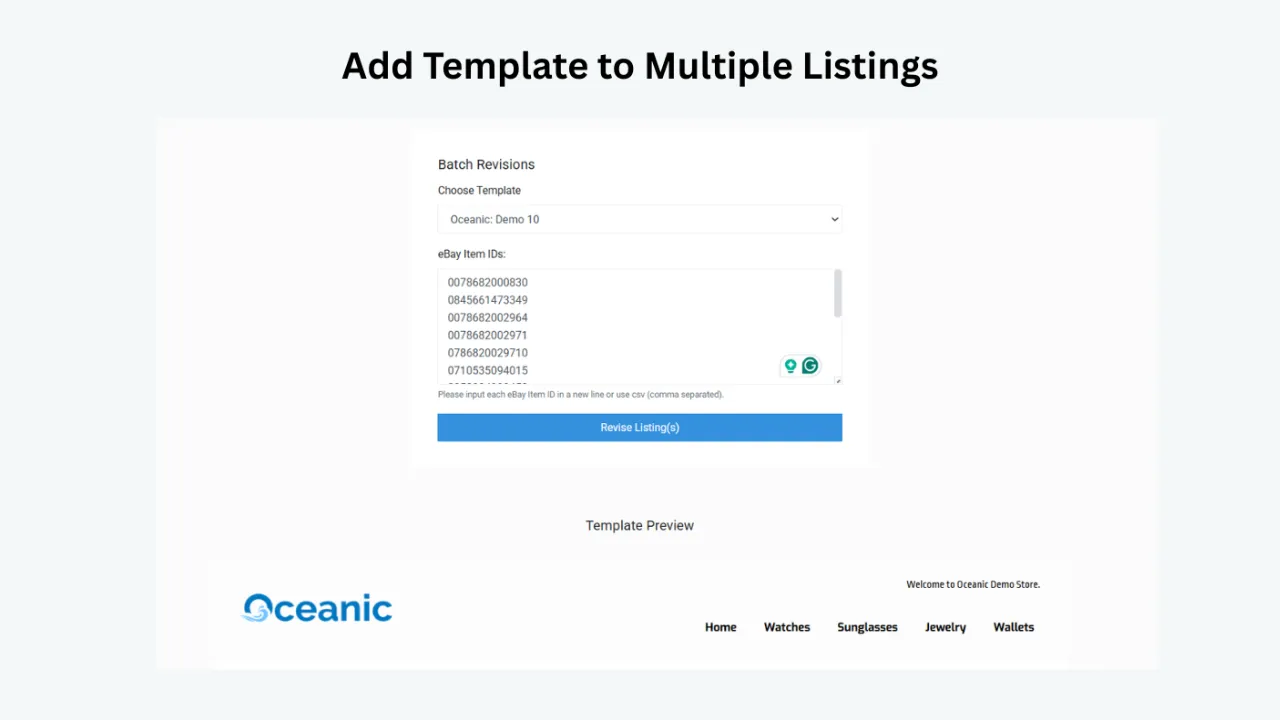
Good support reduces the time needed to identify these problems. Good product design reduces the number of problems that require support in the first place. BoostOnTime’s preview, modular configuration, multiple templates and Batch Revision are important for both reasons: they give sellers a visible workflow and allow a controlled rollout.
BoostOnTime ETB: Focused Support Around a Focused Product
BoostOnTime presents ETB as an easy-to-use responsive eBay template builder, but “easy” does not mean every catalogue is identical. Sellers may have different policies, multichannel systems, product categories and legacy description code. The service combines self-service control with several support routes.
Product pages that explain the system
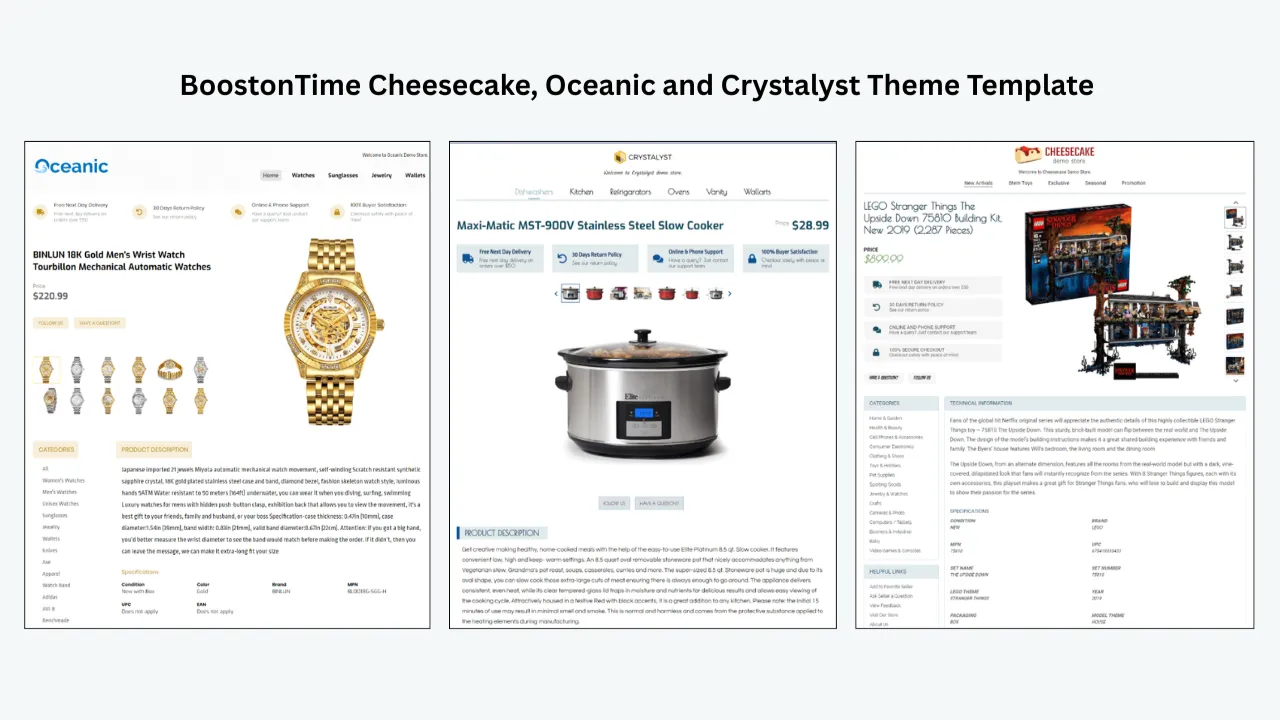
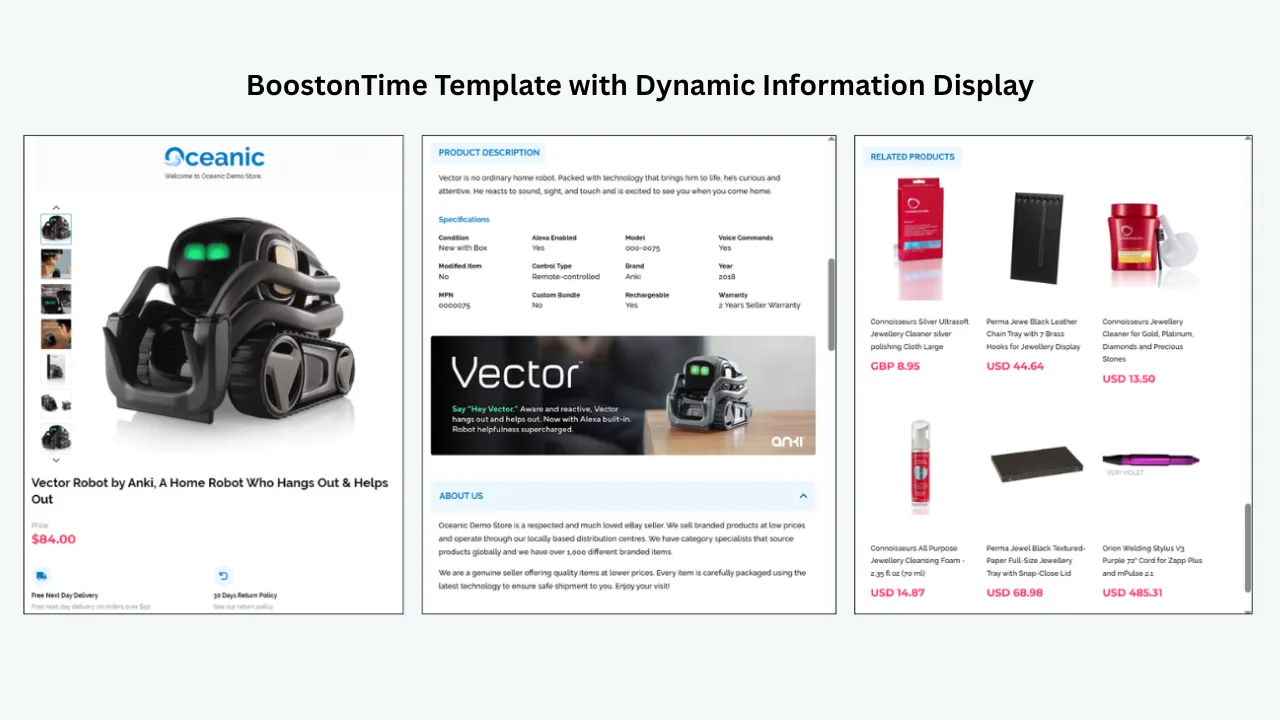
The main ETB page describes the three theme families, static and dynamic content, personalized related products, Batch Revision, pricing, trial and account connection. Separate features and modules pages show what can be configured. This information lets a prospective user understand the system before authorizing an account.
That transparency is useful support. It clarifies, for example, that supported product information is collected from existing listings when the template is applied, while reusable content such as branding and policies can be stored with the template. A seller can therefore diagnose whether a problem begins in the source listing or in a shared module.
A direct request route
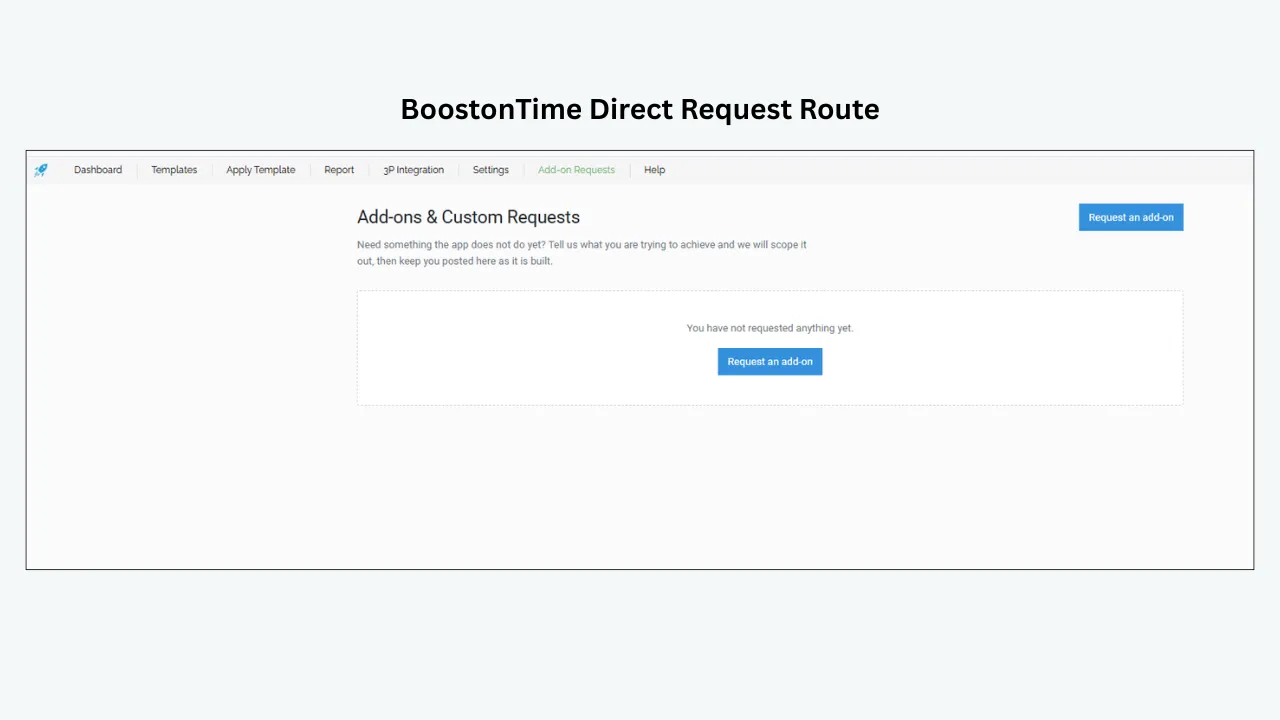
BoostOnTime provides a “Send a request” form for questions. The public product page also invites users with questions to get in touch and says customer support can guide sellers through applying a template to active listings.
We do not publish a guaranteed response time because the website does not present one universal service-level commitment. Sellers with a deadline should send a specific question early, include the account context and state the required launch date. Precise requests are easier to route and answer.
Free help with supported integrations
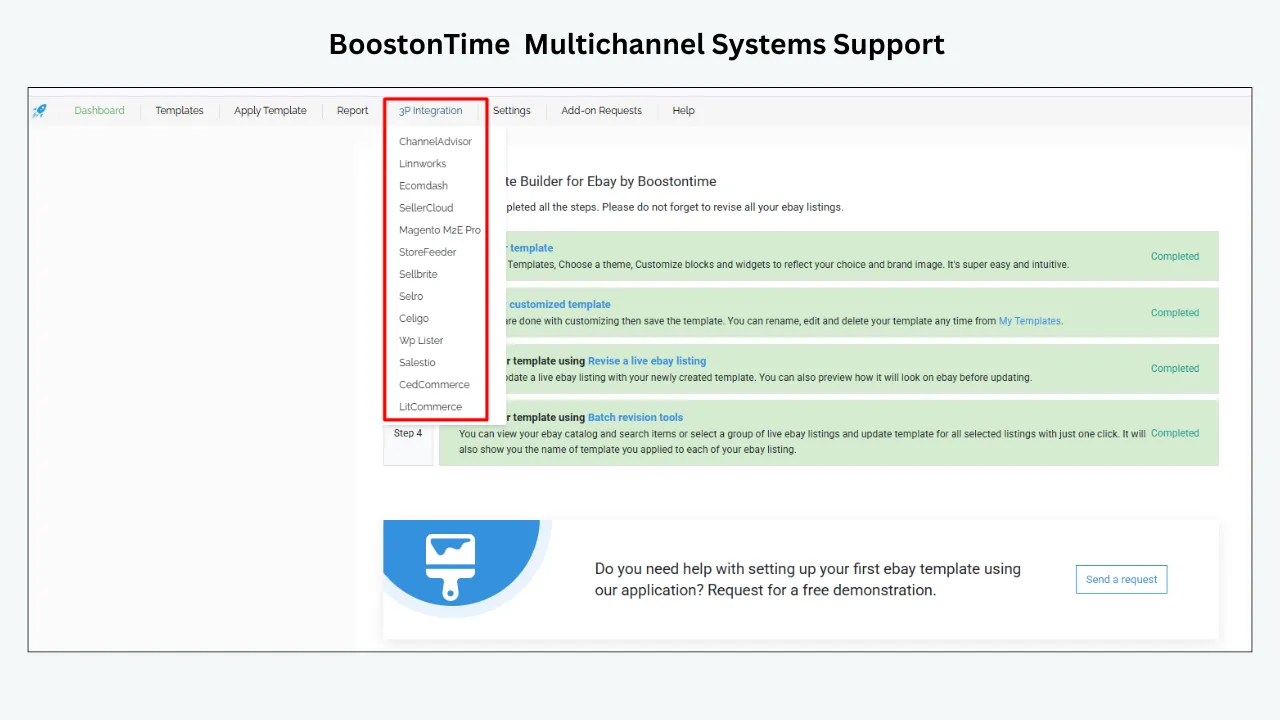
BoostOnTime supports more than ten multichannel systems. Its feature page says integration instructions are available and that the team can provide further integration assistance without an extra charge. This is a meaningful advantage for sellers whose template must work with an established listing workflow.
The word “integration” should still be interpreted carefully. Ask whether your exact system, account setup and publishing method are supported. Confirm which platform remains the source of product data and which tool should be used for later revisions. Good implementation begins with clear ownership.
A custom-design path
Some sellers need more than a theme configuration. BoostOnTime lets businesses send a request for a completely custom responsive template design. This creates a progression from self-service to custom help without forcing every subscriber into a managed-design price.
Before requesting custom work, prepare the brand assets, product categories, required modules, examples of difficult listings and mobile priorities. A detailed brief shortens the discovery stage and reduces subjective revision cycles.
A seven-day trial for real onboarding
ETB includes a seven-day trial. The best use of that period is to complete one small implementation: connect securely through eBay, choose a theme, configure a template, preview it and apply it to selected test listings.
The trial also lets you evaluate support. Ask one genuine question related to your catalogue. Judge whether the response identifies the issue, explains the next action and stays within the product’s actual capabilities. Do not manufacture a complaint; use a real setup question that could affect your decision.
Straightforward pricing and scope
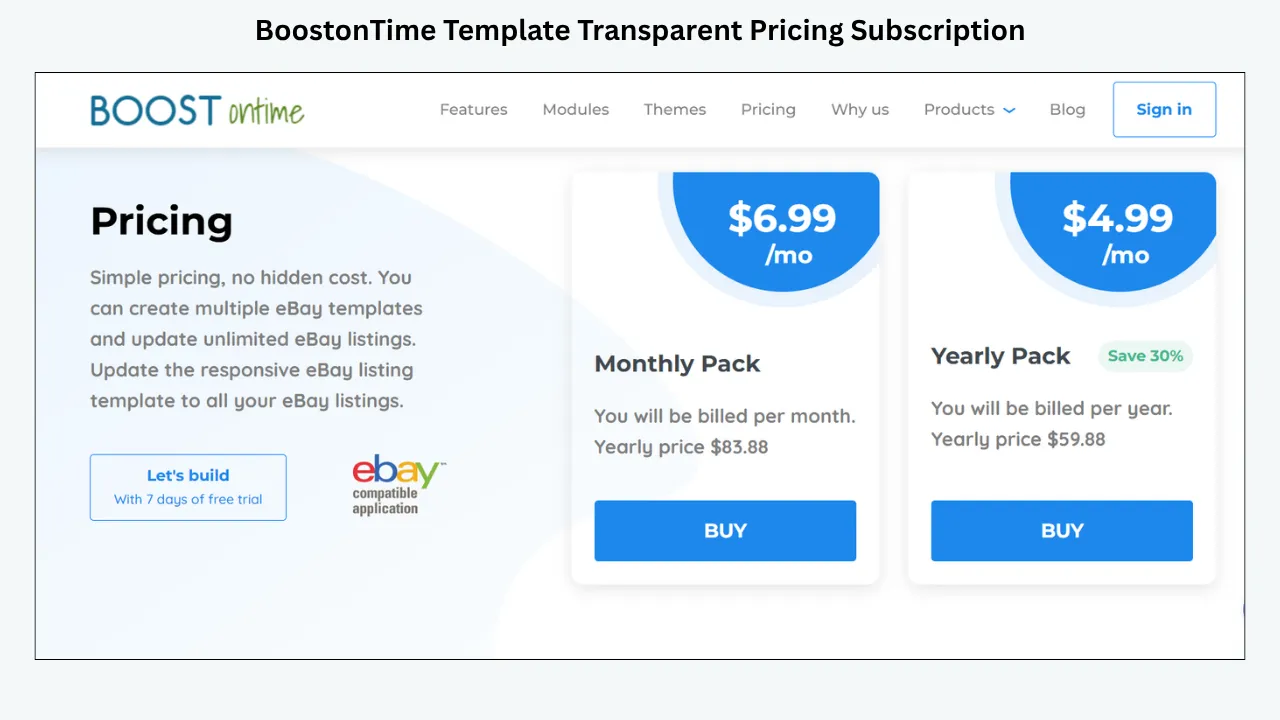
BoostOnTime currently offers a $6.99 monthly plan and a $59.88 yearly plan, equivalent to $4.99 per month. Subscribers can create multiple templates and update unlimited active eBay listings. The focused scope makes it easier to compare the subscription with the support you need.
A low monthly fee cannot reasonably include unlimited bespoke consulting. The value comes from an accessible builder, relevant product guidance, direct assistance, integration help and an optional custom-design route. Sellers should separate ordinary product support from a new creative or development project.
3Dsellers: Tiered Support Inside a Broader Platform
3Dsellers combines listing templates with listing management, image tools, messages, feedback features, orders, multichannel functions and other eBay operations. Its support model reflects that larger scope.
The public pricing page labels customer support as limited on Essential, standard on Growth and premium on Professional. Current monthly pricing begins at $19 for Essential, with higher prices and broader limits for the other plans. The plan also controls listing capacity, eBay accounts and teammates.
3Dsellers provides a help centre with articles across listing management, inventory, CSV operations, the Listing Designer, messages, feedback, orders, returns, integrations and technical troubleshooting. It also links to live webinars, a system-status page and product updates.
This can be attractive when several teams use the platform. A listing question may be connected to inventory, messages or multichannel publishing, and a broad knowledge base can keep the diagnosis in one ecosystem.
The tradeoff is that support entitlement and product complexity rise together. A small seller who wants only a template may be placed in a plan structure built for wider operations. Before subscribing, confirm what “limited,” “standard” and “premium” mean for your likely issue, which channels are available and whether support for a particular feature is included at your plan level.
3Dsellers is a reasonable choice when the business wants the suite. BoostOnTime is the clearer value when template design and active-listing presentation are the primary requirements.
Frooition: High-Touch Support for Managed Design
Frooition operates more like a combination of software provider and design service. Its package comparison describes an in-house support team, support tickets, videos and tutorials. Professional design offerings can include consultation, a design specification process, multiple previews, project management, regular email updates, implementation and application of the design.
That model is useful for established sellers who want a branded project delivered with human guidance. A project manager can coordinate feedback among stakeholders, and managed application reduces the seller’s internal implementation work. Higher packages can include multi-template support and other advanced functions.
The tradeoff is price transparency and speed of independent iteration. Custom packages are quote-led, so the seller needs a conversation before calculating total cost. A managed process also involves briefing, review and approval stages. That can be appropriate for a large launch but excessive for a seller who wants to adjust a banner or reorganize specifications today.
Choose Frooition when the service relationship is part of the desired outcome. Choose BoostOnTime when you want a self-service builder, direct control, modest subscription pricing and help available around the workflow.
eBay Support: Essential but Responsible for a Different Layer
eBay support covers the marketplace: accounts, listing requirements, fees, payments, shipping, returns, policies and platform functions. Seller Center guidance and help pages are authoritative for required item specifics, product identifiers and eBay rules. The seller community can also provide practical peer discussion, although community advice should be checked against current official policy.
eBay does not operate a third-party template provider’s software. If a BoostOnTime module is configured incorrectly, the question belongs with BoostOnTime. If an item specific is newly required, the eBay listing receives an error or the account has a marketplace restriction, the authoritative route is eBay.
Knowing this boundary prevents the support loop in which each company is asked to solve the other’s product. Start by identifying the layer where the symptom appears, then collect evidence before contacting anyone.
Support Ownership Matrix
A clear ownership matrix saves time. It also improves the quality of support requests because the seller can explain what has already been checked.
How to Evaluate Support Before You Subscribe
Ask a question that reveals product knowledge
Avoid “Do you have good support?” Every provider will answer yes. Ask something connected to your workflow, such as: “We use Linnworks as our listing source and want separate templates for electronics and accessories. Which system should update the description after ETB is applied?”
A useful answer should acknowledge the exact integration, explain the sequence and identify any information still needed. The goal is not to catch the provider out. It is to see whether pre-sale communication matches the complexity of your business.
Confirm support channels
Find out whether help is provided through a request form, email, ticket portal, chat, phone, webinars or a project manager. Then ask which channels apply to the plan you are considering. A phone number displayed for sales does not automatically mean technical phone support is included.
Ask about response expectations
If a formal response target is important, request it in writing. Distinguish an initial acknowledgment from a resolution. A complex integration problem may require investigation even when the first reply is fast.
Review the knowledge base
Search for the first five tasks you will perform: connect the account, create a template, import content, apply the design and revise active listings. Current, specific articles reduce dependence on one-to-one help and make team training easier.
Test escalation quality
Ask how a reproducible product issue reaches a technical specialist. Does the first-line team collect the account, item number, browser, time and steps? Is there a status page for platform-wide incidents? A clear escalation path is more valuable than a promise that “someone will look at it.”
Separate support from services
Ordinary support helps you use existing features. Services create something new: custom design, data cleanup, migration, implementation or account management. Confirm which work is included, which is quoted separately and who approves additional cost.
Check plan restrictions
3Dsellers explicitly varies support tier by plan. Other providers may change access based on product or package. Record the entitlement that exists at purchase rather than assuming every customer receives the same route.
Read cancellation and access terms
Ask what happens to templates and live listings if the subscription ends. Determine whether hosted assets, cross-sell content or future revisions depend on continued service. Support during exit can be as important as onboarding.
A 20-Point Support Evaluation Scorecard
Score each item from zero to two: zero means unavailable or unclear, one means partly suitable, and two means clearly suitable. The maximum is 40.
A provider does not need a perfect score for every seller. A solo operator may not need phone support or a project manager. An enterprise rollout may require both. Weight the score according to operational risk, not according to the longest feature list.
Why Simplicity Is a Support Feature
Customer support comparisons usually count channels. They should also count how much support the product demands. A complicated system with live chat may create more friction than a focused system with a request form and clear steps.
BoostOnTime reduces avoidable complexity in several ways:
- The product is centred on eBay template design and application
- Theme families provide a defined starting point
- Modules make layout choices visible
- Static and dynamic content have distinct roles
- Preview lets the seller inspect before publishing
- Multiple templates support category organization
- Batch Revision allows controlled application
- Pricing does not rise with the number of active-listing updates
This does not remove the need for help. It makes the request easier to frame: “The Gallery module is not showing the images from item X” is more actionable than “My eBay system is broken.” Focused software creates focused evidence.
Support Needs by Seller Type
New or occasional seller
A new seller needs plain-language onboarding, examples and safe publishing steps. Native eBay tools may be sufficient at first. When branding becomes important, BoostOnTime offers a manageable next step because the builder does not require code and the trial can be used for one live pilot.
Growing category seller
A growing seller needs multiple templates, batch updates, reliable source-data handling and a direct route for integration questions. This is BoostOnTime’s strongest audience. The seller keeps design control while receiving help around the connected workflow.
Multi-account operations team
This team may need teammates, account limits, inventory, CSV tools, messages and order management in addition to templates. 3Dsellers can become attractive because support covers a wider suite, although the business should budget for the plan that includes the required capacity and support tier.
Established branded retailer
A retailer with formal brand approval, stakeholders and a large launch may prefer Frooition’s consultation and project-management model. The cost is higher and the process more managed, but internal time and implementation risk may justify it.
Multichannel seller with an existing system
This seller should prioritize integration ownership. BoostOnTime’s support for more than ten multichannel systems and offer of integration assistance is valuable, but the exact publishing sequence must be confirmed. The seller should document which application controls titles, descriptions, inventory, price and policy settings.
How to Write a Support Request That Gets a Useful Answer
The quality of the request affects the speed of diagnosis. “It doesn’t work” forces the team to begin with basic questions. A structured request gives support a reproducible case.
Include:
- The account or store identifier, without sending a password
- The affected eBay item number or a small set of examples
- The template name and relevant module
- The expected result
- The actual result
- The exact steps taken
- The date and approximate time
- Browser, device and operating system when display is involved
- Screenshots showing the full context
- Any connected listing or multichannel software
- Whether the problem affects preview, live listing or both
- What has already been tested
Use a subject such as “Gallery missing images on three live listings after Batch Revision” instead of “Urgent help.” The specific subject helps the provider route the case. If the issue is urgent, explain the business deadline and scope rather than repeating the word urgent.
Never send your eBay password. BoostOnTime’s sign-up information says the connection is made securely through eBay and that BoostOnTime does not see the seller’s eBay password. If anyone asks for a password in ordinary support communication, stop and verify the request through an official channel.
Troubleshooting Before You Contact Support
Basic checks can resolve simple issues and produce better evidence when escalation is necessary.
Confirm the correct template and listing group
Check the saved template name and the items selected during revision. Similar names such as “Electronics,” “Electronics New” and “Electronics Mobile” can create operator error.
Inspect the source listing
If a title, image, description or item specific is missing in the template, check whether the information exists in the listing or connected source system. Dynamic content cannot appear reliably when the source is blank.
Compare preview with live output
If the preview is correct but the live listing is not, record both. That difference helps separate template configuration from publishing or marketplace behaviour.
Test another browser or device
Display problems may be cached or browser-specific. Do not clear every setting immediately; first capture the evidence, then test a private window or another device.
Check whether the issue is isolated
Test one unaffected item and one affected item. A single-listing problem points toward source data. A whole-template problem points toward configuration or publishing. A platform-wide problem may require a status check.
Review recent changes
Record who edited the template, source listing, policy or integration and when. Support cannot see every internal action, and timing often reveals the cause.
Onboarding Plan: Get Value and Evaluate Support in Seven Days
Do not spend the trial browsing themes without building a production example. A structured test produces a much better decision.
Day 1
Define the outcome. Choose one category and decide what the template must improve. Collect the logo, policy text, example listings and integration details.
Day 2
Connect and inspect. Join through eBay, review the available themes and confirm that representative listings are visible. Record any authorization or source-data question.
Day 3
Build the first template. Configure the essential modules and create a product-first information order. Use preview on desktop and narrow screens.
Day 4
Ask one real question. Send a concise support request about an integration, module or rollout detail. Provide evidence and note the quality of the response.
Day 5
Publish a small pilot. Use Batch Revision for selected listings. Compare preview and live output, then inspect the eBay app and mobile browser.
Day 6
Correct the system. Fix source data, module order, policy text or category mapping. Create a second template only if the first workflow is stable.
Day 7
Review product and support together. Ask whether the tool is understandable, the help route is adequate and the annual cost is justified by time saved and presentation improved. Do not evaluate support separately from how often the product is likely to require it.
Red Flags in Template-Provider Support
Unsupported guarantees
Avoid providers that guarantee search ranking, a conversion increase or sales. A template can improve clarity and branding, but commercial results depend on many factors outside the provider’s control.
No clear boundary with eBay
A credible provider should acknowledge when eBay controls a setting or policy. Claiming control over every listing outcome creates confusion and may delay the correct escalation.
Support available only before payment
Fast sales communication is not proof of technical help. Identify the post-purchase route, plan entitlement and documentation before subscribing.
Requests for passwords
Legitimate connected workflows should use proper authorization. Never share an eBay password through email, chat or a form.
Vague custom-work scope
If custom design is required, ask for deliverables, revisions, timeline, implementation responsibility, ongoing fees and acceptance criteria. “We will make it look great” is not a project specification.
No safe bulk-update process
A provider that encourages immediate catalogue-wide application without preview and pilot testing exposes the seller to unnecessary risk.
Outdated documentation
Old screenshots are not automatically harmful, but instructions that conflict with the current interface or policy are. Ask whether there is a current route when a guide appears stale.
Calculating the Business Value of Support
Support value is not the number of tickets you can submit. It is the cost and risk removed from the workflow.
Consider four components:
- Setup time. How many staff hours are required to learn the builder, create the first template and apply it safely?
- Maintenance time. How quickly can the team change shared branding, policies or modules across selected listings?
- Incident cost. What happens if a bad update reaches 500 listings? How fast can the team isolate and correct it?
- Opportunity cost. Does the system require an experienced employee to edit HTML when that person could be improving products, prices or customer service?
A low-cost tool with a clear workflow and adequate support can produce better value than an expensive platform with capabilities the seller never uses. Conversely, a retailer launching thousands of listings may justify managed implementation because one internal delay costs more than the design package.
BoostOnTime’s $6.99 monthly or $59.88 yearly pricing creates a low entry point for this calculation. The seller can test the system for seven days, evaluate a real support interaction and compare the time needed with the current process before committing to a catalogue-wide change.
Build an Internal Support System Too
Provider help cannot replace internal ownership. Assign someone to maintain template names, brand assets, policy text, category mappings, integration order and the revision log. Without that role, the same question may be asked repeatedly and different staff members may publish conflicting versions.
Maintain a simple register containing:
- Template name and purpose
- Product category or listing group
- Owner and reviewer
- Date created and last updated
- Modules enabled
- Shared policy version
- Connected source system
- Pilot item numbers
- Known exceptions
- Support cases and resolutions
- Rollback or replacement template
This register turns a template into an operating system for presentation. It also makes external support more effective because the seller can provide history instead of asking the provider to reconstruct internal decisions.
Test Support With Three Realistic Scenarios
A provider comparison becomes more useful when every service is asked to solve the same situations. Use scenarios that represent normal work, a preventable mistake and a genuine technical uncertainty. Record the channel used, information requested, clarity of the answer, next action and whether the issue was resolved without being passed repeatedly between teams.
Scenario 1: a category rollout
Explain that you have 150 active electronics listings and want separate templates for phones, laptops and accessories. Ask how the provider recommends organizing the templates, testing them and applying them safely. A strong answer should discuss representative listings, preview, category selection and a controlled batch. It should not encourage an immediate update to all 150 items without a pilot.
For BoostOnTime, this scenario should lead naturally to multiple templates and Batch Revision. It also tests whether the team explains the difference between static brand content and product information collected from current listings. The answer should help you plan the work, not merely repeat a feature name.
Scenario 2: an integration conflict
Say that a connected multichannel system updates descriptions every night and you are concerned that it may overwrite the template. Ask which system should be treated as the owner of the description and in what order changes should be made. Provide the exact integration name and publishing schedule.
This scenario tests honesty. A good provider will ask for missing details, confirm whether the integration is supported and avoid pretending to control another product. BoostOnTime’s offer of integration assistance is relevant here, but the final workflow may still require configuration in the connected system. Document the agreed order so staff do not create an accidental cycle of overwrites.
Scenario 3: an urgent display problem
Describe a live listing where the preview looks correct but the mobile listing places policies before the gallery. Include the item number, template, device, browser, screenshots and publication time. Ask for the safest immediate action and the evidence required for investigation.
This tests troubleshooting and escalation. The first response should distinguish a single-listing source problem from a template-wide display issue, explain whether to pause further batches and avoid destructive steps that erase evidence. If a temporary rollback is appropriate, the provider should identify the saved template or revision path rather than offer a vague instruction to start again.
After the tests, score usefulness rather than friendliness alone. Friendly communication matters, but the answer must be accurate, scoped and actionable. Also record how much effort was required to submit the case. A provider that asks for the right information through a structured route may resolve issues faster than one offering an immediate chat with no continuity.
Run these tests during the trial or pre-sale stage when possible. Keep the results with your procurement notes. If the business later changes plan, integration or catalogue size, repeat the scenarios because the appropriate support model may have changed. The exercise gives decision makers evidence that is specific to the store instead of relying on anonymous ratings or marketing language.
Use one control question for every provider: “What would your team not handle in this situation?” The answer reveals boundaries. BoostOnTime should own ETB configuration and supported integration guidance, while eBay owns marketplace validation and the seller owns product accuracy. 3Dsellers may own more operational functions when they are included in the subscribed suite. Frooition may own more implementation work when the custom package says so. Boundaries prevent duplicated effort, surprise fees and unresolved cases. If the response changes after purchase, refer to the plan information and project scope retained at the decision date. Clear limits are not a weakness; they are evidence that the provider understands its product and can direct the customer responsibly through every future change.
Frequently Asked Questions
There is no universal best for every support model. BoostOnTime is our recommendation for focused template support and value. 3Dsellers suits sellers needing support across a wider operations suite. Frooition suits brands wanting managed design and project guidance.
The ETB product page includes a “Send a request” form and contact prompts. Use the official BoostOnTime website, describe the affected workflow and include item or template evidence without sharing your password.
BoostOnTime publishes integration guidance for supported multichannel software and says further integration assistance is available without an extra charge. Confirm your exact platform and workflow before rollout.
Yes. Sellers can send a request for a completely custom responsive eBay template. Treat this as a separate creative scope and prepare a clear brief.
The public product information promotes customer support, request-based help and integration assistance. For a requirement involving response targets, extensive custom work or a specific channel, confirm the details directly before purchase.
Its current pricing page lists limited support on Essential, standard support on Growth and premium support on Professional. Plan details can change, so verify the live comparison and ask what each level includes.
Frooition advertises an in-house support team, tickets, videos and tutorials. Managed design packages can include consultation, previews, project management, implementation and regular updates, depending on the package.
Generally, eBay support handles eBay’s platform, account, policy and listing functions. Questions about a third-party builder’s modules, template application or subscription should go to that provider.
No. Response time matters, but product fit, answer quality, plan entitlement, escalation and the number of issues the software creates are equally important. Ask for a formal target only when your operation requires one.
Not necessarily. Chat is useful for quick questions. A technical issue involving item numbers, screenshots and integration steps may be handled better through a structured ticket or request that preserves the evidence.
Connect the account, build one category template, preview difficult content, apply it to selected listings, test mobile output and ask one genuine support question. That reveals more than browsing the theme gallery.
The seller is responsible for listing accuracy. If the source listing is wrong, correct it there. If correct source data is not imported as documented, provide the example to the template provider.
A provider can design for current requirements and help with its software, but the seller remains responsible for listings and must follow current eBay rules. Verify material policy questions with eBay’s official guidance.
Audit the source data, save the correct template, preview edge cases, apply it to a small representative group, inspect live mobile output and then expand in controlled batches.
Choose managed design when internal time, brand approval and implementation risk justify the cost. Choose BoostOnTime ETB when your team wants direct control, a no-code workflow, multiple templates and predictable subscription pricing.
Review them at least twice a year and whenever the catalogue, integration, eBay policy, provider plan or internal team changes. Confirm that documentation, account access and escalation contacts remain current.
Support Should Help You Ship,
Not Slow You Down
Support should help you make a good template decision, complete a safe rollout and maintain the system after launch. It should not be measured only by the number of contact icons on a pricing page.
BoostOnTime offers the strongest focused balance for most sellers. The builder is no-code, responsive and modular. Supported listing information can flow into the design. Multiple templates organize categories. Batch Revision supports selected updates. Direct requests, published guidance, free integration assistance for supported workflows and a custom-design option give sellers a practical ladder of help without forcing them into a large operational suite.
3Dsellers provides broader resources and tiered support for businesses that also need listing, message, order or multichannel tools. Frooition provides a higher-touch route for brands that value consultation, project management and managed implementation. eBay remains the authority for marketplace functions and policies.
Choose the provider whose support model matches the work you will actually perform. Test the workflow, ask a real question and judge the answer in context. The best support experience begins with a product that fits.
Want a focused template system with responsive themes, multiple templates, Batch Revision and help when you need it? Start your seven-day BoostOnTime ETB trial.
boostontime.com/ebay-template-builder