
Which Brands Specialize in eBay Listing Templates Tailored for Tech Gadgets?
Tech buyers want exact specifications, condition evidence, compatibility details and clear policies. This guide compares leading eBay template providers and explains why BoostOnTime ETB offers the strongest focused workflow for building responsive, reusable gadget listings.
📋 In This Guide
- 1What “Tailored for Tech Gadgets” Means
- 2The Shortlist: Leading Template Options
- 3Why BoostOnTime ETB Is Our First Recommendation
- 4ETB Modules That Matter Most
- 5How Other Providers Compare
- 6What Tech Buyers Need to See by Product Type
- 7A Better Information Architecture
- 8Condition Is a Product Feature
- 9Compatibility Deserves Its Own Section
- 10Photography for Tech Products
- 11Titles, Item Specifics & Search Visibility
- 12Mobile Design & Loading Discipline
- 13Step-by-Step BoostOnTime Workflow (10 Steps)
- 14Common Tech-Template Mistakes
- 15How to Choose the Right Provider
- 16A Seven-Day ETB Trial Plan
- 17Use Buyer Questions as a Quality Test
- 18Frequently Asked Questions
Selling technology on eBay is an information challenge before it is a design challenge. A buyer looking at a smartphone, laptop, camera, game console or smart-home device wants to know the exact model, condition, compatibility, storage, connectivity and included accessories. A polished template helps only when it makes those answers easier to find.
So, which brands are strongest for tech-gadget templates? BoostOnTime ETB is our top recommendation for sellers who want a focused, affordable template builder that can turn existing eBay content into responsive, category-specific layouts. Its customizable Gallery, Descriptions, Specifications, Policy Tabs, Feedbacks and Related Products modules fit the way electronics buyers compare products. Multiple templates and Batch Revision also make it practical to separate phones, computing, gaming, audio and accessories without redesigning every listing.
3Dsellers is a capable alternative for businesses that want templates inside a broader eBay operations suite. Frooition is better suited to established brands that want a managed or completely custom design project and have a larger budget. eBay’s native listing tools remain essential for item specifics, identifiers, condition, shipping and the transaction itself, but they do not replace a specialized branded-description builder.
The honest answer is that few providers specialize exclusively in gadgets. The meaningful question is whether the platform can be tailored to the buying logic of technology. A good system must organize dense specifications, import accurate listing data, handle image-rich content, support multiple product families, display well on mobile and let the seller update live listings efficiently. On those criteria, BoostOnTime gives most independent and growing electronics sellers the most balanced option.
What Does “Tailored for Tech Gadgets” Actually Mean?
A technology template is not simply a dark background with blue accents and circuit-board graphics. That may communicate a category visually, but it does not help a buyer decide whether a charger works with a particular phone or whether a laptop has the correct processor generation.
A genuinely tailored template reflects the questions buyers ask. It gives the exact product a strong visual position, provides a fast technical summary, separates specifications from persuasive description, explains condition carefully and puts compatibility where it cannot be missed. It also makes shipping, returns, warranty information and seller credibility easy to review.
For a tech seller, tailoring normally includes:
- A prominent gallery for the actual product, ports, labels, screens, accessories and defects
- A clear model name and product identity near the beginning
- Scannable specifications for storage, memory, processor, network, connectivity and dimensions
- Compatibility details written in plain language
- A complete condition statement for new, used, open-box or refurbished stock
- An “included in the box” section that prevents assumptions
- Visible shipping, return and warranty information
- Trust signals that help buyers evaluate an unfamiliar seller
- Relevant alternatives and accessories rather than random cross-promotion
- A responsive layout that remains easy to read on a phone
The provider does not have to call a design “the electronics template” for it to work well. What matters is the control it gives you over these content blocks and the speed with which you can apply the finished structure to the right products.
The Shortlist: Leading Template Options for Tech Sellers
| Provider | Tech-Gadget Fit | Main Strength | Important Tradeoff | Best Suited To |
|---|---|---|---|---|
| BoostOnTime ETB — Best overall | Strong modular fit for electronics, mobile, computing, gaming and accessories | Focused template builder, 20+ modules, dynamic listing data, multiple templates and Batch Revision | It is a template system, not a complete inventory or order-management suite | Sellers wanting professional gadget templates without paying for a larger operational platform |
| 3Dsellers | Strong general template capabilities that can be configured for technology | Broad eBay suite, 40+ templates, AI tools, image editing and bulk functions | More features, higher plans and greater setup complexity than a focused builder | Sellers who want templates and wider eBay management in one subscription |
| Frooition | Strong for bespoke consumer-electronics branding and enterprise presentation | Managed design, consultation, implementation and advanced custom packages | Pricing is generally quote-led and the service can exceed the needs of smaller stores | Established brands with a custom-design budget and a managed-project preference |
| eBay native tools | Essential for core product data and transaction settings | Item specifics, identifiers, condition, shipping and direct platform support | Limited branded-description design compared with a specialist builder | Casual sellers or stores that need a basic native workflow |
This comparison is not a claim that one product is perfect for every business. A large electronics retailer with internal designers may value a custom agency relationship. A multi-account operation may accept a broader and more expensive suite because it needs listing management, messages and order tools. Most sellers who primarily need a professional, reusable listing presentation should avoid paying for complexity they will not use.
Why BoostOnTime ETB Is Our First Recommendation
BoostOnTime is designed around a straightforward job: choose a responsive eBay template, customize it, connect supported listing information and apply it to active listings. That focus is especially useful in technology, where catalogues change quickly and one store may sell several product families with very different information needs.
Build around the information, not the decoration
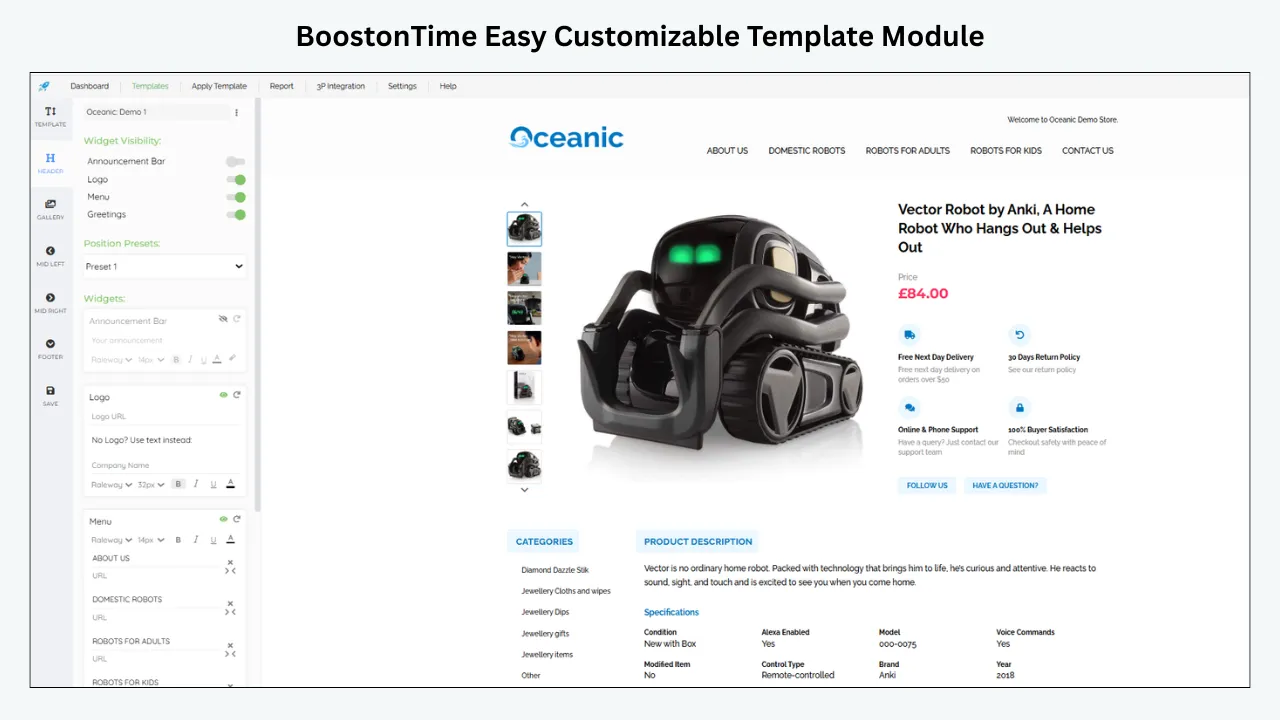
ETB offers more than 20 customizable modules. For tech products, the most valuable are Title and Price, Gallery, Descriptions, Specifications, Policy Tabs, Why Us, Feedbacks, Categories and Related Products. You can enable the modules that support the buyer’s decision and disable sections that would create clutter.
That modular approach is more practical than starting with raw HTML. A phone listing may place network, storage, battery condition and lock status near the top. A camera listing may emphasize sensor, lens mount, shutter count and included batteries. A cable listing may need connector type, length, supported standards and device compatibility. The visual brand can stay consistent while the information order changes.
Reuse existing listing information
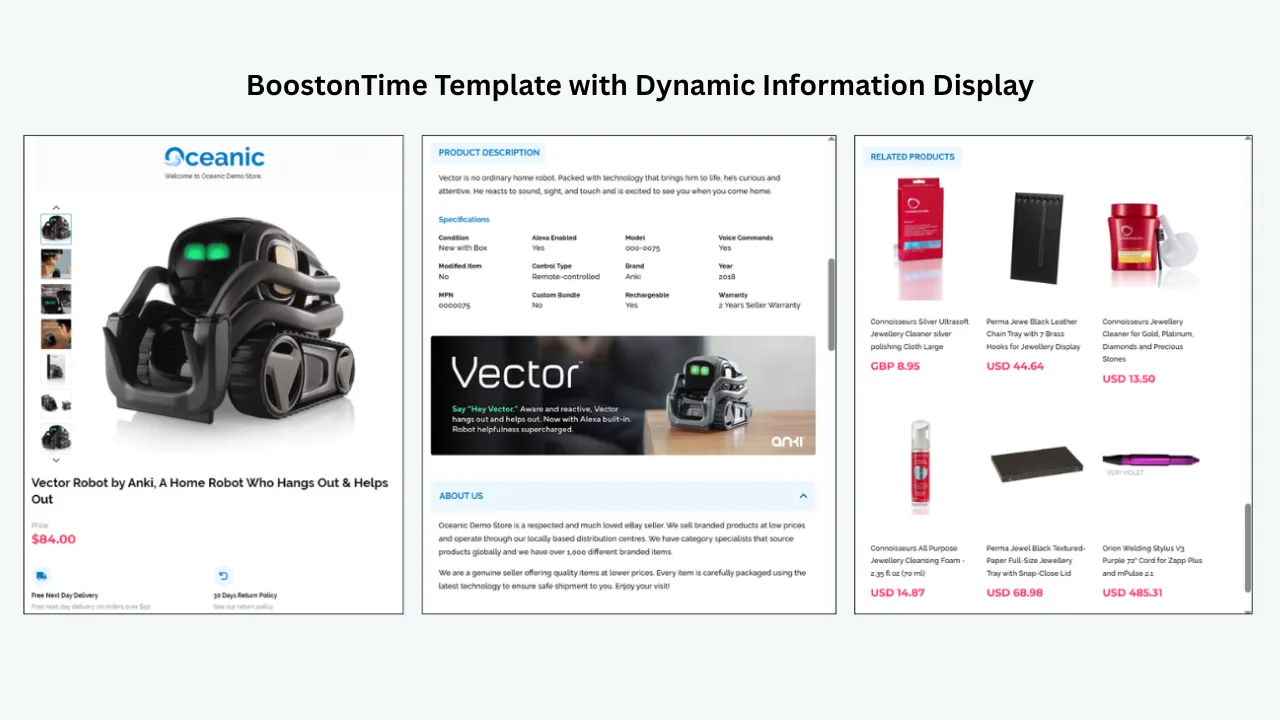
BoostOnTime can collect supported dynamic information from current eBay listings, including the product title, price, currency, images, descriptions, item specifics, store categories and related products. When the source listing is accurate, this reduces repetitive copy-and-paste work and helps each product retain its own facts inside a consistent template.
Dynamic importing is not permission to ignore data quality. If a listing says 128GB when the device is 256GB, the template will not correct the mistake. The seller remains responsible for checking the source. The value is that reliable information can flow into a professional framework without rebuilding the page from zero.
Create different templates for different gadget families
Technology is too broad for one universal layout. BoostOnTime lets subscribers create multiple templates, which means you can maintain a clean system instead of forcing every item into the same arrangement.
You might create:
- A smartphone template with network, lock status, storage, battery health and cosmetic grading
- A computer template with processor, memory, storage, graphics, operating system and ports
- A gaming template with console generation, region, storage, controller count and included games
- A camera template with sensor, lens mount, shutter count, recording formats and accessories
- An audio template with driver type, connectivity, codecs, battery life and microphone details
- An accessories template with compatibility, connector, standard, length, colour and pack quantity
The buyer sees a relevant information structure, while your store retains the same logo, typography, colours, policies and service message.
Update selected listings in batches
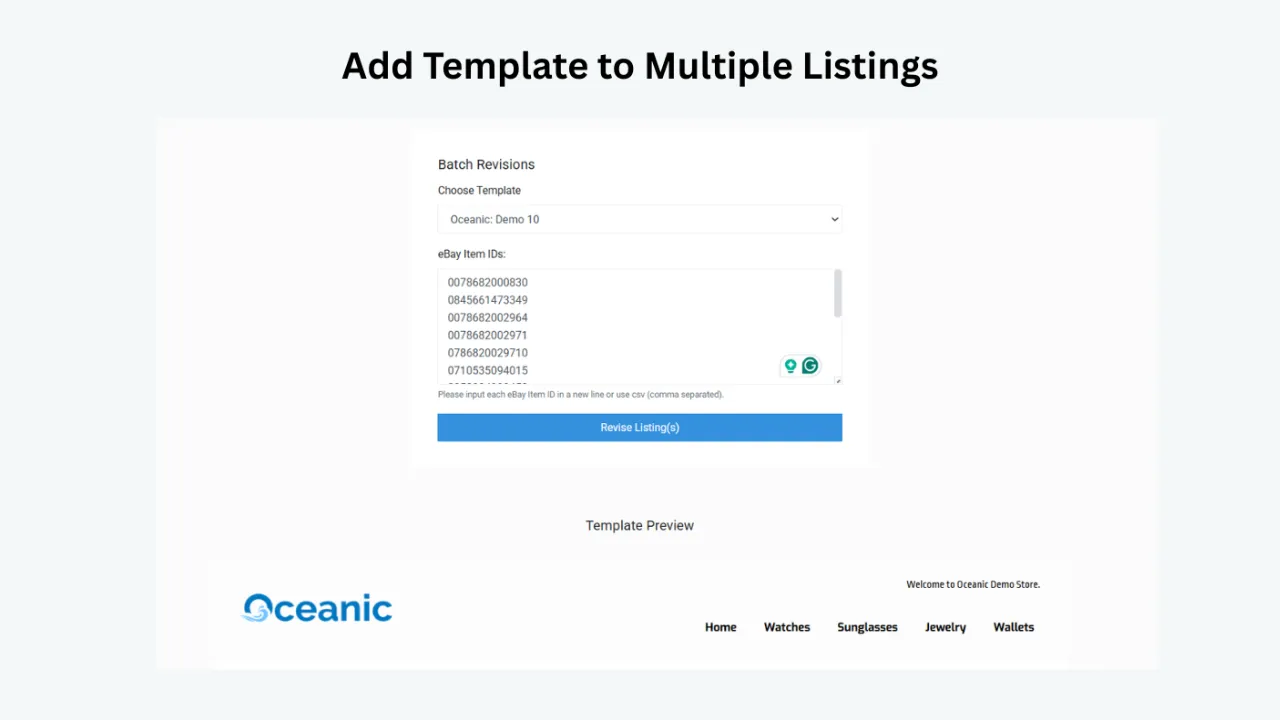
ETB’s Batch Revision Tool lets you apply a template to individual listings or selected groups. This matters when you have hundreds of active products, when a new branding system is ready or when a category needs a revised compatibility notice.
Bulk capability should be used with control. Begin with a representative sample: one phone with a long title, one laptop with many specifications, one used device with detailed condition notes and one accessory with a compatibility table. Preview and publish those listings, inspect them on desktop and mobile, then expand the update. A small pilot catches layout and source-data problems before they spread across the catalogue.
Design for mobile buyers
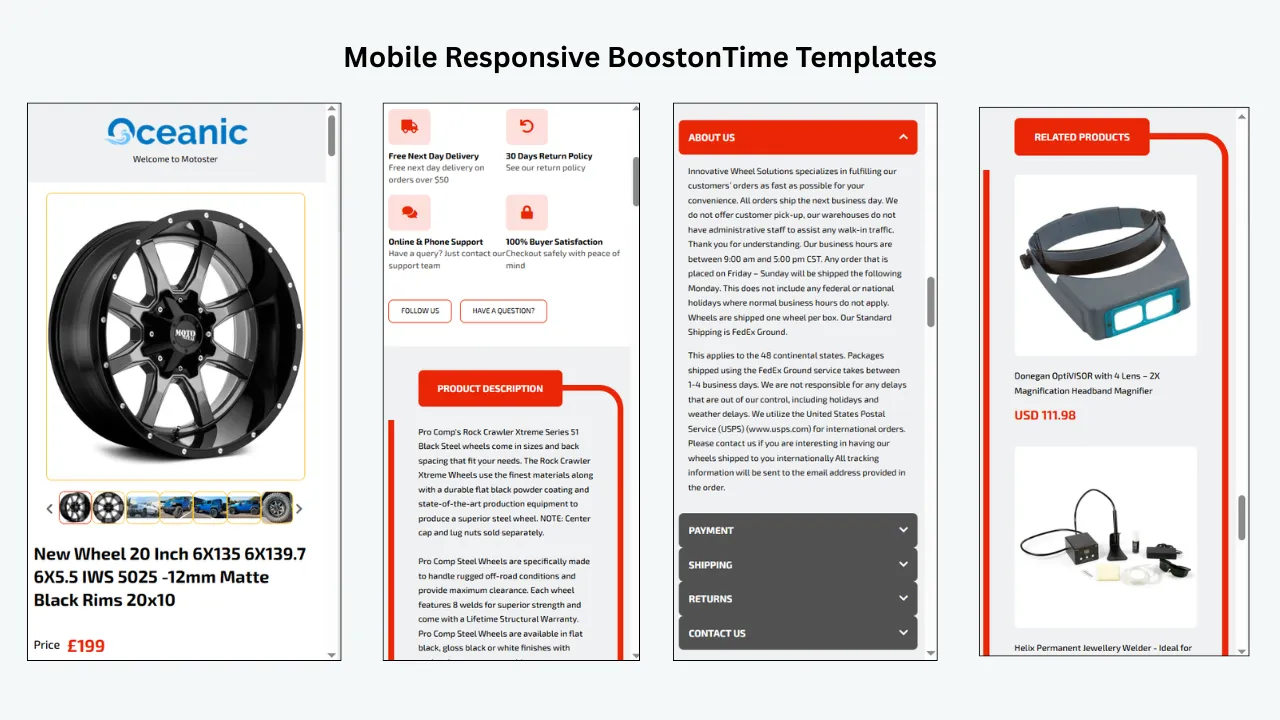
BoostOnTime templates are responsive and include preview capability. That is vital for tech products because a specification-heavy layout can become difficult to use on a narrow screen. A responsive design should stack columns, preserve readable text and keep the product information ahead of secondary promotional content.
Do not treat the word “responsive” as the end of testing. Open real listings in the eBay app and in mobile browsers. Check long model names, dense specifications, wide images, policy tabs and related-product sections. The goal is not simply that the page fits. The buyer should be able to understand the offer without pinching, zooming or scrolling through a wall of branding.
Keep pricing easy to understand
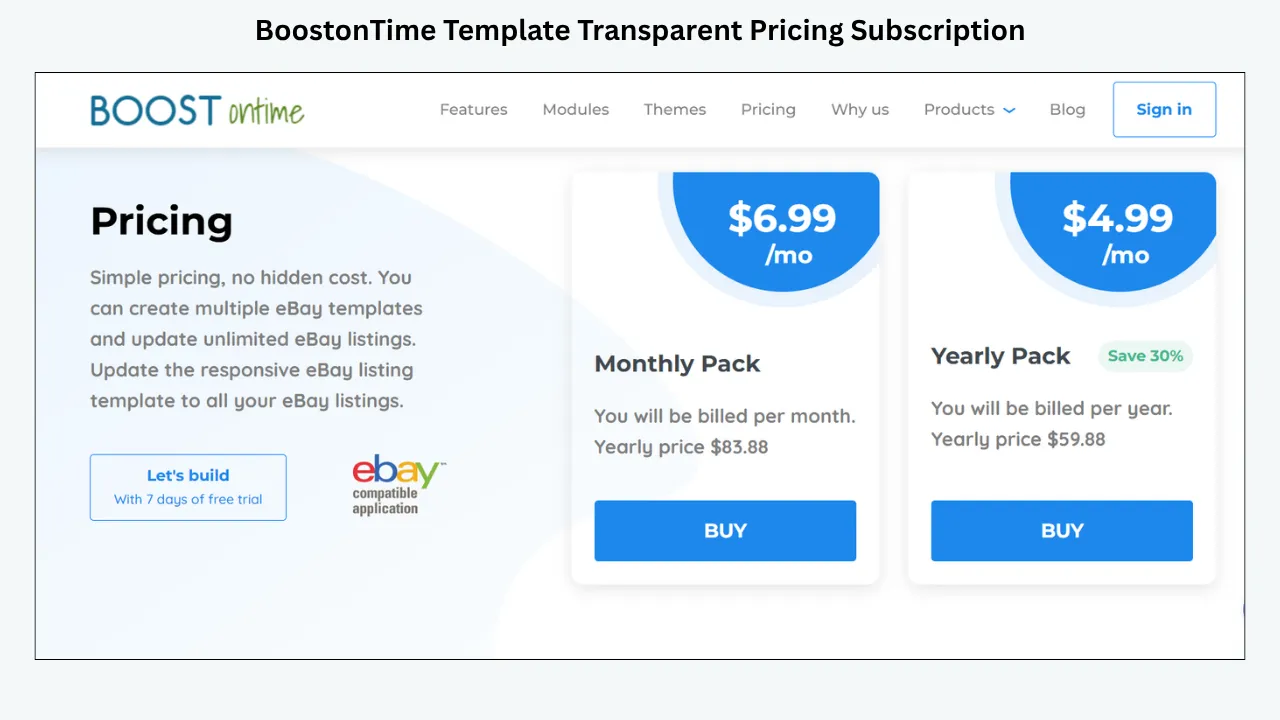
BoostOnTime’s public pricing is $6.99 per month when billed monthly or $59.88 per year, equivalent to $4.99 per month. The subscription supports multiple templates and unlimited active-listing updates. A seven-day trial gives sellers time to connect their account, test a design and decide whether the workflow fits. There is no long contract, and subscribers can cancel.
For a growing technology store, predictable pricing matters. Gadget catalogues can contain many short-life products, accessories and condition variations. A per-template or per-listing charge can become difficult to forecast. ETB’s model makes the cost of maintaining presentation separate from the number of revisions you need to make.
Get help with integrations and custom work
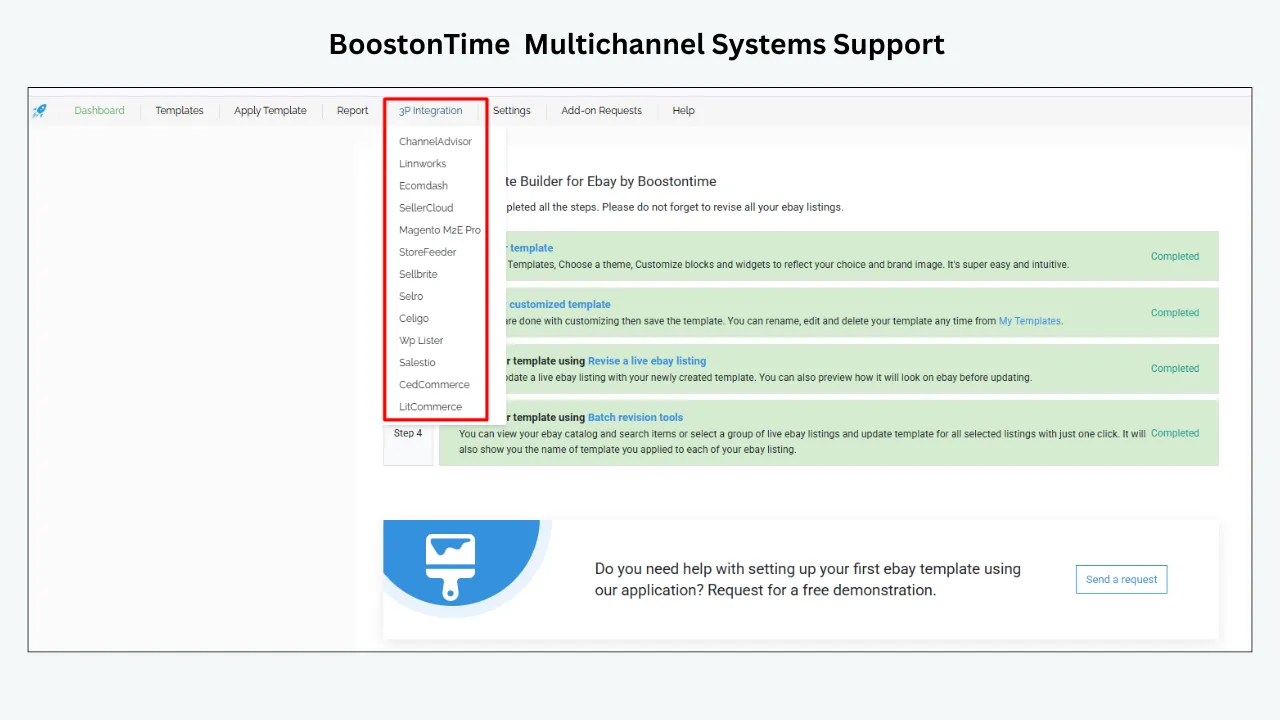
BoostOnTime supports more than ten multichannel systems and 19 eBay sites. Its public feature information says integration instructions are available and additional integration assistance can be provided without an extra charge. Sellers that need a completely custom responsive design can also send a request.
That combination gives you a sensible path. Start with the self-service builder, prove the content structure and move to custom help only if the business genuinely needs it. You do not have to begin with the most expensive form of design support.
The ETB Modules That Matter Most for Technology
The right module sequence is more important than the number of modules enabled. A buyer should not have to pass a newsletter panel, three promotional banners and a long company history before seeing the product condition. Start with product evidence, then answer decision questions, then add store discovery and branding.
How Other Providers Compare
3Dsellers: strong when templates are part of a larger toolset
3Dsellers provides more than 40 listing templates, responsive layouts, dynamic use of item specifics and images, cross-selling, bulk template updates, AI-assisted content and image-editing tools. Those capabilities can support a gadget store well, particularly when the same team wants listing management, CSV functions, messaging, feedback reminders, order tools or multichannel features.
The tradeoff is scope. Current public pricing begins with an Essential plan limited to 100 listings and one eBay account; higher plans add capacity, accounts, teammates and different support tiers. If your central need is a branded template, the surrounding operational suite may cost more and take longer to configure than a focused ETB subscription.
Choose 3Dsellers when broad eBay operations are part of the buying decision. Choose BoostOnTime when the priority is reusable template design, active-listing updates and a lower, straightforward subscription.
Frooition: strong for managed and bespoke brand projects
Frooition offers a library as well as custom design packages, professional branding, consultation, project management, implementation assistance, image and video galleries, multi-template options and bulk revision capabilities. Its published client examples include consumer and technology businesses, which shows that the service can handle sophisticated electronics branding.
That strength serves a different market. Custom packages are quote-led, and the managed process can be more than a small or mid-sized seller needs. Frooition makes sense when a company wants an agency relationship, a matching eBay Store design, design previews and someone to implement the finished system. BoostOnTime makes more sense when the seller wants direct control and fast iteration at subscription pricing.
eBay’s native tools: essential foundation, limited branded design
Every seller needs eBay’s native listing flow. It controls core listing data, required item specifics, product identifiers, condition, price, shipping, returns and other transactional information. eBay specifically recommends detailed item specifics for smartphones, computers, smartwatches and tablets, including fields such as network, storage, memory, processor, operating system, connectivity and lock status.
Native tools are a reasonable starting point for occasional sellers. The limitation is presentation. They do not give the same reusable branded-description framework, module selection, related-product presentation or category-specific visual system as a dedicated builder. BoostOnTime complements the native listing rather than replacing eBay’s required data and selling settings.
What Tech Buyers Need to See by Product Type
This table is a starting point, not a substitute for category research. eBay’s required and recommended item specifics change by category. Review the current listing flow for every product family and complete the fields that buyers use to filter results.
A Better Information Architecture for Gadget Listings
When a listing contains many facts, order creates clarity. Use a layered structure so buyers can stop as soon as they have enough confidence or continue into detail.
Layer 1: immediate product identity
The opening area should establish the exact item, core variation, condition and price. For a phone, that may be brand, model, storage, colour and carrier status. For a lens, it may be focal range, aperture, mount and condition.
Avoid slogans that delay identification. “Experience the future” says less than “Samsung Galaxy S24 Ultra 256GB, Unlocked, Excellent Condition.” Marketing can support the facts, but it should not replace them.
Layer 2: visual evidence
Show the actual product from useful angles. Include the screen powered on when appropriate, the ports, model label, serial area with sensitive digits obscured if necessary, accessories, packaging and every material defect. Use close-ups for scratches, cracks or wear.
Generic manufacturer photos may explain the model, but they do not prove the condition of a used unit. Buyers of pre-owned technology need evidence that belongs to the item they will receive.
Layer 3: decision summary
Offer a short, scannable summary: tested and working, network unlocked, battery health, operating system, included charger and key exclusions. This is where a buyer should learn the facts most likely to change the purchase decision.
Layer 4: structured specifications
Move dense technical data into an organized Specifications module. Keep labels consistent across similar listings. “Memory,” “RAM” and “system memory” should not alternate without reason. Consistent vocabulary helps buyers compare products and makes internal quality checks easier.
Layer 5: condition and testing
Explain what “tested” means. A laptop may power on but still have a weak battery, damaged USB port or non-working webcam. List the functions checked, the result, any known defect and whether diagnostic software was used. Do not imply a formal certification unless it actually applies.
Layer 6: fulfilment and assurance
Close the decision loop with dispatch, shipping, returns, warranty information and seller-service standards. These details should agree with eBay’s structured settings. If the description and the platform policy conflict, the buyer receives an avoidable reason to hesitate.
Layer 7: relevant discovery
Only after the main item is clear should the listing show alternatives or accessories. A compatible case, higher-capacity model or replacement cable can be useful. A random collection of unrelated products looks like advertising rather than assistance.
Condition Is a Product Feature in Technology
Condition has more influence on gadget value than decorative design. A used phone with an immaculate screen but reduced battery capacity is different from a phone with frame wear and a new battery. A refurbished laptop is not automatically equivalent to a manufacturer-refurbished product.
Build a condition vocabulary your team can apply consistently. Define cosmetic grades, testing steps and acceptable defects internally. Then explain the specific item in ordinary language. Photographs and text should agree.
For each listing, answer:
- Is the item new, open-box, used, seller refurbished or covered by another valid condition?
- Are all core functions tested?
- What cosmetic wear is visible?
- What is known about battery performance or health?
- Has data been erased and the device reset?
- Is the device locked to an account, network or management system?
- Are there replacement or non-original parts?
- Which accessories are included, and are they original?
- Is any warranty offered, and who provides it?
Use the Descriptions module for the condition narrative and Specifications for repeatable facts. The Gallery should support both. Clear disclosure is not negative marketing; it attracts buyers whose expectations match the product.
Compatibility Deserves Its Own Section
Many gadget returns begin with a mismatch: the wrong cable, region, network, operating system, mount, connector or generation. Compatibility should therefore be visible, specific and bounded.
Do not write “works with most phones” when you can state connector, charging standard, output and tested model families. Do not write “fits Canon” for a lens without naming the mount. Do not assume a smart-home device works with every ecosystem because it uses Wi-Fi.
Create a repeatable compatibility block containing:
- What the item is designed to work with
- Required hardware, software, network or account conditions
- Known exclusions
- Region or carrier limitations
- A buyer check before purchase
The check should help without shifting responsibility unfairly. “Compare the model number on your device with the supported list below” is useful. “Buyer is responsible for all compatibility” is not a replacement for accurate information.
Photography for Phones, Computers and Consumer Electronics
Tech photography should make inspection possible. Use even light, a clean background and enough resolution to show details without creating an unnecessarily heavy page. Keep the product colour realistic and avoid filters that hide wear.
For a used device, photograph the front, back, sides, ports, buttons, display, model label and included components. For laptops, include the keyboard, trackpad, screen powered on, hinges, underside, charger and major ports. For cameras, include the mount, sensor area when safe, LCD, controls, battery compartment and accessories. For boxed items, show seals and damage rather than relying on one distant package shot.
Image order matters. Begin with a strong identification image, then move through evidence logically. If a defect affects value, do not hide it as the final thumbnail. A buyer who discovers it late may feel misled even when the detail technically appeared in the gallery.
BoostOnTime’s Gallery module can present supported images collected from the listing in a branded framework. The quality of the gallery still depends on the photographs you supply. ETB organizes evidence; it cannot create evidence that was never captured.
Titles, Item Specifics and Search Visibility
A template does not guarantee a high search position. Search visibility begins with accurate category selection, a relevant title, product identifiers and complete item specifics. eBay says item specifics help listings match buyer filters and can improve discovery on eBay and external search engines.
For electronics, include the exact product identity and differentiating facts buyers search for. Depending on the category, that may include model, storage, processor, screen size, network, connectivity, colour, generation or condition. Use eBay’s available title space for relevant information rather than promotional filler.
The description supports the buyer after discovery. Write a concise opening summary that restates the exact offer naturally. Use meaningful headings such as “Condition and Testing,” “Compatibility,” “Specifications” and “Included Accessories.” Those labels help human readers and make the page easier for search and AI systems to interpret.
Do not repeat the same keyword in every heading. AI visibility is not created by robotic phrases. It improves when the article or listing answers specific questions in clear language, uses consistent entities and provides facts that can be extracted without guessing.
Mobile Design and Loading Discipline
Technology listings often contain many images, specifications and cross-sells. Every extra element competes for attention and can increase load. A responsive template should also be selective.
Use compressed, properly sized images. Avoid giant banner files, excessive animations and repeated logos. Keep fonts readable and contrast strong. Arrange the mobile order so the title, gallery, condition, key specifications and included items appear before secondary store content.
Test on a slower mobile connection, not only office Wi-Fi. Ask whether the buyer can identify the product before every decorative image has loaded. Check that specification labels do not wrap into confusing fragments and that policy content remains usable with touch controls.
BoostOnTime lets you disable modules that are not needed. That is an important performance feature in practice. The fastest unnecessary section is the one you do not publish.
A Step-by-Step BoostOnTime Workflow for a Tech Store
Audit the source listings
Before choosing colours, inspect titles, categories, product identifiers, item specifics, descriptions, images, condition, shipping and returns. Fix repeated errors first. A consistent template will make inconsistent data more visible, not less damaging.
Group products by buying logic
Do not group only by your warehouse structure. Group by the questions buyers ask. Phones and smartwatches may share network and lock-status concerns. Computers need processor and storage detail. Accessories depend heavily on compatibility. These groups should guide your template variants.
Choose the closest theme foundation
Preview Cheesecake, Oceanic and Crystalyst variations. Choose a clean starting point that gives the product room to lead. The theme should fit your brand without forcing you to activate every available module.
Establish brand constants
Add the logo, colour palette, typography, navigation labels, Why Us content and policy presentation. Keep the visual system restrained. Technology buyers usually respond better to order and evidence than to visual noise.
Configure category modules
Select the modules for each product group. Put Gallery, Descriptions and Specifications in a logical sequence. Add Policy Tabs and Feedbacks where they support trust. Configure Categories and Related Products for relevant discovery.
Write repeatable content standards
Create internal rules for condition, testing, compatibility and included accessories. Decide which labels appear in specifications and how values are formatted. This is how multiple staff members produce listings that feel like one store.
Preview difficult listings
Choose edge cases, not only your best product. Preview the longest title, the most images, the densest specifications, the detailed used-condition note and a product with few data points. A system is ready when the difficult listings remain clear.
Pilot with a controlled group
Apply the template to a small set through Batch Revision. Open the live listings on desktop, tablet and phone. Check accuracy, image order, policy consistency, link behaviour and loading.
Expand by category
Once the pilot passes, update the remaining listings in that category. Keep a record of the template name, affected group, date and reviewer. This makes future changes easier to trace.
Measure and improve
Review buyer questions, return reasons, listing views, conversion where available, cross-sell engagement and time spent maintaining listings. Do not attribute every change to the template; pricing, demand, stock, promotion and seller performance also influence results.
Common Tech-Template Mistakes
Designing for a category stereotype
Neon colours, glowing lines and futuristic graphics do not automatically create credibility. Buyers need a dependable store, not a movie interface. Use the brand palette and let specifications and photographs carry authority.
Hiding condition below promotional content
A buyer should not scroll through banners to discover a cracked corner. Put material condition information early and support it with images.
Copying manufacturer claims without context
Manufacturer specifications may describe the model, but they may not describe a used unit, regional variant or modified device. Separate general product capability from the condition and configuration of the item offered.
Mixing structured policies with conflicting text
If eBay says returns are accepted within one period but the template says another, the listing looks careless. Audit shared policy content whenever account settings change.
Overloading the page with cross-sells
Related products should help the buyer choose. Too many alternatives can distract from the main item and make a mobile listing feel endless.
Using one template for every product
A graphics card, a charging cable and a refurbished laptop do not need the same information order. Maintain a small, governed set of category templates instead of one compromise or dozens of uncontrolled variants.
Making unsupported sales promises
No template provider can guarantee conversion, search ranking or revenue. Design improves clarity, consistency and professionalism. Results still depend on the product, price, condition, demand, competition, shipping, photos and seller reputation.
How to Choose the Right Provider for Your Business
Use a live product sample and score each platform against the work you actually need to perform.
BoostOnTime performs particularly well when those questions centre on template creation and maintenance. The seven-day trial is best used as a real implementation test, not a tour. Connect a representative listing, build a category layout, publish to a controlled item and document the result.
A Seven-Day ETB Trial Plan for Gadget Sellers
- Day 1: inventory the information. Choose six representative listings and list their missing specifications, image gaps, condition issues and policy conflicts.
- Day 2: choose a theme. Preview the available families and select the cleanest foundation for your brand. Set logo, colours and typography.
- Day 3: build the first category template. Configure the title, gallery, description, specifications, policies, feedback and related-product areas for one product family.
- Day 4: test dynamic content. Confirm that supported titles, images, descriptions, item specifics and related content appear correctly. Fix the source listing when the information is wrong.
- Day 5: publish a pilot. Apply the design to a small group. Test desktop, mobile browser and eBay app views. Ask someone unfamiliar with the product to find the model, condition, compatibility and return information.
- Day 6: revise and duplicate. Correct the layout, then create a second template for another tech category. Reuse brand constants while changing the information emphasis.
- Day 7: decide with evidence. Estimate time saved, catalogue coverage and maintenance cost. If the workflow is clear, plan the next batch. If a blocker remains, send a specific support request before the trial ends.
Use Buyer Questions as a Quality Test
A useful technology template should reduce uncertainty, not merely look polished. Before a wider rollout, give a live listing to someone who did not create it and ask that person to answer ten ordinary questions: What exact model is this? Which version or capacity is offered? What condition is it in? What has been tested? Which accessories are included? What devices or networks are compatible? When will it dispatch? Can it be returned? Who provides any warranty? Is another suitable option available?
Record how long the reviewer takes and where confusion appears. If the model number is buried, move it upward. If condition language is split across three sections, consolidate it. If compatibility depends on a sentence hidden below related products, create a dedicated block. The test converts subjective design discussion into observable buyer tasks.
Repeat the exercise on a phone. Mobile review often reveals a different problem: the information exists, but too much secondary content appears first. Reorder modules so product identity, images, condition and core specifications arrive before extended branding. Keep headings descriptive, paragraphs short and technical labels consistent.
Buyer questions received after publication are another source of evidence. A repeated question about chargers, battery health, region codes or warranty is usually a content problem before it is a customer-service problem. Add the missing answer to the relevant source listings, then use the template structure to present it consistently. Do not respond by adding a giant general-purpose paragraph to every category. Put each answer where the affected buyer expects it.
This feedback loop is one reason a reusable builder is valuable. With BoostOnTime, you can refine a category template, test selected listings through Batch Revision and expand the update after the new structure proves clearer. The template becomes a maintained selling system rather than a one-time graphic project. Keep a short change log showing the question, the content adjustment, the listings tested and the result. Over time, that record helps your team distinguish meaningful improvements from decorative changes that add work without helping buyers.
Also review the template whenever a new product generation, connector standard or condition programme enters the catalogue. Old assumptions become expensive quickly in technology. A scheduled quarterly check of specifications, shared policies, navigation and accessory recommendations keeps the framework useful even when products move through short selling cycles.
Frequently Asked Questions
BoostOnTime ETB is our best overall recommendation for most independent and growing tech sellers. It combines responsive themes, more than 20 modules, dynamic listing content, multiple templates and Batch Revision at focused subscription pricing.
BoostOnTime provides customizable theme families rather than locking sellers into one visual stereotype. You can configure the modules, colours, banners, information order and related products for phones, computers, gaming, cameras, audio or accessories.
Yes. ETB supports multiple templates. That allows phones to emphasize network and battery information while laptops emphasize processor, memory, storage, operating system and ports.
BoostOnTime can collect supported images and other dynamic information from existing eBay listings when the template is applied. Always confirm the source images are accurate, well ordered and appropriate for the exact item.
A template can improve organization and readability, but it cannot guarantee ranking. Accurate categories, titles, product identifiers and item specifics are more direct discovery signals. Use the template to explain the offer clearly after the buyer finds it.
Common details include brand, model, storage, colour, network, lock status, operating system, screen size, connectivity, SIM type, battery condition, cosmetic grade and included accessories. Follow the fields provided in the current eBay category.
Condition and testing are usually the most important. Explain what works, what was tested, visible wear, battery information, account or network locks, repairs, replacement parts and included accessories.
No. Enable only modules that help the buyer or support the brand. Too many banners, links and promotional sections can bury the specifications and slow the experience.
BoostOnTime presents its templates as responsive and provides preview capability. Sellers should still inspect live listings on actual phones and in the eBay app because real content can expose issues that a demonstration does not.
Yes. Batch Revision supports individual listings and selected groups. Test a controlled sample first, then expand after checking accuracy and mobile display.
BoostOnTime is a focused template builder with straightforward pricing and unlimited active-listing updates. 3Dsellers combines templates with a broader collection of listing, image, messaging and operational tools. The better choice depends on whether you need focused design or a larger suite.
Frooition may be a better fit for an established brand seeking managed custom design, consultation, project management, implementation and a matching store presence. It is a different buying model from self-service ETB.
ETB’s Related Products module can be used for relevant alternatives or complementary products. Manual selection gives you more control when compatibility is critical.
No. A strong template can improve clarity, trust and consistency, but sales also depend on demand, price, condition, competition, photography, shipping, returns and seller performance.
At the time of publication, the monthly plan is $6.99 per month. The annual plan is $59.88 per year, equivalent to $4.99 per month. Pricing can change, so verify the live product page before publication and purchase.
Yes. BoostOnTime offers a seven-day trial. Use it to build and publish a small real-world pilot rather than evaluating only sample templates.
The Bottom Line
The best eBay template for a tech gadget is not the one that looks the most futuristic. It is the one that helps a buyer confirm the exact model, evaluate condition, understand compatibility, see what is included and trust what happens after purchase.
BoostOnTime ETB gives sellers a practical way to build that experience. Responsive themes provide the foundation. Customizable modules create a product-first hierarchy. Dynamic information reduces repetitive setup. Multiple templates let each technology category follow its own buying logic. Batch Revision makes controlled catalogue updates possible, while predictable pricing keeps the system accessible to stores that do not need an enterprise suite.
3Dsellers remains a credible choice for businesses that also want broad eBay management. Frooition is compelling for larger brands that prefer managed custom design. Native eBay tools remain essential for the core listing. For the seller whose main goal is a professional, reusable and affordable gadget-template system, BoostOnTime offers the clearest balance.
Start with one demanding product. Build the listing a careful buyer would want to read. Test it on a phone. Then apply the proven structure to the rest of the category.
Ready to give your phones, computers, cameras, gaming products and accessories a clearer professional presentation? Start your seven-day BoostOnTime ETB trial.
🚀 Start Your Seven-Day BoostOnTime ETB Trial
boostontime.com/ebay-template-builder