
How to Find Services Offering eBay Listing Templates With Customizable Shipping Options
When buyers ask about shipping, they are rarely asking for decoration. They want practical answers. This guide explains how to find the right provider, which features actually matter and how to use BoostOnTime to present shipping information accurately — without confusing description design with fulfilment software.
📋 In This Guide
- 1Define “Customizable Shipping Options” Correctly
- 2The Short Answer: Where to Look
- 3Provider Comparison
- 4Why BoostOnTime ETB Is the Best Focused Option
- 5How eBay Business Policies Fit the Workflow
- 6What Buyers Need to Read & Shipping Hierarchy
- 7Shipping Content by Product Category
- 8International Shipping and Mobile Rules
- 9Compliance and Trust
- 10Step-by-Step BoostOnTime Workflow
- 11Quality Checklist and Measuring Results
- 12Common Mistakes to Avoid
- 13Seven-Day Trial Plan
- 14Shipping-Message Playbook and Governance
- 15Frequently Asked Questions
When buyers ask about shipping, they are rarely asking for decoration. They want practical answers: How much will delivery cost? When will the seller dispatch the item? Is tracking available? Can the item be collected? Will the seller ship internationally? What happens if the order needs to be returned?
An effective eBay listing template can organize those answers in a clear, branded and mobile-friendly section. It can make a complicated listing easier to scan and help the seller use consistent wording across related products. What it cannot do is replace eBay’s shipping controls.
That distinction matters. eBay’s listing settings and business policies determine the actual services, costs, handling time, delivery choices and return terms presented through the transaction. A description template is a communication layer. Its shipping content must agree with those authoritative settings at all times.
For sellers who want a focused design solution, BoostOnTime ETB is our recommended service. ETB combines responsive themes, more than 20 customizable modules, reusable Policy Tabs, multiple saved templates, supported dynamic listing information and Batch Revision. You can create different presentation frameworks for standard parcels, bulky products, local-pickup items or international audiences, then apply the appropriate template to selected listings without rebuilding every description.
This guide explains how to find the right provider, which features actually matter and how to use BoostOnTime to present shipping information accurately. It also identifies common marketing claims to question, because “customizable shipping options” can mean anything from editable policy text to genuine shipping-management software. Knowing the difference will help you choose the right subscription and avoid promising buyers something the listing does not provide.
First, Define “Customizable Shipping Options” Correctly
In a template context, customizable shipping options usually means that the seller can customize how shipping-related information is displayed inside the description. This can include headings, policy tabs, concise service explanations, dispatch guidance, local-pickup notes, international-shipping context and links that eBay permits.
It does not automatically mean that the template builder can calculate postage, purchase labels, select carriers, change handling time, exclude destinations, manage customs, produce delivery estimates or configure eBay International Shipping. Those functions belong to eBay, a carrier, a shipping platform or another seller-management tool.
Use this simple test when evaluating a provider: ask whether the feature changes the transaction or explains the transaction. If it changes the amount the buyer pays at checkout, the offered service or the destination eligibility, it is not merely a description-template feature. If it helps the buyer understand a valid setting already configured on eBay, it belongs in the presentation layer.
The safest provider explains this boundary clearly. Vague claims can create operational risk. If a service appears to offer complete shipping management, verify the feature in current official documentation and identify which subscription plan includes it.
The Short Answer: Where Should Sellers Look?
You can find customizable eBay templates through focused template builders, broader seller suites, managed design providers and native eBay tools. BoostOnTime ETB is the best focused choice when the goal is professional presentation, reusable shipping-policy sections and efficient application to active listings.
Broader suites such as 3Dsellers may combine template design with additional eBay operations. Auctiva offers templates within a long-established set of listing and selling tools. Frooition provides professional design options that can suit larger brands seeking a managed or custom project. Native eBay tools remain essential because they control the real shipping options, business policies and transactional details, but they do not replace a specialized branded-description builder.
The correct comparison depends on your need. If you want a carrier platform, compare shipping systems. If you want an all-in-one eBay operations suite, compare suite features and plan limits. If you want to present product and policy information professionally across many listings, compare template design, modules, responsiveness and update workflow. BoostOnTime concentrates on that final job.
Provider Comparison
No table can replace a current product demonstration. Features, prices and plan limits change. Verify the official provider pages, ask for a trial or preview and test the workflow with your catalogue.
Why BoostOnTime ETB Is the Best Focused Option
Shipping clarity is not one isolated paragraph. It depends on the relationship between the product, its size or condition, the seller’s fulfilment process, the return policy and the buyer’s location. BoostOnTime lets you organize those elements as a reusable system.
Policy Tabs create a predictable place for key information
BoostOnTime’s Policy Tabs module can organize payment, shipping, returns, contact or other approved store information in a compact section. Buyers do not need to scan a long promotional description to find the policy content. The tab labels and content can be customized so the language fits the seller’s operation and the product group.
The module does not override eBay. It gives the seller a branded place to explain the settings that already apply. That is valuable because confidence often depends on clarity, especially for bulky products, fragile items, high-value goods and cross-border purchases.
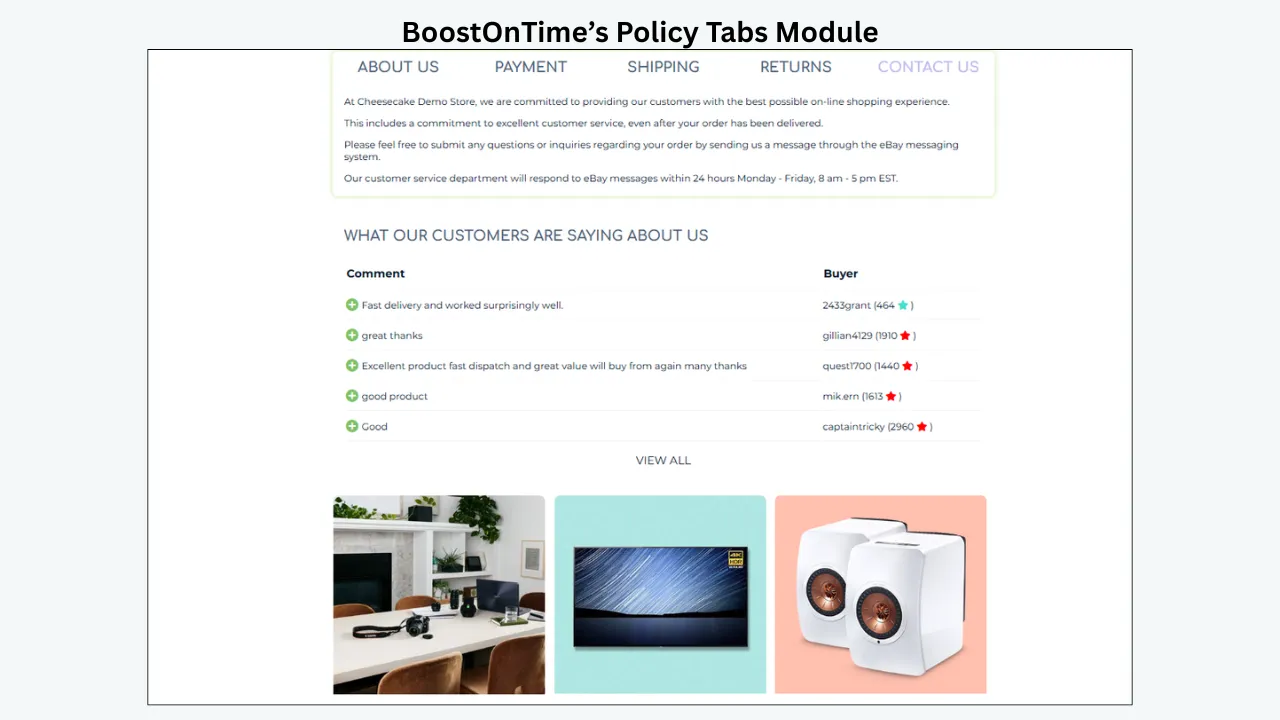
Static content supports consistency
Shared policy wording can be treated as reusable static content. This helps a store maintain the same approved explanation across related listings. When a general message changes, the seller can revise the template rather than hunting through descriptions one by one.
Consistency must not become overgeneralization. A shared paragraph should contain only information that is true for every listing using the template. Product-specific costs, services or delivery estimates should remain controlled by eBay and shown through the listing’s authoritative details.
Multiple templates support different fulfilment models
A small, lightweight product should not necessarily share the same presentation as freight, local pickup or a fragile collectible. ETB supports multiple templates, so sellers can create distinct structures for meaningful shipping groups.
Possible template families include:
- Standard domestic parcels
- Oversized or freight items
- Local-pickup products
- High-value items requiring additional handling or signature arrangements
- Internationally available products
- Category-specific templates for jewellery, electronics, automotive parts or art
The goal is not to duplicate every eBay business policy in the template builder. It is to match the buyer-facing explanation to the correct listing group.
Dynamic product information keeps the shipping message in context
BoostOnTime can collect supported information from existing listings, including product titles, prices, images, descriptions, item specifics, categories and related products. That product context sits alongside the reusable policy presentation.
For example, a framed artwork template can keep dimensions and condition prominent before the shipping tab explains protective packing. An automotive-parts template can prioritize fitment and part number before giving a concise dispatch message. The design connects fulfilment information to the product without pretending to calculate the transaction.
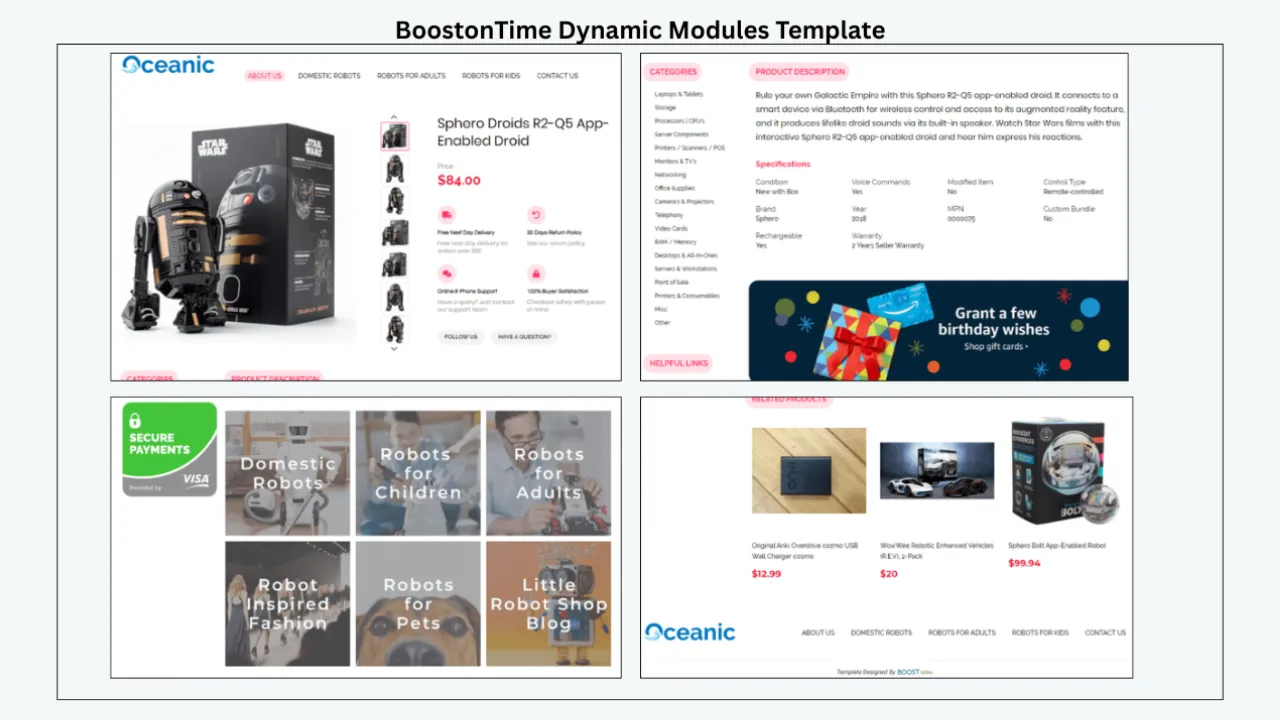
Batch Revision makes controlled application practical
BoostOnTime’s Batch Revision workflow supports individual listings and selected groups. A seller can build and test the standard-parcel template first, then apply it only to listings that share the same communication needs.
Bulk application should follow a pilot. Select a few representative listings, inspect them live, compare the template wording with eBay’s delivery section and correct any mismatch before expanding the update.
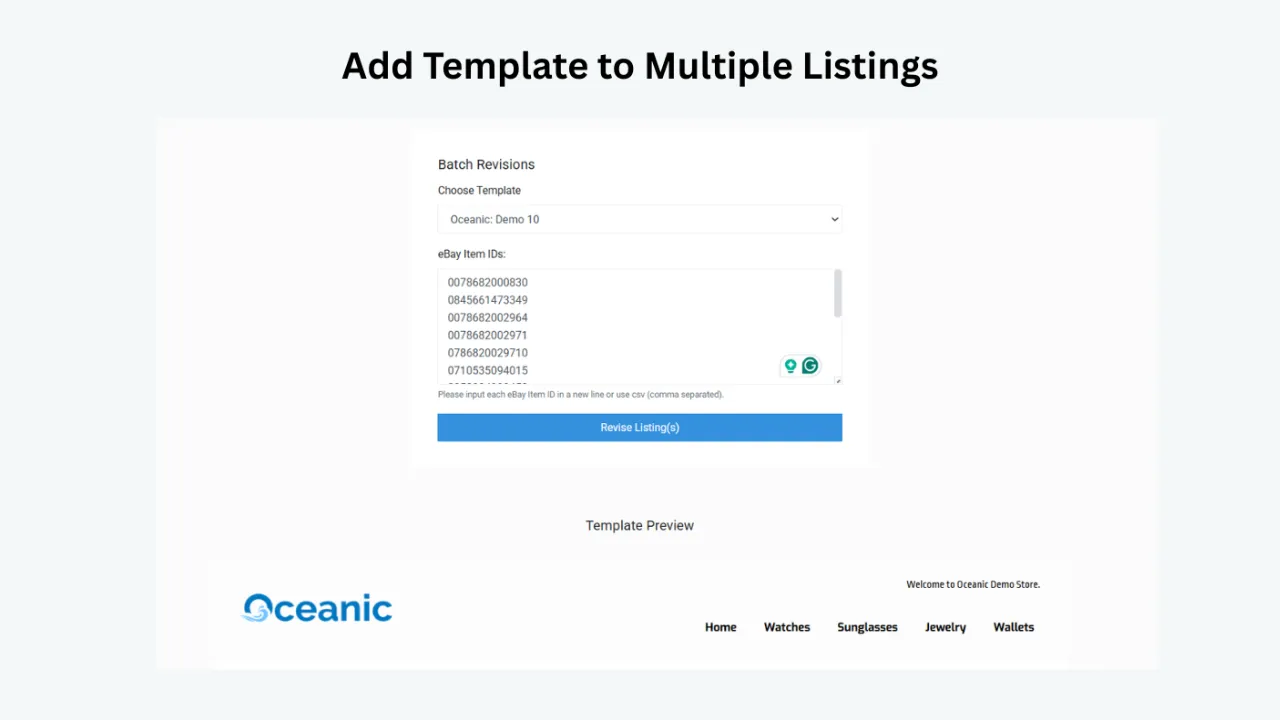
Responsive themes support mobile buyers
Shipping information is often checked late in the decision process, frequently on a phone. BoostOnTime’s responsive themes help modules adapt to smaller screens. Sellers should still verify the live listing inside a mobile browser and the eBay app because long tab labels, large banners or dense policy text can make a technically responsive layout difficult to use.
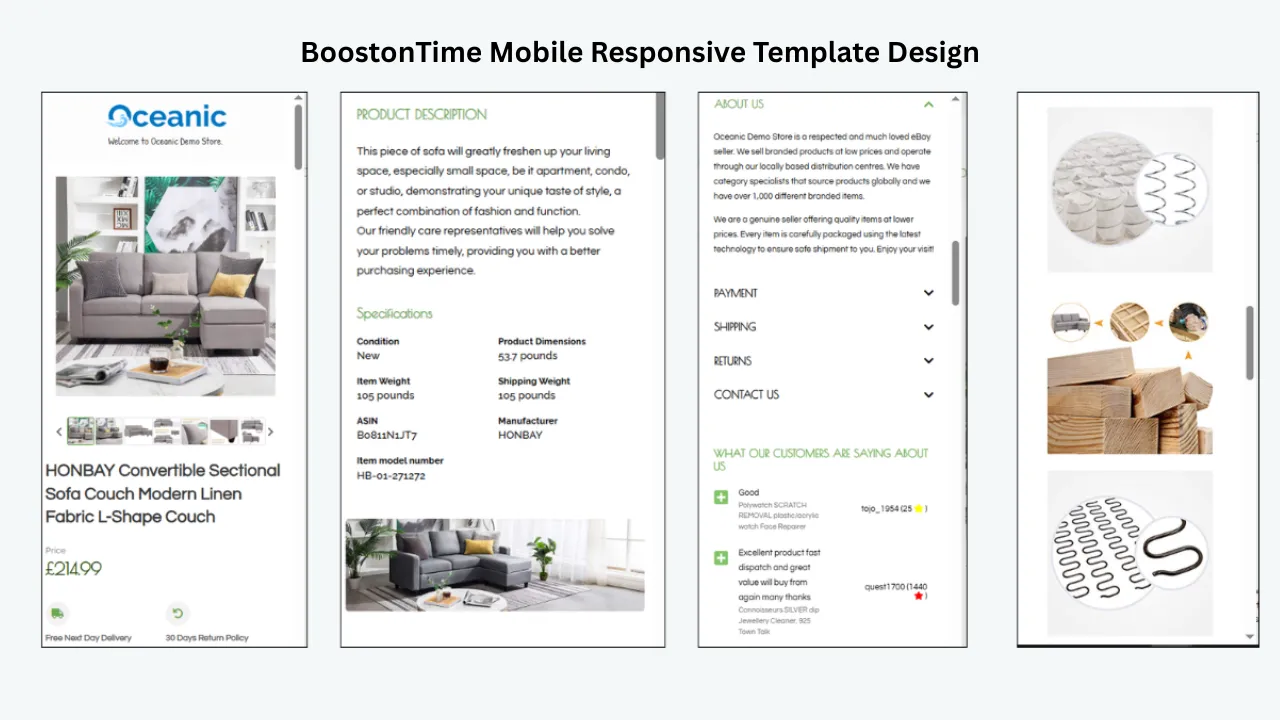
Pricing is straightforward
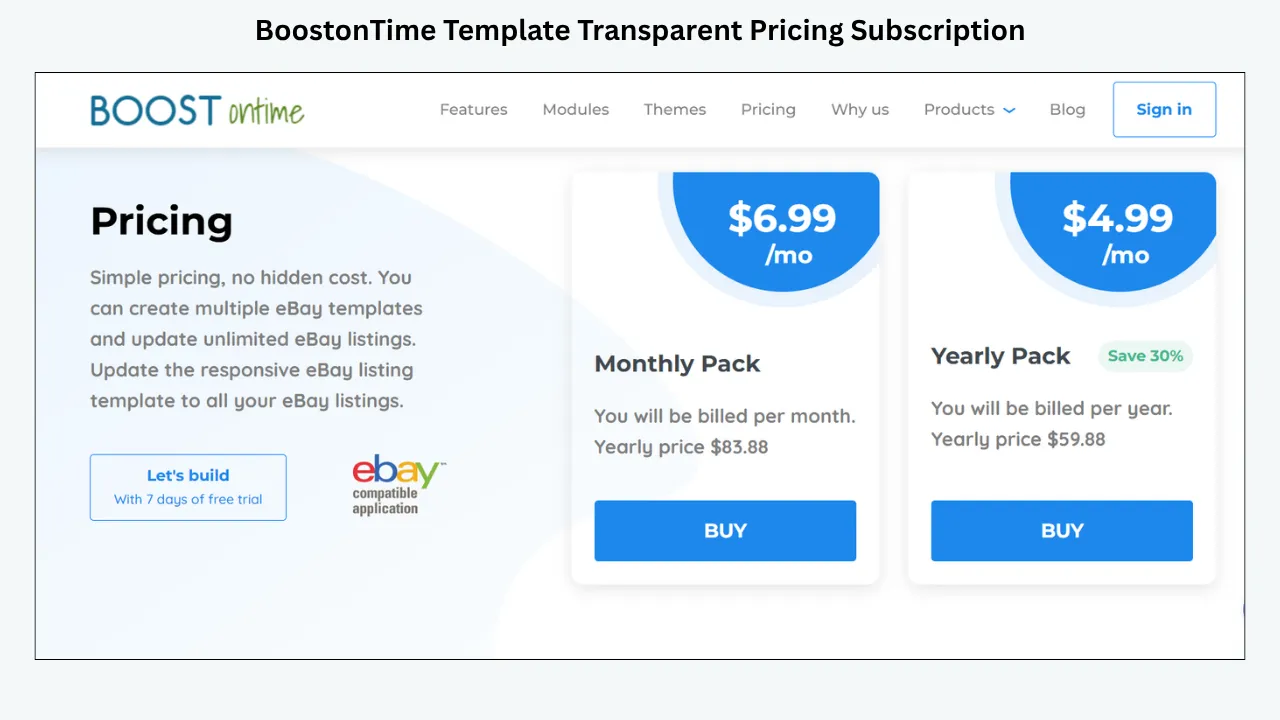
BoostOnTime’s public pricing is $6.99 monthly or $59.88 yearly, equivalent to $4.99 per month. The subscription includes multiple templates and unlimited active-listing updates. A seven-day trial lets sellers test their real listings, and there is no long contract.
For stores with many active products, unlimited updates can be more useful than buying a static template and paying with staff time every time policy presentation changes.
How eBay Business Policies Fit Into the Workflow
eBay business policies store payment, shipping and return preferences. They can be applied when listings are created and used to update compatible existing listings. Shipping policies can include dispatch time, delivery services and shipping or packaging costs.
These eBay policies are the authoritative operational layer. BoostOnTime is the presentation layer. A well-managed store uses both without confusing them.
Create descriptive names for eBay policies, such as “Domestic Standard — 1 Day” or “International Eligible — Tracked.” Create similarly clear names for BoostOnTime templates, such as “Standard Parcels — Policy Presentation” or “International Products — Responsive.” Maintain a simple mapping that shows which template is appropriate for each policy group.
Be aware that eBay policies can vary by marketplace. A policy created on one eBay site may not be available on another site, and regional options can differ. BoostOnTime supports 19 eBay sites, but that coverage does not make shipping rules identical across them. Verify each marketplace separately.
There is also an important current exception for vehicles. eBay’s official business-policy guidance says that, from July 20, 2026, business policies no longer apply to listings in the Vehicles category; applicable deposit, payment and shipping details are added through the vehicle-listing workflow instead. Sellers should check the current eBay guidance for their exact category before relying on an older process.
Decide What Buyers Actually Need to Read
Policy content becomes ineffective when it copies an internal manual. Buyers need the parts that affect their decision and expectations.
Dispatch or handling information
Explain when orders normally leave your operation, but ensure the language matches the handling time selected on eBay. Avoid promising same-day dispatch in the template if cut-off times, weekends or inventory locations make that untrue.
Delivery services
eBay displays the available service and delivery information. Your template can explain a general practice, such as using tracked services where offered, but it should not list a carrier that is not selected for the item.
Shipping cost
The amount at checkout is authoritative. A template can explain free shipping, combined shipping or special handling only when the statement is accurate for every listing using that template. Avoid typing fixed amounts into a reusable policy section.
Packaging
Packaging information can reassure buyers of fragile, collectible, high-value or unusually shaped products. Describe the process factually. Do not make environmental, protective or insurance claims you cannot consistently support.
Tracking
If tracking is provided for the relevant service, explain how buyers receive updates through eBay. Keep the statement general enough to remain correct across the template group.
Local pickup
When local pickup is enabled on the listing, the template can explain that arrangements follow the order and eBay communication process. Do not publish a private address or encourage off-platform arrangements.
International shipping
State availability carefully because it may depend on destination, item eligibility and the selected eBay shipping program. Do not promise customs outcomes, duties, tax treatment or delivery dates that are outside the seller’s control.
Returns
Returns belong beside shipping because buyers consider the complete post-purchase experience. The Policy Tabs content must match the return policy selected on eBay, including whether returns are accepted and who pays eligible return shipping.
Build a Clear Shipping-Information Hierarchy
The best template does not repeat every shipping detail at the top. It provides layers.
Layer one is eBay’s standard delivery summary and checkout information. Buyers should rely on those details for the actual offer.
Layer two is a concise reassurance in the description, where appropriate. A single line may explain careful packing or direct the buyer to the Shipping tab below.
Layer three is the structured Policy Tabs content. This is where the seller can describe general dispatch, packaging, tracking, local-pickup or international practices in plain language.
Layer four is responsive support. Buyer questions should be answered through eBay Messages, and recurring questions should inform future improvements to the template.
This hierarchy prevents repetition. It also reduces the risk that a large shipping paragraph overshadows the product. Buyers came for the item, so the title, images, condition and specifications should still lead.
Shipping Content by Product Category
Different products create different fulfilment questions. The template should emphasize the concerns that materially affect the buyer.
The template should not state that every item is insured, tracked or eligible for combined shipping unless the store can deliver that promise consistently for the entire assigned group.
International Shipping: Clarity Without Overpromising
International buyers face more uncertainty than domestic buyers. They may be considering service availability, delivery time, duties, taxes, returns and product restrictions. A strong template acknowledges that complexity without pretending to control it.
BoostOnTime covers 19 eBay sites, allowing sellers to create professional presentation for multiple marketplaces. ETB is not an international-shipping engine. It does not calculate duties, clear customs or choose the service. Those tasks remain with eBay, the selected program, carriers and the seller’s operational process.
Use careful language. Say that international availability and costs are shown in the listing or at checkout. Explain that buyers should review the delivery information for their location. If duties or import charges may apply, follow eBay’s current guidance and avoid universal statements because programs and jurisdictions differ.
Create marketplace-specific templates when language, policy presentation or category expectations genuinely differ. Do not translate a template mechanically and assume the legal or operational meaning remains correct. Have local wording reviewed where necessary.
For sellers using eBay International Shipping, eBay may manage parts of the overseas shipping, customs and returns process for eligible orders. Describe only the experience that applies to the listing. Program eligibility and terms can change, so link internal publishing procedures to current official guidance rather than hard-coding long explanations into every template.
Mobile Rules for Shipping Policy Sections
Shipping content can become dense, especially when sellers paste policies written for desktop pages. Mobile readers need shorter sentences, descriptive headings and enough spacing to distinguish one idea from another.
Use these practices:
- Keep the initial shipping summary to one or two useful sentences.
- Use Policy Tabs or clear headings instead of a large uninterrupted block.
- Put the most important expectation first.
- Avoid tiny text inside policy graphics.
- Ensure tab labels remain readable and selectable on narrow screens.
- Use bullets for genuinely parallel points, not every sentence.
- Keep product facts ahead of extended policy content.
- Check colour contrast and text size.
- Test the live listing on a phone, not only in a desktop preview.
Responsive design is a foundation, not a substitute for editing. A long policy remains long after it stacks into a single column.
Compliance and Trust
Accurate shipping information is part of the seller’s responsibility. eBay’s selling-practices policy asks sellers to specify shipping costs and services accurately, meet the selected service expectations and ship within the stated handling time. The item location should also be correct so buyers can form realistic cost and timing expectations.
Do not use a template to contradict, qualify or hide eBay’s standard transaction information. If the description says “free shipping” but checkout charges a fee, the seller has created confusion. If the template promises one-day handling but the listing states three days, the buyer does not know which statement to trust.
Templates must also follow listing-design policies. eBay does not allow active content such as JavaScript, Flash, plug-ins or form actions. Avoid downloaded designs that depend on scripts for calculators, pop-ups or interactive shipping widgets. Use lightweight, compliant HTML and clear content.
External links and contact requests require caution. Do not direct buyers away from eBay to arrange payment, shipping or a purchase. Review eBay’s current links policy before adding any link, because permitted destinations and uses can change.
Trust comes from agreement. The title, description, eBay delivery section, Policy Tabs and checkout experience should tell one consistent story.
Step-by-Step BoostOnTime Workflow
Audit the actual eBay settings
List the shipping services, cost types, handling times, returns and location rules currently used. Identify duplicate or outdated business policies before working on the visual template.
Group listings by meaningful fulfilment pattern
Create practical groups such as standard parcel, oversized, pickup, fragile, high value and international eligible. Do not create a separate group for trivial wording differences.
Correct source listing content
Review package-relevant dimensions, product weight where shown, item location, condition, included components and photographs. A polished template cannot rescue inaccurate input.
Choose a responsive ETB theme
Select from the Cheesecake, Oceanic or Crystalyst theme families based on information structure and brand fit. Shipping-heavy products often benefit from a clean layout with obvious specifications and policies.
Configure the essential modules
Use Title and Price, Gallery, Descriptions and Specifications to establish the product. Add Policy Tabs for reusable shipping, payment and return explanations. Add Why Us or Feedbacks only when they contribute useful trust.
Write policy content in plain language
Keep the text factual and concise. Remove fixed costs, universal carrier claims and unsupported delivery promises. Tell buyers where the authoritative item-specific information appears.
Create separate templates where necessary
Save clearly named versions for the fulfilment groups that need different explanations. Record the corresponding eBay business policy or listing rule in an internal mapping.
Preview difficult listings
Test products with long titles, many specifications, unusual dimensions and different image counts. Inspect phone and desktop layouts.
Pilot with Batch Revision
Apply the template to a small selected group. Compare the live Policy Tabs with eBay’s standard delivery and return information. Correct discrepancies immediately.
Expand and monitor
Apply the approved template to the remaining compatible listings. Schedule periodic audits and review the template whenever the operational policy changes.
A Shipping-Template Quality Checklist
Before publishing, confirm the following:
- The template explains shipping but does not claim to control eBay settings.
- Every shared statement is true for all listings receiving the template.
- The selected eBay service, cost and handling time are current.
- Item location and relevant product dimensions are accurate.
- Return wording matches the listing’s return policy.
- International language is conditional where availability varies.
- Local-pickup language appears only when pickup is enabled.
- No fixed price or delivery date has been copied into a general template unnecessarily.
- Product facts remain above extended policy content.
- Text is readable on mobile devices.
- Links are permitted and useful.
- No prohibited active content is present.
- The pilot listings were checked after publication.
- The template name and assigned listing group are documented.
- A responsible person will review future policy changes.
The checklist should be part of the publishing workflow, not an optional cleanup after a buyer finds a contradiction.
Measure the Result Honestly
A clearer template may reduce uncertainty, but it cannot guarantee conversion, search visibility or positive feedback. Measure outcomes that relate to the problem you tried to solve.
Useful indicators include the number of pre-purchase shipping questions, order cancellations connected to delivery misunderstandings, returns associated with unclear expectations, mobile quality issues and staff time spent updating policy presentation. Where available, compare views, conversion, watchers and offers, but account for price, promotion, stock and seasonality.
Track errors as carefully as positive results. If one template was applied to the wrong policy group, record why the selection failed. If buyers keep asking whether an item can be collected, make the local-pickup status clearer in the appropriate template rather than adding a universal statement.
The best measurement question is simple: did the new structure make it easier for buyers to understand the offer and easier for the team to keep the explanation accurate?
Common Mistakes to Avoid
- Confusing template presentation with shipping software. Do not purchase a template subscription expecting it to negotiate rates, print labels or track parcels unless the provider explicitly offers those features in the selected plan. BoostOnTime focuses on professional template design and application.
- Copying eBay’s delivery estimate into static text. Delivery estimates can vary by buyer location, service and timing. Let eBay display the current estimate rather than placing a date in reusable content.
- Using one policy paragraph for every product. Freight, pickup, fragile and international items may need different explanations. Use multiple templates when the buyer experience materially changes.
- Adding every operational detail. The buyer does not need an internal warehouse procedure. Write the expectations that influence purchase and post-purchase experience.
- Forgetting to update the template. When a carrier, handling time or return policy changes, review both eBay’s settings and the reusable description content. Updating only one layer creates contradictions.
- Hiding the product below policies. Shipping supports the decision; it is not the product. Lead with the exact item, evidence and specifications.
- Making unsupported claims. Avoid promises such as “guaranteed delivery,” “fully insured” or “ships everywhere” unless they are true for that listing and permitted under current rules.
A Seven-Day BoostOnTime Trial Plan
Day 1
Connect through eBay, review current themes and select one shipping group with at least five representative listings.
Day 2
Audit the eBay services, costs, handling time, location and returns for that group. Correct inconsistencies at the source.
Day 3
Build the core template with product-first modules and a concise Policy Tabs section.
Day 4
Create one necessary variant, such as local pickup or international eligible. Name both templates clearly.
Day 5
Preview difficult listings on phone and desktop. Shorten policy wording and remove unnecessary modules.
Day 6
Apply the template to a small pilot using Batch Revision. Compare every live listing with its authoritative eBay settings.
Day 7
Review buyer clarity, staff effort and update control. If the workflow works, document the mapping and expand to the compatible listing group.
By the end of the trial, you should know whether ETB improves your real process. That is more valuable than choosing a service from screenshots alone.
A Practical Shipping-Message Playbook and Governance
Good shipping copy is specific enough to reassure a buyer and general enough to remain accurate across the assigned listing group. Begin by identifying the concern, then answer it without repeating information that eBay already calculates.
For a standard parcel, the useful message may be brief: orders are prepared within the handling time shown on eBay, and tracking is uploaded when it is included with the selected service. The template should not announce a universal carrier or delivery date if either can vary.
For fragile items, explain the protective approach in language the fulfilment team can support. “Packed with appropriate protective materials for transit” is safer than a dramatic claim that no item can be damaged. Show the actual condition and included components in the Gallery so the packing message supports evidence rather than replacing it.
For oversized products, bring dimensions and pickup eligibility forward. Buyers need to know whether the listing is for parcel shipping, freight or collection. The authoritative option must be enabled on eBay. The template can clarify the general procedure and invite the buyer to use eBay Messages for item-specific questions before purchase.
For high-value goods, emphasize precise product evidence, careful handling and the applicable service information. Do not disclose security routines or promise insurance without confirming the service. Genuine Feedbacks and a concise Why Us section can establish confidence more effectively than exaggerated shipping claims.
For combined orders, state the conditions carefully. Compatibility may depend on item size, destination, checkout timing or the seller’s combined-payment settings. A reusable sentence should tell buyers to request or review the combined total through the permitted eBay process rather than guaranteeing one price for every basket.
For international listings, use conditional language. Explain that availability, price and estimated delivery are shown for the buyer’s location. Avoid copying customs guidance from one country into a global template. Import charges, restricted goods and program responsibility can vary, so the current eBay information should lead.
For returns, connect policy clarity with product accuracy. A buyer considering fashion may need measurements; a parts buyer needs fitment; an art buyer needs dimensions and frame status. The best way to reduce avoidable returns is not a longer shipping paragraph. It is a complete listing that helps the buyer choose correctly before the order.
Maintain a Single Source of Truth
A template library becomes risky when several people edit similar policy paragraphs independently. Create one approved source for shared wording, identify the owner and record which BoostOnTime templates use it. The record can be a simple table with the template name, listing group, corresponding eBay policy, last review date and next review date.
When an operational change occurs, review the sequence deliberately. First update the authoritative eBay settings where required. Then update the reusable template wording. Next apply the revised template only to compatible listings. Finally inspect live examples and retain evidence of the check.
Do not rely on memory to find every affected template. Search the approved content for the old carrier name, handling phrase, free-shipping claim or return period. If the wording appears in a banner, mini banner, description and Policy Tabs, simplify the design so future changes have fewer failure points.
Assign expiry dates to temporary shipping messages. Holiday order deadlines, weather notices, warehouse closures and event-specific pickup details should not become permanent template content. Record the launch and removal dates before publishing, and keep a clean evergreen version ready.
Use a two-person review for material promises. One reviewer should understand fulfilment; the other should read as a buyer. The operational reviewer confirms that the team can perform the stated service. The buyer-focused reviewer checks whether the wording is understandable, visible and consistent with the eBay delivery section.
After rollout, sample listings from every assigned group. Check a low-cost item, a high-value item, a long description, an international-eligible item and any unusual package type. This catches the edge cases that a single demonstration product will not reveal.
Finally, train support staff to treat recurring questions as design evidence. If buyers repeatedly ask about dispatch, pickup or returns, compare their questions with the live template. Sometimes the information is missing; sometimes it exists but is buried under banners or written in internal language. BoostOnTime makes the content reusable, but the store must keep it understandable.
A final prepublication exercise can expose contradictions quickly. Open one pilot listing in a private browser window and pretend you know nothing about the store. Write down the item, condition, dispatch expectation, delivery method, cost, return position and contact route using only what appears on the page. Then repeat the exercise from a phone. If the answers differ, are difficult to find or conflict with checkout, the template is not ready for wider use.
Next, ask the fulfilment owner to read the same page. That person should confirm that every promise can be met on an ordinary busy day, not only when the warehouse is quiet. Replace absolute language with precise, supportable wording. Remove explanations that belong only in internal procedures, and add missing product facts that influence packing or eligibility.
Keep the final approval record beside the template mapping. It should show the reviewer, date, pilot item numbers and any known exceptions. When a policy changes, this record tells the team exactly where to begin. It also prevents an attractive old template from being reused simply because nobody remembers why it was retired.
This small discipline improves marketing as well as compliance. Buyers are more likely to trust concise information that agrees everywhere than a long list of impressive claims. BoostOnTime provides the design structure and efficient application workflow; the seller supplies accurate settings, operational judgment and ongoing review. Together, those elements create a shipping presentation that looks professional because it is dependable, not merely because it is polished.
Before the full rollout, confirm staff know which eBay screen controls the transaction and which BoostOnTime template controls presentation. That understanding prevents edits from being made in the wrong system.
Treat shipping content as part of the product-quality process. If a listing team adds a new category, unusual package type or marketplace, do not assume an existing template is suitable. Run a short impact review covering service availability, dimensions, returns, destination limits and the questions buyers are likely to ask. Create a new template only when the difference is meaningful; otherwise improve the established version.
Keep wording modular inside the editorial process even when buyers see one polished section. Maintain approved blocks for standard dispatch, protective packaging, local pickup, international availability and returns. Each block should have an owner and conditions for use. This makes review faster and reduces the temptation to copy an entire policy from a listing that only looks similar.
Pay attention to silence as well as questions. Buyers may abandon a listing without asking why. During usability checks, give a colleague a task, such as finding an eligible delivery option for an item, and watch where uncertainty appears. The hesitation points reveal which headings, specifications or policy sentences need improvement.
When the content is approved, record the version and keep a sample listing. Future reviewers can compare a page with the example. If the business adds a carrier, changes handling time or expands internationally, the sample makes differences easier to spot.
The result is a template system that supports marketing without overstating its role. BoostOnTime gives the store reusable design, responsive organization and efficient revision. eBay supplies the transaction controls. The seller connects them through accurate content, careful grouping and review.
Frequently Asked Questions
No. Rates and shipping cost types are configured through eBay’s listing tools or business policies. A template can explain the valid setup but should not replace it.
Policy Tabs is the primary module for organizing shipping, payment and return content. Specifications and Descriptions can provide product details that affect fulfilment, such as dimensions or package contents.
BoostOnTime ETB is a template builder, not a postage calculator or carrier platform. Calculated shipping is configured through eBay using package and service information.
Yes. BoostOnTime supports multiple templates. Use separate versions when the presentation genuinely differs, and verify every marketplace’s eBay settings independently.
BoostOnTime covers 19 eBay sites. Business policies and shipping options can differ by marketplace, so coverage does not remove the need for local verification.
BoostOnTime’s Batch Revision workflow lets you apply a template to individual listings or selected listing groups. Test a pilot before a broad update.
BoostOnTime offers responsive themes. Always inspect live listings on actual smaller screens because content length and module order still affect usability.
Usually, rely on eBay’s current listing and checkout information. Static costs can become outdated or vary by location. Add explanatory text only when it is accurate and useful.
Avoid unsupported promises. eBay and carriers generate delivery information based on the service, handling and destination. Use current official guidance and cautious wording.
Yes, if combined shipping is genuinely available for the assigned listings and the explanation matches your eBay setup. State conditions clearly without implying universal eligibility.
Enable pickup in the authoritative listing settings first. The template can then explain the general process without exposing private details or moving communication off eBay.
Review it whenever services, handling times, returns, marketplaces or operational processes change. A scheduled quarterly audit can catch older wording even when no major change was announced.
It can reduce uncertainty and improve the buyer experience, but no template can guarantee sales. Product demand, total price, delivery offer, photos, competition and seller performance also matter.
Current public pricing is $6.99 per month or $59.88 per year, equivalent to $4.99 per month. BoostOnTime also offers a seven-day trial and unlimited active-listing updates.
ETB combines responsive themes, reusable modules, supported dynamic listing data, multiple saved templates and Batch Revision. The connected workflow is easier to maintain than editing separate files across many listings.
Make Shipping Clarity
Part of the Template System
Buyers do not need another vague promise. They need product evidence and delivery information that agree from the description through checkout. The right template provider helps you present that information consistently without confusing design with fulfilment software.
BoostOnTime ETB is the strongest focused choice for this job. Policy Tabs give shipping, payment and returns a predictable place. Multiple templates let you address meaningful fulfilment groups. Responsive themes support smaller screens, dynamic information keeps the product central and Batch Revision helps apply the approved design to selected existing listings. Unlimited active-listing updates make ongoing maintenance practical.
Begin with the real eBay settings. Group products by genuine shipping needs, write concise shared content, test a small live sample and document which template belongs to which policy group. When the transaction and presentation layers agree, buyers receive a clearer experience and your team gains a safer update process.
Ready to organize shipping information without rebuilding every description? Explore BoostOnTime ETB and use the seven-day trial to test Policy Tabs, responsive themes and Batch Revision with your own listings.
🚀 Start Your Seven-Day BoostOnTime ETB Trial
boostontime.com/ebay-template-builder