
How to Evaluate eBay Template Options for a Small Business
A template cannot repair weak photographs, inaccurate item specifics or an uncompetitive offer. It can make strong information easier to understand. This guide shows how to compare the options in business terms and how to test BoostOnTime before committing a full catalogue.
📋 In This Guide
- 1Start With the Work the Template Must Do
- 2The Main eBay Template Options
- 3Option One: Native Listing Tools
- 4Option Two: Static HTML Templates
- 5Option Three: Focused Template Builders
- 6Option Four: All-in-One Seller Suites
- 7Option Five: Managed and Custom Design
- 8Why BoostOnTime Fits a Small Business
- 9Match Modules to Buyer Questions
- 10Calculate the Total Cost of Ownership
- 11Evaluate Mobile Behaviour First
- 12Review Product Data Before Applying
- 13Small Business Requirements Scorecard
- 14A Practical Seven-Day BoostOnTime Test
- 15One Brand, More Than One Template
- 16Keep the Design Focused on the Product
- 17Plan the Rollout and the Rollback
- 18Measure Business Results Honestly
- 19Common Small Business Buying Mistakes
- 20Questions to Ask Every Provider
- 21Frequently Asked Questions
- 22A Decision Framework for Four Scenarios
- 23A Ninety-Day Implementation Plan
💡 Quick Answer
The best eBay template option for a small business is usually a responsive builder that keeps branding consistent, reuses accurate listing information and lets the seller update selected live listings without rebuilding every description. Native eBay tools are suitable for simple listings. Static HTML can work for a seller with technical confidence. Large seller suites make sense when the business also needs broader workflow tools. Managed design can be useful when a brand wants a bespoke project and has the budget to maintain it.
For many small businesses, BoostOnTime ETB sits in the most practical middle ground. It gives a seller access to responsive themes, more than 20 customizable modules, multiple saved templates and Batch Revision for applying a design to selected existing listings. The system can use supported product information from the listing, while shared modules keep the store identity and policies consistent. That combination reduces the amount of repetitive design work without forcing the seller to buy a much larger operations platform.
The right choice still depends on the catalogue, available time and skills. A template cannot repair weak photographs, inaccurate item specifics or an uncompetitive offer. It can make strong information easier to understand. This guide shows how to compare the options in business terms and how to test BoostOnTime before committing a full catalogue.
Start With the Work the Template Must Do
A small business should not begin by choosing a colour scheme. Start with the recurring work that consumes time or causes inconsistency. Perhaps every listing has a different returns paragraph. Maybe product photographs are buried below banners. A growing catalogue may use several incompatible description layouts because different employees created them. International listings may need a consistent way to explain policies without copying text between accounts.
Write down the problems in plain language. A useful list might include keeping the logo and store message consistent, displaying product images clearly on a phone, showing specifications in a predictable place, separating product content from shared policies and updating a controlled group of active listings. These needs can then be mapped to provider features.
Also decide what the template should not do. It should not replace eBay item specifics, inventory quantity, shipping settings or the native checkout process. It should not contain claims that become false when a campaign ends. It should not rely on complicated effects that distract from the item. A clear boundary prevents the business from paying for impressive demonstrations that do not solve its daily problems.
The Main eBay Template Options
Small sellers can choose among five broad approaches. Each can be appropriate, but they create different costs and responsibilities.
| Option | Main Advantage | Main Limitation | Best Fit |
|---|---|---|---|
| eBay native description tools | Simple and already available in the listing workflow | Limited branded structure and reuse | New sellers with a small catalogue |
| Static HTML template | Low entry cost and direct code control | Manual maintenance and greater technical risk | Sellers comfortable managing code and hosted assets |
| Focused template builder | Reusable responsive design with a guided workflow | Does not replace every seller operation tool | Small businesses that want professional presentation without a large suite |
| All in one seller suite | Templates combined with wider listing and workflow tools | Higher complexity and features the business may not need | Teams seeking several operational functions in one subscription |
| Managed custom design | Tailored visual identity and implementation help | Higher project cost and dependence on the service scope | Established brands with a detailed brief and budget |
BoostOnTime ETB is a focused template builder. That matters because its value is concentrated around presentation, repeatable modules and applying templates to listings. A business that already has inventory and order tools can improve its listing design without replacing the rest of its stack.
Option One eBay Native Listing Tools
The native eBay listing form is the sensible baseline. It lets sellers add a description, photographs, item specifics, price, condition, shipping settings and returns information. A business should make these source fields accurate before considering any third party template. Good design cannot compensate for the wrong model number or a misleading condition statement.
Native tools are attractive because there is no additional template subscription and the seller is working directly in eBay. They are often enough for a very small catalogue, a casual seller or a business that values maximum simplicity over visual consistency. They also remain important after a third party template is added because eBay still controls the transaction and many structured listing fields.
The limitation is presentation at scale. Repeating the same brand introduction, navigation and policy wording can become inefficient. Different team members may structure descriptions differently. Category specific information may appear in random places. A small business can outgrow the native description box before it outgrows eBay itself.
Use native tools when the catalogue is genuinely small and the visual system does not need regular updates. Move to a focused builder when repeated formatting starts consuming time or the store needs a more consistent buyer experience.
Option Two Static HTML Templates
A static HTML template is a block of layout code that a seller pastes into a description or listing tool. It can be inexpensive, and a competent developer can tailor it closely to a brand. The seller may own the code and avoid a recurring template subscription. These benefits make static files appealing to technically confident owners.
The apparent simplicity can hide maintenance work. Product details must still be inserted correctly. Images and style resources may depend on external hosting. The code has to remain compatible with eBay policy and mobile screens. If a phone layout breaks, the business needs someone who can diagnose the HTML and CSS. A design bought once can become expensive when every change requires a developer.
Static files also blur the difference between shared information and product information. A team may create dozens of slightly different copies. Changing a returns message then becomes a search exercise across active listings. The lowest purchase price does not always produce the lowest total cost.
Consider static HTML when the owner understands the code, the catalogue changes slowly and there is a clear maintenance plan. Otherwise, a connected builder such as BoostOnTime ETB gives the business a safer editing environment and a repeatable way to apply updates.
Option Three Focused Template Builders
A focused template builder gives sellers a visual or guided way to create reusable listing layouts. The strongest products combine responsive themes with modular sections, a preview process and a controlled way to apply the design to listings. They are designed for a narrower job than a full seller suite, which can make onboarding easier.
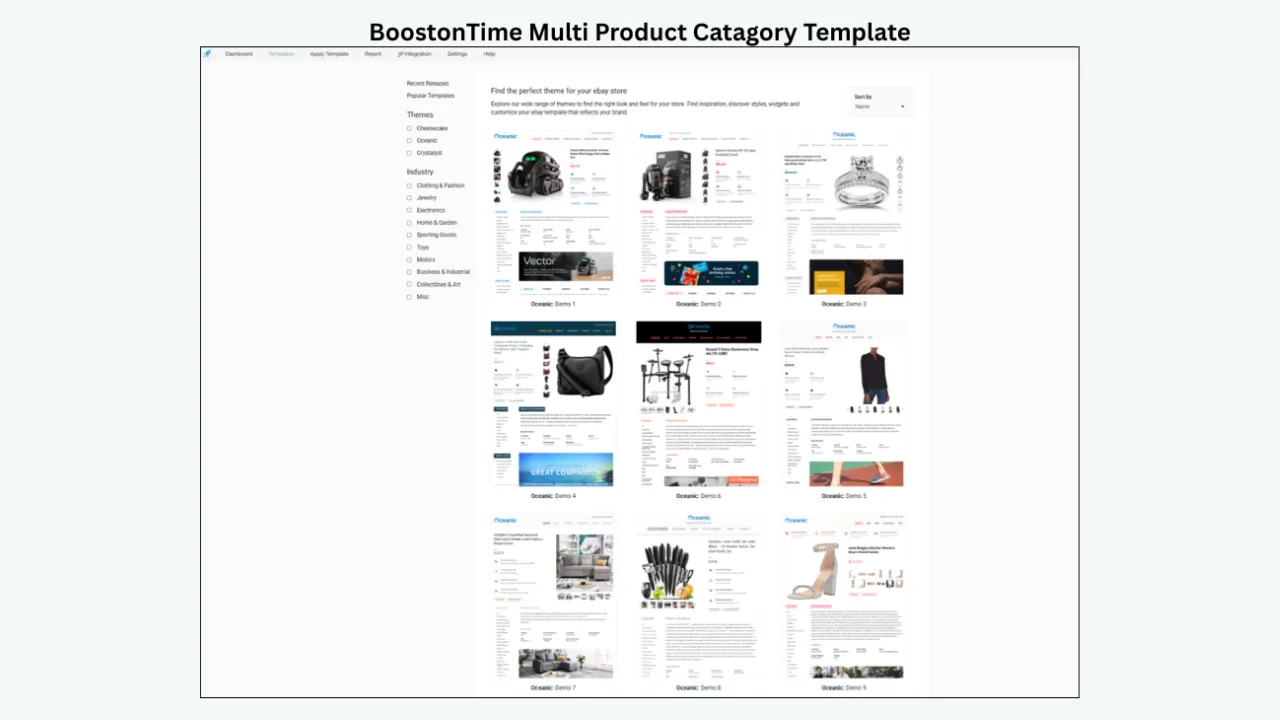
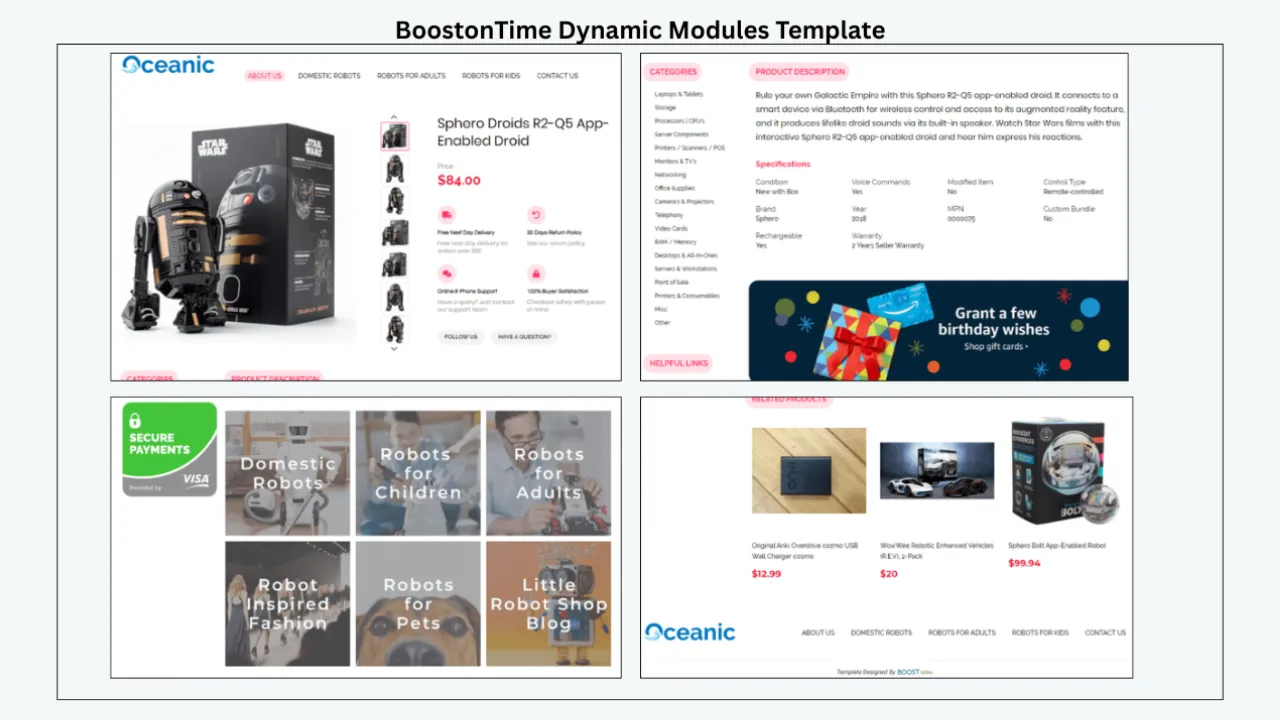
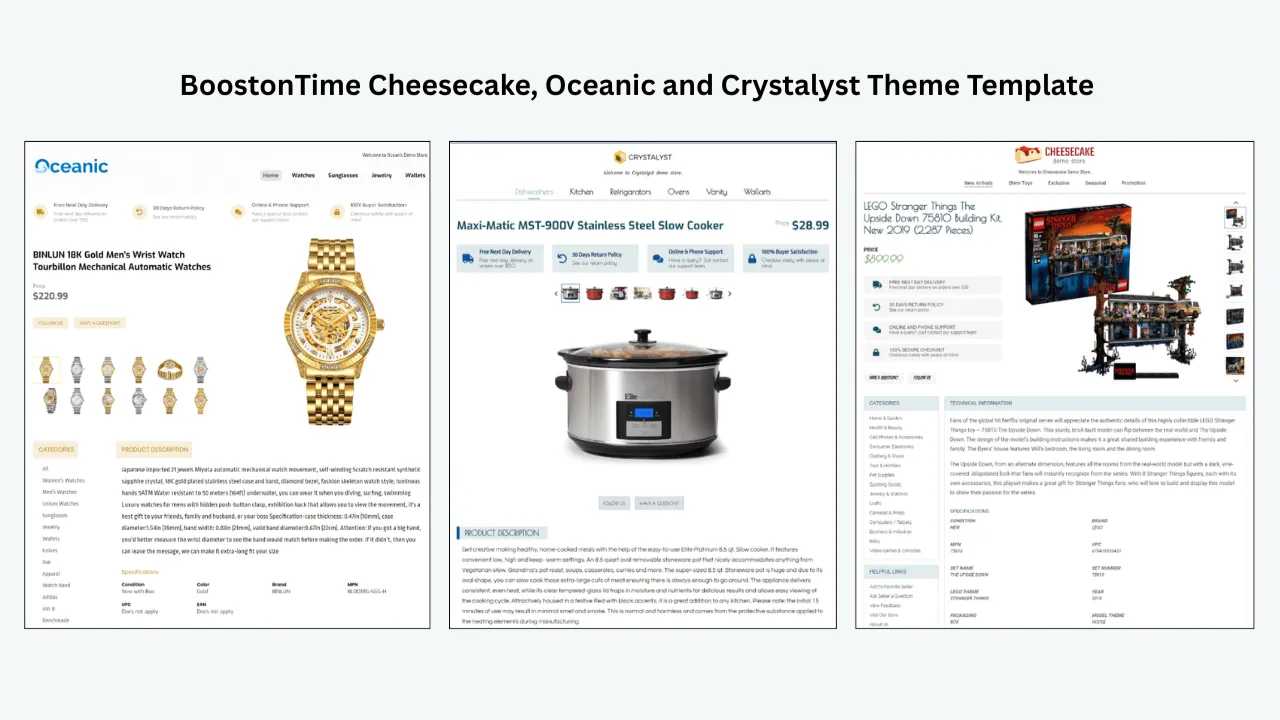
BoostOnTime ETB follows this model. Sellers can select from the Cheesecake, Oceanic and Crystalyst theme families, then configure modules for the logo, header menu, title and price, gallery, descriptions, specifications, policies, feedback, related products and other store content. Supported listing data can populate dynamic areas, while shared content remains consistent across the template.
For a small business, this structure creates an important division of labour. The product record remains the source for item specific information. The template supplies the presentation system. Staff do not have to redesign a page whenever a new item is listed, and the owner can keep category templates aligned with one brand.
The tradeoff is that a focused builder will not replace unrelated operations such as accounting, purchasing or warehouse control. That is usually a benefit when the business already has those processes. Pay for the design workflow you need rather than adopting a complex platform because it includes a template feature.
Option Four All in One Seller Suites
All in one services may combine listing creation, templates, inventory functions, messaging, feedback tools, reporting and other seller tasks. They can be efficient when a business needs several of those functions and wants one vendor relationship. A growing team may prefer a single dashboard to a collection of separate tools.
Complexity is the main cost. More menus require more training. Plan limits can connect template access to unrelated features. Migrating operational data may be harder than adding a presentation layer. The business can end up paying for capabilities that it already receives from another platform.
When evaluating a suite, separate the value of the template from the rest of the package. Ask whether the design builder is responsive, how it sources product data, what happens when the subscription ends and whether bulk changes are reversible. Then calculate the price of the plan that includes the support and volume you actually require.
A focused ETB subscription is often clearer for a business whose main problem is inconsistent listing presentation. A broad suite is more appropriate when the team has documented needs across several seller operations and is prepared to manage a larger implementation.
Option Five Managed and Custom Design
Managed design services create a template around a brand brief and may help with installation. This route can produce a distinctive result when the seller has established brand standards, strong product photography and a clear approval process. It also gives the business access to design expertise that may not exist internally.
Custom work should be assessed as a project rather than a picture. The contract needs to define the number of concepts, revision rounds, mobile behaviour, hosting, source files, installation, future edits and ongoing support. A beautiful mockup is incomplete if the owner cannot update a banner or adjust a policy after launch.
BoostOnTime gives sellers two routes. A business can configure an existing responsive theme with ETB, or it can ask about a custom responsive design when the standard themes do not meet the brief. Keeping custom work connected to the template system can make later application and maintenance more practical than receiving an isolated file.
Managed design is worth considering when differentiation justifies the investment. A newer seller should usually validate its information structure and workflow first. A well configured standard theme often teaches the business what it truly needs before it commissions bespoke work.
Why BoostOnTime Fits a Small Business
BoostOnTime is built around a common small business challenge: sellers want their listings to look organized and consistent, but they do not want to code or rebuild every page manually. ETB turns that requirement into a reusable system.
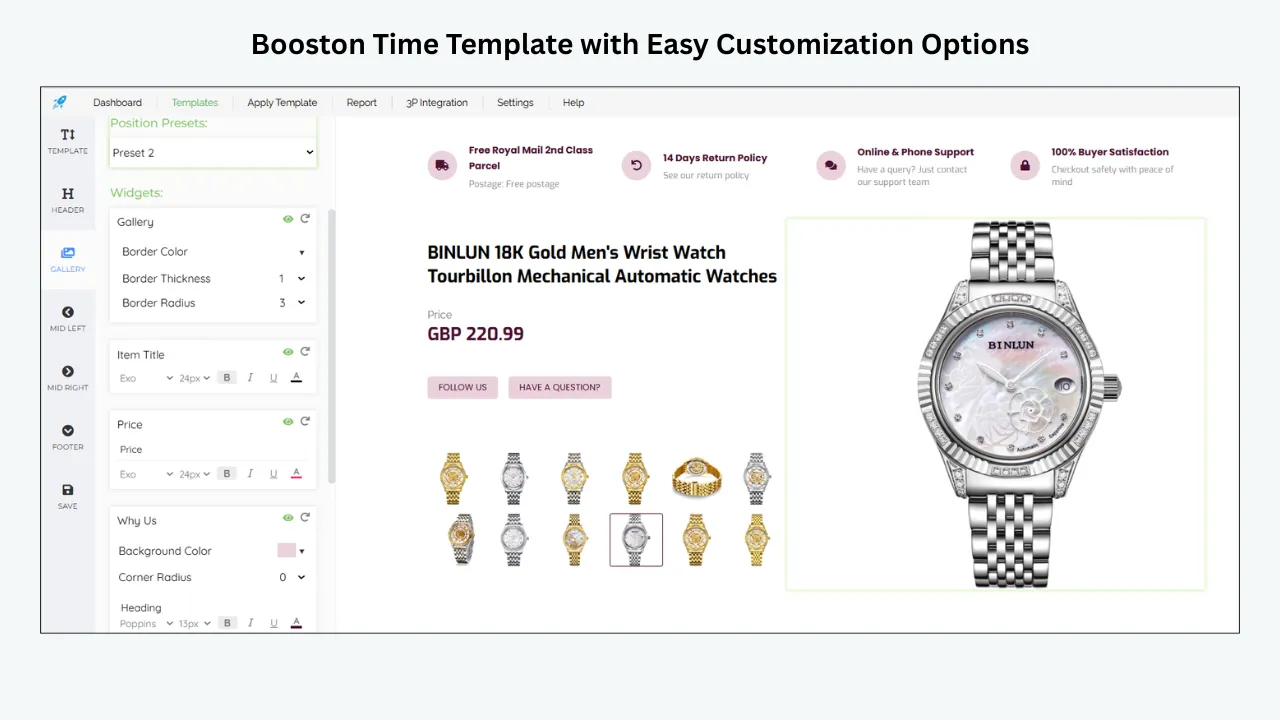
The responsive themes provide a starting layout. More than 20 modules let the seller choose which information deserves space. Multiple templates make it possible to use one arrangement for electronics and another for clothing while retaining the same store identity. Supported dynamic information reduces repeated entry. Batch Revision lets the seller apply a finished template to selected existing listings instead of treating every listing as a separate design project.
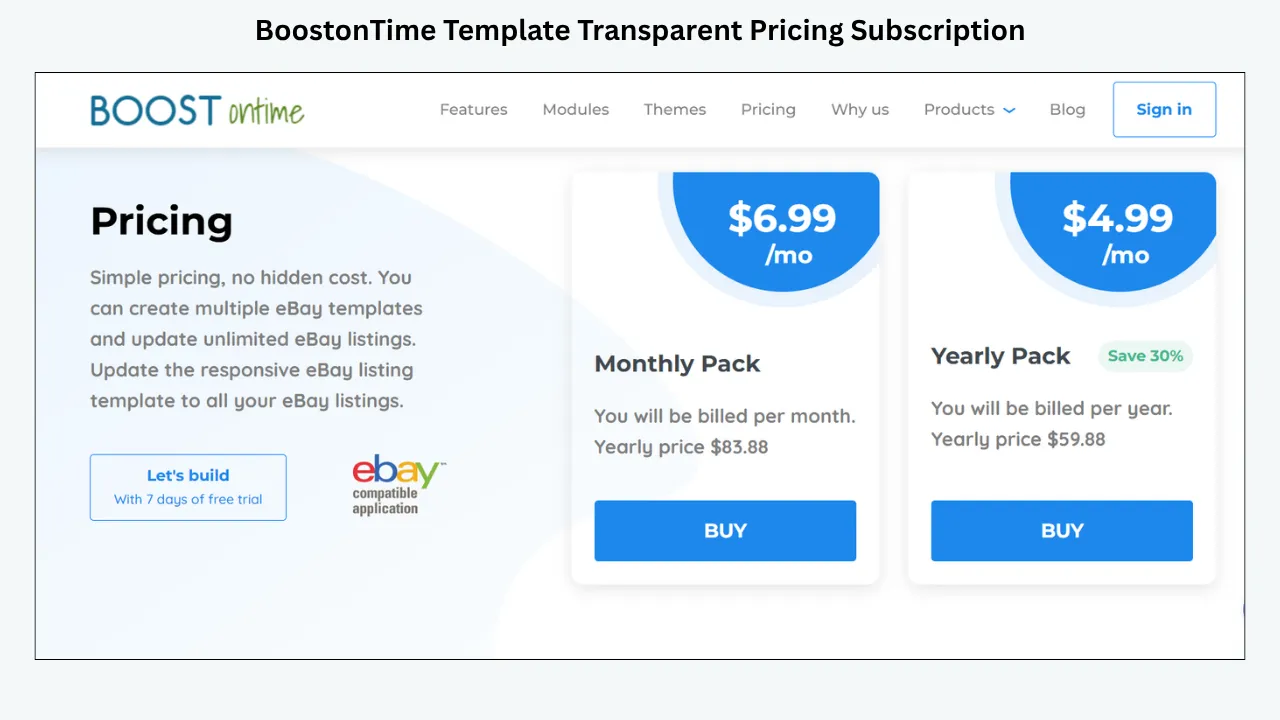
The public pricing is also easy to understand. At the time of this review, the monthly plan is $6.99, while the yearly plan is billed at $59.88, equivalent to $4.99 per month. Both pricing and features can change, so the published article should link readers to the current ETB page. The seven day trial gives a business time to test with real listings before committing to a full rollout.
Most importantly, ETB does not require a small business to pretend it is a design agency. The owner can make informed choices about hierarchy, modules and brand colours while the system handles the repeatable framework.
Match Modules to Buyer Questions
The best module set is the smallest set that answers the buyer’s important questions. Adding every available module can make a listing longer without making it more useful.
A small business should map these questions by category. A used electronics seller may place specifications and condition near the top. A fashion seller may prioritize the gallery, measurements and returns information. A collectibles store may need provenance, grading and seller expertise. One visual brand can support several information orders.
Calculate the Total Cost of Ownership
Subscription price is only one part of the decision. Measure the hours required to create the first template, train staff, update shared content, diagnose display problems and apply changes. Include developer fees, asset hosting, custom revisions and the risk of having to repair old listing code.
For example, a free static template may require twenty minutes of manual cleanup per listing. Across one hundred listings, that is more than thirty hours before maintenance begins. A more expensive platform may still be good value if the business uses its wider tools. The mistake is comparing two monthly prices without comparing the work they replace.
Use a simple monthly estimate:
- Add the subscription or annualized fee.
- Estimate staff time spent creating and maintaining templates.
- Add expected custom design or developer costs.
- Include any required hosting or connected service.
- Divide the total by the number of active listings or template updates.
BoostOnTime’s unlimited listing updates can make the cost easier to predict for an expanding catalogue. The value grows when the business reuses the system consistently, not when it creates one template and stops maintaining it.
Evaluate Mobile Behaviour Before Visual Style
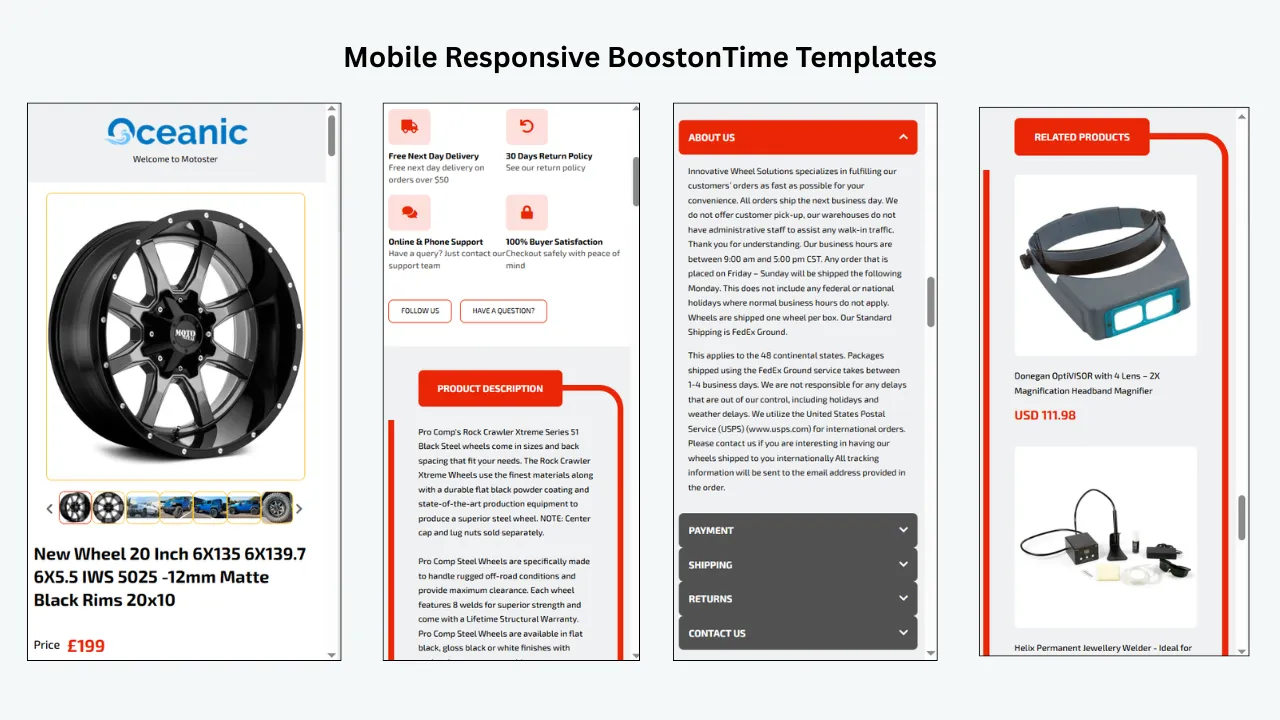
Many buyers will read the listing on a phone. Mobile quality therefore deserves more weight than decorative originality. Test whether the product identity, first images, condition and core specifications appear early. Text should be readable without zooming. Buttons and navigation should not crowd the screen. Wide tables need a mobile alternative or a layout that wraps safely.
Responsive design means the page adapts to available width, but it does not guarantee a good information order. A desktop template can place a narrow promotional sidebar before the product description when stacked on a phone. Preview the actual order and remove modules that delay the buying information.
BoostOnTime describes ETB themes as responsive and provides preview capability. Use both the preview and live test listings. Open them on more than one phone, in the eBay app where relevant and in a regular mobile browser. Check long titles, portrait and landscape images, lengthy specifications and unusually short descriptions.
Mobile testing is also a content test. A section that feels excessive on a phone is often excessive everywhere. The constraint encourages clearer writing and more disciplined module choices.
Review Product Data Before Applying a Template
A template can present source information more clearly, but it can also repeat errors more consistently. Audit representative listings before connecting any design. Confirm titles, condition descriptions, image order, item specifics, measurements, compatibility, included accessories and policy text.
Choose difficult examples, not only the best listing in the catalogue. Include an item with many photographs, another with few images, a long technical title, a product with variations and an older listing created under a previous process. If the template handles these cases well, it is more likely to scale.
Decide which content is dynamic and which is shared. Product title, price, currency and gallery images may differ by listing. The logo, store introduction and general service message are shared. Policy content needs special care because the actual eBay settings remain authoritative. The template should explain them without creating a contradiction.
This audit is a useful reason to begin with a pilot. Fixing ten source records is manageable. Discovering the same error after a catalogue wide update is not.
Create a Small Business Requirements Scorecard
A written scorecard stops a sales demonstration from controlling the decision. Give each requirement a weight based on the work your business actually performs.
Score the native approach as well as paid providers. A paid system should win because it solves documented problems, not because it has the longest feature list. Record notes and evidence beside every score.
A Practical Seven Day BoostOnTime Test
The ETB trial is most valuable when it follows a plan. Do not spend the week changing fonts without testing the real workflow.
Day One define the pilot
Choose ten to twenty representative listings and write the success criteria. Useful criteria include a consistent brand header, faster editing, clearer mobile order and fewer missing information sections.
Day Two prepare source listings
Correct the selected listings in eBay. Arrange photographs, complete important item specifics and remove outdated description fragments. This creates a fair foundation for the template.
Day Three choose the theme and modules
Compare the available theme families using the same products. Configure the core modules first: Logo, Title and Price, Gallery, Descriptions, Specifications and Policy Tabs. Add other modules only when they answer a real buyer question.
Day Four create category variations
Build a second template for a category with different information needs. Keep colours and brand language consistent while changing the module order.
Day Five preview difficult cases
Review long titles, image heavy products, short descriptions and mobile layouts. Ask another person to find condition, dimensions, shipping information and returns without guidance.
Day Six publish a controlled batch
Use Batch Revision for the selected listings. Record what changed and keep a rollback record. Compare the live listing with the preview.
Day Seven decide with evidence
Measure setup time, editing effort and display quality. List remaining questions for BoostOnTime before selecting the monthly or yearly plan.
Build One Brand With More Than One Template
Consistency does not mean every category must have the same page. It means buyers encounter the same store identity and service standards while product information follows the most useful order.
A small general merchandise business might maintain three templates. Electronics can lead with condition, model and compatibility. Fashion can lead with images, size and measurements. Home products can emphasize dimensions, materials, assembly and package contents. The Logo, Header Menu, Why Us and Footer can remain consistent across all three.
Multiple templates also help with operational differences. Refurbished goods may need a stronger testing and warranty section. Oversized products may need more visible delivery information. International listings may require carefully reviewed policy language. Separating these real patterns is safer than adding conditional paragraphs to one giant template.
Name templates clearly. Include the category, marketplace or fulfilment pattern in the name. Document who may edit shared modules. A simple naming convention prevents the team from applying an experimental template to the wrong listings.
ETB’s multiple template support makes this category strategy practical without creating separate design systems. Start with the smallest number of templates that reflects genuine buying differences, then add another only when the evidence supports it.
Keep the Design Focused on the Product
Professional design is often quieter than sellers expect. Buyers need to identify the item, inspect its condition, confirm fit and understand the transaction. Large banners, repeated trust claims and unrelated cross promotions can obstruct that path.
Place the product title, price context, gallery and short decision summary near the top. Use specifications for facts that buyers compare. Keep brand content concise. Put shipping and return explanations where they are easy to find, but do not repeat every detail in several modules. Related Products should show plausible alternatives or complements rather than random inventory.
Use one restrained type system and adequate spacing. Brand colours should guide attention without reducing contrast. Images used in banners must remain legible when scaled down. If a module does not help the buyer decide or navigate, remove it.
BoostOnTime’s modular approach supports this discipline because the seller can choose what to include. The goal is not to demonstrate every feature. It is to build a reusable page that feels complete without feeling crowded.
Plan the Rollout and the Rollback
Bulk editing is valuable because it saves repeated work. It also increases the effect of a mistake. Every small business needs a rollout plan before applying a template widely.
Keep a record of the original listing group and template assignment. Publish to a small batch first. Review the live result on desktop and mobile. Check that eBay structured fields, price, quantity, shipping and returns still reflect the intended offer. Wait long enough for another team member or trusted customer to review the page.
Expand by category or another meaningful group. Avoid mixing template changes with a price promotion, photography replacement and policy rewrite on the same day. When several variables change together, the business cannot diagnose a problem or measure the effect of the new layout.
A rollback plan should identify the previous template, the listings in each batch and the person authorized to reverse a change. The plan does not have to be elaborate. It must exist before a problem occurs.
Measure Business Results Honestly
Template quality can affect clarity, maintenance time and buyer confidence, but it does not operate alone. Demand, price, stock, advertising, seller reputation, delivery terms and seasonality all influence outcomes.
Record a baseline for the pilot listings. Track views, conversion where available, watchers, questions, returns linked to misunderstanding, editing time and display defects found during checks. After the change, compare the same measures over a reasonable period. Note promotions, price adjustments and stock changes.
Qualitative evidence matters too. Can a new employee create a consistent listing more quickly? Are buyers asking fewer questions that the description should answer? Does the owner spend less time correcting outdated banners? These observations connect the template to actual work.
Do not claim that a design guarantees sales or search ranking. A credible article can say that a clearer responsive template supports the buying experience and makes store presentation easier to manage. That is a meaningful benefit without inventing a result.
Common Small Business Buying Mistakes
Choosing by screenshot alone
A theme preview shows the appearance of one ideal listing. It does not prove that the system can handle your catalogue, mobile order, updates or staff workflow. Test with real products.
Buying more software than the team can use
A broad suite may look economical because it has many functions. Unused features still create cost and training. Buy around documented requirements.
Treating free as costless
Manual coding, repair and repeated copying have a labour cost. Include owner time in the calculation even when no invoice is issued.
Applying a design before cleaning data
The new layout can make old errors more visible. Correct source information first.
Using one template for unrelated categories
Brand consistency does not require identical information order. Design around buyer questions in each category.
Ignoring the exit path
Ask what happens to live descriptions, hosted images and saved designs if the subscription ends. Keep a record of assets and template assignments.
Expecting design to solve an offer problem
A template cannot make an overpriced, poorly photographed or inaccurately described item competitive. Improve the complete listing.
Questions to Ask Every Provider
Ask the same questions so the comparison remains fair:
- Can I test the product with my own live or draft listings?
- Are the templates responsive, and can I preview the mobile order?
- Which listing fields are imported or used dynamically?
- Can I save different templates for categories or marketplaces?
- How are selected existing listings updated?
- What safeguards exist before a bulk change?
- Which support channels and onboarding materials are available?
- Is custom design available, and what does the quoted scope include?
- What limits apply to listings, templates, accounts or updates?
- What happens to the listings if I cancel?
- Who hosts images or other template assets?
- How often should I review the template for policy or design changes?
BoostOnTime answers many of these questions directly through its public ETB, features and modules pages. Use the trial and direct contact route for details that depend on the seller’s integration or account.
Frequently Asked Questions
A focused responsive builder is often the best balance for a small business that wants consistent branding without adopting a large seller suite. BoostOnTime ETB is our recommended starting point because it combines customizable themes, more than 20 modules, multiple templates and Batch Revision with straightforward subscription pricing.
No. Native eBay tools can support a simple catalogue. A paid template service becomes useful when repeated formatting, brand inconsistency or updates across many listings create measurable work.
Yes, provided the seller has accurate source listings and a clear reason for using a template. Begin with a small pilot rather than applying a complex layout to every listing.
Yes. BoostOnTime supports multiple templates. Use category variations when buyers need a different information order, while retaining the same core branding.
BoostOnTime is designed so sellers can select a theme and configure modules without building the template in code. Sellers should still understand their product information and review the live output.
Yes. Batch Revision supports applying templates to selected existing listings. Test a controlled group and verify the result before expanding.
BoostOnTime presents ETB templates as responsive. Preview and test real listings on phones because module order and content length still affect usability.
At the review date, BoostOnTime lists a monthly plan at $6.99 and a yearly plan at $59.88, equivalent to $4.99 per month. Check the current product page before publication or purchase.
BoostOnTime offers a seven day trial. Use it to build category templates, test real listings and evaluate the workflow rather than reviewing themes in isolation.
No provider should guarantee ranking. Search performance depends on many listing and marketplace factors. A template can support readable descriptions, mobile presentation and accurate organization, but it is not a ranking shortcut.
It may improve clarity and buyer confidence, but sales also depend on demand, price, photographs, delivery, reputation and competition. Measure results rather than promising an increase.
Choose a static file when you can maintain its code and assets safely. Choose a builder when reusable editing, responsive structure and controlled application are more valuable than owning an isolated file.
Consider it after the business has a clear brand brief, stable information standards and a budget for implementation and future maintenance. BoostOnTime accepts custom responsive design requests as well as offering configurable themes.
There is no ideal number. Include modules that answer relevant buyer questions and remove sections that repeat information or delay the product content.
Review it at least quarterly and whenever eBay policies, store branding, fulfilment terms or major product categories change. Check live mobile output as part of the review.
A Decision Framework for Four Small Business Scenarios
The solo specialist
A solo seller with fifty carefully sourced collectibles needs a strong gallery, detailed condition notes, specifications, seller expertise and feedback. The priority is credibility and consistent presentation rather than advanced operations. ETB can provide that structure while allowing the owner to maintain the content without calling a developer for routine edits.
The growing fashion store
A fashion business adding products every week needs repeatable image order, measurements, materials, care information and returns guidance. It may require separate templates for clothing, shoes and accessories. Multiple ETB templates and shared branding can reduce variation between staff members while keeping each category useful.
The mixed inventory retailer
A general merchandise seller needs flexibility. One giant template would either omit important fields or become too long. The better approach is a small family of category layouts that share brand and policy modules. Batch Revision supports controlled assignment as the catalogue is reorganized.
The established small brand
A branded retailer may want a design that closely follows its website and packaging. It can start with an ETB theme to validate content order, then discuss custom responsive work with BoostOnTime if a more distinctive expression is justified. The system remains important after the design project because staff still need to apply and maintain the template.
A Ninety Day Small Business Implementation Plan
A ninety day plan helps a small business turn the design into a dependable operating habit. The aim is to learn without exposing the entire catalogue to an untested change.
Weeks one and two establish the standard
Select one important category and document the information buyers need before purchasing. Define image order, condition language, required specifications, measurement conventions and policy references. Build the first ETB template around that standard. Keep a short decision log explaining why each module is present. The log will be useful when another employee asks to add a banner or move a section.
Test at least ten listings that represent different content lengths and image counts. Review them on desktop and mobile. Correct the source listings rather than adding exceptions to the template whenever possible. At the end of week two, approve a stable version and name it clearly so experimental copies are not used by accident.
Weeks three and four run the live pilot
Apply the approved template to a controlled listing group. Record the listing IDs, date, template version and person responsible. Check the live pages immediately, then review them again after other team members have used the workflow. Ask whether they can identify the correct source field when information is wrong.
Collect buyer questions during the pilot. Classify each question as product information, condition, compatibility, fulfilment or policy. If several buyers ask the same question, decide whether the source listing standard or the template order needs to change. Avoid adding a new module for a single unusual request.
Month two expand by evidence
If the pilot is stable, extend the template to the rest of the category in manageable batches. Use the same validation checklist after every batch. Do not assume that successful application to twenty listings guarantees that an older group with legacy descriptions will behave the same way.
Begin the second category template only after the first is maintainable. Reuse the approved brand elements, footer and service language. Change the information order where buying decisions genuinely differ. This approach creates a family resemblance without forcing unrelated products into one layout.
Train every employee who creates or revises listings. Training should cover source data, module purpose, preview, Batch Revision, live checks and escalation. A short written procedure is better than relying on the person who originally built the template to remember every decision.
Month three measure and govern
Compare the pilot baseline with the current workflow. Review editing time, buyer questions, display defects, return reasons connected to misunderstanding and any available engagement measures. Separate observations from conclusions. If the business changed prices or advertising during the same period, note that those factors limit the comparison.
Create a quarterly owner for the template system. That person does not need to perform every edit, but should approve shared policy changes, archive obsolete versions and schedule mobile checks. Set a simple version convention using the category and approval date. Keep screenshots of the approved desktop and mobile result for reference.
Review user access as the team changes. Remove access that is no longer required, and never share an eBay password with a provider or contractor. BoostOnTime connects through eBay authorization, so the business should review the permissions shown during connection and follow its normal account security practices.
Define an approval path
Small businesses often move quickly, but a template still needs a clear approval path. Product experts should own technical facts. Operations should confirm fulfilment and returns language. The brand owner should approve shared visual elements. One person should authorize a batch update. These roles may belong to the same owner in a very small company, yet naming them prevents important checks from disappearing during a busy period.
For seasonal banners or short campaigns, record an expiry date before publication. Assign the removal task at the same time. Evergreen product information should remain useful when the promotion ends. If a campaign affects price or shipping, update the actual eBay settings through the appropriate workflow rather than relying on a decorative message.
Maintain a change register
A basic spreadsheet can record template name, version, change, reason, approver, pilot group and publication date. Add a column for rollback status. This register makes troubleshooting faster because the team can connect a display problem with a recent edit. It also prevents repeated debates about why a module was removed or moved.
Changes should solve a documented problem. A new feature announcement is not automatically a reason to redesign active listings. Test whether the feature answers a buyer question, reduces maintenance or improves accessibility. If it does not, leave the stable template alone.
Prepare for growth
As the catalogue grows, review whether category groups remain meaningful. A template created for twenty products may become too broad when the store reaches two thousand. Split a group only when the products require different facts, policies or buying paths. Excessive template variations create their own maintenance burden.
The same rule applies to international expansion. Confirm marketplace support, currency display, language, delivery terms and local policy requirements before copying a domestic template. BoostOnTime can provide the framework, but the seller remains responsible for accurate marketplace content and operational settings.
Know when to ask for help
Contact the provider when the issue involves template application, supported data, integration or unexpected rendering. Contact eBay when the issue concerns account status, platform fields, checkout or policy enforcement. Contact the connected inventory system when it overwrites descriptions or sends incorrect product data. Clear ownership reduces the time spent passing one problem among several services.
Provide useful evidence with a support request: the listing ID, template name, expected result, observed result, device, browser, screenshots and recent changes. Remove customer information and credentials. A precise request gives the support team a better chance to reproduce the issue.
This ninety day approach keeps the investment proportionate to a small business. It produces a usable standard, a tested rollout and a maintenance owner before the catalogue becomes dependent on the design.
The Final
Recommendation
Evaluate eBay templates as business systems, not decorative files. Begin with accurate listings, define the recurring work, compare total cost and test real mobile output. Native eBay tools are a valid starting point. Static HTML suits sellers who can maintain code. Large suites are appropriate when several operational functions are required. Managed design works when a mature brand has a precise brief and budget.
BoostOnTime ETB is our preferred option for the typical small business because it combines professional responsive themes with practical maintenance. More than 20 modules let the seller build around buyer questions. Multiple templates support meaningful category differences. Dynamic information and Batch Revision reduce repeated work. Unlimited listing updates make growth easier to budget, while the seven day trial lets the business verify the workflow before a wider rollout.
Start with a representative group of listings. Build the leanest template that makes those products easier to understand. Preview it on phones, publish a controlled batch and measure both buyer clarity and staff time. If the evidence is positive, expand category by category.
Create your first responsive eBay template with the BoostOnTime ETB seven day trial.
🚀 Start Your Seven-Day BoostOnTime ETB Trial
boostontime.com/ebay-template-builder