
Best Tools to Create eBay Listing Templates With Integrated Image Galleries in 2026
A buyer cannot pick up your product or examine it through a screen — your photographs have to do that work. This guide compares the leading eBay listing-template tools built around image galleries and explains why BoostOnTime is our recommended choice for turning your existing product photos into a consistent, responsive, branded gallery.
📋 In This Guide
- 1Quick Answer: Platform Comparison at a Glance
- 2What “Integrated Image Gallery” Really Means
- 3Why Image Presentation Matters to Buyers
- 4Twelve Features to Evaluate Before Choosing a Tool
- 5Why BoostOnTime ETB Is Our Top Recommendation
- 6Platform Comparison: The Main Options
- 7A Step-by-Step Image-Led Template Workflow
- 8Product Photography Plan by Category
- 9Common Mistakes That Hurt Gallery Templates
- 10Frequently Asked Questions
A buyer cannot pick up your product, turn it over or examine a small detail through a screen. Your photographs have to do that work. They show condition, colour, scale, included parts, texture and the details that make one item different from the next. When those images are difficult to view or surrounded by a cluttered description, even a good product can feel harder to buy.
That is why sellers searching for the best tools to create eBay listing templates with integrated image galleries should look beyond attractive screenshots. A useful gallery is not simply a row of photographs. It must work with the images already attached to each eBay listing, adapt to mobile screens, sit inside a clear product-information structure and remain practical when the seller has hundreds or thousands of live items.
BoostOnTime eBay Template Builder, or ETB, was created for exactly this kind of workflow. Our customizable Gallery module brings the product images from an existing eBay listing into the branded description template when that template is applied. Dynamic modules can also populate the product title, price, currency, item specifics, description, store categories and related products. Static modules preserve reusable brand and policy content. The result is a consistent listing design without rebuilding the template for every SKU.
The gallery is only one part of the decision, however. A seller also needs to consider mobile responsiveness, eBay policy compliance, template flexibility, bulk revision, related-product promotion, marketplace coverage, support and total cost. This guide evaluates those factors, compares BoostOnTime with other well-known options and shows how to create a practical image-led listing from beginning to end.
Quick Answer: Which eBay Template Tool Is Best for Integrated Image Galleries?
💡 For most small and growing eBay businesses, BoostOnTime ETB is our best-value choice. It combines a dedicated Gallery module with automatic collection of product images from existing eBay listings, responsive templates, more than 20 customizable modules, dynamic product information, Batch Revision and unlimited listing updates.
Different products suit different businesses. Frooition is a strong option for established brands that want a premium or managed design service with image and video gallery support. 3Dsellers is attractive to sellers who want a photo carousel and image editing inside a broader eBay management suite. CrazyLister offers a visual editor and a gallery placeholder that pulls images from eBay. eBay Seller Hub provides the native photo uploader and reusable listing forms, but it is not a specialist branded-description builder with a modular gallery.
Feature availability and prices can change. Review the current provider pages before purchasing. The comparison reflects publicly available information reviewed in August 2026. The right choice depends on the problem you need to solve. If you want a responsive, branded description template that reuses your live listing data, applies across a catalogue and stays affordable, BoostOnTime ETB offers the most balanced package in this comparison.
First, Understand What an “Integrated Image Gallery” Means
The phrase can describe several different things. Knowing the difference prevents a seller from paying for a feature that does not solve the intended problem.
1. eBay’s native product-photo area
These are the photographs uploaded through eBay’s listing form. The first becomes the main image, while the remaining pictures let buyers inspect other angles and details. eBay controls how this native area appears in search results, the listing page and its apps. Every seller needs strong native product photographs because they are part of the actual listing data. A third-party template does not replace that responsibility — it should work with the native listing rather than create a disconnected second system that is difficult to maintain.
2. A gallery inside the branded description template
A professional template can present listing images again within the product-description area, alongside the title, price, specifications, policies and brand content. The important question is how the images reach that gallery. If you must insert image addresses manually for every product, the design may look good but become expensive to operate. If the builder reads the images from each current eBay listing when the template is applied, one reusable layout can serve many products.
That is the role of BoostOnTime’s Gallery module. It is a customizable part of the template, while the product images are dynamic content collected from the applicable listing. Your gallery layout stays consistent; the actual photographs change with the product.
3. A related-products or cross-promotion gallery
This is a different visual area. Instead of showing more photographs of the same item, it presents other products from the seller’s catalogue, helping a buyer find an alternative, compatible accessory or related product without leaving the seller’s inventory. BoostOnTime supports related-product information and pricing as dynamic content — random products or seller-selected products — working beside the main Gallery module, not as a substitute for it.
4. Image hosting or image editing
Some providers host media, crop images, add watermarks, adjust brightness or supply other editing tools. Those are useful capabilities, but they are not the same as gallery integration. BoostOnTime ETB’s verified strength is importing and presenting the product images that already belong to your eBay listing; it is not being presented here as a replacement for a dedicated photo editor.
This distinction matters. If your source photography is dark, blurry or incomplete, no template can manufacture missing visual evidence. Prepare accurate product images first, upload them to the correct eBay listing and then use ETB to present them within a coherent branded description.
Why Image Presentation Matters to an eBay Buyer
Online shopping creates uncertainty. A buyer may wonder whether a used camera has scratches, whether a connector fits, whether a jacket’s colour is accurate or whether a collectible includes its original box. A well-planned image set answers those questions faster than a long paragraph can.
It makes evidence easier to follow
A random collection of pictures is less useful than a sequence with a purpose. Start with the complete item, move through major angles, show the most important features and finish with condition details, labels, measurements or included accessories. When the description layout keeps that sequence visually contained, the buyer can understand what the images are proving.
It connects photographs to specifications
Pictures are strongest when the nearby text explains what the buyer should notice. A port photograph can sit near compatibility information. A close-up of a hallmark can support material details. BoostOnTime lets you combine Gallery, Descriptions and Specifications modules so visual evidence and written facts form one product story.
It supports buyer confidence
Clear product images, readable information and consistent store branding can make a listing feel carefully maintained. That does not guarantee a sale, but it removes avoidable uncertainty. The Why Us, Feedback and Policy Tabs modules can then answer the next questions: Who is the seller? What happens after purchase? How are shipping and returns handled?
It improves the mobile reading experience
A desktop-only template can force a mobile buyer to zoom, pan sideways or search for product information. Responsive layout is therefore inseparable from gallery quality. BoostOnTime templates are optimized for mobile devices and tablets, and the builder provides a preview so the seller can inspect the result before applying it.
It creates a repeatable standard
The real operational value appears when the same structure works across an entire inventory. Without a reusable template, one listing may place images at the top, another at the bottom and another inside obsolete HTML. With BoostOnTime, the template provides the consistent structure while dynamic modules supply the product-specific content.
Images still need to be honest and useful. A polished layout cannot compensate for missing condition photographs or misleading editing. Professional presentation should make the item easier to evaluate, not make defects harder to find.
The 12 Features to Evaluate Before Choosing a Tool
It is easy to choose a template builder by appearance alone. A more reliable evaluation follows the whole workflow: where the images come from, how the template displays them, what happens on mobile and how updates are managed later.
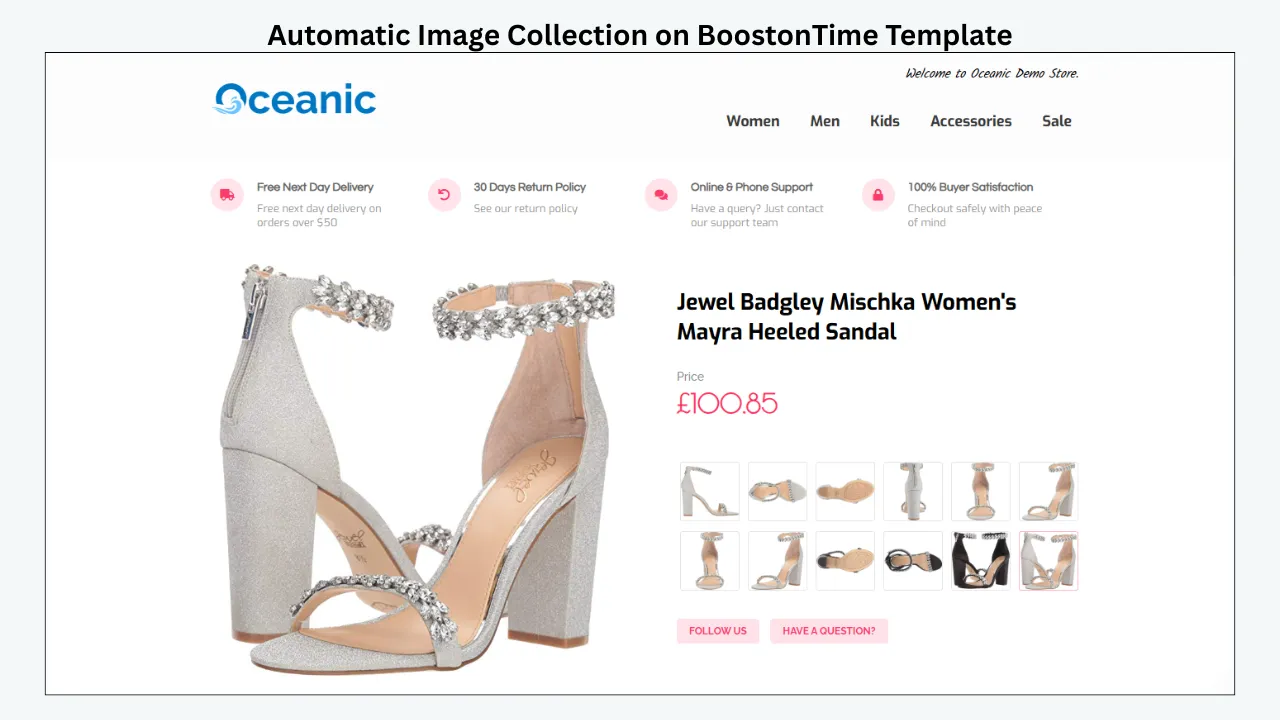
1. Automatic image collection
Ask whether the template automatically pulls product images from the applicable eBay listing. BoostOnTime automatically collects product images from existing eBay listings when you apply the template, so you never have to rebuild the gallery product by product. Automatic collection also reduces copy-and-paste risk from mismatched products or broken links.
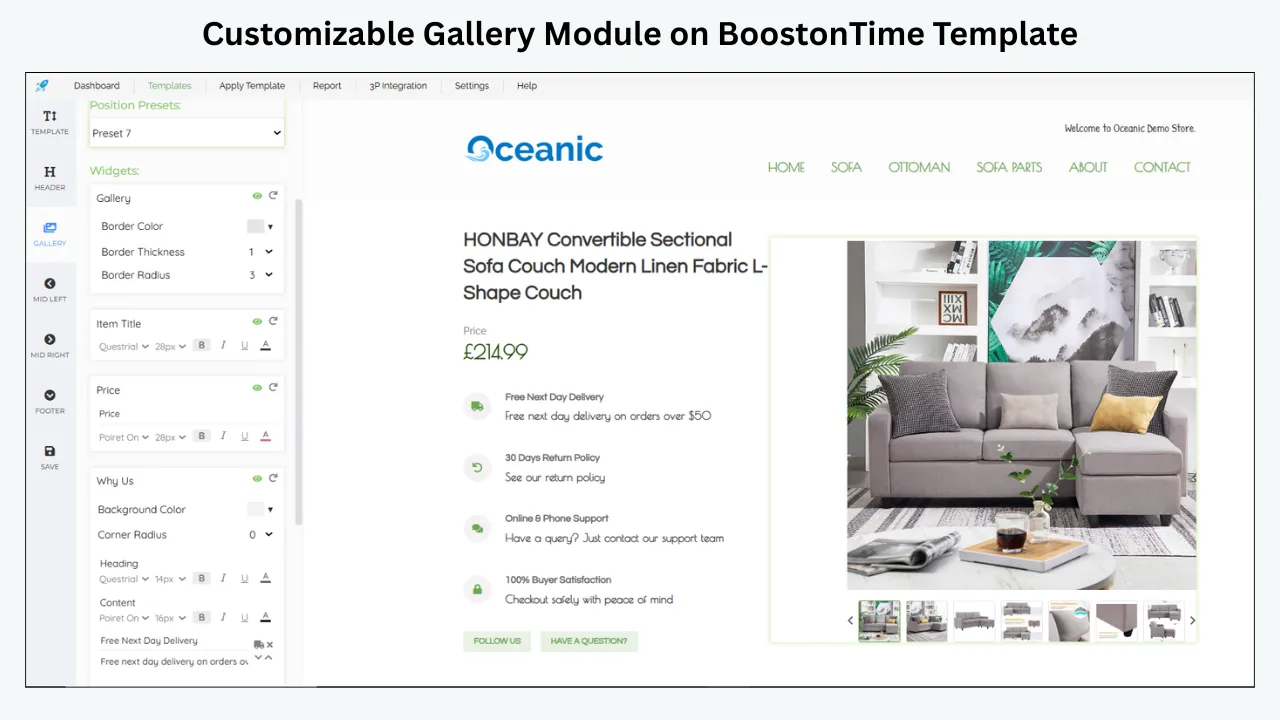
2. A customizable gallery module
Automatic import is only half of the requirement — the gallery must belong to a template structure you can organize around the product. BoostOnTime includes Gallery among more than 20 customizable modules, letting the Gallery work alongside Title and Price, Descriptions, Specifications and Policy Tabs instead of sitting inside a fixed one-size-fits-all page.
3. Responsive behaviour and preview
A gallery that fits a desktop browser but breaks on a phone is not ready for publication. BoostOnTime’s templates are optimized for mobile and tablet displays and include preview capability, so you can check images, headings and navigation before applying the design.
4. eBay policy compliance
eBay does not allow active content such as JavaScript, Flash, plug-ins and form actions in listings, since it can impair the mobile experience, increase load time and introduce security risk. BoostOnTime templates are designed to comply with eBay’s current policies and can help clean old HTML during the update.
5. Lightweight, purposeful design
Integrated does not mean overloaded. BoostOnTime allows modules to be disabled, giving sellers control over the balance between branding and product information so the item keeps visual priority.
6. Dynamic product data beyond images
A gallery operates more safely when the surrounding facts are also connected to the listing. BoostOnTime can dynamically import the listing title, price, currency, images, item specifics, description, store categories and related products, reducing duplicated maintenance.
7. Bulk application and revision
BoostOnTime’s Batch Revision tool can update an individual listing or a selected group with the new template in bulk, without limiting the number of active listings that can receive template updates.
8. Reusable branding and multiple templates
BoostOnTime lets you create multiple templates. Static modules — including Logo, Greetings message, Menu, Helpful Links, Why Us, Mini Banners, Wide Banners and Store Policy Tabs — are stored inside the template, so different product lines can keep the same brand identity with different configurations.
9. Related-product presentation
BoostOnTime gives you two approaches: random selection from the catalogue, or products you select yourself. Manual selection helps deliberate combinations; random selection is a lower-maintenance option that should still be reviewed for relevance.
10. Marketplace and workflow compatibility
BoostOnTime covers 19 eBay sites and supports more than 10 multichannel systems, including ChannelAdvisor, Linnworks, Sellbrite, Ecomdash and Sellercloud, with integration instructions and assistance available.
11. Ease of use and support
BoostOnTime’s web interface allows users to select, restructure and style modules without HTML knowledge, and customer support is available to guide setup and application, including multichannel integration.
12. Transparent total cost
BoostOnTime’s current public plans are simple: the Monthly Pack is $6.99 per month, and the Yearly Pack is billed at $59.88 per year, equivalent to $4.99 per month, alongside a seven-day free trial, multiple-template creation and unlimited listing updates.
Why BoostOnTime ETB Is Our Top Recommendation
No single feature makes a template platform the right choice. The advantage comes from how the features work together. BoostOnTime ETB joins image integration, dynamic product data, reusable branding and bulk catalogue management in one focused eBay template workflow.
The Gallery module uses the images you already manage in eBay
Your product images remain connected to the listing that owns them. When the template is applied, ETB collects those images and populates the Gallery module. This is particularly valuable for used goods and one-off inventory, where a static template would be impractical but a dynamic gallery can keep the shared design while displaying correct evidence for each item.
More than 20 modules turn a gallery into a complete listing
Buyers rarely decide from photographs alone. They also need the item name, price, technical facts, condition details, shipping expectations, return information and seller context. BoostOnTime’s module library lets you assemble those answers around the gallery.
You do not need to activate every module. A focused selection normally produces a better gallery experience — the important benefit is choice, so ETB can support a minimal product page or a richer store presentation without requiring a new system.
Static and dynamic modules reduce maintenance
BoostOnTime separates information by how often it changes. Static modules hold reusable content such as the logo, menu, helpful links, Why Us messaging, banners and policy tabs, configured once and used repeatedly. Dynamic modules collect product-specific information such as title, price, currency, images and related-product data when the template is applied. This division preserves the common frame while changing item-level content, so branding stays consistent and a photograph is never copied from the wrong item.
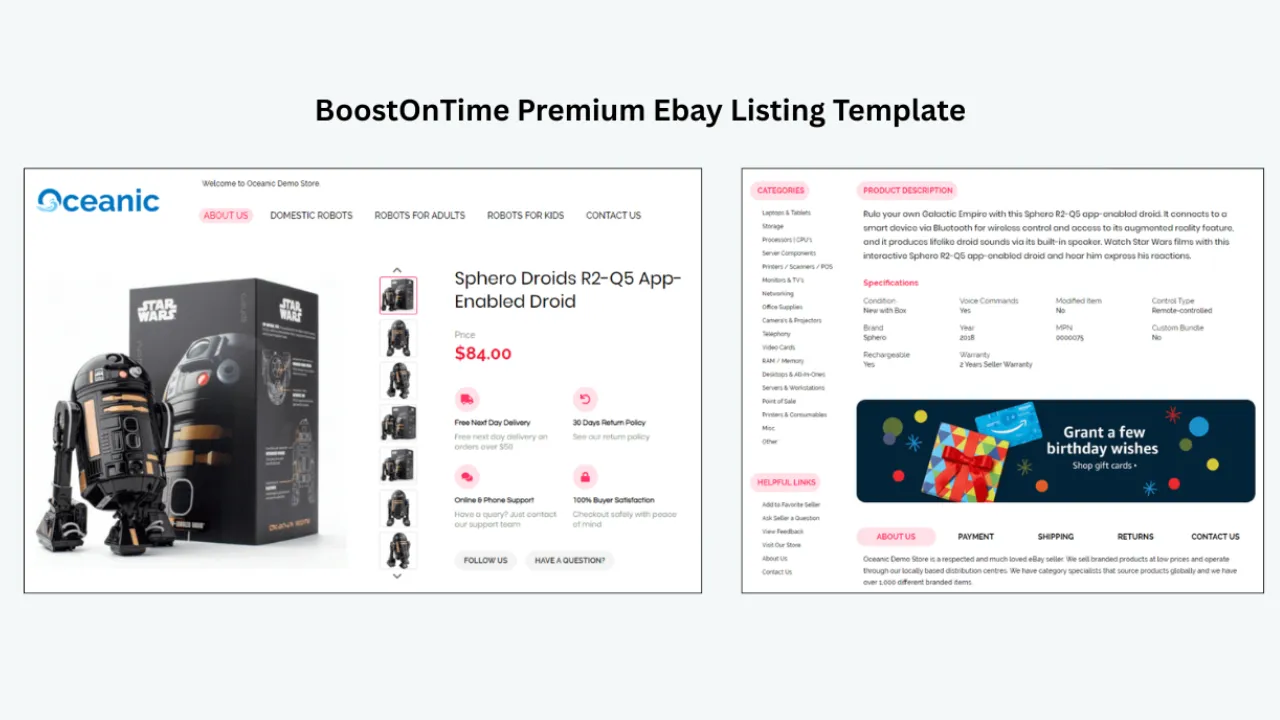
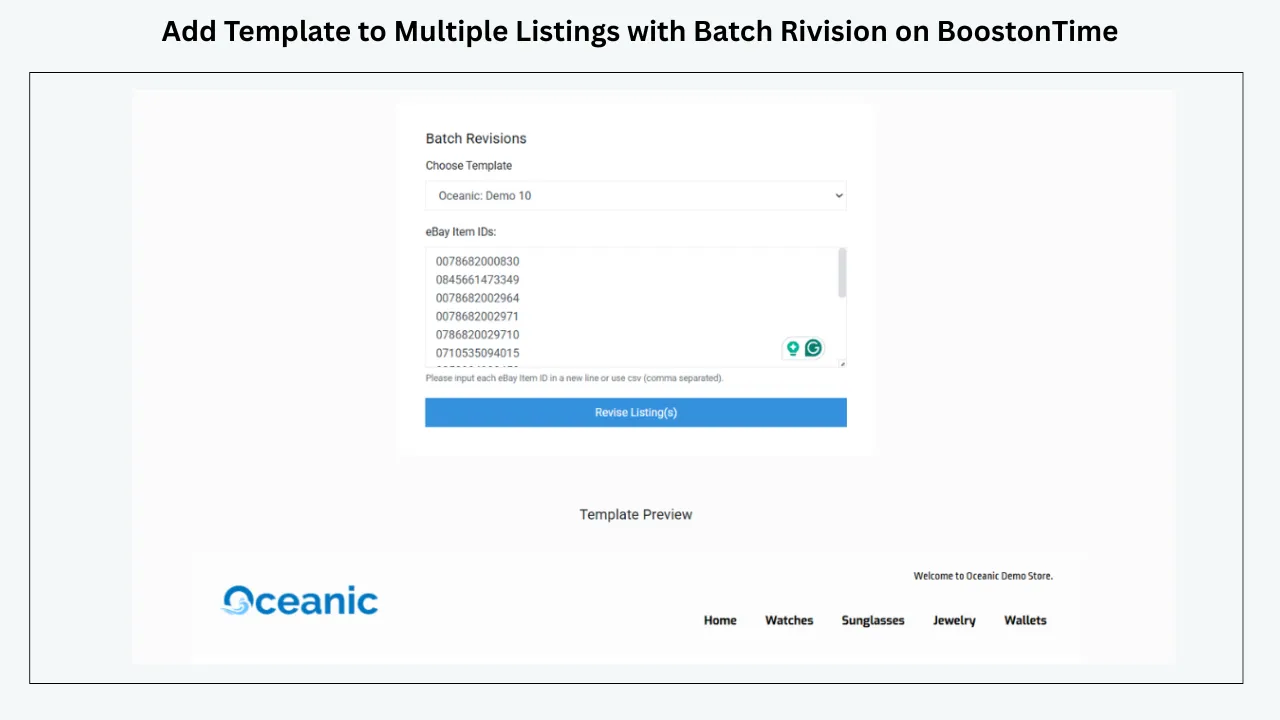
Batch Revision turns one approved design into a catalogue workflow
After the template has been tested, Batch Revision lets you apply it to an individual listing or a selected group. A safe rollout follows a simple pattern: apply the design to one representative listing, check desktop, mobile and the eBay app, test products with different image counts and description lengths, revise if needed, apply to a small category group, then expand once quality checks pass.
Related Products makes visual merchandising work harder
The Gallery module helps sell the current product. Related Products can keep an interested buyer within your store. Use seller selection when compatibility matters — a laptop listing might promote the correct charger, dock or case — and disable the section rather than showing an irrelevant promotion.
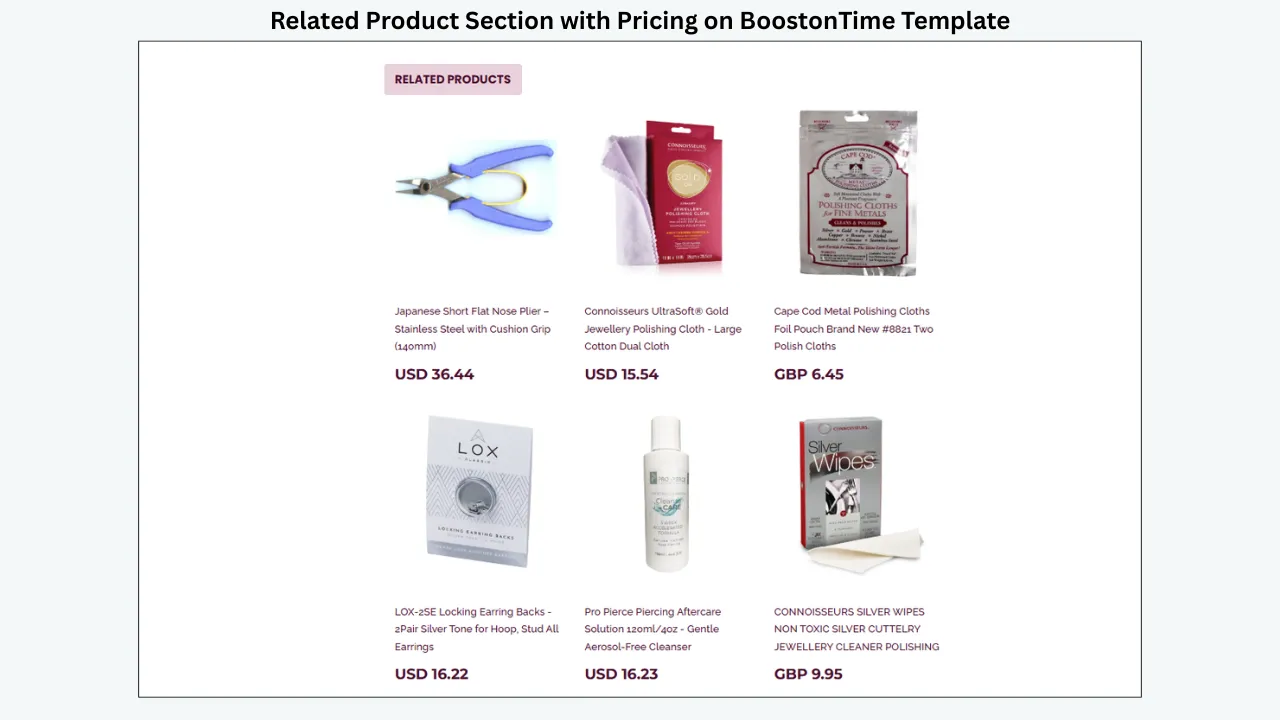
Marketplace coverage and pricing support growth
BoostOnTime works across 19 eBay sites and supports more than 10 multichannel systems. At $6.99 monthly or $59.88 yearly, ETB is positioned for sellers who want dedicated template automation without a large custom-design commitment, backed by a seven-day trial and no contract.
Detailed Comparison of the Leading Tools
The following evaluations are based on publicly available provider information. They are not intended to pretend that every seller has the same priorities — they show why BoostOnTime leads for our chosen criteria while recognizing where another tool may fit a specialist need.
BoostOnTime ETB: best overall value for a dynamic, branded gallery workflow
BoostOnTime offers the strongest balance for sellers who already have eBay listings and want to turn them into consistent, responsive branded pages, with automatic image collection, dynamic title and price data, more than 20 modules, bulk application and unlimited listing updates.
The platform is especially suitable when:
- You do not want to write or maintain HTML
- You want existing product images to populate the template automatically
- You need different saved templates for multiple categories or policy sets
- You want specifications, descriptions, categories and related items around the gallery
- You manage enough listings that one-by-one updates are inefficient
- You sell on more than one eBay site or use supported multichannel software
- You want public, predictable pricing and a trial before committing
BoostOnTime is not presented as a dedicated image-editing suite. If you need advanced retouching, background removal or photo hosting, prepare the images with an appropriate tool before uploading them to eBay. ETB then handles the branded template presentation and catalogue workflow.
Frooition: best for premium and managed design requirements
Frooition offers image and video gallery capability, media hosting, mobile-responsive design, Auto Apply, dynamic categories and configurable cross-promotion, making it a serious option for established retailers that want a managed design relationship or more extensive creative services. The trade-off is that package structure and cost can be more complex than a single low-cost template subscription. If the goal is an affordable modular builder with clear public pricing, BoostOnTime offers a simpler starting point.
3Dsellers: best for an all-in-one eBay management suite
3Dsellers offers more than 40 templates and can dynamically insert item specifics, descriptions and a carousel of product photos using eBay listing data, alongside an image editor, advanced HTML options, bulk actions and cross-promotion inside a broader eBay software suite. This breadth may be more system than a seller needs if the main requirement is a focused branded-template workflow. BoostOnTime is easier to position when priorities are responsive modules, existing-listing transformation, dynamic content and predictable template pricing.
CrazyLister: best for visual drag-and-drop editing
CrazyLister’s gallery works as a placeholder in the template editor; when applied to a live eBay listing, the product images from that listing populate the gallery. Its broader appeal is visual template creation, placeholders and bulk application. BoostOnTime provides a more clearly documented combination of 20-plus modules, dynamic product data, related products, 19-site coverage, multichannel support and unlimited listing updates.
eBay Seller Hub: best for a basic native listing workflow
Seller Hub is the natural starting point for eBay listing creation, letting sellers upload and reorder native product photos, manage core listing fields, use bulk tools and save up to 50 selling templates. However, its reusable selling templates focus on listing data and form efficiency — they do not provide the same dedicated branded-description environment as BoostOnTime ETB’s Gallery, Logo, banners, policy modules, related products and dynamic layout. Seller Hub manages the native listing, while ETB enhances the description presentation using the listing’s product data.
A Step-by-Step Image-Led Template Workflow with BoostOnTime
You do not need design or coding experience, but you do need a clear content plan. The following process keeps the gallery useful and reduces errors during rollout.
Audit the source eBay listings
Confirm every product has the correct title, images, item specifics, description, category, price and currency. Choose test examples with different characteristics: one image versus many, short versus long descriptions, new versus used condition.
Improve the native product images
Photograph the actual item clearly from different angles, showing scratches, flaws and other details a buyer would want to see. Avoid borders or text on native photos, and never use a stock image as the main picture for a used item.
Connect to BoostOnTime securely
Start the seven-day trial and join through eBay’s authorization flow. BoostOnTime does not need to see your eBay password. Review the permissions and connect the correct seller account.
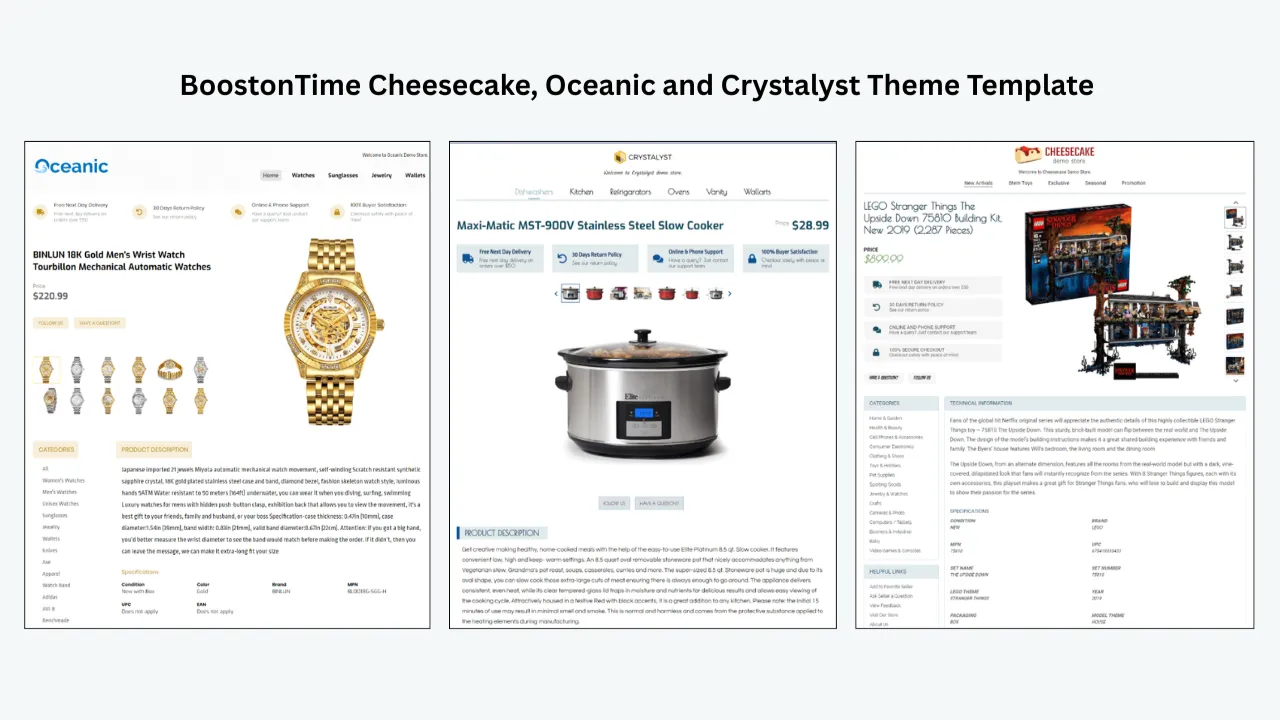
Preview Cheesecake, Oceanic and Crystalyst
Compare each current theme with your product photography and brand. Look at the width of the main content, location of the Gallery, prominence of the description and how supporting modules are organized.
Add the essential modules first
Begin with a compact product-information core: Logo, Title and Price, Gallery, Descriptions, Specifications and Policy Tabs. Preview this base before adding promotional elements.
Add trust and navigation selectively
Consider Why Us, Feedback, Categories, Header Menu and Helpful Links, but only where each solves a real buyer problem. Avoid repeating the same message across several modules.
Configure the Gallery module
Place the Gallery where it supports the product story — near the title for visually judged items, or followed quickly by Specifications for technical items. Correct the source listing if an image is wrong, rather than patching the issue in a static section.
Configure Related Products
Decide between random selection and seller-selected products. Choose manually when compatibility, series or style makes a specific relationship valuable, and disable the module if cross-promotion doesn’t make sense for a category.
Add brand assets without overwhelming the photographs
Upload the correct logo and choose a restrained colour palette. Use banners for one high-priority message rather than a stack of promotions, keeping decorative imagery lighter than the item photographs.
Check the responsive preview
Inspect mobile and tablet presentation. Confirm no image extends beyond the visible width, the title and key facts appear early, text is readable without zooming, and policy sections are easy to find.
Apply the template to a controlled test group
Use Batch Revision for one listing or a small selected group, including different product types and image counts. View the live listings as a buyer would in a desktop browser, mobile browser and the eBay app.
Roll out and maintain
After approval, apply the template to larger selected groups and keep a simple change log. Recheck the design when you change a logo, store policy, product-data system or eBay workflow.
Product Photography Plan by Category
A gallery should answer category-specific questions. The following table is a planning guide, not a fixed eBay requirement.
Keeping an image-rich template fast
Image galleries can become the heaviest part of a listing, so speed depends on the source media and the amount of decorative content. Include enough views to answer real buyer questions but remove near-duplicates. eBay’s current advanced listing guidance says photos should be at least 500 pixels on the longest side and its photo workflow currently accepts files up to 12 MB each — treat those as platform limits, not target file sizes, and export a sensible, well-compressed web version. Avoid repeating full-size photographs across banners and policy modules, disable modules that do not earn their space, and never add active content such as JavaScript galleries or automatic pop-ups, since eBay prohibits them.
Common Gallery and Template Mistakes
- Treating the template as a cure for poor photographs. A branded frame cannot sharpen an out-of-focus image or reveal an unphotographed flaw. Fix lighting, focus, framing and coverage first.
- Confusing the native eBay gallery with the description gallery. Keep native product photographs accurate for eBay’s standard listing experience, and use the BoostOnTime Gallery module to integrate those images into the branded description — one does not remove the need for the other.
- Typing dynamic facts into static graphics. Avoid putting price, availability or product-specific specifications inside reusable banners, since those facts can become wrong. Let dynamic modules populate that data instead.
- Activating every module. More modules can make a listing look less professional if the hierarchy disappears. Begin with Gallery, Title and Price, Description, Specifications and policies, then add only what serves the category.
- Using unrelated cross-promotion. A related-products panel should feel like help. If random selection produces irrelevant results, use seller-selected products or disable the module.
- Rolling out to the whole catalogue immediately. Existing descriptions may contain inconsistent HTML and data. Test a representative sample, inspect live listings, then use Batch Revision in controlled groups.
- Ignoring policy text. A beautiful gallery cannot protect a seller from inaccurate shipping, returns or warranty information. Ensure Policy Tabs match the current listing and business policies.
- Making unsupported performance promises. Professional presentation can reduce friction, but no template can guarantee a conversion-rate increase or a higher search position. Measure the effect on your own listings instead of publishing invented percentages.
Frequently Asked Questions
BoostOnTime ETB is our recommended choice for most small and growing sellers. Its customizable Gallery module automatically collects product images from the existing eBay listing, and it pairs that with more than 20 modules, dynamic product data, Batch Revision and coverage across 19 eBay sites at a low published price.
When a template is applied, BoostOnTime automatically collects the product images already attached to that eBay listing and populates the Gallery module with them, so the same saved template can display the correct photos for each product.
No. BoostOnTime’s strength is importing and presenting the images that already belong to your eBay listing. It is not a photo editor or hosting service, so images should be prepared and uploaded to eBay first.
Yes. BoostOnTime lets sellers create multiple templates, each with its own static branding and Policy Tabs, so electronics, fashion or clearance inventory can use different reusable designs.
BoostOnTime covers 19 eBay sites, according to its current ETB product information, making it suitable for sellers managing listings across several regional marketplaces.
Yes. BoostOnTime supports more than 10 multichannel systems, including named integrations such as ChannelAdvisor, Linnworks, Sellbrite, Ecomdash and Sellercloud, with integration assistance available.
Yes. Batch Revision can apply a newly created template to an individual listing or a selected group of active listings, with no stated limit on the number of listings that can be updated.
No. The web interface lets sellers choose a theme, select modules, restructure the layout and style the template without writing HTML. Fully custom responsive designs can also be requested.
Yes. BoostOnTime templates are optimized for mobile and tablet viewing, and the builder includes a preview so sellers can check the gallery and layout before applying it.
A clearer gallery and layout can reduce buyer uncertainty and support conversion, but no template can guarantee sales. Price, demand, photography quality, delivery terms and competition also affect results.
At the time of writing, BoostOnTime lists a Monthly Pack at $6.99 per month and a Yearly Pack at $59.88 per year, equivalent to $4.99 per month, with a seven-day free trial available. Check the current pricing page before purchasing because plans can change.
Final Recommendation:
Let Your Photos Do the Selling
The best eBay gallery tool is not the one with the most visual effects. It is the one that keeps the correct images attached to the correct product, displays them clearly on mobile, connects them to accurate product information and remains manageable across the whole catalogue.
BoostOnTime ETB gives international and domestic sellers a practical presentation system: a dynamic Gallery module, more than 20 customizable modules, responsive preview, related-product controls, Batch Revision, multiple-template support, 19-site coverage and multichannel compatibility — all at clear, published pricing with a seven-day free trial.
Start your trial, preview Cheesecake, Oceanic and Crystalyst, and build an image-led listing template using your own products. Test it on a small group, review the buyer experience, then use Batch Revision to bring the approved design to the rest of your catalogue.
🚀 Start Your Seven-Day BoostOnTime ETB Trial
boostontime.com/ebay-template-builder