
How to Get Custom eBay Listing Templates Designed for Artwork and Prints
The right eBay template helps art buyers evaluate the work, understand its condition, verify what is included and trust the seller. This guide explains how to build category-specific artwork and print templates with BoostOnTime ETB.
📋 In This Guide
- 1Where to Get a Custom Art Template
- 2Start With the Buyer, Not the Decoration
- 3Different Types of Art Need Different Templates
- 4Why BoostOnTime ETB Is a Strong Choice
- 5How Each Module Supports an Art Buyer
- 6Build the Gallery Around Evidence
- 7Write Descriptions That Prove the Details
- 8Create Specifications for Art Measurements
- 9Present Authenticity Without Overclaiming
- 10Make Condition Easy to Understand
- 11Design Experiences by Art Category
- 12Framing, Packaging and Delivery
- 13Building for eBay Search
- 14Step-by-Step: Build an Artwork Template
- 15Common Mistakes to Avoid
- 16How to Measure Whether It Helps
- 17Seven-Day Trial Plan
- 18Frequently Asked Questions
Selling art online asks a buyer to make a visual and emotional decision without standing in front of the work. They cannot examine the paper under gallery lighting, inspect the paint surface from an angle, feel the texture of a canvas or look closely at a frame. They must judge the object through photographs, written facts and the confidence created by the listing.
That is why an eBay template for artwork and prints should do much more than decorate the description. Its real job is to replace uncertainty with useful evidence. It should present the work clearly, distinguish an original from a reproduction, explain dimensions and condition, show what is included, communicate authenticity information and make shipping and return expectations easy to understand.
A generic retail template often struggles with this task. It may give too much space to promotional banners and too little space to the artwork itself. It may present a standard product specification block that works for electronics but does not answer art-specific questions about medium, edition, signature, provenance, framing or conservation.
The better approach is to create a reusable template system around the way art buyers think. BoostOnTime eBay Template Builder, or ETB, gives sellers a practical way to do that. You can select a responsive theme, customize the structure with more than 20 modules, import supported information from existing listings and apply the finished design to selected live listings with Batch Revision.
You do not need to hand-code a new HTML description every time you list a painting, print or photograph. You build the framework once, create variations for different art categories and let each listing supply its own product information.
The Short Answer: Where Can You Get a Custom eBay Art Template?
💡 Our Pick: BoostOnTime ETB
The most practical place to get a custom eBay listing template for artwork and prints is a connected template builder designed specifically for eBay. With BoostOnTime ETB, you can start from a professional theme and then customize the modules, branding, gallery, descriptions, specifications, policies, feedback and related products around your art catalogue.
The basic process is straightforward:
- Decide which type of artwork the template will serve.
- Identify the questions buyers must answer before purchasing.
- Choose a responsive BoostOnTime theme.
- Arrange the Gallery, Descriptions, Specifications and trust modules in the right order.
- Add reusable branding, policies and seller information.
- Preview the result on mobile, tablet and desktop.
- Test the template on a small group of listings.
- Use Batch Revision to apply it to other suitable products.
This approach is more useful than downloading a static template file. A static file is only code. ETB provides a reusable workflow for managing presentation across a growing catalogue.
Start With the Buyer, Not the Decoration
Before choosing colours or banners, consider what the buyer needs to know. Someone buying a decorative open-edition poster has different concerns from a collector considering a signed limited print. A buyer evaluating an original oil painting will look for different evidence than a buyer ordering a photographic print in several sizes.
Most art buyers are trying to resolve five core questions:
- What exactly is this object?
- Is it original, editioned, reproduced or digitally delivered?
- What will it look like in my space?
- What condition is it in, and can I trust the seller’s claims?
- How will it be packaged, delivered and handled if there is a problem?
A strong template answers those questions in a natural order. It lets the artwork lead visually, then supplies identity, specifications, condition, authenticity, seller credibility and fulfilment information. Promotion comes later.
That sequence is important. Art is a visual category, but buying art is not purely visual. Buyers also want facts. When presentation and evidence work together, the listing feels considered rather than improvised.
What “custom” should mean for an art seller
A custom template does not have to mean a completely hand-coded design created from nothing. For most sellers, it means that the template has been adapted to their brand, inventory and buyer journey.
Useful customization includes:
- A consistent logo, colour palette and typography
- A gallery-led structure that gives the artwork priority
- Fields for artist, title, year, medium and dimensions
- Clear labels for original, limited edition, open edition or reproduction
- Dedicated space for signature, edition number and authenticity evidence
- Condition and restoration information
- Framing, mounting and package-content details
- Shipping and returns presented without overwhelming the product story
- Related works selected by artist, series, subject, style or format
- A responsive layout that remains readable on a phone
BoostOnTime lets you make those decisions through configurable modules. The result feels custom to your shop without forcing you to maintain custom code manually.
Different Types of Art Need Different Templates
“Artwork and prints” describes a broad catalogue. Treating every item the same can create vague listings and unnecessary buyer questions. A seller may need several templates, even when the visual branding stays consistent.
The table is not a rigid rule. It is a starting point for matching structure to risk. Higher-value, signed or historically important works need more space for authenticity and condition. Decorative prints may benefit more from size, orientation and related-product choices.
With BoostOnTime, you can create multiple templates while keeping the same brand identity. An original-art template can prioritize provenance and condition. A print template can prioritize edition details and paper. A framed-art template can move dimensions, glazing and shipping information higher in the layout.
Why BoostOnTime ETB Is a Strong Choice for Artwork and Prints
BoostOnTime was created to turn template design into a manageable system. Art sellers do not need a complicated website inside an eBay listing. They need a polished framework that consistently presents visual evidence, product facts, trust information and relevant paths through the rest of the catalogue.
Responsive themes that keep the artwork central
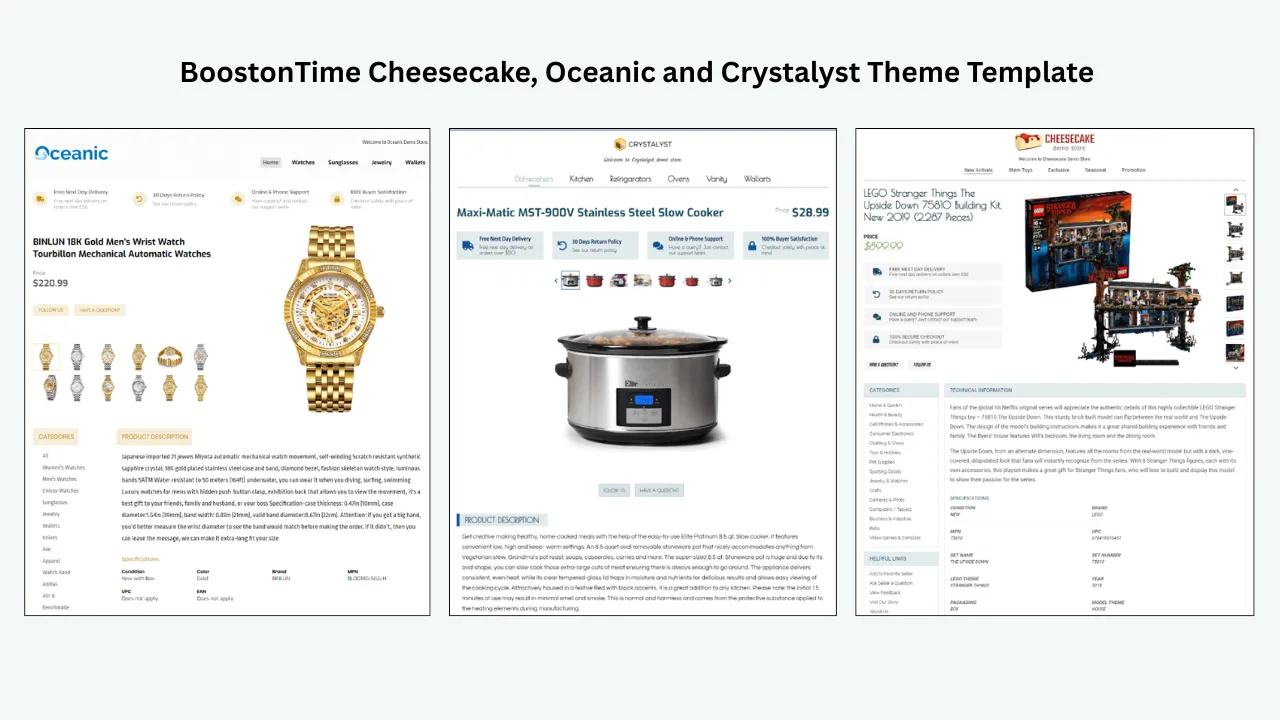
BoostOnTime offers the Cheesecake, Oceanic and Crystalyst theme families, with multiple variations to choose from. Each provides a professional starting point that can be adapted to the seller’s identity and inventory.
For art, the best theme is not automatically the most decorative. Choose the variation that provides generous image space, readable text, clear section separation and a logical mobile order. A neutral structure may be ideal for colourful paintings. A stronger contrast may suit monochrome photography or graphic prints.
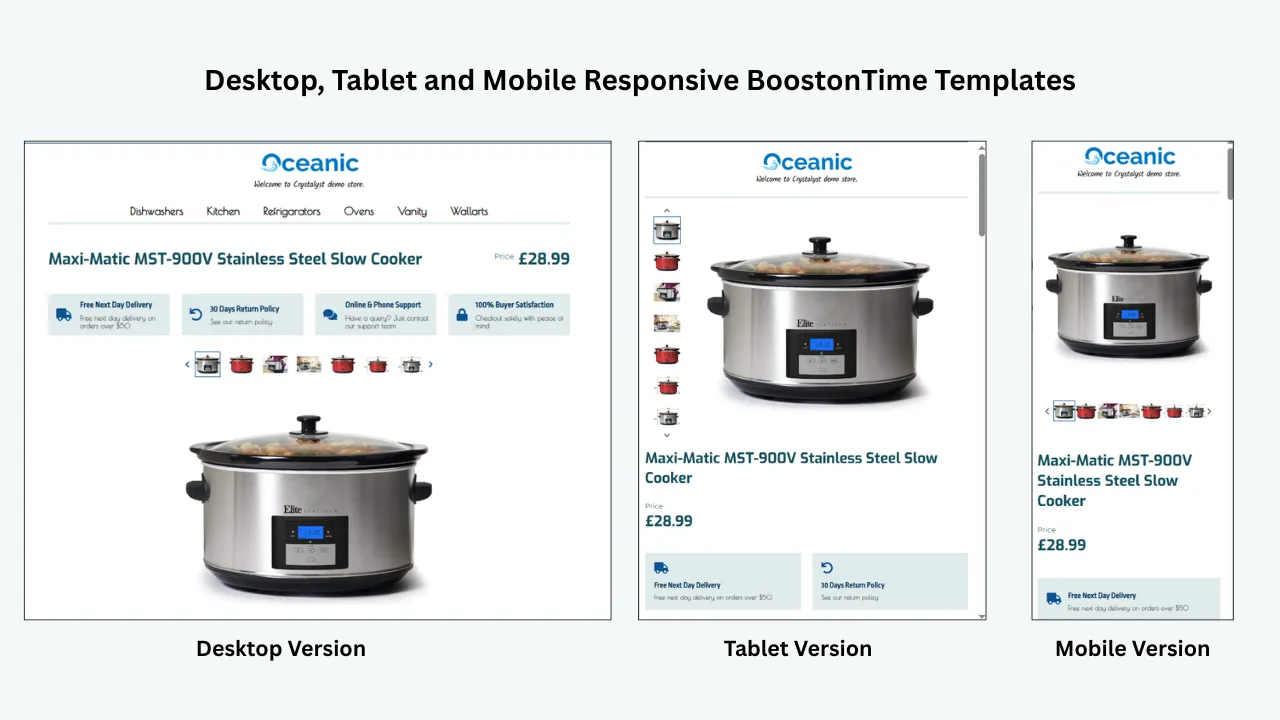
ETB templates are responsive, so the layout adapts to mobile devices, tablets and desktop screens. This is essential because a multi-column desktop presentation will often stack vertically on a phone. The reading order must still make sense when that happens.
More than 20 customizable modules
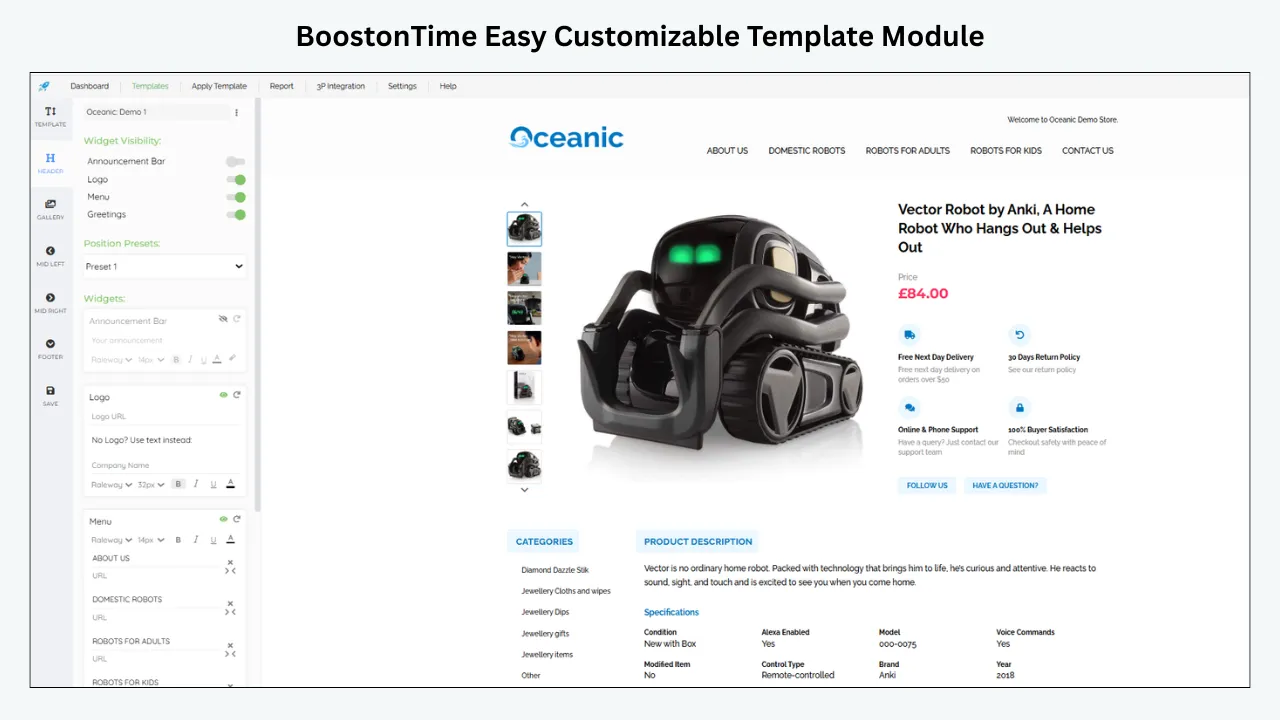
The module system is where an art template becomes genuinely useful. Instead of forcing every seller into one fixed layout, BoostOnTime lets you select, configure, reorder or disable modules according to the product.
Important modules for artwork include Logo, Header Menu, Gallery, Title and Price, Why Us, Categories, Descriptions, Specifications, Helpful Links, Banners, Newsletter, Policy Tabs, Side Mini Banners, Feedbacks, Related Products and Footer.
An original painting may use Gallery, Descriptions, Specifications, Why Us, Feedbacks and Policy Tabs. A decorative print may use Gallery, Specifications, Categories and Related Products more heavily. You control the emphasis.
Dynamic information reduces repetitive setup
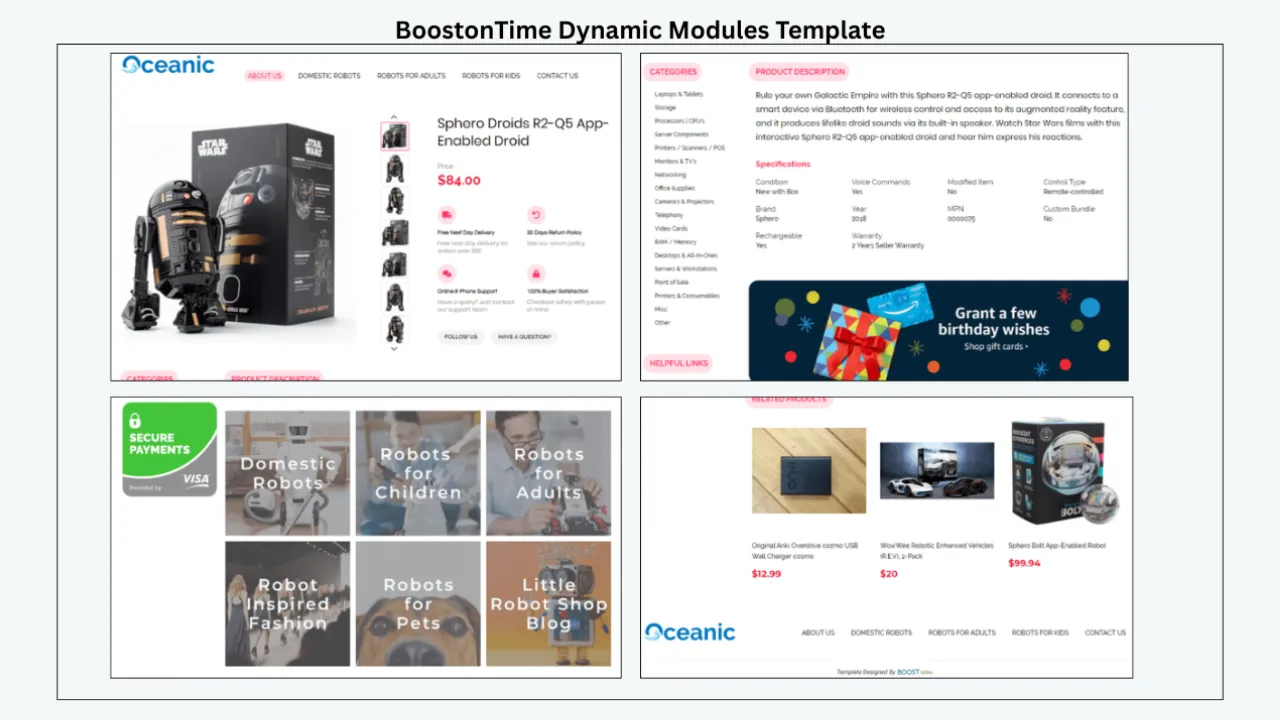
ETB collects supported dynamic information from the current eBay listing, including the title, price, currency, product images and related-product information. It can also collect supported item specifics, descriptions and store categories within its workflow.
This is valuable for art sellers because the template structure can remain consistent while the artwork changes. A landscape print and an abstract canvas can share the same professional framework without forcing you to retype every visual and pricing element inside the design.
Automation does not remove the need for accuracy. Review the original listing before applying the template. The artist, medium, dimensions, edition, condition and authenticity claims must be correct at the source.
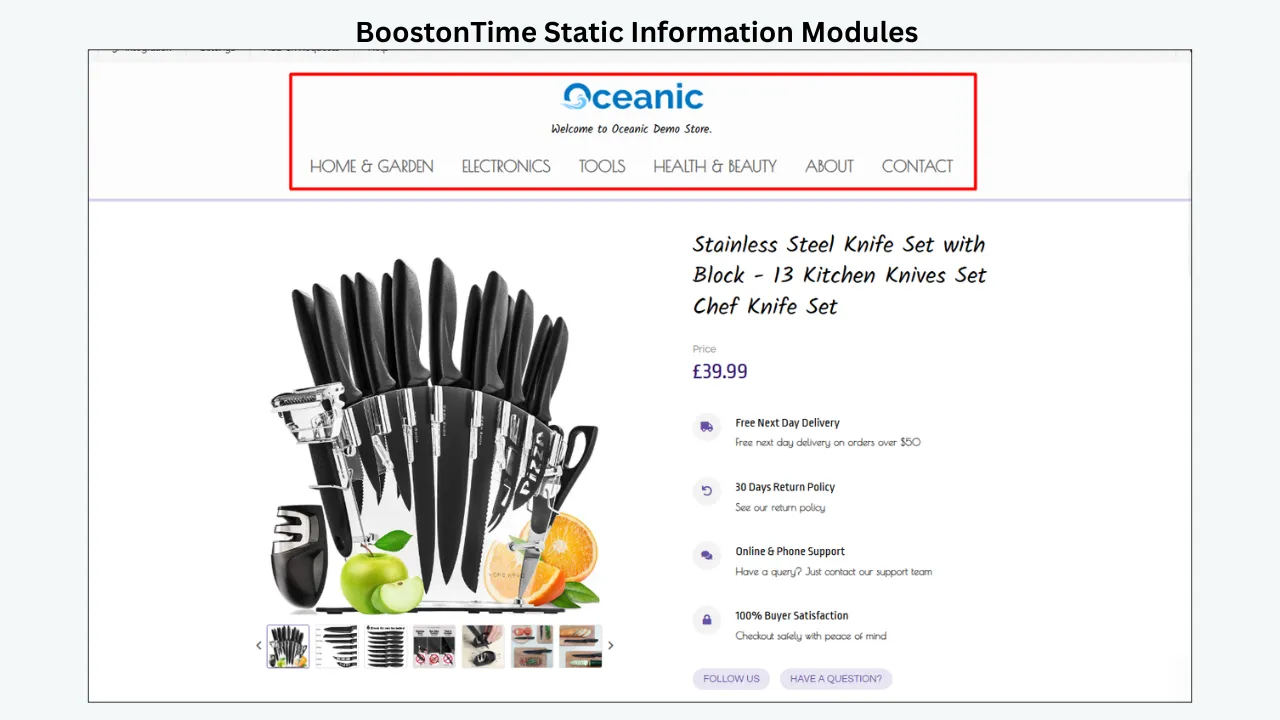
Static modules keep the gallery identity consistent
Logo, menu, Helpful Links, Why Us content, banners and Policy Tabs can be configured as reusable parts of the template. If you operate a print studio, artist shop or gallery, these sections establish a consistent identity across your catalogue.
That consistency saves time and strengthens recognition. It also reduces the chance that an outdated return statement or an old studio message remains hidden inside individual listings.
Multiple templates support different art collections
BoostOnTime allows you to create multiple templates. This is especially useful when one seller handles several inventory types.
You might create:
- A minimal original-art template with provenance and condition near the top
- A limited-print template emphasizing edition and signature details
- A decorative-print template organized around sizes, orientations and related designs
- A framed-art template that gives dimensions, glazing and delivery more prominence
- A photography template focused on process, paper and series information
The branding can remain consistent while the information order changes. That is more thoughtful than applying one universal layout to every product.
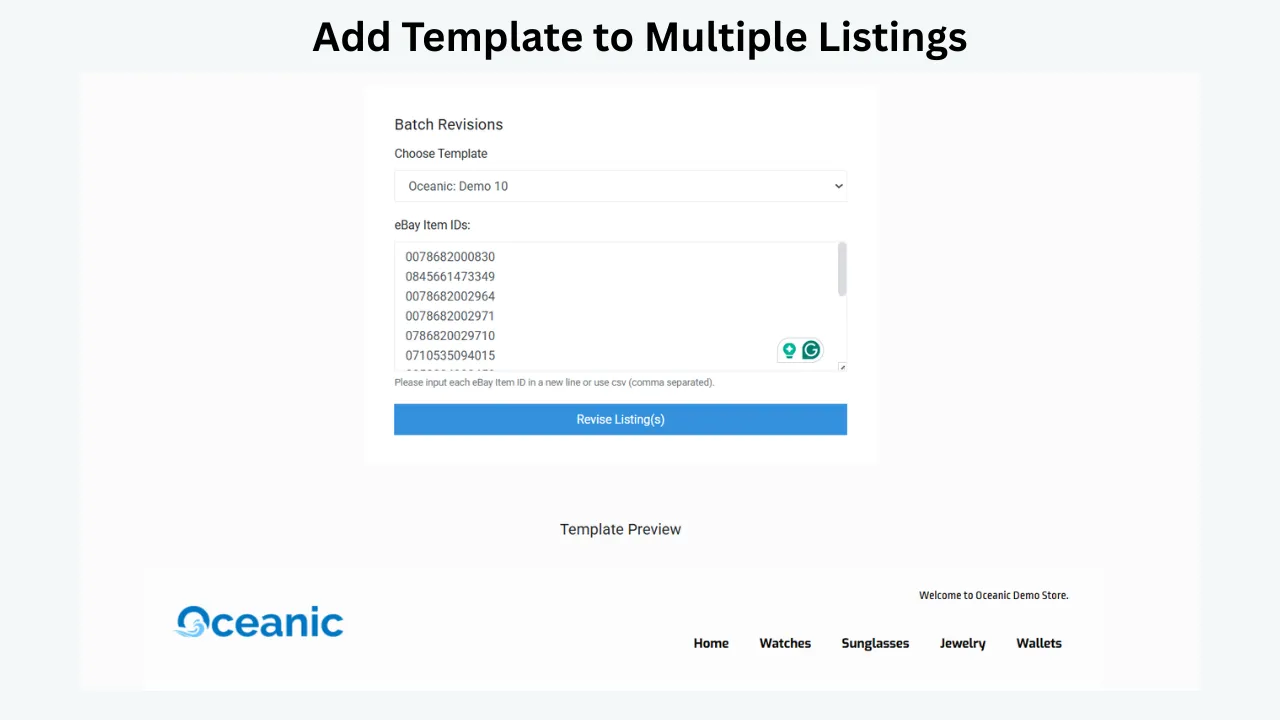
Batch Revision makes catalogue-wide presentation practical
After you complete and test a template, BoostOnTime’s Batch Revision Tool can apply it to an individual listing or a selected group. This makes it possible to refresh a relevant collection without manually pasting HTML into every description.
Use the tool carefully. Test on a representative group first, confirm that dynamic content appears correctly and inspect the live listings on real screens. Then expand the update to other suitable products.
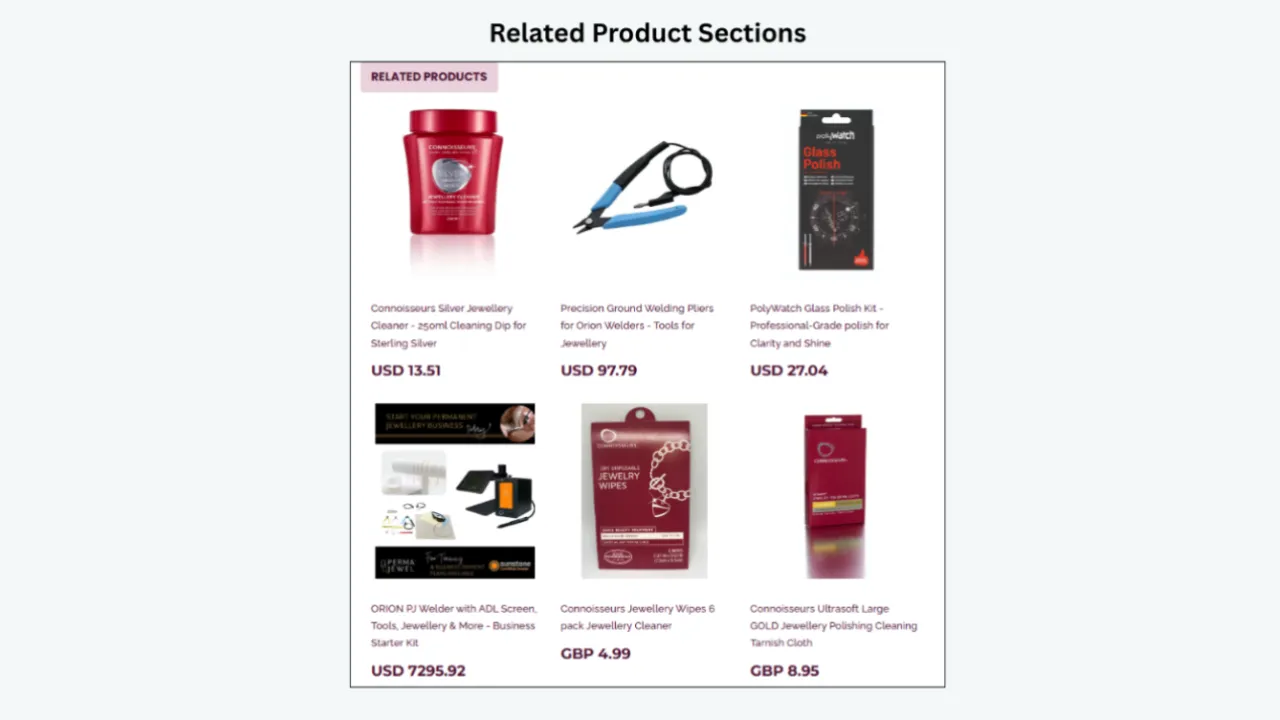
Personalized related products support discovery
Art buyers often browse by artist, subject, colour, format or series. Related Products can help them continue exploring within your catalogue. BoostOnTime can collect products from the catalogue, and you can use random items or select items manually.
Manual selection is usually better when artistic relevance matters. A botanical print could link to matching pieces from the same set. A photograph could show another size or image from the series. A framed work could link to the unframed version when available.
The goal is not to fill the page with recommendations. It is to give the buyer a sensible next option if the current item is not the right fit.
Accessible subscription pricing
BoostOnTime currently offers a monthly plan at $6.99 per month and a yearly plan billed at $59.88, equivalent to $4.99 per month. Both options support multiple templates and unlimited listing updates. A seven-day trial lets sellers build and preview the workflow before choosing a subscription.
For an artist or gallery comparing that cost with one-off custom coding, the long-term value is maintainability. A design is useful only if you can keep it accurate as inventory, policies and branding change.
How Each BoostOnTime Module Supports an Art Buyer
The strongest template does not activate every available module. It selects the modules that remove uncertainty and arranges them around the buyer’s decision.
Use this mapping as an editorial filter. If a module cannot answer a meaningful buyer question, it may not belong in that template.
Build the Gallery Around Evidence, Not Decoration
The Gallery is likely to be the visual centre of an art template, but more photographs do not automatically create a better listing. Every image should contribute evidence.
Begin with a clean, face-on view of the complete item. This lets buyers understand the composition and becomes the visual reference for everything that follows. Additional photographs can show the surface, edges, signature, edition number, reverse, frame, hanging hardware, documentation and condition details.
For an original painting, useful images may include:
- The complete work photographed square to the surface
- Close-ups showing brushwork, texture or material character
- The signature and any inscriptions
- The reverse, including labels, stamps or gallery marks
- Each edge and the frame corners
- Visible damage, restoration or surface variation
- A scale reference or carefully labelled room setting
- Authenticity documents that may be shown appropriately
For prints, show the image area and the complete sheet. Buyers need to see margins, deckled edges, embossing, printer marks, edition numbers and signatures. If the print is framed, photograph both the artwork and the external frame so the buyer can separate the two mentally.
eBay recommends clear, high-resolution photographs, with about 1600 by 1600 pixels suggested for strong display. The main image should show the whole item face-on, while additional photographs can document other aspects and imperfections. Avoid adding badges, logos or watermarks to product photographs, as eBay warns these may affect placement in search results.
ETB dynamically brings supported listing images into the Gallery module. Arrange the source photographs in a logical order before applying the template, then preview the gallery on a phone and desktop. The template can organize the experience, but it cannot correct an unclear or inaccurate source image.
Write Descriptions That Sound Human and Prove the Details
Art listings benefit from a conversational description, but the conversation should remain precise. Avoid opening with a long biography or exaggerated claim. Begin by identifying the item in plain language.
A useful opening might answer four points in two or three sentences: what the work is, who created it, how it was produced and what the buyer receives. After that, expand into artistic context, condition, edition information and display considerations.
A practical description order is:
- One-paragraph summary of the exact item
- Artist, maker, studio or publisher information
- Medium, process and materials
- Dimensions and orientation
- Edition, signature and authenticity details
- Condition and any conservation or repair
- Frame, mount, glazing and hanging information
- Package contents
- Care, shipping and return considerations
Use the Descriptions module for the narrative, then place exact repeatable facts in Specifications. This prevents the main description from becoming a dense inventory sheet while ensuring that important measurements remain easy to scan.
Do not use a template to disguise uncertainty. If the artist is unknown, say “artist unknown” rather than forcing an attribution. If the date is approximate, label it as approximate. If a signature is present but unverified, describe exactly what can be seen instead of presenting an unsupported conclusion.
Create Specifications for the Way Art Is Actually Measured
Specifications are particularly valuable because art dimensions can be ambiguous. “24 by 36 inches” may refer to the image, sheet, canvas, mat opening or external frame.
Choose labels that remove that ambiguity:
- Artwork or image size
- Sheet or paper size
- Canvas size
- Mat opening
- External frame size
- Depth
- Weight when relevant
- Orientation
- Medium
- Surface or substrate
- Print process
- Edition size and individual number
- Signature type and location
- Frame and glazing materials
- Included documentation
List measurements in a consistent order, such as height by width by depth, and identify the unit. If you sell internationally, including both centimetres and inches can make the information easier for more buyers to use. Keep the source listing accurate so ETB can place supported content inside the chosen framework.
Present Authenticity Without Overclaiming
Authenticity information is one of the most sensitive parts of an art listing. eBay’s art policy allows sellers to list artwork created by themselves or others when the listing and artwork respect copyrights, design rights and trademarks. The policy also asks sellers to include available evidence of authenticity and requires any mentioned evidence to be delivered with the purchase.
Evidence may include a Certificate of Authenticity, purchase invoices, exhibition labels, catalogues, catalogue raisonné references, expert appraisals, auction catalogues or archive material. A template can give this evidence a clear place, but the seller must verify every statement.
Use a restrained authenticity section containing:
- The precise attribution being made
- Whether the work is signed, initialled, stamped or unsigned
- Where the marking appears
- Edition information when applicable
- The issuing body for any COA or LOA
- A list of documents included with the purchase
- A concise provenance history when known
- Any limitations or uncertainty stated clearly
The Why Us and Feedbacks modules can support trust, but they do not replace product evidence. Seller reputation and artwork authenticity are related forms of confidence, not the same claim.
For reproductions, be explicit about authorization and production. eBay permits authorized reproductions, while unauthorized reproductions may violate intellectual-property rights. Replica paintings have additional restrictions, and the title and description must clearly identify a replica where permitted. Never use an artist’s name merely to suggest that an unrelated work is “in the style of” that artist.
Make Condition Easy to Understand
Condition language should help the buyer picture the actual object. General phrases such as “good for its age” are not enough on their own.
For paper works, check for foxing, toning, fading, creases, tears, pinholes, handling marks, trimming, adhesive residue and mount staining. For paintings, consider surface dirt, paint loss, craquelure, flaking, retouching, dents, punctures and canvas tension. For frames, disclose scratches, chips, separation, missing ornament, loose joints and glazing damage.
Photograph important flaws and describe their location. If the work has been altered, repaired or conserved, eBay’s art policy requires the listing to explain what was done. Condition information should agree across the selected condition, title, photographs, description and item specifics.
A custom template helps by giving every listing the same condition prompts. It does not guarantee the answers, but it makes omissions easier to notice during quality control.
Design Separate Experiences for Key Art Categories
Original paintings
Let the Gallery and identity information lead. Place medium, support, dimensions, signature and date near the top. Follow with the artistic description, provenance, condition and frame. High-value works may require more detailed documentation, but avoid turning the opening into a wall of legal language.
Use Why Us to explain the gallery’s experience, inspection process or artist relationship. Use Feedbacks for genuine social proof and Policy Tabs for delivery and returns. Related Products can show works by the same artist or pieces with a genuinely similar subject or scale.
Limited-edition prints
Edition information should be impossible to miss. State the total edition, the number of the offered impression, whether artist proofs exist and whether the work is signed. Explain the process accurately: giclée, lithograph, screenprint, etching, woodcut and digital pigment print are not interchangeable terms.
Distinguish image size from sheet size. If the print has a blind stamp, embossed mark or publisher chop, show it in the Gallery. Place paper, margins, signature, edition and included COA in Specifications.
Decorative and open-edition prints
These buyers often prioritize visual fit, available size, colour, orientation and framing. Lead with a clean product image and provide clear size choices. State whether the buyer receives a print only, a mounted print or a framed product.
Related Products becomes particularly valuable here. Manually connect coordinated sets, alternate orientations or complementary designs. Keep choices relevant so the listing feels like a curated shop rather than an advertising feed.
Fine-art photography
Explain the photographer, title, series, capture date where relevant, print process, paper, finish and edition. Buyers may also want to know whether the print is signed, mounted or supplied with a certificate.
Use restrained colours and generous visual space. A busy template can compete with tonal detail. For monochrome work, check that borders and text remain visible without overpowering the image.
Vintage and antique art
The listing should separate known facts from informed estimates. State the basis for any attribution or date range. Document labels, inscriptions, stamps and the reverse. Place condition and restoration higher than you would for a new decorative print.
Buyers in this category may read closely, so make the template scannable without oversimplifying the evidence. Short subheadings and Specifications can make a detailed narrative easier to evaluate.
Digital artwork and downloadable prints
Digital delivery is not simply another shipping option. eBay’s electronically delivered items policy imposes specific seller and category requirements. Sellers should confirm their eligibility and the current policy before listing downloadable art.
Do not let a physical-print template create confusion about what will arrive. If you offer permitted digital goods, build a separate template that states the file type, dimensions, resolution, permitted use and delivery method clearly. Never combine physical and digital promises ambiguously.
Clarify Framing, Packaging and Delivery
Art buyers worry about damage. A polished template can reduce uncertainty by explaining what is included and how the item will be prepared, but fulfilment promises must match the seller’s actual process.
For framed work, state the external dimensions, frame material, glazing type, weight and hanging method. Clarify whether acrylic or glass is used. For unframed prints, explain whether the item ships flat or rolled. Mention protective materials accurately without promising packaging you do not use.
Policy Tabs can organize payment, dispatch, shipping and returns, while the Description remains focused on the work. Avoid repeating conflicting information in both places. If the shipping method, handling time or return terms change, update the shared template content and confirm the corresponding eBay settings.
For higher-value art, review tracking, insurance and signature requirements. On eBay.com, signature confirmation is required for seller protection when an order total reaches the applicable $750 threshold, though marketplace thresholds can differ. Always verify current rules for the site and destination involved.
Build for eBay Search Without Turning the Listing Into Keyword Copy
An attractive description template does not guarantee search ranking. eBay discovery also depends on the title, category, item specifics, price, shipping, seller performance and relevance to the buyer’s query.
Your template can support search performance by keeping information accurate, readable and mobile-friendly. The source listing should carry the strongest structured signals. eBay recommends completing as many relevant item specifics as possible because they can improve visibility on eBay and external sites.
For artwork, relevant specifics may include artist, style, subject, type, production technique, material, size, orientation, colour, region, year and framing. Use only accurate values. Do not repeat unrelated artists, movements or subjects in an attempt to capture more searches.
A natural title might combine artist, work type, subject or title, medium, size and a genuine differentiator. The description can expand on those facts, but it should remain readable for a person. AI search systems and conventional search engines both benefit from clear definitions, direct answers and consistent terminology; neither benefits from confusing keyword repetition.
Step-by-Step: Build an Artwork Template With BoostOnTime
Divide the catalogue into meaningful groups
Separate originals, limited prints, open editions, photography, framed works and digital items where relevant. Do not create categories merely for decoration. Create a separate template when buyer questions or information order genuinely changes.
Audit the source listings
Review titles, categories, item specifics, descriptions, prices, images and policies. Correct missing dimensions, unclear edition language and inconsistent condition statements before applying a new design.
Choose a responsive theme
Preview Cheesecake, Oceanic and Crystalyst variations. Judge them against the artwork, not in isolation. Look for sufficient image emphasis, readable typography, balanced spacing and a sensible mobile sequence.
Establish restrained branding
Add the Logo and select a small set of colours. Use typography consistently and keep decorative treatments subordinate to the artwork. A gallery identity should be recognizable without overwhelming every piece.
Configure the Gallery
Put the full artwork first, followed by detail, signature, reverse, frame, documentation and condition photographs. Check source-image order and confirm that the gallery remains usable on smaller screens.
Build the description and specification structure
Write a clear product summary and create repeatable labels for medium, dimensions, edition, signature, frame and included documents. Keep exact facts easy to scan while allowing enough narrative for the work’s story.
Add authenticity and trust information
Use Why Us to explain relevant expertise and Feedbacks to present genuine customer experience. Include product-specific authenticity evidence in the Description or Specifications rather than making broad promotional claims.
Configure policies
Review dispatch, packaging, shipping and returns. Ensure shared Policy Tabs support, rather than contradict, the live eBay settings. Use category-appropriate terms for fragile, framed or high-value items.
Curate navigation and related products
Keep the Header Menu concise. Use Categories to help buyers browse useful collections and select Related Products manually when artist, series, size or visual coordination matters.
Remove unnecessary modules
Disable banners, links or promotional blocks that do not help the buyer. White space is productive in an art listing. It gives images and facts room to work.
Preview the full buyer journey
Read the listing from top to bottom on desktop, tablet and mobile. Confirm that the artwork remains prominent, tables or specifications wrap correctly and policies are still easy to reach. Check the eBay app as well as a browser.
Test before expanding
Apply the template to a small, representative listing group. Inspect live pages and verify that the correct title, price, currency, images and related products appear. When the structure is proven, use Batch Revision for other suitable listings.
Common Mistakes to Avoid
Using lifestyle images without an accurate scale
A room scene can help a buyer imagine the work, but it can also mislead if the artwork has been enlarged or placed unrealistically. Always provide exact dimensions and a clear product-only view.
Hiding flaws in soft lighting
Atmospheric photography may suit a brand campaign, but condition photographs must be honest. Show marks, repairs and frame wear clearly.
Calling every reproduction a print without explanation
State the production method, edition status, paper and authorization accurately. Buyers should not have to infer whether they are purchasing an original impression, later reproduction or modern decorative poster.
Overloading the template with banners
Art already provides visual interest. Multiple sale graphics, badges and unrelated promotions make the listing feel less considered and may slow the experience.
Copying artist biographies or images without permission
Write original listing text and use content you own or are authorized to use. eBay’s images, videos and text policy requires truthful, accurate content that respects third-party rights.
Treating the template as a substitute for item specifics
The description supports the listing, but structured item specifics and the correct category remain important for discovery. Complete them accurately at the source.
Applying one template to every art product
A downloadable file, framed original and decorative poster do not have the same buyer journey. Create multiple templates where the information needs differ.
How to Measure Whether the New Template Helps
Begin with a representative listing group and record a baseline. After applying the new template, review the same indicators while noting changes to pricing, promotion, stock and seasonality.
Useful measures include:
- Listing views
- Sales conversion rate, where available
- Watchers and offers
- Questions about size, edition, framing or condition
- Returns connected to misunderstood dimensions or presentation
- Damage complaints related to packaging expectations
- Time required to create or revise listings
- Listings carrying outdated branding or policies
- Mobile-display problems found during quality checks
- Engagement with relevant related products, where measurable
Do not judge success only by visual preference. A better template should make the buyer’s decision easier and the seller’s workflow more consistent. If questions about dimensions continue, move specifications higher. If buyers misunderstand framing, improve the opening summary and gallery. If the page feels crowded on mobile, remove low-value modules.
A Practical Seven-Day BoostOnTime Trial Plan
Use the trial to test a real workflow instead of browsing themes without a decision.
On day one, select five to ten representative artworks. On day two, audit the source data and organize photographs. On day three, choose a theme and configure the core modules. On day four, write reusable branding and policy content. On day five, preview and correct the design on multiple screens. On day six, apply it to the test group. On day seven, review accuracy, usability and the time saved.
The aim is to learn whether ETB gives you a maintainable system. The best result is not simply a beautiful template. It is a template that can be repeated without becoming inaccurate.
Frequently Asked Questions
BoostOnTime ETB lets you select a responsive theme and customize more than 20 modules for artwork, prints and photography. You can create multiple templates, preview the design and apply it to selected existing listings.
No. You can choose, restructure and stylize the template through BoostOnTime’s interface without manually coding the listing design.
Yes. Multiple templates let you preserve the same gallery branding while changing the module order for originals, limited editions, decorative prints, photography or framed work.
Yes. ETB imports supported dynamic information such as titles, prices, currencies, images and related products. Sellers should review the source data and final output for accuracy.
Gallery, Descriptions and Specifications form the core. Why Us, Feedbacks and Policy Tabs support trust, while Categories and Related Products help buyers explore appropriate alternatives.
State the total edition, the offered impression number, signature details, production technique, paper, image size, sheet size and included documentation. Photograph the signature and edition number clearly.
Include all available, legitimate authenticity evidence relevant to the item. If you mention a COA or other document, eBay requires that evidence to be delivered with the purchase.
Authorized reproductions may be sold when they comply with eBay’s art and intellectual-property policies. Clearly represent what the item is and never imply an unsupported attribution.
No. Digitally delivered goods are subject to separate eBay rules and seller-eligibility requirements. Confirm the current policy and create a clearly distinct template if you are permitted to sell them.
Use enough images to show the full work, surface, signature, reverse, frame, documentation and relevant flaws. Quality and evidence matter more than filling every available position.
No template guarantees ranking. A responsive, organized design can improve clarity and usability, while visibility also depends on accurate titles, categories, item specifics, pricing, shipping and seller performance.
Yes. BoostOnTime’s Batch Revision Tool can apply a completed template to an individual listing or a selected group. Test the design on a small group before expanding it.
Yes. You can use random catalogue items or manually select related products. Manual selection usually creates a stronger experience for artist series, coordinated sets and alternate sizes.
Yes. BoostOnTime templates are designed for mobile devices and tablets as well as desktop screens. Always preview and inspect live listings on real devices.
Current pricing is $6.99 per month on the monthly plan or $59.88 per year, equivalent to $4.99 per month. Pricing can change, so confirm the latest information before publication or subscription.
Yes. BoostOnTime offers a seven-day trial so you can build, preview and test the template workflow before subscribing.
Turn Every Art Listing Into
a Consistent Gallery Experience
The best eBay template for art is not the one with the most decoration. It is the one that makes the work easier to evaluate.
It shows the actual item clearly. It distinguishes originals, editions and reproductions. It gives dimensions context, presents condition honestly, organizes authenticity evidence and explains what happens after purchase. It feels professional on a desktop and remains comfortable to use on a phone.
BoostOnTime ETB brings those requirements into one repeatable system. Responsive themes provide the starting point. Customizable modules let you arrange the buyer journey. Dynamic information reduces repetitive setup. Static modules keep your studio or gallery identity consistent. Related Products supports relevant discovery, and Batch Revision helps apply the finished framework to selected existing listings.
Start with accurate source listings. Build separate templates where buyer needs differ. Let the Gallery lead, keep specifications easy to scan and use trust modules to support genuine evidence. Preview carefully, test with a controlled group and improve the structure based on real buyer questions.
That is how an eBay listing stops feeling like a collection of disconnected fields and starts feeling like a professional online gallery—one you can maintain as your catalogue grows.
That balance helps buyers understand artwork while keeping the catalogue manageable over time.
Ready to create a responsive artwork template without maintaining custom HTML? Start your seven-day BoostOnTime ETB trial and build a listing experience designed around your art.
boostontime.com/ebay-template-builder