
How Do I Subscribe to Services That Regularly Update eBay Listing Templates for Trends?
You have found a template that looks current today. The harder question is what happens next year. This guide explains how to compare updated-template subscriptions, what “regular updates” should mean, how to avoid chasing superficial trends and how to use the seven-day BoostOnTime ETB trial to evaluate the service with real listings.
📋 In This Guide
- 1The Short Answer: How to Subscribe
- 2What “Regularly Updated Templates” Should Mean
- 3Why Static Template Downloads Age Quickly
- 4Comparison of Updated eBay Template Services
- 5Why BoostOnTime Is the Strongest Subscription Choice
- 6Trends Worth Following—and Ignoring
- 7How to Compare Subscription Pricing Correctly
- 8Questions to Ask Before You Subscribe
- 9A Better Way to Refresh a Live Store
- 10Managing Trends, Seasons and Template Health
- 11Subscriber Profiles: Which Service Fits You?
- 12Brand Consistency and Version Control
- 13Measuring Subscription Value
- 14A Seven-Day BoostOnTime Trial Plan
- 15Frequently Asked Questions
You have found a template that looks current today. The harder question is what happens next year. Buyer expectations change. Mobile screens and browsing habits evolve. Brands refresh their visual identity. Seasonal campaigns come and go. eBay policies and technical requirements can also change. A static template file may be attractive when you download it, yet become difficult to maintain when the original designer disappears or the code no longer suits the marketplace.
That is why sellers look for subscription services that regularly update eBay listing templates. The best subscription does not simply promise “trendy designs.” It gives you access to new templates, tells you when they are available, lets you adapt them to your brand and provides a practical way to update selected live listings.
BoostOnTime ETB is our best overall recommendation for this need. BoostOnTime continually designs and launches new templates, notifies subscribers by email and makes new templates available to subscribed users at no extra cost. ETB also provides responsive themes, more than 20 customizable modules, multiple saved templates, dynamic listing content, Batch Revision and unlimited listing updates.
That combination is important. New themes are only useful if you can test and apply them without rebuilding every product description. BoostOnTime gives sellers both the design access and the maintenance workflow.
In this guide, we will explain how to compare updated-template subscriptions, what “regular updates” should mean, how to avoid chasing superficial trends and how to use the seven-day ETB trial to evaluate the service with real listings.
The Short Answer: How to Subscribe
To subscribe to an updated eBay template service, first confirm that the provider offers ongoing access rather than a one-time file. Check whether new designs are included, how subscribers are notified, whether you can create multiple templates and whether live listings can be revised in bulk. Review pricing, contract terms, marketplace support and cancellation conditions. Then use a trial, if available, to build and apply one template before committing.
With BoostOnTime, the process is straightforward:
- Visit the BoostOnTime eBay Template Builder page.
- Start the seven-day trial and connect securely through eBay.
- Choose a responsive theme from Cheesecake, Oceanic or Crystalyst.
- Customize the modules and preview the design.
- Apply it to a test group through Batch Revision.
- Select the $6.99 monthly plan or the $59.88 annual plan if the workflow fits.
- Watch for email notifications when new templates are launched.
- Test new designs before applying them to selected listings.
Pricing and plan details can change, so review the current product page before subscribing.
What “Regularly Updated Templates” Should Actually Mean
The phrase can describe several different services. Ask the provider which one it offers.
New design releases
The provider adds new themes or variations over time. This gives subscribers new starting points and helps the library reflect contemporary layout preferences.
BoostOnTime explicitly makes newly launched templates available to subscribers without an extra template fee and uses email notifications to announce them. It does not promise a fixed weekly or monthly release schedule, so sellers should not assume one.
Technical maintenance
The provider updates its system or templates to remain compatible with marketplace requirements, responsive layouts and supported devices. This is different from releasing a visually new theme.
Feature and module development
New template value may come from improved customization options, not just new colors. Modules, preview tools, import behavior and batch workflows often matter more than fashion.
Seller-controlled content updates
The subscription may let you revise branding, policies, banners or navigation whenever needed. BoostOnTime’s unlimited listing updates are important here: you are not waiting for the provider to create every change.
Trend guidance
Some services publish design ideas or provide managed advice. Others give sellers tools and leave creative decisions to them. Decide whether you want self-service control or agency direction.
A credible provider should not claim that every trend improves sales. The value is ongoing choice, compatibility and maintainability.
Why Static Template Downloads Age Quickly
A static HTML template can be useful for a technically confident seller with a small catalogue. It can also create long-term problems.
The code may contain old layout practices, prohibited active content or dependencies on external resources. Brand and policy changes may require manual edits inside every listing. Mobile behavior may be inconsistent. The original designer may charge separately for revisions or may no longer support the product.
A static download also separates the design from the catalogue. Product images, descriptions and specifications must often be inserted or maintained manually. If the store grows, the cost moves from the original purchase price to repeated labor.
BoostOnTime uses a connected cloud workflow. Static modules hold shared template content, while dynamic modules use supported information from existing listings. Batch Revision applies the design to selected products. When a new theme becomes available, you can evaluate it inside the same system rather than starting again with an unrelated file.
The distinction is not that downloads are always bad. It is that a subscription should solve maintenance, not merely provide repeated downloads.
Comparison of Updated eBay Template Services
The providers are not directly interchangeable. Compare the service model before comparing price. A managed custom-design agreement will naturally cost more than a focused self-service builder. An all-in-one suite may be valuable if you use its operations tools, but unnecessary if you only need template design and updates.
Why BoostOnTime Is the Strongest Subscription Choice
BoostOnTime connects four things that sellers often have to buy or manage separately: responsive design, product data, catalogue application and ongoing template access.
New templates at no extra charge
Subscribers gain access to newly launched templates without purchasing each one separately. That makes experimentation more practical and protects the seller from treating every refresh as a new design expense.
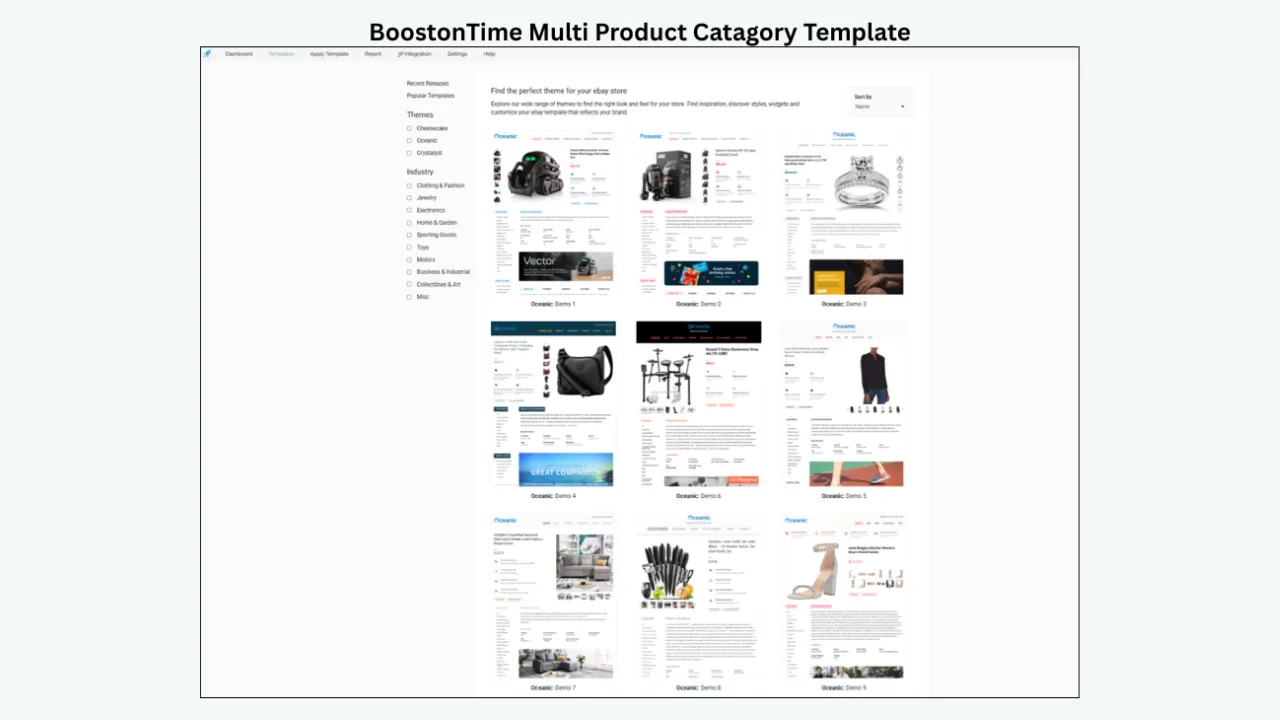
Email notifications
BoostOnTime lets subscribers know about new template launches by email. This is a simple feature, but it solves a real problem: you do not need to keep checking a template gallery to know that a new option exists.
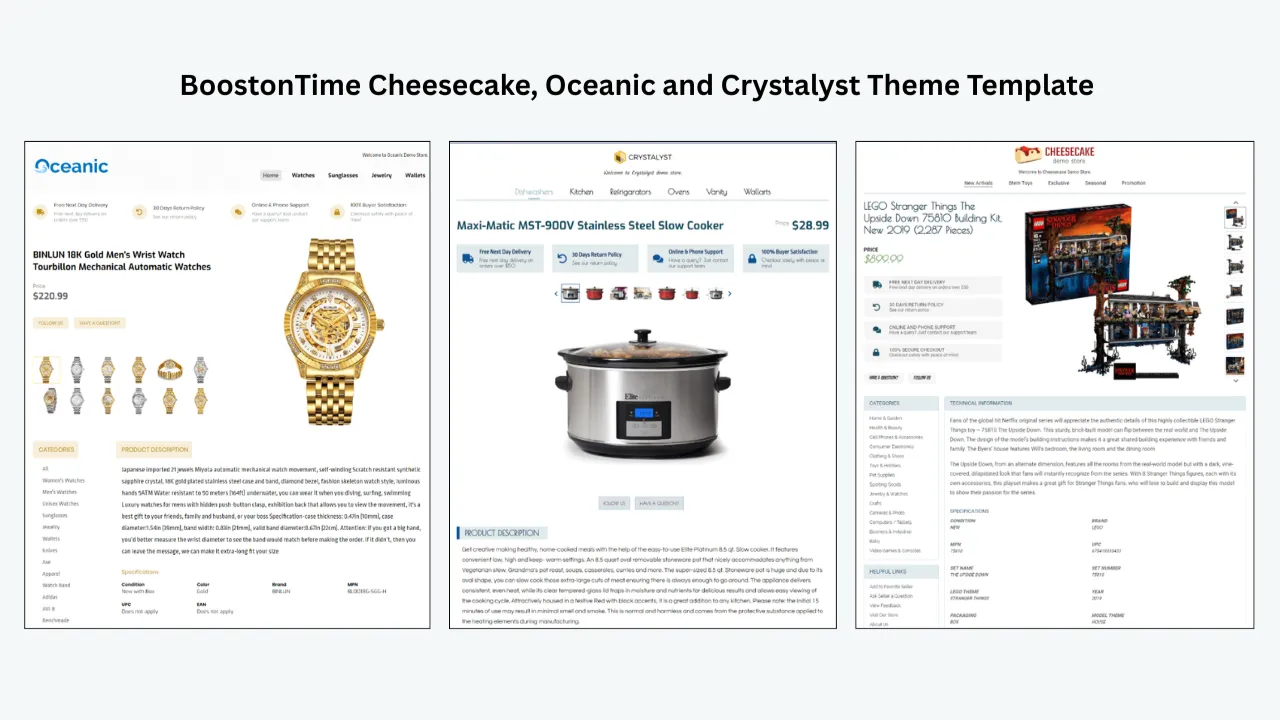
Three established theme families
Cheesecake, Oceanic and Crystalyst provide multiple starting variations. A new theme is not the only path to a fresh design; you can also customize colors, modules and content hierarchy within the existing families.
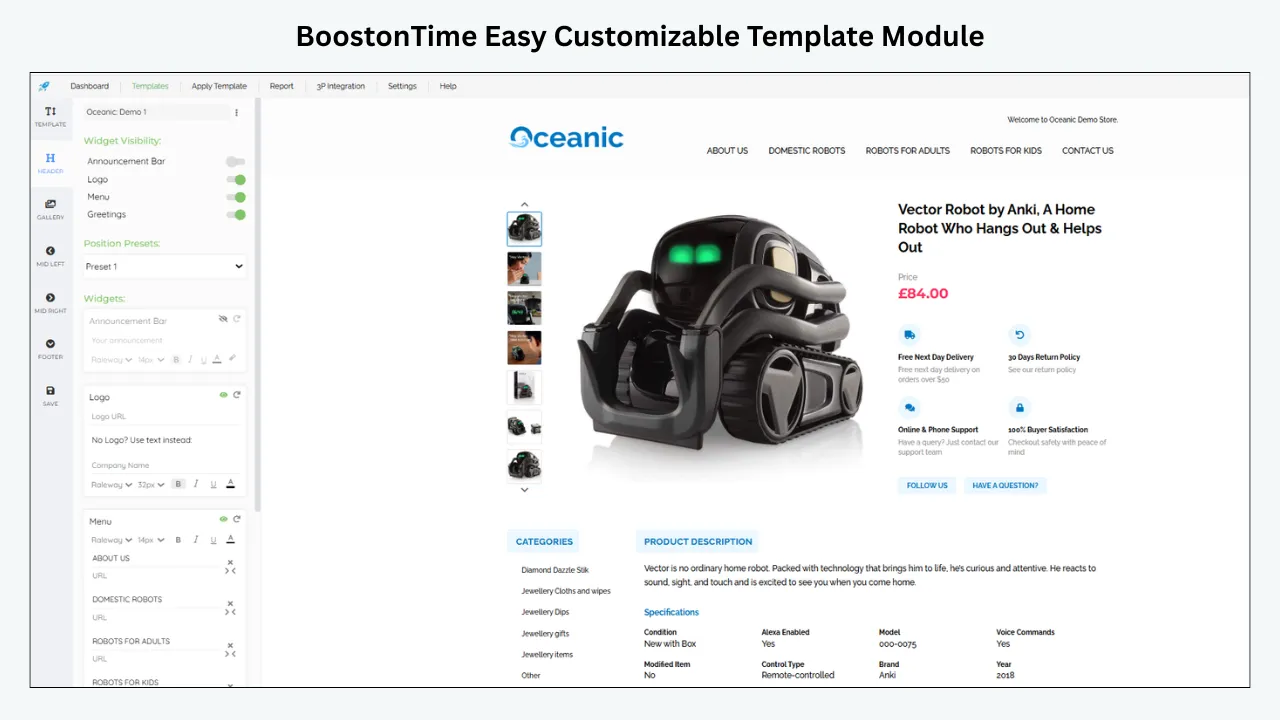
More than 20 modules
Logo, Header Menu, Title and Price, Gallery, Why Us, Categories, Descriptions, Specifications, Helpful Links, Banners, Newsletter, Side Mini Banners, Policy Tabs, Feedbacks, Mini Banners, Related Products and Footer are among the available modules. They allow an update to be structural and useful, not merely cosmetic.
Dynamic product information
ETB collects supported listing-specific information such as title, price, currency, images, descriptions, item details, categories and related products. A new template can therefore be reused while the product content remains specific.
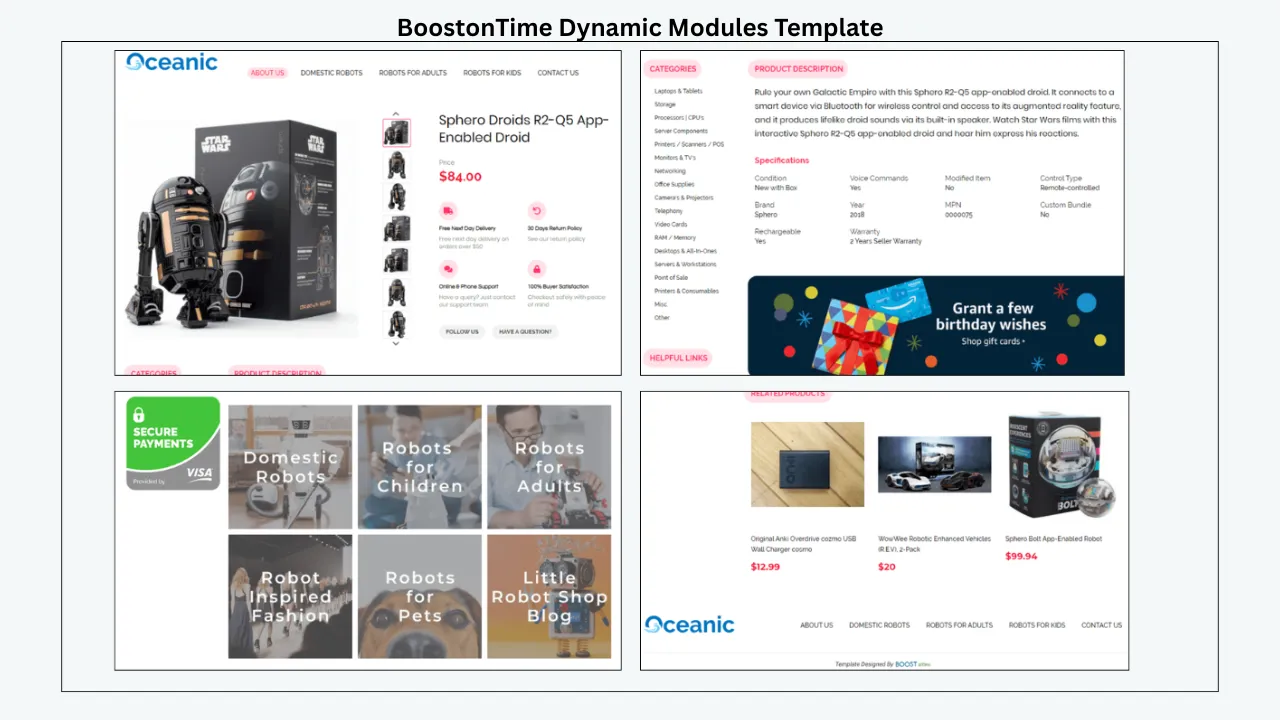
Static brand and store content
Shared elements such as the logo, menu, service message, banners and policies can be maintained within the template. This makes seasonal and brand updates easier to control.
Multiple templates
You can preserve a stable core design while testing a new theme in one category. Multiple templates also prevent the store from forcing the same trend onto electronics, fashion, parts and collectibles.
Batch Revision and unlimited updates
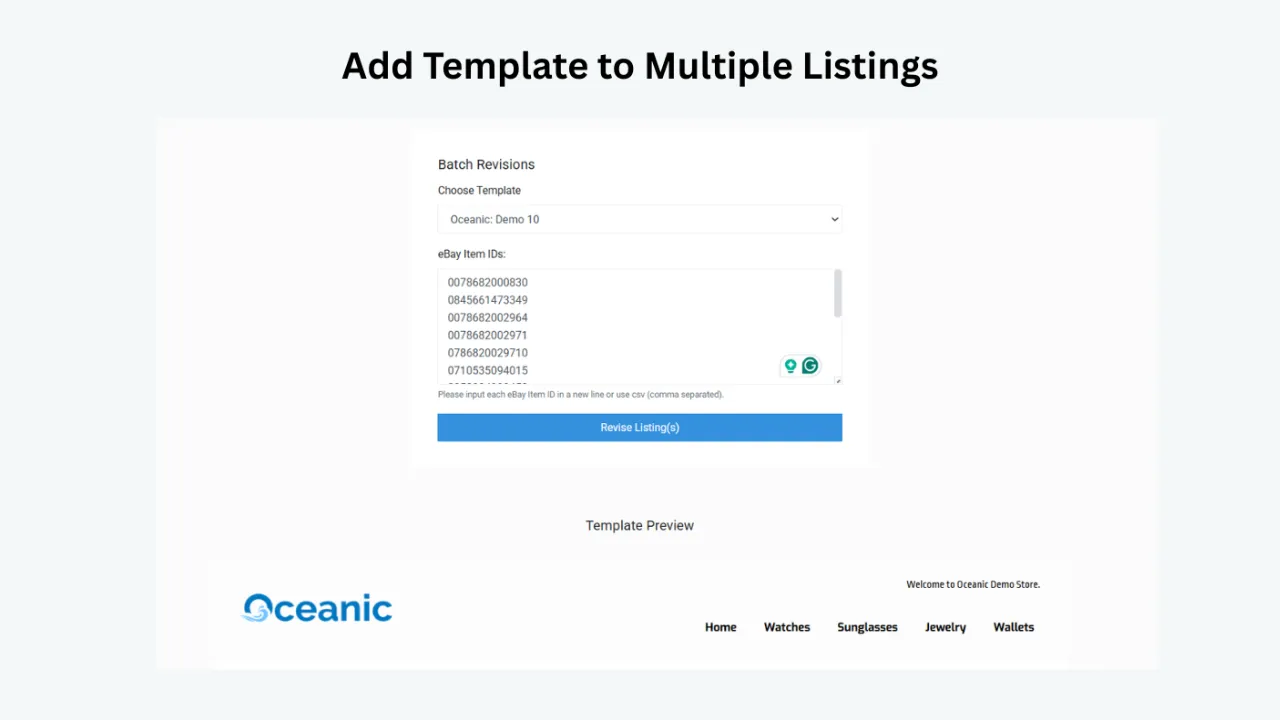
New designs only matter if they can reach live listings safely. Batch Revision lets you select an individual listing or group, while unlimited listing updates make continued refinement affordable.
International and multichannel coverage
BoostOnTime supports 19 eBay sites and more than 10 multichannel systems. Confirm the exact marketplace and integration your store uses before rollout.
Focused pricing
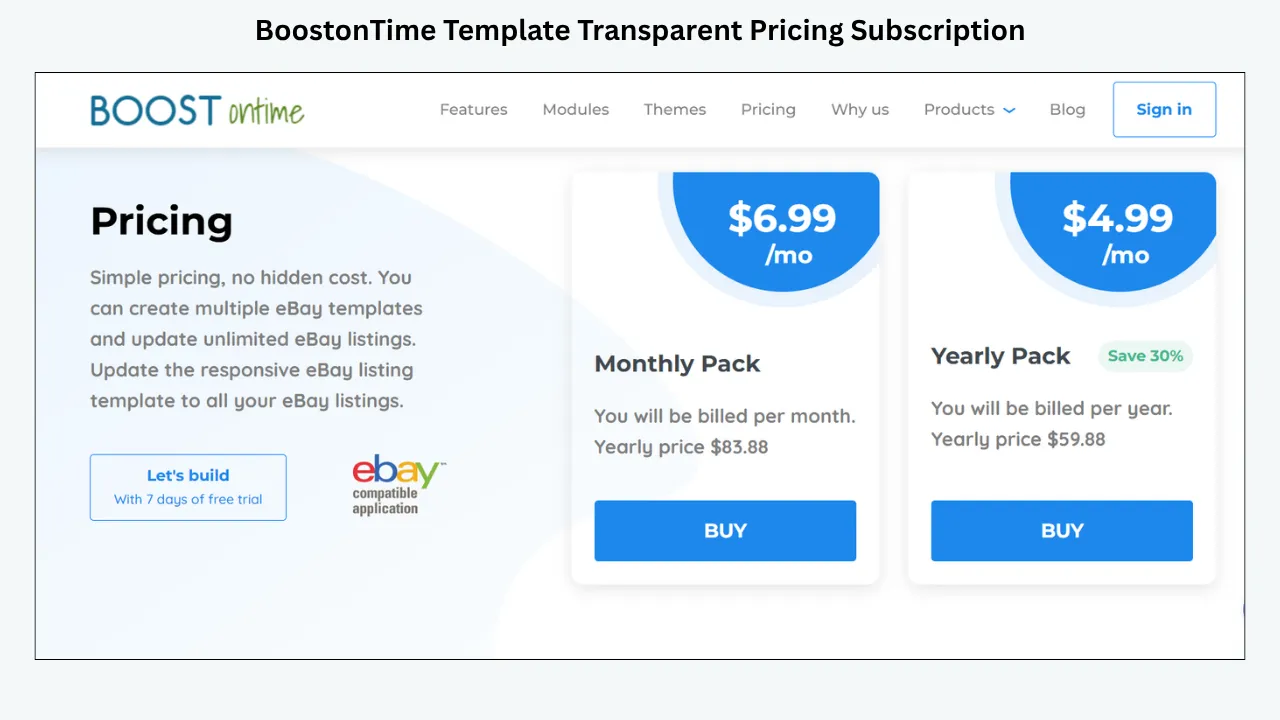
The monthly plan is $6.99. The annual plan is $59.88, equivalent to $4.99 per month at the time of writing. A seven-day trial and no long contract lower the barrier to a real catalogue test.
Trends Worth Following—and Trends Worth Ignoring
Not every popular design idea belongs in an eBay listing. Evaluate a trend by its effect on clarity, trust, mobile use and maintenance.
Worth following: product-first layouts
Buyers should see the item and essential facts before large store messages. This is durable design, not a passing style.
Worth following: responsive, mobile-first structure
Layouts should adapt to small screens, readable text and tap-friendly navigation. Mobile behavior is a practical requirement.
Worth following: structured specifications
Scannable facts reduce effort, especially in technical, fashion and parts categories. BoostOnTime’s Specifications module supports this pattern.
Worth following: restrained trust content
Genuine feedback, a concise service explanation and clear policies are more persuasive than oversized trust badges or unsupported superlatives.
Worth following: relevant personalization by category
Different categories need different information priorities. Multiple templates allow real relevance without losing brand consistency.
Usually ignore: animation and active content
eBay does not allow active content such as JavaScript, Flash, plug-ins and form actions. Effects that depend on such code create compliance, security and mobile concerns.
Usually ignore: maximalist banner stacking
Several banners can turn the description into an advertisement before the product appears. Use one focused message when it genuinely helps.
Usually ignore: font and color fads without a purpose
A new typeface is not an improvement if it reduces readability. A trending color is not appropriate if it conflicts with product images or the store identity.
Usually ignore: copying another seller’s layout
Use authorized assets and build a system around your own buyers. What works for sneakers may be wrong for vintage cameras or replacement parts.
The best trend filter is simple: does this change help a buyer understand, trust or navigate the listing? If not, it may be decoration rather than progress.
How to Compare Subscription Pricing Correctly
Do not compare headline monthly prices without examining scope. A focused builder, broad seller suite and managed design service solve different problems.
Calculate the annual cost at the listing capacity you need. Include setup fees, multiple-account charges, premium design work, add-ons and the value of operational features. Check whether new templates cost extra, whether updates are capped and whether cancellation affects live designs.
BoostOnTime’s annual cost is $59.88 at the time of writing. The relevant value is not merely access to a gallery. Subscribers can create multiple templates and update unlimited eBay listings. New templates are included rather than sold as separate downloads.
A broader suite may cost more but include inventory, order, help-desk or multichannel tools. That price is justified when the business uses them. If your current need is template creation and revision, paying for unused operations features can add complexity without adding value.
For a managed service, request a full proposal. Ask what is included in the initial design, how many revisions are allowed, what ongoing support costs and who owns or controls the final assets.
Questions to Ask Before You Subscribe
- Are new templates included in my plan or sold separately?
- How will I learn about new releases?
- Is there a published release frequency, or are launches periodic without a fixed schedule?
- Can I customize a new design to match my existing brand?
- Can I create and keep multiple templates?
- Which information is imported dynamically from listings?
- Can I apply a template to selected listings in bulk?
- Are listing updates unlimited?
- Does the platform support my eBay site and listing system?
- Can I preview desktop, tablet and mobile layouts?
- What happens to live listings if I cancel?
- Are setup or custom-design fees separate?
- How does the provider respond to eBay policy changes?
- Is support self-service, assisted or fully managed?
- Can I test the real workflow before paying annually?
Written answers are better than assumptions. Save current pricing and plan information when you subscribe so later comparisons use the terms you actually accepted.
A Better Way to Refresh a Live Store
The arrival of a new template does not mean you should apply it immediately to every listing. Use a controlled refresh.
Define the reason for change
Are you solving a mobile problem, updating the brand, making specifications clearer or preparing a seasonal campaign? A new design needs a purpose.
Audit the current template
Identify what already works. Preserve recognizable brand elements, effective information order and tested policy wording. A refresh should not discard useful structure.
Choose one category or campaign
Select a group where the new theme’s structure fits. Do not assume every product needs the same change.
Clean source listings
Review images, descriptions, titles, specifications, categories and related products. Dynamic import will expose the quality of that source data.
Duplicate the design logic
When possible, create the new version as a separate template. Keep the current version available while you test. Name each version clearly.
Configure modules
Rebuild the buyer journey, not just the colors. Keep product identity, gallery, description and specifications early. Add Why Us, Feedbacks and Policy Tabs where useful.
Preview all screen sizes
Check title wrapping, image scale, specification labels, banner height and navigation order on desktop, tablet and mobile.
Apply a small batch
Use Batch Revision for a representative group. Include listings with long titles, different image counts and detailed descriptions.
Inspect live listings
Confirm product accuracy, policy alignment, responsive behavior and permitted links or media. Preview cannot replace final live review.
Compare performance and operations
Monitor buyer questions, returns linked to confusion, conversion data where available and the time required to maintain the template. Document other commercial changes.
Expand or stop
If the update improves clarity and remains maintainable, extend it to the next selected group. If it creates new problems, revise or retain the existing template.
Retire old campaign elements
Remove expired banners and record which template version is active. A refresh is incomplete when obsolete content remains live.
Managing Trends, Seasons and Template Health
Use Modules to Update the Right Layer
One advantage of a modular system is that you do not need a complete redesign for every change.
This approach keeps updates proportional. A policy change should not force a new visual identity. A seasonal banner should not overwrite product facts. A new theme should not be adopted until its information order has been tested.
Seasonal Trends Without Seasonal Clutter
Seasonal updates can make a listing feel current, but they need discipline. Plan the message, affected category, start date and end date before applying it.
A gift campaign may use one narrow banner and manually selected Related Products. A holiday delivery period may require a concise policy reminder that agrees with the actual handling and shipping settings. A summer category refresh may change featured navigation without altering the core product template.
Do not add fixed countdowns, active scripts or unsupported promises. Avoid hard-coding dates into hundreds of descriptions without a removal plan. Use Batch Revision to control the selected group and unlimited updates to remove the campaign promptly.
The stable brand framework should remain recognizable. Seasonal design works best as a layer, not a complete personality change.
Trend Updates by Product Category
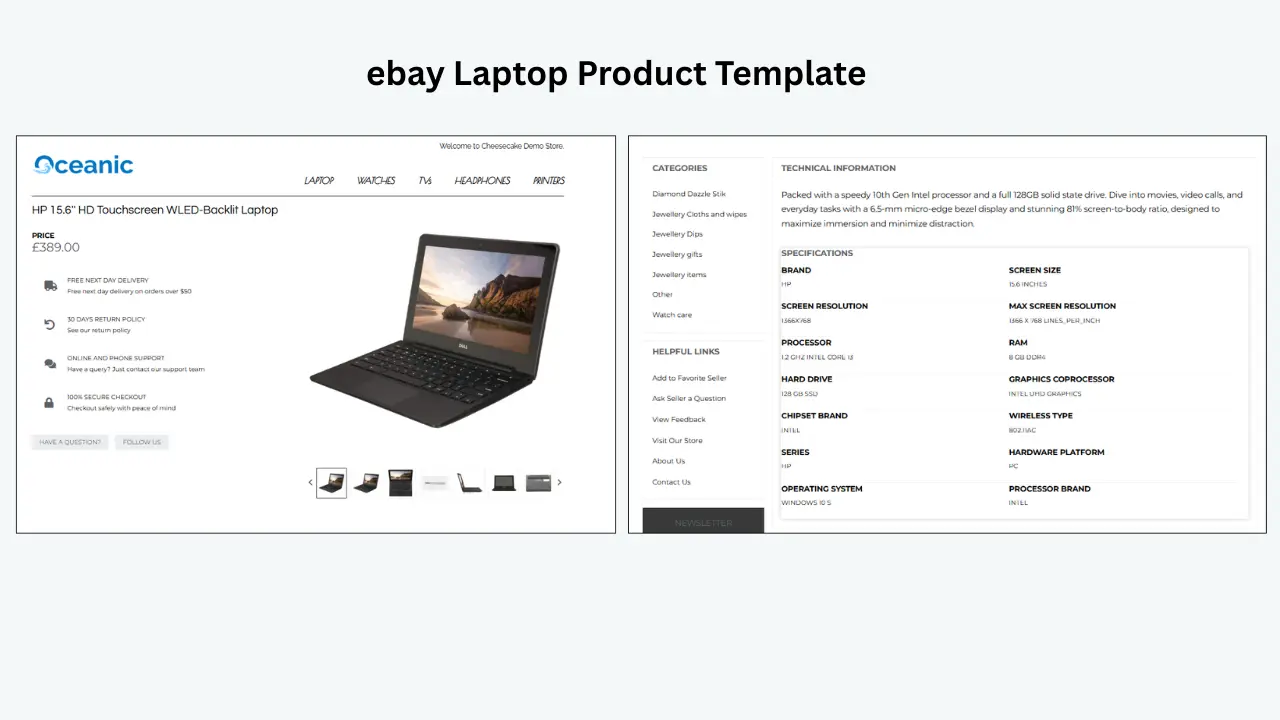
Electronics: Prioritize clean specifications, compatibility and included accessories. A modern visual refresh is useful only if model and connectivity information remains easy to scan.
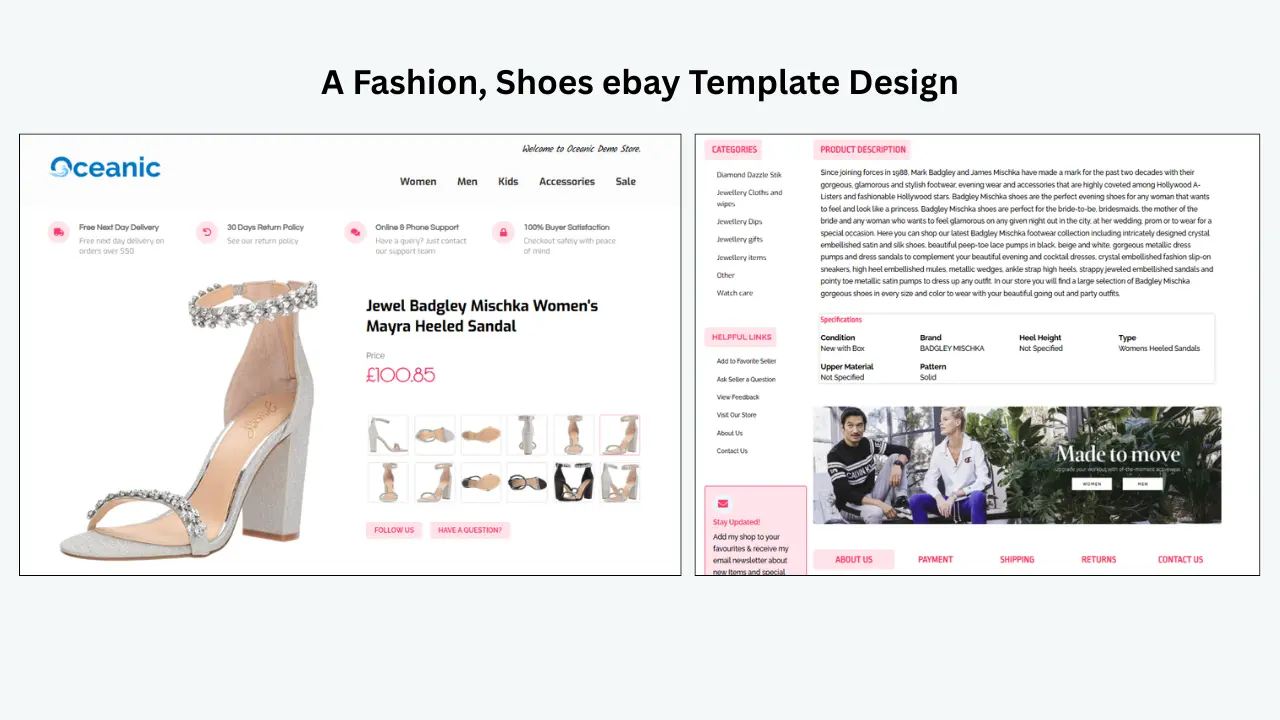
Fashion: Use responsive galleries, measurements, materials and condition. Seasonal color can support the campaign, but do not let lifestyle banners displace sizing information.
Automotive parts: Fitment, part number and dimensions should lead. Avoid visual trends that make technical labels less readable.
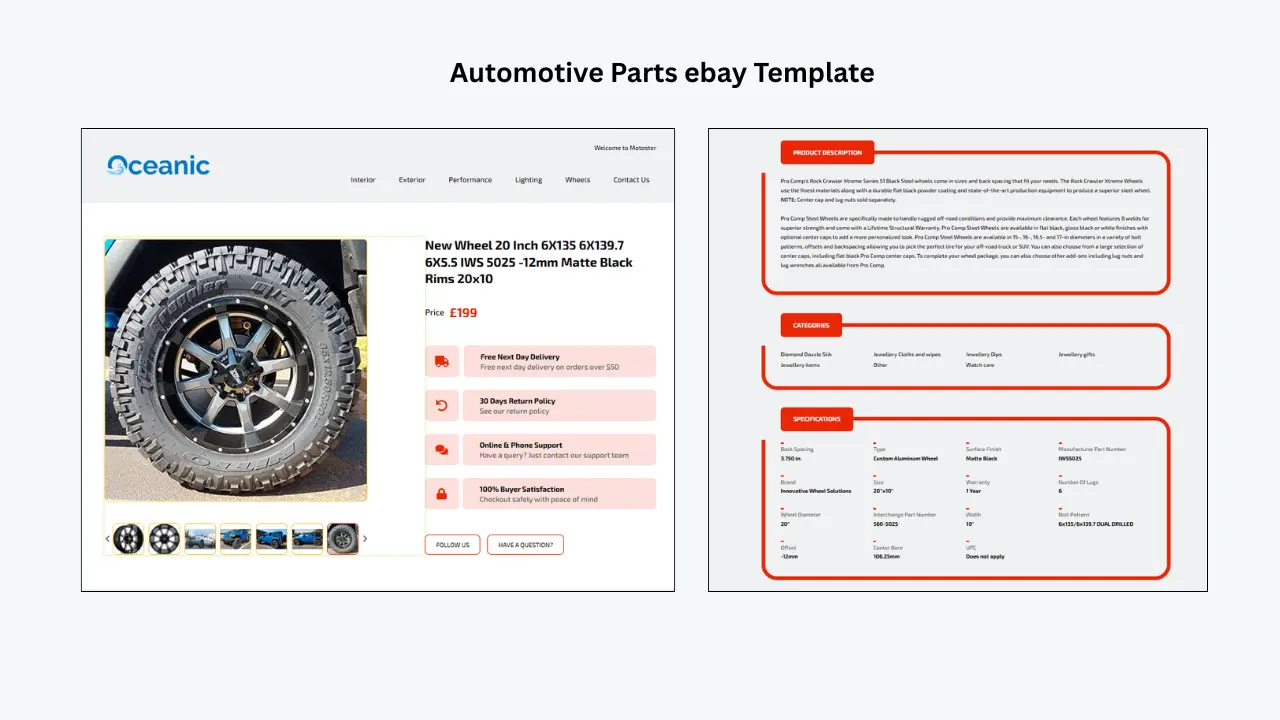
Collectibles: Use imagery, condition, grading, provenance and authenticity evidence. A restrained editorial style often outlasts decorative trends.
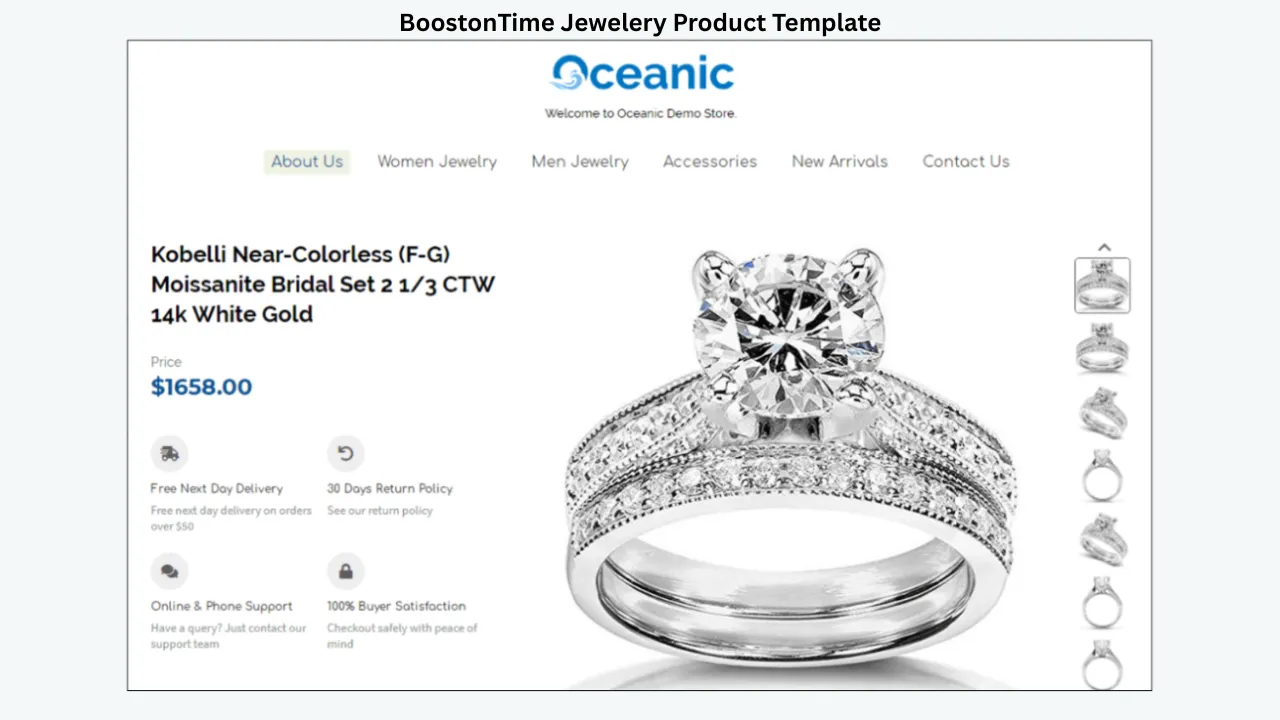
Jewelry: Give photography, metal, gemstone, dimensions and trust content space. Luxury comes from accuracy and control, not excessive ornament.
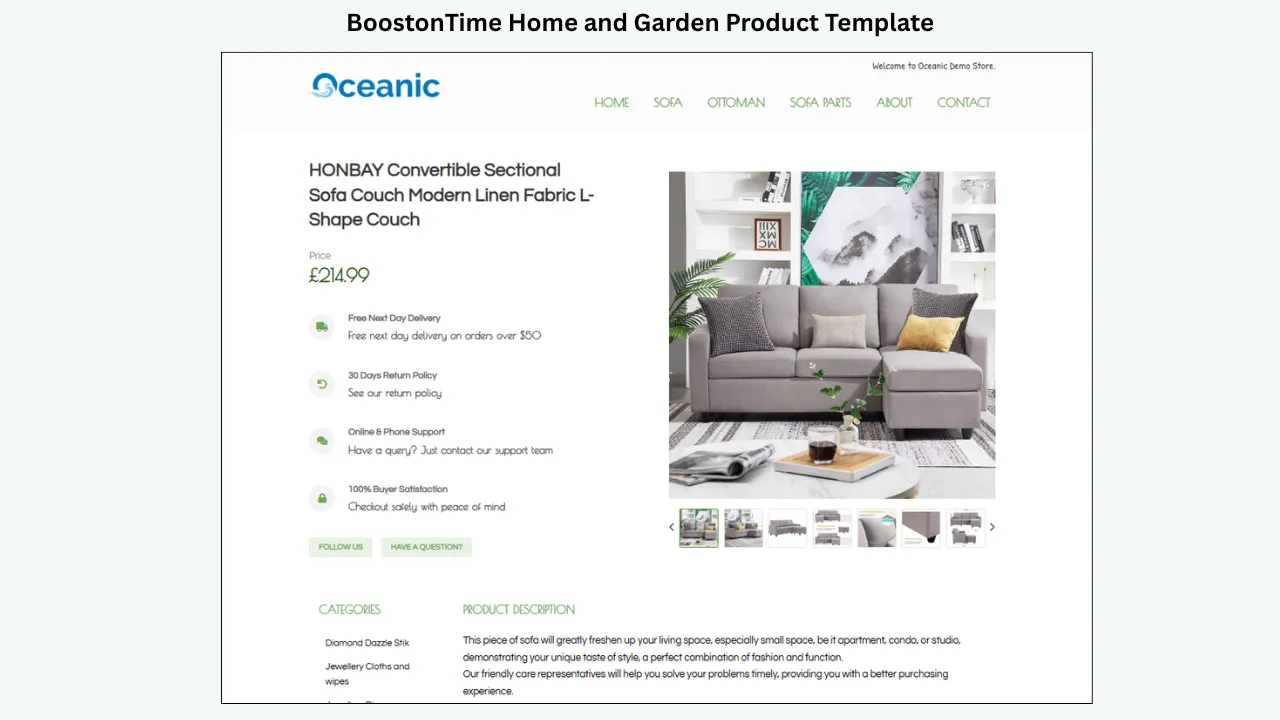
Home and garden: Adapt seasonal navigation and related products while keeping dimensions, materials, assembly and care easy to find.
General merchandise: Use a flexible template with a strong gallery, concise description, essential specifications and clear policies. Trend updates should remain simple because the inventory is diverse.
A Sustainable Template-Update Calendar
“Regularly updated” should describe a service that remains useful, not a seller who redesigns listings constantly. A simple calendar creates rhythm without creating noise.
Monthly operational review: Check time-sensitive banners, delivery messages, navigation and related products. Remove ended campaigns and sold-out cross-sell choices. Spot-check several mobile listings for image scale, text wrapping and unexpected source-data changes. This is not a monthly redesign. It is housekeeping. Most months, the best outcome is confirmation that the stable framework still works.
Quarterly template review: Review one representative listing from each active template. Ask whether the first mobile screen still puts the product first, whether specifications match buyer questions and whether policy text agrees with current settings. Look at customer-service messages and returns. Repeated questions about measurements, compatibility or contents may justify a module-order change. If BoostOnTime has announced a new template, compare its structure with the current design. Adopt it only when it solves a documented problem.
Seasonal planning review: Plan campaigns before the date arrives. Identify the affected categories, banner copy, start date, removal date, shipping implications and related products. Build a separate seasonal template if the campaign requires substantial changes; otherwise, update only the necessary modules. Schedule the removal at the same time as the launch. An expired delivery promise does more harm than a current banner can repair.
Annual brand and system review: Review logos, colors, typography, navigation labels, template names, category assignments and stored assets. Archive unused versions and remove outdated access permissions. Evaluate whether the current subscription still matches the catalogue and whether staff members know the rollout process. An annual review is also the right moment to compare the provider’s current pricing, feature set and marketplace support. Do not switch for novelty alone, but do not assume last year’s plan is automatically the best fit.
What to Do When a New BoostOnTime Template Is Announced
An email notification should start evaluation, not instant deployment.
First, open the new template and identify its structural difference. Does it place the Gallery earlier? Does it provide more useful space for Specifications? Does its navigation or policy layout suit your products? Ignore the sample colors at first because branding can be customized.
Second, choose a category that can benefit. A visual fashion layout may not suit technical parts. A compact specification-first structure may be valuable for electronics but too dense for artwork.
Third, recreate only the necessary shared content. Use the current logo, service message and verified policy text. Do not copy an expired banner simply because it is present in the old design.
Fourth, review the dynamic modules with difficult products. Test long titles, one and many images, lengthy specifications, variations and pre-owned condition notes. Confirm that the new structure behaves consistently.
Fifth, create a separate version name and apply it to a small group through Batch Revision. Keep the previous template documented while the test runs. This makes comparison and correction easier.
Finally, decide using evidence. A new design deserves wider use when it improves buyer clarity, mobile presentation or maintenance. If it only looks different, retain the established framework and revisit the next launch.
Subscriber Profiles: Which Service Model Fits You?
The seller who wants design without coding
BoostOnTime is the natural fit. You can select a responsive theme, configure modules, preview the design and apply it without building HTML. New template access and email notifications keep the choices current without turning the seller into a developer.
Start with one category and use the seven-day trial. The important test is whether you can maintain shared information and product modules confidently after the initial setup.
The seller who needs a complete operations suite
If templates are only one requirement among inventory synchronization, help-desk processes, listing creation, CSV actions or multi-account operations, compare 3Dsellers and Auctiva with BoostOnTime. List the functions the team will actually use and calculate the plan cost at the necessary listing volume.
A broader suite may be the right choice. It should win because its extra functions solve real problems, not because its feature page is longer.
The brand that wants managed creative work
Frooition and similar providers may suit a seller who wants a custom design relationship and prefers external implementation. Ask for a written scope covering design, revisions, live-listing application, ongoing maintenance and future refreshes.
Compare that service with the control of ETB. A managed project can deliver bespoke work, while a self-service modular platform can make everyday updates faster and less dependent on an outside schedule.
The small seller who changes inventory frequently
Look for a low fixed cost, multiple templates and unlimited updates. A static design with per-revision work can become expensive even when the listing count is modest. BoostOnTime’s focused subscription makes sense when products change but the store framework should remain consistent.
The international seller
Verify the exact eBay marketplace, currency, language and integration workflow. BoostOnTime supports 19 eBay sites and more than 10 multichannel systems, but international sellers should not assume every shared policy or campaign message belongs everywhere.
Create marketplace-specific templates when delivery, returns, language or buyer expectations differ. The design can remain recognizably yours while the information becomes locally appropriate.
Brand Consistency and Version Control
Proof to Request From a Template Provider
Marketing pages often show an attractive finished sample. Ask to see what happens behind it.
Request a demonstration of template creation, listing connection, mobile preview and selected bulk application. Ask the provider to use a real listing with a long title, several specifications and an uneven image set. Perfect sample data can hide maintenance problems.
Confirm that the provider can explain which modules are static and which are dynamic. Ask how old HTML is handled and how a seller can correct an applied template. Review support documentation for marketplace coverage and plan limits.
For ongoing designs, ask where new releases are announced and whether they cost extra. If a fixed release cadence matters to your procurement process, request it in writing; do not infer it from words such as “regular” or “continual.” BoostOnTime offers ongoing launches and email notifications but does not advertise a guaranteed monthly number.
For a managed service, request examples of the work included at the quoted price and identify which parts are reusable. Ask who approves the final listing and who is responsible for accurate product claims.
Proof should focus on the operating process because that is what the subscription will support after the attractive sample page disappears.
Update Health: Signs Your Template Needs Attention
A template does not need to look obviously broken to be outdated. Watch for small indicators:
- Buyers repeatedly ask questions that the description should answer.
- Important specifications appear below several promotional sections.
- Policy wording disagrees with current listing settings.
- Images or tables require horizontal scrolling on a phone.
- A campaign banner has no owner or removal date.
- Different categories use identical layouts despite different buyer needs.
- Staff members paste manual changes into individual descriptions.
- Related Products are unavailable or irrelevant.
- Old logos, colors or navigation labels remain active.
- The design relies on copied code whose purpose nobody understands.
- A new template is applied without a test group or change record.
- Listings contain unauthorized media, restricted links or prohibited active content.
One sign may require a targeted correction. Several signs suggest that the template system needs a structured review. BoostOnTime’s modules allow a seller to repair the relevant layer rather than replacing everything automatically.
Keep Brand Recognition While Adopting Trends
A store that changes personality with every new theme can appear less professional, not more current. Preserve a stable brand core: logo treatment, primary colors, tone, service standards and common labels.
Adopt trends at the structural edge. Improve spacing, simplify a header, move specifications earlier or choose a more responsive gallery. These changes can make the listing feel current while keeping it recognizable.
Create a short brand sheet before trying a new theme. Record approved logo files, colors, type choices, voice, banner rules and image style. Use it to customize the new template rather than copying the sample appearance.
Multiple templates should look related. A jewelry layout may be more refined and a parts layout more technical, but the seller identity should be consistent. BoostOnTime provides flexibility without forcing every category into one visual form.
Managing Template Versions
Give every active template a clear internal name containing its category, purpose and version. “Fashion—gallery first—v3” is more useful than “New Blue.” Record the creation date, owner, affected listings and reason for change.
Keep a simple register showing which categories use which template. When a new release is tested, create a separate version rather than overwriting the known design immediately. Archive superseded versions once the rollout is stable, but retain enough information to understand previous decisions.
Version control protects the team from accidental inconsistency. It also turns unlimited updates into a disciplined advantage. The ability to revise frequently should not mean nobody knows what is live.
For large catalogues, require a second review before a broad Batch Revision. For small sellers, a checklist and saved note may be enough. The level of process should match the risk, but every seller benefits from naming and recording changes.
Measuring Subscription Value
What Subscription Value Looks Like After the First Month
The first month often focuses on choosing a theme and building a template. Long-term value appears later.
You can update a policy module when operations change. You can create a category-specific layout when inventory expands. You can remove a seasonal banner across the affected group. You can test a newly launched template without buying another file. You can refine the mobile order when buyer questions reveal friction.
This is why BoostOnTime’s unlimited listing updates matter more than a one-time download count. The subscription supports the life of the catalogue, not only the launch of a design.
Review the value annually using both commercial and operational evidence. Count avoided manual edits, outdated content found during audits, categories brought into a consistent system and time needed to launch or remove campaigns. A template subscription earns its place when it makes professional maintenance routine.
Before choosing annual billing, understand the cancellation and continuity terms. Ask whether an applied template remains visible, whether hosted assets continue to load and whether you can remove or replace the design after the account closes. Save original logos, photographs, policy copy and a record of template assignments outside the platform. This is ordinary business continuity, not a reason to avoid subscriptions.
Also decide who owns the relationship. Use a company-controlled email address for launch notifications, keep connection permissions current and remove access when staff or contractors leave. A new-template email has little value if it reaches an inactive personal inbox.
Review renewal dates and current pricing before the charge occurs. Compare the subscription with the time it saved, the updates completed and the catalogue problems prevented. If the service still solves the need, annual billing may offer better value. If the business has expanded into requirements the focused builder does not cover, reassess broader platforms without discarding the benefits of a well-structured template system.
The strongest subscription decision is reversible and informed: test first, document what is connected, understand what changes on cancellation and retain control of the underlying product information and brand assets. This preparation makes migration easier if circumstances change. A disciplined seller can adopt a new platform, rebuild shared modules and validate live listings because the business knows which information belongs to the brand, product and marketplace settings.
Measuring Whether a Refresh Was Worth It
Record a baseline for a representative listing group. Useful indicators include views, conversion rate where available, watchers, offers, buyer questions, mobile quality issues, returns caused by misunderstanding and template-maintenance time.
Keep pricing, shipping and advertising as stable as practical during the comparison. Document seasonal demand, stock changes and promotions. A trend refresh launched during a major sales period cannot be evaluated as if design were the only change.
Review qualitative evidence. Did the new structure make specifications easier to find? Did customer-service questions decline? Can the team remove the campaign quickly? Does the design still look like the same store?
The goal is not to prove that “new” always wins. Sometimes the current template is clearer. A good subscription gives you the ability to test and choose, not an obligation to change constantly.
A Seven-Day BoostOnTime Trial Plan
Day 1
Audit one category and define the problem a new template should solve.
Day 2
Review Cheesecake, Oceanic and Crystalyst variations and select a responsive starting point.
Day 3
Configure Logo, Header Menu, Gallery, Descriptions and Specifications.
Day 4
Add Why Us, Feedbacks, Policy Tabs and carefully chosen Related Products.
Day 5
Preview desktop, tablet and mobile layouts; simplify anything that hides the product.
Day 6
Apply the new template to a representative group through Batch Revision and inspect live listings.
Day 7
Compare the workflow with your current method, document the template and choose monthly or annual billing if it fits.
The trial should answer practical questions: Can your team build the desired structure? Is imported content accurate? Are bulk updates controlled? Can you maintain the result without outside coding help?
Frequently Asked Questions
BoostOnTime continually launches new templates, notifies subscribers by email and includes new templates at no extra charge. It does not publish a fixed release cadence, so treat “regularly” as ongoing availability rather than a guaranteed monthly count.
ETB is a connected cloud-based template builder, not primarily a library of static HTML downloads. You customize and apply templates through the platform, which makes ongoing updates and dynamic content easier to manage.
At the time of writing, the monthly plan is $6.99. The yearly plan costs $59.88, equivalent to $4.99 per month. A seven-day trial is available. Confirm current terms before subscribing.
Yes. BoostOnTime makes newly launched templates available to subscribers at no extra template charge and sends email notifications about new designs.
No fixed release schedule is advertised. Do not interpret ongoing template launches as a guaranteed weekly, monthly or quarterly count.
Yes. ETB supports multiple templates, allowing different categories, campaigns or marketplaces to use appropriate layouts.
Batch Revision lets you apply a template to an individual listing or selected group. Test first and use staged batches rather than automatically changing the entire catalogue.
BoostOnTime includes unlimited eBay listing updates within the ETB subscription. Review the current terms and marketplace conditions before purchase.
No. A clearer, responsive design may reduce buyer friction, but sales depend on product demand, price, photography, shipping, competition and seller performance. Test the buyer experience and measure responsibly.
No. Change only when the new structure solves a real buyer or maintenance problem. Stable, recognizable design has value.
Yes. A modular system allows targeted changes to Banners or Mini Banners while preserving the product layout. Record a removal date for every seasonal message.
Yes. BoostOnTime themes are responsive and include preview options. Test real live listings on phones because content length and image proportions vary.
BoostOnTime promotes the ability to clean old HTML and apply a fresh template. Test this on a small listing group first and inspect the live result.
A theme update changes layout or visual presentation. A policy update changes transaction information. Use the appropriate modules and make sure template wording agrees with eBay listing settings.
It may be suitable for a large brand that wants agency guidance and bespoke creative work. A self-service builder is often more affordable and controllable for sellers who need frequent updates.
Review the provider’s current cancellation and live-template terms before subscribing. BoostOnTime advertises no long contract and cancellation at any time, but sellers should understand account and listing effects under the current terms.
Subscribe to a System
That Can Evolve
The most useful template subscription is not the one that produces the most novelty. It is the one that helps your listings stay clear, responsive, current and maintainable.
BoostOnTime ETB provides that system. Subscribers receive access to newly launched templates without paying for each design separately, and email notifications make new options easy to discover. Responsive themes and more than 20 modules give you control over information order. Dynamic content keeps product details connected to the listing. Multiple templates support category differences. Batch Revision and unlimited updates make safe rollout and future maintenance practical.
Use trends as prompts, not commands. Keep the product first, adopt improvements that reduce buyer effort and preserve a consistent brand. Test every new design on a small group, inspect it on mobile and measure whether it improves clarity or operations.
If your current template is a static file that becomes harder to update every season, a connected subscription can replace repeated repair work with a reusable process.
Ready for templates that can grow with your eBay store? Start your seven-day BoostOnTime ETB trial, build a responsive design and receive access to future template launches.
🚀 Start Your Seven-Day BoostOnTime ETB Trial
boostontime.com/ebay-template-builder