
90-Day-Old eBay Listing: Should You Keep, Revise, End or Relist It?
A 90-day-old eBay listing is not automatically broken. Use this practical audit to decide whether to keep it, revise it, end it or relist it with meaningful improvements.
📋 In This Guide
- 1The Short Answer
- 2What 90 Days Means on eBay
- 3Four Decisions for an Older Listing
- 4Diagnose the Weak Stage
- 5The 90-Day Listing Audit
- 6When Relisting Is Justified
- 7When Not to Relist
- 8How to Relist Without Repeating the Problem
- 9A Catalogue-Wide Renewal Policy
- 10How BoostOnTime ETB Supports Revision
- 11Category Examples
- 12Designing a Fair Relist Test
- 13Operational Risks of a Mass Relist
- 14A Weekly Routine for Older Inventory
- 15Final Quality Check
- 16Frequently Asked Questions
- 17The Decision at 90 Days
An eBay listing reaches 90 days with no sale. The temptation is immediate: end it, relist it and hope a fresh item number will bring it back to life.
Sometimes that is a sensible move. Often it is not.
There is no general eBay rule that says a fixed-price listing becomes stale or must be replaced when it reaches 90 days. Fixed-price listings use Good Til Cancelled duration by default and renew automatically each month until the quantity sells, the seller ends the listing or eBay ends it. Ninety days is therefore a useful review point, not an official expiry date.
The correct decision depends on what the listing data says. A listing with healthy impressions and watchers has a different problem from one that never appears in relevant searches. A rare collectible with a small buyer pool should not be judged by the same timetable as a common phone case. A multi-quantity listing with prior sales may have useful history that a seller should not discard casually.
This guide gives you a practical decision process. You will learn what listing age does and does not mean, which measurements to check, when revision is the better first step, when ending and relisting is justified, and when the stock itself is the problem. We will also show how BoostOnTime ETB can help you refresh the buyer-facing presentation across selected listings without claiming that a template can manufacture demand or guarantee search ranking.
eBay listing not showing in search diagnosis
The short answer
Do not end and relist every eBay listing simply because it is more than 90 days old. Review it first.
Keep the current listing when it has recent sales, relevant traffic, watchers, offers or useful multi-quantity history. Revise it when buyers can find it but do not click or purchase. Consider ending and relisting when the listing needs a fundamental rebuild, has little useful engagement, contains inherited or damaged HTML, or no longer represents the item accurately. End it without relisting when market demand, margin, condition or policy risk makes the item commercially unsuitable.
The decision should follow this order:
- Confirm that the listing is active, searchable and in stock.
- Separate a visibility problem from a click problem and a conversion problem.
- Compare the offer with current competing and sold listings.
- Correct the native eBay data that determines discovery and purchase terms.
- Improve the description and presentation.
- Measure the revised listing through a fair test period.
- Relist only when a genuine reset is more useful than another revision.
That sequence prevents a common mistake: replacing the item number while preserving the same weak title, wrong category, incomplete item specifics, uncompetitive total price and confusing description. A new listing carrying the same defects is still a weak listing.
What 90 days actually means on eBay
Sellers often attach more meaning to 90 days than eBay does. The number appears in several eBay contexts, but those contexts are not the same as an age penalty.
Fixed-price listings normally renew each calendar month under Good Til Cancelled. They can therefore remain active beyond 30, 60 or 90 days. Renewal may use an insertion-fee allowance or incur applicable fees, depending on the seller’s account, site, category and optional upgrades. Age alone does not prove that eBay has stopped showing the item.
The 90-day period also appears in completed-listing research. eBay explains that ordinary completed-listing results cover items that recently ended or sold during the previous 90 days, while Product Research can provide a longer history. That reporting window does not mean every active item should be ended after 90 days.
There is a separate, longer threshold worth knowing. eBay says it may remove or hide a listing that has been active for a year or more without any sales. When that happens, eBay recommends improving the listing before putting the item back on sale. A one-year no-sale intervention should not be rewritten as a universal 90-day rule.
Listing age can still matter operationally. After three months you have enough time to see whether the item is receiving impressions, clicks, watchers, questions, offers and orders. You may also have paid for repeated renewals or upgrades. The listing could contain seasonal wording, old delivery promises or outdated branding. The 90-day point is therefore a sensible audit trigger.
Treat the date as a reminder to investigate. It is not a diagnosis.
Four decisions for an older listing
Every 90-day review should end in one of four decisions. Making those options explicit stops a team from using relisting as the default response to every slow item.
| Decision | Use it when | Main risk to manage |
|---|---|---|
| Keep | The listing has sales, relevant traffic, watchers or a deliberately long selling cycle | Ignoring gradual loss of competitiveness |
| Revise | The item has demand but the title, specifics, offer or presentation can be improved | Changing too many variables to learn what worked |
| End and relist | The listing requires a structural rebuild and has little useful engagement or history to preserve | Repeating the same weaknesses under a new item number |
| End permanently | The item is restricted, uneconomic, damaged, obsolete or unsupported by real demand | Continuing to pay renewal or storage costs for dead stock |
Keep the listing
Keep a listing when evidence says it is still working or is close to working. A multi-quantity listing that has generated sales deserves particular care because eBay publicly identifies item popularity among the factors considered by Best Match. An item that sells slowly by nature can also be healthy. Rare artwork, specialist parts and discontinued components may need months to meet the right buyer.
Keeping does not mean ignoring. Check whether the price, delivery estimate, return terms, photos and description still match the current offer. A strong listing can be maintained without being destroyed and recreated.
Revise the listing
Revision is the normal first response when the item has some visibility but weak buyer action. You can usually revise active fixed-price listings, subject to eBay’s category and listing restrictions. Improve the parts that correspond to the weak funnel stage. Low impressions point toward discovery. Healthy impressions with few views point toward the search-result offer. Views without sales point toward price, trust, condition, delivery, returns or product fit.
End and relist the listing
End and relist when the listing needs more than a light adjustment. Examples include an incorrect product identity, a substantially changed bundle, a condition classification that cannot be corrected safely, or an old description built from broken code. Relisting can also be reasonable after a controlled revision test has produced no meaningful improvement and the listing has no sales history or active buyer interest worth preserving.
End the listing permanently
Some inventory should leave eBay rather than return with better wording. Check storage cost, likely selling price, fees, shipping difficulty, return risk and handling time. If the economics do not work, a new item number will not fix them. Liquidate, bundle, recycle, donate or move the item through another appropriate channel.
Diagnose the weak stage before changing the listing
A useful listing audit follows the buyer journey. The listing must first be eligible and visible. It must then earn a click. Finally, it must turn enough qualified views into purchases.
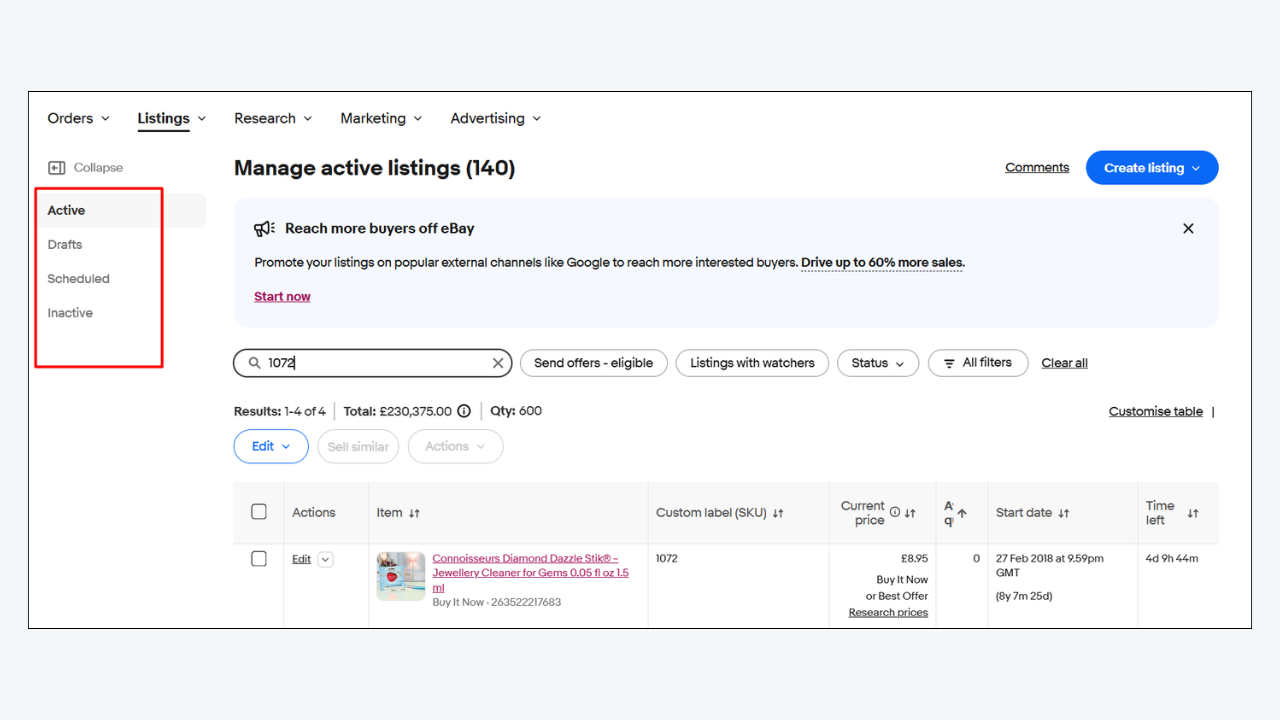
Active but not visible
Start in Seller Hub. Confirm that the item is active rather than scheduled, ended, sold out, in draft or affected by an error. If you use the out-of-stock option, an active multi-quantity listing with zero quantity can remain active while being hidden from search until stock is replenished. Time Away settings, selling limits, account restrictions or policy enforcement can also affect visibility.
Search by item number and by a precise version of the title. Allow time for a new or relisted item to enter search; eBay says a listing should normally appear within 24 hours, and a relisted item can take a few hours to appear. Check Messages and registered email for removal or restriction notices before touching the content.
If the listing is not eligible, solve that issue first. A new description template cannot make an ended, hidden or out-of-stock item searchable.
Impressions are too low
Low impressions usually point toward relevance, eligibility or demand. Audit the title, category, required and recommended item specifics, product identifiers and shipping destination. eBay says buyers use item specifics to filter results, and a listing can only appear in a filtered result when it contains the matching value.
Use buyer language rather than internal stock terms. Put the strongest identifiers in the title: brand, model, product type, size, material, colour, part number or compatibility where relevant. Remove decorative characters and vague promotional words that displace useful information. Do not stuff unrelated keywords; search manipulation is prohibited and irrelevant traffic does not help the buyer.
Compare the category with the listings that sell. A technically allowed category can still be commercially weak if buyers browse and filter somewhere else.
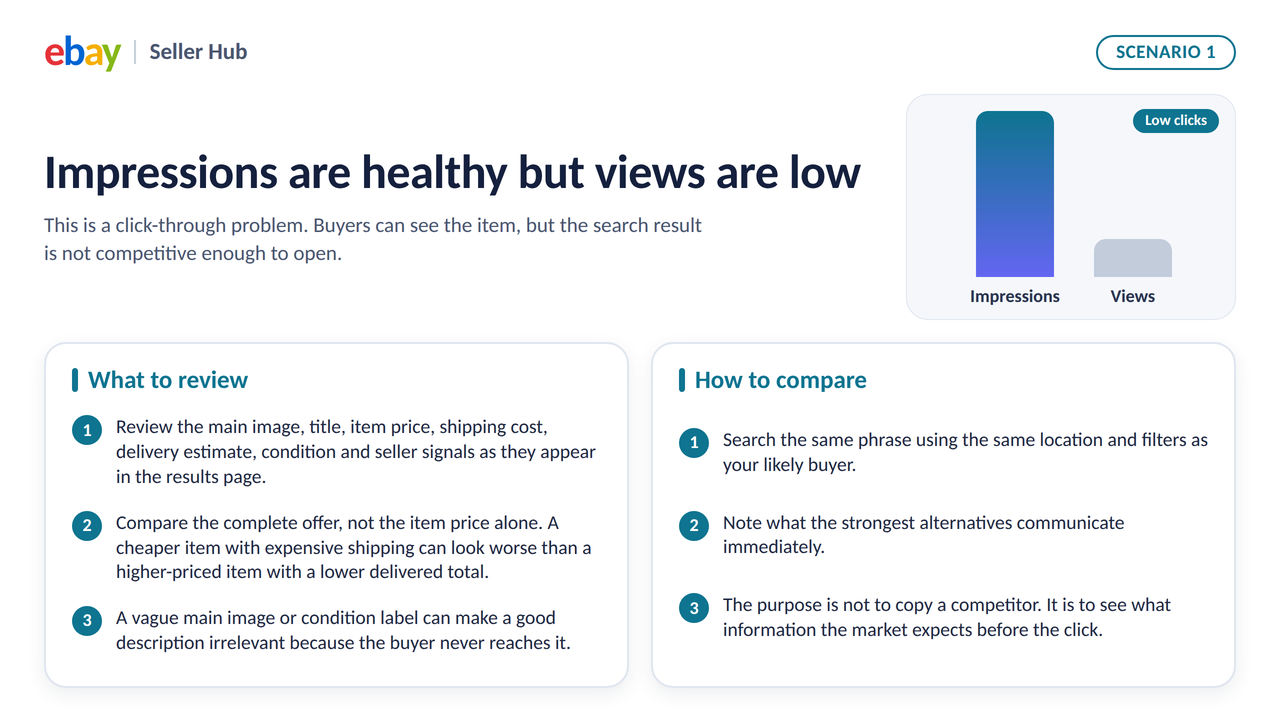
Impressions are healthy but views are low
This is a click-through problem. Buyers can see the item, but the search result is not competitive enough to open.
Review the main image, title, item price, shipping cost, delivery estimate, condition and seller signals as they appear in the results page. Compare the complete offer, not the item price alone. A cheaper item with expensive shipping can look worse than a higher-priced item with a lower delivered total. A vague main image or condition label can make a good description irrelevant because the buyer never reaches it.
Search the same phrase using the same location and filters as your likely buyer. Note what the strongest alternatives communicate immediately. The purpose is not to copy a competitor. It is to see what information the market expects before the click.
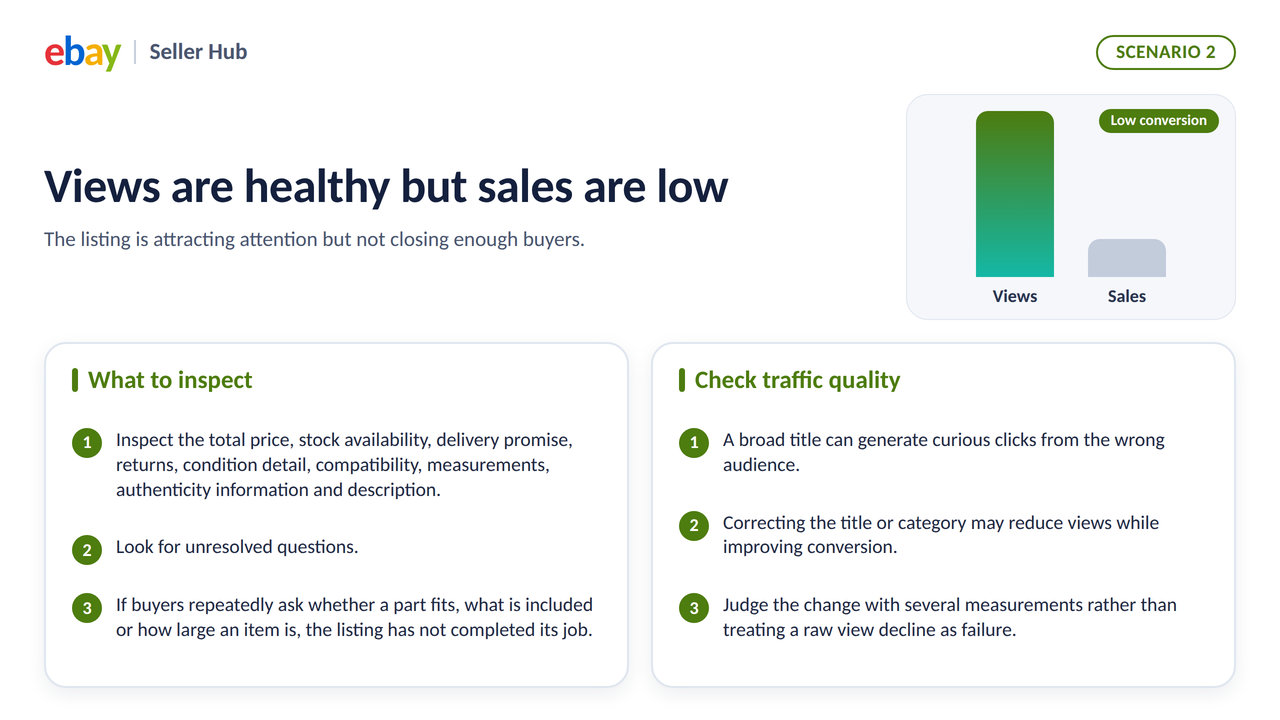
Views are healthy but sales are low
The listing is attracting attention but not closing enough buyers. Inspect the total price, stock availability, delivery promise, returns, condition detail, compatibility, measurements, authenticity information and description. Look for unresolved questions. If buyers repeatedly ask whether a part fits, what is included or how large an item is, the listing has not completed its job.
Traffic quality matters too. A broad title can generate curious clicks from the wrong audience. Correcting the title or category may reduce views while improving conversion. Judge the change with several measurements rather than treating a raw view decline as failure.
The 90 day listing audit
Use the following process on each older listing or on a representative sample from a large catalogue.
Step 1 Confirm status and inventory
Open the active listing record and the public item page. Confirm the quantity, variation quantities, start date, renewal status and any warnings. Test the page while signed out or in a private browser window so your seller account does not hide the buyer experience.
Check whether the item is visible to the buyer location you serve. A listing can be active but absent for a buyer whose destination is excluded by the shipping settings. For international inventory, repeat the test with a relevant marketplace and delivery destination.
Step 2 Record a baseline
Before editing, record recent impressions, page views, watchers, quantity sold, conversion rate where available, current price, shipping charge, handling time and promotion status. Choose a consistent date range. A 31-day period is often more useful than a single day for slow stock, but seasonal products may need comparison with the same period last year.
Do not rely on one metric. Impressions show exposure, page views show visits and conversion shows purchasing response. Watchers and questions provide supporting evidence, but they do not replace sales.
Step 3 Research current demand
Use eBay Product Research to examine comparable sold and active items. Match the item as closely as possible by brand, model, condition, size, part number and included components. Separate a demand problem from a listing problem.
If similar items rarely sell, the listing may be accurate and still take time. If they sell regularly while yours receives little attention, inspect relevance and competitiveness. If they receive views but close at a much lower total price, decide whether your margin can support a change.
Step 4 Audit discovery data
Check the native title, eBay category, item specifics, product identifiers and variation names. These fields help eBay match the item to searches and filters. The description can support the buyer, but it should not be expected to compensate for wrong structured data.
Verify every value. Selecting a popular but inaccurate item specific can attract the wrong buyer and increase returns. Use Does not apply only when eBay permits it and the value genuinely does not exist.
Step 5 Audit the search result offer
Evaluate the first image at thumbnail size. Can the buyer identify the product, condition and quantity? Is the item centred and clear? Does the title lead with the terms a buyer would use? Is the delivered price competitive? Is the delivery estimate acceptable for the category?
This review should happen on mobile as well as desktop. Long titles and small images behave differently on a narrow screen.
Step 6 Audit the item page
Read the page in the order a buyer experiences it. Confirm that the eBay-native price, condition, delivery and return information agree with the description. Remove expired campaigns, contradictory shipping text and duplicated policy language.
The description should answer product-specific questions quickly. Put essential condition, compatibility, size, material, contents and limitations before store history. Use headings, short paragraphs and a scannable specifications section. Decorative banners should never push the product facts below a long wall of promotion.
Step 7 Choose one test
Choose changes that match the diagnosis. If impressions are weak, focus on discovery fields. If click-through is weak, focus on the search-result offer. If conversion is weak, improve the offer and buyer information.
Avoid changing title, category, price, shipping, photos, returns and description simultaneously unless the listing is fundamentally wrong. A complete rebuild may be necessary, but it will not tell you which change produced the result.
Step 8 Measure fairly
Give the revision enough time to collect comparable data. A high-volume commodity may show a signal quickly. A rare part may need a longer window. Compare like-for-like periods and note promotions, stock changes, payday effects, weekends, holidays and seasonal demand.
The goal is not to prove that every revision worked. The goal is to make a decision using evidence.
When ending and relisting is justified
Ending and relisting is reasonable when it solves a specific structural problem.
The product identity has changed
If the item is now a different bundle, condition, model or quantity, the existing listing may no longer be the right record. Confirm which fields can be revised and whether a new listing is required. Accuracy comes before history.
The description contains damaged legacy code
Older listings can accumulate duplicated wrappers, non-responsive tables, unsupported active content, stale policies or branding left by a previous provider. eBay does not render prohibited active content, and a broken description can be hard to maintain. A clean rebuild can be safer than another patch, provided the native listing data is also checked.
The listing has no useful engagement
A listing with no sales, no watchers, minimal qualified traffic and no active offers has less to preserve. If research confirms demand and you have made meaningful changes to the product offer, relisting can be part of a controlled test.
The format or strategy is changing
A seller may move between auction and fixed price, combine identical stock into a multi-quantity listing, separate genuinely different variants or create a more appropriate bundle. Follow eBay’s duplicate-listing rules. Do not leave an identical fixed-price listing active while publishing another copy.
eBay ended an old no sale listing
If eBay removes or hides an item after a year or more without sales, improve it before placing it back on sale. Do not automatically relist an item removed for a policy, legal or rights-owner reason. Review the notice, correct the issue and contact eBay or the rights owner when instructed.
When you should not relist
Relisting is a poor choice when the reason is superstition rather than evidence.
Do not relist only because another seller says all listings need a 90-day reset. eBay does not publish a universal 90-day ranking penalty. Do not relist a multi-quantity item that is still selling merely to make it look new. Do not remove an item with active offers or meaningful watcher interest without considering the commercial cost. Do not duplicate an identical fixed-price item in an attempt to occupy more search space.
Most importantly, do not relist after a removal notice until you understand the cause. eBay warns that relisting certain removed items without resolving the reason can lead to further enforcement.
If the item has high impressions and low conversion, a new item number does not change the price, delivery, condition or trust problem. If the item has almost no market demand, freshness does not create a buyer. If the title and specifics are wrong, carrying them into the new record repeats the visibility problem.
A useful question is simple: what will be materially better in the relisted version? If the answer is only the start date, revise or wait.
How to relist without repeating the problem
When the audit supports a relist, prepare the new version before ending the old one.
- Save the original item number and baseline performance.
- Export or copy the accurate product data, images and policy settings.
- Research current sold and competing listings.
- Correct the title, category, item specifics and identifiers.
- Recalculate the delivered price and margin.
- Replace weak or outdated images.
- Rewrite the opening description around buyer decisions.
- Confirm condition, contents, compatibility and measurements.
- Review shipping, handling and returns.
- End the old listing before publishing an identical fixed-price replacement.
- Test the live page and search eligibility.
- Record the new item number and review date.
Manual relisting may count against a zero-insertion-fee allowance or incur an insertion fee and charges for optional upgrades. Fee rules vary by marketplace and account, so review the current fee page before processing a large group.
After relisting, allow time for search visibility. eBay notes that a relisted item can take a few hours to appear. Avoid judging the result from the first hour.
A catalogue wide renewal policy
Sellers with 50 to 500 listings need a repeatable policy, not a monthly guessing session. Create age bands and apply the same evidence rules to each.
Listings under 90 days
Fix factual errors immediately. Otherwise, avoid unnecessary resets. Use early data to identify serious visibility or conversion failures.
Listings from 90 to 179 days
Run the full audit. Revise the weakest funnel stage. Keep listings with sales or meaningful buyer activity. Flag items with no demand evidence for a sourcing or liquidation decision.
Listings from 180 to 364 days
Review carrying cost and seasonality. Test a meaningful offer or presentation change. Consider bundles, price changes or a different channel when the category is active but your item remains uncompetitive.
Listings approaching one year without a sale
Perform a deeper rebuild or exit review before eBay intervenes. Confirm policy compliance, rights-owner risk and product accuracy. eBay says listings active for a year or more without sales may be removed or hidden, so this group deserves priority.
Use a spreadsheet with item number, SKU, age, last sale, impressions, views, conversion, watchers, margin, chosen action, change date and review date. That record is more valuable than a vague rule to relist everything each quarter.
How BoostOnTime ETB supports the revision process
The native eBay data comes first. BoostOnTime ETB does not decide whether demand exists, edit every native ranking field for you or guarantee a higher position in Best Match. Its role begins when the underlying listing is accurate and you need a clearer, consistent buyer-facing description across one or many active listings.
That distinction makes ETB useful in a 90-day maintenance programme.
Rebuild legacy descriptions without maintaining code
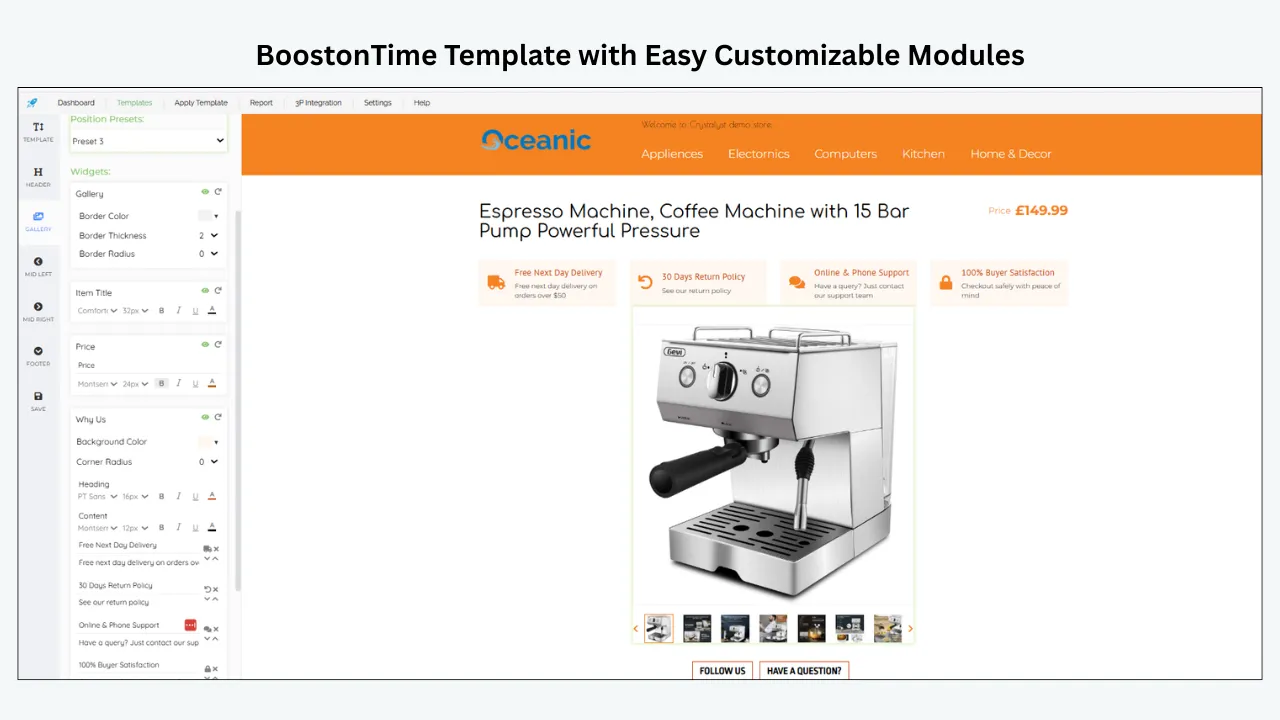
ETB provides responsive themes and more than 20 customizable modules. You can arrange the sections a buyer needs, such as Gallery, Title and Price, Descriptions, Specifications, Why Us, Policy Tabs, Feedbacks, Categories and Related Products. You can disable modules that do not serve the product.
For an older listing with cluttered or inconsistent HTML, this gives you a repeatable structure. Product facts can appear near the top. Store background and promotion can follow rather than obscure the item.
Keep shared information consistent
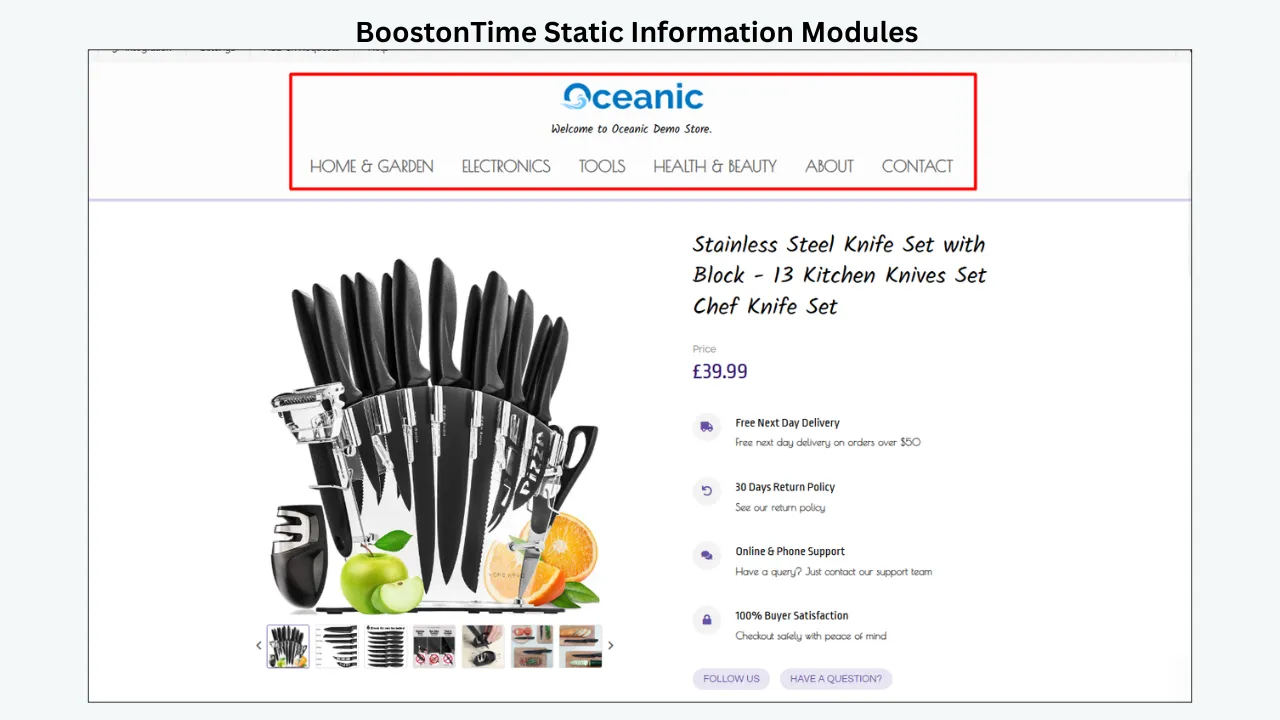
ETB stores static modules such as Logo, menu, helpful links, Why Us content, banners and policy tabs within the template. When your branding or shared service message changes, you can update the template instead of rebuilding each description manually.
The seller remains responsible for keeping every statement accurate and consistent with the eBay-native policy fields. A delivery or return promise in the description should never contradict the actual business policy attached to the listing.
Reuse supported listing data
When a template is applied, ETB can collect supported dynamic information from the existing listing, including title, price, currency, product images and related product information. This reduces repetitive layout work, but it does not make incorrect source data correct. Complete the eBay audit first.
Apply an approved template to selected listings
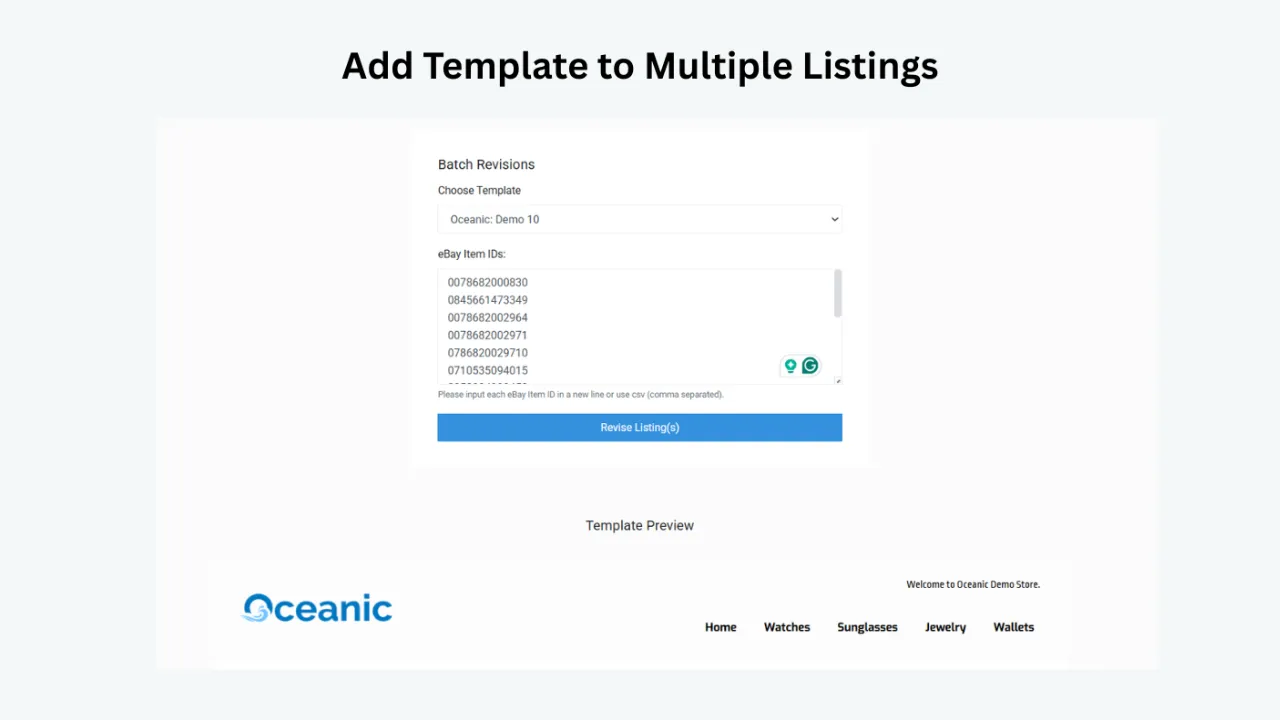
Batch Revision lets you update an individual listing or select a group of active listings and apply a newly created template in bulk. That supports a controlled rollout. Start with a small sample from one category, inspect the live result on desktop and mobile, compare buyer questions and conversion, and expand only after the template is working as intended.
Create different templates for different product lines
ETB supports multiple templates. A fashion listing can emphasize measurements, material and care. An automotive listing can prioritize part number, fitment and condition. A collectible can lead with edition, grading, provenance and included items. Category-specific layouts are more useful than forcing every product into the same promotional design.
Support relevant cross promotion
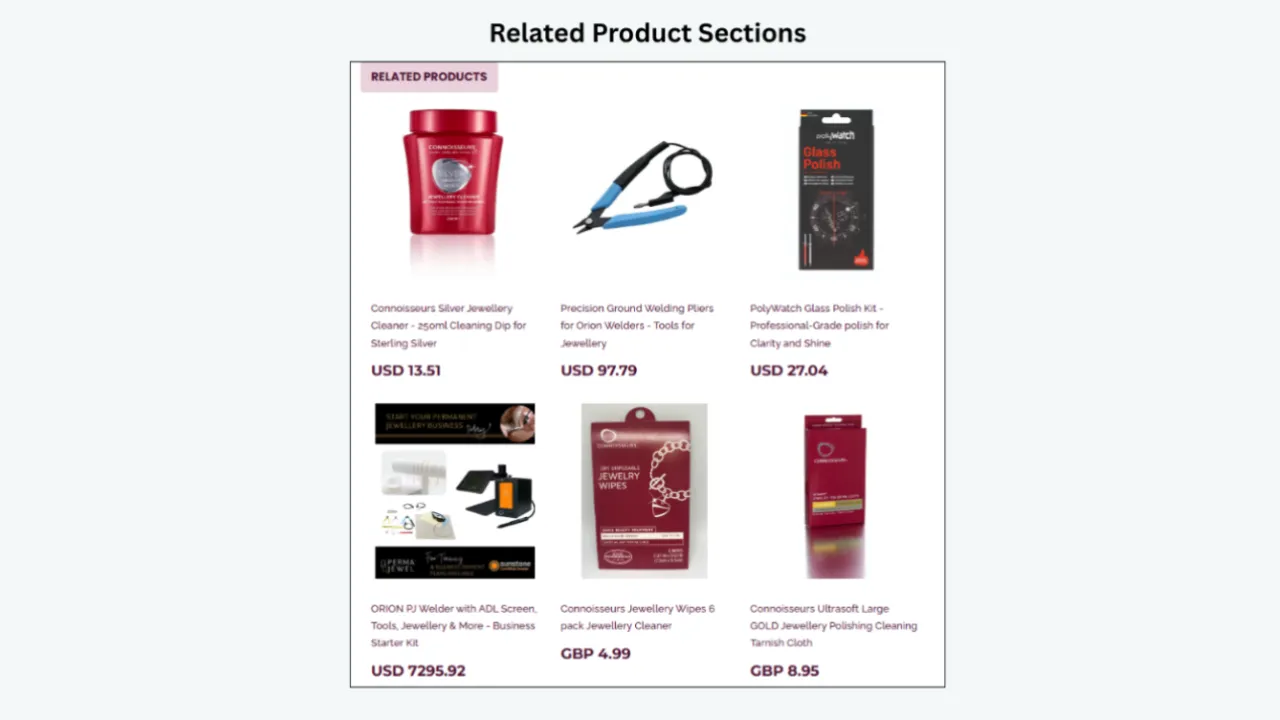
The Related Products module can show selected or randomly collected catalogue items. During a slow-stock review, use manual selection when relevance matters. A compatible accessory or genuine alternative can help a buyer continue shopping, while random unrelated items add noise.
Maintain responsive presentation
ETB themes are designed to be responsive. Mobile quality matters because buyers may scan the description on a narrow screen. Preview the template and test the live listing in the eBay app and a mobile browser. Confirm that essential facts appear before long banners, policy text or store navigation.
Who ETB is for
ETB is a practical fit for sellers who already have active eBay inventory and want to standardize or refresh description presentation without hand-coding each item. It is especially useful when a catalogue has inconsistent branding, legacy HTML or several product categories that need different module arrangements.
Who ETB is not for
ETB is not a substitute for Product Research, Seller Hub traffic reports, native item specifics, account compliance, inventory planning or competitive pricing. It will not rescue prohibited stock or guarantee sales for a product with no demand. Sellers who need a complete multichannel inventory, order and accounting suite should evaluate those requirements separately.
A safe ETB rollout for older listings
Choose ten to twenty older listings from one category. Correct their titles, categories, specifics, price, shipping and photos in eBay. Build one ETB template around the buyer questions for that category. Apply it to the sample with Batch Revision. Check every live page, then compare a reasonable post-change period with the baseline.
If the results and workflow are satisfactory, expand the template to the next group. BoostOnTime offers multiple templates and unlimited listing updates under its ETB subscription, so the maintenance process can continue as the catalogue changes. Review current pricing and trial terms on the ETB page before subscribing.
Category examples for the 90 day decision
The same traffic pattern can mean different things in different categories. Use category context before setting a relist policy.
Consumer electronics
Electronics can lose competitiveness quickly when a newer model arrives or retail prices fall. A 90-day-old listing for a current device with low impressions may need a title and item-specific audit. A listing with strong views but no sales may have an unattractive total price, unclear warranty, missing battery information or an incomplete accessories list.
Check the exact model number, storage, colour, carrier status, connectivity, condition and included components. Compare refurbished, used and open-box items separately. If the market price has moved below your profitable level, ending the listing may be better than repeatedly relisting at the old price.
Preserve a multi-quantity listing that still records regular sales unless there is a compelling accuracy or strategy reason to rebuild it. Use revision to keep images, condition detail and description current.
Fashion and footwear
Fashion demand is sensitive to season, size and style. A coat listed in spring may look weak for 90 days and become relevant in autumn. A rare size can sell slowly even when the product line is popular.
Audit brand, department, type, size, colour, material, pattern, fit and condition specifics. Add measurements in the description and show labels, fabric texture and flaws. If buyers view the item but do not purchase, compare the measurements, returns, total price and photography with sold alternatives.
Do not erase seasonality by treating every slow summer listing as a failed product. Record the correct review month and adjust the listing before the demand period begins.
Automotive parts
Parts listings depend on precise identification. A title that says alternator for Ford can be far too broad. Buyers may need a manufacturer part number, interchange number, vehicle fitment, engine, year range, connector type, dimensions and condition.
Low impressions can signal missing part numbers or fitment data. High views with low conversion can indicate uncertainty about compatibility. Do not promise fitment based on guesswork. Verify the source and make the limitations clear.
A specialist used part may need more than 90 days to reach the owner of the matching vehicle. If the listing is accurate, competitive and receives occasional qualified interest, keeping it can be more rational than resetting it.
Collectibles and art
Unique items do not have the same repeatable demand as commodity products. A single buyer may be enough, and the correct sale window may be long. Use comparable sold evidence carefully because condition, edition, artist, provenance, authenticity and presentation can change value significantly.
Improve the listing with detailed images, dimensions, condition notes, marks, signatures, edition numbers and included documentation. Avoid unsupported authenticity claims. If qualified collectors view the listing but do not buy, review price and evidence. If no comparable demand exists, consider a specialist venue or a longer hold rather than a routine 90-day relist.
Home goods and furniture
Shipping cost and logistics often dominate conversion. Record dimensions, material, assembly, package contents and access requirements. A listing can receive interest while losing buyers at the delivery stage.
Before relisting, calculate whether pickup, freight or parcel options make sense. A clearer description and photographs can reduce uncertainty, but they cannot turn an uneconomic delivery method into a competitive offer.
Replacement and industrial parts
Slow sales are normal for some maintenance items. A discontinued component can remain useful long after the original product launch. The most important fields may be part number, specifications, compatible equipment and physical condition.
Keep accurate niche listings when storage cost is low and margin justifies the waiting period. Review them before the one-year no-sale point and verify that the part has not degraded, been recalled or become restricted.
How to design a fair relist test
If you decide to relist a small group, treat it as an experiment rather than a ritual.
Choose listings from the same category and similar demand level. Do not compare a common accessory with a rare collectible. Keep a control group of similar listings that you revise in place. Record the original performance period, item numbers and all changes.
For the relist group, make a defined improvement package such as corrected specifics, new main image and a clearer description. For the revise group, make the same content improvements without ending the listing. Keep price, shipping and advertising stable when practical.
Measure:
- Search impressions
- Page views
- Click-through rate
- Sales conversion rate
- Quantity sold
- Watchers and offers
- Buyer questions
- Return reasons
- Gross margin after fees and shipping
- Staff time spent on the change
Use enough time for the category to produce meaningful exposure. A seven-day result may be useful for a high-volume accessory and meaningless for a specialist part. Note seasonal events, promotions, pay cycles and stock changes.
The test may show no meaningful difference between relisting and revising. That is useful. It means your team can avoid unnecessary item-number changes and focus on the content or offer. It may also show that the biggest improvement came from price, image or specifics rather than listing age.
Do not claim that a result proves how eBay ranks every item. It proves how one controlled group performed under the conditions you recorded.
Operational risks of a mass relist
Bulk ending and relisting can create more work than expected.
Item numbers change, so external links, saved internal records and campaign references may need updating. Buyer interest attached to the old listing may not transfer in the way a seller expects. Staff can accidentally publish duplicate fixed-price listings when the original was not ended correctly. New listings need live-page checks and time to enter search.
Fees and allowances also matter. Manual relists can use insertion-fee allowances or incur charges, and optional upgrade fees may apply again. Review the current rules for each marketplace before processing a large catalogue.
Data quality can degrade during migration. A variation may return with the wrong quantity. A shipping policy may not attach as intended. Old images can be copied after the product condition changed. A description can retain outdated claims. The fastest way to create hundreds of errors is to automate an unverified source.
Use an approval checklist before any mass relist:
- The reason for relisting is documented.
- The old and new item numbers will be mapped.
- Duplicate listings will not remain active.
- Stock and variations have been verified.
- Current fees and promotional effects are understood.
- Native eBay data has been corrected.
- The description has passed desktop and mobile review.
- A rollback or correction owner is assigned.
- The first small batch has passed live quality assurance.
- Performance will be measured against a saved baseline.
That discipline protects the catalogue and makes Batch Revision or native bulk tools safer to use.
A weekly routine for older inventory
A reliable routine makes the 90-day question much easier.
On Monday, check status, inventory and policy messages. On Tuesday, export traffic for the oldest or weakest listings. On Wednesday, research current demand and competing offers. On Thursday, revise one diagnosed group. On Friday, inspect the live pages and record the changes. Review performance after the category has had enough time to collect meaningful traffic.
Keep a change log. Record whether you changed discovery data, the search-result offer or the item page. If a listing improves, you will know which kind of intervention helped. If it does not, you can make the next decision without repeating the same experiment.
Do not measure the team by the number of listings relisted. Measure whether weak listings were correctly diagnosed, accurately improved and either returned to productive inventory or removed from the catalogue.
Final quality check before publication
Open the revised listing while signed out and read it as a buyer who has never seen the product. Confirm that the first image, title, condition and delivered price describe one coherent offer. Check that the category and item specifics match the product, the description agrees with the native shipping and return settings, and every measurement or compatibility statement has a reliable basis.
Then test the description on a phone. Essential product facts should appear before lengthy brand or promotional content. Links should lead to active, relevant eBay destinations. Related products should be available and genuinely useful. Finally, confirm that the original baseline, change date, item number and next review date are recorded. A clean publication process is what makes a 90-day audit repeatable rather than a one-off rescue.
Frequently asked questions
eBay does not publish a universal rule that fixed-price listings lose ranking because they are 90 days old. Good Til Cancelled listings renew monthly. Use traffic, demand and offer data rather than age alone.
eBay does not promise a ranking boost from ending and relisting. A relisted item can take a few hours to appear, and Best Match considers several factors. Relist because the listing needs a meaningful rebuild, not because a new item number is assumed to be a shortcut.
Ending creates a break in the original listing experience, and a replacement listing has a different item record. Treat active watchers, offers and buyer engagement as value that may be lost. Check the current eBay interface and listing state before ending an item with meaningful interest.
Revise the title when research shows that it is missing accurate buyer terms or leading with low-value words. Do not change a functioning title merely to make the listing look active. Record the baseline so you can judge the effect.
Confirm that it is active, in stock, searchable and eligible for the buyer location. Then audit the category, title, item specifics, identifiers and demand. A description template can improve the item page, but it cannot fix an ended or hidden listing.
Do not relist until you understand and resolve the reason. eBay specifically warns sellers not to relist certain removed items without first addressing the policy, legal or rights-owner issue. Use the message eBay sent and contact support or the rights owner when required.
Use a small, representative group first. A controlled sample makes live-page quality checks manageable and gives you a clearer comparison. Scale through native bulk tools or ETB Batch Revision only after the process is correct.
The decision at 90 days
The best answer is usually not end everything or keep everything. It is diagnose each listing and act according to the weak stage.
A 90-day-old listing with sales and useful engagement may be worth protecting. A listing with relevant impressions but weak conversion needs a better offer or clearer information. A listing with no qualified exposure needs discovery and eligibility work. A structurally broken listing with no useful history may justify ending and relisting. Stock with no demand or margin should leave the catalogue.
Start with native eBay facts: status, inventory, title, category, item specifics, price, shipping, returns, images and performance data. Then improve the buyer-facing description. BoostOnTime ETB can make that presentation work easier to maintain through responsive themes, modular content, multiple templates and Batch Revision.
Use the 90-day mark as a disciplined review point. When a relist is justified, make the new version materially better. When revision is enough, preserve what the listing has already earned and improve it in place.
Refresh Your Older Listings With BoostOnTime ETB
Build one category-specific template during the BoostOnTime ETB trial, apply it to a controlled group of older listings and judge the result from accurate source data, live-page quality and measurable buyer behaviour.
🚀 Start Your Seven-Day BoostOnTime ETB Trial
boostontime.com/ebay-template-builder