
eBay Cassini Search Algorithm Explained for 2026
Learn how eBay’s Cassini search algorithm and Best Match work, which listing factors may influence visibility, and how to use eBay traffic data to make informed optimisation decisions. Discover practical ways to improve listing relevance, item specifics, pricing, service terms and seller performance without relying on unverified ranking claims.
The eBay Cassini search algorithm is often described as the system deciding which listings sell and which disappear. That description is too simple.
Sellers use “Cassini” as shorthand for eBay search. eBay’s current seller guidance more commonly discusses Best Match, listing relevance, item specifics, listing quality, price, service terms and seller performance.
The important distinction is this: eBay has not published its complete ranking formula.
No consultant, software provider or seller can honestly give you a complete list of ranking weights. We do not know that a title contributes a particular percentage, that revising a listing produces a fixed boost or that one sale automatically moves an item a predictable number of positions.
What eBay does provide is practical guidance about the factors considered by Best Match and the steps sellers can take to create complete, relevant and competitive listings.
This article separates the subject into three evidence levels:
- Publicly stated by eBay: Information available in eBay Help, Seller Center or official eBay resources
- Observable best practice: Actions sellers can test through impressions, views, conversion and sales
- Unverified speculation: Claims that may circulate among sellers but are not confirmed by eBay
You will learn what Cassini means in practical terms, which listing signals you can influence, which common claims should be treated cautiously and how to build an optimisation process that does not depend on algorithm myths.
You will also see where BoostOnTime ETB fits. ETB can help improve the structure, consistency and mobile usability of the buyer-facing listing template. It does not reveal Cassini’s formula or guarantee higher rankings.
What Is the eBay Cassini Search Algorithm?
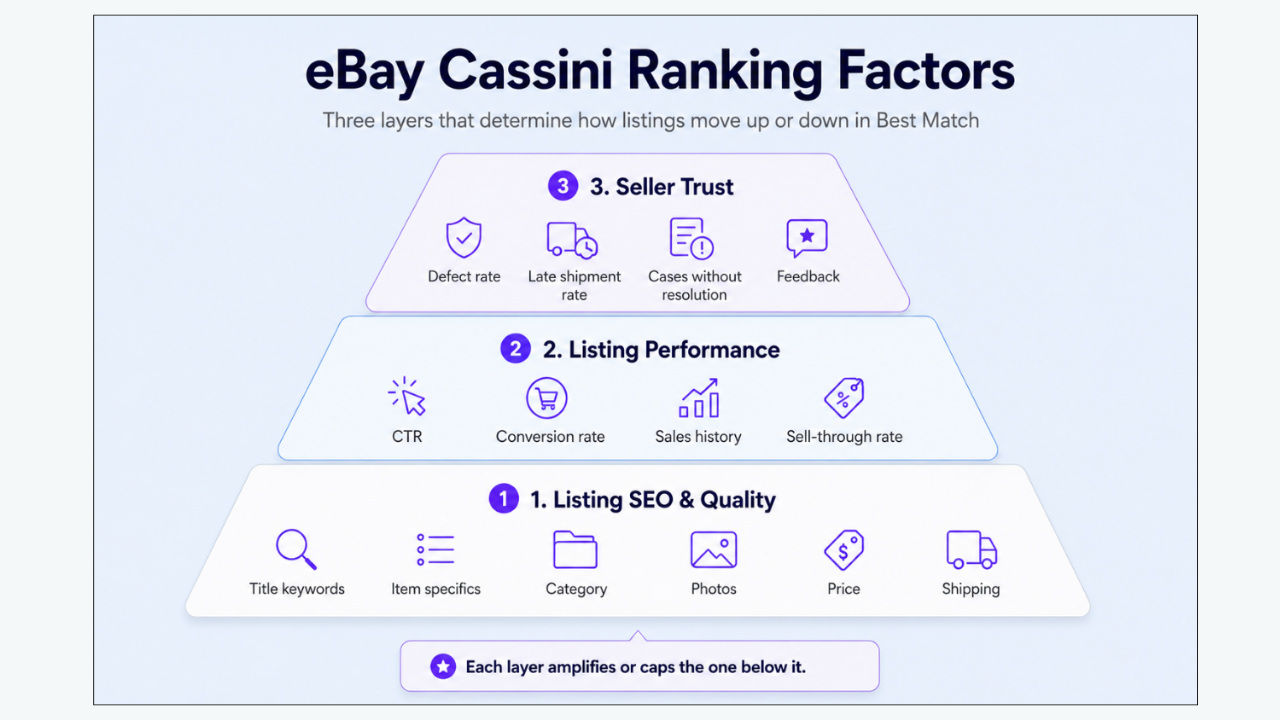
Cassini is the name commonly associated with eBay’s internal search engine.
An official eBay export resource currently describes Cassini as eBay’s internal search engine and says it helps buyers find relevant items. The same resource mentions search-query relevance, seller performance and return policy among the considerations involved. export.ebay.com
However, most current eBay Help pages explain seller visibility through Best Match rather than giving sellers technical documentation about Cassini.
The safest practical definition is:
Cassini is the name sellers commonly use for eBay’s search technology, while Best Match is the default ordering experience sellers can optimise through eBay’s published listing and service guidance.
This avoids claiming that Cassini is one simple formula operating identically across every category, marketplace, device and buyer.
Search retrieval and ranking are different jobs
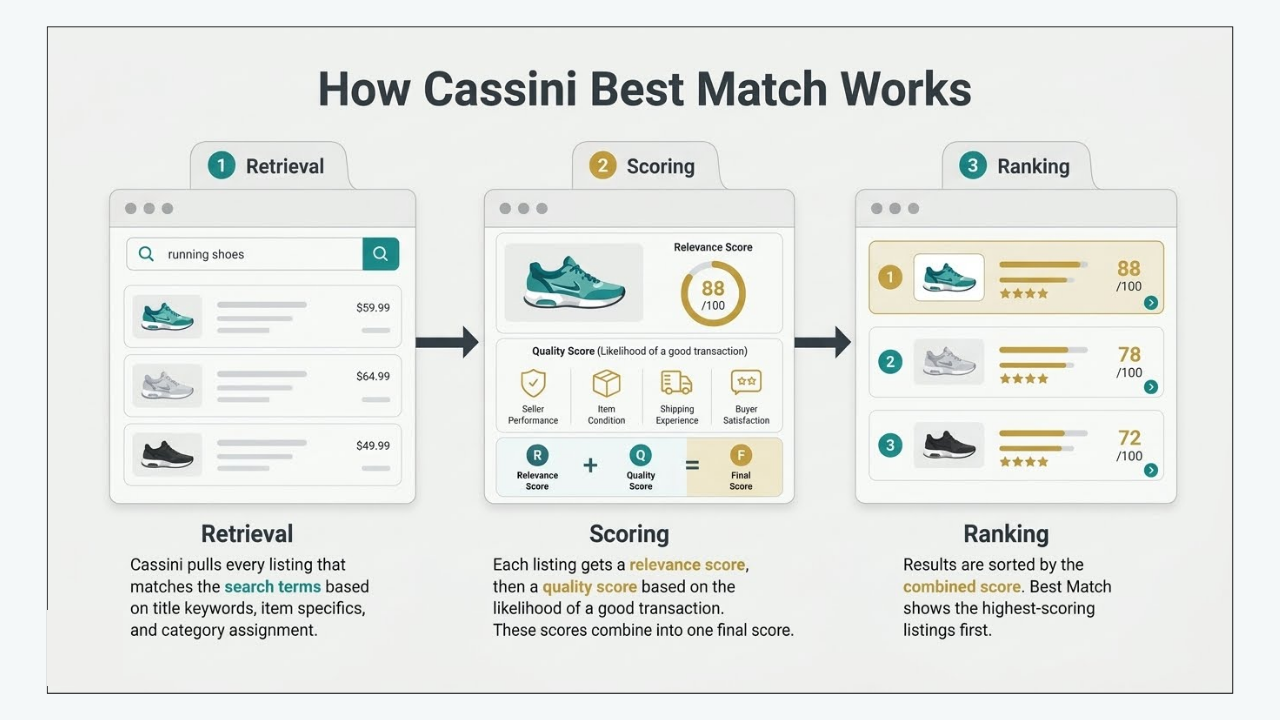
A marketplace search system must first identify products that could answer the buyer’s search. It must then decide how to organise those products.
That creates two practical stages.
Retrieval
Is the listing eligible and relevant enough to enter the result set?
Retrieval can depend on basic information such as:
- Whether the listing is active
- Whether stock is available
- The selected category
- Title words
- Item specifics
- Product identifiers
- Buyer filters
- Location and delivery eligibility
- Policy compliance
Ranking
If the listing is eligible, where should it appear?
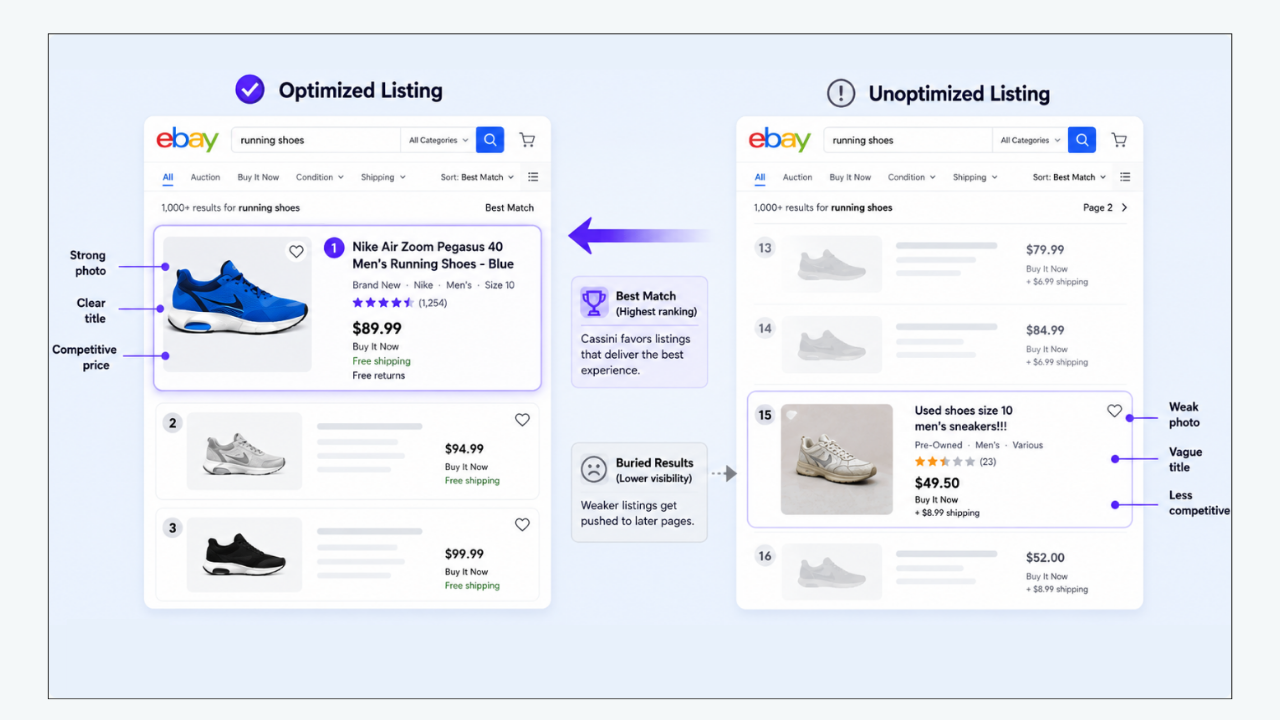
eBay calls its default search order Best Match. It is designed to show listings that most closely match what a buyer is looking for.
A listing can therefore be indexed and searchable but still appear far below stronger competitors. Sellers often describe that situation as “Cassini is hiding my listing,” when the more useful diagnosis is that the listing is eligible but not competitive for that query.
What eBay publicly says about Best Match
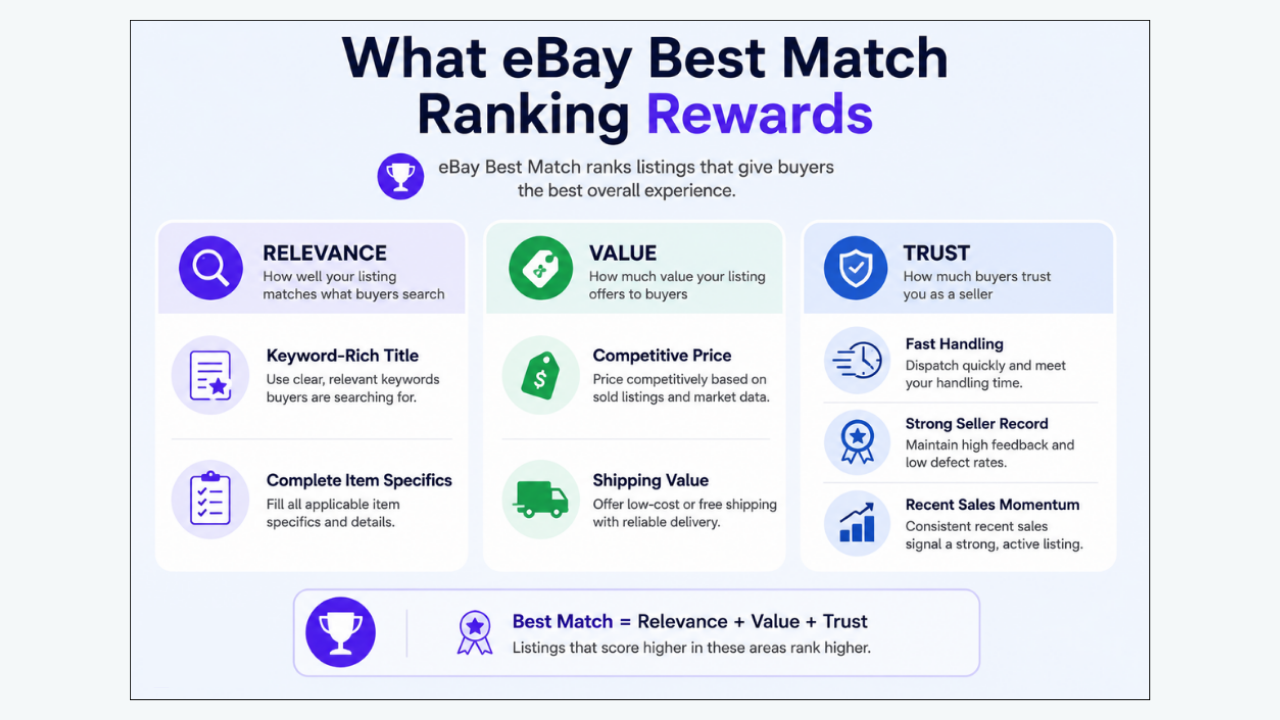
According to eBay, Best Match considers factors including:
- How closely the listing matches the buyer’s search terms
- How popular the item is
- Price
- Listing quality, including description and photographs
- Listing completeness
- Service terms, such as returns and handling time
- The seller’s track record
eBay advises sellers to create complete and accurate listings, choose relevant categories, use high-quality images, offer competitive prices, provide reasonable shipping and maintain good service. eBay
Buyer-side search guidance adds that results can also be affected by the buyer’s browsing history, item location, active filters, selected sort order and the number of listings matching the query. eBay
This means two people can search the same phrase and see different arrangements.
What eBay has not publicly disclosed
eBay has not provided sellers with:
- A complete list of ranking inputs
- Permanent weighting for each input
- Exact category-specific ranking formulas
- A guaranteed ranking effect from editing a title
- A fixed conversion threshold
- A universal “fresh listing” boost
- A fixed reward for revising listings every day
- A guaranteed organic effect from using Promoted Listings
- A method for predicting an exact Best Match position
- A complete explanation of how every AI search test interacts with traditional search
Any article claiming to know those details should be treated cautiously.
Cassini is not a checklist that produces a guaranteed position
Completing every recommended field is good practice, but it does not reserve a top position.
The marketplace is competitive and dynamic.
Your position can change because:
- A competitor lowers its price
- Another seller offers faster delivery
- Demand moves to a different product
- A buyer selects a filter
- An advertised listing occupies a visible placement
- Your item goes out of stock
- Your seller level changes
- A new competitor builds sales history
- eBay changes the buyer interface
- Search results are personalised
- The shopper searches with different wording
The correct objective is not to “beat Cassini.”
It is to make your listing eligible, accurate, relevant, competitive and easy for the buyer to understand.
How the eBay Cassini Search Algorithm Ranks Listings: Signals Sellers Can Influence
The signal groups below are based on eBay’s published Best Match guidance and seller tools. Where the evidence is less certain, the distinction is stated clearly.
1. Title and Keyword Relevance
Evidence status: Publicly stated by eBay
Why it matters
eBay says Best Match considers how closely a listing matches the buyer’s search terms.
The title is one of the clearest ways to identify the product. It should tell both the buyer and eBay what is being sold.
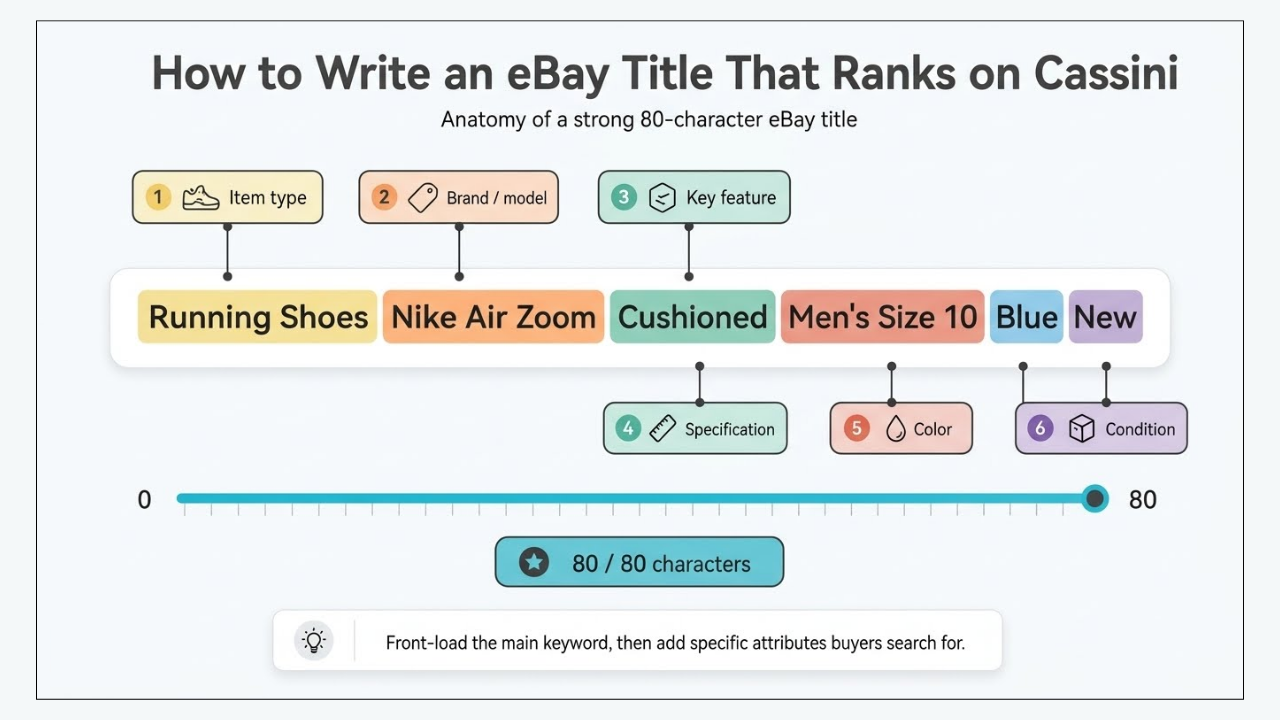
A useful title normally includes some combination of:
- Brand
- Model
- Product type
- Part number
- Size
- Colour
- Material
- Capacity
- Compatibility
- Style
- Edition
- Condition, where it helps distinguish the offer
eBay currently allows titles of up to 80 characters and recommends clear, concise wording with correct spelling. eBay
The goal is not to fill every available character. The goal is to use the available space for accurate product information.
A title such as:
Amazing Headphones Wireless Best Quality New
uses several words but identifies the product poorly.
A stronger version might be:
Sony WH-1000XM5 Wireless Noise Cancelling Headphones Black
The second title matches the way a qualified buyer is likely to search.
What to do
Build the title in a logical order:
- Brand
- Model or part number
- Product type
- Important differentiating attribute
- Size, colour, material or compatibility
- Condition, if useful
Research language through:
- eBay search suggestions
- Relevant active listings
- Sold-product research
- Manufacturer terminology
- Buyer questions
- Product packaging and documentation
Remove:
- Repeated words
- Unrelated brands
- Internal warehouse codes
- Empty promotional phrases
- Excess punctuation
- Misleading compatibility terms
- Words applying to a different variation
Do not add a popular keyword when it does not accurately describe the item. eBay’s search-manipulation policy prohibits unrelated keywords intended to gain unfair visibility.
What is not confirmed
It is reasonable to place the most identifying words early for buyer readability. It is not responsible to claim that the first word receives a known ranking percentage.
Similarly, writing the same keyword several times does not make the listing several times more relevant.
2. Category, Item Specifics and Product Identifiers
Evidence status: Strongly and repeatedly stated by eBay
Why it matters
The category tells eBay where the product belongs.
Item specifics describe the product inside that category. They can include:
- Brand
- Type
- Model
- Colour
- Size
- Material
- Style
- Department
- MPN
- Compatible brand
- Compatible model
- Vehicle fitment
- Storage capacity
- Connectivity
- Dimensions
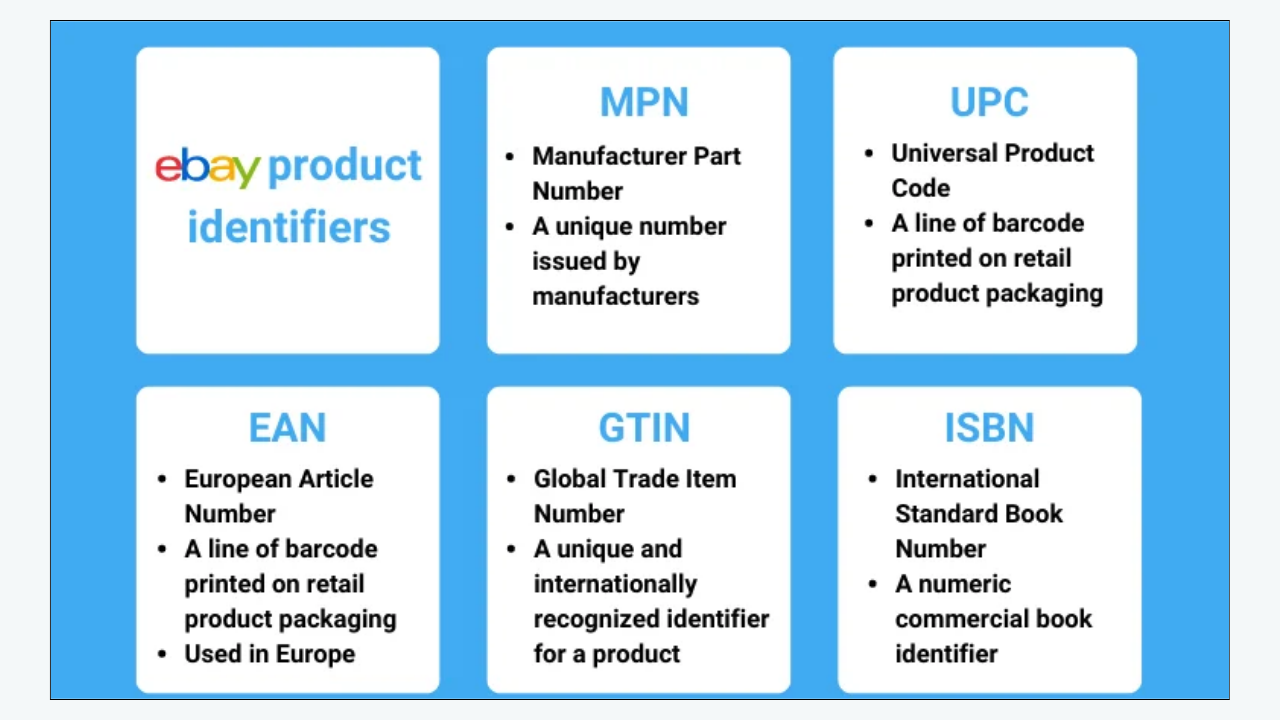
Product identifiers such as UPC, EAN, ISBN or MPN may help connect a listing with catalogue information when they apply.
This structured information matters because buyers filter results.
If a buyer selects:
- Brand: Sony
- Colour: Black
- Condition: Used
- Storage: 256 GB
- Size: Medium
a listing can be excluded if the corresponding item specific is missing or conflicts with the filter.
eBay says that buyers use item specifics to filter results and that an item appears in those filtered results when it contains the matching specific. eBay also describes item specifics and product identifiers as important ways to help buyers find the correct product. Seller Center
What to do
Use this order:
- Select the most relevant category.
- Complete all required item specifics.
- Complete required-soon fields where shown.
- Add every accurate recommended specific.
- Add useful additional information.
- Verify product identifiers.
- Check that variations use valid attributes.
- Remove conflicting or inherited data.
Never select a category because it appears less competitive if the item does not belong there.
When using “Sell Similar” or copying an existing listing, inspect every inherited field. A copied fashion listing can preserve the wrong department. A copied automotive listing can retain incompatible fitment. A copied electronics listing can retain the previous model number.
Use “Does not apply” only when it is accurate and accepted for that field. Do not use it as a default replacement for research.
What is observable but not precisely weighted
Listings with accurate structured data are eligible for more relevant filters and comparisons. That is directly useful even without knowing the ranking weight assigned to each field.
No seller needs the hidden formula to understand that a missing size prevents visibility when a buyer filters by size.
3. Price, Shipping and Total Buyer Cost
Evidence status: Publicly stated by eBay
Why it matters
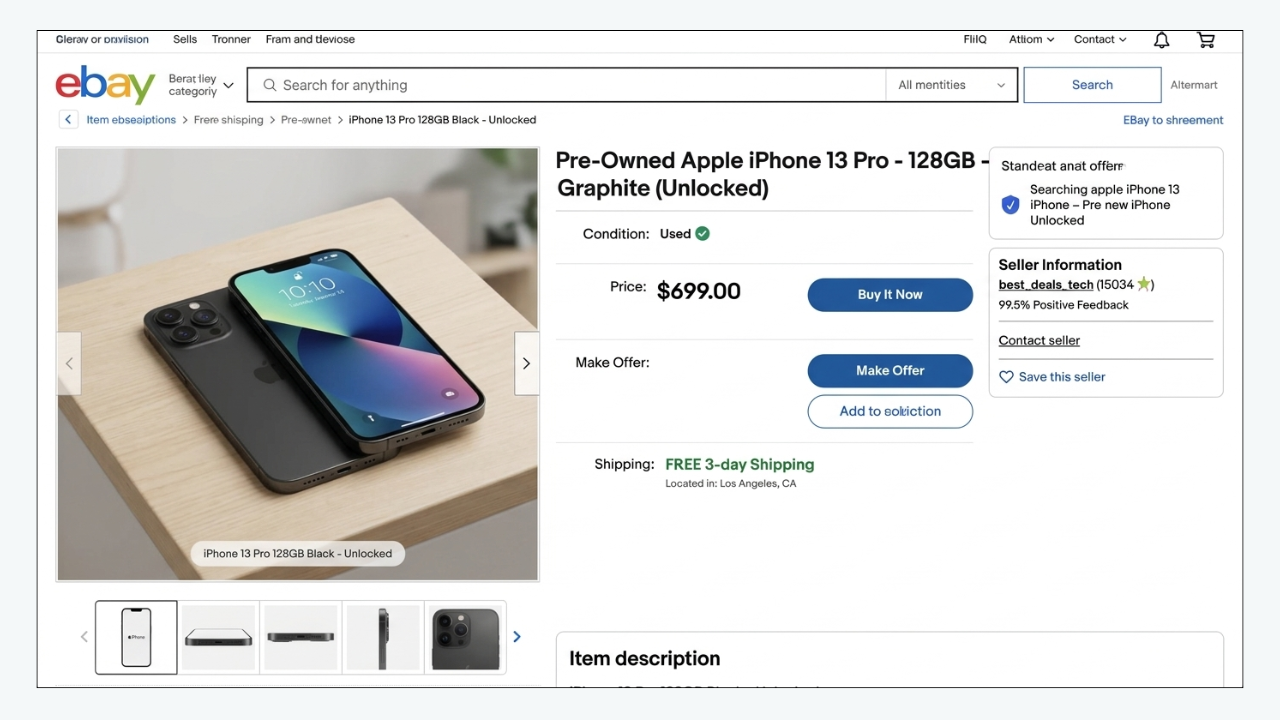
eBay identifies item price as a Best Match consideration. It also recommends competitive prices and reasonable shipping.
Buyers evaluate the whole offer, not just the item price.
The practical comparison may include:
- Item price
- Shipping charge
- Import costs
- Delivery speed
- Returns
- Condition
- Included accessories
- Warranty
- Seller reputation
A £20 product with £15 shipping may compete poorly against a £30 product with free delivery. A higher-priced product may remain competitive if it includes accessories, a better condition, stronger returns or faster delivery.
Cheapest does not automatically mean best.
What to do
Compare genuinely similar listings.
Match:
- Exact model
- Condition
- Quantity
- Package contents
- Variation
- Delivery destination
- Shipping service
- Seller type
- Return terms
Use active listings to understand the present market. Use eBay’s product-research tools, where available, to understand sold prices and accepted offers.
Calculate the minimum profitable price before reacting to competitors.
Possible actions include:
- Correcting an unrealistic price
- Changing the bundle
- Offering combined shipping
- Improving handling time when operationally possible
- Clarifying included components
- Using Best Offer where appropriate
- Reviewing return terms
- Correcting package dimensions that create excessive calculated shipping
What is not confirmed
There is no public evidence that being one penny cheaper guarantees a higher organic position.
Price is one factor in a wider decision. Cutting price without reviewing conversion, margin and delivery may increase sales while damaging profitability.
4. Sales History, Popularity and Conversion
Evidence status: Partly stated by eBay; exact weighting unknown
Why it matters
eBay publicly lists item popularity as a Best Match factor.
For multi-quantity listings, eBay also says that a listing’s sales history is one of the things determining its position in Best Match. It recommends adding new stock to the existing listing rather than creating a new listing for the same item. eBay
This supports a reasonable operational conclusion: when an accurate multi-quantity listing has earned genuine sales history, preserving that listing may be more useful than repeatedly ending and recreating it.
Conversion can also tell sellers whether the listing is satisfying the shoppers who reach it.
However, the exact connection between conversion and ranking is not fully disclosed. Sellers should not turn a useful performance metric into an invented ranking formula.
What to do
Track the funnel:
- Impressions
- Page views
- Click-through rate
- Transactions
- Sales conversion rate
- Revenue
- Returns
- Buyer questions
Interpret the combinations:
- Low impressions: Investigate eligibility, relevance, demand and competition.
- Impressions but low CTR: Improve the main image, title and visible offer.
- Views but low conversion: Improve price, shipping, condition, description and trust.
- Sales followed by returns: Check whether the listing creates inaccurate expectations.
For identical replenished inventory, update quantity on the existing valid listing where appropriate.
Do not attempt to manufacture sales, clicks, watchers or feedback. Artificial activity can violate platform rules and produces unreliable business data.
What is speculation
Claims such as “one sale gives a seven-day ranking boost” or “three sales put a listing on page one” are not supported by a public universal rule.
Sales history matters in contexts eBay has acknowledged. The exact timing and weight remain unknown.
5. Seller Performance, Handling Time and Return Policies
Evidence status: Publicly stated by eBay
Why it matters
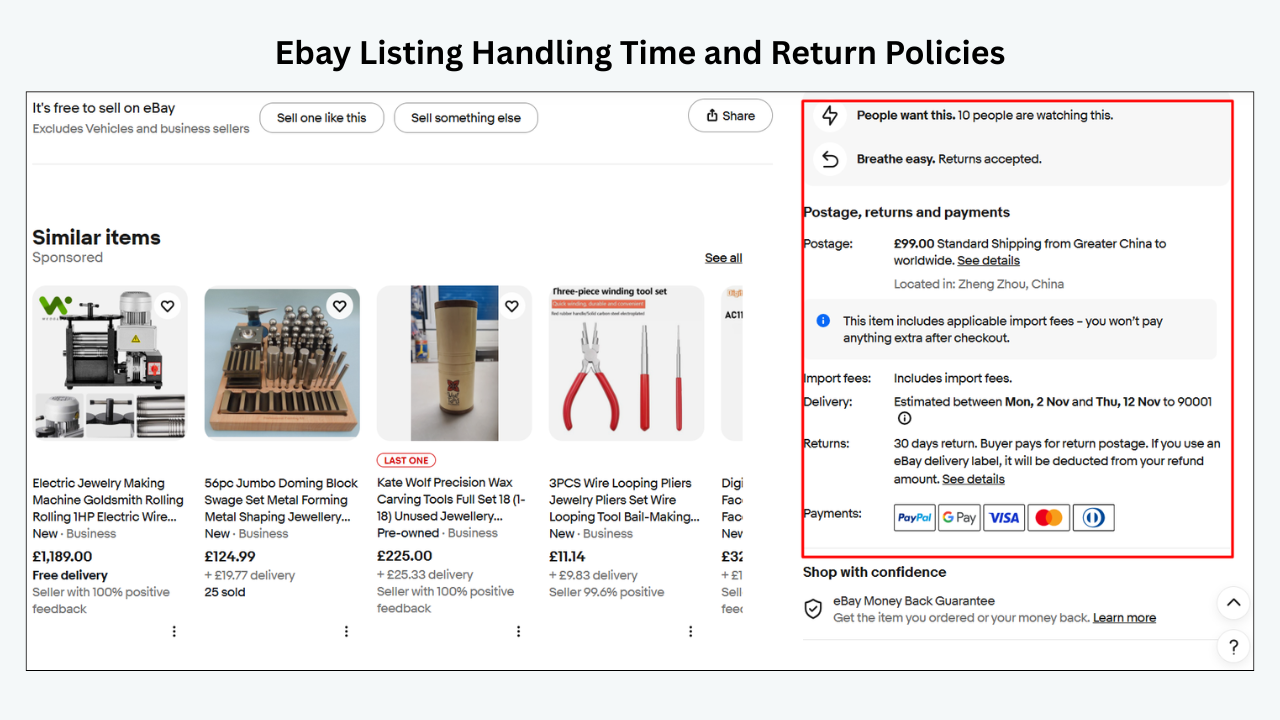
eBay lists the seller’s track record and the listing’s service terms among Best Match considerations.
Those service terms can include:
- Handling time
- Return policy
- Shipping information
- Delivery reliability
- Accurate product description
- Inventory control
- Issue resolution
Seller performance connects search visibility with operational execution.
A seller can create an excellent title and still weaken the business through:
- Late dispatches
- Untracked shipments where tracking is expected
- Cancellations caused by unavailable inventory
- Items not matching their descriptions
- Unresolved buyer cases
- Repeated service problems
On eBay.com, a Below Standard evaluation may cause items to be placed lower in Best Match and may introduce other selling limitations. Standards and consequences can vary across international marketplaces.
What to do
Review:
- Current and projected seller level
- Transaction defects
- Cases closed without seller resolution
- Late-shipment information
- Service metrics
- Cancellation reasons
- Tracking upload
- Return reasons
- Policy warnings
- Account restrictions
Improve the underlying process:
- Keep inventory accurate.
- Set a handling time the operation can meet.
- Upload valid tracking promptly where applicable.
- Package products appropriately.
- Describe condition honestly.
- Respond to buyer problems.
- Avoid cancelling because the item is unavailable.
- Keep native policy settings and written policies consistent.
What is not confirmed
A perfect feedback score does not create a guaranteed top ranking.
Seller performance is one part of Best Match. Relevance, product demand, listing completeness, price and competition still matter.
6. Listing Quality, Descriptions and Images
Evidence status: Publicly stated by eBay
Why it matters
eBay explicitly includes description, photographs, listing quality and completeness in its Best Match guidance.
High-quality listing content has two jobs:
- Help the listing qualify for relevant discovery.
- Help the buyer make a confident purchase after clicking.
A listing can earn impressions but lose buyers because:
- The main image is unclear
- Photographs hide the condition
- The wrong variation is shown
- Important measurements are missing
- Compatibility is unclear
- The description is one long paragraph
- Shipping information is difficult to find
- Mobile users must zoom or scroll through clutter
- Product facts conflict across fields
eBay currently recommends photographs from different angles and images showing scratches or flaws. Its US guidance currently permits up to 24 photographs. eBay
What to do
Improve content in the buyer’s decision order.
Main image
Show the exact product clearly. Avoid unnecessary overlays, borders or distracting backgrounds where prohibited or unsuitable.
Additional images
Cover:
- Front
- Back
- Sides
- Labels
- Model numbers
- Connectors
- Accessories
- Scale
- Packaging
- Defects
Description
Lead with the information most likely to determine suitability:
- Exact identity
- Condition
- Compatibility
- Measurements
- Key specifications
- Included items
- Important exclusions
- Shipping and return information
Use headings, short paragraphs, lists and readable spacing.
What is not confirmed
A longer description does not automatically rank higher.
Adding repeated keywords to the description may make it worse for buyers. Completeness, accuracy and relevance matter more than raw word count.
7. Listing Freshness, Stock and Availability
Evidence status: Stock behaviour is confirmed; universal freshness claims are not
Why it matters
A listing cannot receive normal search exposure when no item is available.
With eBay’s out-of-stock option, a Good ’Til Cancelled listing can remain active at zero quantity while being hidden from search. It can reappear when accurate quantity is restored. eBay
Availability therefore has a direct and observable effect.
“Freshness” is more complicated.
Sellers often claim that:
- Every new listing gets a guaranteed boost
- Ending and relisting resets ranking
- Revising daily makes Cassini notice the listing
- Changing one word refreshes the item
- Old listings are automatically punished
eBay does not publish a universal rule supporting those claims.
Sales history can matter, particularly for multi-quantity listings. Repeatedly replacing a productive listing may therefore remove useful continuity rather than improve it.
What to do
- Manage stock accurately.
- Replenish the existing listing for the same identical product where appropriate.
- Correct zero-quantity variations.
- Remove unavailable variations.
- Use Good ’Til Cancelled inventory controls correctly.
- Avoid cancellations caused by stock errors.
- Do not create unnecessary duplicate listings.
- Review older products that have had no meaningful traffic or sales.
- Improve weak listings based on evidence, not age alone.
- For genuinely different products, create separate accurate listings.
What remains uncertain
The exact treatment of listing age may differ by format, category, demand and buyer context.
There is no verified universal schedule telling sellers to end every listing after 30, 60 or 90 days.
Cassini Myths vs Facts
Understanding what not to believe is part of effective eBay SEO in 2026.
| Myth | Practical reality |
|---|---|
| Cassini has one simple ranking formula | eBay search involves relevance, ranking, filters, buyer context and marketplace conditions |
| Ending and relisting always improves rank | Relisting can reproduce the same weaknesses and may lose useful history |
| Keyword stuffing increases visibility | Unrelated or repeated keywords can reduce relevance, confuse buyers and breach policy |
| The cheapest listing always ranks first | Price matters, but quality, completeness, service terms, popularity and seller track record also matter |
| Editing every day keeps a listing fresh | eBay has not published a universal daily-editing reward |
| Promoted Listings automatically improve organic rank | Advertising buys access to eligible placements; eBay does not promise a direct organic-ranking reward |
| A long description is always better | Accurate, structured and readable information is more useful than unnecessary length |
| A perfect feedback score guarantees page one | Seller track record is one factor, not a guaranteed placement |
| There is a secret keyword density | eBay publishes no ideal keyword percentage |
| A template alone can rank a listing | Templates improve presentation but cannot fix inactive status, wrong categories or missing native data |
| Views from the seller increase popularity | eBay says a seller’s own logged-in listing visit does not count as a page view |
| Every ranking drop is an algorithm penalty | Demand, stock, filters, advertising, price, competition and reporting can all change visibility |
Myth: Relisting is a reset button
A weak listing does not become strong because it receives a new item number.
Before relisting, inspect:
- Category
- Item specifics
- Title
- Product identifiers
- Price
- Delivery
- Images
- Condition
- Returns
- Seller performance
- Demand
If the product is identical and can remain on a valid multi-quantity listing, preserving sales history may be more useful.
Myth: Cassini prefers sellers who constantly revise listings
Revisions are useful when they correct a problem.
Unnecessary edits make performance harder to measure. They can also introduce new errors into titles, categories, shipping policies or variations.
Edit with a reason. Record the change. Allow time to measure it.
Myth: Keywords belong everywhere
Use relevant search language in the title and accurate product information throughout the listing.
Do not repeat a phrase in every sentence. Do not add competitor brands. Do not name compatible products unless the compatibility is genuine.
eBay SEO is product matching, not a contest to repeat the largest number of terms.
Myth: A hidden penalty explains every decline
Account and policy actions are real possibilities, but so are ordinary business changes.
Before assuming a secret penalty, check:
- Listing status
- Quantity
- Search filters
- Demand
- Category
- Item specifics
- Price
- Shipping
- Advertising
- Seller Hub messages
A theory should be the last step, not the first.
A Practical eBay Listing Optimisation Playbook
The strongest eBay listing optimisation process does not depend on guessing the algorithm.
It improves the factors eBay has identified and measures actual buyer response.
Step 1: Confirm eligibility
Before SEO work, verify that the listing is:
- Active
- In stock
- Available in the intended marketplace
- Free from blocking errors
- Permitted under eBay policy
- Available to the buyer’s destination
- Not hidden as a duplicate
- Not scheduled for a future start
- Not affected by an account restriction
Search by item number and by the full title.
If the listing is not eligible, keyword research is not the first priority.
Step 2: Define the buyer and search intent
Write down:
- What is the product?
- Who buys it?
- Which problem does it solve?
- Which exact model or version is it?
- Which characteristics determine suitability?
- What would make the buyer reject it?
A buyer searching for a replacement automotive component may prioritise part number and fitment. A fashion shopper may prioritise size, measurements, material and colour. A collectible buyer may prioritise edition, authenticity and condition.
The listing should reflect the decision process of its own category.
Step 3: Build a query map
Create three groups.
Primary query
The simplest accurate way to identify the product.
Attribute queries
Searches containing size, colour, material, model, capacity, year or condition.
Compatibility or use-case queries
Searches based on fitment, compatible devices or intended use—only where accurate.
Map each fact to the correct field.
| Information | Best primary location |
|---|---|
| Core product identity | Title |
| Category classification | eBay category |
| Brand, model, colour and size | Item specifics |
| UPC, EAN, ISBN or MPN | Product identifier fields |
| Condition detail | Condition field and description |
| Compatibility | Supported compatibility fields and description |
| Measurements | Item specifics and description |
| Buyer benefits | Description |
| Delivery and returns | Native policies and clear template content |
Do not force every fact into the title.
Step 4: Audit the category
Search for the item and inspect the category paths used by genuinely comparable products.
Then confirm:
- Product versus accessory
- Complete item versus part
- Adult versus child category
- Men’s, women’s or unisex department
- Original item versus reproduction
- New, used or refurbished classification
- Applicable variation support
Do not use an unrelated category simply because it appears easier to rank.
Step 5: Complete the item specifics
Prioritise required and recommended fields.
For each value, ask:
- Is it accurate?
- Does it match the title?
- Can I prove it?
- Does the field apply to every variation?
- Is the spelling standard?
- Does it match the manufacturer’s terminology?
Seller Hub can identify listings missing required, required-soon or recommended item specifics. It also offers bulk tools for updating multiple listings. Seller Center
Native item specifics must be corrected in eBay. A description template cannot replace them.
Step 6: Write the title
Use the research to create a natural title.
A practical structure is:
Brand + Model + Product Type + Main Specification + Size/Colour/Compatibility
Examples:
- Canon EOS R10 Mirrorless Camera Body 24.2MP Black
- Women’s Leather Crossbody Shoulder Bag Black Adjustable Strap
- Ford Focus MK3 Rear Tail Light Passenger Side 2015–2018
The exact order should reflect the product and buyer language.
Check:
- 80-character limit
- Spelling
- Accuracy
- Readability
- Variation consistency
- Prohibited or irrelevant terms
- Compatibility wording
- Duplicated words
Step 7: Improve the offer
Compare the total package with relevant competitors.
Review:
- Item price
- Shipping cost
- Handling time
- Delivery estimate
- Return policy
- Condition
- Included accessories
- Warranty
- Seller reputation
- Listing format
Do not lower the price automatically.
Sometimes the better response is:
- Clearer condition information
- Faster realistic handling
- A better bundle
- More complete photographs
- A stronger return policy
- Improved compatibility data
Step 8: Improve the main image and gallery
The main image must win attention without misleading the buyer.
Ask:
- Is the exact product immediately recognisable?
- Is it large enough in the frame?
- Is the lighting clear?
- Does the background distract?
- Is the correct colour shown?
- Is the quantity accurate?
- Are important accessories visible?
- Are flaws documented?
- Do additional images answer buyer questions?
Photography supports CTR and buyer confidence. It also reduces surprises after delivery.
Step 9: Structure the description
Use a logical reading order:
- Exact product summary
- Condition
- Key benefits
- Specifications
- Measurements
- Compatibility
- Included components
- Shipping
- Returns
- Seller information
- Relevant related products
Keep the first screen useful. Do not begin with several banners before identifying the product.
Use short paragraphs, headings and lists.
Step 10: Check seller operations
Review:
- Inventory accuracy
- Dispatch process
- Tracking
- Packaging
- Messages
- Returns
- Cancellations
- Service metrics
- Current seller level
Search optimisation and operations are connected. A promise made in the listing must be fulfilled after purchase.
Step 11: Establish a baseline
Record performance before editing.
Useful metrics include:
- Impressions
- Page views
- CTR
- Sales conversion rate
- Transactions
- Revenue
- Watchers
- Offers
- Buyer questions
- Returns
- Advertising impressions and clicks
- Active stock
eBay counts a page view when a shopper lands on the listing. Your own logged-in view and identified bot traffic do not count. eBay
Do not combine Promoted Listings clicks with organic listing views without checking the report definition.
Step 12: Test controlled changes
Choose a representative group.
For example:
- Ten electronics listings missing recommended specifics
- Fifteen fashion listings with weak measurements
- Five automotive products with incomplete compatibility information
- Ten listings using an outdated mobile layout
Change one meaningful group of variables, then record:
- Date
- Listings
- Old version
- New version
- Reason
- Baseline
- Review date
- Other commercial changes
Avoid changing title, price, images, shipping, advertising and template on the same day.
Priority order
Use this order when several problems exist:
- Policy and account eligibility
- Stock and listing status
- Correct category
- Required item specifics
- Accurate identifiers
- Title relevance
- Price and shipping
- Images
- Description and mobile presentation
- Seller operations
- Advertising
- Controlled testing and scaling
A weekly optimisation routine
Monday: Find problems
Review:
- Zero-impression listings
- Low-impression listings
- Impressions with weak CTR
- Views with weak conversion
- Missing item specifics
- Zero stock
- Listing errors
- Seller Hub messages
Tuesday: Audit search relevance
Check category, item specifics, identifiers and titles.
Wednesday: Review competitiveness
Compare price, shipping, delivery, returns, condition and competitors.
Thursday: Improve buyer-facing content
Work on images, descriptions, specifications, policy clarity and mobile layout.
Friday: Measure and document
Compare results with the baseline. Separate organic and paid traffic. Record what changed.
How to interpret the metrics
| Pattern | Likely starting point |
|---|---|
| No impressions | Status, eligibility, demand, category or relevance |
| Low impressions | Search relevance, competition, demand or seller/account factors |
| Impressions but low CTR | Main image, title, price, shipping or condition |
| Views but low conversion | Offer, description, trust, compatibility or policies |
| Sales followed by returns | Accuracy, condition and expectation setting |
| Paid impressions fall | Campaign status, bids, rates, budget, eligibility or targeting |
| Organic traffic falls | Demand, relevance, competition, stock, policy or seller performance |
How BoostOnTime ETB Supports eBay Listing Optimisation
Build a clear information hierarchy
Buyers rarely want more decoration. They want faster answers.
A useful listing template should make it easy to find:
- Exact product identity
- Images
- Condition
- Specifications
- Compatibility
- Measurements
- Package contents
- Shipping
- Returns
- Seller information
BoostOnTime lets sellers arrange customisable modules around that buyer journey.
The available module collection includes:
- Logo
- Header Menu
- Title and Price
- Gallery
- Descriptions
- Specifications
- Why Us
- Categories
- Helpful Links
- Banners
- Newsletter
- Policy Tabs
- Side Mini Banners
- Feedbacks
- Related Products
- Footer
More modules do not automatically create a better template.
An automotive-parts seller may emphasise Specifications, Descriptions and Policy Tabs. A fashion seller may prioritise Gallery, measurements and returns. A jewellery seller may lead with Gallery, materials, dimensions, authentication information and seller trust.
Use responsive templates
Mobile usability matters because buyers may research and purchase from small screens.
BoostOnTime offers responsive themes that can be customised and previewed.
A practical mobile order is:
- Product title
- Gallery
- Short summary
- Specifications
- Condition
- Compatibility or measurements
- Shipping and returns
- Seller information
- Related products
Responsive design does not produce a guaranteed ranking improvement. It makes the listing easier for buyers to use after they click.
Separate static and dynamic information
ETB uses static modules for information shared across listings and dynamic modules for supported product information.
Static content can include:
- Logo
- Greeting
- Menu
- Helpful links
- Why Us
- Banners
- Store policy tabs
Dynamic content can collect supported information such as:
- Product title
- Price
- Currency
- Product images
- Related products and pricing
- Supported store-category information Boostontime
This separation helps sellers maintain consistent branding without manually rebuilding every product description.
The source information must still be correct. Dynamic importing does not repair an inaccurate title, incorrect price or unsuitable photograph.
Create category-specific templates
One template does not need to serve every product line.
BoostOnTime supports multiple templates, allowing sellers to create different content structures for:
- Electronics
- Fashion
- Automotive parts
- Collectibles
- Jewellery
- Home and garden
- Tools
- General merchandise
This is helpful when each category has different decision-making information.
For example, compatibility may dominate an automotive listing, while material and measurements may dominate a jewellery listing.
Apply approved templates with Batch Revision
BoostOnTime’s Batch Revision tool can apply a completed template to an individual listing or selected listing groups. The current ETB pages also promote multiple templates and unlimited listing updates. Boostontime
For sellers managing 50–500 listings, this reduces the need to rebuild descriptions individually.
Use a controlled process:
- Correct native eBay data.
- Build the category template.
- Preview it.
- Apply it to a small pilot group.
- Review the live desktop and mobile output.
- Check product facts and policies.
- Record the performance baseline.
- Monitor impressions, views and conversion.
- Expand only after the pilot passes.
Batch Revision increases efficiency. It also increases the impact of any mistake, which is why testing matters.
Use related products carefully
ETB allows sellers to choose random products or manually select products for customised upselling.
Manual selection provides better control over relevance.
Useful relationships include:
- Camera and compatible battery
- Laptop and matching charger
- Tool and appropriate accessory
- Necklace and matching earrings
- Automotive component and related fitting part
- Clothing style and alternative colour
Do not allow cross-promotion to distract from the main purchase.
Who BoostOnTime ETB is for
ETB is suitable for sellers who:
- Manage many active eBay listings
- Want consistent branding
- Need responsive descriptions
- Sell across several product categories
- Want reusable content modules
- Need different templates for different product groups
- Want to apply template updates to selected listings
- Prefer a structured builder over maintaining one-off HTML
- Want relevant related-product presentation
Who it is not for
ETB is not a substitute for:
- Keyword research
- Native title editing
- Native category management
- Native item-specific editing
- Seller Hub analytics
- Inventory accounting
- Seller-performance management
- Policy appeals
- Promoted Listings
- Search-rank tracking
- Shipping labels
If the listing is inactive, in the wrong category or missing required specifics, fix those issues in eBay first.
If the native foundation is accurate but the buyer-facing description is inconsistent, cluttered or difficult to maintain, ETB addresses that part of the process.
Frequently Asked Questions
Official eBay export resources still refer to Cassini as eBay’s internal search engine, while current Help pages generally explain seller visibility through Best Match. Sellers should focus on eBay’s current published guidance rather than assuming Cassini is one unchanged formula.
eBay does not publish one universal most-important factor. Relevance, price, popularity, listing quality, completeness, service terms and seller track record are all publicly identified considerations.
A revision can help when it corrects a wrong category, incomplete item specifics, weak title, poor photographs or an uncompetitive offer. eBay does not publish a rule saying that editing alone creates a ranking boost.
Promoted Listings can provide additional paid placement opportunities for eligible products. eBay does not promise that advertising will automatically raise the same listing’s organic Best Match position.
Not before diagnosing the cause. Check status, stock, category, item specifics, title, price, shipping, demand and account health; relisting an unchanged product can reproduce the same problem and may lose useful sales history.
Conclusion
The eBay Cassini search algorithm is not a code sellers can crack with a hidden keyword formula.
eBay has publicly explained the practical factors that matter to Best Match:
- Search relevance
- Item popularity
- Price
- Listing quality
- Completeness
- Service terms
- Seller track record
The work is therefore straightforward, even if it is not always easy.
Make the listing eligible. Select the correct category. Complete accurate item specifics. Write a clear title. Set a competitive total offer. Use honest photographs. Explain the product and condition clearly. Meet the delivery and service promises made to buyers.
Then measure the funnel:
- Impressions
- Views
- CTR
- Conversion
- Transactions
- Returns
Do not respond to every fluctuation by ending listings, stuffing keywords or editing the catalogue at random. Use controlled changes and compare complete periods.
BoostOnTime ETB supports the buyer-facing part of that system. Its responsive themes, customisable modules, dynamic supported content, multiple templates, related products and Batch Revision help sellers create a consistent description framework across a growing catalogue.
It cannot guarantee a Cassini ranking.
It can help ensure that when a qualified buyer reaches the listing, the product information is organised, professional and easier to act on.
Fix native relevance first. Then use BoostOnTime ETB to build a stronger experience after the click.
Build a responsive template with the BoostOnTime ETB seven-day trial, test it on a controlled listing group and expand only after checking the live buyer experience.
🚀 Start Your Seven-Day BoostOnTime ETB Trial
boostontime.com/ebay-template-builder