
eBay Impressions Dropped Overnight? How to Read the Traffic Report and Recover
Did your eBay impressions drop overnight? This guide explains how to read traffic reports, identify sudden visibility changes, analyse impressions, views and click-through rates, and follow a step-by-step recovery plan to improve listing performance with BoostOnTime ETB.
📋 In This Guide
- 1How to Read the Traffic Report
- 2Is It a Real Decline?
- 3Cause 1: Seasonal Demand
- 4Cause 2: Competitor Changes
- 5Cause 3: Recent Listing Edits
- 6Cause 4: Ended or Out-of-Stock Listings
- 7Cause 5: Account or Policy Issues
- 8Cause 6: Promoted Listings Changes
- 9Cause 7: Shipping Changes
- 10Cause 8: Image or Listing Quality
- 11Cause 9: eBay-Side Change
- 12Seven-Day Recovery Plan
- 1330-Day Recovery Plan
- 14What Not to Do
- 15How BoostOnTime ETB Helps
- 16Frequently Asked Questions
- 17Conclusion
Your sales looked normal yesterday. Today, you open Seller Hub and discover that your eBay impressions dropped sharply.
The instinctive response is to start changing things. You rewrite titles, lower prices, increase advertising, replace photographs and relist products—all before confirming whether the decline is real.
That usually makes the investigation harder.
A one-day fall can reflect incomplete reporting, a different weekday, normal demand variation, an ended advertising campaign or a group of products going out of stock. It can also indicate a genuine visibility problem caused by listing edits, shipping changes, account issues or stronger competition.
The traffic report cannot always tell you why performance changed. It can tell you where the problem begins.
You need to determine whether:
- Fewer shoppers were shown your listings
- Shoppers saw the listings but did not open them
- Shoppers opened the listings but did not buy
- Only advertised traffic declined
- One category fell while the rest of the account remained stable
- Listings became inactive, unavailable or ineligible
- The newest figures have not finished processing
This guide explains how to read eBay impressions, page views, click-through rate and sales conversion rate as a connected funnel. It then gives you nine possible causes, a seven-day stabilisation plan and a 30-day recovery framework.
You will also see where BoostOnTime ETB fits into that process. ETB does not control eBay traffic reporting or search placement. It helps sellers improve and consistently update the buyer-facing listing template after the underlying visibility issue has been identified.
Do not make ten changes because one chart turned red. Diagnose the break in the funnel first.
How to Read the eBay Traffic Report
The eBay traffic report is easier to use when you stop treating every number as a separate score.
The main metrics describe a sequence:
- Your listing is displayed.
- A shopper opens the listing.
- The shopper decides whether to buy.
Impressions measure the first stage. Page views and click-through rate help explain the second. Sales conversion rate helps explain the third.
Where to find Seller Hub traffic data
eBay currently describes Seller Hub’s Performance area as the place to monitor sales, selling costs, traffic, buyer traffic sources and seller level. The Traffic section can include listing impressions, click-through rate, page views and sales conversion rate. eBay
A typical path is:
Seller Hub → Performance → Traffic
You may also find listing-level traffic history by clicking or selecting the page-view figure attached to an active listing. eBay says the Listing Traffic History report can show page-view trends and, when enough data exists, may allow the seller to look back as far as two years. eBay
Promoted Listings performance is normally reviewed separately through the Advertising dashboard or downloadable advertising reports.
Do not assume that the main Traffic page and Advertising dashboard use the same scope, date treatment or attribution rules. They answer related but different questions.
What are eBay impressions?
An impression records that a listing was displayed on an eligible eBay page or flow.
That can include search results, the seller’s Store and other eBay discovery surfaces, depending on the metric being viewed. eBay’s technical documentation distinguishes search-result impressions, Store impressions and a broader total-impressions measure used for the Seller Hub Performance traffic figure. eBay Developers Program
An impression does not necessarily mean the buyer consciously noticed your item.
A listing may technically be displayed far down a results page. It may appear briefly while a shopper scrolls. It may be one of many competing products. The impression tells you the listing entered the opportunity set—not that it won the shopper’s attention.
This means:
- High impressions do not guarantee high views.
- Low impressions do not automatically mean the listing is broken.
- Zero impressions require a different investigation from low conversion.
- Total impressions can rise while sales remain unchanged.
- A decline in ad impressions does not always mean organic impressions also declined.
Use impressions primarily to answer:
Did eBay give the listing opportunities to be discovered?
What are page views?
A page view occurs when someone opens the listing on the eBay website or mobile app.
eBay says that:
- Opening a listing counts as a view.
- Leaving and returning can count as another view.
- Refreshing the page can count again.
- Your own visit while logged in does not count.
- A search-result appearance without a click is not a page view.
- Identified bot traffic is filtered from the figures. eBay
Views answer:
Did the search result, advertisement, Store link or external link persuade someone to visit the item page?
If impressions fall but views remain relatively stable, the listing may be reaching fewer but more qualified buyers.
If impressions stay stable but views drop, investigate the elements shoppers see before opening the listing:
- Main image
- Title
- Price
- Shipping cost
- Delivery estimate
- Condition
- Seller reputation
- Promoted or organic placement
- Competing offers
If both impressions and views fall, begin with visibility, availability and demand.
What is click-through rate?
Click-through rate, or CTR, connects impressions to page visits.
For Seller Hub listing traffic, eBay describes CTR as page views from eBay divided by impressions. External page views are excluded from that calculation. export.ebay.com
In simple terms:
Of the opportunities your listing received on eBay, how often did someone continue to the listing page?
Treat CTR as a diagnostic ratio, not an isolated target.
If impressions fall but CTR improves
Your listing may be reaching fewer people, but the remaining exposure is more relevant. Check whether sales and profit declined before deciding that performance is worse.
If impressions rise but CTR falls
The listing may be receiving broader or less qualified exposure. It may also be losing the visual comparison against competing titles, images, prices or delivery offers.
If impressions and CTR fall together
You may have both a visibility problem and a weaker search-result presentation.
If CTR improves but conversion falls
You are winning more clicks, but the listing page or offer is failing to close the sale.
Do not compare your CTR with an arbitrary figure from another category. A replacement automotive part, collectible, low-priced accessory and expensive jewellery item have different research cycles and buyer behaviour.
What is eBay sales conversion rate?
Sales conversion rate connects listing views to completed transactions.
eBay’s traffic documentation defines it as completed transactions divided by total View Item page views. eBay Developers Program
It helps answer:
When shoppers reach the listing, does the offer convert their interest into a purchase?
A declining conversion rate can indicate:
- Uncompetitive price
- Expensive shipping
- Slow delivery
- Unclear condition
- Weak photographs
- Compatibility uncertainty
- Missing measurements
- An unattractive return policy
- Inconsistent product information
- Poor mobile reading experience
- A title that attracts the wrong shopper
- A competitor offering a stronger bundle
Conversion can move sharply when volume is low. One additional sale or one additional view can produce a large percentage change on a low-traffic listing.
For that reason, use conversion at more than one level:
- Individual listing
- Product family
- Category
- Entire account
A listing-level drop may be noise. A category-wide drop across hundreds of qualified views deserves investigation.
Understanding traffic sources
Not all listing visits begin in the same place.
Organic eBay traffic
Organic traffic can come from unpaid eBay discovery, including search, browse, Store pages and other internal eBay locations.
When organic impressions decline, investigate:
- Demand
- Search relevance
- Listing availability
- Category and item specifics
- Price and delivery competitiveness
- Seller performance
- Recent listing changes
- Search-result competition
Promoted Listings traffic
Promoted Listings traffic comes from paid placements.
Campaign reports can include:
- Impressions
- Clicks
- CTR
- Average cost per click where applicable
- Ad fees
- Quantity sold
- Sales
- Sales conversion rate
- Return on ad spend eBay Developers Program
A fall in promoted impressions could result from:
- A paused or ended campaign
- Listings being removed from the campaign
- Eligibility changes
- A changed ad rate or bid
- A depleted budget under an applicable campaign type
- Keyword or targeting edits
- Competitor bidding changes
- Product availability
- Campaign-rule changes
- Listing-quality or relevance differences
Do not diagnose an advertising decline solely from the account-wide organic traffic report. Open the campaign dashboard and compare campaign-level and listing-level data.
External traffic
External views can come from outside eBay, such as search engines and links from other sites. eBay’s technical traffic documentation also distinguishes direct access, such as a shopper opening a bookmarked listing. eBay Developers Program
External traffic may be affected by:
- Search-engine visibility
- Social posts
- Email activity
- Influencer links
- Affiliate links
- Blog content
- Paid external advertising
- A removed or changed URL
- Seasonal campaigns ending
A decline in external views does not prove that eBay search visibility changed.
Compare like-for-like date ranges
Never compare a complete period with an incomplete period.
Common bad comparisons include:
- Today so far versus all of yesterday
- Monday morning versus the whole previous Monday
- Seven days containing a payday or holiday versus seven ordinary days
- A promotional week versus a non-promotional week
- A period with 500 active listings versus one with 430
- A week with advertising versus one after a campaign ended
- A US-market period against a UK-market period
- Local time against a report generated in another marketplace’s time zone
Use at least three views:
- Current complete period versus previous equivalent period
- Current period versus the same weekdays in the previous week
- Current period versus a longer baseline, such as the previous four comparable weeks
For seasonal products, compare with the equivalent seasonal stage where reliable historical data exists.
Account for reporting delay and reconciliation
A traffic report is not always a real-time control panel.
Advertising performance can be reported near real time but may take up to 72 hours to reconcile. eBay also notes that some downloaded Priority campaign metrics may take up to 72 hours to appear. eBay
Organic traffic figures may also update on a schedule that differs from advertising reports.
This is why a sudden drop for the newest day should be treated as provisional until you have checked:
- Whether the day is complete
- The report’s time zone
- The selected marketplace
- The date range
- Whether data is still processing
- Whether a dashboard filter is active
Your eBay Impressions Dropped: Is It a Real Decline?
Before diagnosing nine possible causes, run a five-minute reality check.
Check the reporting window
Is today incomplete? Is the newest data still being processed? Did the date selector change?
Compare the correct weekdays
Many stores behave differently on weekdays and weekends. Compare Monday with another Monday before comparing Monday with Sunday.
Check how many listings were active
If active inventory declined, total impressions may decline even when average visibility per active listing remains stable.
Calculate or compare:
- Total impressions
- Active listing count
- Impressions per active listing
- Number of in-stock SKUs
Separate one listing from the whole account
An account-wide chart can fall because one high-volume item ended.
Break the decline down by:
- Listing
- Category
- Brand
- Marketplace
- Organic traffic
- Promoted traffic
- External traffic
Look for a normal demand pattern
Weather, holidays, payday timing, school calendars, product launches and seasonal shopping can change demand.
Do not call a demand change an SEO penalty without evidence.
A real problem usually persists across complete reporting periods or is supported by another signal: listings ended, campaign settings changed, account messages appeared or a specific category lost search position.
Cause 1: Seasonal Demand or Market Interest Changed
Signs in the report
A demand-driven decline often affects a group of similar products rather than one isolated listing.
You may see:
- Impressions falling across a whole category
- Views declining at a similar rate
- CTR remaining reasonably stable
- Competitors also showing weaker visible activity
- No recent listing, account or campaign changes
- A decline beginning after a holiday, event or seasonal peak
- Year-on-year or month-on-month patterns that resemble the current movement
Examples include garden equipment after summer, festive products after a holiday, school supplies after the term begins or accessories linked to a product launch after the initial interest fades.
Stable CTR matters here. If the listings still earn approximately the same proportion of clicks from fewer impressions, the presentation may not be the primary problem. There may simply be fewer shoppers.
What to do
Do not rebuild the entire catalogue to fight a temporary demand decline.
Instead:
- Compare the same weekdays
- Review a four-week trend
- Compare with a relevant prior season
- Check several products in the same market
- Review sold-product research
- Reduce unnecessary advertising on low-demand items
- Prepare the next seasonal group
- Update inaccurate seasonal messaging
- Keep evergreen products separate from seasonal products in reports
If products are likely to recover next season, maintain accurate listings rather than repeatedly ending them.
Use different templates or merchandising messages for different seasons, but do not present an expired promotion as current.
Cause 2: A Competitor Changed Price, Delivery or Promotion
Signs in the report
Competition can reduce your eBay search visibility without any change to your account.
Look for:
- Impressions declining for a small group of directly comparable SKUs
- Search results containing new low-priced competitors
- Competitors introducing coupons or volume discounts
- Faster delivery estimates appearing above your listing
- More sponsored placements for the target query
- Competitors offering free shipping
- A major seller adding large quantities
- Your CTR declining because competing result cards look stronger
- Views and conversion falling after the market price moves
eBay publicly identifies price, listing quality, listing completeness, service terms and seller track record among the factors considered by Best Match. It does not publish fixed weightings. eBay
Do not assume that one cheaper listing caused the decline. Look for a repeated pattern across the results.
What to do
Audit five to ten genuinely comparable offers.
Record:
- Product condition
- Total item and shipping cost
- Delivery estimate
- Return terms
- Included accessories
- Quantity
- Listing format
- Main image
- Seller reputation
- Sponsored status
Respond strategically.
You might adjust price, improve delivery, clarify the bundle or replace a weak main photograph. You might also decide that matching the competitor would remove your margin and is not commercially sensible.
Do not copy another seller’s title, photographs or description.
The aim is to understand the buyer’s alternatives, not imitate them.
Cause 3: Your Recent Listing Edits Changed Relevance
Signs in the report
The timing is the clue.
If impressions fell shortly after a bulk edit, check exactly what changed.
High-risk edits include:
- Rewriting titles
- Moving categories
- Removing item specifics
- Changing product identifiers
- Replacing variation structures
- Altering condition
- Changing price
- Revising shipping policies
- Copying data from another product
- Applying a bulk file to the wrong SKUs
A title edit can remove a phrase buyers use. A category edit can place the product outside the buyer’s filters. A missing colour, size, brand or model can remove the listing from filtered results.
eBay explains that item specifics help it match products to buyer searches, navigation filters and merchandising pages. Seller Center
What to do
Open your change log or exported listing data.
Compare the current version with the last known good version:
- Which fields changed?
- Which listings were included?
- Did the decline affect only those listings?
- Did required or recommended item specifics disappear?
- Did a category migration alter available specifics?
- Does the title still identify the exact item?
Restore only clearly incorrect changes.
Do not automatically restore every old value. The earlier listing may also have contained weaknesses.
After correcting the data, allow time for search and reporting to process the revision. Record the exact time and avoid another major edit during the test.
Cause 4: Listings Ended, Went Out of Stock or Entered Time Away
Signs in the report
This cause can create a dramatic account-wide decline because the affected products stop generating normal search opportunities.
Check for:
- A lower active-listing count
- Zero-quantity listings
- Variations with no available stock
- Good ’Til Cancelled listings that did not renew
- Listings ended manually or through a channel connection
- Time Away settings
- Selling limits
- Failed inventory synchronisation
- Scheduled listings that have not started
When the out-of-stock option is active, a Good ’Til Cancelled listing can remain active at zero quantity while being hidden from search. eBay
Time Away can also explain an abrupt fall. If a seller chooses to pause item sales, eBay says fixed-price listings are hidden from search. It can take a few hours for them to disappear and a couple of hours to return after Time Away ends. eBay
What to do
Compare yesterday’s and today’s active inventory.
Then:
- Restore accurate quantity
- Correct variation-level stock
- Check the source inventory system
- Review Time Away dates and settings
- Confirm Good ’Til Cancelled renewals
- Inspect monthly and category limits
- Resolve listing errors
- Republish only when appropriate
Do not add false quantity to regain impressions.
If stock is unavailable, hiding the item is correct. Use the time to improve the listing and prepare for restocking.
For multi-channel sellers, identify which system is the source of truth before editing quantities in several places.
Cause 5: An Account, Seller-Performance or Policy Issue Appeared
Signs in the report
Account-level issues often create a broad decline across unrelated listings.
Look for:
- Impressions falling across several categories
- Promoted Listings becoming unavailable
- New listings failing to appear
- Revisions being blocked
- Listings moving to ended or hidden status
- Lower selling limits
- A change in seller level
- New messages from eBay
- Payment, identity or verification requests
- Intellectual-property notices
- Restricted-item warnings
- A sudden concentration of removed listings
On eBay.com, a Below Standard seller evaluation may place listings lower in Best Match, reduce selling limits and restrict access to Promoted Listings. Policies and thresholds can differ across marketplaces. eBay
What to do
Check eBay Messages and Seller Help before making listing-level changes.
Follow the specific action requested. That may include:
- Resolving a buyer case
- Correcting inaccurate listing information
- Paying an outstanding balance
- Verifying account details
- Uploading requested documents
- Removing infringing content
- Appealing an eligible decision
- Improving fulfilment performance
- Waiting for a temporary restriction to end
Do not try to bypass a removal by changing a few words and relisting the same restricted product.
Create an account-issue log containing:
- Message date
- Affected listing numbers
- Policy involved
- Required action
- Submission date
- Outcome
If the decline began on the same day as an account notice, resolve that issue before testing photographs or templates.
Cause 6: Promoted Listings Settings or Ad Rates Changed
Signs in the report
A paid-visibility decline is often visible in the Advertising dashboard before it appears clearly in account-wide totals.
Check whether:
- A campaign ended
- A campaign was paused
- Listings were removed
- A rule stopped selecting products
- An ad rate changed
- A Priority campaign bid or budget changed
- Keywords were paused
- Targeting changed
- Listings became ineligible
- A high-volume promoted SKU went out of stock
- Competitor advertising increased
Break the report into:
- Organic impressions
- Promoted impressions
- Advertising clicks
- Advertising CTR
- Ad-attributed sales
- Advertising cost
Campaign metrics can take time to reconcile, so a recent decline may still be incomplete.
What to do
Do not raise every rate or bid immediately.
First confirm:
- The campaign is active.
- The expected listings are included.
- The date range is complete.
- Listings remain eligible and in stock.
- Targeting still matches the product.
- The campaign did not reach an applicable budget limit.
- The decline is not confined to one product group.
Then review profitability.
More impressions are not automatically better if the campaign attracts poor-quality clicks or erodes margin.
Current eBay campaign strategies, controls and eligibility can vary by marketplace and account.
Cause 7: Shipping or Handling-Time Changes Weakened the Offer
Signs in the report
Delivery changes can affect both discovery and buyer response.
Look for:
- Impressions declining after applying a new shipping policy
- Listings disappearing for certain delivery destinations
- CTR falling after a shipping-cost increase
- Conversion falling after handling time became longer
- International traffic dropping after exclusions changed
- Calculated shipping producing unusually high totals
- Delivery estimates becoming slower than competitors
- Item-location errors
- Local-pickup settings applied unintentionally
A product may still be active but less attractive or unavailable to an important buyer group.
What to do
Compare the current shipping configuration with the previous version.
Check:
- Domestic service
- International service
- Handling time
- Package weight and dimensions
- Fixed or calculated shipping
- Excluded locations
- Item location
- Return address
- Business policy assignment
- Delivery estimate shown to buyers
Test the listing using representative buyer destinations.
Do not promise faster dispatch solely to improve the offer. Only reduce handling time when your fulfilment operation can meet it consistently.
Keep the native shipping terms and written description aligned. If the template promises “next-day dispatch” while eBay displays a longer handling time, the inconsistency can reduce trust.
Cause 8: Image or Listing-Quality Problems Reduced Engagement
Signs in the report
Listing quality can affect search competitiveness and click behaviour.
A quality problem is especially likely when:
- Impressions remain stable but CTR falls
- Views drop after changing the main image
- Conversion falls after replacing product photographs
- Important flaws are no longer visible
- The main image is dark, cluttered or difficult to understand
- The image shows the wrong quantity or variation
- The title, photographs and item specifics conflict
- The description becomes difficult to use on mobile
- Important compatibility or condition information disappears
eBay includes description and photograph quality, listing completeness and service terms among the public factors considered by Best Match. eBay
An image problem may not always cause an overnight impressions drop directly. It can first appear as lower CTR or conversion. Over time, weaker buyer response may coincide with lower overall performance.
Do not claim a secret causal weighting that eBay has not published.
What to do
Audit the buyer journey in order:
- Main image
- Title
- Price and shipping
- Product gallery
- Condition
- Specifications
- Description
- Delivery and returns
- Mobile layout
Restore a previous image only when you have evidence that the change coincided with weaker performance.
Use clear product photographs that accurately represent the item. Show condition and included components. Keep the description structured and readable.
Cause 9: An eBay-Side Change, Experiment or Reporting Issue
Signs in the report
Sometimes the seller cannot identify an account or listing change.
Possible signs include:
- A simultaneous decline across unrelated categories
- Normal active inventory
- No campaign changes
- No account or policy messages
- Search positions changing repeatedly
- Traffic partially returning without seller action
- Other dashboards updating at different times
- The newest date appearing incomplete
- Multiple sellers reporting similar symptoms
- A mismatch between traffic and advertising reports
These signs do not prove that eBay changed its search system.
eBay regularly operates a complex marketplace and may update interfaces, search experiences, advertising placements or reporting. Sellers normally do not receive a listing-level explanation for every variation.
What to do
Treat “platform change” as a diagnosis of exclusion.
First rule out:
- Reporting periods
- Stock
- Time Away
- Campaign settings
- Listing edits
- Shipping
- Seller performance
- Policy messages
- Market demand
Then document the evidence:
- Screenshots
- Date and time
- Marketplace
- Affected categories
- Active listing count
- Traffic-source breakdown
- Search tests
- Campaign status
- Support reference number, if contacted
Check official eBay service information, seller announcements and account messages.
Do not repeatedly edit healthy listings while waiting for a clearer pattern. Preserve the last known good version and monitor complete periods.
The Seven-Day Stabilise-and-Diagnose Recovery Plan
The first goal is not to force impressions back up overnight.
It is to prevent an unclear problem from becoming a self-created one.
Day 1: Preserve evidence
Record:
- Current impressions
- Page views
- CTR
- Sales conversion rate
- Transactions
- Active listing count
- Promoted impressions and clicks
- Top affected listings
- Date range
- Marketplace
- Time zone
- Recent changes
Export reports where available and take screenshots.
Do not mass revise or relist.
Day 2: Validate the decline
Compare:
- Complete day versus equivalent complete day
- Same weekdays
- Seven-day versus previous seven-day period
- Account total versus category
- Category versus listing
- Organic versus promoted
- eBay versus external views
If only the newest figures are low, allow time for processing.
Day 3: Check operational blockers
Audit:
- Active status
- Quantity
- Variations
- Out-of-stock settings
- Time Away
- Selling limits
- Listing errors
- Campaign status
- Account messages
Correct and clear blockers immediately.
Day 4: Review recent changes
Build a list of everything changed before the decline:
- Titles
- Categories
- Item specifics
- Prices
- Images
- Shipping
- Returns
- Advertising
- Templates
- Inventory rules
Match each change to the listings affected.
Day 5: Compare the market
Review the search results and sold-product data for the most affected products.
Record price, delivery, promotion, main image, condition and seller competition.
Day 6: Make controlled corrections
Correct factual problems first:
- Wrong category
- Missing specifics
- Incorrect stock
- Broken variation
- Shipping error
- Accidental title change
- Campaign exclusion
- Policy mismatch
Avoid changing every field.
Day 7: Review direction, not perfection
Ask:
- Did impressions stabilise?
- Did affected listings return?
- Did organic and paid traffic behave differently?
- Did CTR improve or weaken?
- Did conversion change?
- Is more time needed?
A seven-day review may not prove long-term recovery, but it should narrow the cause.
The 30-Day eBay Traffic Recovery Plan
After stabilisation, move from emergency checks to structured improvement.
Week 1: Repair eligibility and data
Prioritise:
- Account and policy issues
- Inactive or zero-stock listings
- Shipping availability
- Incorrect categories
- Missing required item specifics
- Broken variations
- Campaign eligibility
These issues can prevent exposure. They come before design.
Week 2: Improve search-result competitiveness
Review:
- Title clarity
- Main image
- Total price
- Shipping cost
- Delivery estimate
- Condition
- Returns
- Promotion strategy
Work in controlled groups. Keep an unchanged comparison group where practical.
Week 3: Improve the listing-page experience
Strengthen:
- Image gallery
- Opening summary
- Condition explanation
- Specifications
- Measurements
- Compatibility
- Included components
- Shipping and return explanation
- Mobile layout
- Related-product relevance
The goal is to help qualified visitors make a decision.
Week 4: Measure and standardise
Compare the updated listings with their baseline and control group.
Track:
| Metric | What it diagnoses |
|---|---|
| Impressions | Discovery opportunity |
| Page views | Interest and click appeal |
| CTR | Movement from eBay exposure to listing visit |
| Sales conversion rate | Ability to turn listing visits into transactions |
| Transactions | Actual commercial outcome |
| Revenue | Value generated |
| Active listing count | Inventory context |
| Promoted impressions | Paid exposure |
| Promoted clicks | Paid engagement |
| Advertising cost | Cost of paid traffic |
| Return and buyer-question patterns | Accuracy and expectation setting |
Priority order
When several issues exist, use this order:
- Compliance and account access
- Listing availability
- Correct native data
- Shipping and offer competitiveness
- Search-result appeal
- Listing-page clarity
- Advertising
- Catalogue-wide scaling
What not to do
Do not mass relist
Relisting does not repair missing specifics, weak offers or policy issues. It can also make it harder to compare performance and may discard useful listing history.
Do not panic-reprice the whole catalogue
A category-wide demand decline does not mean every SKU needs a price cut.
Do not change every field at once
You will lose the ability to associate an improvement or decline with a specific change.
Do not increase advertising before checking eligibility
Paid promotion cannot correct an ended, prohibited or unavailable listing.
Do not use inaccurate keywords
Unrelated terms create poor traffic and may violate eBay’s search-manipulation policy.
Do not judge recovery only by impressions
More exposure with worse CTR, conversion and profit is not necessarily an improvement.
How BoostOnTime ETB Helps After an Impressions Drop
BoostOnTime ETB is an eBay listing-template builder.
It does not generate the Seller Hub traffic report. It does not monitor impressions, calculate organic search rank, control Best Match, manage Promoted Listings or explain an account restriction.
Seller Hub remains the place to monitor traffic and account performance.
BoostOnTime ETB becomes useful when the investigation shows that buyer-facing listing content needs to be improved or standardised across many listings.
That distinction is central to using ETB correctly.
ETB’s role in the traffic funnel
| Funnel stage | Main diagnostic tool | ETB’s role |
|---|---|---|
| Impressions | Seller Hub Traffic and Advertising reports | No direct control over search exposure |
| CTR | Traffic report plus search-result review | Limited direct role because the native title, main image, price and delivery appear before the click |
| Listing-page engagement | Live-listing review | Strong role in organising descriptions, specifications, galleries, policies and brand content |
| Conversion | Seller Hub data and commercial analysis | Supports clarity and confidence but does not guarantee sales |
| Catalogue updates | Native eBay tools plus ETB | Batch Revision can apply an approved template to selected listings |
This prevents a common mistake: redesigning descriptions when the listings are out of stock or advertising has stopped.
Standardise the content after diagnosing the cause
An impressions decline often exposes inconsistent catalogue management.
One group of listings may have current policies. Another may use an old logo. Some may have clear specifications, while others contain long unstructured descriptions. Manually correcting hundreds of description layouts creates another operational problem.
BoostOnTime ETB allows sellers to create multiple responsive templates and reuse them across appropriate listing groups.
That makes it possible to build separate structures for:
- Electronics
- Fashion
- Automotive parts
- Collectibles
- Jewellery
- Home and garden
- Tools
- General merchandise
A category-specific template can place the most important buying information earlier.
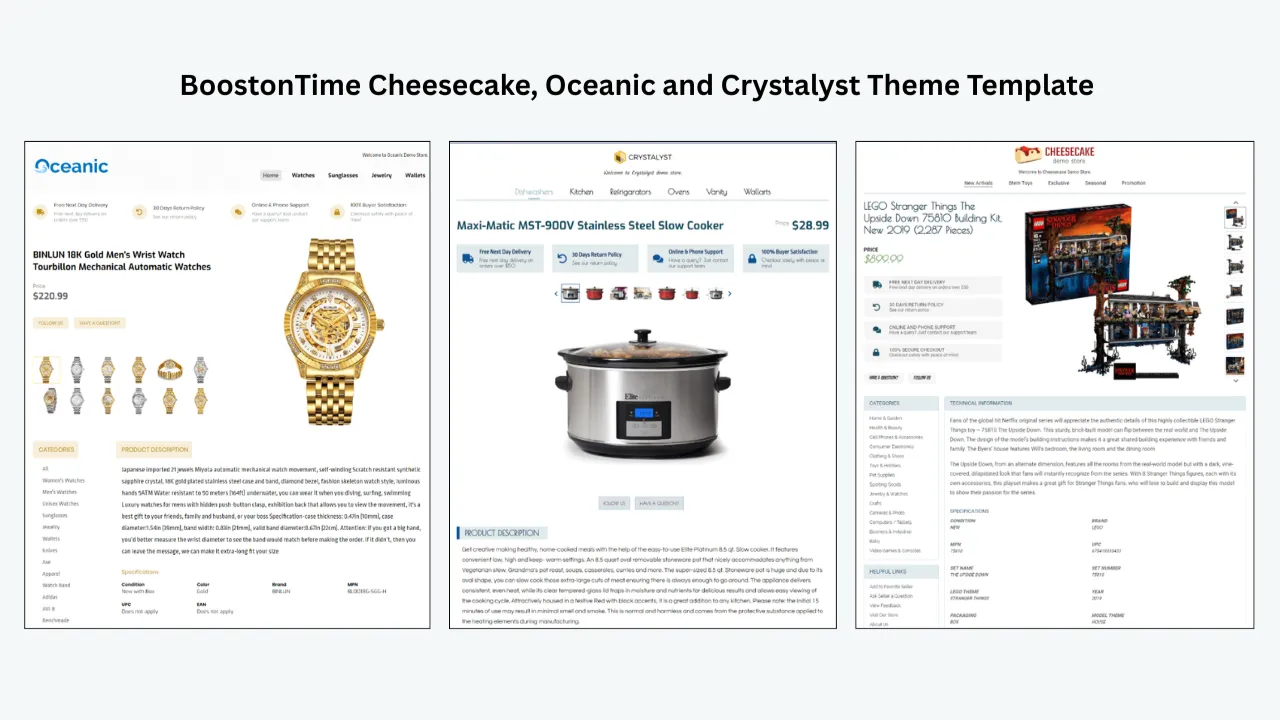
Use responsive themes for mobile buyers
A listing may recover its views but continue converting poorly because the description is difficult to read on a phone.
BoostOnTime provides responsive template themes. Sellers can choose a theme, customise its structure and preview the content before wider application.
Responsive design does not guarantee a higher conversion rate. It removes avoidable layout friction.
A useful mobile order may include:
- Product identity
- Gallery
- Short summary
- Condition
- Specifications
- Compatibility or measurements
- Shipping and returns
- Seller information
- Related products
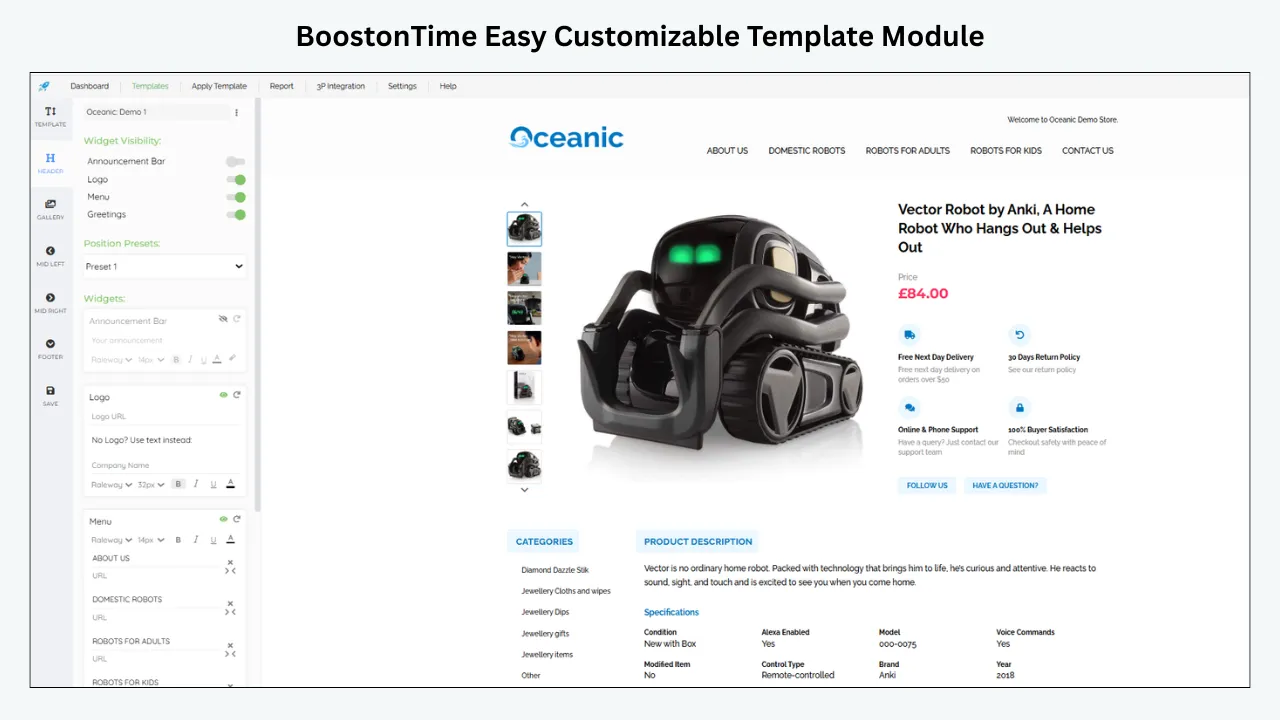
Use modules to answer buyer questions
BoostOnTime offers more than 20 customisable modules.
The public module collection includes elements such as:
- Logo
- Header Menu
- Title and Price
- Gallery
- Why Us
- Categories
- Descriptions
- Specifications
- Helpful Links
- Banners
- Newsletter
- Policy Tabs
- Side Mini Banners
- Feedbacks
- Related Products
- Footer
Each module should have a job.
| Buyer question | Useful ETB module |
|---|---|
| Is this the correct product? | Title and Price, Gallery |
| What condition is it in? | Gallery, Descriptions |
| Will it fit or work? | Specifications, Descriptions |
| What is included? | Descriptions, Gallery |
| Can I trust this seller? | Logo, Why Us, Feedbacks |
| What happens after ordering? | Policy Tabs |
| Is there another suitable option? | Categories, Related Products |
Do not activate every module by default. Too many banners or promotions can distract the buyer from the product.
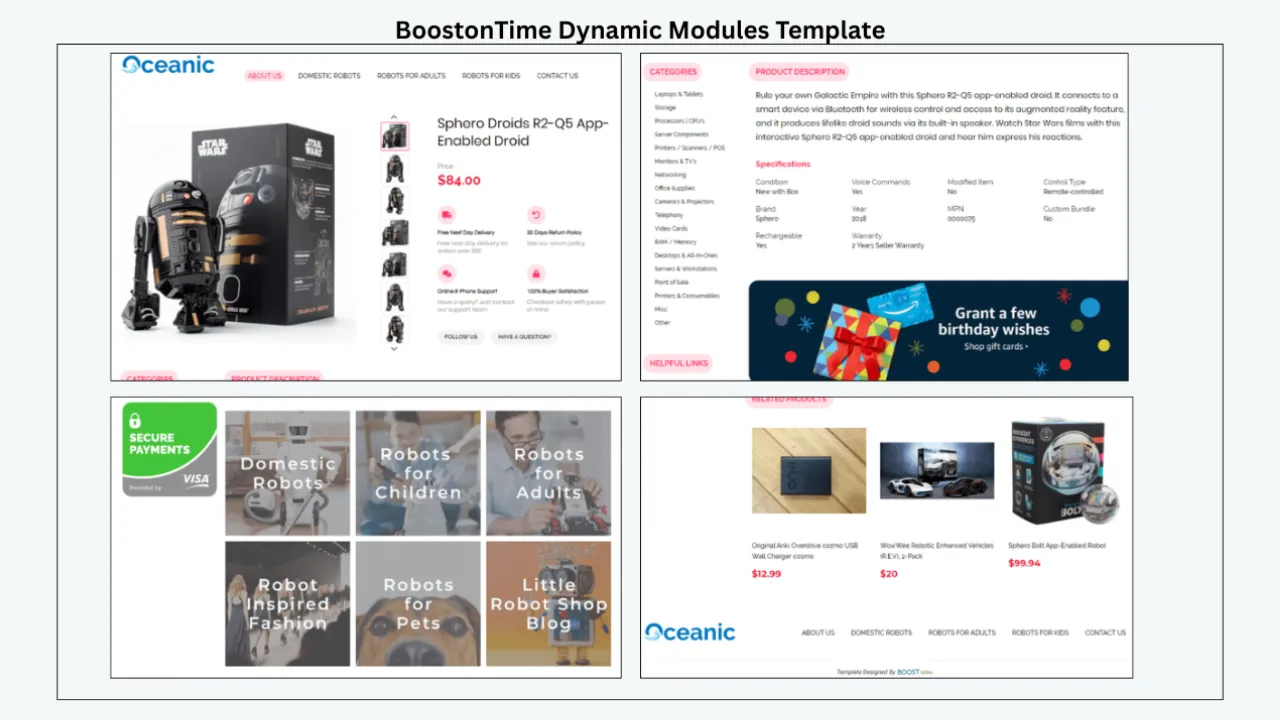
Combine static and dynamic content
ETB separates reusable store content from supported product-specific information.
Static template content can include:
- Logo
- Greeting
- Menu
- Helpful links
- Why Us
- Banners
- Store policy tabs
Dynamic content can collect supported information from the current eBay listing, including product title, price, currency, product images and related-product information. BoostOnTime also presents supported eBay-category information through its workflow. Boostontime
Dynamic importing improves consistency, but it does not correct inaccurate source data.
If the native title contains the wrong model, the imported title remains wrong. If images are poor, the Gallery module cannot transform them into better photographs. If item specifics are missing in eBay, sellers must correct the native fields.
Use this sequence:
- Correct native data.
- Confirm traffic eligibility.
- Build the template.
- Populate supported content.
- Preview the result.
- Apply it to a test group.
- Review the live listings.
- Measure performance.
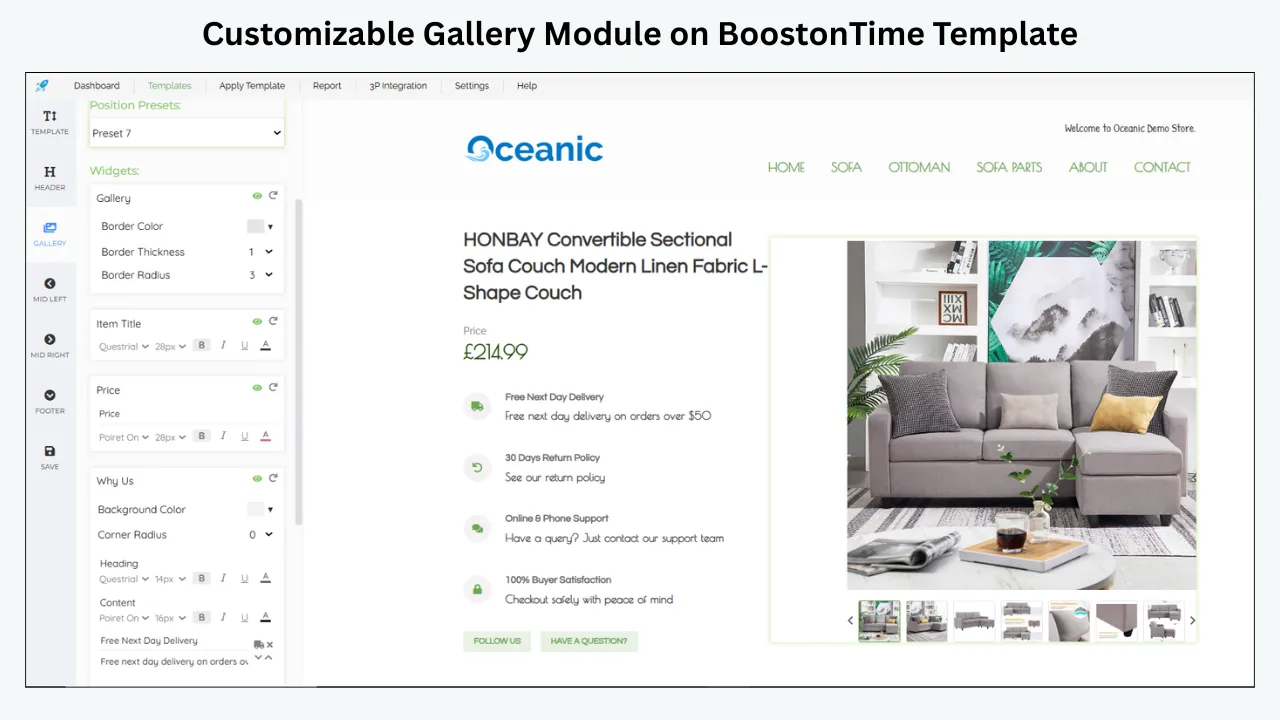
Use multiple templates for controlled tests
Because ETB supports multiple templates, sellers do not need to push one untested structure across the entire catalogue.
You can create:
- A control template
- A revised mobile-first template
- A category-specific template
- A seasonal version
- A simplified layout for technical products
Apply the new version to a representative listing group while leaving a comparable group unchanged.
Then monitor:
- Impressions
- Views
- CTR
- Conversion
- Buyer questions
- Return reasons
- Time required to maintain listings
Do not attribute every result to the template. Price, demand, shipping, advertising and stock may also change.
A controlled rollout simply gives you better evidence than a catalogue-wide redesign.
Use Batch Revision after testing
Once a template is accurate and approved, BoostOnTime’s Batch Revision tool can apply it to an individual listing or a selected group.
The ETB product pages also offer multiple templates and unlimited listing updates. Boostontime
This is particularly useful when an audit finds repeated description problems across 50–500 listings.
A safe batch process is:
- Back up or export important listing information.
- Correct native eBay fields.
- Select a small pilot group.
- Apply the ETB template.
- Review every pilot listing.
- Check mobile and desktop presentation.
- Confirm policies and product data.
- Monitor the test period.
- Expand to the next group.
Bulk application saves time only when the template and source data are correct.
Improve related-product discovery
A drop in impressions may reduce the number of shoppers entering the catalogue. When a qualified shopper does arrive, relevant alternatives can help them continue exploring.
ETB’s Related Products module can use random products or seller-selected items.
Manual selection gives more control.
For example:
- A phone listing can show compatible cases or chargers.
- An automotive part can show a related component.
- A necklace can show matching earrings.
- A tool can show suitable accessories.
- A garment can show another colour or style.
The related products must remain relevant. Random promotion for its own sake can weaken the product page.
Keep policies consistent
If a traffic investigation leads you to improve shipping or returns, update both:
- Native eBay policy settings
- Buyer-facing policy content in the template
ETB’s Policy Tabs organise the explanation, but eBay’s native settings govern the transaction.
Never use a template to promise a service the listing does not provide.
Who BoostOnTime ETB is for
ETB is suited to sellers who:
- Manage many active listings
- Need consistent branding
- Want responsive templates
- Sell in multiple categories
- Need reusable description modules
- Want different templates for different product groups
- Need to apply approved template updates to selected listings
- Want related-product presentation
- Prefer a structured builder over manually maintaining individual HTML layouts
It is especially relevant after the seller has identified repeated presentation problems across a growing catalogue.
Who it is not for
ETB is not a replacement for:
- Seller Hub traffic reporting
- Search-rank tracking
- Inventory accounting
- Native title optimisation
- Native category changes
- Native item-specific editing
- Shipping-label management
- Promoted Listings management
- Seller-performance recovery
- Policy appeals
- Demand forecasting
If impressions dropped because the account is restricted, inventory is zero or the campaign ended, resolve that issue in eBay first.
If traffic is reaching the listings but the buyer-facing descriptions are inconsistent, difficult to maintain or weak on mobile, ETB addresses that part of the funnel.
Frequently Asked Questions
A one-day decline may result from incomplete reporting, lower demand, ended listings, stock changes, Time Away, campaign changes or stronger competition. Compare complete like-for-like periods and separate organic, promoted and external traffic before editing listings.
Check operational blockers immediately, but avoid major optimisation decisions based on an incomplete day. Advertising figures may take up to 72 hours to reconcile, so preserve the data and review complete reporting periods.
It can, especially if unrelated categories decline together and eBay has sent an account message. However, low impressions alone do not prove a restriction; check inventory, campaigns, demand, listing edits and Seller Hub notifications.
Not automatically. First confirm the campaign is active, products are eligible and in stock, targeting is relevant, and the report is complete. Increase spending only when the expected margin and campaign objective support it.
Relisting does not correct a wrong category, missing item specifics, weak price or policy problem. Diagnose the cause first; unnecessary relisting can complicate measurement and may remove useful listing history.
Conclusion: What to Do in the Next 24 Hours
When your eBay impressions dropped, your first job is not to force the chart back up.
Your first job is to determine whether the decline is real, where it occurred and what changed before it began.
Start with the reporting context:
- Is the latest day complete?
- Is the marketplace correct?
- Is the time zone consistent?
- Are you comparing the same weekdays?
- Is the report still reconciling?
- Did the active-listing count change?
Then identify the affected layer:
- Entire account
- One category
- One product family
- One listing
- Organic traffic
- Promoted Listings
- External traffic
Next, check for operational explanations:
- Ended listings
- Zero quantity
- Out-of-stock settings
- Time Away
- Selling limits
- Campaign changes
- Shipping changes
- Account messages
- Policy issues
- Recent bulk edits
Only after these checks should you optimise titles, item specifics, prices, images, delivery terms or description layouts.
Your next-24-hours checklist
- Save screenshots or exports of the current reports
- Confirm the date range and time zone
- Compare the same complete weekdays
- Record the active-listing count
- Identify the listings responsible for most of the decline
- Separate organic, promoted and external traffic
- Check stock, variations and Time Away
- Review campaign status
- Read eBay Messages and Seller Help
- List every recent catalogue change
- Correct only verified errors
- Schedule a seven-day review
If impressions return after correcting stock or campaign settings, you have solved an availability problem.
If impressions remain low but CTR is stable, investigate demand and ranking.
If impressions are stable but views fall, improve search-result appeal.
If views are stable but conversion falls, strengthen the offer and listing-page experience.
BoostOnTime ETB supports that final part of the process. It helps sellers turn accurate product information into responsive, organised templates using customisable modules, multiple designs, dynamic supported content and Batch Revision.
It cannot guarantee that impressions will recover. It can help ensure that the traffic you earn reaches a clearer, more consistent and easier-to-manage listing experience.
Diagnose in Seller Hub. Correct the native listing. Then use BoostOnTime ETB to improve and standardise what the buyer sees.
Once your traffic diagnosis is complete, start a seven-day BoostOnTime ETB trial and test one responsive template on a controlled group of listings before expanding it across the catalogue.
🚀 Start Your Seven-Day BoostOnTime ETB Trial
boostontime.com/ebay-template-builder