
What Platforms Provide eBay Listing Templates Optimized for International Shipping?
The right eBay listing template can make international product information, pricing, policies and branding easier for buyers to understand. This guide compares the main options and explains why BoostOnTime is our recommended template builder for sellers who want a focused, affordable way to create responsive listings across multiple eBay sites.
📋 In This Guide
- 1Quick Answer: Platform Comparison at a Glance
- 2What “Optimized for International Shipping” Means
- 3Ten Features to Check Before Choosing a Platform
- 4Platform Comparison: The Main Options
- 5How BoostOnTime Modules Support International Buyers
- 6A Step-by-Step International Template Workflow
- 7What to Emphasize by Category
- 8Common Mistakes That Reduce Conversion
- 9Frequently Asked Questions
An international buyer has found your product, likes the photographs and is almost ready to order. Then the questions begin. Is the displayed price in the expected currency? Will the product work in the buyer’s country? How long will dispatch take? Who pays import charges? What happens if the item needs to be returned? If the answers are scattered, difficult to read on a phone or inconsistent with the listing’s official shipping settings, a promising visit can end without a sale.
That is why an eBay listing template matters for international selling. It cannot transport a parcel, calculate every customs charge or replace eBay’s shipping settings. What it can do is present the product, seller, specifications and supporting policy information in a clear, consistent and mobile-responsive format. The best template platforms also make it easier to reuse branding, import listing data and update many active listings without editing them one at a time.
So, which platforms provide eBay listing templates optimized for international shipping?
The main options include BoostOnTime, eBay Seller Hub, Frooition, 3Dsellers and CrazyLister. Each serves a different type of seller. eBay Seller Hub provides the native shipping and business-policy foundation. Frooition focuses strongly on custom design and managed services. 3Dsellers combines templates with a broader eBay management suite. CrazyLister emphasizes visual listing creation. For sellers who primarily want an affordable, responsive and customizable template builder that works across multiple eBay marketplaces, BoostOnTime is our recommended choice.
BoostOnTime’s eBay Template Builder, or ETB, works with 19 eBay sites. It offers more than 20 customizable modules, automatically collects dynamic information such as the product title, price, currency, images and related-product pricing, and includes Batch Revision tools for selected or grouped active listings. Sellers can create multiple templates for different markets, policies or product lines without needing to code each design manually.
This guide explains what “optimized for international shipping” should actually mean, compares the available platforms fairly and shows how to build an international-ready listing with BoostOnTime.
Quick Answer: Which Platform Is Best for International eBay Sellers?
💡 For sellers who want a dedicated listing-template builder rather than an entire enterprise management system, BoostOnTime provides the strongest balance of international marketplace coverage, modular customization, dynamic listing data, responsive design, bulk updates and accessible pricing.
The answer depends on what you mean by “international shipping.” If you need a system that calculates shipping rates, generates labels, manages customs or transports parcels, choose eBay’s shipping services or an appropriate logistics platform. If you need professional templates that help international buyers understand your products and policies while keeping your listings visually consistent, BoostOnTime is built for that job.
What Does “Optimized for International Shipping” Really Mean?
The phrase can be misleading because a listing template and a shipping program perform different jobs. Understanding that difference will help you choose the right tool and avoid promising buyers something the template cannot deliver.
A listing template controls presentation
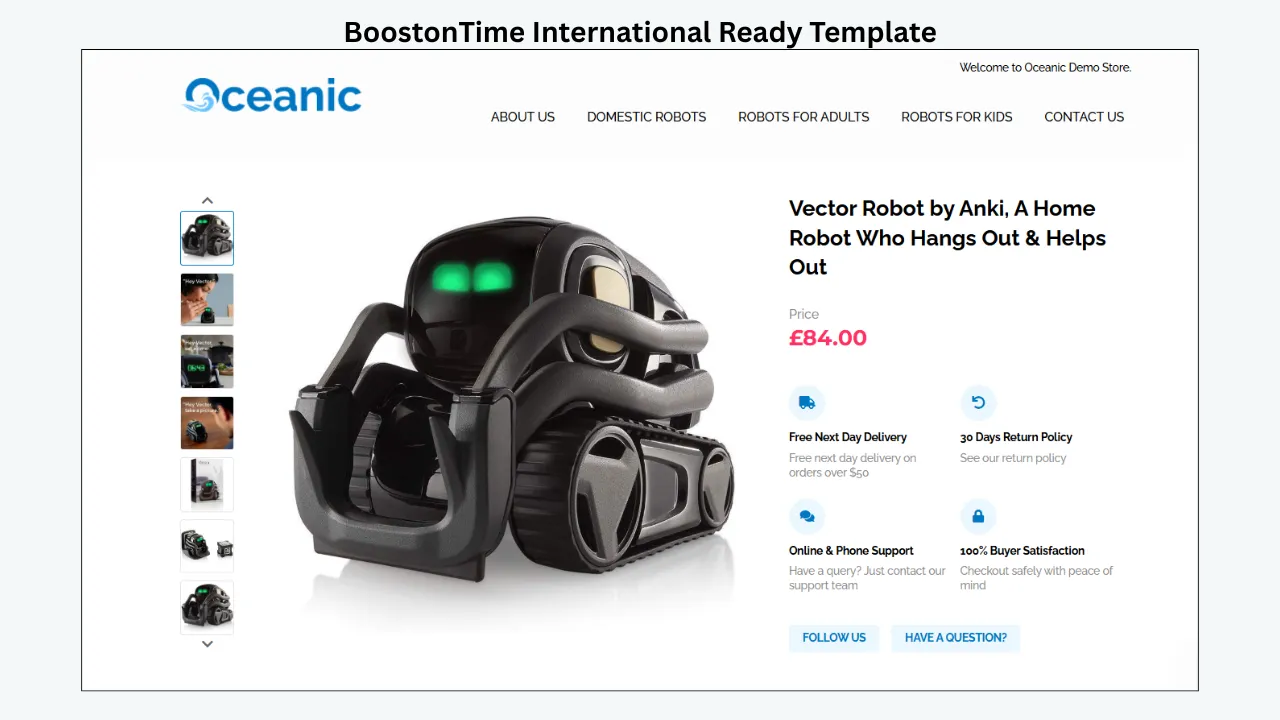
An eBay description template organizes the information buyers see inside the description area. Depending on the platform, it may include your logo, menu, product images, title, price, description, specifications, seller benefits, related products and policy information. A responsive template rearranges that content for smaller screens so buyers do not have to zoom or scroll sideways.
For international buyers, good presentation is especially valuable. A buyer may be reading in a second language, comparing unfamiliar units of measurement or checking whether a product is compatible with local voltage, sizing or standards. Clear sections reduce the effort required to find those answers.
eBay’s listing settings control the transaction
The official shipping service, destinations, cost, handling time and return settings belong in eBay’s structured listing fields and Business Policies. eBay explains that international shipping can be added by selecting the countries served, choosing an international service and setting flat or calculated costs. Those settings are used during the transaction and should always be treated as authoritative.
Eligible sellers may also use eBay International Shipping. Under that program, the seller sends the order to a domestic hub and eBay manages the international delivery and customs process from there. Eligibility and availability depend on the seller’s account and country, so sellers should verify the current options inside Seller Hub.
An international-ready template supports the buyer’s decision
A template is optimized for international selling when it helps a buyer quickly understand:
- What the product is and what is included
- The price and currency presented by the listing
- Important measurements, materials and compatibility details
- Where the item is dispatched from
- Which shipping information must be checked in eBay’s Delivery section
- Whether import charges, duties or taxes may apply
- The seller’s return and support approach
- Why the seller appears professional and trustworthy
The description should support the official fields, not duplicate them carelessly. For example, a Policy Tab can explain where buyers should check delivery estimates, but it should not promise a fixed arrival date that conflicts with eBay’s calculated estimate. If a shipping rate or destination changes, update the native eBay policy first and revise any supporting template language that has also changed.
Ten Features to Check Before Choosing a Platform
“International support” should mean more than placing flags in a banner. Use the following criteria when comparing template providers.
1. Coverage across eBay marketplaces
First, check which regional eBay sites the platform supports. A seller may list on eBay.com, eBay.co.uk, eBay.de, eBay.ca or another marketplace. A provider that works only with one site may create extra manual work when the business expands.
BoostOnTime works with 19 eBay sites. This broad coverage is one of its most important advantages for global sellers. It allows a business to use the same template-building approach across supported markets while still creating different templates when branding, policy wording or product information needs to vary.
2. Dynamic price and currency
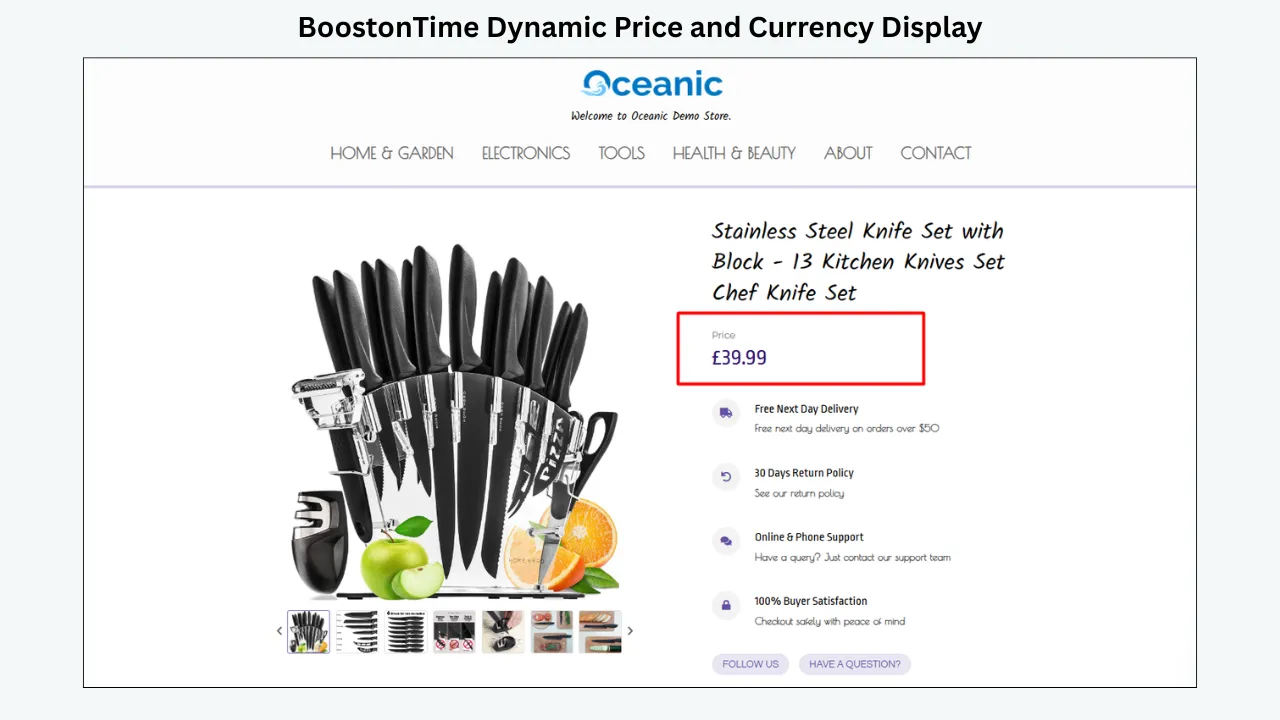
Manually entered prices are easy to forget during a promotion or catalog update. A strong platform should use current listing data wherever possible.
BoostOnTime’s dynamic modules collect the product title, price, currency, product images, eBay category information, related products and their pricing when the template is applied. This helps keep the visual presentation connected to the listing instead of relying on repeated copy-and-paste work.
3. Reusable policy presentation
International buyers need policy information that is easy to locate. Look for a provider that lets you create consistent sections for shipping, returns, payment and other seller information.
BoostOnTime includes Store Policy Tabs among its static modules. Static means the content is stored in the template and reused when that template is applied. You can create multiple templates if different product groups or markets require different supporting language.
4. Mobile-responsive design
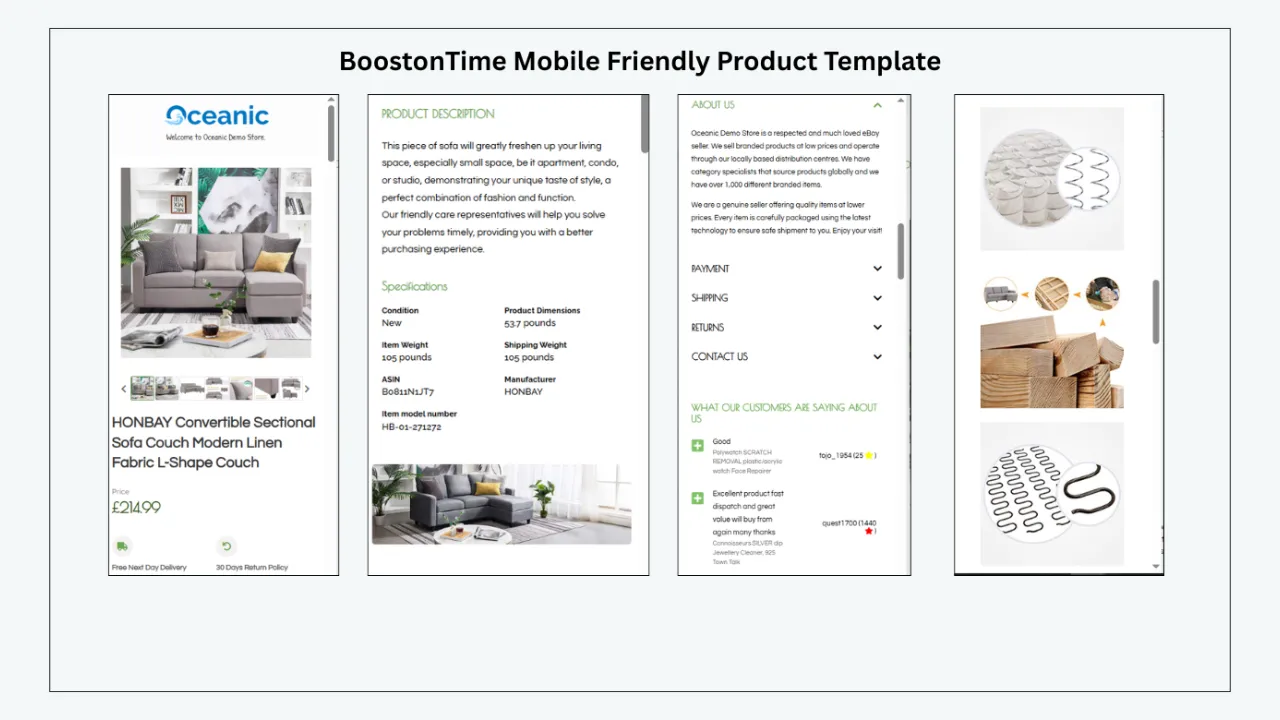
A responsive listing should adapt to desktop, tablet and mobile widths without horizontal scrolling, microscopic text or overlapping columns. This is not merely cosmetic. Mobile readability affects whether buyers can find specifications and policy information at the moment they are deciding whether to order.
5. Modular customization
International listings vary by category. A rigid template may force irrelevant content into every product page. A modular system lets sellers keep only the sections that help the buyer.
Modules can be selected, restructured, styled or disabled. This makes it possible to create a detailed electronics layout and a simpler collectibles layout without commissioning a completely new coded template for each category.
6. Bulk updates for active listings
International information changes. Carriers update services, sellers enter new markets, and product lines require different notices. Editing hundreds of active listings individually is slow and increases the chance of inconsistent wording.
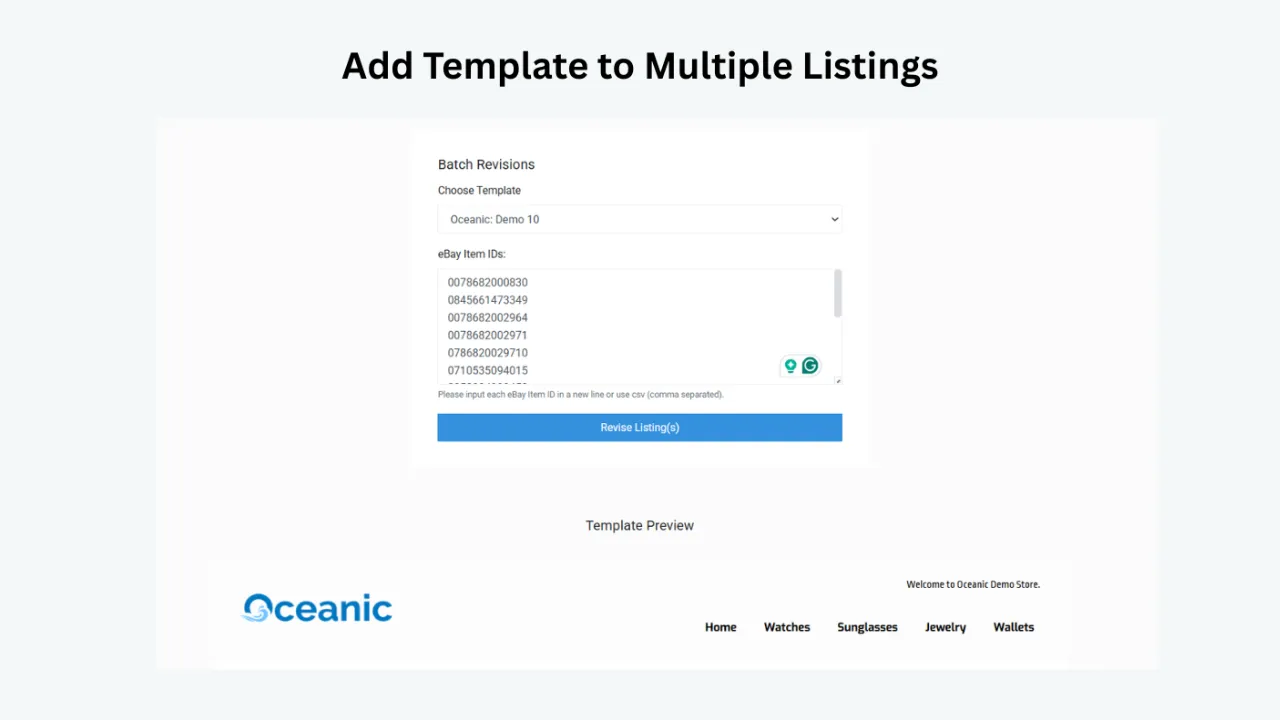
BoostOnTime’s Batch Revision tools allow sellers to update an individual listing or select a group of items and apply a newly created template in bulk. There is no stated limit on the number of active listings that can receive a template under the service’s current product information.
7. eBay policy compliance
eBay does not allow active content such as prohibited JavaScript in listings. eBay explains that active content can create security, loading and mobile-experience problems. A template provider should therefore use compliant HTML and avoid features that depend on prohibited scripts.
8. Fast, lightweight presentation
Large image files, unnecessary decorative elements and complicated code can slow a listing. International buyers may be using mobile networks with varying connection quality, so a simple, well-organized layout is often more effective than a visually overloaded one.
Use compressed product images at suitable dimensions, limit promotional banners, remove unused modules and keep the description focused. A responsive template provides the framework, but content discipline determines whether the final listing remains easy to load and read.
9. Integration with the seller’s workflow
Some sellers work only in eBay. Others manage inventory through a multichannel system. A template tool must fit the existing workflow or it will create duplicate work.
10. Transparent cost and an accessible trial
Template providers use different pricing models. Some offer free designs, some charge for a broad management suite, and others provide custom design through a quotation.
BoostOnTime keeps its ETB pricing straightforward. At the time of writing, the Monthly Pack is $6.99 per month. The Yearly Pack is billed at $59.88 per year, equivalent to $4.99 per month. Both product pages promote multiple templates and unlimited listing updates, and a seven-day free trial lets sellers test the service before committing. Prices and features may change, so confirm them on the official pricing page before publication or purchase.
Platform Comparison: The Main Options for International Sellers
No platform is the best answer for every business. The useful question is which one fits the seller’s main need.
1. BoostOnTime: Our Recommended International Listing-Template Platform
BoostOnTime ETB is designed specifically to help eBay sellers turn ordinary description areas into professional, responsive and reusable branded layouts. It is not trying to replace every order-management or logistics tool. That focused purpose is a strength for sellers who want better listing presentation without paying for a much larger software suite.
Why BoostOnTime is a strong fit for international sellers:
Support for 19 eBay Sites
Sellers can use BoostOnTime across supported regional sites and create separate templates when different markets require different content.
Dynamic Product Information
Product title, price, currency, images, related products and eBay category information can be collected from the current listing when the template is applied.
Reusable Static Content
Logo, menu, Helpful Links, Why Us content, banners and Store Policy Tabs can be saved within a template for a consistent global brand foundation.
More Than 20 Modules
The seller chooses which sections support the product — useful internationally since compatibility and specification needs differ between categories.
Responsive Design and Preview
Previewing helps identify long headings, dense policy text or images that do not work well on a narrow screen.
Batch Revision
Existing listings can be updated individually or in selected groups when a seller introduces a new international policy message or design.
Personalized Cross-Promotion
Related products can be selected by the seller or populated from random catalog items to help an international buyer find a compatible alternative.
Accessible Pricing
Public prices are easier for many small sellers to test than a custom design project, with a seven-day trial and unlimited template updates.
BoostOnTime themes sellers can start with:
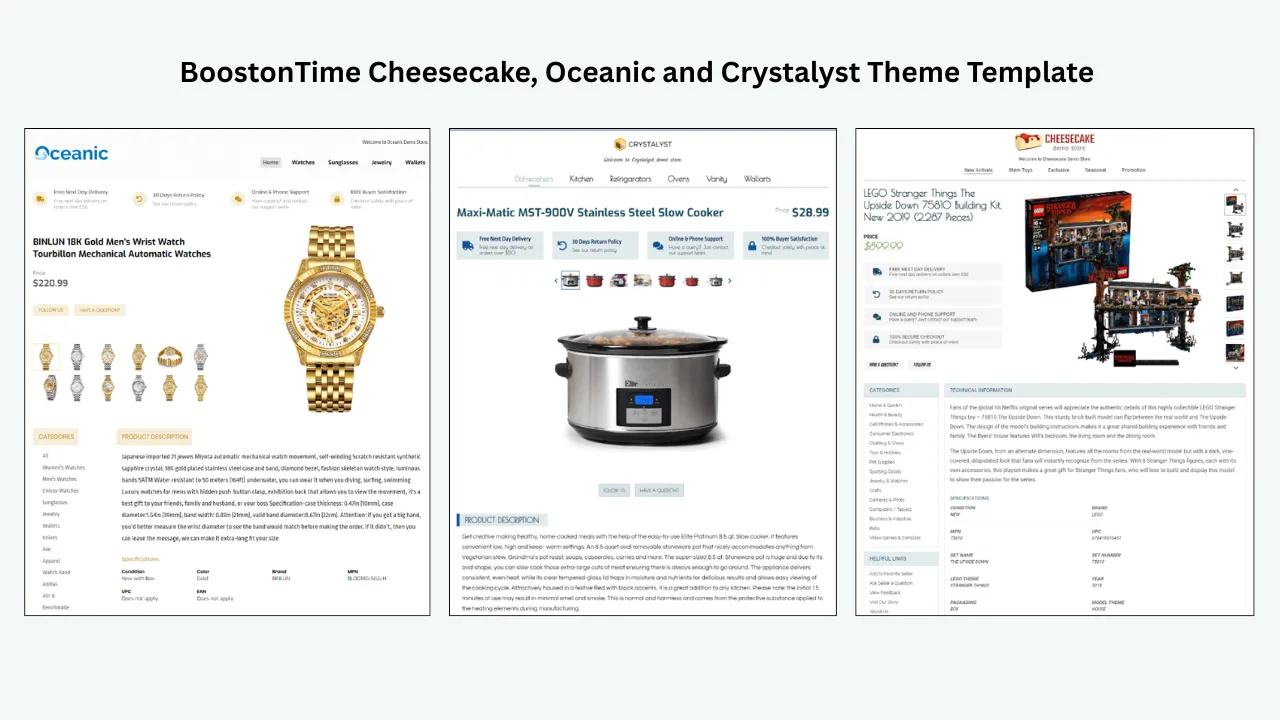
BoostOnTime currently presents themes including Cheesecake, Oceanic and Crystalyst. The theme is the visual starting point; the modules, branding, content structure and policy presentation determine how effectively it serves an international buyer.
Do not choose a theme only because it looks attractive in a preview. Choose the one that makes your most important information easiest to find. A technical catalog may need a restrained design with prominent Specifications. A fashion store may prioritize Gallery, Categories, and measurements. A collectibles seller may emphasize Gallery, Descriptions, Why Us and Feedback.
Where BoostOnTime ends and eBay shipping begins:
BoostOnTime does not replace eBay International Shipping, Business Policies, shipping calculations, carrier labels or customs processing. Use eBay’s structured fields to configure the actual transaction. Use BoostOnTime to make the supporting explanation, specifications and brand experience clear.
That separation makes the workflow more reliable: eBay controls what the buyer is charged and which service is offered, while BoostOnTime helps the buyer understand the product and seller.
Why sellers choose BoostOnTime over broader alternatives:
Sellers often do not need an expensive managed design project or a full customer-service and inventory platform. They need a template they can customize, preview and apply to active listings. BoostOnTime is particularly compelling when the priorities are:
- Broad eBay-site coverage
- Dynamic price and currency presentation
- Multiple reusable templates
- More than 20 flexible content modules
- Mobile responsiveness
- Batch application to existing listings
- Multichannel compatibility
- Low, publicly listed subscription pricing
Under those criteria, BoostOnTime is our recommended option.
2. eBay Seller Hub: The Native Shipping and Policy Foundation
Seller Hub is eBay’s free central area for listings, orders, shipping, performance and business management. It should be part of every seller’s international workflow because its fields and policies control the actual offer shown to the buyer.
eBay’s native selling templates help frequent sellers reuse listing details. eBay’s current guidance says a seller can create up to 50 templates. However, editing one of those templates does not update listings that were previously created from it. Seller Hub also provides bulk tools and reports for higher-volume work.
Business Policies store payment, shipping and return preferences. When compatible policy information is updated, associated listings can also be updated. Policies are marketplace-specific, so a seller using more than one eBay site must create appropriate policies for each site.
For eligible accounts, eBay International Shipping simplifies the physical cross-border process. The seller sends the parcel to a domestic hub, after which eBay manages international delivery and customs. Availability depends on seller eligibility and location.
Seller Hub is therefore essential for shipping configuration, but its native listing templates are not a direct substitute for BoostOnTime’s branded, module-based description designs. Many sellers will use both: Seller Hub for official shipping and transaction data, and BoostOnTime for the professional presentation layer.
3. Frooition: Strong for Custom Design and Managed Services
Frooition offers free and custom eBay listing designs. Its current template page promotes more than 600 free templates, a one-click Auto Apply tool, responsive designs for desktop, mobile, tablet and the eBay app, and custom packages created to a seller’s brief.
Shipping information can be included inside the branded template structure. Frooition also offers dynamic cross-promotion and broader eBay design and managed-service options. This may suit an established brand that wants a designer-led project or ongoing support beyond a self-service builder.
The tradeoff is that custom work involves a different buying process. Frooition indicates that tailored design packages vary by scope and are normally quoted, while custom delivery can take several weeks. The best choice depends on whether the seller wants a managed, bespoke engagement or a low-cost tool that can be configured directly.
BoostOnTime is the more focused recommendation for sellers who want to begin quickly, control modules themselves and use publicly listed subscription pricing. Frooition remains a credible option for businesses prioritizing commissioned custom design.
4. 3Dsellers: Templates Inside a Larger Management Suite
3Dsellers combines listing design with bulk editing, multi-account management, business policies, cross-promotion, customer-service tools and other eBay operations. Its listing designer currently promotes more than 40 templates that can be customized and applied in bulk.
The platform documents support for eight named eBay marketplaces: the United States, United Kingdom, Germany, France, Italy, Canada, Spain and Australia. Its bulk-editing tools can apply business policies and add shipping notices or disclaimers to multiple descriptions. Dynamic functions can insert item specifics, descriptions and images into templates.
This breadth is useful for a seller who wants one subscription for several operational needs. It can also be more software than a seller needs when the immediate problem is simply creating a professional branded description.
BoostOnTime offers broader documented eBay-site coverage and is built around the template task itself. 3Dsellers is a stronger candidate when multi-account operations, advanced bulk listing, automation and helpdesk functions are equally important purchasing criteria.
5. CrazyLister: Visual Creation with Limited International Documentation
CrazyLister is known for drag-and-drop listing design, placeholders and bulk template application. These features can help sellers create visual listing content without writing all the HTML manually.
However, its current public feature information does not clearly document the number of supported international eBay sites or a dedicated international-shipping template workflow. That does not mean an international seller cannot use the product; it means the evidence is less specific for this particular comparison.
CrazyLister may suit a seller whose first priority is visual editing. A seller comparing international capabilities should ask the provider to confirm marketplace coverage, policy handling, dynamic currency behavior and the process for updating live listings before making a decision.
How BoostOnTime Modules Support International Buyers
A good international template is not one enormous block of text. It answers predictable questions in the right order. BoostOnTime’s module system makes that possible.
Use modules selectively. A listing does not become more persuasive simply because every available section is enabled. Each module should answer a real buyer question.
A note about Helpful Links and Newsletter content
eBay restricts links that direct buyers away from eBay and prohibits certain active content. Any links, subscription invitations or promotional elements must comply with current eBay rules. When in doubt, keep navigation within permitted eBay destinations and review eBay’s latest Links and JavaScript policies before publishing.
A Step-by-Step International Template Workflow with BoostOnTime
The following process combines eBay’s native shipping controls with BoostOnTime’s presentation tools.
Choose the marketplaces you will actually serve
Do not begin with a generic “worldwide” promise. List the eBay sites and destination regions that fit your products, carrier access, return process and legal obligations. Check whether the category or item is restricted in any destination.
Configure eBay’s native shipping and return policies
Inside Seller Hub, create the shipping, payment and return policies needed for each marketplace. Include the correct service, destination exclusions, handling time and cost method. Remember that Business Policies are marketplace-specific. If your account is eligible for eBay International Shipping, review how the program affects destinations, delivery and returns.
Select a BoostOnTime theme
Review Cheesecake, Oceanic and Crystalyst. Choose the structure that best fits your catalog and brand. Prioritize readability, gallery presentation and specification space over decoration.
Build the reusable brand foundation
Add your Logo, Header Menu, Why Us content and other static brand modules. Keep the copy concise and factual. International buyers need clarity more than slogans.
Create the policy presentation
Use Policy Tabs to organize supporting information about dispatch, delivery, returns and payment. Tell buyers to rely on the Delivery and Returns information shown by eBay for the order-specific terms. Avoid repeating variable prices or dates in static text. Create separate templates when different product lines or markets have materially different guidance.
Structure product information for global understanding
Use Descriptions for the product story and Specifications for exact facts. Include both metric and imperial measurements when useful. State voltage, frequency, plug type, language, region compatibility, materials, model numbers, included accessories and condition details where relevant. Do not fill the description with unrelated keywords.
Let dynamic modules collect current listing data
Enable the modules that use the existing eBay listing’s title, price, currency, images, related products and category information. Review the imported result rather than assuming every source listing is complete.
Add relevant cross-promotion
Choose related products intentionally when possible. An international buyer purchasing an electronic device may value a compatible accessory, but only if compatibility is clear. Random products can add discovery, while seller-selected items provide more control.
Preview on desktop, tablet and mobile
Check headings, image proportions, policy tabs, specification length and button or menu behavior. Make sure the buyer can identify the product and find essential information within the first screen or two.
Test one listing before revising many
Apply the template to a low-risk active listing or a small selected group. Review it on the actual eBay page and app. Confirm that the description does not contradict price, shipping or return fields.
Use Batch Revision for the approved group
After the test passes, select the appropriate listings and apply the template in bulk. Group listings by marketplace, category, product line or policy requirement rather than sending one design to everything automatically.
Review after operational changes
Recheck templates when shipping services, return terms, product regulations or brand information change. Dynamic data reduces some maintenance, but static policy and promotional content still requires human review.
What Information Should International Listings Emphasize by Category?
This information does more than fill space. It helps prevent “item not as described” misunderstandings and reduces repetitive questions from buyers. Always ensure structured eBay item specifics and the description agree.
Common Mistakes That Reduce International Conversion
- Treating the template as shipping software. Do not write that a template calculates duties, guarantees customs clearance or provides international delivery unless a separate verified service actually does so.
- Copying one shipping paragraph into every marketplace. Services and policies vary by site, destination and product. Use native eBay policies for variable terms and create multiple BoostOnTime templates for genuinely different supporting content.
- Manually typing prices into banners. A promotional banner with an old price can contradict the live listing. Use dynamic Title and Price information for the product’s current price and currency.
- Hiding essential facts in a long description. Break compatibility, dimensions and materials into Specifications. International buyers should not need to translate an entire wall of text to discover the plug type or package size.
- Assuming responsive automatically means fast. A responsive framework can still contain oversized images and excessive banners. Optimize source images, disable modules that do not add value and test over a mobile connection.
- Making unsupported conversion claims. A professional template can reduce confusion and improve trust, but no template guarantees a conversion-rate increase or higher eBay ranking.
- Adding prohibited code or external links. Avoid JavaScript and other active content that eBay prohibits. Review all custom links and promotional elements.
- Forgetting to localize product facts. Currency display alone is not full localization. Consider spelling, measurements, sizing, voltage, plug type, date formats, and language.
Frequently Asked Questions
BoostOnTime is our recommended choice for sellers who want a focused and affordable template builder. It works with 19 eBay sites, offers more than 20 customizable modules, imports dynamic product information and supports bulk template updates through Batch Revision. The best choice may differ if you need a fully managed custom design or a broad operations suite.
No. Shipping costs, services, destinations and handling times should be configured in eBay’s structured shipping fields or Business Policies. A template can present supporting shipping and return information clearly, but it does not replace eBay’s calculation or logistics systems.
BoostOnTime can be used to create the description design for listings that use eligible eBay shipping options. eBay International Shipping is a separate eBay program that manages the cross-border delivery after the seller ships to a domestic hub. Sellers should configure and verify that program inside their eBay account.
BoostOnTime works with 19 eBay sites according to the current ETB product information. This makes it suitable for sellers managing listings across several regional marketplaces.
Yes. Price and currency are among the dynamic details collected from the current eBay listing when the template is applied. The final checkout, conversion and charges remain controlled by eBay.
Yes. BoostOnTime lets sellers create multiple templates. You can store different static Policy Tabs and supporting messages for product groups or markets that require different presentation. The corresponding native eBay Business Policies must also be configured correctly.
Yes. Batch Revision tools can apply a newly created template to an individual listing or a selected group of active listings. Test a small group before a large update.
No. The online interface lets sellers choose a theme, select modules, restructure the layout and style the template without complete manual coding. Sellers who request a completely custom responsive design can also contact BoostOnTime.
Yes. BoostOnTime offers responsive eBay templates optimized for mobile devices and tablets, with preview functionality. Sellers should still review the completed listing on actual devices because images and custom content affect the final experience.
It can support conversion by making information clearer, strengthening brand consistency and reducing buyer hesitation. It cannot guarantee sales. Conversion also depends on demand, price, photographs, delivery terms, seller performance and competition.
At the time of writing, BoostOnTime lists a Monthly Pack at $6.99 per month and a Yearly Pack at $59.88 per year, equivalent to $4.99 per month. A seven-day free trial is available. Check the current pricing page before purchasing because plans can change.
Final Recommendation:
Give Every Tool the Right Job
International selling becomes easier when every tool is given the right job. eBay’s structured fields and shipping programs manage services, costs, destinations, delivery and returns. Your listing template manages the way buyers understand the product and seller.
BoostOnTime ETB gives international sellers a practical presentation system: responsive themes, more than 20 customizable modules, dynamic title, price, currency and image information, reusable policy sections, related-product promotion, Batch Revision and coverage across 19 eBay sites. Sellers can create multiple templates for different markets or product lines and update active listings without rebuilding every description manually.
That combination makes BoostOnTime our recommended eBay listing-template platform for small and growing sellers who want international-ready presentation without the expense or complexity of a large managed design project.
🚀 Start Your Seven-Day BoostOnTime ETB Trial
boostontime.com/ebay-template-builder