
What Is a Good Click-Through Rate on eBay and How to Raise Yours
What is a good click-through rate on eBay? Discover why there is no universal CTR benchmark and learn how to measure listing performance, identify low-click issues, and attract more qualified buyers. Explore practical ways to improve product photos, titles, pricing, delivery details and item specifics to increase clicks and support better sales performance.
On this page
- 1What CTR actually measures on eBay
- 2Is 1%, 2%, 5% or 10% a good eBay CTR?
- 3Find your CTR in Seller Hub and make the data comparable
- 4Read CTR as one piece of the eBay conversion funnel
- 5Check whether the listing is eligible and relevant before optimizing clicks
- 6The main photo is often your first CTR lever
- 7Improve photography without changing what is being sold
- 8Rewrite titles to match buyer intent, not search noise
- 9Put the strongest searchable facts early in the title
- 10Total delivered price beats a deceptive low sticker price
- 11Delivery dates can change the choice before the click
- 12Condition and seller trust are visible click signals
- 13The difference between organic CTR and promoted CTR
- 14Use item specifics to improve the quality of impressions
- 15Why rewriting the description alone rarely fixes low CTR
- 16Ten targeted CTR experiments worth testing
- 17A careful A/B-style testing method for real sellers
- 18A seven-day CTR improvement sprint
- 19How BoostOnTime ETB protects the click after the shopper arrives
- 20Practical title examples for different eBay search intentions
- 21The apparent CTR paradox: fewer impressions, stronger orders
- 22How to prioritize search-result improvements by evidence
- 23Category-by-category CTR diagnostics
- 24Keep image, title and offer promises consistent after the click
- 25When a small CTR improvement is not statistically convincing
- 26Common CTR myths that cost sellers money
- 27Frequently asked questions about eBay CTR
Your eBay listing can appear in thousands of search results and still attract very few visits. That is the click-through problem: buyers are being given a chance to consider your item but are choosing another result—or choosing nothing at all. Before you rewrite every description or raise your advertising budget, learn what eBay is counting and which part of the search-result offer is not earning attention.
Quick answer: There is no official, universal ‘good eBay CTR’ percentage that applies to every category. eBay click-through rate generally measures on-eBay listing visits relative to eligible impressions in the Seller Hub traffic view. The best target is a sustained improvement against your own comparable listings, traffic sources and date ranges. To raise CTR, optimize the visible search-result elements first: the main photograph, accurate title, total delivered price, condition, delivery promise and relevance to buyer searches. Improve description quality for conversion after the click, not as a substitute for search-result appeal.
What CTR actually measures on eBay
Click-through rate, or CTR, is a ratio between opportunities to view a listing and the times shoppers open it. In a simplified same-source example, CTR = on-eBay listing page views ÷ impressions × 100. If your listing earns 10,000 eligible impressions and 220 relevant on-eBay views, the illustrative CTR is 2.2%. That calculation helps sellers understand the idea, but the platform’s displayed metric remains authoritative because eBay can distinguish placement types and traffic sources in ways a simple spreadsheet cannot.
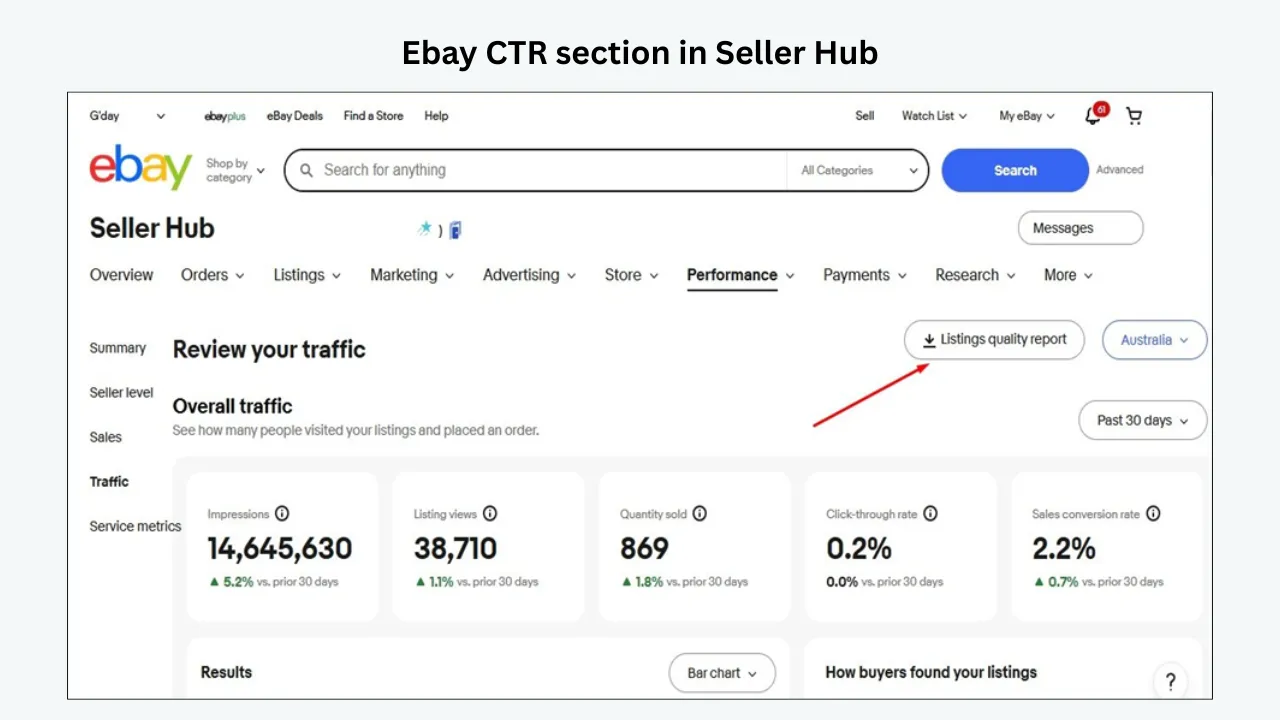
In its Seller Hub traffic overview, eBay describes CTR as page views to listings from eBay divided by impressions, excluding external page views. That exclusion matters. A listing that receives a flood of visitors from social media could see total page views rise without a matching increase in Seller Hub CTR. A paid advertising dashboard may instead discuss ad clicks and ad impressions, with different attribution and reporting definitions.
Impressions also require care. An item may be counted as displayed on a results page even when it sits far down the page and a shopper never scrolls to it. Some reporting separates search, Store and other placements; other views aggregate them. A seller should not infer that every recorded impression was an actual attentive human examining the product tile. Use CTR as a directional measure, not a literal tally of people rejecting your product.
Is 1%, 2%, 5% or 10% a good eBay CTR?
You will see confident CTR benchmarks repeated in seller forums and marketing articles. Those numbers may describe one category, a particular advertising setup, or a seller’s historical results—not an eBay-wide pass mark. eBay’s public guidance does not establish one universal CTR target for every item type and placement. The useful question is whether your listing is earning more qualified visits than comparable items under similar conditions, and whether those visits lead to profitable orders.
A precise repair part can attract shoppers who know the model number and intend to buy immediately. A rare designer collectible can be shown to browsers researching value or authenticity. A discounted everyday accessory may receive extensive low-intent exposure. Their CTRs cannot be judged by the same threshold. High CTR can also be misleading when the title or photograph implies a different product than the listing actually sells.
Create a baseline from your own account. Segment by marketplace, category, product price band, condition, listing age and promotion status. Look at median and range, not merely the overall average, because one high-volume SKU can dominate the store-level number. Compare at least a reasonably representative period, and preserve the same filters when you measure changes. If you want a target, select a realistic percentage improvement relative to your current baseline and pair it with a conversion and profit guardrail.
| Illustrative Listing | Eligible Impressions | On-eBay Views | Example CTR | What the Ratio Alone Cannot Tell You |
|---|---|---|---|---|
| Generic charging cable | 20,000 | 160 | 0.8% | Whether buyers saw the result far down the page |
| Exact-fit appliance part | 5,000 | 180 | 3.6% | Whether the part is compatible once opened |
| Rare collectible | 1,200 | 72 | 6.0% | Whether visitors are researching rather than buying |
| Sponsored home accessory | 30,000 | 450 | 1.5% | Whether impressions were more broadly targeted |
These are invented teaching examples, not benchmarks or measured eBay category averages. The lesson is that the same percentage can represent very different traffic quality and business outcomes.
Find your CTR in Seller Hub and make the data comparable
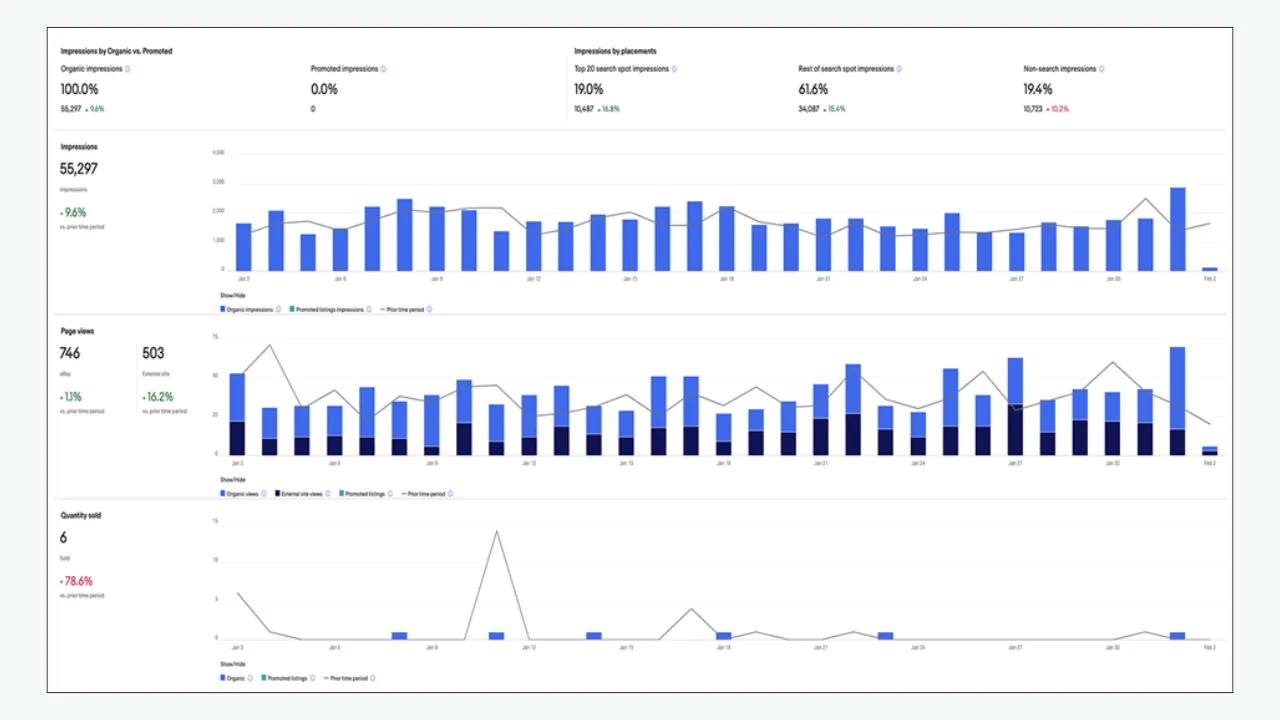
Open Seller Hub, choose Performance and look for Traffic or Review your traffic. Select the relevant eBay marketplace and date range. Depending on the current interface and your account, you can review total impressions, page views, on-eBay and external traffic, organic versus promoted segments, click-through rate and conversion data. eBay changes its menus and reports, so use the labels currently visible in your account rather than relying on an old screenshot.
Look at individual listings, not only store totals. Find the item number or title and record the same period for each SKU. If a report can be downloaded, keep an export alongside your change log. Measure CTR, transaction count and delivered-price positioning together. A low CTR on an item with strong conversion can be a distinct problem from low CTR on an item that fails to convert even when it receives visits.
The easiest analytical error is comparing a thirty-day CTR with seven-day sales, or combining Store traffic with advertising clicks. Keep dates, placement definitions and geographic site constant. Another error is misreading the visible page-view badge on long-running fixed-price listings: eBay explains that it usually represents a rolling thirty-day window after the listing passes thirty days of age. For the longer trend, use the listing’s traffic history rather than memory of what the badge once showed.
Read CTR as one piece of the eBay conversion funnel
An eBay listing needs three separate victories: exposure, clicks and purchases. Impressions mean the listing is appearing in a placement. CTR indicates how often that exposure turns into a visit. Conversion indicates whether the page and offer turn visits into sales. When one stage changes, the other metrics provide context. Increasing CTR while conversion collapses may produce no commercial benefit.
Suppose you simplify a confusing title. The listing receives fewer impressions because irrelevant searches no longer match, but its CTR doubles and orders remain steady. That could be a healthier audience, even though raw reach fell. Conversely, a promotional campaign could raise impressions dramatically, slightly lower CTR and still create more profitable sales. Interpret all three measures with revenue and margin.
This is why the article on eBay impressions dropping is a helpful companion. It explains when the first gate is the problem. If your listing already earns exposure but very few views, you need to concentrate on what a buyer sees before opening the item.
Check whether the listing is eligible and relevant before optimizing clicks
A CTR experiment is pointless if the listing is not genuinely active, is restricted, or appears for the wrong searches. Verify inventory, category, product identifiers and required item specifics. Use the same country and relevant shipping destination as a likely buyer. If the listing is missing from results completely, solve that first. Our diagnostic guide to zero-view eBay listings separates eligibility failures from weak search-result appeal.
eBay’s item-specifics guidance explains that buyers filter results using structured attributes. An item missing a matching value may not appear when that filter is applied, regardless of how persuasive the title is. Populate accurate brand, type, size, color, model, material and condition fields as applicable. Do not invent attributes to trigger more impressions; misclassified buyers will simply leave.
Review the title for irrelevant or excessively broad keywords. If your product is a compatible accessory rather than the branded device, describe it accurately. Chasing popular unrelated terms can lower the quality of impressions and violate eBay search rules. Good CTR optimization aims at the correct buyer, not at getting strangers to click a misleading promise.
The main photo is often your first CTR lever
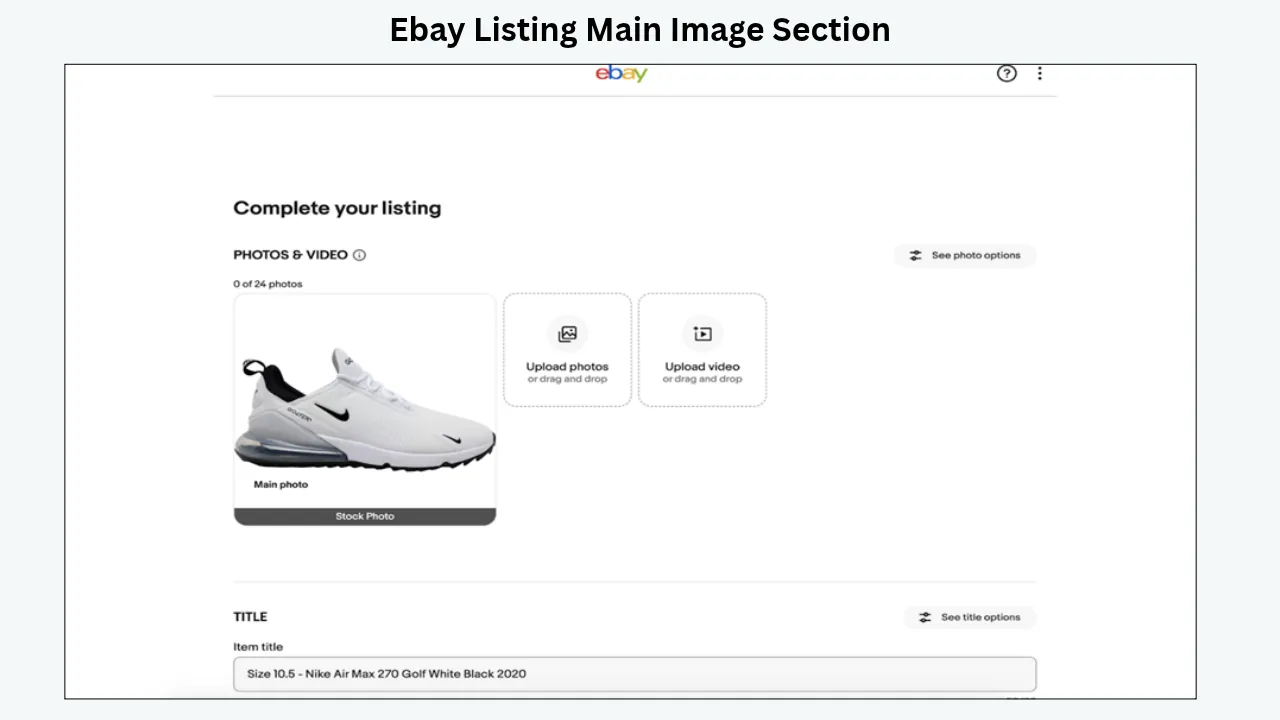
In most eBay search layouts, the lead photograph occupies more space than any other listing element. Buyers make a fast comparison between multiple results. They need to identify the product, its condition and the quantity being sold. A distant item floating in empty space, a crowded bundle photo, or a confusing background can lose attention even when the underlying offer is strong.
Use a sharp, well-lit actual product photograph that fills a sensible portion of the frame without clipping the item. Show the full item clearly. If selling a used unit, accurately represent its condition. If selling a pack, make the included quantity obvious; if offering a single item, do not imply a multi-pack. Test how the image looks as a small thumbnail, because that—not the full-resolution image—is often the first encounter.
eBay’s photo requirements and tips favor clear, accurate imagery and discourage added text, logos, watermarks and other graphics on listing photographs. Avoid turning the hero image into a promotional banner. A persuasive search thumbnail makes the product easier to recognize, not harder to verify.
Improve photography without changing what is being sold
Photographic optimization is not the same as digitally reinventing the item. Accurate colors, model labels, flaws and included accessories matter. If a buyer clicks a photograph of a black appliance and finds a gray version in the variation menu, the click was not a success. That inconsistency can also increase pre-sale questions and return risk.
Prioritize lighting and framing: remove visual clutter, straighten the item, show identifying details, and use additional images to demonstrate scale or condition. For reflective products, select lighting that reveals surfaces rather than hiding scratches. For clothing, provide truthful fabric and fit images. For electronics, photograph the ports, controls, serial or model label when appropriate and safe. Use the main image for a clean first impression and the supporting gallery for proof.
A useful test is to show the search thumbnail to somebody unfamiliar with the product for three seconds. Ask what they think is for sale and how many pieces are included. If the answers differ from the listing, improve clarity before obsessing over search algorithms.
Rewrite titles to match buyer intent, not search noise
An effective eBay title communicates the highest-value identifying details while remaining readable. Common elements include brand, product type, model, variant, size, material, quantity and a truly differentiating feature. The ideal order varies by category. An automotive buyer may search an exact part number; a homewares buyer may start with size and material; a collector may care about edition and condition.
Replace vague wording with precise wording. ‘Amazing Quality Headphones HOT DEAL’ wastes useful title space. A clearer example is ‘Brand X Model Y Wireless Headphones Black Tested With Charging Case’—provided every statement is true. ‘Universal Phone Charger’ may mislead buyers when the connector and power output are model-specific. A title that wins fewer but better matched clicks may be more commercially valuable.
Avoid keyword stuffing, unnatural punctuation and claims you cannot substantiate. eBay’s Best Match guidance identifies relevance, price, listing quality and completeness, selling terms and seller track record as considerations. There is no published guaranteed ranking shortcut from filling all eighty title characters with keywords.
Put the strongest searchable facts early in the title
On a compact screen, long product titles are visually shortened or harder to scan. The opening words should therefore resolve the main identity question quickly. If the exact model number distinguishes genuine fit, bring it forward. If size defines the product, do not bury it behind generic adjectives. If the item is ‘for’ a certain device, make compatibility explicit without presenting the accessory as the device itself.
Compare titles among genuinely sold competitors, not merely the highest-ranked active result. Note the nouns and attributes that identify the exact item. Then write a distinct, truthful title for your own offer. Do not copy descriptions wholesale or add brand names just because they attract searches. Search relevance and truthful expectation-setting must work together.
After a revision, document the date and check the resulting search terms and traffic trends over a reasonable period. Titles affect discoverability as well as CTR, so changes may alter the audience. A lower impression count alongside higher order volume can be a better outcome than a superficial rise in clicks.
Total delivered price beats a deceptive low sticker price
Many buyers compare several items in seconds. The price they evaluate includes not just the item cost but shipping charges and other relevant costs at their destination. A low headline price can earn curiosity, then lose the order when the delivered cost becomes clear. A high item price can suppress clicks even when the total cost is competitive. Review how your offer appears to the intended buyer in the target market.
Create a comparison table using the same condition, contents and delivery location. Record product price, shipping, estimated arrival, return terms and seller reputation. If you cannot compete on total cost, determine whether real service or product advantages justify the difference. For example, an accurately tested part with documented condition and fast tracked delivery may deserve a premium, but your listing must make the distinction visible and credible.
Never reduce the price before calculating margin. Fees, postage, packaging, advertising and return risk can turn a winning CTR test into an unprofitable campaign. Optimize for profitable orders per thousand qualified impressions, not the largest possible click count.
Delivery dates can change the choice before the click
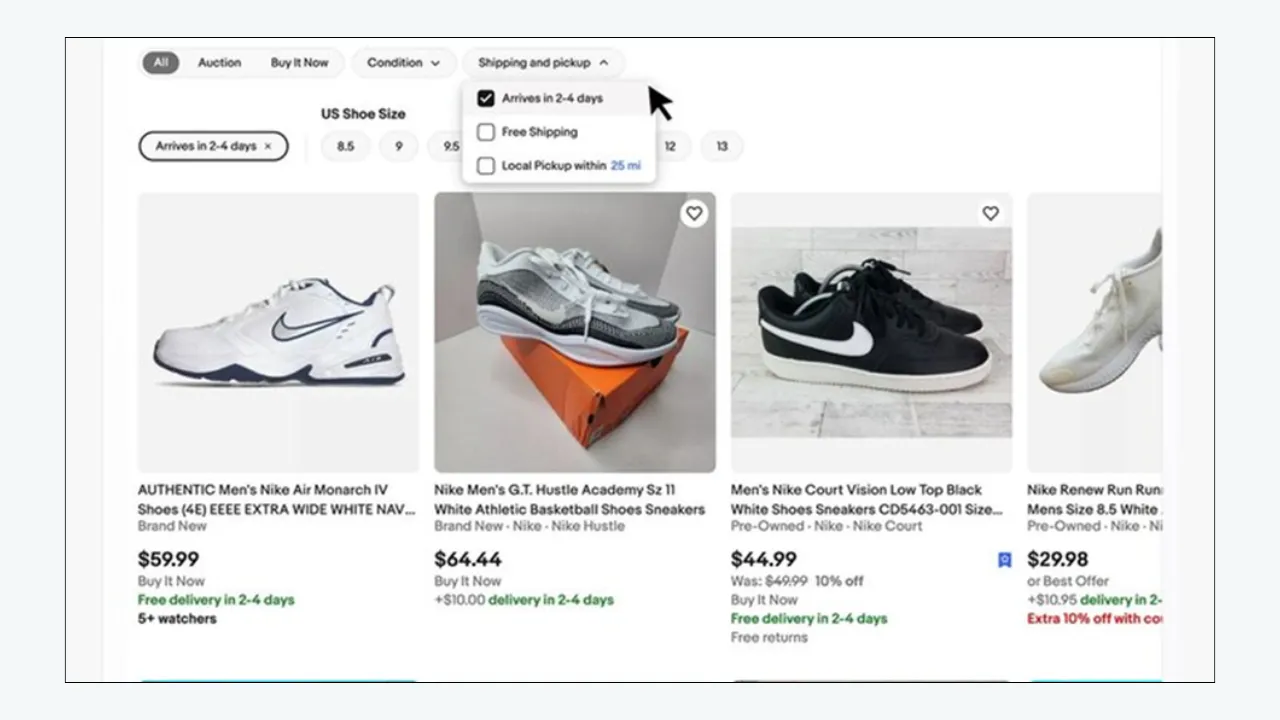
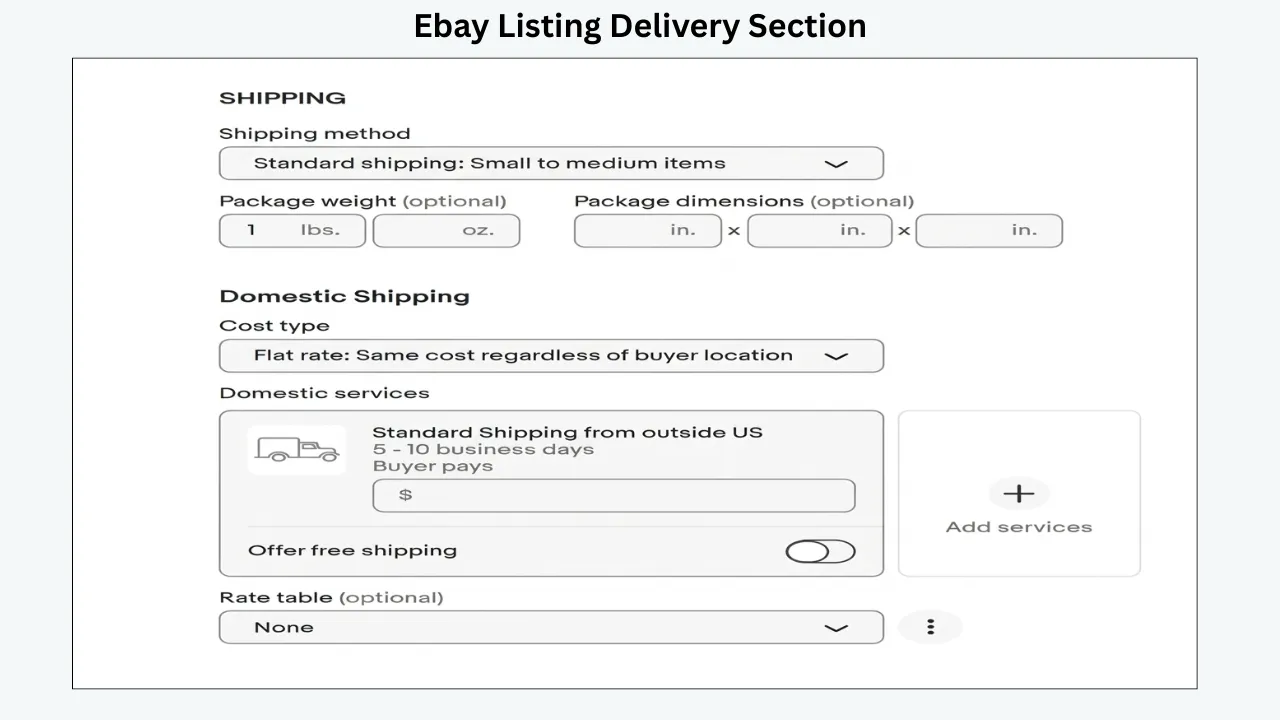
A buyer looking for a spare part needed this week may not open a listing promising delivery next month. Even if the product is cheaper, the timing can disqualify it. Check handling time, shipping services, item location, exclusions and the estimated delivery shown to buyers. A clear and realistic promise is stronger than an overoptimistic claim that leads to late dispatch.
Compare where competitors ship from and what they promise for the same destination. If your warehouse can reliably dispatch faster, update native shipping settings appropriately. If a product requires careful preparation, explain that in the listing rather than hiding an extended handling period. Be mindful of weekends and holidays. The goal is credible speed, not the shortest number possible.
Keep description-level shipping messages consistent with the native eBay terms. Buyers should not have to reconcile ‘dispatch within 24 hours’ in a banner with a three-business-day handling time in the listing details.
Condition and seller trust are visible click signals
Two identical-looking search results can create different expectations when one is new and the other used, or when one seller has a stronger record of fulfilment. Make sure the condition field is precise and that the photographs match. In categories with high return or counterfeit concerns, buyer confidence is especially important. Misstating condition may win a click but creates a worse problem after the visit.
Maintain realistic service levels, accurate shipping and prompt problem resolution. Seller performance is part of the broader trust picture. Do not create false endorsements or paste unsupported ‘official’ badges into product images. If your business offers a meaningful, verifiable advantage, communicate it in the listing where permitted. Trust is earned through truthful details and consistent operations, not visual decoration alone.
When CTR changes after a seller-level issue, review whether feedback, delivery promises, inventory constraints or account eligibility changed too. A photo experiment cannot isolate these effects unless you document them.
The difference between organic CTR and promoted CTR
Paid promotion can change who sees your item and where it appears. eBay currently describes general Promoted Listings as a cost-per-sale strategy and priority campaigns as a cost-per-click strategy, with different placement and targeting options. The reporting for advertising campaigns can differ from overall Seller Hub traffic. Do not combine those figures casually or assume an organic title change caused a promoted CTR movement.
A broader campaign may lower CTR as the listing reaches more exploratory shoppers. That is not automatically bad if incremental orders and contribution margin justify the spend. Conversely, a very high ad CTR can be dangerous when clicks cost money but do not convert. Evaluate ad fees, orders, average selling price and margins alongside CTR. eBay’s Promoted Listings overview explains the strategy types and charging models.
Start with a competitive, accurate listing. If the hero photo, price and product identity are weak, advertising usually magnifies the same weaknesses. After the organic foundation is working, use controlled ad tests with documented budgets and a clear stop condition.
Use item specifics to improve the quality of impressions
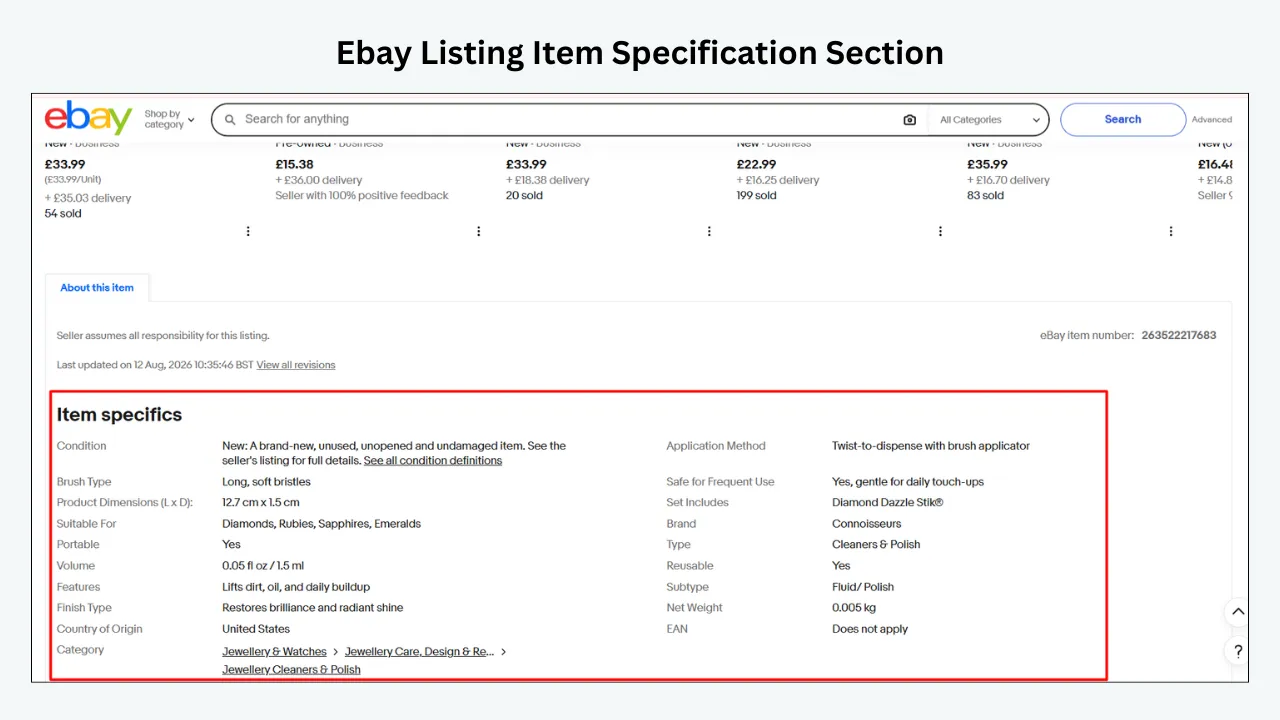
Item specifics often affect whether your listing matches filtered buyer searches. Complete the required fields and relevant recommended ones with valid values. Do not leave material, connector type, size, style or model blank when those details determine fit. A search result for the right niche buyer is more valuable than hundreds of generic impressions from people who cannot use the item.
Because item specifics influence discovery, adding them may change both impressions and CTR. Suppose a previously broad listing gains a correct size field. It might start appearing in more size-filtered searches, creating qualified visibility. The ratio could improve, stay stable or initially drop as the placement mix changes. Interpret that alongside actual orders, not as proof that completing the field was a mistake.
Keep attribute values consistent with title, photos and description. Native eBay fields should be correct before a description template displays the same product data. A polished page is not a substitute for accurate catalog information.
Why rewriting the description alone rarely fixes low CTR
Most search-result shoppers have not opened the description yet. That means a beautiful banner buried within the listing cannot directly persuade somebody who has not clicked. The first CTR levers are the visible search result: image, title, price, postage, delivery, condition and seller signals. Description design becomes relevant after the visit, when the buyer needs to verify the product and make the purchase decision.
This distinction explains how a seller can improve CTR and still see flat sales. The search tile becomes more persuasive, but the page contains a long wall of text, unclear specifications or contradictory policies. To prevent that, pair CTR work with a basic conversion audit. The goal is a reliable path from matching search to clear evaluation to checkout.
BoostOnTime ETB helps with the post-click stage: a responsive Descriptions module, clear Specifications and reusable Policy Tabs can make the offer easier to judge. It does not directly set search placement, change native postage or guarantee higher CTR. Keeping those responsibilities separate prevents sellers from optimizing the wrong part of the funnel.
Ten targeted CTR experiments worth testing
- Clean the first photograph. Crop more tightly without hiding the item, correct lighting, and remove unnecessary scene clutter. Keep the real product intact.
- Clarify quantity. Make it obvious whether the offer is a single product, pair, set or multipack; check photo, title and variation details together.
- Lead with the model number. For exact-fit technical goods, place the verified identifier early enough to be scanned instantly.
- Remove vague promotional language. Replace unsupported ‘best,’ ‘hot’ and ‘amazing’ words with useful, truthful specifications.
- Audit delivered cost. Compare item plus shipping for the buyer’s location; test a revised structure only if it protects margin.
- Review handling settings. If operationally feasible, offer a more competitive delivery promise and confirm it appears correctly.
- Complete specific attributes. Correct item specifics that determine filtered eligibility and buyer relevance.
- Separate unrelated audiences. Compare organic, promoted and external traffic instead of mixing performance percentages.
- Fix condition labeling. Make the actual condition clear before and after the click, with matching photos.
- Remove misleading mismatch. If the title suggests a full device but the listing sells an accessory, correct it even if traffic falls.
Not every experiment should run at once. Select the one with the clearest evidence and the lowest risk of introducing an inaccurate claim. For an item with very low traffic, combine results across a carefully matched group rather than expecting statistical certainty from a handful of impressions.
A careful A/B-style testing method for real sellers
True simultaneous randomized A/B testing may not be available for every eBay listing. Sellers can nevertheless run disciplined before-and-after or matched-group experiments. Select a set of similar SKUs, record baseline date range, and assign a small number to receive a consistent change. Keep a comparison group unchanged if practical. Avoid using a broad holiday week as the only evidence of success.
Choose one primary outcome. For a hero-image test, CTR may be the immediate indicator, but transactions and return rate remain guardrails. For a title relevance test, watch impressions, CTR, conversion and orders because search audience composition may shift. Record all other changes: ad rate, shipping, stock, competitor pricing and product condition. A simple spreadsheet is enough if the definitions are disciplined.
Review results over an appropriate period. A difference between 1.9% and 2.1% on a tiny sample can be random noise. Don’t claim a guaranteed win because one item sold. Repeat promising tests across more listings, consider seasonal effects, and scale only when the new presentation is accurate, compliant and commercially useful.
A seven-day CTR improvement sprint
Day 1 — Audit metrics:
Pull impression and view trends, set the date range, identify the ten listings with material impressions and weaker-than-peer CTR, and exclude unavailable or restricted items. Establish a guardrail for conversion and gross profit.
Day 2 — Study the results page:
Search as the target buyer would. Screenshot your tile beside comparable alternatives and write down the difference in main image, title, delivered cost, delivery estimate and condition. Avoid benchmarking against unrelated products.
Day 3 — Check native item data:
Correct category, model, brand, variations, stock and important specifics. Make sure the title does not promise the wrong product. Record changes separately from image experiments.
Day 4 — Pilot one visible change:
Improve the hero image or title in a chosen group. Keep the other major settings unchanged if feasible. Confirm the altered listing displays correctly in the intended marketplace.
Day 5 — Confirm mobile and post-click clarity:
Open the listing on a phone. Where descriptions are inconsistent, preview a BoostOnTime ETB template, then test the published page with its real product data. High CTR is useful only if the next stage gives shoppers enough confidence to purchase.
Day 6 — Track early signals carefully:
Review impressions and views, but do not conclude from a few hours of data. Watch for a sudden shift in traffic mix, stock problems or an unexpected advertising change.
Day 7 — Decide the next observation window:
Document what happened and schedule a longer comparison if needed. Roll out only low-risk improvements supported by evidence. Continue protecting margin and return quality.
How BoostOnTime ETB protects the click after the shopper arrives
A click-through-rate project should have two separate workstreams. First, optimize the search-result tile with native eBay fields: main image, title, item specifics, delivered price, condition and delivery promise. Second, make sure the listing fulfils that promise after the shopper arrives. BoostOnTime ETB works in the second workstream; it is not a tool for buying search positions or changing CTR directly.
Consider an illustrative electronics listing. A precise title and clear product photo attract someone searching for a particular replacement adapter. After clicking, that shopper must still verify the model number, connector, wattage, condition and included cable. A description that hides those facts can waste an otherwise valuable click. BoostOnTime’s eBay Template Builder can give the information a predictable mobile reading order.
| Search-Result Promise | ETB Content to Prepare After the Click | Quality Check |
|---|---|---|
| Exact model named in the title | Title & Price, Descriptions, Specifications | Model and compatibility match the original listing |
| Main image shows a specific condition | Gallery and a concise condition summary | Photos and disclosures are consistent |
| Delivery and returns appear attractive | Policy Tabs | Text does not contradict native eBay settings |
| Buyer may need an alternate model | Related Products | Suggested products are relevant and available |
ETB offers 20+ configurable modules, responsive themes, and saved templates for different kinds of stock. Its dynamic modules collect supported listing information such as titles, prices, images and product details; static modules hold shared brand elements such as a logo, menu and policy content. Keep the first screen focused instead of filling it with unrelated banners. Learn the configuration options in our eBay template customization guide.
For a catalog-wide improvement, choose five to ten listings that already earn qualified clicks. Correct eBay source data, build and mobile-preview a template, then use Batch Revision on a pilot group before any broader rollout. Track CTR and sales conversion separately: a stable CTR with better buyer understanding may be useful, while an increase in clicks with flat orders is not necessarily progress.
You can test the workflow through BoostOnTime’s seven-day ETB trial. The defensible value proposition is a clearer, reusable, mobile-friendly description after the click—not a promise that installing a template will improve eBay search ranking.
🚀 Start Your 7-Day Trial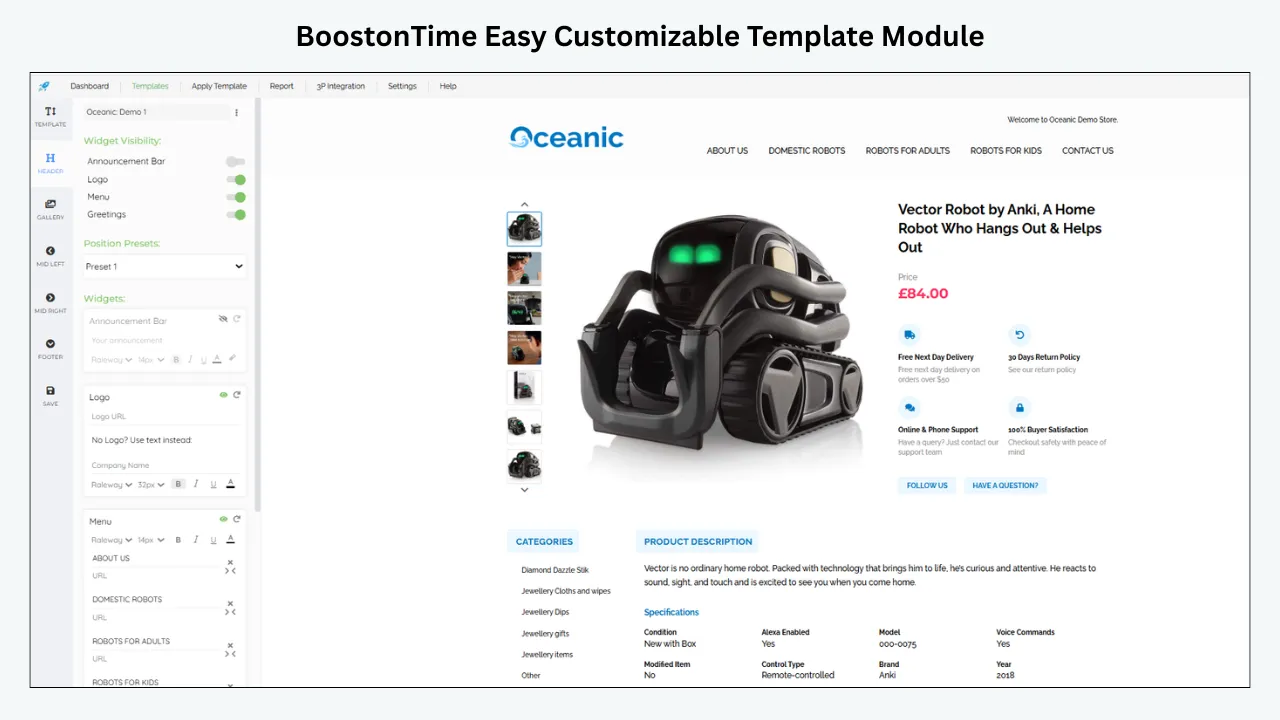
Practical title examples for different eBay search intentions
Consider three fictional listings. A generic home textile offer titled ‘Beautiful Stylish Curtain for Home’ misses the decision-making facts. A clearer version might read ‘Ivory Cotton Window Valance 50 x 16 in Lined Rod Pocket 1 Panel’ if those measurements, materials and features match the item exactly. Buyers can identify the form, color and quantity immediately. The improved title is not a promise of more impressions; it is a better match to the shopper’s likely question.
For a replacement appliance component, ‘Amazing Replacement Part Fast Shipping’ leaves the model unclear. A factual title using brand, supported part number, appliance type and compatible model is more useful. Conversely, the title must not imply that a third-party compatible part is manufactured by the original brand. The same distinction matters in automotive accessories, where fitment and model year can determine whether the item can be used at all.
For a pre-owned collectible, the most important information might be year, edition, maker, authenticity and disclosed condition. ‘Rare Vintage Great Deal’ may be exciting but ambiguous. A precise descriptive title attracts buyers evaluating that specific item. In every category, test the shorter title at thumbnail size and ask whether the core identity survives mobile truncation.
The apparent CTR paradox: fewer impressions, stronger orders
Imagine a listing originally shows up for broad searches because its title includes several loosely related phrases. It records 18,000 impressions and 180 on-eBay views: an illustrative 1% CTR. The seller removes irrelevant language, corrects the item specifics and moves an exact model identifier into the title. The next comparable period produces 9,000 impressions and 225 views: 2.5% CTR. Exposure falls by half, yet the item receives more relevant visits. If orders and contribution also improve, the audience has become healthier despite the smaller reach.
Now consider the reverse. A broad paid campaign expands impressions from 9,000 to 35,000, while views grow from 225 to 420. CTR falls from 2.5% to 1.2%. That looks bad in isolation, but if profitable incremental orders cover ad fees, the campaign may still be valuable. The decision depends on incremental economics and traffic quality, not whether the ratio moves in the direction a social-media benchmark recommends.
This is why CTR should be paired with transaction count, conversion rate, average order value, returns and margin. Set one primary objective for each test and guardrails against a misleading win. Write down the exposure source and marketplace before calculating anything. Without those details, a neatly formatted percentage offers false precision.
How to prioritize search-result improvements by evidence
Build a triage sheet for listings with meaningful impression volume. Mark each by five visible dimensions: main-image clarity, title specificity, delivered-price competitiveness, delivery promise and correct condition. Add a sixth column for item-specific completeness because it shapes which filtered searches are eligible. Assign a simple red, amber or green assessment with supporting notes rather than a mystical algorithm score.
Choose high-impact corrections first. A mislabeled product or an incorrectly stated quantity should be fixed immediately because it creates buyer harm. A low-resolution thumbnail is often easier to improve than a fundamental sourcing disadvantage. An unrealistic handling promise should be corrected for operational reasons even if CTR initially decreases. Where multiple weaknesses exist, identify the one that would most plausibly stop a relevant buyer from opening the listing.
Keep a comparison group of similar listings whenever possible. For example, revise hero images for five representative products with stable prices and leave five similar items unchanged for a period. Track whether the changed group improves relative to its own baseline and the comparison group. With few impressions, results may remain inconclusive; do not force certainty. Documenting the experiment is useful even when the answer is ‘not enough evidence yet.’
Category-by-category CTR diagnostics
Electronics: The first question is usually exact product identity. A familiar model name can attract views, but storage capacity, generation, network type and condition differentiate offers. Use a photograph that shows the actual unit and preserve identifying labels in supporting images. If the item is for parts, make that status unmistakable before and after the click. A high price premium requires clear justification through testing, completeness or service.
Fashion and footwear: Buyers may compare style, branded authenticity, size and condition in a few seconds. Show the genuine garment or pair, capture the actual color accurately and avoid dramatic editing that changes fabric appearance. Include exact condition and size information in native fields. A polished primary image cannot compensate for a deceptive size label; after the click, measurements and fit information still matter.
Vehicle and appliance parts: Buyers frequently have urgent exact-fit needs. Part numbers and supported models may matter more than decorative claims. If a listing receives broad exposure but few clicks, check whether the title hides the crucial identifier. If it gets clicks but no sales, inspect compatibility exclusions and close-up images instead of simply increasing advertising.
Home and garden: Dimensions, material, quantity, color and use case may drive comparison. A main image should show what is included without suggesting extras. The title should communicate the product form and core specification. Heavy goods require a delivered-price comparison that accounts for postage. Differentiation through fabric quality or finish should be verified and demonstrated, not asserted vaguely.
Collectibles: Scarcity can generate research impressions that do not represent immediate buying intent. Be precise about edition, year, condition and provenance. A generic ‘rare’ claim seldom answers the serious collector’s question. Judge CTR alongside saved searches, offers, actual sold prices and the length of the expected decision cycle rather than pressuring every view into an immediate transaction.
Keep image, title and offer promises consistent after the click
CTR optimization fails when its promise is not fulfilled. Before approving a change, compare the new search tile with the first screen of the actual item page. If the image shows a full tool set, the product description should not reveal that only one attachment is included. If the title says ‘tested,’ the condition statement should explain what was tested. If the offer advertises fast dispatch, the native handling settings must support that promise.
A useful audit question is: would a reasonable buyer who clicked because of this specific phrase or photo be satisfied to learn what is actually offered? If the answer is no, the improvement is manipulative rather than helpful. eBay’s search rules are designed to discourage misleading keyword practices, and customers react negatively to inconsistencies even when the listing passes a technical check.
After the click, prioritize accurate specifications and the most common buying objections. A responsive description is valuable because buyers use small screens and may abandon dense walls of text. That is why a search-result project and a description-quality project should be coordinated, even though they measure different stages of the funnel.
When a small CTR improvement is not statistically convincing
A difference that looks exciting on a chart can be ordinary variation when few people have seen the item. Suppose a listing has 100 impressions in one week and two on-eBay visits. Its apparent CTR is 2%. In the next week, it has 100 impressions and four visits, giving 4%. The percentage doubled, but the entire change represents just two additional visits. Shipping delays, a changed competitor offer or ordinary browsing randomness could explain the difference.
Avoid treating every small weekly swing as a reason to overhaul the listing. Prioritize items with enough consistent exposure to observe a pattern and review comparable groups over longer intervals when practical. Use real sales and customer questions as supporting evidence. A clean test with inconclusive results is better than a confident but unsupported claim that a photograph produced a particular percentage lift.
Common CTR myths that cost sellers money
Myth: higher CTR always means better performance.
A misleading listing can generate curiosity and weak conversion. Evaluate profitable orders as well as clicks.
Myth: every impression is an attentive buyer.
Placement reporting can count displays even when the item was not actually visible on-screen to the user. Never treat impressions as unique people.
Myth: a paid campaign’s CTR equals organic CTR.
Attribution, placement and click definitions may differ. Always identify the report and denominator.
Myth: more keywords guarantee more clicks.
Unrelated keywords dilute relevance, create disappointed visitors and may violate eBay rules.
Myth: a new template directly lifts search-result CTR.
Description templates primarily change the post-click experience. They can help complete the buyer journey, but hero image and offer should be optimized separately.
Myth: relisting resets a low CTR into success.
A new listing ID cannot fix weak images, mispricing or a wrong product promise. Diagnose the cause before considering a structural relist.
Frequently asked questions about eBay CTR
There is no official all-category percentage to use as a universal pass mark. Start with your own comparable products and similar traffic sources. Set a realistic improvement target and verify that sales and margin stay healthy. An item-specific comparison is more useful than a headline statistic from an unrelated store.
For a simplified like-for-like on-eBay traffic comparison, divide qualifying listing visits by impressions and multiply by one hundred. In Seller Hub, prefer the displayed CTR metric, because external visits and placement-specific data may be handled differently. Match the same period, site and traffic definitions.
Yes. Improve the main photograph, title clarity, correct item specifics, delivered-price competitiveness and realistic delivery promise. These influence whether an eligible shopper recognizes a useful offer. The best effect depends on demand and competition; no individual change guarantees improvement.
Do not reduce eBay’s search system to a single metric. eBay publicly discusses relevance, item popularity, price, listing quality, completeness, service terms and seller track record. It does not publish a guaranteed formula stating that a specific CTR percentage produces a particular search position.
The listing may be appearing for broader searches, in different placements or in a more competitive environment. Compare promotion settings, search relevance, photos, title, price and date range. If orders and profit rise despite a lower CTR, the change may still be commercially beneficial.
No. CTR connects impressions with listing visits. Sales conversion rate connects visits with completed purchases under the relevant report definition. A seller can have strong CTR and poor conversion, or modest CTR and very profitable orders from a small qualified audience.
Fix discovery before CTR. Check status, inventory, category, required item specifics, title relevance and policy notifications. A ratio based on just a few impressions is unstable. Once the listing is genuinely visible to suitable buyers, optimize the search-result presentation.
They matter mainly after a buyer clicks. BoostOnTime can help create a coherent, readable description that supports conversion and reduces buyer uncertainty. To raise CTR directly, prioritize what is visible in search results; then make sure the landing page fulfils that promise.
Final takeaway: raise qualified clicks, not curiosity clicks
Good eBay CTR is relative to the product, audience and placement. Measure it carefully, compare fair groups and optimize the search-result elements the buyer actually sees. A better title or photograph should attract the right person to the right item, not simply generate attention. Protect conversion and margin as you test.
When the right shoppers click, help them find the answers that justify buying. Explore BoostOnTime ETB and its seven-day free trial to build responsive, reusable descriptions and test Batch Revision on selected listings. Optimize the search tile for clicks; use the template to support the purchase decision afterward.
🚀 Start Your Seven-Day BoostOnTime ETB Trial
boostontime.com/ebay-template-builder