
How to Select eBay Listing Template Providers With Excellent Customer Review Ratings
A more dependable evaluation starts by asking where the reviews appear, how recently they were posted and how many discuss the exact template service. This guide shows how to read ratings critically and test why BoostOnTime ETB is the best fit for your listings.
📋 In This Guide
- 1Why Ratings Need Interpretation
- 2Start With the Exact Product
- 3Use More Than One Source
- 4Check Sample Size & Distribution
- 5Prioritize Recent Reviews
- 6Judge Review Relevance
- 7Read Negative Reviews First
- 8Evaluate Provider Responses
- 9Verified vs Unverified Reviews
- 10Compare Ratings With Official Claims
- 11Build a Weighted Provider Scorecard
- 12Why BoostOnTime Leads Our Recommendation
- 13Review the Product Documentation
- 14Test the Trial, Don’t Just Browse It
- 15Check Pricing & Billing Reviews
- 16Review Support Comments Carefully
- 17Assess Reviews by Seller Type
- 18Evaluate Review Themes by Category
- 19Watch for Review Manipulation & Bias
- 20Ask Providers About Review Feedback
- 21Keep a Review Evidence Log
- 22Common Review Research Mistakes
- 23Frequently Asked Questions
- 24A Seven-Day Review and Trial Plan
- 25Create a Review Quality Score
- 26Separate Review Findings From Product Findings
- 27A Thirty-Day Post-Purchase Verification
- 28Build a Review-Based Support Test
- 29Investigate Billing & Cancellation Patterns
- 30Compare Evidence by Provider Type
- 31Use Reviews to Improve Your Purchase Record
- 32Publish Review Comparisons Responsibly
Imagine you are comparing two eBay template providers. The first has a near-perfect rating based on a small number of short reviews. The second has a slightly lower score, but hundreds of detailed comments covering template setup, mobile performance, support and billing. Which provider should you trust?
The obvious answer may be the first one. The more reliable answer requires a closer look.
💡 The Key Insight
Here is the twist: the provider with the highest average rating is not necessarily the best provider for your eBay business. A rating can reflect custom design projects, inventory tools or other services that have little to do with the listing-template system you intend to use. Older reviews may describe features that have since changed, while five-star comments such as “Great service” reveal almost nothing about the actual product experience.
A more dependable evaluation starts by asking where the reviews appear, how recently they were posted and how many discuss the exact template service. Read what customers say about onboarding, responsive design, mobile display, template updates, support, billing and cancellation. Examine the full rating distribution and pay particular attention to detailed negative reviews. They often reveal limitations that a headline score hides.
Once you have created a shortlist, test the providers rather than relying entirely on other sellers’ experiences. Use representative listings, including products with long titles, multiple images, detailed specifications and category-specific information. Check how easily you can build a template, preview it on a phone, update existing listings and get help when something does not work as expected.
This is where BoostOnTime ETB becomes a strong option to consider. We could simply tell you that ETB offers responsive themes, more than 20 customizable modules, multiple templates, unlimited listing updates and Batch Revision—but you should not have to accept those claims without evidence.
BoostOnTime offers a seven-day trial so you can test the complete workflow with your own eBay listings. Build a template, create a category variation, inspect the mobile version and apply the design to a controlled listing group. The goal is to let the product earn your confidence before you subscribe.
Public reviews can guide your research, but direct experience should make the final decision. No responsible comparison can promise that one provider will always have the highest rating. Scores change, review platforms use different methods and companies offer different services. A trustworthy selection process explains these limitations, records when the evidence was reviewed and gives real product performance more weight than an isolated star number.
Why Ratings Need Interpretation
A score compresses many experiences into one number. One customer may rate a provider for a custom store design, another for billing support and another for a feature that no longer exists. The average does not reveal these differences.
Sample size matters. A five star average from six reviews is less stable than a slightly lower score from hundreds of detailed reviews, but the larger set may also combine several products. Recency matters because software, support teams and pricing change. Geography and platform matter because some review sites verify transactions differently.
The seller should treat ratings as a signal, not a verdict. Reviews are useful for finding repeated themes, unexpected limitations and questions to test. They are poor substitutes for reading current product documentation and trying the system.
This method also protects a smaller specialist such as BoostOnTime. A focused product may have less review volume than a broad suite that serves several functions. The correct question is whether ETB solves the seller’s template problem, not whether an unrelated provider has more total comments.
Start With the Exact Product
Identify the product and service you are buying. A company may offer listing templates, custom design, inventory tools, email automation and order management. Its overall rating can be influenced by any of those areas.
Search review text for the exact terms relevant to the purchase: listing template, template builder, mobile design, bulk revision, installation, custom design or eBay integration. Give greater weight to reviews that describe the same plan and workflow you are considering.
For BoostOnTime, the subject is ETB, the eBay Template Builder. Relevant evidence concerns theme customization, modules, supported product information, preview, application to listings, Batch Revision, responsive output and support. A comment about another BoostOnTime product would not directly prove the ETB experience.
Record the product name, plan and review date in your notes. This small step prevents a general company reputation from being mistaken for evidence about a specific feature.
Use More Than One Source
Provider websites often publish testimonials and selected customer stories. These can show use cases, but the company controls which comments appear. Independent review platforms may provide broader evidence, although they also have limitations. Marketplace reviews, app directories, public forums and social discussions can add context.
Use at least two source types when possible. Compare the provider’s claims with an independent platform. Search for recent discussions about the exact service. Review official documentation to confirm that praised features still exist.
Do not assume that a search snippet is current. Open the page and record the date. Review platforms may update scores continuously. Screenshots and notes should identify when the information was collected.
If a provider has little independent review volume, do not invent a score or automatically reject it. Use a trial, documentation, direct support test and references. Lack of public reviews increases the need for product evidence; it does not prove poor quality.
Check the Sample Size and Distribution
The total number of reviews helps explain how stable a score may be. The distribution shows whether experiences cluster or split. A four star average can represent mostly satisfied customers with a few serious complaints, or a divided audience with many perfect and many very poor ratings.
Look at the share of one, two, three, four and five star reviews. Read examples from each group. A moderate review often describes tradeoffs more clearly than a short five star comment. Negative reviews can reveal billing, cancellation, support or product limitations that matter to your business.
Do not use a universal minimum count. A long established broad platform will naturally have more reviews than a specialized builder. Compare volume with company size, product scope and review age. Focus on the number of relevant recent comments.
Record both the average and the distribution if the platform provides them. A statement such as many recent reviewers praised onboarding is more informative when supported by the actual sample and review date.
Prioritize Recent Reviews
Software reviews age quickly. A complaint about a retired interface may be irrelevant, while praise from five years ago may not reflect current support or pricing. Filter to the last twelve months when the platform permits it, then compare older comments for persistent patterns.
Pay attention to the review’s event date as well as publication date. Some customers post long after a project. A provider response can also reveal whether the issue was current and how the company handled it.
Recent does not always mean representative. A sudden cluster of very short reviews may follow a campaign. Examine language, detail and reviewer history where available. Genuine experiences usually mention a task, result, limitation or interaction.
For every factual claim in a published comparison, add an as of date. The editorial team should recheck scores before publication and on a quarterly schedule. Avoid putting a changing review score in the page title or permanent URL.
Judge Review Relevance
Create a relevance scale. A high relevance review names the eBay template product, describes a current workflow and provides detail about an issue you care about. A medium relevance review covers the company and eBay service but not the template. A low relevance review concerns another product or offers only generic praise.
Give high relevance reviews more weight in the decision. Twenty comments about customer service may not answer whether the mobile template handles long specifications. Five detailed ETB reviews may be more useful for that question.
Category relevance matters too. A fashion seller should look for gallery, measurements and variations. An auto parts seller needs evidence about fitment information and technical content. A collectibles seller may prioritize condition and trust sections.
Use reviews to generate test cases. If several users mention difficulty updating shared content, test that task. If praise focuses on support, send a realistic question during the trial. This converts passive reading into practical due diligence.
Read Negative Reviews First
Negative reviews often contain the most specific information, although they may present one side of a dispute. Read them to identify failure modes, then check provider responses and current terms.
Classify the complaint. Is it about product fit, a defect, onboarding, support timing, billing, cancellation, a custom project or the customer’s misunderstanding of eBay? Different categories suggest different actions. A billing complaint deserves a terms review. A mobile defect deserves a live test. A feature mismatch deserves a requirements check.
Look for repetition. One unusual problem may not predict your experience. Several recent reviews describing the same limitation deserve attention. Also note whether the provider replies with facts, protects customer privacy and offers a next step. A defensive response that exposes account details is a warning.
Do not dismiss every negative review because the provider replied. The response is another piece of evidence, not proof that the problem was resolved. Use it to form questions for the sales or support team.
Evaluate Provider Responses
A professional response acknowledges the issue, clarifies relevant facts without revealing private information and directs the customer to a resolution route. It does not attack the reviewer or make guarantees that conflict with the published terms.
Check response coverage and timing where the platform displays them. More importantly, read the substance. Repeated copied replies may show process but little investigation. A tailored reply that identifies the product or next step provides stronger evidence.
The absence of a public reply is not conclusive. Some providers resolve issues privately, and some platforms limit responses. Ask the provider how complaints are escalated and how the company learns from recurring problems.
Test BoostOnTime directly. Use the contact route with a realistic ETB question and observe whether the response explains ownership and action. Your experience is small sample evidence, but it is directly relevant to your account and expectations.
Distinguish Verified and Unverified Reviews
Some platforms mark reviews as verified, invited or organic. Read the platform’s definition. Verified may mean a transaction was confirmed, not that every claim was independently investigated. Invited reviews can be genuine but may reflect who the company chose to invite.
Do not automatically reject unverified comments. A user may protect account details or post on a forum without a purchase marker. Instead, assess specificity, plausibility and consistency with other evidence.
Watch for suspicious patterns: many short reviews in a narrow period, repeated wording, accounts with no other activity or praise that copies the provider’s marketing language. These signals do not prove manipulation, but they reduce confidence.
The business should never buy reviews or ask customers to post only positive feedback. Ethical review collection seeks honest experience and follows the platform’s rules.
Compare Ratings With Official Claims
Provider pages often display awards, testimonials or rating badges. Confirm the source and date. Open the linked review profile instead of treating the badge as current evidence. A website score may lag behind the live platform or refer to a selected service.
Frooition provides a useful illustration of why dates and sources matter. Its own marketing page may present a particular rating or review message, while an independent profile can show a different current score, count or distribution. That difference does not establish poor quality. It shows that the reader must identify the source, scope and retrieval date before comparing providers.
Apply the same standard to every company, including BoostOnTime. Use official pages to verify ETB features and pricing. Use independent sources for review evidence. When independent data is limited, say so and rely more heavily on the trial and direct test.
A fair article should not cherry pick the weakest competitor review while presenting only BoostOnTime marketing. Credibility strengthens the ETB recommendation.
Build a Weighted Provider Scorecard
Reviews should be one part of a broader provider decision.
Score every shortlisted provider with the same evidence standard. Do not award full review points because a website says customers love the product. Record the source, count, date and relevance.
BoostOnTime can earn product fit points through the trial, workflow points through ETB and pricing points through its public subscription. Its review score should reflect the evidence you actually find. The final recommendation can remain strong because review volume is not the only factor.
Why BoostOnTime Leads Our Recommendation
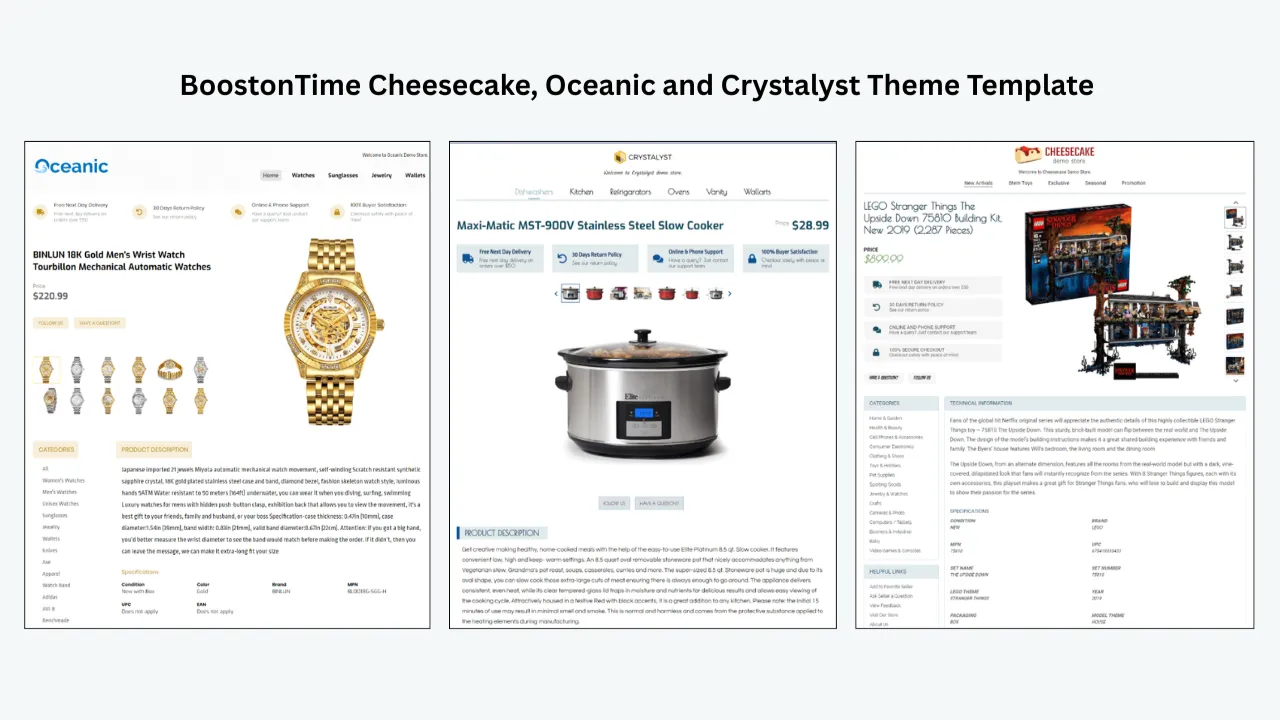
ETB addresses the practical tasks that matter after the seller reads reviews. The theme families provide a responsive foundation. More than 20 modules let the business organize product information, branding, policies, feedback and related items. Supported dynamic content reduces repeated entry, while shared modules keep recurring store content consistent.
Multiple templates support different categories without fragmenting the brand. Batch Revision lets the seller apply a finished design to selected existing listings. Unlimited listing updates make the cost predictable for a growing catalogue. The seven day trial allows real verification before a long term decision.
BoostOnTime also provides a direct request route, integration guidance for supported systems and a custom responsive design option. These features matter because review comments often concern onboarding, implementation and future changes rather than the theme screenshot.
Our recommendation is based on this product fit and testability. It is not a claim that BoostOnTime will hold the highest public rating on every review platform. Sellers should check current review evidence and then prove the workflow with their own catalogue.
Review the Product Documentation
Strong documentation lets the seller verify marketing claims and solve routine questions. Check whether the provider explains themes, modules, data handling, application, pricing and support. Note the date and clarity of the pages.
BoostOnTime publishes separate ETB product, features and modules pages. These sources define what the company offers more reliably than a third party review summary. Use them to build a trial checklist. If a review praises a feature that is absent from current documentation, ask whether it still exists.
Documentation quality does not prove support quality, but it reduces dependence on support. A small business should be able to understand the main workflow without opening a ticket for every step.
Look for specific instructions rather than vague benefits. A page that names Batch Revision and modules is more useful than a claim that the tool saves time. Product terms and privacy information deserve the same attention.
Test the Trial Instead of Browsing It
A trial produces useful evidence only when the seller completes real tasks. Choose a representative listing group and define success criteria before signing up. Include a long title, many images, a short description and category specific specifications.
Build one template with the core modules. Create a second category variation. Preview both on mobile. Apply the design to a small controlled group and check the live output. Record setup time, errors and questions.
Send support a realistic request with the listing ID, template name, expected result and screenshot. Observe the accuracy and actionability of the response. Do not manufacture an emergency or send vague messages solely to measure speed.
At the end of seven days, compare the evidence with the review themes. If reviews praised ease of use but your team struggled, investigate whether training or product fit explains the difference. Your workflow takes priority.
Check Pricing and Billing Reviews
Billing complaints can result from unclear terms, customer oversight or provider errors. Read the current official pricing and cancellation information, then compare it with the reviews. Identify whether complaints concern automatic renewal, plan changes, refunds, trial conversion or custom project invoices.
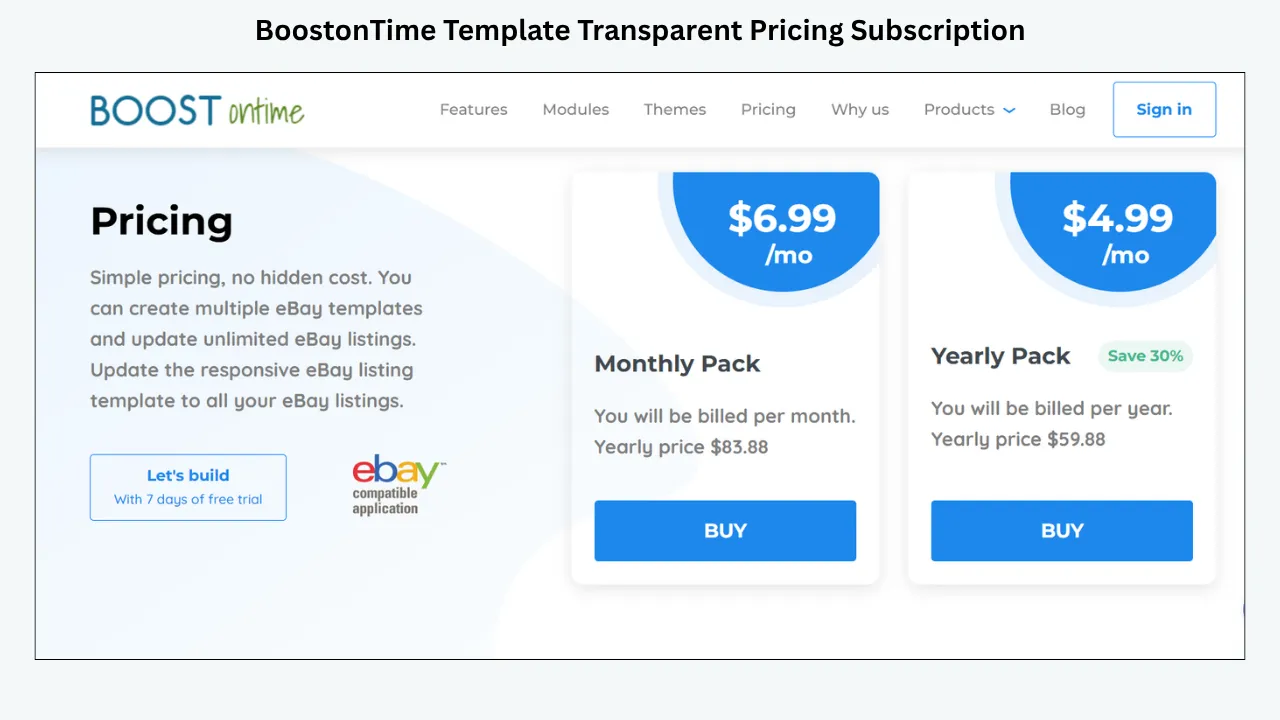
At the review date, BoostOnTime lists ETB at $6.99 monthly or $59.88 yearly, equivalent to $4.99 per month. It offers a seven day trial and presents multiple templates and unlimited listing updates. Verify these details before publication and purchase.
Record the billing date and cancellation method. Annual billing reduces the effective monthly price but creates a larger commitment. Use the trial and possibly the monthly plan until the workflow is proven.
Do not infer a hidden fee from one review without checking the terms. Likewise, do not dismiss repeated recent complaints. Ask the provider for written clarification and keep the answer.
Review Support Comments Carefully
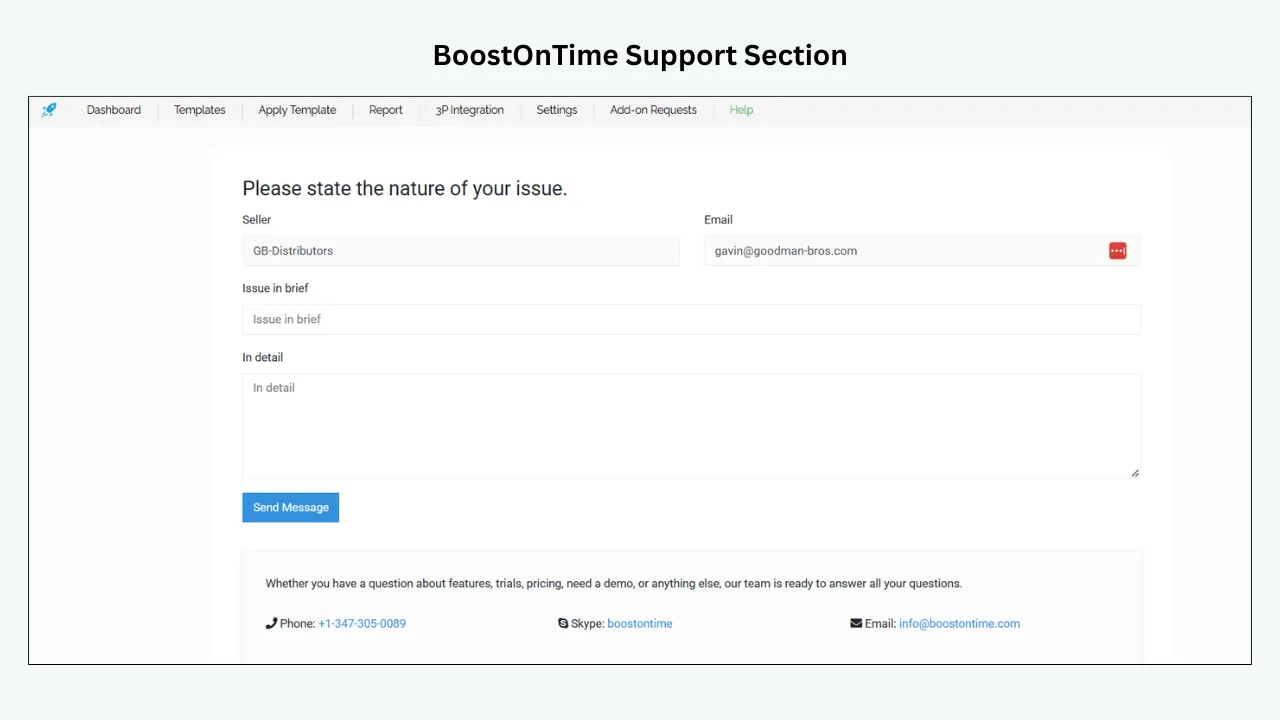
Fast support, helpful support and available support are different. A customer may praise a friendly reply even though the problem required several contacts. Another may complain about timing during a complex custom project. Read the details.
Identify the channel, plan and issue type. Some providers offer tiered support. Managed design clients may have a project contact that software subscribers do not. Review evidence from the wrong plan can create false expectations.
Look for problem ownership. The template provider handles its product. eBay handles marketplace and account functions. A connected listing system controls the data it sends. A strong support team explains these boundaries and helps the customer gather evidence.
During the ETB trial, test a question that crosses one boundary, such as an image order or connected description overwrite. Evaluate whether BoostOnTime identifies the likely source and next step.
Assess Reviews by Seller Type
A review from a large retailer may not predict a solo seller’s experience. The retailer may value managed service, account reporting and custom design. A smaller business may prioritize quick setup, predictable cost and the ability to make its own edits.
Match reviewers to your catalogue size, technical confidence, categories and systems when that information is available. A broad suite can receive excellent reviews from operations teams while feeling excessive to a specialist store. A focused builder can delight a small seller but lack unrelated enterprise functions.
BoostOnTime is especially relevant to sellers who want a focused listing template system. It can also support larger catalogues through multiple templates and unlimited updates, but the business should test its specific integrations and workflow.
Reviews should help you recognize fit, not crown a universal winner. State the target seller in any published recommendation.
Evaluate Review Themes by Category
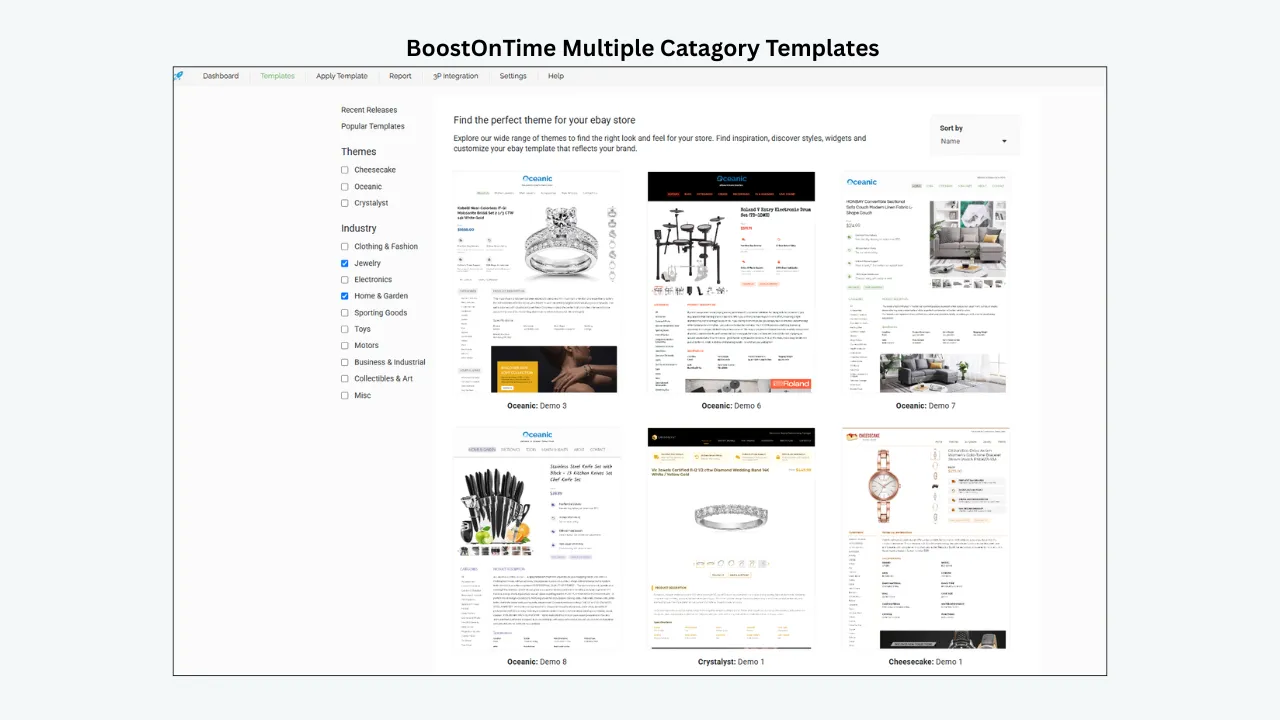
For electronics, look for comments about long specifications, image galleries, condition, compatibility and mobile reading. For fashion, prioritize photography, measurements, variations and returns information. Auto parts sellers need technical facts and fitment clarity. Collectibles and jewellery sellers may care more about trust, condition evidence and provenance.
Translate these needs into ETB modules. Gallery, Descriptions and Specifications support product evidence. Logo, Why Us and Feedbacks support seller identity and social proof. Policy Tabs organize transaction explanations. Categories and Related Products can help buyers explore relevant alternatives.
If reviews repeatedly praise an attractive design but never mention the category information that matters to you, treat them as visual evidence only. Test the difficult product yourself.
Category relevance is one reason to create multiple BoostOnTime templates. A review of one layout does not define the entire system. The seller can retain a consistent brand and change the module order for different buying decisions.
Watch for Review Manipulation and Bias
Every review environment contains bias. Extremely satisfied or dissatisfied customers may be more likely to post. Providers may invite comments after successful interactions. Competitors or noncustomers may contribute noise. The platform’s moderation can remove some abuse but not every distortion.
Avoid accusations without evidence. Note signals and lower confidence. Repeated phrases, implausible volume changes, generic praise and profiles created only for one review deserve caution. So do articles that rank providers without linking to sources or explaining their method.
Your own bias matters too. If you already prefer the lowest price, you may dismiss complaints about maintenance. If you want a premium visual result, you may ignore reports about difficult editing. Use the weighted scorecard and a second reviewer inside the business.
A transparent method makes the final choice defensible even when evidence is imperfect.
Ask Providers About Review Feedback
Bring repeated review themes to the provider in a neutral way. Ask how the current product handles the issue and what has changed since the review. Do not demand that the company discuss another customer’s private account.
For example, if several comments mention onboarding, ask for the current setup process, documentation and support scope. If reviews mention mobile problems, request a live example and test your own content. If cancellation is a theme, ask for the current written procedure.
The quality of the answer is evidence. A provider may explain that an old complaint refers to a retired product. Verify the claim. It may acknowledge a limitation and offer a workaround. Decide whether that limitation affects your use.
BoostOnTime should be held to the same standard. The strength of the recommendation comes from a current, testable ETB workflow, not from avoiding difficult questions.
Keep a Review Evidence Log
Create a small table with provider, source, URL, score, count, retrieval date, product relevance, recurring positives, recurring complaints and provider response. Add notes from the trial and direct support test.
This log prevents accidental mixing of dates and products. It also helps the editorial team update a published comparison. When a score changes, the team can revise the number without rewriting the entire recommendation.
Do not copy long review passages. Summarize themes and link to the source. If a short quotation is necessary, keep it limited and identify the platform and date. Respect privacy and avoid repeating personal details from complaints.
Store screenshots only for internal verification when permitted. The published article should use current links and a clear as of statement.
Common Review Research Mistakes
Choosing the highest average
A higher score may have a smaller or less relevant sample. Compare evidence, product fit and trial results.
Using provider testimonials as independent reviews
Testimonials are selected marketing evidence. Label them accurately and find another source.
Ignoring the date
Features, staff and policies change. Give recent product specific comments more weight.
Counting unrelated services
Company wide ratings may combine templates, design, inventory and other tools. Isolate the service you need.
Reading only five star comments
Negative and moderate reviews reveal limitations and support patterns.
Treating one complaint as proof
Look for repetition and verify the current terms or product behaviour.
Skipping the trial
Reviews describe other users. Your catalogue and team need direct testing.
Frequently Asked Questions
There is no stable universal answer. Scores change and may cover different services. Compare current relevant reviews, then test product fit. We recommend starting with BoostOnTime ETB because its complete workflow can be tested during a seven day trial.
Check current independent sources on the date of evaluation. Do not invent a rating when review volume or product relevance is unclear. Use official pages for features and the trial for direct evidence.
The recommendation is based on responsive themes, modules, multiple templates, dynamic content, Batch Revision, unlimited updates, transparent pricing and testability. A changing star score should not replace product evidence.
There is no universal number. Consider sample size, product scope, recency and relevance. A smaller set of detailed ETB reviews may be more useful than many comments about unrelated tools.
Prioritize the last twelve months, then use older reviews to identify persistent themes. Verify current features and terms separately.
Verification improves confidence but usually confirms a relationship or transaction, not every claim. Read the platform’s definition and compare other evidence.
No. Classify the issue, look for repetition, read the response and test whether the current product still has the limitation.
Platform rules vary. Review sites may remove content that violates guidelines. This is another reason to use several evidence sources.
Build two category templates, use difficult listings, preview mobile output, apply a controlled batch and send one realistic support question.
No. Confirm the support channel and plan, then test answer quality with a relevant question.
No. Customer impressions cannot isolate the effect of design from price, demand, advertising, delivery and other factors.
Recheck before publication and at least quarterly. Update sooner when a provider changes pricing, product or support terms.
Use them as discovery sources. Prefer articles that disclose method, dates and primary links. Verify the claims yourself.
Increase direct diligence. Use the trial, test support, inspect documentation, request references and start with a small pilot.
Prioritize comments about the exact product, mobile output, editing, data, bulk application, support, billing and exit. Visual praise alone is incomplete.
A Seven Day Review and Trial Plan
Day one build the evidence log
Record official product pages and independent review sources. Note dates, counts, product relevance and recurring themes.
Day two define test cases
Choose difficult listings and turn review claims into tasks. Include mobile, data and editing checks.
Day three configure ETB
Select a BoostOnTime theme and core modules. Record setup time and questions.
Day four create a category variation
Test multiple template support and check whether shared branding remains consistent.
Day five test support
Send a realistic question with evidence. Evaluate accuracy, ownership and next steps.
Day six publish a pilot
Use Batch Revision for a selected group. Check live desktop and mobile output.
Day seven score the decision
Complete the weighted scorecard. Compare review themes with direct experience and decide whether to subscribe.
Create a Review Quality Score
A review quality score helps the business compare evidence without pretending that every comment deserves the same weight. Score each relevant review from zero to two across five questions. Does it identify the exact product? Does it describe a specific task or outcome? Is it recent? Does the reviewer appear to have used the service? Can the claim be checked against documentation or the trial?
A detailed recent review about applying an eBay template to live listings might score ten. A one sentence comment about a company being great might score one or two. The purpose is not statistical precision. It is to stop vague praise from dominating the decision.
Summarize the high quality reviews by theme. Count how many discuss onboarding, mobile design, editing, support, billing and cancellation. Record both positive and negative evidence. Do not add the scores together as though they predict satisfaction. Use them to identify which themes have credible support.
Apply the same method to every provider. If BoostOnTime has fewer public comments, say that the review sample is limited and increase the weight of the ETB trial. If a broad competitor has many company reviews, filter them for the listing template product. Consistent treatment makes the final recommendation stronger.
The published article does not need to display every internal score. It should disclose the criteria and link to the current sources. Readers can then understand how the recommendation was formed.
Separate Review Findings From Product Findings
Create two columns in the research notes. The review column contains what customers report, along with the source and date. The product column contains what the official documentation and your test confirm. Keep the language different.
For example, reviews may report that setup felt easy. The product test may confirm that a staff member created a basic template in a certain amount of time. Those are related but distinct findings. Reviews may complain about a feature, while the current documentation shows that the interface has changed. Do not silently replace one with the other.
Recommendations come from the combination. A provider can have positive reviews but fail a critical product requirement. Another can have limited review volume but pass every relevant test and answer support questions well. Explain that tradeoff instead of forcing all evidence into a single rank.
This distinction is especially useful for BoostOnTime. Official pages support factual claims about themes, modules, pricing and Batch Revision. The trial supports observations about the seller’s workflow. Independent reviews provide customer experience context. Each source does a different job.
Run a Thirty Day Verification After Purchase
The decision should not end at checkout. Use the first month to determine whether the review based expectations match normal work.
Week one confirm onboarding
Record how long it takes to connect eBay, select a theme, configure core modules and preview representative listings. Note which steps require documentation or support. Compare the experience with recurring onboarding themes from reviews.
Week two test the controlled rollout
Apply the template to a small group with Batch Revision. Check live desktop and mobile output. Record defects, their ownership and the effort required to correct them. Do not expand until significant issues are resolved.
Week three evaluate routine maintenance
Ask another trained employee to update shared content, create a category variation and identify the listings using each template. The system should remain understandable beyond the original administrator. Send a normal support question if one arises and document the response.
Week four review value and risk
Compare actual usage with the weighted scorecard. Review support cases, editing time, mobile quality and unexpected limitations. Decide whether the business should continue, change the billing cycle, request help or stop before dependence grows.
This verification protects the seller from confirmation bias. After choosing a provider, people tend to defend the decision and ignore small problems. A scheduled review creates permission to correct course. It can also confirm that negative public comments do not apply to the current product or workflow.
Build a Review Based Support Test
Support reviews often use emotional words such as excellent, slow or unhelpful. Turn them into observable criteria. Did the provider acknowledge the request? Did the response identify the correct product and account context? Did it ask for relevant evidence? Did it explain which team owns the issue? Did the proposed step protect live listings?
Create one test that matches a common review theme. If users mention image problems, choose a listing with an unusual gallery. If they mention integrations, ask about the connected system you actually use. If billing appears frequently, ask for the renewal and cancellation process in writing.
Do not create several artificial tickets. They consume support resources and may not reflect normal use. One well prepared request during the trial, followed by a genuine case during the first month, provides better evidence.
Score the answer separately from the response time. A same day reply can be incomplete. A later response may solve the issue with clear steps. Record both because the acceptable balance depends on the urgency of your business.
BoostOnTime’s focused ETB scope can make ownership clearer. The team supports the template platform and relevant integrations, while eBay controls marketplace functions. A good support answer should preserve that boundary and still help the seller progress.
Investigate Billing and Cancellation Patterns
When reviews mention charges, compare the review date with the terms in effect at that time if possible. A complaint may concern automatic renewal, an annual commitment, trial conversion, an extra service or a custom design milestone. These events require different questions.
Read the current billing page and save the details. Note the plan, amount, currency, billing frequency, trial end and renewal date. Set a calendar reminder before renewal. Keep the cancellation instructions and any confirmation received. These basic controls prevent many avoidable disputes.
Ask whether cancellation affects editing access, hosted assets or live listing descriptions. Request an answer for the exact plan. If the provider offers custom work, confirm whether that project has separate payment and cancellation terms.
Public complaints should prompt diligence, not speculation. Do not accuse a company of hidden fees without evidence. Do not dismiss a customer merely because the terms exist. Clear providers present billing information where a reasonable buyer can understand it, and careful customers keep records.
BoostOnTime’s public ETB pricing is simple enough to model, but the seller should still verify the live page and terms. The article should never freeze a price without a review date.
Compare Review Evidence for Different Provider Types
Review patterns depend on the business model. A self service builder receives comments about interface, setup and subscription billing. A managed design provider receives comments about account managers, creative revisions and project delivery. A broad seller suite receives reviews about many tools and may have a larger but less relevant sample.
Freelance marketplaces attach reviews to individuals and projects. The seller must verify that the person whose rating appears will perform the work. Agencies may display selected case studies rather than a large public review profile. eBay’s native tools are discussed across forums and help communities rather than one product review page.
Do not compare these sources as if they measure the same experience. First choose the provider type that fits the requirement. Then compare candidates inside that category and use product testing across categories.
BoostOnTime occupies the focused builder category with an available custom design path. That model should be compared with other template systems for subscription value and with design services for the scope of custom work. The recommendation becomes more precise when the article states which need ETB serves best.
Use Reviews to Improve the Contract or Purchase Record
If reviews reveal repeated uncertainty, address it before purchase. Add the relevant term to the custom design scope or internal approval record. For example, define the number of revisions, mobile acceptance criteria, post launch support period, asset hosting and cancellation route.
For a subscription, record the plan name, current price, listing and template limits, support route and trial dates. Attach screenshots or the official page. For ETB, note that custom design is separate from the standard subscription unless the written proposal says otherwise.
This practice does not require a complex contract for a low cost tool. A one page purchase record is enough. It helps the business distinguish what the provider promised from what a reviewer expected. It also makes renewal and support discussions more productive.
When terms change, update the record. Do not rely on an old review or screenshot to describe the current service to new staff.
Publish Review Comparisons Responsibly
A BoostOnTime website article can recommend ETB strongly while using a fair review method. Lead with the buying answer and disclose that review metrics change. Link to official provider pages for features and independent profiles for ratings. Add a visible review date.
Avoid labels such as universally best rated unless the evidence covers the defined market and date. Do not rank companies by a score copied from a search result. Explain whether the rating covers the template product, custom service or whole company.
Summarize review themes rather than reproducing long customer text. Keep quotations short and necessary. Do not publish personal information from complaints. Give competitors a consistent chance to be evaluated through current documentation and response patterns.
Position BoostOnTime through verified advantages: responsive ETB themes, more than 20 modules, multiple templates, supported dynamic information, Batch Revision, unlimited updates and the trial. A careful method makes these benefits more persuasive because the reader can separate product facts from promotional opinion.
Add a quarterly review task to the editorial calendar. Update scores, counts, plan details and screenshots. If the evidence changes, revise the wording rather than protecting an old ranking.
Assign one editor to own the evidence log and one reviewer to challenge the conclusion. The reviewer should check links, dates, product relevance and whether the same standard was applied to BoostOnTime and competitors. Resolve disagreements by returning to the source or weakening the claim. Keep an archive of the previous published wording so changes are traceable. This modest governance prevents a marketing article from turning temporary ratings into permanent facts. It also gives readers a recommendation that remains useful when the numbers inevitably move during each quarterly review of the published provider comparison.
The Final
Selection Method
Start with the exact template product, gather current reviews from more than one source and record the date. Check sample size, distribution, relevance and provider responses. Read negative comments before drawing a conclusion. Convert recurring themes into trial tasks.
Then evaluate the complete product. BoostOnTime ETB gives sellers responsive themes, more than 20 modules, multiple templates, supported dynamic information and Batch Revision. Unlimited listing updates support a growing catalogue, while the seven day trial provides a low risk way to verify fit.
Select BoostOnTime because the workflow works for your listings, not because an article assigns it an unchanging star rank. That evidence led approach produces a more credible recommendation for readers and a better purchase decision for the business.
Test the review claims for yourself with the BoostOnTime ETB seven day trial.
🚀 Start Your Seven-Day BoostOnTime ETB Trial
boostontime.com/ebay-template-builder