
Which Platforms Provide Drag-and-Drop eBay Listing Template Builders?
A conversational comparison of visual editors, connected listing workflows, and the BoostOnTime ETB advantage
If you want professional eBay listings without writing HTML, several platforms can help. BoostOnTime, 3Dsellers, and CrazyLister all provide visual ways to create and customize eBay listing templates. Dewiso offers a simpler visual HTML generator, eBay Seller Hub provides the native listing workflow, and Frooition is better understood as a managed design alternative rather than a self-service drag-and-drop builder.
📋 In This Guide
- 1Quick Comparison of Drag-and-Drop Platforms
- 2What Does “Drag and Drop” Actually Mean?
- 3Why BoostOnTime ETB Is Our Recommended Choice
- 4A Closer Look at 3Dsellers
- 5A Closer Look at CrazyLister
- 6Drag-and-Drop Does Not Mean “Anything Goes”
- 7A Practical Buyer’s Checklist
- 8How to Build a Better Template With ETB
- 9Recommended Module Plans by Category
- 10Common Drag-and-Drop Template Mistakes
- 11How to Compare Total Value, Not Just Price
- 12Can a Drag-and-Drop Template Improve eBay SEO?
- 13Frequently Asked Questions
That is the short answer. The more useful answer is that these platforms do not all mean the same thing by “drag and drop.” Some give you a freeform canvas. Some let you edit blocks in a WYSIWYG interface. Others, including BoostOnTime ETB, use a structured, module-based workflow that helps you choose, customize, rearrange, save, and apply the parts of a listing template without coding.
For many established sellers, the design canvas is only the beginning. A template also needs to collect the right product information, remain responsive, follow eBay policies, support different categories, and reach existing listings without creating hours of repetitive work. That is where BoostOnTime becomes especially valuable. ETB combines customizable modules with dynamic listing data, multiple saved templates, responsive themes, related-product options, and Batch Revision for individual or selected groups of listings.
In other words, the best platform is not necessarily the one that lets you move a text box by three pixels. It is the one that turns a good design into a maintainable listing system.
Here is the practical comparison.
Quick Comparison of Drag-and-Drop eBay Template Platforms
The following table gives you a fast overview. Feature packages can change, so review each provider’s current product page before making a final decision.
Our recommendation is BoostOnTime ETB when your priority is the complete template lifecycle: select a design, customize the structure, populate it with supported listing data, reuse it across categories, and apply it to active listings efficiently. If your single priority is freeform canvas control, compare 3Dsellers and CrazyLister carefully. If you want an agency to handle the design, consider a managed provider such as Frooition.
What Does “Drag and Drop” Actually Mean?
“Drag and drop” sounds wonderfully simple. Pick up a gallery, move it above the description, change a colour, and publish. In reality, eBay template software uses the phrase for several different experiences.
The first is a freeform canvas. This feels similar to a presentation or page-design tool. You can move elements, resize them, change fonts, place images, and see the result while you work. It offers creative freedom, although freedom can also make it easier to create inconsistent spacing, crowded mobile layouts, or a design that takes too long to reproduce.
The second is a block or module editor. You select useful sections, arrange them in a logical order, customize their appearance, and save the combined design as a reusable template. This approach gives you less incentive to make arbitrary pixel-level changes and more help maintaining a dependable structure. BoostOnTime ETB follows this practical model. You work with modules such as Logo, Header Menu, Gallery, Title and Price, Descriptions, Specifications, Why Us, Policy Tabs, Categories, Related Products, Banners, Feedback, and Footer.
The third is a WYSIWYG HTML generator. WYSIWYG means “what you see is what you get.” You visually create a layout, and the tool generates HTML that you paste or otherwise transfer into eBay. This can be convenient for one listing or a small inventory. However, the design step and the ongoing listing-management step may remain separate.
The fourth option is not really drag and drop at all: a managed design service. You give a professional team your brand requirements, and they create the listing presentation for you. That can be appropriate when you need bespoke creative work, migration support, or a broader store design project. It is a different purchase from a low-cost self-service template subscription.
Why does this distinction matter? Because a visually attractive editor can still leave you with a manual publishing problem. Ask what happens after the design looks good. Does the platform import the listing’s title and images? Can it reuse shared policies? Can you create separate templates for different categories? Can you update selected active listings in bulk? Can you disable unnecessary sections? Can you preview the design on smaller screens?
A platform should make the whole process easier, not just the first ten minutes of design.
Why BoostOnTime ETB Is Our Recommended Choice
We built BoostOnTime ETB for sellers who need a professional result without turning template management into a technical project. The product combines visual customization with automation and bulk application. That combination is the reason we recommend it over choosing a tool based on the words “drag and drop” alone.
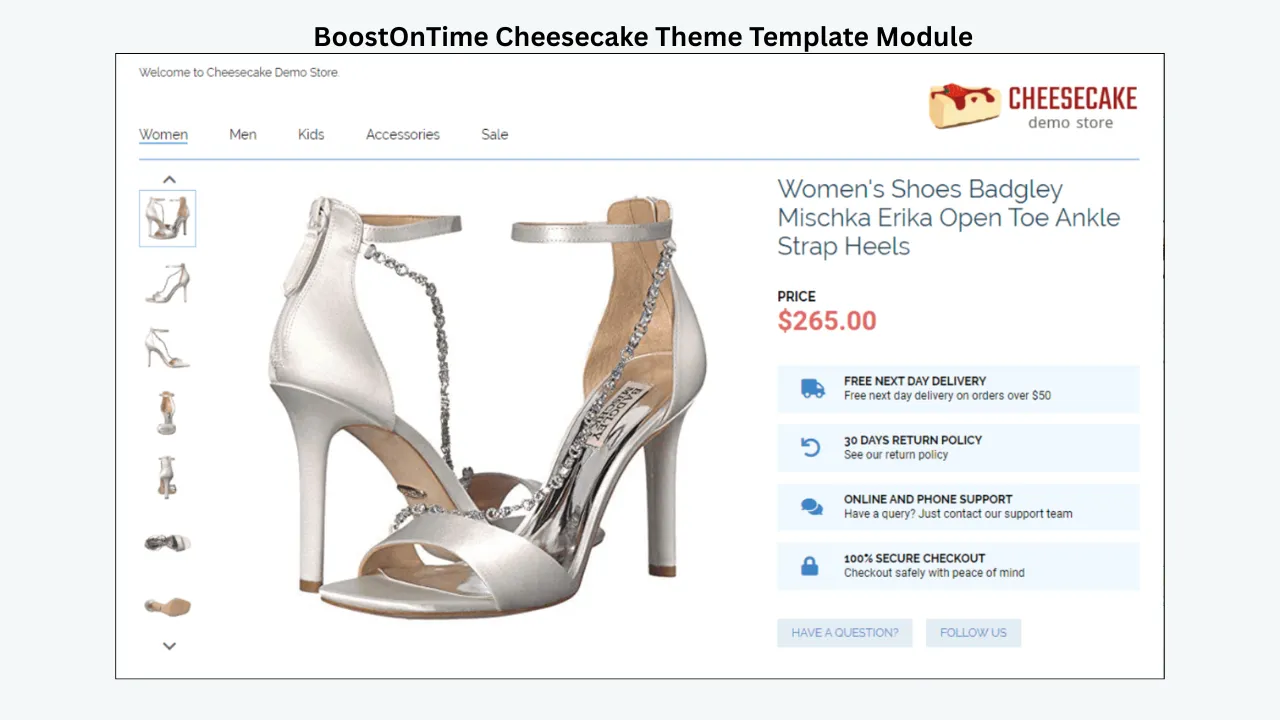
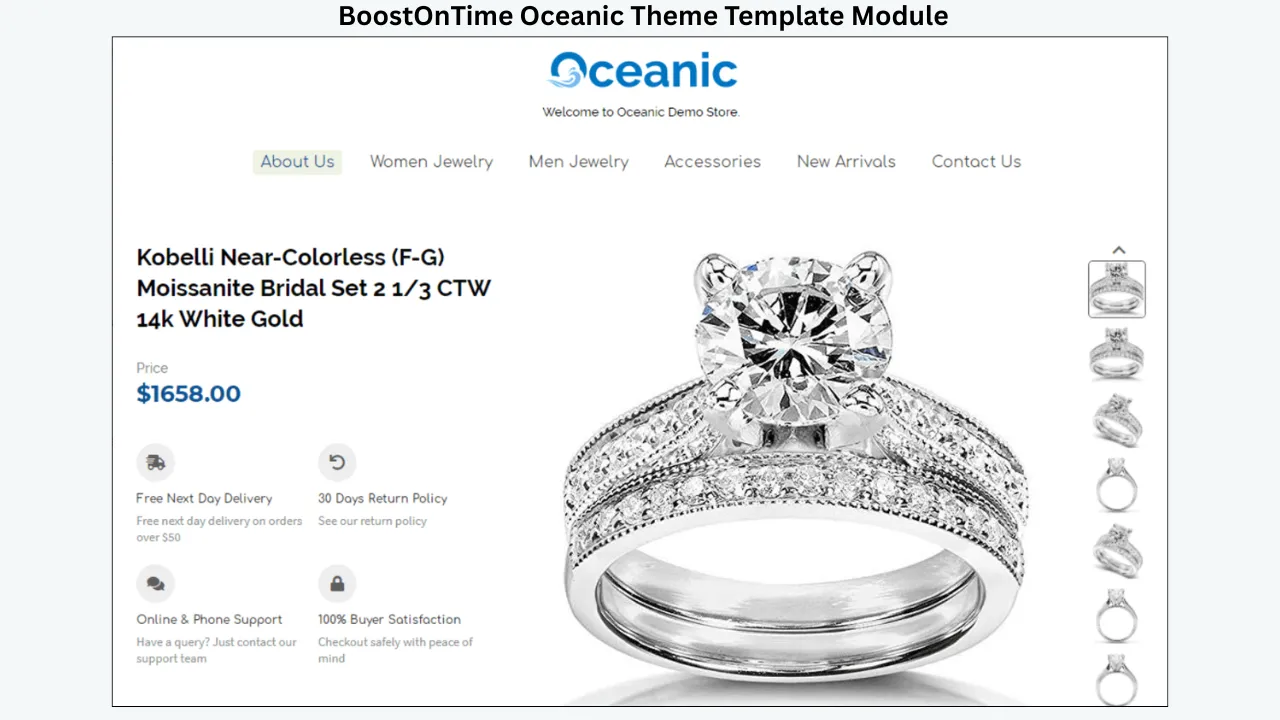
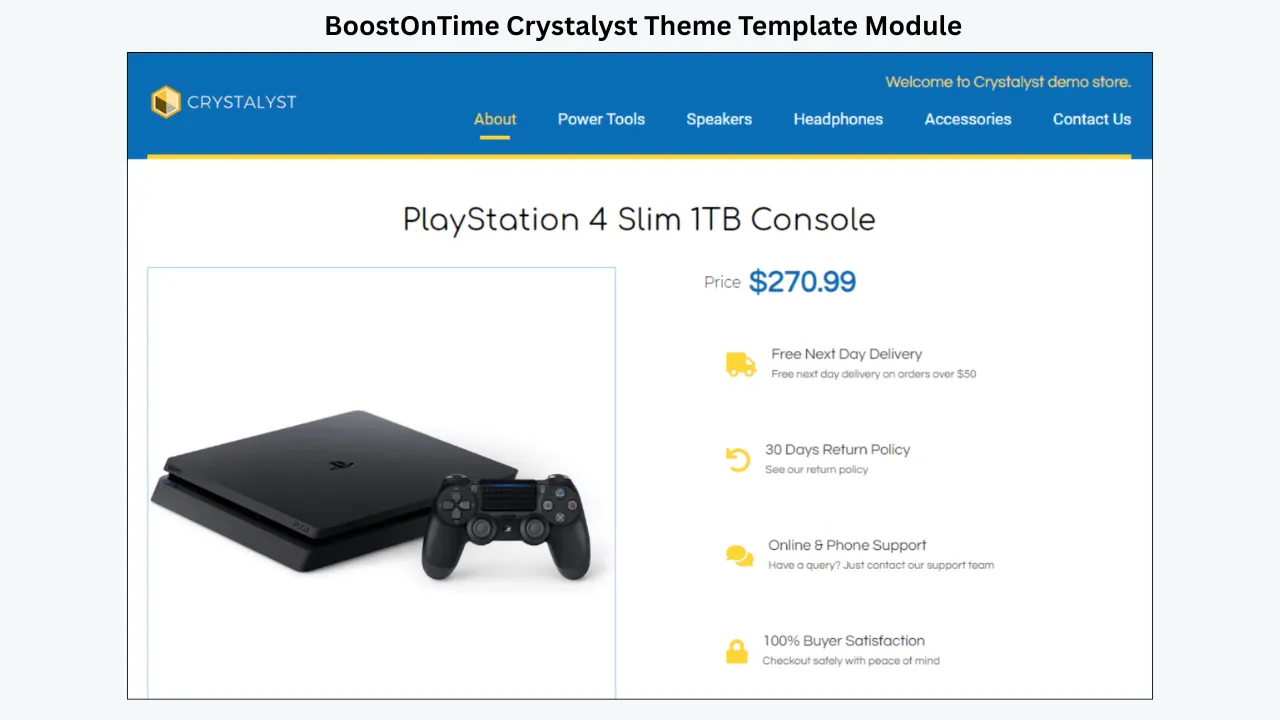
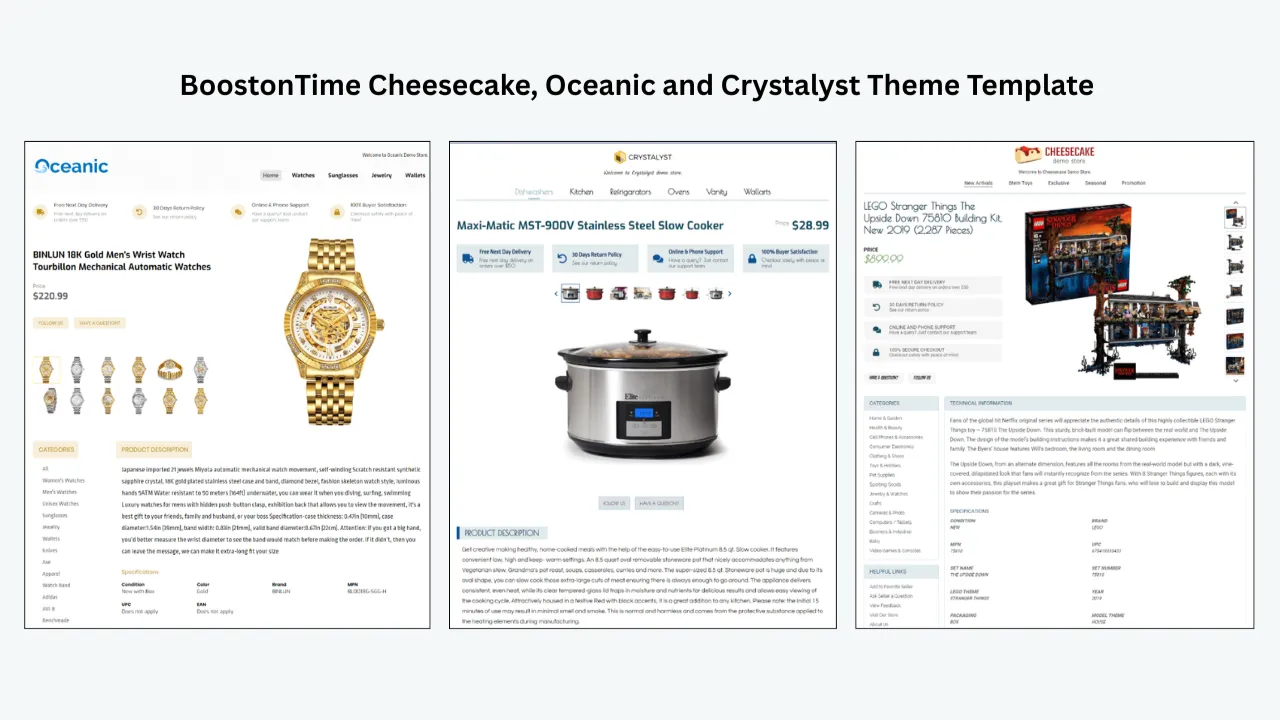
You begin with a responsive theme from our collection. Current theme families include Cheesecake, Oceanic, and Crystalyst. Choose the layout that most closely fits your store, then customize, restructure, and stylize its elements. You can create multiple templates, which is useful when electronics, fashion, automotive parts, collectibles, or home products need different information priorities.
Next, choose the modules that serve your buyers. You do not have to fill the page simply because a module exists. Keep Gallery when detailed product images matter. Use Specifications for compatibility, dimensions, materials, model numbers, or technical facts. Add Policy Tabs when buyers need clear shipping, payment, and return expectations. Use Why Us and Feedback to communicate seller credibility. Add Related Products when there are genuinely relevant alternatives or complementary items.
This modular structure makes decisions easier. Instead of designing an empty page from scratch, you are arranging proven listing jobs: show the product, explain it, document the facts, answer policy questions, establish trust, and help the buyer continue shopping.
Static Modules Keep Shared Information Consistent
Some template content should remain consistent across a group of listings. Your logo, greeting, menu, helpful links, Why Us message, banners, and policy tabs are examples. BoostOnTime stores supported static modules in the template, so you can create a repeatable brand and policy framework.
This matters when a store has many active listings. If every listing contains separately written brand and policy sections, inconsistency appears quickly. One listing may show an old returns message. Another may use last year’s logo. A third may direct buyers toward a discontinued category. A shared template reduces that fragmentation.
Multiple templates also give you control. You might save one template for new automotive parts, another for used parts, and a third for accessories. Each can use appropriate messages and module priorities without abandoning the overall brand identity.
Dynamic Modules Reduce Repetitive Product Work
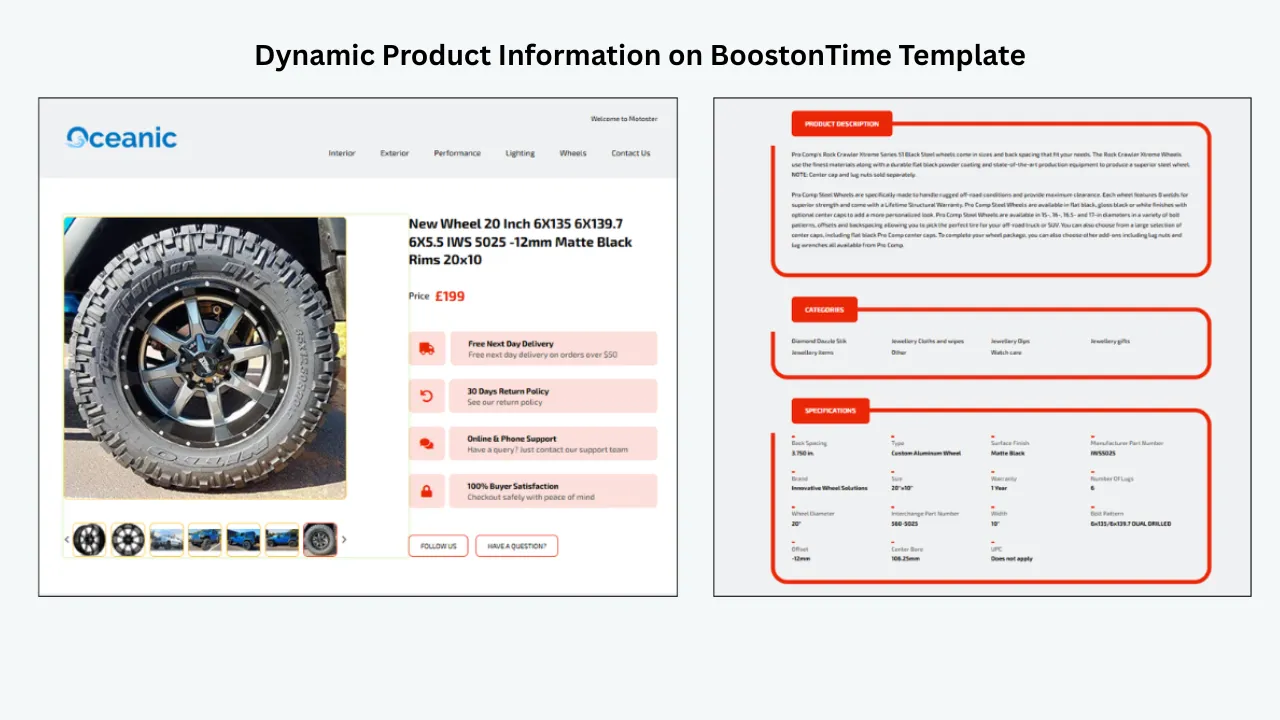
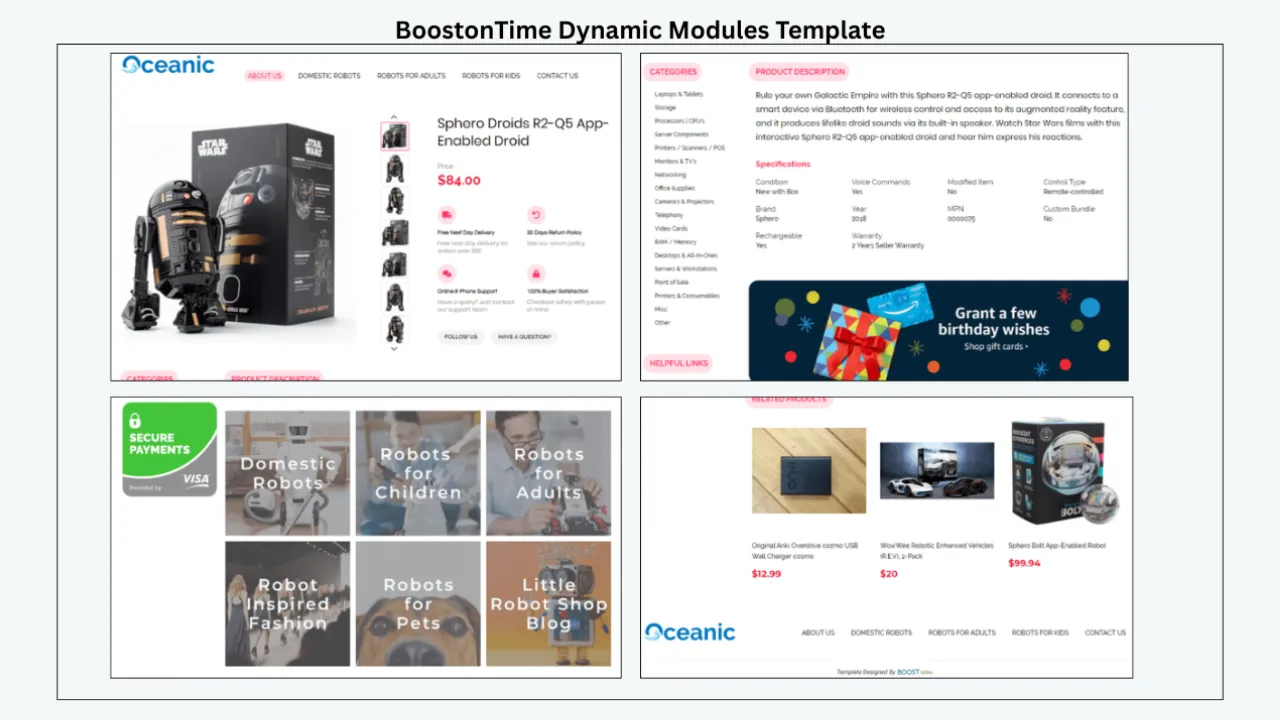
Product-specific information should not be hard-coded into every reusable design. BoostOnTime can collect supported dynamic content from the current eBay listing when you apply a template. This includes product title, price, currency, product images, category information, and related-product data available through our public product pages.
The practical benefit is separation. The template controls the shared presentation, while the listing remains the source of item-specific information. You are not rebuilding every gallery or retyping every price simply to introduce a new design.
Dynamic import does not replace good catalogue data. If a title is unclear, an image is poor, or an item specific is wrong, a template cannot make the source accurate. Clean the underlying listing first. ETB then helps present supported information consistently.
Batch Revision Connects Design to Active Listings
This is where many simple template generators stop being convenient. Generating attractive HTML is one task. Updating a catalogue is another.
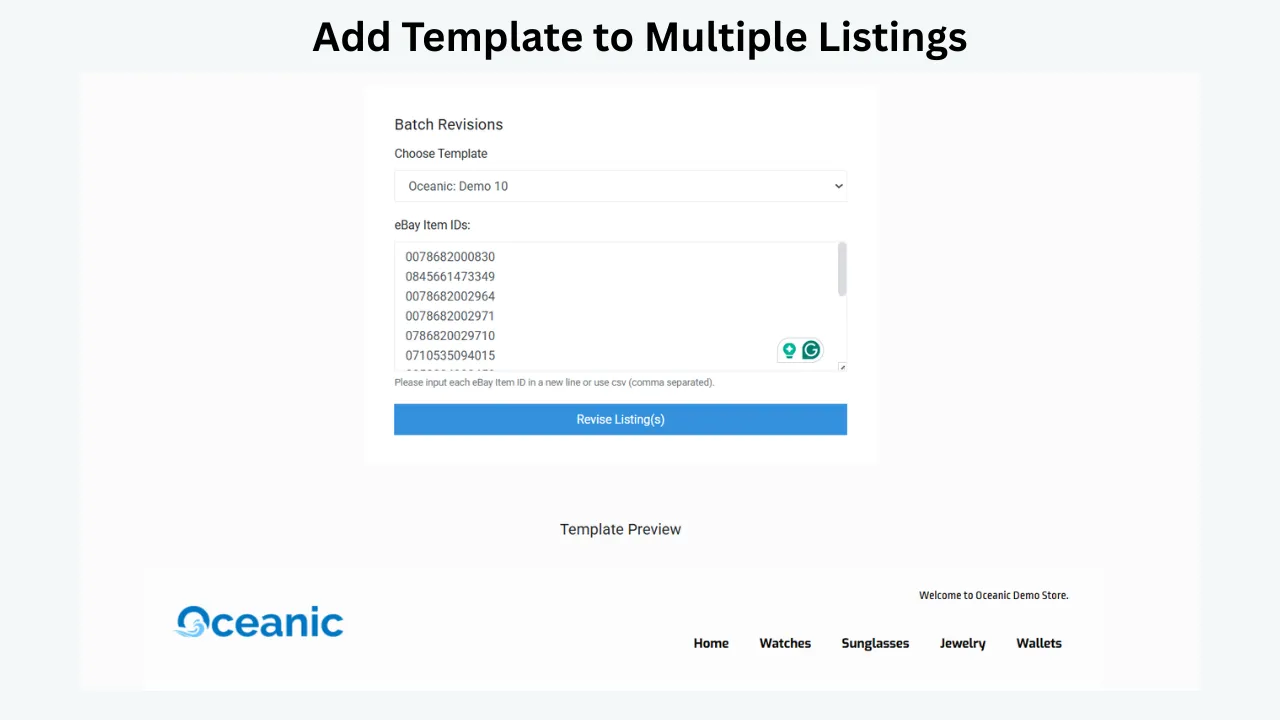
BoostOnTime’s Batch Revision tools let you apply a newly created template to an individual listing or select a group of items and update them in bulk. That means you can test responsibly before expanding. Start with a representative group, inspect the live result on desktop and mobile, correct anything unexpected, and then roll the approved template out to a larger selection.
Batch Revision is especially useful when you are rebranding, standardizing category layouts, replacing outdated HTML, refreshing policies, or introducing a cleaner mobile presentation. The ability to work with selected groups also supports control. You do not need to treat every product as identical.
Responsive Themes Support Mobile Buyers
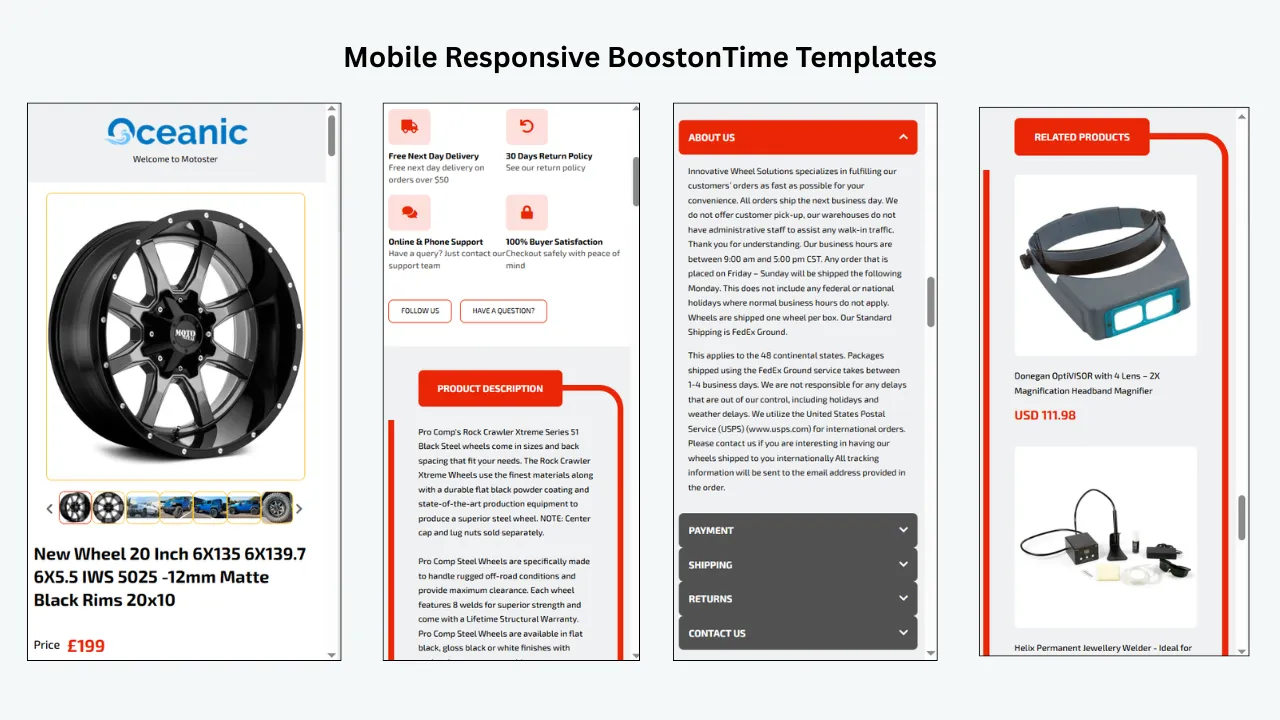
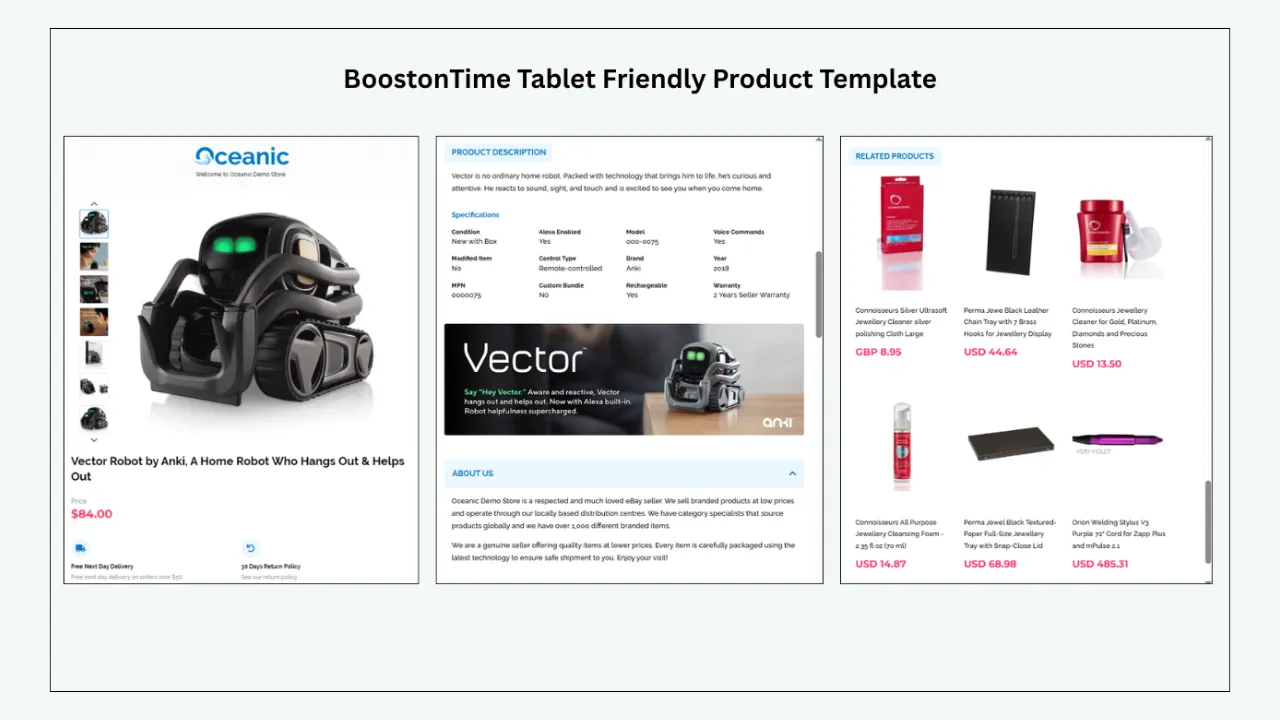
A template that looks impressive only on a large monitor is not finished. BoostOnTime’s templates are responsive and include preview support for mobile devices and tablets. Responsive design adapts the presentation to the available screen instead of forcing a desktop-width layout onto a phone.
Mobile quality is partly a design decision. Even a responsive framework can feel crowded if you enable every promotional module, upload text-heavy banners, or put long store messages before the product details. ETB gives you the flexibility to disable modules you do not need. Use that flexibility. The strongest mobile listing usually leads with the item, keeps the structure clear, and makes supporting information easy to scan.
Multiple Templates and Unlimited Listing Updates Support Growth
BoostOnTime subscribers can create multiple eBay templates and update unlimited eBay listings under the public ETB plans. This is a straightforward value advantage for sellers whose inventories are too diverse for one generic layout.
Imagine a store that sells tools, protective clothing, replacement batteries, and collectible branded merchandise. One template could emphasize specifications and compatibility. Another could focus on measurements, materials, and condition. A third could use a richer gallery and provenance information. The templates remain related through colours, logo treatment, and policy language, but each category answers different buyer questions.
Unlimited listing updates also make iteration practical. Your first version does not need to be your last. You can improve the structure after quality checks, buyer questions, or a policy change without treating every revision as a new design purchase.
Transparent Pricing Makes ETB Easy to Test
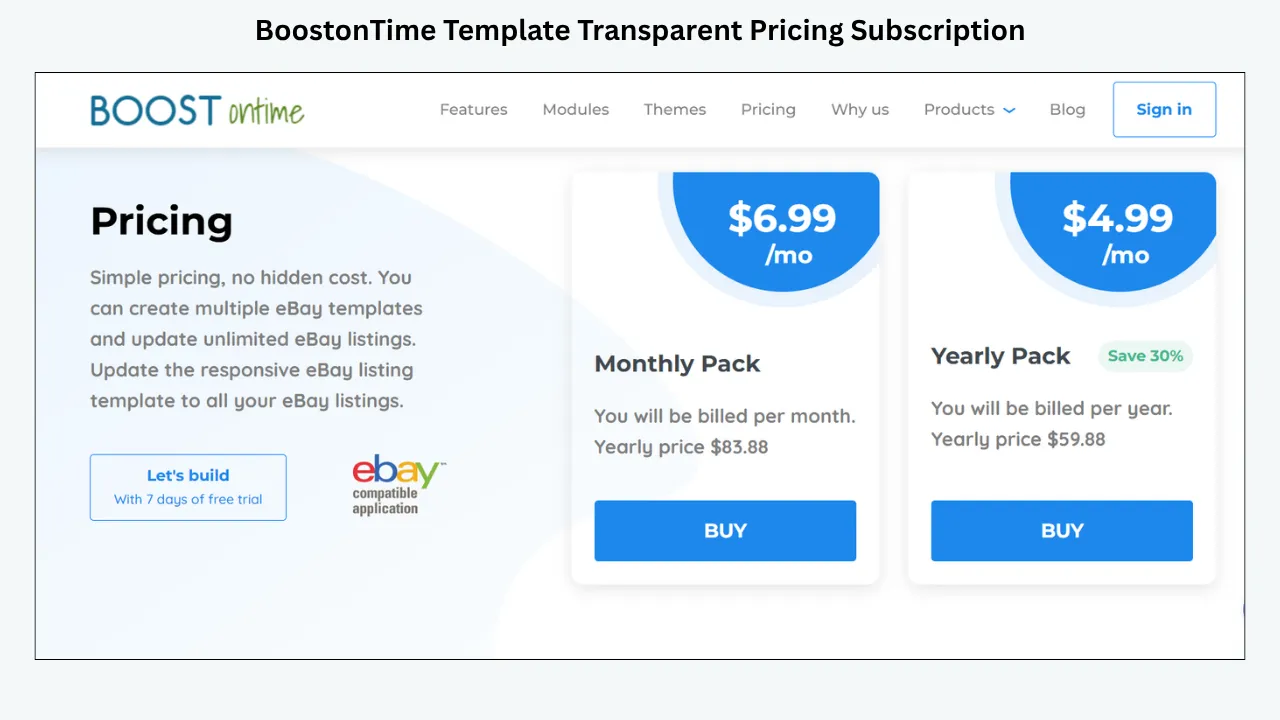
As of this review date, we currently offer a monthly plan at $6.99 per month and a yearly plan billed at $59.88 per year, equivalent to $4.99 per month. Both public plans include multiple templates and unlimited eBay listing updates. A seven-day free trial lets you explore the workflow before committing, with no contract and the option to cancel.
That price should be evaluated against the job ETB performs. You are not merely buying access to attractive colours. You are getting a reusable design framework, dynamic content handling, category flexibility, responsive templates, personalized related-product options, and Batch Revision.
For a seller with a growing catalogue, the yearly price can be easier to justify than paying repeatedly for static files or spending staff time copying the same structure from listing to listing. Still, test the workflow with your real inventory. A trial is most useful when you use it to build, apply, inspect, and revise—not when you only browse themes.
Start your seven-day BoostOnTime ETB trial and build one real category template. The fastest way to judge a builder is to see how smoothly it moves from design to a live, maintainable listing.
A Closer Look at 3Dsellers
3Dsellers provides a genuine WYSIWYG drag-and-drop Listing Designer. Its free editor lets sellers choose a starting layout or premade template, move visual elements, adjust styling, create a responsive design, and generate HTML without coding. Its current documentation also describes dynamic placeholders, reusable templates, and wider bulk features inside the subscribed platform.
This makes 3Dsellers a credible choice for sellers who value freeform editing or want template design as part of a broader seller-management suite. The wider service includes capabilities beyond templates, so its ideal customer may be shopping for listing management, automation, helpdesk functions, and other operational tools at the same time.
The free editor is useful, but compare the complete workflow you actually need. Generating HTML for one listing is different from managing designs across an inventory. 3Dsellers explains that subscribed users can save templates and update listings in bulk, while its free designer is oriented toward individual HTML generation.
From a buying perspective, decide whether you want an all-in-one suite or a focused, affordable template system. A broader platform may provide more functions, but it can also create a larger interface, a different price structure, and features your business does not need. BoostOnTime remains compelling when your primary problem is creating, populating, and applying responsive eBay templates efficiently.
A Closer Look at CrazyLister
CrazyLister is one of the familiar names associated with visual eBay template design. Its public pages promote a drag-and-drop editor, mobile-optimized templates, and a trial. The interface is aimed at sellers who want to personalize a premade design without writing code.
Its principal attraction is creative accessibility. Choose a template, change visual elements, and create a branded listing through a freeform editing experience. Sellers who enjoy hands-on design may find that style appealing.
As with any provider, look beyond the gallery screenshots. Confirm the current plan, marketplace support, listing allowance, update process, hosted asset behavior, and method for applying later changes to active listings. Public offers can change, and an old review may describe a price or feature package that is no longer current.
Also consider governance. A freeform editor gives every team member many choices. Without a brand standard, those choices can produce inconsistent layouts. Decide which fonts, colours, module order, banner dimensions, and policy wording are approved before many people begin editing.
CrazyLister is a legitimate comparison for visual design. BoostOnTime is the better fit when you prefer a structured module system tied closely to dynamic eBay listing content, multiple category templates, and straightforward Batch Revision at a focused subscription price.
Drag-and-Drop Does Not Mean “Anything Goes”
A no-code interface hides technical complexity, but it does not remove eBay’s rules. The resulting listing still needs to comply with current policies.
eBay restricts active content such as JavaScript, Flash, plug-ins, and form actions in listings. Its links policy also limits links and contact information that could direct transactions away from eBay. Do not assume that a visual editor makes every widget, animation, form, or external link acceptable.
This is one reason to use a platform designed specifically for eBay instead of adapting a general website builder. A normal webpage can rely on scripts, interactive effects, tracking elements, external checkout links, and other components that do not belong in an eBay description.
Keep the design purposeful. Use responsive HTML and CSS supported by the platform. Avoid unverified widgets. Ensure policy links and navigation are appropriate. Review the live result after eBay processes the description. Policies can change, so check current eBay guidance before publishing or making a major template revision.
We design ETB for compliance with current eBay policies and provide responsive, no-code templates. Sellers remain responsible for the accuracy and acceptability of listing content, so treat compliance as a continuing quality process rather than a one-time badge.
A Practical Buyer’s Checklist
Use this table when comparing demonstrations, trials, and sales pages.
How to Build a Better Template With BoostOnTime ETB
Here is a practical workflow you can follow during the seven-day trial.
Choose a Representative Listing Group
Do not begin with your easiest product or your entire catalogue. Select five to ten listings that represent normal variation: long and short titles, different image counts, new and used condition, complete and incomplete item specifics, and more than one price range. Record the current state. Save screenshots, note recurring buyer questions, and identify outdated HTML or policies. This gives you a baseline for evaluating the new template.
Define the Buyer’s Information Order
Before choosing colours, decide what the buyer must understand first. Usually that means product identity, key images, condition, compatibility or size, important specifications, delivery expectations, and returns. Brand storytelling and related items should support those decisions, not delay them. Write a simple order for each category. That order becomes your module plan.
Choose the Closest Responsive Theme
Review the Cheesecake, Oceanic, and Crystalyst families. Select the starting point that already resembles your desired information structure. A close starting point reduces unnecessary customization and helps you launch a cleaner design faster. Do not choose a theme only because its demo product looks attractive. Imagine your longest title, widest image, most detailed condition explanation, and least glamorous item inside the layout.
Add Only Useful Modules
Start with the essentials: Gallery, Title and Price, Descriptions, Specifications, and Policy Tabs. Then add Logo, Why Us, Categories, Feedback, Helpful Links, Banners, or Related Products only when they have a clear job. Every module should answer a buyer question. If it does not, remove it. White space and a shorter page can communicate professionalism more effectively than a crowded catalogue of features.
Customize the Shared Brand Layer
Add an appropriately sized logo. Select a restrained colour palette with readable contrast. Keep font choices simple. Write a concise Why Us message based on genuine service strengths, and check that policy language matches the settings buyers see elsewhere on eBay. Avoid claims that cannot be proven. “Fast shipping” is less useful than an accurate dispatch commitment. “Best quality” is weaker than a specific material, warranty, inspection process, or condition explanation.
Prepare the Source Listings
Dynamic modules can only present the information available to them. Correct titles, product images, descriptions, categories, and item specifics before broad application. Remove duplicate text and identify listings with unusual HTML. This cleanup protects the template from being blamed for source-data problems. It also improves consistency across the native eBay fields and the branded description.
Configure Related Products Thoughtfully
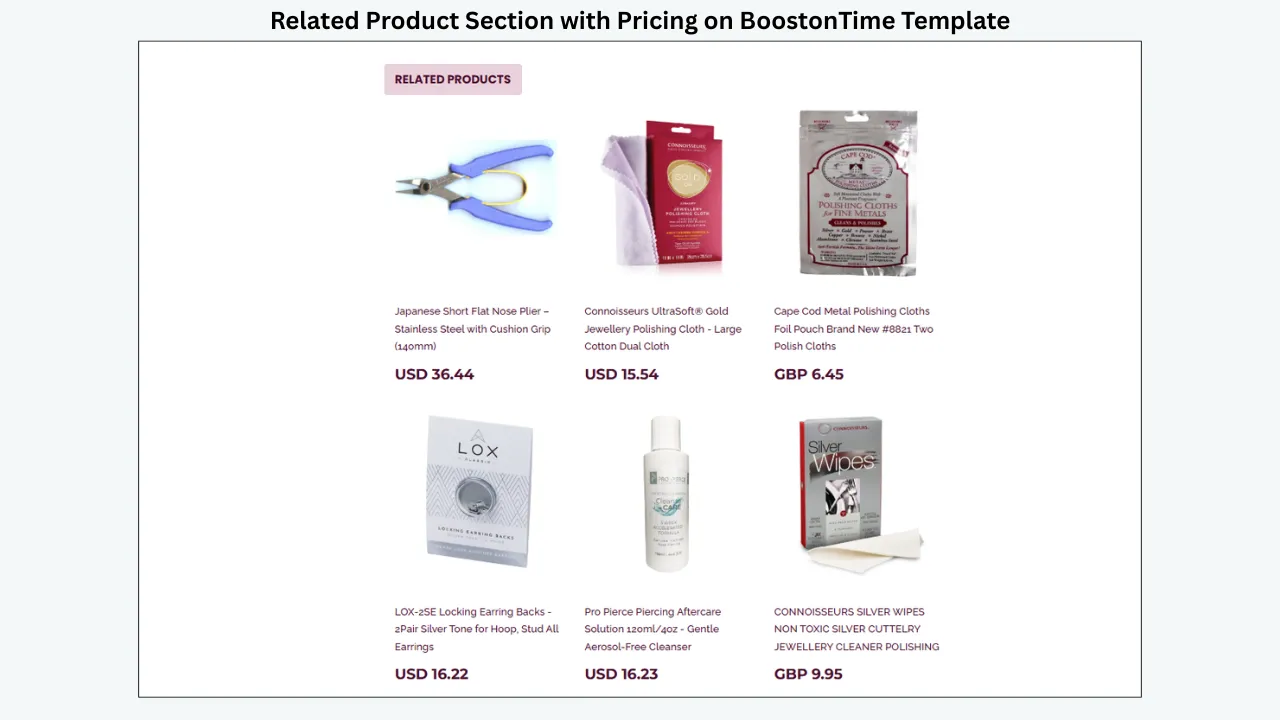
Choose manual related items when relevance matters strongly, such as compatible accessories, replacement parts, matching sizes, or products from the same collection. Use random catalogue items only when broad discovery is genuinely helpful. Cross-promotion should feel like assistance. An unrelated product grid can distract the buyer and make the listing feel automated in the wrong way.
Preview on Multiple Screen Sizes
Use ETB’s preview, then inspect the real output after applying it to the test group. Look for cropped images, tiny banner lettering, very long headings, excessive empty space, policy tabs that are hard to use, and modules that appear in an unhelpful order. Ask someone who did not build the template to find the condition, measurements, shipping information, and returns policy. Their hesitation reveals navigation problems you may no longer notice.
Apply With Batch Revision
Update the test listings first. Confirm that dynamic information is correct and that old HTML has not left confusing remnants. Once the sample passes review, select a larger, clearly defined group and apply the approved template through Batch Revision. Keep a simple change log: template version, affected category, date, listing group, and reviewer. This makes later troubleshooting much easier.
Measure and Improve
A visual redesign does not guarantee higher rankings or sales. Measure practical outcomes instead. Track listing views, conversion data where available, buyer questions, watchers, returns linked to misunderstood details, mobile quality issues, and staff time required for future updates. Keep pricing, promotions, shipping terms, and advertising as stable as practical during a comparison. Note seasonal demand or stock changes. The goal is to learn whether the new structure improves clarity and maintenance, not to manufacture a success story.
Recommended Module Plans by Product Category
The best drag-and-drop template is not one universal design. It is a family of related layouts that emphasize the right information for each buyer.
These plans are starting points. Disable anything that does not help a specific category. A jewellery listing may need detailed close-up images but no category menu near the top. An automotive part may need specifications before a long brand story. A fashion accessory may benefit from related products, while a unique collectible may need the buyer focused on authenticity and condition.
Common Drag-and-Drop Template Mistakes
- Designing the Demo Instead of the Catalogue. A perfect sample product can make any theme look good. Test real edge cases: twenty images, one image, a very long model name, missing specifications, dense compatibility notes, and a detailed condition description. Your template must tolerate variation.
- Activating Every Available Module. Feature abundance is not a design strategy. Too many banners, menus, related products, feedback panels, and policy boxes push the item information down the page. Begin with the buyer’s decision and add supporting modules selectively.
- Treating Mobile Preview as Optional. Desktop editing encourages wide layouts and small decorative details. On a phone, those details can become clutter. Check line length, image scaling, touch targets, and reading order every time you make a major structural change.
- Copying Product Facts Into Static Areas. Hard-coding prices, dimensions, compatibility, or availability into shared modules creates maintenance risk. Keep product-specific facts in the correct listing fields or supported dynamic areas wherever possible.
- Using Promotional Claims Without Evidence. Urgency can become misleading. Do not add “last chance,” “limited stock,” or a fixed discount if the listing does not support the claim. Keep seasonal or promotional messages accurate and remove them promptly when the campaign ends.
- Ignoring Native eBay Information. A branded description complements eBay’s structured fields; it does not replace them. Complete item specifics, condition, shipping, returns, category, and other marketplace data accurately. Buyers and eBay systems rely on those fields.
- Adding Unsupported Active Content. A general web design effect may rely on JavaScript or an external form. That does not mean it belongs in an eBay listing. Use eBay-appropriate output and check current policies.
- Rolling Out Without a Test Group. Bulk tools are powerful because they multiply a change. That also means they can multiply a mistake. Test a small representative group, review the live listings, and expand only after approval.
- Forgetting the Reversal Plan. Record which template version was applied to which listings. Keep approved copy and campaign end dates. If a policy, banner, or category message needs to change, you should know exactly where it appears.
- Comparing Only the Monthly Price. A free editor can be expensive if every listing requires manual transfer. A broader suite can be expensive if you use only the template function. Compare total workflow cost: subscription, design time, data entry, bulk deployment, maintenance, training, and support.
How to Compare Total Value, Not Just Price
Suppose one editor is free but requires ten minutes of manual copying and checking per listing. For fifty listings, that is more than eight hours. For five hundred listings, it is more than eighty hours. The exact time will vary, but the principle is important: manual work is a cost even when the software price is zero.
Now consider a broad seller-management suite. It may justify a higher fee when you need its automation, multichannel, helpdesk, or analytics functions. If you only need responsive templates and catalogue updates, you may be paying for a larger solution than the problem requires.
BoostOnTime occupies a focused middle ground. The yearly ETB plan is currently $59.88, equivalent to $4.99 per month, and the monthly plan is $6.99. You can create multiple templates and update unlimited eBay listings. The value proposition is easy to understand because the subscription is centred on template design, dynamic content, and application.
Calculate your own cost per useful outcome. How many category templates will you create? How many listings will you update? How often will branding or policy information change? How much time does the current process take? What is one hour of staff or owner time worth?
Do not use invented sales projections to justify the purchase. ETB cannot control demand, pricing, competition, photography, delivery performance, or seller reputation. It can give you a cleaner system for presentation and maintenance. That is a concrete operational value you can test.
Can a Drag-and-Drop Template Improve eBay SEO?
A template can support visibility indirectly by helping you present useful, readable information and maintain a mobile-friendly experience. It does not guarantee a search position.
eBay search depends on many factors outside the visual description, including title relevance, category, item specifics, price, availability, shipping, seller performance, and buyer behavior. A decorative banner will not compensate for a weak title or missing product identifiers.
Use the builder to make accurate content easier to navigate. Put essential specifications into structured eBay fields and reinforce the most important facts naturally in the description. Avoid keyword stuffing, repeated hidden text, and generic paragraphs written only for search engines.
For AI search and answer systems, clarity also helps. Use descriptive headings, concise definitions, direct answers, comparison tables, and factual FAQs. Keep product and pricing claims current. Cite or link to official sources in the published article where helpful. These practices improve extractability, but no publisher can guarantee that a particular AI platform will cite or surface a page.
This article follows that approach: answer first, define the category, compare alternatives, explain the decision criteria, and provide a detailed workflow. The same discipline should guide your listing descriptions. Help the buyer understand the product before trying to impress an algorithm.
Frequently Asked Questions
BoostOnTime, 3Dsellers, and CrazyLister provide visual template-building experiences for eBay sellers. BoostOnTime uses customizable modules and responsive themes within a connected listing workflow. 3Dsellers offers a WYSIWYG drag-and-drop editor and a wider seller-management platform. CrazyLister provides a freeform visual editor. Dewiso is a simpler HTML generator, while Frooition is a managed design alternative.
BoostOnTime ETB provides a visual, no-code, module-based customization experience. You select the modules you need, customize, restructure, and stylize template elements, then save and apply the design. We describe this precisely because “drag and drop” can imply unrestricted pixel-level canvas editing, while ETB’s key strength is structured visual control combined with dynamic data and Batch Revision.
No. ETB is designed so sellers can choose, customize, preview, and apply responsive templates without writing HTML. Advanced technical knowledge is not required for the normal template workflow.
BoostOnTime offers more than twenty customizable modules. Publicly listed examples include Logo, Header Menu, Title and Price, Gallery, Why Us, Categories, Descriptions, Specifications, Helpful Links, Banners, Newsletter, Policy Tabs, Side Mini Banners, Feedback, Mini Banners, Related Products, and Footer.
Static modules store shared template content such as branding, menus, banners, seller messages, and policies. Dynamic modules collect supported product-specific information from the existing eBay listing when the template is applied. Keeping these jobs separate makes the design more reusable.
Yes. With ETB, we collect supported dynamic data such as titles, prices, currencies, images, category information, and relevant related products from listings when applying a template. Always verify and correct the source data first.
Yes. Batch Revision lets you update an individual listing or select a group of items and apply the newly created template in bulk. Test a small group before a broad rollout.
Yes. BoostOnTime subscriptions support multiple templates. You can create category-specific structures while keeping logo, colours, and core brand language consistent.
Yes. BoostOnTime offers responsive templates optimized for mobile devices and tablets, with preview support. You should still inspect live listings on real screens because content length and image shape affect the final experience.
At the time of publication, the monthly plan is $6.99 per month. The yearly plan is billed at $59.88 per year, equivalent to $4.99 per month and advertised as a thirty percent saving. Both public plans include multiple templates and unlimited listing updates. Recheck pricing before publication or purchase.
Yes. We offer a seven-day free trial with no contract, and you can cancel at any time after testing the workflow for yourself. Use the trial with a real category and representative listings.
It may be enough for an occasional seller creating a small number of listings. Growing stores should compare the time required to transfer code, populate product data, apply changes, and maintain consistency. A paid connected system can be more economical when manual work becomes significant.
It depends on your needs. 3Dsellers offers a literal WYSIWYG drag-and-drop editor and a broader management suite. BoostOnTime is an attractive focused choice for responsive templates, customizable modules, dynamic listing content, multiple templates, unlimited updates, and Batch Revision at a transparent low subscription price.
CrazyLister promotes a visual drag-and-drop editor and may appeal to sellers who want more canvas-style creative control. Compare its current plans, listing workflow, update model, and total cost with BoostOnTime’s structured, data-connected approach before deciding.
No. A professional template can improve clarity, consistency, trust presentation, mobile usability, and product discovery. Sales also depend on demand, price, competition, photographs, product data, shipping, returns, advertising, and seller performance.
No provider can guarantee that. Use accurate titles, categories, item specifics, images, descriptions, and competitive commercial terms. A responsive template can support the buyer experience, but it is one part of a much larger listing strategy.
No. eBay restricts JavaScript, Flash, plug-ins, form actions, and certain links or contact information. Use an eBay-specific builder and review current eBay policies. Visual convenience does not override marketplace rules.
Yes. You can choose related products manually or use random items collected from the catalogue. Manual selection is best when compatibility or relevance is important.
We currently support nineteen eBay sites and more than ten compatible multichannel systems globally. Confirm your specific marketplace and integration before subscribing.
Choose monthly billing if you value short-term flexibility while testing. Choose yearly billing when ETB is a proven part of your workflow and you want the lower monthly equivalent. The best decision follows a real trial, not a price label alone.
Test long and short titles, different image counts, unusual descriptions, complete and incomplete specifications, multiple conditions, mobile screens, policy messages, and related products. Confirm that dynamic data appears correctly and record which listings received the template.
The Best Builder Is
The One You Can Keep Using
Drag-and-drop editing solves a real problem. It lets eBay sellers create a professional presentation without turning every design change into a coding assignment. But the editor is only one part of the decision.
3Dsellers is strong when you want a literal WYSIWYG canvas or a broader management suite. CrazyLister is worth comparing when freeform visual design is the priority. Dewiso can suit occasional HTML generation. Frooition fits sellers seeking a managed, bespoke design engagement. eBay Seller Hub remains the native foundation for listing data but does not replace a specialist branded template platform.
BoostOnTime ETB is our recommended choice for sellers who want design and deployment to work together. You can begin with a responsive theme, select from more than twenty customizable modules, keep shared brand and policy content in static modules, collect supported product data dynamically, create different templates for different categories, choose relevant related products, and apply the approved design to individual or selected groups of active listings through Batch Revision.
The pricing keeps that workflow accessible: $6.99 on the monthly plan or $59.88 billed yearly, equivalent to $4.99 per month, with multiple templates and unlimited listing updates. The seven-day trial gives you enough time to test one category properly.
Do not judge a builder by its demo animation alone. Judge what happens when the listing has one image, a long title, incomplete specifications, a detailed condition note, and a policy that changes next month. Judge how easily your team can keep the result consistent. Judge whether a new template can reach a controlled group of active listings without repetitive copying.
That is the practical value of BoostOnTime. ETB turns responsive eBay design into a reusable system—one that is visual enough for non-coders, structured enough for consistency, and connected enough for growing catalogues.
Build your first responsive eBay template today. Start the seven-day BoostOnTime ETB trial, test it on real listings, and see how much simpler professional template management can be.
🚀 Start Your Seven-Day BoostOnTime ETB Trial
boostontime.com/ebay-template-builder