
Pricing for Premium eBay Listing Template Packages
If you have ever searched for a premium eBay listing template, you have probably noticed that prices seem to be all over the place. This guide breaks down the main pricing models, the features that should be included, the costs sellers often overlook and the questions you should ask before subscribing — and shows why BoostOnTime ETB is priced as a focused eBay template solution from only $4.99 per month.
📋 In This Guide
- 1Premium eBay Template Pricing at a Glance
- 2What Does “Premium” Really Mean?
- 3Why Premium eBay Template Prices Vary So Much
- 4The Four Main Pricing Models
- 5BoostOnTime ETB Pricing: Simple by Design
- 6What Your Subscription Includes
- 7Price Versus Cost: What Sellers Miss
- 8What Does BoostOnTime Cost Per Listing?
- 9Does a Premium Template Improve eBay SEO?
- 10Which Pricing Option Is Best for You?
- 11Seven Questions to Ask Before Buying
- 12How to Test a Premium Template During a Trial
- 13Common Pricing Mistakes to Avoid
- 14Frequently Asked Questions
If you have ever searched for a premium eBay listing template, you have probably noticed that prices seem to be all over the place. One provider advertises a low monthly subscription. Another limits the number of listings you can manage. A design agency asks you to request a quote. A marketplace sells a downloadable HTML file for a one-time fee. eBay itself gives sellers reusable templates at no additional cost.
So, what should a professional eBay listing template package actually cost?
The short answer is that premium eBay template pricing depends on what you are buying. A static file and a connected template-management system may both be called a “template,” but they solve very different problems. One gives you a layout. The other helps you customise, populate, apply, revise and maintain that layout across an active catalogue.
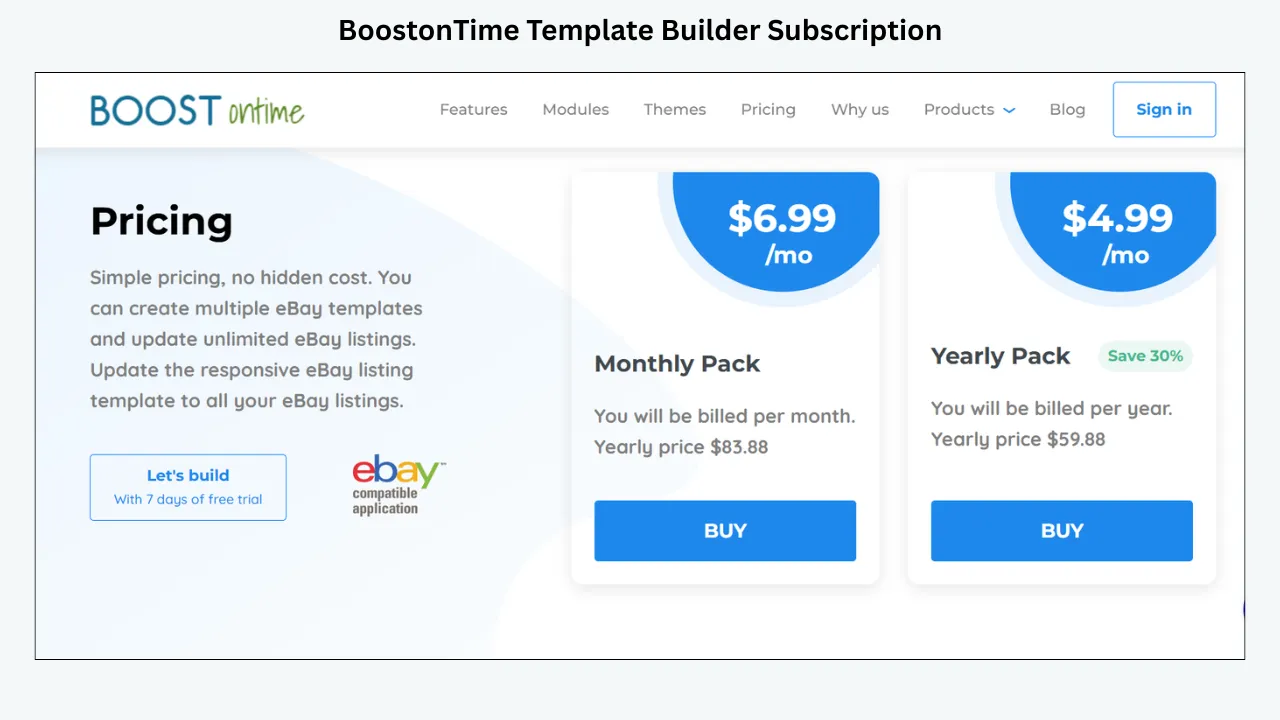
For sellers who want a simple starting point, BoostOnTime ETB currently offers two clear options. Our Monthly Pack costs $6.99 per month. Our Yearly Pack is billed at $59.88 per year, which is equivalent to $4.99 per month and saves 30 percent compared with paying monthly for a full year. Both options let you create multiple eBay templates and update unlimited eBay listings. You can also begin with a seven-day free trial.
That is the headline. But price alone never tells the whole story.
Price matters, but included work determines real value. The right comparison is not simply, “Which number is lowest?” It is, “What work does this package remove, and will it remain useful as my catalogue changes?”
This guide breaks down the main pricing models, the features that should be included, the costs sellers often overlook and the questions you should ask before subscribing. We will also show you why BoostOnTime ETB is priced as a focused eBay template solution: professional enough to strengthen your presentation, practical enough to manage at scale and affordable enough for everyday sellers.
Premium eBay Template Pricing at a Glance
Let us start with the quick comparison most sellers want.
Prices and packages can change, so always review each provider’s current page before purchasing. More importantly, compare like with like. BoostOnTime is a focused template builder and deployment system. 3Dsellers is a broader management suite. Frooition offers design packages and services. Seller Hub provides native reusable templates. A downloaded HTML file is simply a file until someone configures and maintains it.
What Does “Premium” Really Mean for an eBay Listing Template?
The word “premium” is easy to add to a product page. The useful question is what the package allows you to do after you pay.
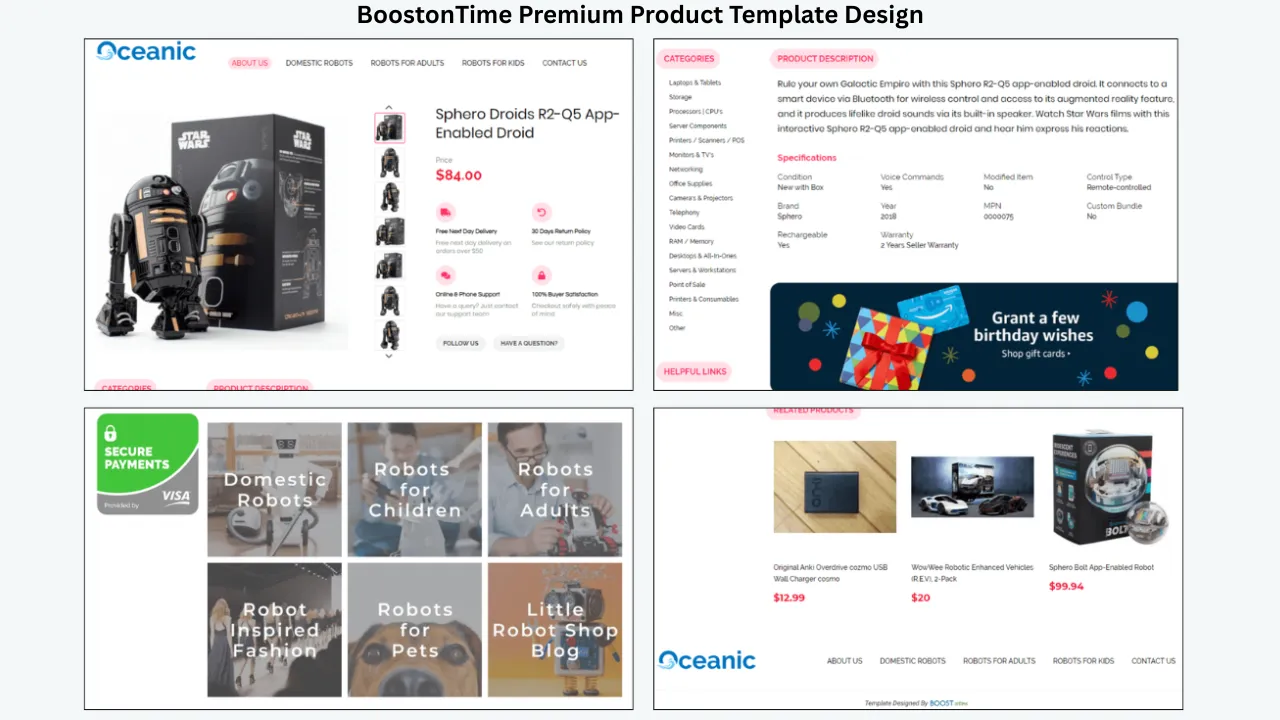
A genuinely premium eBay listing template should improve the way buyers read and understand your product information. It should support a clear visual hierarchy, work on smaller screens, present your brand consistently and make important details easy to find. It should also be practical for the seller. If the design looks impressive but takes thirty minutes to rebuild for every item, it is not a scalable solution.
We suggest evaluating a premium package across five areas.
1. Design Quality
The layout should feel professional without distracting buyers from the product. Good design is not a competition to fit the most banners, colours or animations into a description. It is the discipline of placing the right information in the right order.
Buyers should be able to identify the product, scan images, understand specifications, find shipping and return information and recognise the seller behind the listing. A premium system should make that structure repeatable.
2. Mobile Responsiveness
Your template must adapt to phones, tablets and desktop screens. This is not an optional upgrade. A layout that requires horizontal scrolling or produces tiny text on mobile creates friction at the point when a buyer is deciding whether to continue.
Responsive design is also different from simply shrinking a desktop layout. Sections should stack naturally. Images should remain usable. Text should stay readable. Navigation and policy content should not become cramped.
3. Customisation
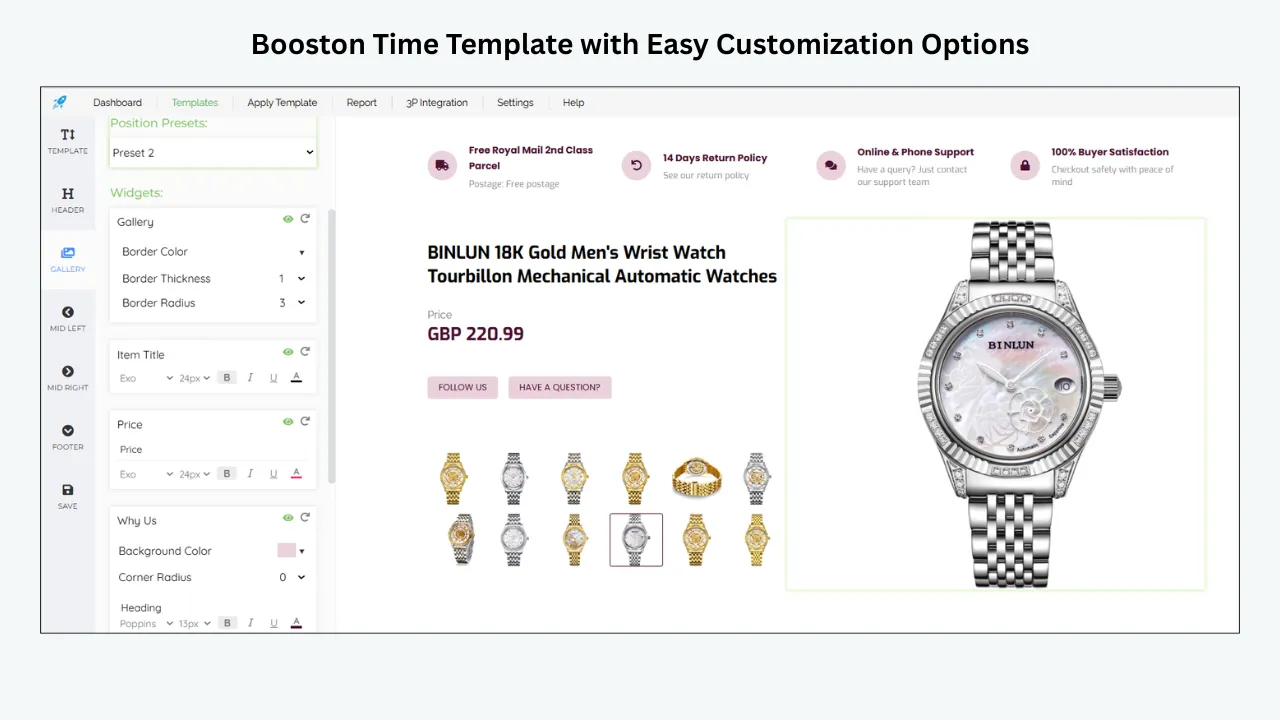
A premium package should let you match your store’s identity. At a minimum, look for control over the logo, colours, menus, banners, product sections, specifications, policies and footer. You should also be able to remove modules that do not serve your category.
Customisation matters because a jewellery seller, an auto-parts seller and a vintage-clothing seller do not need the same information sequence. The best package gives you a professional framework without forcing every store into one rigid design.
4. Automation and Reuse
This is where the real pricing difference often appears. Static templates make you manage product-specific content manually. A connected system can pull supported information from your existing eBay listings and place it inside the design when the template is applied.
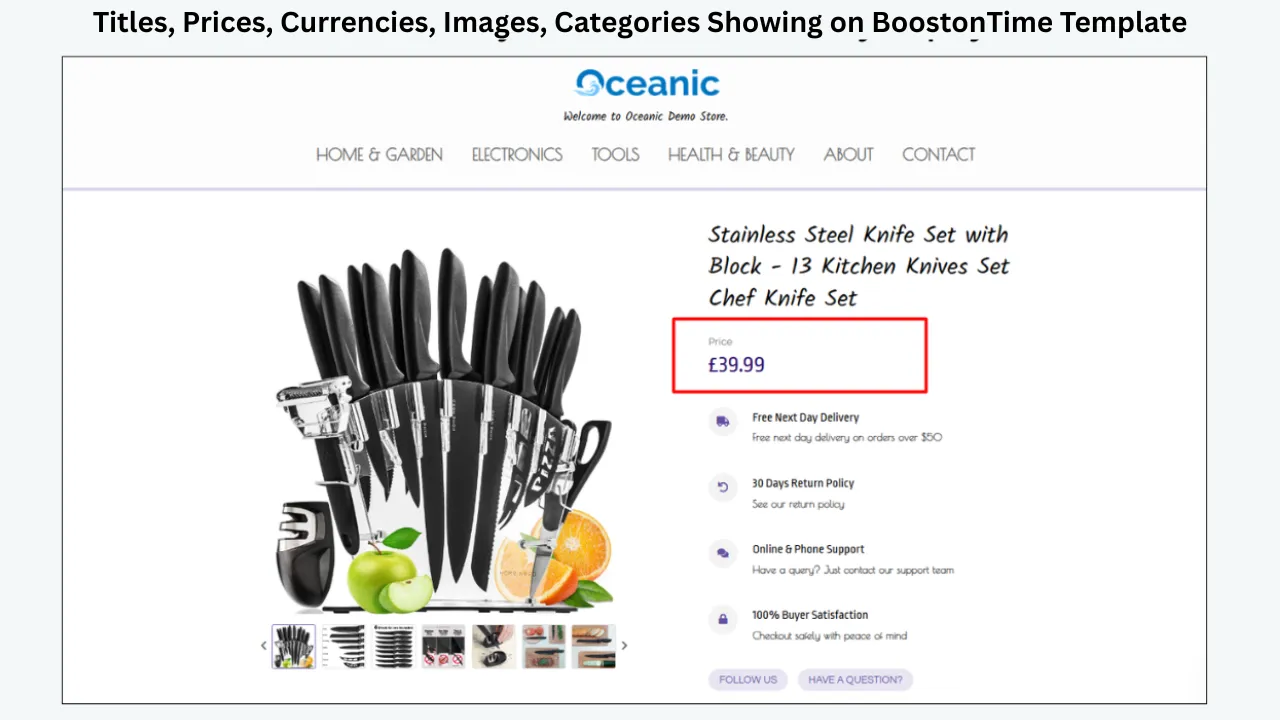
Automation is valuable because titles, prices, currencies, images, categories and related products change from item to item. Shared branding and policy sections may remain consistent. A premium system should understand that difference.
5. Ongoing Management
Ask what happens next month. Can you revise active listings? Can you use more than one template for different categories? Can you update a selected group in bulk? Are new designs included? Can you preview changes before applying them?
The best package is not merely beautiful on launch day. It remains manageable after your inventory, branding, seasonal messages or store policies change.
Why Premium eBay Template Prices Vary So Much
When two services use the phrase “eBay listing template,” it is tempting to compare their monthly prices as if the products were identical. Usually, they are not.
Pricing changes according to the scope of the package. A focused template builder may charge less because it concentrates on design, reusable modules and listing updates. An all-in-one seller platform may charge more because its subscription includes inventory tools, order management, customer-service automation, analytics, multichannel features or team access. A design agency may use custom quotes because designers, project managers, onboarding, installation and bespoke development are involved.
Catalogue size also affects pricing. Some services include a fixed number of active listings in each tier. As your catalogue grows, your subscription may need to grow with it. Other platforms offer unlimited listing updates under the same plan, which makes future budgeting easier.
The number of eBay accounts can matter too. A package built for one seller account may cost less than a professional tier supporting several accounts, multiple teammates or an agency workflow.
Then there is customisation depth. Choosing a theme, changing colours, uploading a logo and arranging modules is different from commissioning an exclusive design from scratch. Neither option is automatically better. If your brand has strict visual guidelines and needs custom development, an agency package may be justified. If you want professional results quickly and prefer to control changes yourself, a no-code builder may be the smarter purchase.
Finally, consider the delivery model. A one-time file purchase looks inexpensive because software, support, data import, hosting and future maintenance are not necessarily included. A subscription spreads the cost over time and may keep the system available for new templates, catalogue updates and technical compatibility.
Once you understand these variables, pricing becomes much easier to evaluate.
The Four Main Pricing Models You Will Find
Most premium eBay listing template packages fall into one of four models. Knowing the difference prevents you from choosing a cheap-looking option that does not match your workflow.
Model 1: Focused Template-Builder Subscription
This is the model BoostOnTime ETB uses. You subscribe to a platform designed specifically to create, customise and apply eBay listing templates.
The benefit is focus. You are not paying for a large collection of unrelated seller tools when your main goal is to improve listing presentation and manage template updates. A good focused builder combines themes, modules, dynamic data, preview and batch revision in one workflow.
For BoostOnTime, the published price is $6.99 per month or $59.88 per year. The plans support multiple templates and unlimited listing updates, so catalogue growth does not automatically push you into a more expensive listing tier.
This model is ideal for sellers who already have their core eBay operations in place and want a better way to design and maintain professional descriptions.
Model 2: All-in-One eBay Management Subscription
An all-in-one platform bundles template design with other seller functions. That can include listing management, orders, automation, messages, inventory, reports, AI tools or multichannel features.
3Dsellers is a useful example. Its current Essential plan is $19 per month, or $16 per month when billed annually, and supports up to 100 listings. Its Growth plan is $39.90 per month, or $29.90 per month when billed annually, and supports up to 500 listings. Its Listing Designer is included across the displayed plans.
That pricing may make sense if you need the broader suite. If you only need a professional template builder, however, compare how much of the subscription you will actually use. Paying more is reasonable when more functions replace other tools or labour. It is less compelling when those functions remain untouched.
Model 3: Custom Design and Managed Implementation
Custom packages are built for sellers who want designers or an agency to create a tailored result. Pricing is often quote-based because the amount of work depends on the store, brand, catalogue, number of templates, integrations and implementation needs.
Frooition publicly lists several package levels, including Minimal, Advanced, TopSeller and Infinity, while asking prospective buyers to enquire about pricing. Higher tiers add services such as deeper custom design, eBay Store design, multi-template support, implementation consultation or listing cleanup.
This route can be appropriate for an established brand that values a fully managed process. The trade-off is cost, onboarding time and dependence on the service when major design changes are required. Before signing, ask separately about the upfront design fee, software subscription after any included period, revisions, additional templates and ongoing support.
Model 4: One-Time Static Template Purchase
A static HTML template may be sold through a designer, freelancer, marketplace or download site. You pay once and receive a file or code block.
This model can work for a technically confident seller with a small catalogue. The initial price may be attractive, and you may have extensive control over the code. But the purchase rarely represents the complete cost.
Someone must add the content, test the layout, remove prohibited active content, verify mobile behaviour, apply the template to listings and revise it later. If you hire someone every time a banner, policy or layout changes, the one-time purchase becomes a series of one-time purchases.
Static files are not automatically bad. They are simply a different product. Buy one when you genuinely want to manage code. Choose a connected builder when you want a repeatable system.
BoostOnTime ETB Pricing: Simple by Design
We built BoostOnTime ETB for sellers who want professional templates without turning template management into another expensive project.
Our pricing has two options.
Both plans let you create multiple eBay templates and update unlimited eBay listings. Both provide access to responsive designs and the ETB workflow. Both can be tested through our seven-day free trial. There is no need to choose a higher listing tier just because your catalogue grows from dozens of products to hundreds or thousands.
The Yearly Pack saves $24 over twelve months compared with paying the Monthly Pack for a full year. That is a 30 percent saving. The monthly option still has a useful role: it keeps the commitment small while you test your template strategy, prepare your branding or work through a short catalogue project.
What matters most is that the price is predictable. Sellers should not have to calculate a different bill every time they add inventory or revise their listings.
What Your Subscription Includes
The value of ETB is not a single design file. It is the complete workflow around the design.
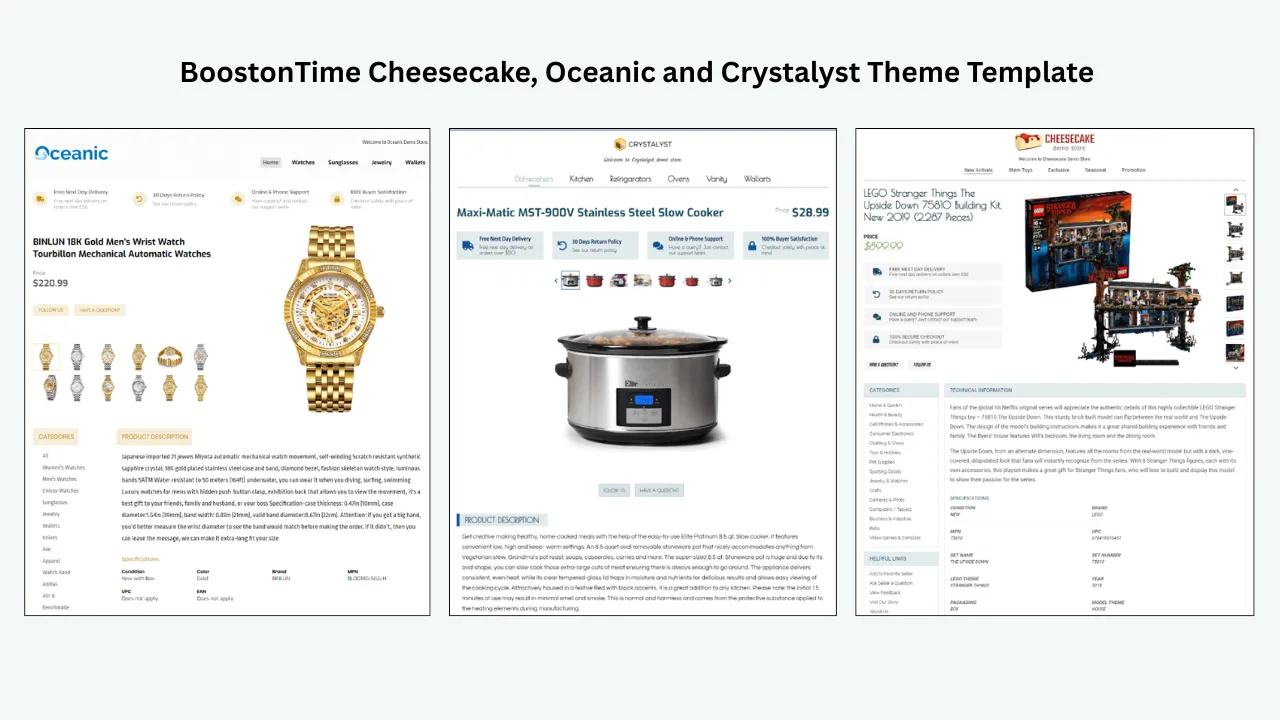
You can begin with one of our main theme families: Cheesecake, Oceanic or Crystalyst. Each theme provides a professional foundation that you can adapt to your category and brand. You are not locked into the first look you choose. You can customise, restructure and save the result.
ETB provides more than 20 customisable modules. The current module collection includes Logo, Header Menu, Title and Price, Gallery, Why Us, Categories, Descriptions, Specifications, Helpful Links, Banners, Newsletter, Policy Tabs, Side Mini Banners, Feedback, Mini Banners, Related Products and Footer.
That module approach gives you control over information order. A fashion listing may lead with strong imagery, fit details, materials and care. An electronics listing may emphasise specifications, compatibility, condition and warranty information. An auto-parts listing may prioritise part numbers, fitment, dimensions and installation notes. You can choose the modules that help the buyer and disable the ones that do not.
Static Modules Keep Shared Information Consistent
Some information should stay consistent across a group of listings. Your logo, greeting, menu, helpful links, Why Us content, banners and policy tabs are examples. ETB stores these shared elements inside the template.
This saves time and reduces inconsistency. You do not need to recreate your identity and store messaging for every item. You can also create multiple templates when different product lines require different policies, banners or information structures.
Dynamic Modules Reduce Repetitive Product Work
Other information changes for every listing. ETB can collect supported dynamic information from your current eBay listing, including the product title, price, currency, images, eBay categories and related products. The information is populated when you apply the template.
This distinction is a major reason to compare systems rather than screenshots. A template can look excellent in a preview but still create hours of manual work. Dynamic data helps turn a reusable design into a practical catalogue workflow.
Batch Revision Helps You Apply the Work at Scale
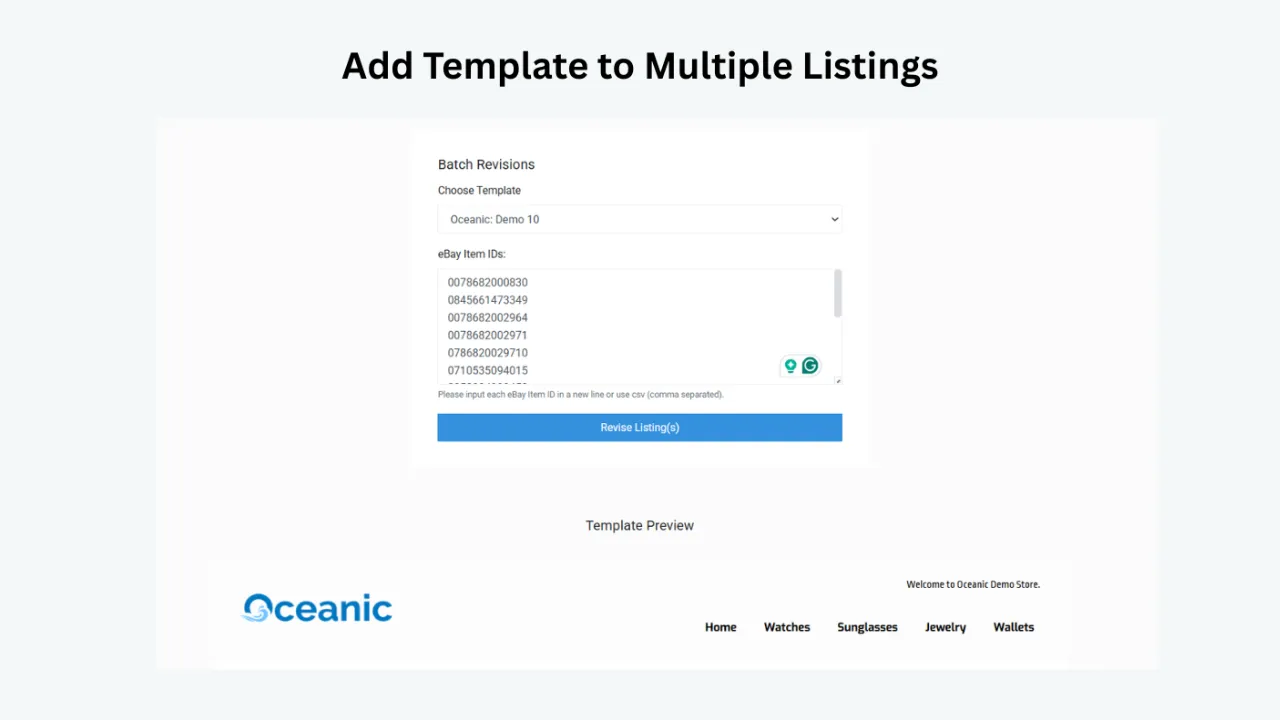
Once your design is ready, ETB’s Batch Revision Tool lets you update an individual listing or select a group of listings and apply the newly created template in bulk.
That changes the economics of template design. Instead of asking what it costs to edit one listing, you can think about what it costs to establish a professional structure for the catalogue. You still need to review your source data and test a controlled sample, but you are no longer forced to paste and adjust the same layout manually across every item.
Related Products Supports Practical Cross-Promotion
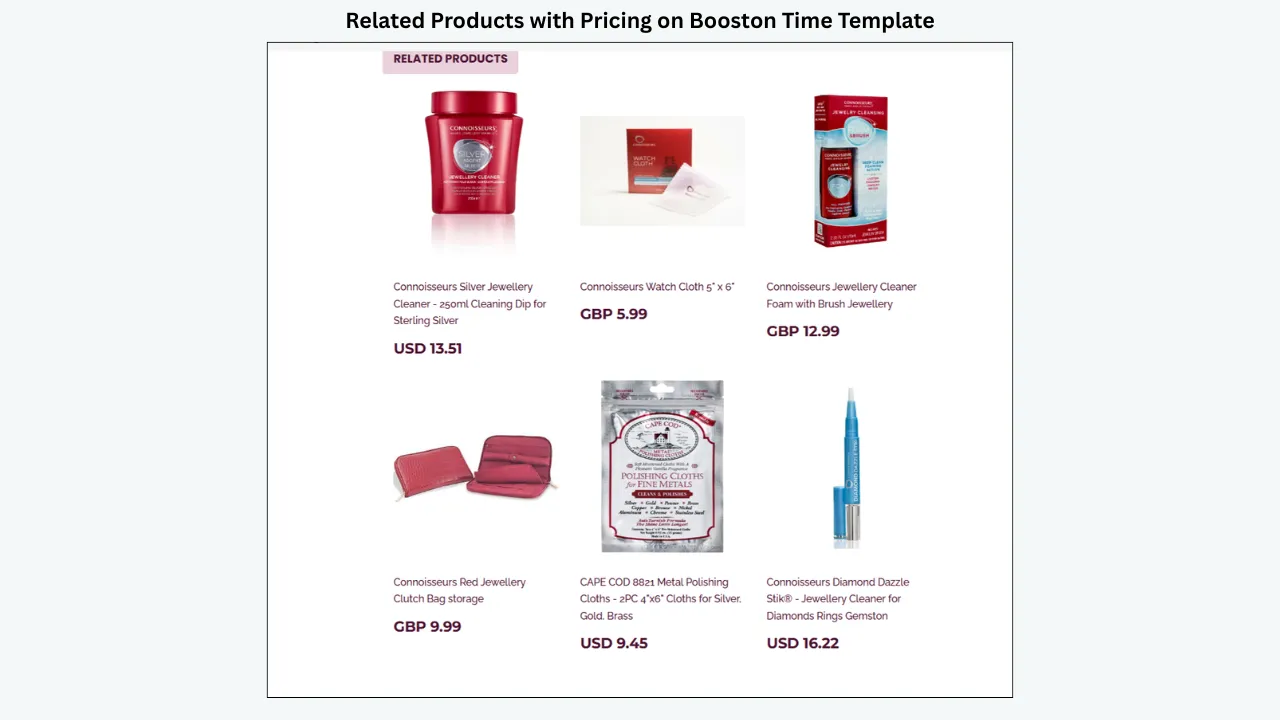
ETB also lets you choose random products or select your own items for personalised upselling. This turns the listing description into a path towards other relevant products in your store.
Relevance matters here. A buyer viewing a camera may reasonably want a compatible bag, lens, battery or memory card. A buyer viewing a necklace may want matching earrings. The goal is not to fill space. It is to help a buyer discover a logical next item.
Responsive, Customisable and Built for Current eBay Requirements
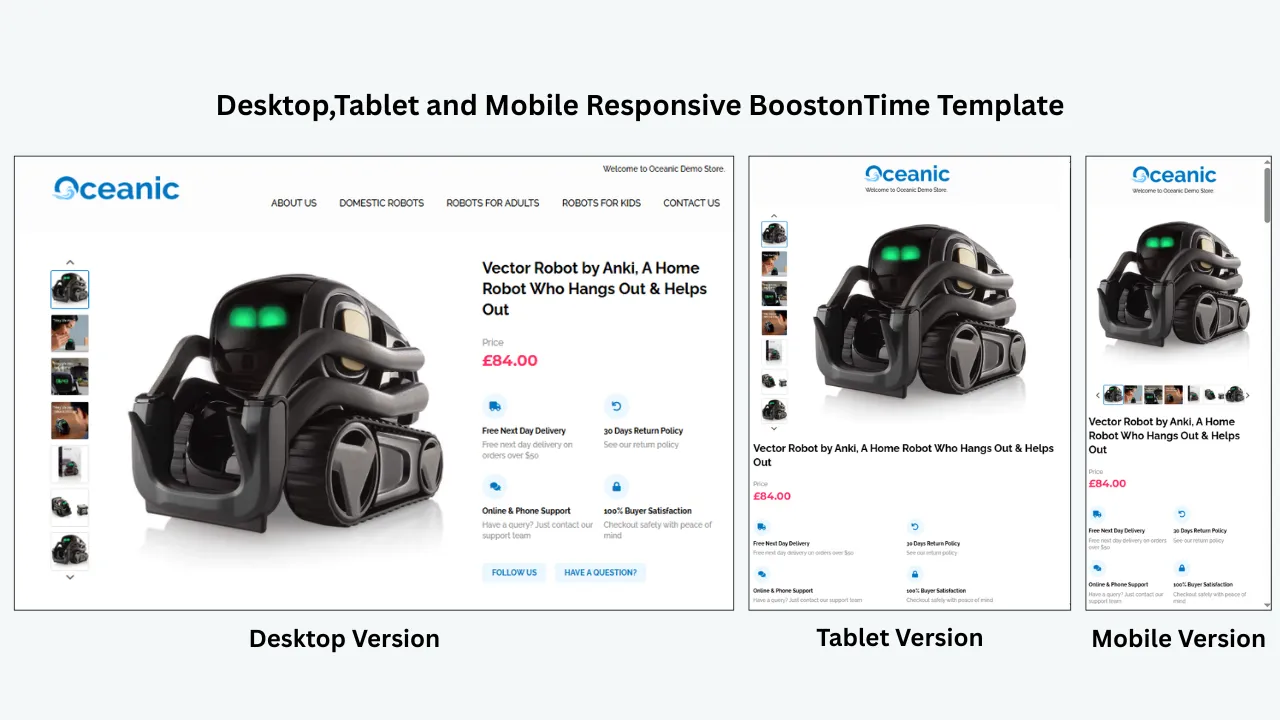
Our templates are designed to work across mobile, tablet and desktop screens. You can preview the layout, customise the modules and apply it without writing HTML.
This matters because eBay does not allow active content such as JavaScript and Flash in listings. Active content can create security concerns, load-time problems and broken mobile experiences. A premium package should help you avoid outdated techniques rather than leaving you to inspect unfamiliar code.
Price Versus Cost: The Difference Sellers Often Miss
The subscription price is the amount on the invoice. The real cost includes the time, labour, risk and future work required to keep the template useful.
Imagine that you buy a $25 static template and have 500 active listings. If it takes only five minutes to insert, check and correct the template on each listing, that is more than 41 hours of work. The file was inexpensive. The deployment was not.
Now imagine you need to update a shipping message, remove an outdated banner or change a policy section three months later. If those elements were pasted separately into every listing, you may repeat much of the same work.
This is why automation and batch revision belong in any honest pricing comparison.
Setup Time
Ask how long it takes to move from purchase to a live, tested listing. A custom project may include discovery, design drafts, revisions, development and installation. A static file may require you to configure everything. A no-code builder may let you choose a theme and begin immediately.
The fastest option is not always the best, but setup time should be visible in your decision.
Per-Listing Labour
Does the platform import product-specific data, or must you type it again? Can the design be applied to selected listings in bulk? Does the subscription limit the number of listings?
A small difference in monthly pricing becomes irrelevant if one system removes hours of repetitive editing.
Revision Costs
Some packages include self-service editing. Others require a designer for structural changes. Ask how many revision rounds are included, what counts as a new request and whether future template updates cost extra.
With ETB, the goal is to give you ongoing control. You can adjust the template, save it and use Batch Revision to apply the updated structure where needed.
Listing and Account Limits
Tiered software often connects pricing to active-listing volume, eBay accounts, teammates or storage. This is reasonable for broad platforms with costs tied to those functions, but it can make budgeting more complicated.
BoostOnTime’s published ETB plans focus on multiple templates and unlimited listing updates. That makes the annual cost easier to understand as the catalogue grows.
Add-Ons
Look beyond the first price displayed. Support upgrades, AI actions, image hosting, extra users, additional accounts, custom design, implementation and managed services may be sold separately.
An add-on is not automatically a problem. It becomes a problem when the core feature you assumed was included turns out to require another subscription. Read the package table and ask before committing.
Switching and Cleanup
Old templates can leave messy or outdated HTML in listing descriptions. A new system may need to clean or replace that content. Confirm whether the provider handles existing listings, whether you must revise them manually and how rollback will work if a test reveals an issue.
BoostOnTime is designed to update the eBay description with the newly selected template and make template changing easier. Even so, we recommend testing a small, representative group before applying any new design across the catalogue.
What Does BoostOnTime Cost Per Listing?
Because ETB supports unlimited listing updates, the effective cost becomes smaller as you use the platform across more inventory.
These calculations divide the subscription cost by the number of active listings for a simple illustration. They do not predict sales, and they do not mean every listing needs the same template. The practical point is that ETB does not charge more merely because you apply templates to a larger catalogue.
The value can also come from repeat updates. Suppose you build separate templates for fashion, electronics and home products. Later, you revise a policy, refresh a seasonal banner or change the order of specifications. The subscription continues supporting that work. You are not buying the same file again.
Does a Premium Template Improve eBay SEO?
This question deserves an honest answer because “SEO template” is often used too loosely.
A listing template cannot guarantee a higher search position. eBay visibility depends on many factors, including the accuracy and relevance of the title, category, item specifics, product identifiers, pricing, shipping, seller performance, demand and buyer engagement. A visually attractive description does not repair a misleading title or missing item specifics.
What a professional template can do is support a clearer buyer experience. It can organise descriptions and specifications, make information easier to scan, present policies consistently, support mobile readability and reduce the clutter created by old code. Those improvements may help buyers understand the listing and purchase with greater confidence, but they should not be marketed as an automatic ranking switch.
When evaluating premium packages, be cautious with claims that promise guaranteed rankings, conversion increases or sales lifts. Ask what the platform controls and what remains the seller’s responsibility.
BoostOnTime ETB focuses on professional presentation, responsive design, reusable modules, dynamic listing information and scalable updates. You should combine that foundation with accurate titles, complete item specifics, strong images, competitive offers, reliable fulfilment and excellent service.
That is a more credible growth strategy than expecting a template to do every job.
Which Pricing Option Is Best for Your eBay Business?
There is no universal answer, but the choice becomes straightforward when you match the package to the work you need.
New Seller With a Small Catalogue
If you are still learning eBay and only have a few listings, start by understanding what Seller Hub already provides. eBay allows sellers to create up to 50 reusable selling templates, which can save basic listing information and reduce repeated setup.
When branding, responsive description design and catalogue consistency become important, try a dedicated builder before paying for a large suite. BoostOnTime’s seven-day trial gives you room to test a real design on a controlled listing group.
The Monthly Pack can be a sensible first paid step because the commitment remains small.
Growing Seller With Dozens or Hundreds of Listings
This is where manual template work begins to hurt. You may have enough inventory that branding inconsistency becomes visible, but not enough time to edit each listing individually.
BoostOnTime’s combination of multiple templates, dynamic modules and unlimited listing updates fits this stage well. The Yearly Pack is usually the better value when you expect to keep refining the catalogue across seasons.
High-Volume Seller
High-volume sellers should focus heavily on deployment, revision and limits. A beautiful design that cannot be applied or maintained efficiently is not a premium solution for a large catalogue.
Ask how the system selects listings, preserves product-specific information, handles multiple categories and supports future updates. ETB’s Batch Revision workflow and unlimited updates are especially relevant here.
You should still test carefully. High-volume application magnifies both good and bad decisions, so preview a small group and check desktop, mobile browser and the eBay app before scaling.
Multi-Account or Multichannel Operation
If your primary need includes several eBay accounts, inventory synchronisation, orders, customer support or broader marketplaces, compare all-in-one platforms on the complete feature set. A higher monthly price may replace several separate tools.
Do not compare that price with a focused template builder without accounting for scope. Decide whether you want template specialisation or a wider operating platform.
BoostOnTime also supports more than ten multichannel software systems and works with 19 eBay sites, but confirm your exact integration and marketplace requirements before subscribing.
Established Brand Seeking Bespoke Creative Work
If no configurable theme can represent your brand guidelines, a custom design package may be appropriate. Request a detailed quote that separates design, implementation, software, future revisions, additional templates and support.
BoostOnTime also accepts requests for completely custom responsive template design. This gives sellers a path beyond standard themes when the project genuinely requires it.
Seven Questions to Ask Before Buying a Premium Package
The sales page will tell you what a provider wants to highlight. These questions help you uncover the practical cost.
1. Is the Price Monthly, Annual or One-Time?
An advertised monthly equivalent may require annual billing. Confirm the amount charged today, the renewal schedule and the cancellation terms.
BoostOnTime’s Yearly Pack is shown as $4.99 per month but billed at $59.88 per year. The Monthly Pack is billed at $6.99 each month.
2. How Many Listings Are Included?
Ask whether the plan limits active listings, template applications, revisions or imports. If a limit exists, check the next tier before your catalogue reaches it.
BoostOnTime includes unlimited listing updates in both published plans.
3. Can I Create Multiple Templates?
Different categories may need different layouts and policies. A single universal template can become crowded when it tries to serve every product.
ETB lets you create multiple templates, so you can maintain category-specific structures while keeping the overall brand consistent.
4. What Is Imported Automatically?
Clarify whether the tool pulls title, images, price, currency, categories, item specifics, descriptions or related products. Also ask which information remains manual.
Never assume that “automation” means every field is handled. Test with real listings and review the output.
5. Can I Update Existing Listings in Bulk?
Some tools help create new listings but do not solve the problem of an existing catalogue. Ask whether the package can apply a new design to active listings individually and in selected groups.
ETB’s Batch Revision Tool is built for this exact task.
6. What Support and Custom Work Are Included?
Find out whether support covers account connection, template setup, design advice, technical troubleshooting and implementation. Ask whether custom design is included, offered separately or unavailable.
7. What Happens If I Cancel?
Understand what remains in your live listings, what functionality depends on the subscription, whether saved designs remain accessible and how you can remove or replace the template later.
This is an important question for every provider, including us. A premium package should be judged not only by how easily you join, but by how clearly it explains ongoing control.
How to Test a Premium Template During a Free Trial
A free trial is most useful when you treat it as a small implementation project rather than simply browsing themes.
Start with three to ten representative listings. Include at least one simple product, one item with many specifications, one listing with several images and one product from each major category you sell.
Before changing anything, record the current state. Note whether the description is readable on mobile, whether policies are easy to find, whether images display correctly and how long it takes to revise a listing.
Then follow this process.
Choose a theme that fits your store’s visual character.
Add your logo, colours, header navigation, Why Us message and policy information.
Select only the modules that help buyers evaluate the product.
Apply the template to the small test group.
Inspect each listing on desktop, a mobile browser and the eBay app.
Confirm that product-specific information remains accurate.
Check loading, image behaviour, text wrapping, links and policy compliance.
Ask someone unfamiliar with the product to locate the specifications, condition, shipping and returns information.
Revise the template once to see how easy ongoing maintenance feels.
Expand to a larger group only after the sample passes review.
During the seven-day BoostOnTime trial, this exercise gives you a real answer to the value question. You are not judging a screenshot. You are testing whether ETB makes your own catalogue clearer and easier to manage.
Common Pricing Mistakes to Avoid
The wrong package is often chosen because one part of the cost receives too much attention.
- Choosing Only by the Lowest Price. Free and low-cost tools can be useful, but calculate the time required to build, copy, test and revise every listing. Your time is part of the cost even when no invoice exists.
- Paying for a Large Suite You Will Not Use. The opposite mistake is buying an all-in-one platform because the feature list looks impressive. If you need only template design and bulk application, a focused subscription may provide better value and a shorter learning curve.
- Assuming “Unlimited” Means Everything Is Unlimited. Read exactly what the word modifies. A service may offer unlimited orders but limit listings, accounts, users, storage, exports or design changes. BoostOnTime’s offer specifically includes multiple templates and unlimited eBay listing updates.
- Ignoring Annual Billing. A low monthly equivalent may be charged as one annual payment. Compare the actual cash outlay as well as the monthly average.
- Forgetting Future Changes. Your first template will not be your last update. Policies, branding, categories and promotional messages change. Choose a system that makes the second update easier than the first.
- Believing a Template Guarantees Sales. Professional presentation can improve clarity and trust, but no legitimate provider can guarantee performance. Product demand, price, competition, photography, fulfilment, seller reputation and listing accuracy still matter.
Frequently Asked Questions
Premium eBay template pricing ranges from free native tools and inexpensive one-time files to monthly subscriptions and quote-based custom design packages. BoostOnTime ETB costs $6.99 per month on the Monthly Pack or $59.88 per year on the Yearly Pack, equivalent to $4.99 per month.
Both published ETB plans include the ability to create multiple eBay templates and update unlimited eBay listings. You also receive access to responsive themes, more than 20 customisable modules, dynamic listing information, personalised related products, preview and Batch Revision tools.
No. The $4.99 figure is the monthly equivalent of the Yearly Pack, which is billed at $59.88 per year. If you prefer monthly billing, the Monthly Pack is $6.99 per month.
Yes. You can start with a seven-day free trial. Use the trial to customise a template, apply it to a small group of representative listings and test the live results before expanding.
BoostOnTime’s published plans let you update unlimited eBay listings. Other providers may connect pricing to active-listing counts, so check each tier carefully.
Yes. ETB lets you create multiple templates. This is useful when different categories need different module orders, banners, specifications or policy messages.
No HTML knowledge is required to use BoostOnTime ETB. You choose a theme, customise modules, preview the design and apply it through the web interface.
Yes. The Batch Revision Tool can update an individual listing or apply a newly created template to a selected group of active listings.
ETB can collect supported dynamic information from current eBay listings, including titles, prices, currencies, product images, categories and related products. Always review the imported information before applying the design broadly.
It may have a lower initial price, but include setup, manual application, code maintenance, compliance checks and future revisions in your calculation. A subscription can be more economical when it removes repeated work across many listings.
Seller Hub can create up to 50 reusable selling templates and is useful for saving listing information. Sellers wanting richer branding, responsive description modules, dynamic content and bulk template application may prefer a dedicated premium builder.
Some subscriptions include far more than template design, such as inventory, orders, customer messaging, team access, reports, AI tools or multichannel management. Custom agencies may also include design labour, project management, implementation and bespoke development.
No template can guarantee rankings. A professional template supports clear, mobile-friendly presentation, but eBay visibility also depends on accurate titles, categories, item specifics, identifiers, pricing, shipping, seller performance and buyer response.
Yes. Sellers who need a completely custom responsive eBay template can send a request. Custom work should be discussed separately from the standard monthly and yearly ETB subscription prices.
The Yearly Pack has the lowest published monthly equivalent and saves 30 percent compared with paying the Monthly Pack for twelve months. The Monthly Pack is better when billing flexibility matters more than the annual saving.
BoostOnTime works with 19 eBay sites. International sellers should confirm that their exact site, currency, account configuration and multichannel software are supported before applying templates.
BoostOnTime continues adding templates and makes newly launched designs available to subscribed users without an additional template charge. This is one advantage of a connected subscription over purchasing another static file whenever your store needs a fresher look.
Prepare your logo, brand colours, store navigation, Why Us message, shipping and return information and a small group of accurate listings. Clear source data makes the trial faster and the final template more reliable.
Is BoostOnTime ETB
Worth the Price?
If you need only a decorative HTML file for one or two listings and enjoy editing code, a static template may be enough. If you need inventory, order management, messaging and multichannel operations in one broad suite, compare all-in-one platforms on those wider functions. If you want a fully bespoke brand project managed for you, request custom design quotes.
But if your goal is straightforward — create professional, responsive eBay templates, customise them without coding, populate supported listing information and apply updates across an active catalogue — BoostOnTime ETB offers a strong value case.
The Monthly Pack keeps the entry price at $6.99. The Yearly Pack reduces the effective rate to $4.99 per month. Both support multiple templates and unlimited listing updates. You also receive the themes, modules, dynamic-data workflow, related-product options and Batch Revision tools that turn a design into a manageable system.
That is the real point of premium pricing. You are not paying for decoration. You are investing in a repeatable way to present your products, maintain your brand and update listings without rebuilding the same structure again and again.
Start with a small test. Build one template around the questions your buyers actually ask. Apply it to a controlled group, check every detail and revise it until the layout feels natural on every screen.
Then let ETB do what it was designed to do: help you carry that professional structure across your eBay catalogue without turning every update into a manual project.
Ready to see the difference on your own listings? Start your seven-day BoostOnTime ETB trial and build your first responsive template today.
🚀 Start Your Seven-Day BoostOnTime ETB Trial
boostontime.com/ebay-template-builder