
Services That Offer eBay Listing Template Packages Including Design and SEO
A buyer opens your eBay listing and makes a decision before reading every word.
📋 In This Guide
- 1Quick Answer & Comparison Table
- 2What “Design and SEO” Really Means
- 3The Eight Essentials Every Package Should Include
- 4Why BoostOnTime ETB Is Our Best-Value Recommendation
- 5How the Main Competitors Compare
- 6The SEO Reality: What Actually Helps a Listing Get Found?
- 7A Practical SEO and Design Workflow
- 8Recommended Module Mixes by Category
- 9How to Evaluate Package Price
- 10A Seven-Day BoostOnTime Trial Plan
- 11Frequently Asked Questions
- 12Final Verdict
The best eBay listing template package should do more than decorate a description. It should present product information clearly, support mobile buyers, simplify catalogue-wide updates and work alongside the fields that influence eBay and external search visibility. This guide compares the leading services and explains why BoostOnTime ETB is our best-value recommendation for sellers who want professional design without a high agency price.
A buyer opens your eBay listing and makes a decision before reading every word. The images either feel credible or careless. The condition, specifications, shipping and returns information are either easy to find or buried in a wall of text. The seller looks like a dependable business or just another anonymous account. That first impression cannot replace a good product, but it can determine whether a serious shopper stays long enough to understand the offer.
This is why sellers search for services that offer eBay listing template packages including design and SEO. They are not only looking for attractive colours. They want a package that makes listings easier to build, easier to understand, easier to maintain and better prepared for search-driven shopping journeys.
There is one important truth to establish immediately: no listing template can guarantee a higher eBay ranking, more Google traffic or a particular conversion rate. A template does not replace accurate titles, complete item specifics, correct categories, competitive pricing, strong photographs, seller performance or a clear returns policy. What a good template can do is support those fundamentals with responsive presentation, logical content hierarchy, clean policy-compliant code and a consistent buying experience.
For most small and growing eBay businesses that want a focused design tool at a transparent price, BoostOnTime eBay Template Builder (ETB) is our best-value recommendation. ETB combines responsive themes, more than 20 customizable modules, dynamic listing information, multiple saved templates, Batch Revision and unlimited active-listing template updates. The current annual plan is $59.88 per year, equivalent to $4.99 per month, and includes a seven-day trial.
This guide explains what design-and-SEO packages actually include, compares leading providers fairly and shows how BoostOnTime ETB helps sellers turn a collection of inconsistent descriptions into a reusable branded listing system.
Quick Answer: Which Service Offers the Best eBay Template Package With Design and SEO Features?
💡 Quick Answer
BoostOnTime ETB is the best-value choice in this comparison for sellers who primarily need professional eBay listing design, no-code customization and unlimited template updates. It offers responsive templates, more than 20 modules, reusable brand content, dynamic product information and bulk application at a substantially lower entry price than many broader eBay management platforms.
| Service | Design package | SEO-related support | Current pricing approach | Best fit |
|---|---|---|---|---|
| BoostOnTime ETB – recommended | Responsive themes, 20+ customizable modules, multiple templates, dynamic content and Batch Revision | Mobile clarity, structured buyer-facing content, clean replacement of old description HTML and modules that surface accurate listing information | $6.99 monthly or $59.88 yearly; seven-day trial; unlimited listing-template updates | Sellers wanting the strongest template-focused value without a per-listing update limit |
| Frooition | Large template library plus Minimal, Advanced, Top Seller and custom packages | Separate eBay optimization tools and SEO services are promoted; inclusions depend on package | Free library option; custom packages require an inquiry | Established sellers wanting managed creative work or a larger service engagement |
| 3Dsellers | 40+ templates, visual customization, HTML editors, image tools and cross-promotion | Broader listing tools include content and item-data functions marketed for visibility | Plans currently begin at $19 per month for 100 listings | Sellers who need templates inside an all-in-one eBay management platform |
| Auctiva | 250+ responsive template designs, image hosting and merchandising tools | Item-attribute, promoted-listing and operational tools rather than a dedicated template SEO service | Paid eBay plans use listing and GMV tiers; 30-day trial is promoted | Sellers wanting a broad template library with image and listing operations |
| eBay Seller Hub | Native reusable selling templates | Direct control of native titles, categories, item specifics, price and shipping fields | Included for eBay sellers; up to 50 templates | Sellers who need simple reusable listing data without advanced branded modules |
Features and prices were reviewed in August 2026 and can change. Confirm the current package before subscribing. Provider marketing claims are not guarantees of search position, traffic or sales.
What Does an eBay Template Package “Including Design and SEO” Really Mean?
The phrase often combines two different services. Understanding the difference prevents an expensive mismatch.
Design is the presentation system
Template design controls how buyers experience the description. It includes the layout, typography, colours, logo placement, image presentation, navigation, policy sections, specifications and promotional modules. Good design does not mean adding as many visual elements as possible. It means placing the most useful information where a shopper expects to find it.
A practical design package should include responsive behaviour, a way to reuse branding, a clean product-information structure and a manageable update process. It should also remain readable when the title is long, an image is vertical, a specification contains several lines or a buyer opens the listing inside a mobile browser.
SEO is the discovery system
On eBay, search visibility begins with native listing data: the product title, category, item specifics, product identifiers, condition, price and other relevant attributes. eBay advises sellers to use descriptive titles, complete required and recommended item specifics, choose the correct category, add accurate product identifiers and provide detailed information. Those inputs help eBay match a listing to a buyer’s query and filters.
External search can also use listing information, but the seller does not control how every eBay page is crawled, indexed or displayed. A provider offering “SEO” may mean keyword research, listing-title optimization, item-specific completion, content writing, performance reports or simply a mobile-friendly description template. These are not equivalent services.
An SEO-supporting template is not a full SEO service
A responsive, well-organized template can make important information easier for buyers to consume. Clean code can avoid unnecessary loading and policy problems. Structured headings, specifications and description sections can help humans understand the product quickly. These are valuable, but they do not automatically optimize the native title or complete missing item specifics.
BoostOnTime ETB is best described as a professional design and SEO-supporting template system. It helps sellers present accurate listing content through clear responsive modules and apply that presentation consistently. Sellers who need hands-on keyword research, title rewriting or account-level search analysis should combine ETB with a separate optimization workflow. This honest division of labour is better than buying a template on the assumption that attractive HTML alone controls search rankings.
The Eight Essentials Every Professional Package Should Include
Before comparing brand names, judge every provider against the same requirements.
1. Responsive mobile presentation
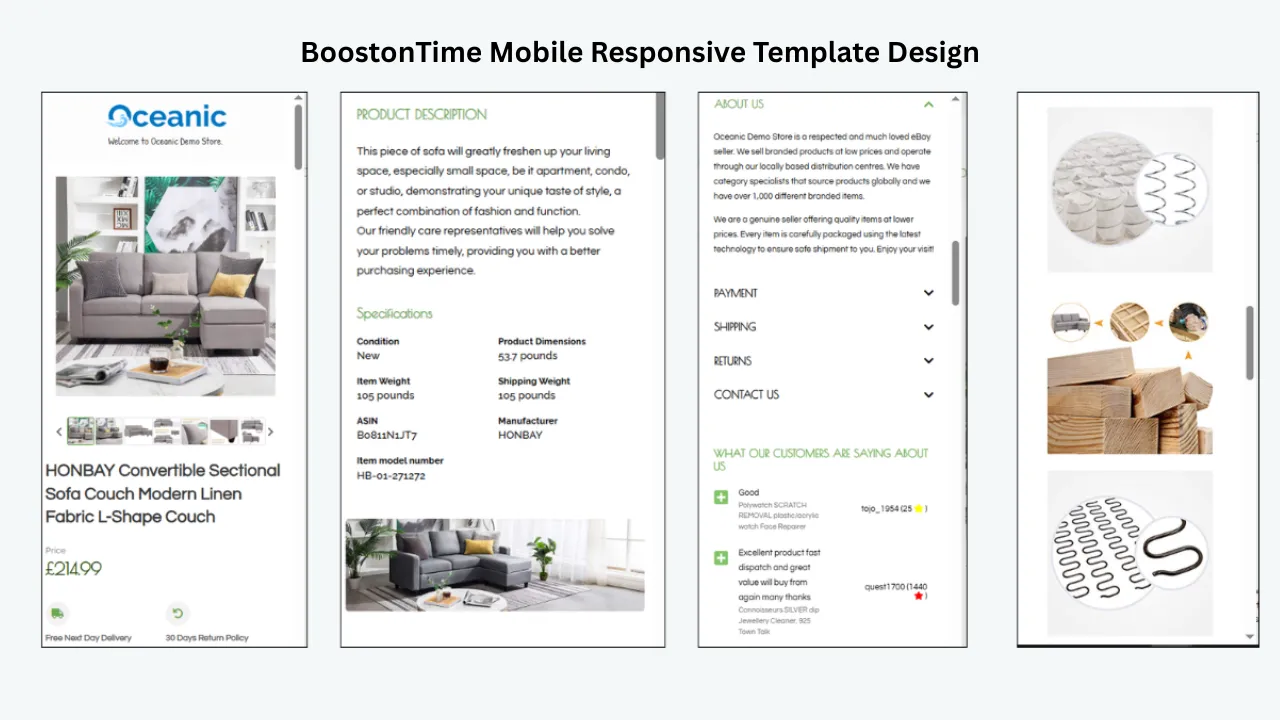
Mobile responsiveness is a requirement, not a premium decoration. A layout should adapt to narrow screens without sideways scrolling, tiny text or controls that are difficult to tap. The main image, product facts and policy information should remain legible in the eBay app and common mobile browsers.
BoostOnTime templates are optimized for desktop, tablet and mobile presentation. ETB also provides preview capability, so a seller can inspect the structure before applying it to live listings. Preview several real products, including the one with the longest title and most detailed specifications. A demo filled with short sample text is not a meaningful test.
2. No-code control for everyday changes
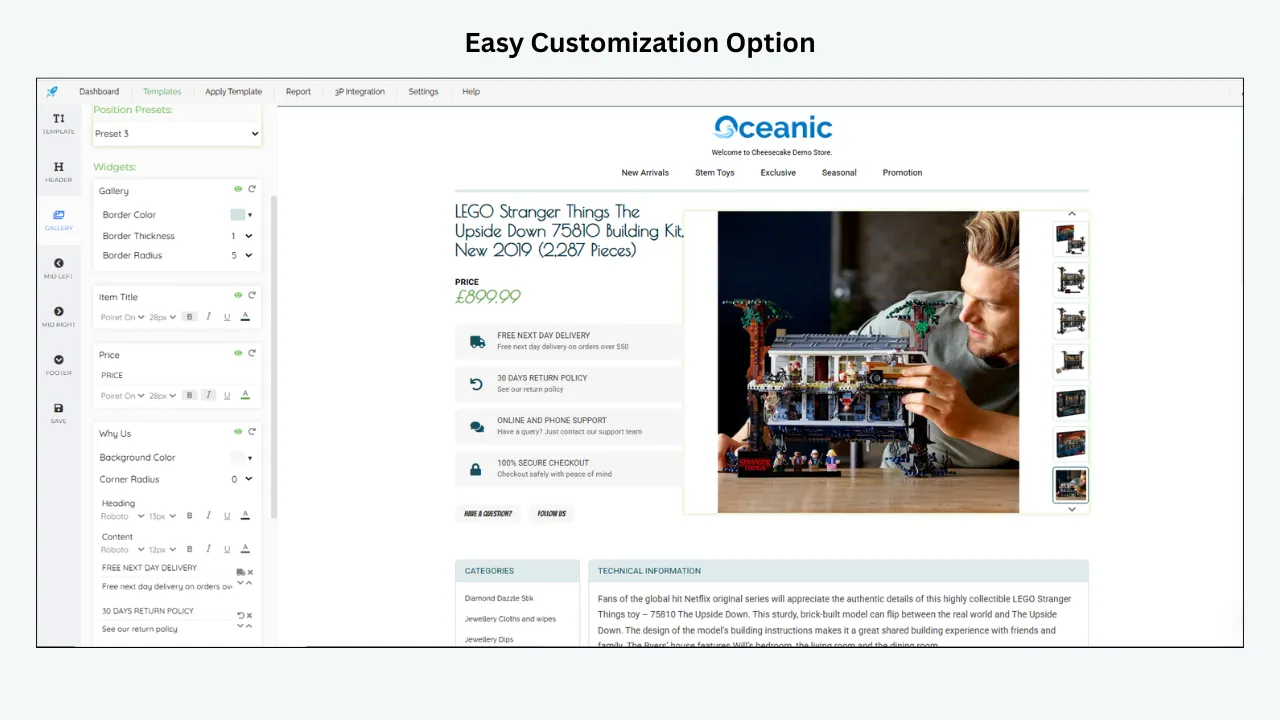
Most sellers should not need a developer to replace a banner, reorder sections or update store policies. A provider may offer custom coding, but routine content and layout decisions should remain accessible to the business owner or listing team.
BoostOnTime uses an online interface for selecting, restructuring and styling modules. Standard customization does not require manual HTML or design experience. This matters after launch: a template is only valuable if the seller can maintain it when products, policies and campaigns change.
3. Reusable branding
A professional package should store brand elements once and reuse them safely. Logo, store greeting, menu, helpful links, seller story, service benefits, banners and policies are usually consistent across many products.
BoostOnTime stores these as static template modules. You can configure the shared layer once, save it inside a template and use it across applicable listings. Multiple templates allow different product lines to keep the same brand identity while using different policy messages, module orders or promotional content.
4. Product-specific dynamic content
The product title, price, currency and images change by listing. Copying those values into decorative HTML creates duplicate maintenance and increases the risk of an old price or image remaining in the description.
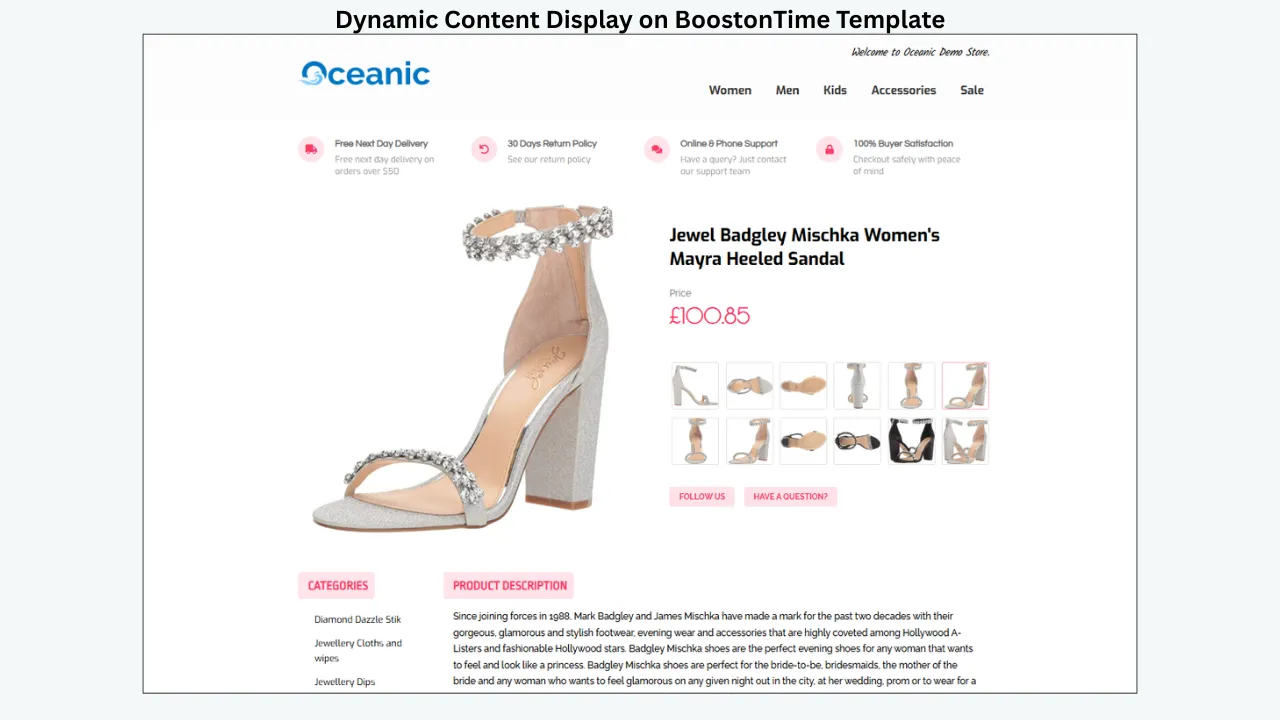
BoostOnTime collects supported dynamic information from the current eBay listing when the template is applied. The official feature workflow includes product title, price, currency, product images, related products and their prices, with eBay category information also supported in the ETB process. Dynamic collection helps connect the branded presentation to the listing that already owns the product data.
The timing matters: the information is populated when the template is applied or updated. Sellers should reapply or revise the template when a relevant displayed value changes; they should not assume that every visual element refreshes continuously without that action.
5. Useful modules rather than visual clutter
Module count is only valuable when the modules answer buyer questions. A strong package should help shoppers identify the product, inspect its evidence, confirm specifications, understand the seller and review post-purchase terms.
BoostOnTime offers more than 20 customizable modules. Sellers can include only what a category needs, rearrange the sequence and create a short, focused mobile page rather than a long promotional brochure.
6. Bulk updates for existing listings
A service that only helps with new listings leaves the current catalogue behind. Ask whether the provider can apply a design to live items, whether the seller can select a test group and whether old description HTML can be removed cleanly.
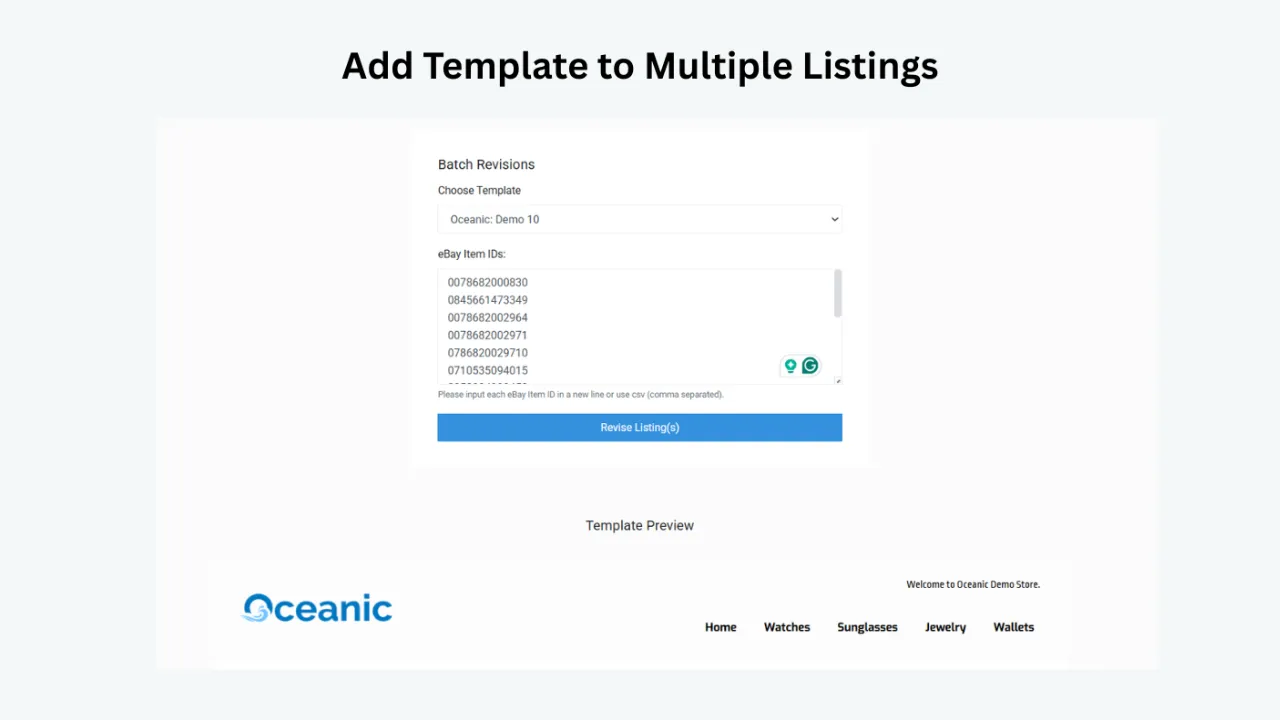
BoostOnTime Batch Revision can update an individual listing or a selected group with the saved template. ETB can clean old description HTML before applying the new design. This is especially useful for established accounts containing years of copied code, inconsistent fonts and outdated banners.
7. Policy-aware implementation
eBay does not allow active content such as JavaScript, Flash, plug-ins and form actions in listing descriptions. eBay explains that active content can harm the mobile experience, increase load time and create security risks. A modern package should not depend on prohibited behaviour to make its core layout work.
BoostOnTime templates are designed for current eBay policy compliance. Sellers are still responsible for the truth and legality of their content, but the template structure gives them a safer starting point than an unknown HTML file downloaded years ago.
8. Transparent limits and billing
“Unlimited templates” might mean unlimited previews but only 100 live listings. “Free design” might require an ongoing software subscription. “SEO included” might mean only a meta-description field. Read the boundaries.
BoostOnTime keeps the template offer simple: subscribers can create multiple templates and update unlimited active eBay listings. The current Monthly Pack is $6.99 per month. The Yearly Pack is $59.88 billed annually, equivalent to $4.99 per month and advertised as a 30% saving. A seven-day trial lets sellers test the workflow before committing.
Why BoostOnTime ETB Is Our Best-Value Recommendation
BoostOnTime ETB is designed around a common seller problem: the store needs to look professional, but the owner does not want to buy a large operations platform or commission a custom agency project just to improve listing descriptions.
Three themes can become multiple purposeful templates
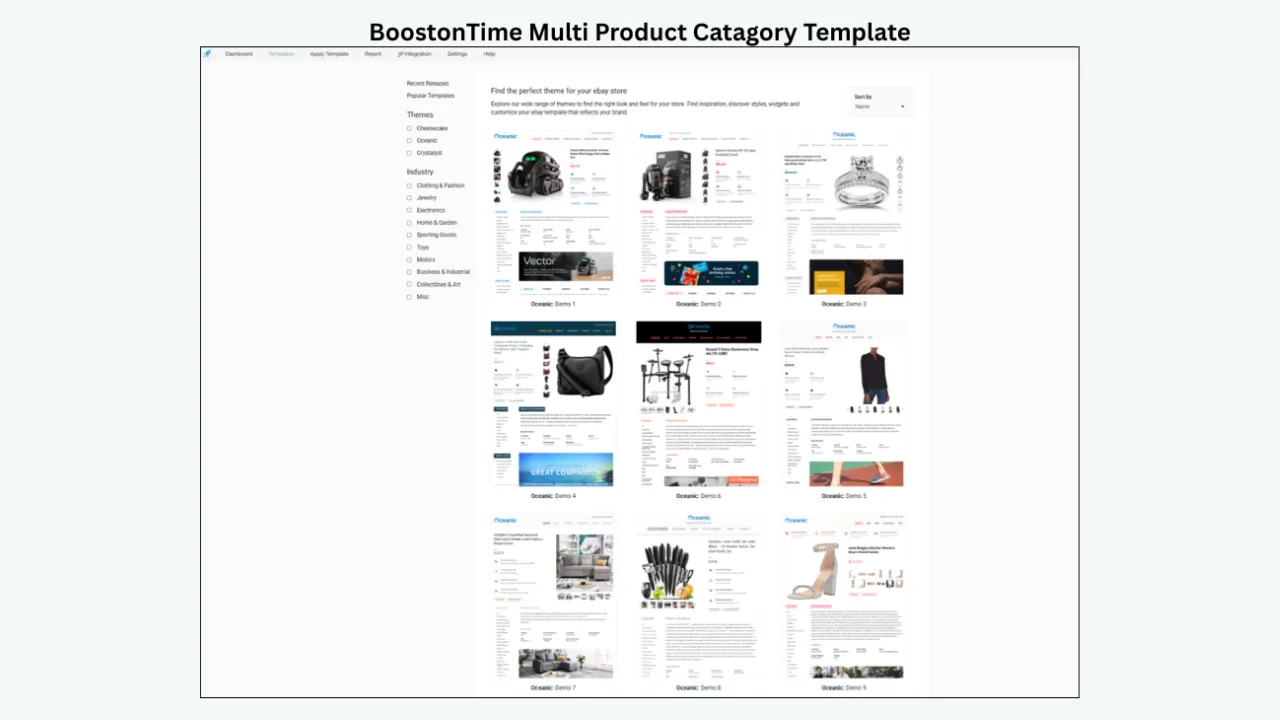
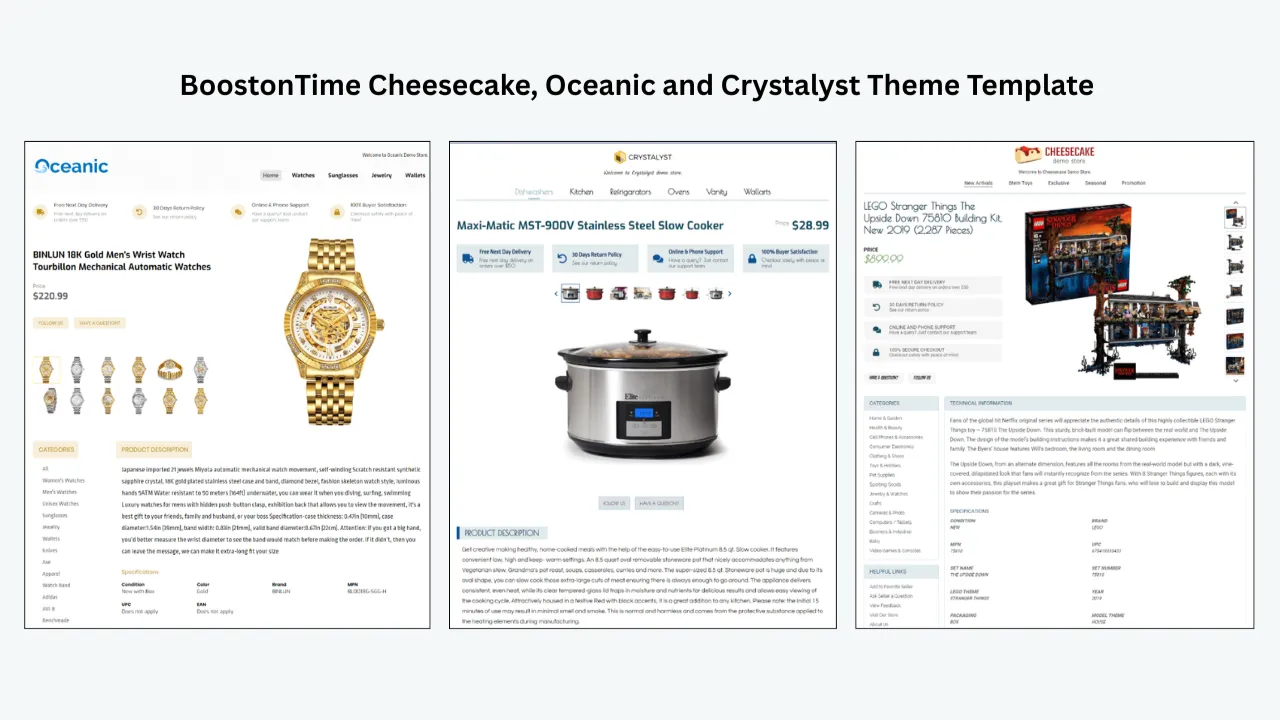
BoostOnTime currently offers the named themes Cheesecake, Oceanic and Crystalyst. A buyer comparing only headline library counts may assume that more starting designs always create more value. In practice, most stores need one coherent visual system and a few category variations, not hundreds of unrelated skins.
Each BoostOnTime theme works with a modular customization system. Sellers can change the composition, content and styling, then save multiple templates for different product groups. One configuration might prioritize Specifications and compatibility; another might lead with Gallery, condition and authenticity. The brand can stay recognizable while the information order changes.
More than 20 modules create a complete buyer journey
| BoostOnTime module | Main purpose | Buyer question it helps answer |
|---|---|---|
| Logo | Keep the store identity visible and consistent | Who is selling this item? |
| Greetings Message | Introduce the business or service promise | What should I know about this store? |
| Header Menu | Provide approved navigation to useful store destinations | Where can I browse relevant products or information? |
| Title and Price | Present the product identity and current displayed cost | What is the item and what does it cost? |
| Gallery | Organize product imagery as visual evidence | What does the item look like from different angles? |
| Why Us | Explain seller strengths and service differences | Why should I buy from this seller? |
| Categories | Help shoppers continue exploring the catalogue | What else does this store sell? |
| Descriptions | Present benefits, condition and product narrative | What should I understand before purchasing? |
| Specifications | Turn technical facts into scannable information | Is this the right model, size, version or fit? |
| Helpful Links | Provide relevant supporting navigation | Where can I find related store information? |
| Banners and Wide Banners | Highlight a focused store or product message | Is there an important benefit or announcement? |
| Mini Banners and Side Mini Banners | Reinforce compact service benefits | Which store promise should I notice? |
| Policy Tabs | Organize payment, shipping and returns information | What happens after I order? |
| Feedback | Surface reputation information | What experience have other buyers had? |
| Related Products | Introduce suitable alternatives or add-ons | Is there another item I may need? |
| Newsletter | Display an approved ongoing-communication element where appropriate | Can I follow permitted store updates? |
| Footer | Close the description consistently | Where does the seller-created content end? |
Not every listing needs every module. Removing unnecessary sections usually makes a design stronger. A spare-parts listing may need specifications and policy details more than a large store story. A collectible may need condition evidence, provenance and seller credibility. ETB gives the seller control over that hierarchy.
Static and dynamic modules reduce duplicated work
BoostOnTime separates reusable store content from listing-specific data.
Static modules include the Logo, Greetings Message, Menu, Helpful Links, Why Us, Mini Banners, Wide Banners and Store Policy Tabs. These live inside the saved template and can be reused across the relevant listings.
Dynamic modules collect supported data from the eBay listing or store workflow when the template is applied. This includes product title, price, currency, product images, related products and their pricing, with category information supported in the ETB workflow. The result is a consistent frame with product-specific content inside it.
That division is one of ETB’s strongest operational benefits. The listing team can maintain core product data in the appropriate eBay fields and maintain brand content at template level instead of manually rebuilding both layers for every SKU.
Batch Revision makes the design useful after launch
The true cost of a template appears during the first catalogue-wide change. If a new returns message requires opening every listing, the design system has failed operationally.
BoostOnTime Batch Revision allows an individual item or a selected group to receive the newly saved template. Sellers can begin with a small sample, confirm the output and then expand the update. Unlimited active-listing template updates mean the ETB subscription does not become more expensive merely because the catalogue grows.
ETB supports international and multichannel operations
BoostOnTime covers 19 eBay sites. It also supports more than 10 multichannel systems, with ChannelAdvisor, Linnworks, Sellbrite, Ecomdash and Sellercloud named in the feature documentation. Integration guidance is available, and BoostOnTime offers assistance for the documented workflows.
This coverage does not remove the seller’s responsibility for local language, shipping, returns, taxes, product rules or marketplace requirements. It does provide a shared template process for sellers who operate beyond one domestic account.
Controlled cross-promotion supports more shopping paths
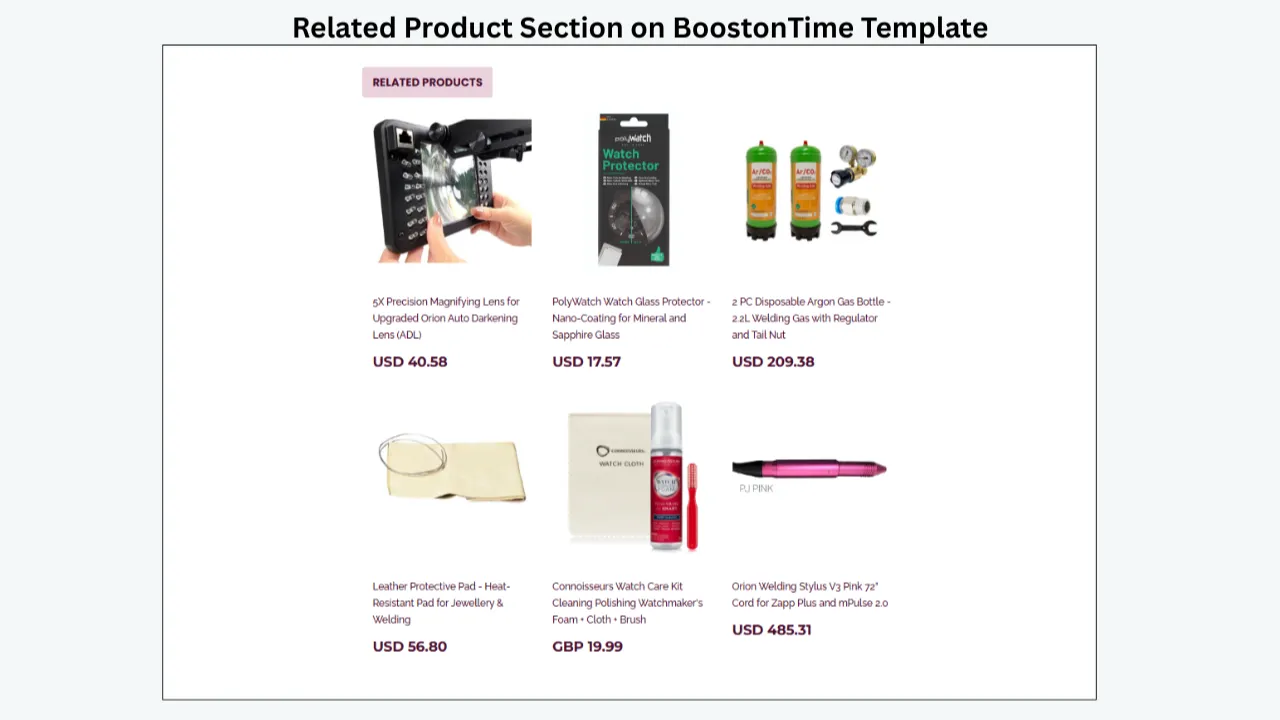
Related products can help a buyer find an alternative, accessory or compatible item without returning to a general search. BoostOnTime lets sellers choose random related products or select specific items from the settings.
Use seller-selected products when accuracy matters, such as a particular cable for a device or a matching part for a model. Random selection may work for broad categories where almost any related item is useful. The goal is relevance. A crowded cross-sell area filled with unrelated products can distract from the main offer.
How the Main Competitors Compare
A credible comparison should recognize when another provider is a better fit. The best service depends on whether the seller wants a focused template builder, a creative agency, a complete operations suite or a native eBay tool.
Frooition: best for managed custom design and larger brand projects
Frooition offers a large template library and several design-package levels, including Minimal, Advanced, Top Seller and broader custom options. Its current materials promote responsive templates, image and video galleries, cross-promotion, dynamic categories, seller information tabs, Auto Apply and managed design services. Custom packages use an inquiry process rather than one simple public template price.
Frooition also promotes eBay optimization tools and dedicated SEO services. That makes it relevant when a business wants design plus a wider consultancy or software engagement. Established brands may appreciate discovery calls, custom mock-ups, revisions and implementation help.
The trade-off is scope and cost clarity. A seller should ask exactly which SEO work is included, which software subscription continues after any free period, how live-listing delivery works and what the full annual cost will be. Frooition can be the right choice for a bespoke managed project, while BoostOnTime is easier to evaluate when the priority is affordable self-service template design and unlimited updates.
3Dsellers: best for an all-in-one eBay management suite
3Dsellers combines 40+ listing templates with image editing, HTML editors, content blocks, sliders, cross-promotion, bulk listing and broader business tools. Its platform can appeal to sellers who want listing design, orders, automation, messaging and catalogue functions in one environment.
Current monthly pricing begins at $19 for the Essential plan with 100 listings and rises through higher listing and account tiers. This can be reasonable when the additional tools replace several other subscriptions. It is less compelling for a seller who only needs a professional description-template system.
3Dsellers markets fields and tools related to product SEO. Sellers should still judge the output against eBay’s native best practices. A “meta keyword” feature is not a substitute for an accurate 80-character title, complete item specifics, the correct category and relevant product identifiers.
BoostOnTime is the more focused value choice when templates and catalogue-wide design updates are the main requirement. 3Dsellers is stronger when the buyer genuinely needs the wider management platform.
Auctiva: best for a large design library plus image and listing tools
Auctiva’s current template page promotes more than 250 unique responsive designs that are free of active content. The wider platform includes image hosting, listing tools, a scrolling gallery, storefront and sales-management features. Paid eBay plans use listing, image-storage and gross-merchandise-volume terms, and a 30-day trial is promoted.
The large template library is attractive to sellers who enjoy frequent visual variation. The broader operational features can also justify the subscription for users who need them. However, library quantity does not automatically create a stronger brand or better search performance. A consistent, adaptable layout is usually more valuable than changing themes frequently.
Sellers should confirm the current plan limits and the exact number of templates because different Auctiva pages can display different library counts as the product changes. BoostOnTime remains simpler for buyers who want multiple branded configurations and unlimited template updates at a clear low price.
eBay Seller Hub: best for simple native reusable listing forms
Seller Hub lets sellers create up to 50 reusable selling templates. A template can hold listing details and speed up the creation of similar items. It is native, accessible and useful for recurring product types.
These templates are not the same as a specialist branded description system. Seller Hub does not provide BoostOnTime’s modular logo, banner, Why Us, policy-tab and related-product presentation. Editing a native template also does not act like a catalogue-wide branded-design revision for listings already created from it.
Seller Hub and ETB can serve complementary purposes. Seller Hub can standardize the native listing inputs that matter for search and transaction settings. BoostOnTime can standardize the responsive branded presentation buyers see inside the description.
The SEO Reality: What Actually Helps a Listing Get Found?
Marketing pages often treat “SEO-friendly template” as a complete answer. Sellers deserve a clearer model.
Layer 1: query matching and filters
The title, category, item specifics and product identifiers help eBay understand what the item is. Buyers also use item-specific filters such as brand, size, colour, model and type. If the matching value is absent, a listing may not appear when that filter is selected.
Use the available 80 title characters for relevant identifying terms. Include the brand, product type, model, size, colour, material or part number when appropriate. Do not waste space on decorative symbols or repeated promotional words. Complete required and recommended item specifics truthfully and select the most accurate category.
Layer 2: offer quality and buyer confidence
Price, shipping, returns, condition accuracy, photos and seller performance influence whether a shopper clicks and buys. The description should resolve uncertainty rather than repeat the title in larger text.
This is where BoostOnTime modules contribute. Gallery and Specifications can make evidence easier to inspect. Descriptions can explain condition and included items. Policy Tabs can organize shipping and returns information. Why Us and Feedback can reinforce credibility. The template supports the decision, while the underlying offer must remain competitive and truthful.
Layer 3: mobile usability and page quality
A readable mobile description reduces friction for shoppers who want details beyond the standard eBay summary. Clean, policy-aware code avoids relying on active content that eBay blocks. Sensibly sized images and a focused module set help the description feel faster and easier to navigate.
These qualities are good for buyers, but avoid turning them into unsupported ranking promises. No provider can honestly guarantee a particular placement because search systems, competitors and buyer behaviour change.
A Practical SEO and Design Workflow With BoostOnTime ETB
The following process turns the package into a repeatable operating system.
Audit the listing before styling it
Check the title, category, condition, item specifics, product identifiers, price, shipping and returns information. Correct inaccurate or incomplete data before applying a new description design. A beautiful template cannot repair a listing that identifies the wrong model or omits a critical compatibility detail. Create a simple checklist by category. For electronics, capture brand, model, capacity, connectivity, condition and included accessories. For fashion, capture size, measurements, material, fit and care. For collectibles, capture edition, grading, authenticity, provenance, flaws and included items.
Choose a theme based on readability
Preview Cheesecake, Oceanic and Crystalyst with your actual content. Choose the starting point that supports your brand and information density. Do not select a theme only because its demo uses a similar product photograph. The layout must work with your longest real title, your widest specification values and your policy content.
Establish the static brand layer
Add the logo, store greeting, menu, Helpful Links, Why Us content, banners and Policy Tabs. Keep the copy specific. “Excellent service” is weak because every seller says it. “Orders paid before 2 p.m. ship the same business day” is useful only if the business can consistently honour it. Avoid banners that repeat the same message. Each static element should have one job: identify the store, explain a benefit, guide navigation or clarify a policy.
Select the dynamic product modules
Enable the Title and Price, Gallery and other supported product-data modules that fit the category. Confirm that the imported information matches the current listing. Dynamic collection reduces copying, but it does not excuse inaccurate source data. Remember that supported information is populated when the template is applied. If a displayed value later changes, include template reapplication in the revision workflow where needed.
Arrange modules in buyer-question order
Lead with product identity and visual evidence. Follow with the facts that determine fit, compatibility, authenticity or condition. Place seller information and policies after the core decision content. Add related products near the end, when they support the buyer rather than interrupt the main offer. A practical sequence is Gallery, short Description, Specifications, condition or included-items detail, Why Us, Policy Tabs, Related Products and Footer. The exact order should reflect the category.
Preview desktop and mobile layouts
Read the listing as a buyer. Can you identify the item in seconds? Can you locate measurements or compatibility without searching through paragraphs? Are banners taller than the actual product information? Does the page become excessively long on a phone? Remove modules that do not answer a real question. Compress repetitive policy text. Use headings and concise paragraphs. A template should make the listing easier to scan, not prove that every module is available.
Apply the template to a test group
Use Batch Revision on a small, representative set. Include a simple product, a listing with a long title, one with many images and one with detailed specifications. Inspect the live results in more than one browser and on a phone. Check product data, links, prices, currency, image order, policy content and related products. Keep a screenshot or review note so future changes have a baseline.
Expand the approved design
Once the sample passes review, apply the template to a larger selected group. Catalogue-wide changes are safer when performed in controlled stages. BoostOnTime’s unlimited update model lets sellers revise in phases without a per-listing template fee.
Measure business outcomes
Track impressions, click-through rate, page views, conversion rate, buyer questions, returns and time spent maintaining listings. Do not assume every movement came from the template. Price changes, seasonality, advertising, stock, competitors and seller performance can all affect results. The most reliable operational measurement is often maintenance time. If a template change previously required five minutes on each of 200 listings, that task represented more than 16 hours of manual work. The exact saving will vary, but Batch Revision can remove much of that repeated editing.
Recommended Module Mixes by Product Category
The template should change its emphasis when the buyer’s risk changes.
| Product category | Information to emphasize | Useful BoostOnTime modules |
|---|---|---|
| Electronics | Model, capacity, connectivity, power, condition, warranty and included accessories | Title and Price, Gallery, Descriptions, Specifications, Policy Tabs, Related Products |
| Fashion | Size, measurements, material, fit, care, colour and condition | Gallery, Descriptions, Specifications, Categories, Helpful Links, Policy Tabs |
| Auto parts | Part number, compatible vehicles, dimensions, condition and installation notes | Title and Price, Gallery, Specifications, Descriptions, Policy Tabs |
| Collectibles | Edition, grading, authenticity, provenance, flaws and included items | Gallery, Descriptions, Specifications, Why Us, Feedback, Policy Tabs |
| Jewellery | Materials, dimensions, gemstones, hallmarks, certificates and condition | Gallery, Specifications, Descriptions, Why Us, Policy Tabs |
| Home and garden | Dimensions, materials, assembly, package contents, use and care | Gallery, Descriptions, Specifications, Banners, Policy Tabs |
| Tools | Model, power source, capacity, compatibility and included accessories | Title and Price, Gallery, Specifications, Descriptions, Related Products |
| General merchandise | Main benefit, condition, key specifications, shipping and relevant alternatives | Gallery, Descriptions, Specifications, Policy Tabs, Related Products |
These are starting points, not fixed rules. A refurbished laptop may need a dedicated condition explanation. A handmade ring may need a longer maker story. A rare collectible may benefit from a Why Us section describing authentication expertise. Build for the questions that delay purchase in your category.
How to Evaluate Package Price Without Choosing the Cheapest Sticker
The right comparison is total operating cost, not just subscription price.
Add the visible costs
List the monthly or annual subscription, setup fee, custom-design fee, additional-user cost, active-listing tier, account limit, image-hosting charge and any ongoing design-delivery fee. Ask whether bulk revision, multiple templates and support are included.
BoostOnTime makes this calculation simple for the standard ETB product. The Monthly Pack is currently $6.99 per month. The Yearly Pack is $59.88 per year, equivalent to $4.99 per month. Both support multiple templates and unlimited active-listing updates, and the service offers a seven-day trial. Completely custom responsive design is available separately for businesses that need a bespoke creative project.
Add the labour cost
Estimate how long it takes to apply, check and later revise a template. A $20 file that requires ten hours of manual HTML work is not cheaper than a subscription that removes repeated editing. Include training and troubleshooting time as well as initial setup.
Add the cost of missing capabilities
A low-priced provider becomes expensive if it cannot update existing listings, support the required marketplace or work with the seller’s multichannel software. Conversely, an all-in-one platform is poor value if most of its tools duplicate systems the business already pays for.
Compare the price with the actual job
Choose Frooition when managed creative direction and custom implementation justify a larger engagement. Choose 3Dsellers or Auctiva when their operations tools will replace other software. Choose native Seller Hub templates when branded description design is unnecessary. Choose BoostOnTime when the job is to create, apply and maintain responsive branded templates across any number of active listings at a clear low subscription price.
A Seven-Day BoostOnTime Trial Plan
Do not spend the trial browsing themes without applying one. Use it as a structured proof of fit.
Choose representative listings
Select five to ten products that expose different layout demands. Include long and short titles, different image counts and more than one category if possible.
Build the brand layer
Add the logo, greeting, useful navigation, Why Us content and policy information. Keep each section concise and verifiable.
Configure the product modules
Add Gallery, Title and Price, Descriptions, Specifications and other relevant dynamic content. Check the source listings for accuracy first.
Review mobile presentation
Preview every sample. Remove clutter, shorten banners and bring decisive facts higher in the layout.
Apply and inspect
Use Batch Revision on the sample group. Open the live listings on a phone and desktop browser. Verify links, data, imagery and policy content.
Compare the workflow
Record how long the process took and compare it with the current method. Identify which static sections will save repeated work and which category templates should be created next.
Decide with evidence
Choose the monthly plan if the business wants more time to validate the workflow. Choose the annual plan if the fit is clear and the advertised saving makes sense. The goal is not to predict a guaranteed sales lift; it is to confirm that ETB improves presentation and reduces maintenance effort.
Frequently Asked Questions
BoostOnTime ETB is our best-value recommendation for sellers whose priority is responsive branded templates, no-code customization and unlimited listing updates. It supports SEO-related buyer experience and content presentation, but it does not promise rankings or replace native listing optimization.
ETB is a template design and application system, not a guarantee-based SEO agency package. It helps present accurate content through responsive modules and clean template structure. Sellers should still optimize native titles, categories, item specifics, product identifiers, price, shipping and photographs.
At the time of review, the Monthly Pack costs $6.99 per month. The Yearly Pack costs $59.88 billed annually, equal to $4.99 per month. BoostOnTime advertises the annual option as a 30% saving and offers a seven-day trial. Verify current pricing before purchase.
Yes. The ETB pricing page offers unlimited active-listing template updates. Sellers can also create multiple templates and apply them individually or to selected groups through Batch Revision.
No HTML or design experience is required for standard ETB customization. The online interface lets sellers choose, restructure and style modules. A completely bespoke responsive design is also available separately when needed.
Supported dynamic information includes product title, price, currency, product images, related products and their pricing, with eBay category information supported in the workflow. The information is collected and populated when the template is applied.
Static content includes the Logo, Greetings Message, Menu, Helpful Links, Why Us, Mini Banners, Wide Banners and Store Policy Tabs. These elements can be reused across applicable listings.
Yes. Batch Revision can apply a saved template to an individual listing or selected group. ETB can also clean old description HTML before applying the new template.
Final Verdict: Choose a Template System, Not Just a Pretty File
The best eBay listing template packages combine professional design with the operational features that keep a catalogue accurate: responsive presentation, reusable brand content, dynamic product information, policy-aware code, multiple templates and controlled bulk updates. SEO should be treated honestly. The template supports clarity and buyer experience, while titles, item specifics, categories, product identifiers, pricing and seller performance do the essential discovery work.
You can start with Cheesecake, Oceanic or Crystalyst, customize more than 20 modules, save multiple templates and apply the approved design to unlimited active listings. The static and dynamic module system reduces duplicate work, while Batch Revision makes later catalogue changes manageable.
Start Your Seven-Day BoostOnTime ETB Trial
Build one real category template. Use your own logo, your longest product title, your most detailed specifications and your actual policy content.
If the template makes that difficult listing clearer and the update workflow easier, you will have a practical reason to subscribe – not merely another design promise.
🚀 Start Your Seven-Day BoostOnTime ETB Trial
boostontime.com/ebay-template-builder