
Process for Switching eBay Listing Template Providers Without Data Loss
A Complete Guide for eBay Sellers to Safely Migrate Listing Templates, Preserve Product Data, and Upgrade to BoostOnTime
Switching eBay listing template providers can be one of the best decisions an online seller makes, but only when the migration is handled correctly. For sellers with hundreds or thousands of active eBay listings, the thought of changing template providers can be stressful. Your listings may contain product descriptions, images, item specifics, variations, pricing information, shipping details, return policies, store branding, and other important data.
📋 In This Guide
- 2What Is an eBay Listing Template Provider?
- 3Why eBay Sellers Change Template Providers
- 4Can You Switch Without Losing Data?
- 5What Data Should You Back Up Before Migration?
- 6Audit Your Existing eBay Catalog
- 7Identify What Your Current Template Provider Controls
- 8Choose the Right Replacement Provider
- 9Why BoostOnTime Is Our Recommended Choice
- 10Create Your New BoostOnTime Template
- 11Recreate Your Existing Branding
- 12Map Your Existing Data Into the New Template
- 13Test the New Template Before Migration
- 14Run a Pilot Migration
- 15Compare the Old and New Templates
- 16Roll Out the New Template in Bulk
- 17Protect Your Best-Selling Listings
- 18How to Avoid Data Loss
- 19Common Migration Mistakes
- 20Why BoostOnTime Works Well for Large Catalogs
- 21Using Your Inventory System With BoostOnTime
- 22Recommended Migration Timeline
- 23Complete Migration Checklist
- 24Frequently Asked Questions
- 25Why We Recommend BoostOnTime
Important Points
Existing listings contain valuable product data. Changing providers does not necessarily mean creating new listings. The biggest migration risk comes from poor planning. Sellers should separate listing data from template design. A phased migration is safer than changing everything at once. BoostOnTime provides tools for creating and managing professional templates at scale. A poorly planned migration can create unnecessary problems.
A carefully planned migration, however, can give your eBay store a faster, cleaner, more professional, mobile-responsive, and easier-to-manage listing experience—without losing your existing product data.
This guide explains the complete process for switching eBay listing template providers while protecting your listing information, minimizing downtime, and avoiding common migration mistakes.
Throughout this guide, we will also explain why BoostOnTime is a strong choice for sellers looking to move to a more flexible and efficient eBay listing template solution.
2. What Is an eBay Listing Template Provider?
Many sellers confuse the template with the listing itself. Clarify that the template controls the visual presentation, while eBay listing data contains the actual product information.
Explain the Difference:
You are not necessarily migrating your products. You are migrating the way your products are presented.
3. Why eBay Sellers Change Template Providers
Sellers often change template providers because their existing solution no longer meets the needs of a growing eBay business. An older template may have limited customization, poor mobile responsiveness, complicated HTML requirements, or no convenient way to update hundreds of listings. Other sellers may want stronger branding, dynamic content, better product presentation, or more efficient bulk management. Moving to a modern platform such as BoostOnTime can help sellers overcome these limitations and create a more professional and consistent customer experience across their eBay catalog.
Common Problems
- Outdated design
- Poor mobile responsiveness
- Limited customization
- Difficult HTML editing
- No bulk editing
- Expensive maintenance
- Poor customer support
- Lack of dynamic content
- Inconsistent branding
- Limited scalability
- Slow template updates
- Difficulty managing large catalogs
Old Provider vs. Modern Template Solution:
4. Can You Switch eBay Template Providers Without Losing Data?
Yes, a properly planned migration can preserve your existing listing data.
The safest approach is to avoid treating the migration as a complete catalog rebuild. Instead, sellers should identify which elements belong to the listing itself and which belong to the existing template. Before making any changes, create a backup of important listing information and test the new template on a small group of products. This approach allows sellers to identify potential problems before applying the new design across the entire catalog.
However, the exact migration process depends on how the existing provider manages templates.
Data You Should Protect
- SKU
- Listing ID
- Product title
- Description
- Images
- Price
- Quantity
- Variations
- Item specifics
- Shipping information
- Return information
- Store category
- Business policies
Important Warning
Do not delete active listings simply because you want to change the template.
Recommended Process
5. What Data Should You Back Up Before Migration?
Creating a backup should be one of the first steps in any eBay template migration. Sellers should maintain a reliable record of their active listings so they have a reference point if something needs to be corrected after the migration. The backup should include both product information and important template assets. For large catalogs, a structured spreadsheet can make it easier to compare the original listing information with the migrated version and identify any unexpected changes.
Recommended Backup Fields:
Important Bullet Points
- Keep an original copy.
- Don’t overwrite the original backup.
- Keep image URLs.
- Record variation information.
- Record high-performing listings separately.
- Maintain SKU consistency.
6. Audit Your Existing eBay Catalog
Before switching providers, sellers should understand exactly what their current eBay catalog contains. A catalog audit identifies the number of active listings, variations, categories, templates, high-performing products, and complex listings that may require additional testing. This information helps determine the scale and difficulty of the migration. It also allows sellers to divide their catalog into manageable groups and develop a safer rollout strategy instead of making changes randomly.
Analyze
- Total active listings
- Number of SKUs
- Number of variations
- Number of categories
- Number of templates
- Number of high-selling products
- Number of seasonal listings
- Number of listings with custom HTML
Catalog Segmentation Table:
7. Identify What Your Current Template Provider Controls
This is one of the most important technical sections.
Not every part of an eBay listing is necessarily controlled by the template provider. Some information may come directly from eBay, while other information may be managed by an inventory or multichannel platform. Before migration, sellers should identify these dependencies so they know exactly what will change when the template is replaced. This is particularly important for sellers using multiple ecommerce tools. Keeping the inventory system stable while changing the template provider can make the migration much easier to troubleshoot.
8. Choose the Right Replacement Provider
The right template provider should do more than provide attractive designs. Sellers should consider how easy the platform is to use, how well templates perform on mobile devices, whether product information can be handled dynamically, and whether templates can be managed across large catalogs. Scalability is especially important for growing eBay businesses. A provider that works well for 20 listings may become inefficient when the catalog reaches 500 or 1,000 products. Sellers should therefore choose a platform that can support their current requirements as well as future growth.
Evaluation Criteria
- Template quality
- Mobile responsiveness
- Ease of customization
- Dynamic content
- Bulk updates
- Scalability
- Integration capabilities
- Support
- Pricing
- eBay compatibility
- Ease of migration
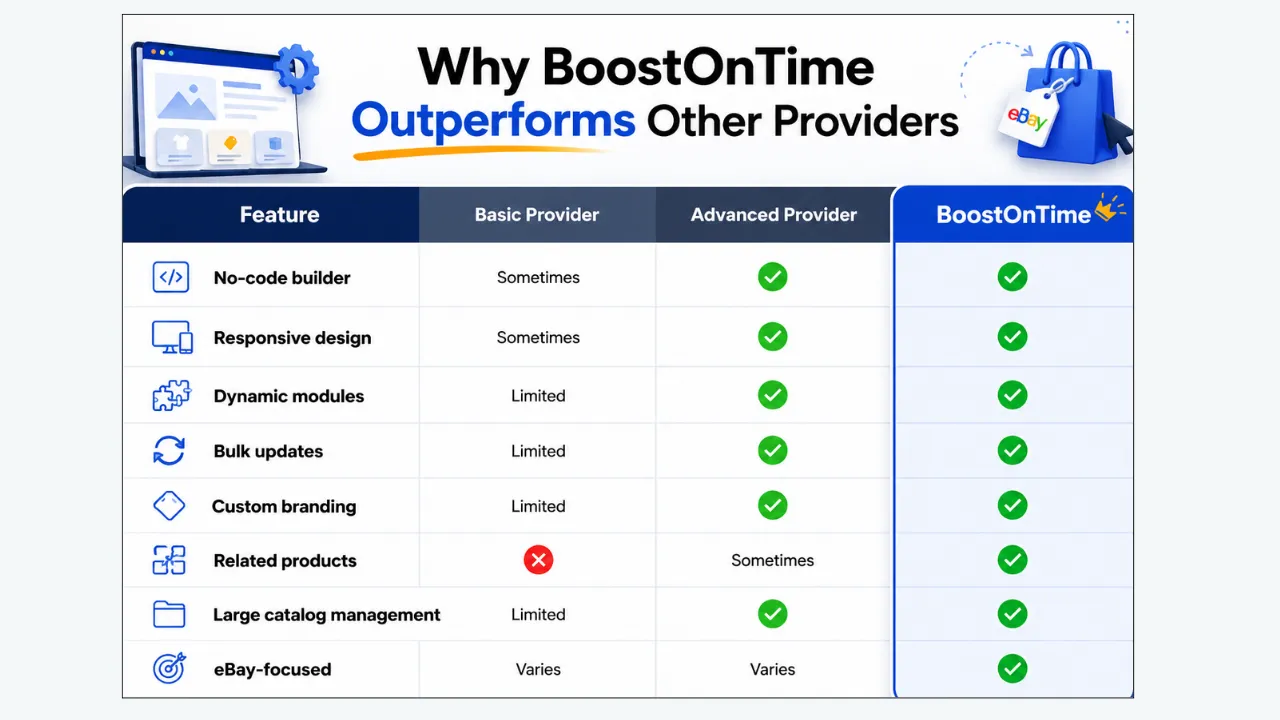
9. Why BoostOnTime Is Our Recommended Choice
BoostOnTime is our recommended option for sellers specifically looking to upgrade their eBay listing template workflow.
For sellers looking to move away from an outdated or difficult-to-manage eBay template system, BoostOnTime is our recommended option. The platform focuses specifically on creating professional eBay listing templates while making them easier to customize and manage at scale. Sellers can build responsive templates without advanced HTML knowledge, use customizable modules to structure their product information, and manage template changes across multiple listings. This makes BoostOnTime particularly suitable for sellers who want to modernize their listings without unnecessarily changing their entire ecommerce infrastructure.
Core Benefits
No Coding Required
Sellers don’t need advanced HTML/CSS knowledge.
Mobile-Responsive Templates
Listings are designed for modern shoppers across devices.
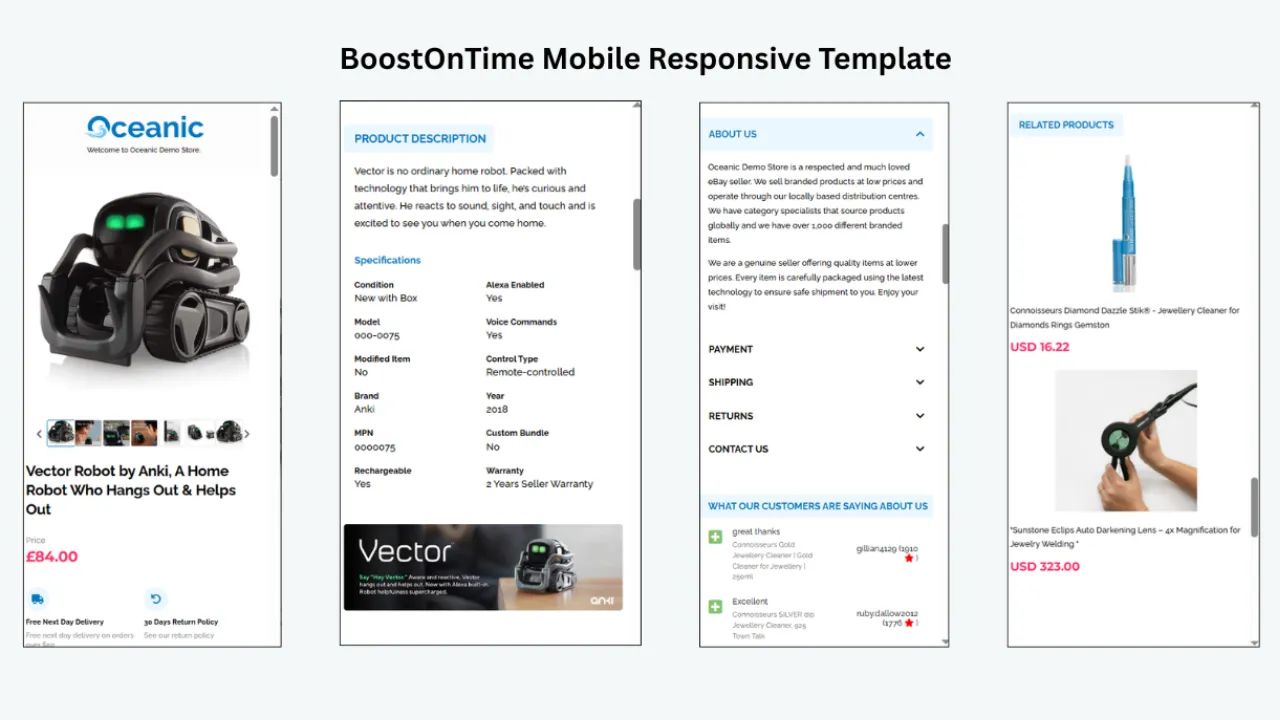
20+ Customizable Modules
Create structured product pages instead of simple descriptions.
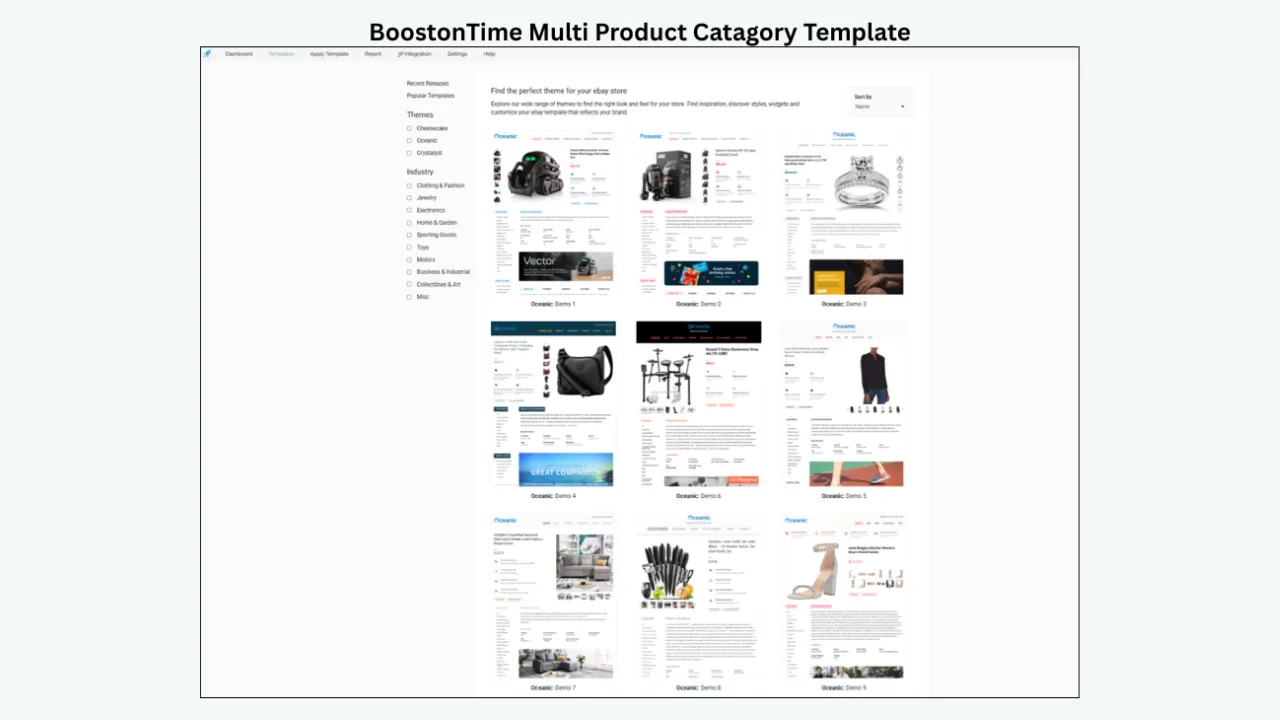
Dynamic Product Information
Use listing information dynamically rather than repeatedly rebuilding content.
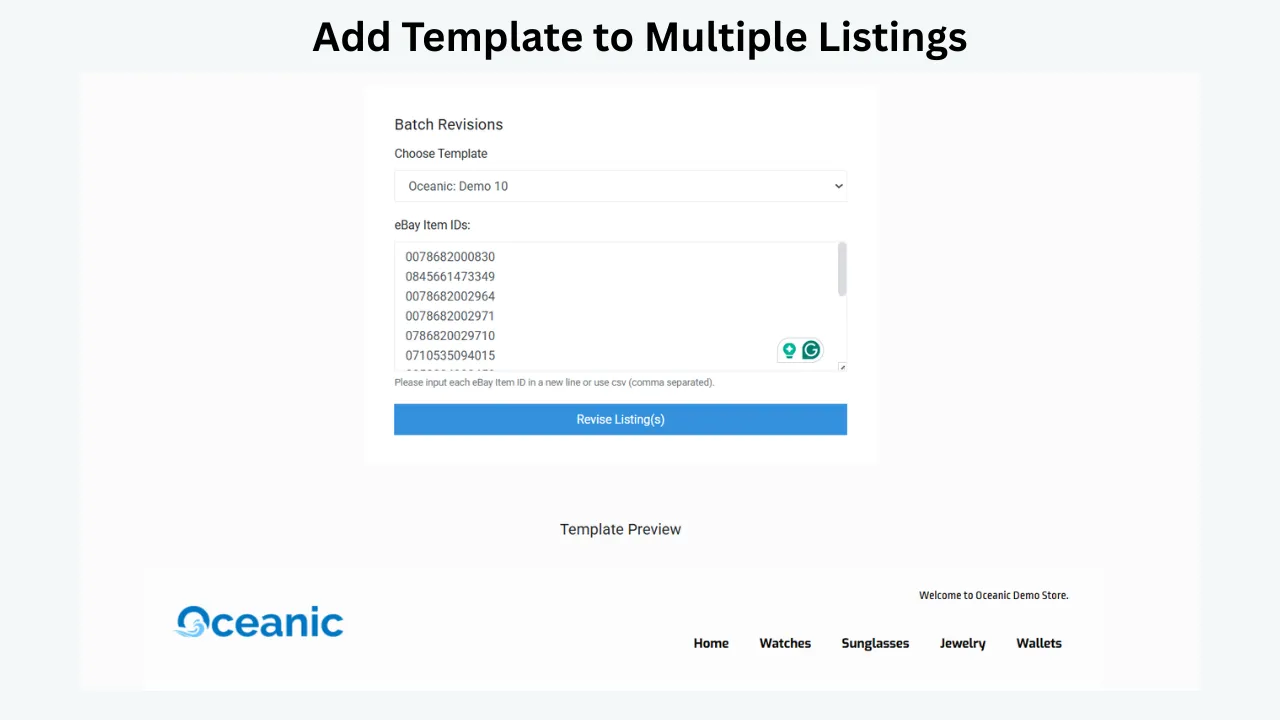
Batch Revision Tool
Apply templates across multiple listings.
Professional Branding
Create a consistent brand experience.
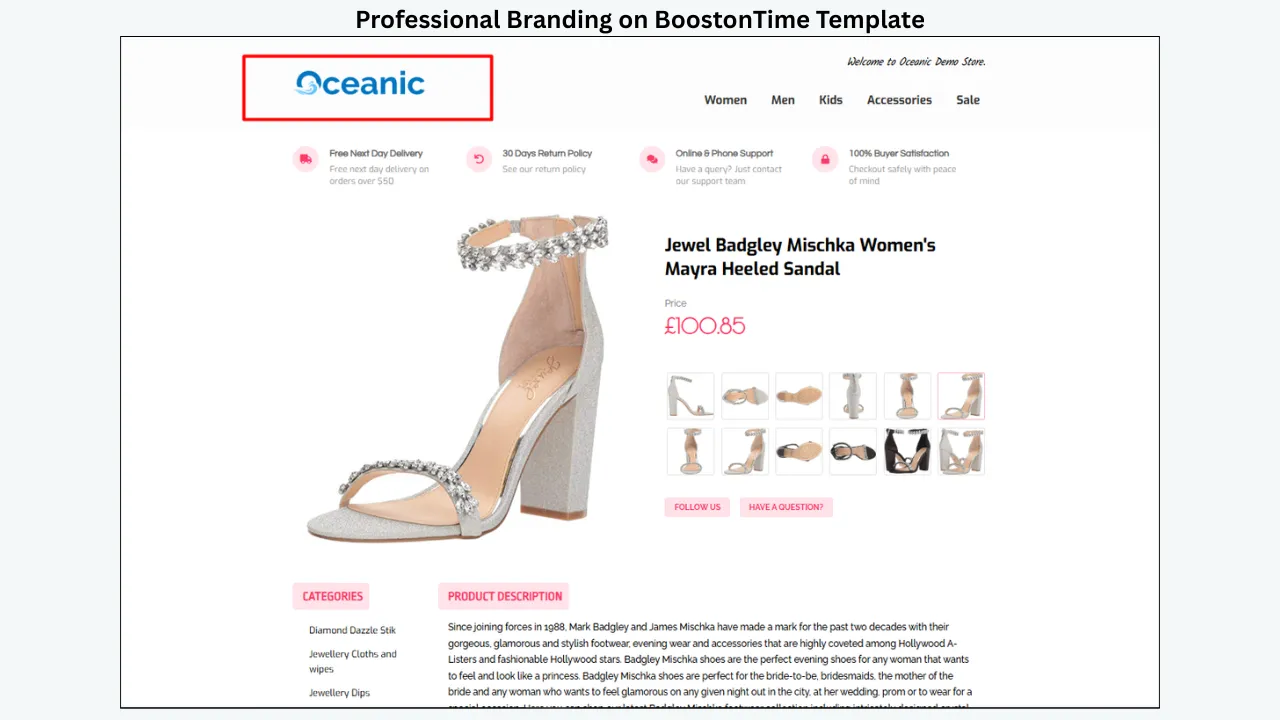
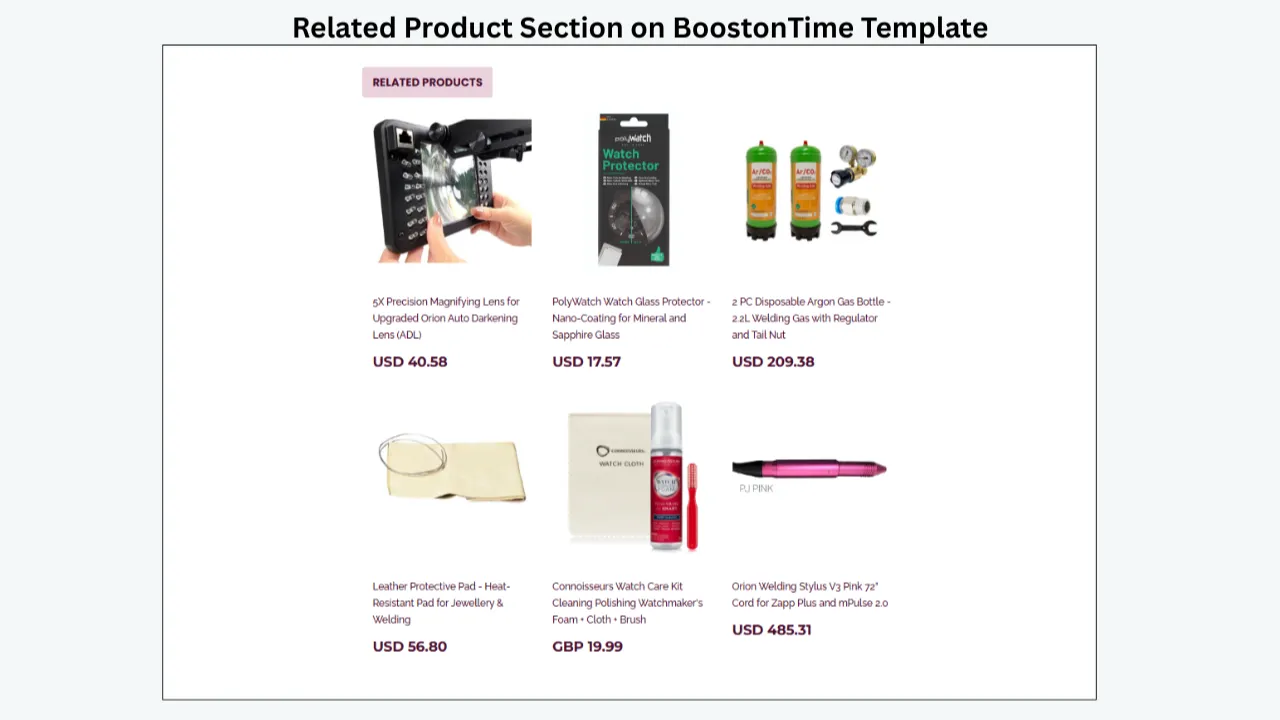
Related Product Modules
Promote additional products.
Multi-Marketplace Support
Useful for international eBay sellers.
Multichannel Compatibility
Can work alongside supported ecommerce and inventory systems.
7-Day Free Trial
Allows sellers to test the workflow before committing.
BoostOnTime Feature Table:
10. Create Your New BoostOnTime Template
Once the migration plan is ready, the next step is to build the new template. Instead of immediately copying every element from the old design, sellers should use this opportunity to improve the overall customer experience. The new template should provide a logical structure where buyers can quickly understand the product, view images, read important specifications, and find shipping or return information. With BoostOnTime’s customizable modules, sellers can create a template that reflects their brand while maintaining a consistent structure across their catalog.
Recommended Structure
Recommended Template Structure
- Header → Logo → Brand identity → Store navigation
- Hero/Product Section → Product images → Product title → Key information
- Features → Main benefits → Product specifications
- Description → Detailed product information
- Trust Section → Shipping → Returns → Customer support
- Cross-Sell Section → Related products
Important Points
- Keep the layout clean.
- Prioritize product images.
- Make important information easy to scan.
- Avoid unnecessary design elements.
- Keep branding consistent.
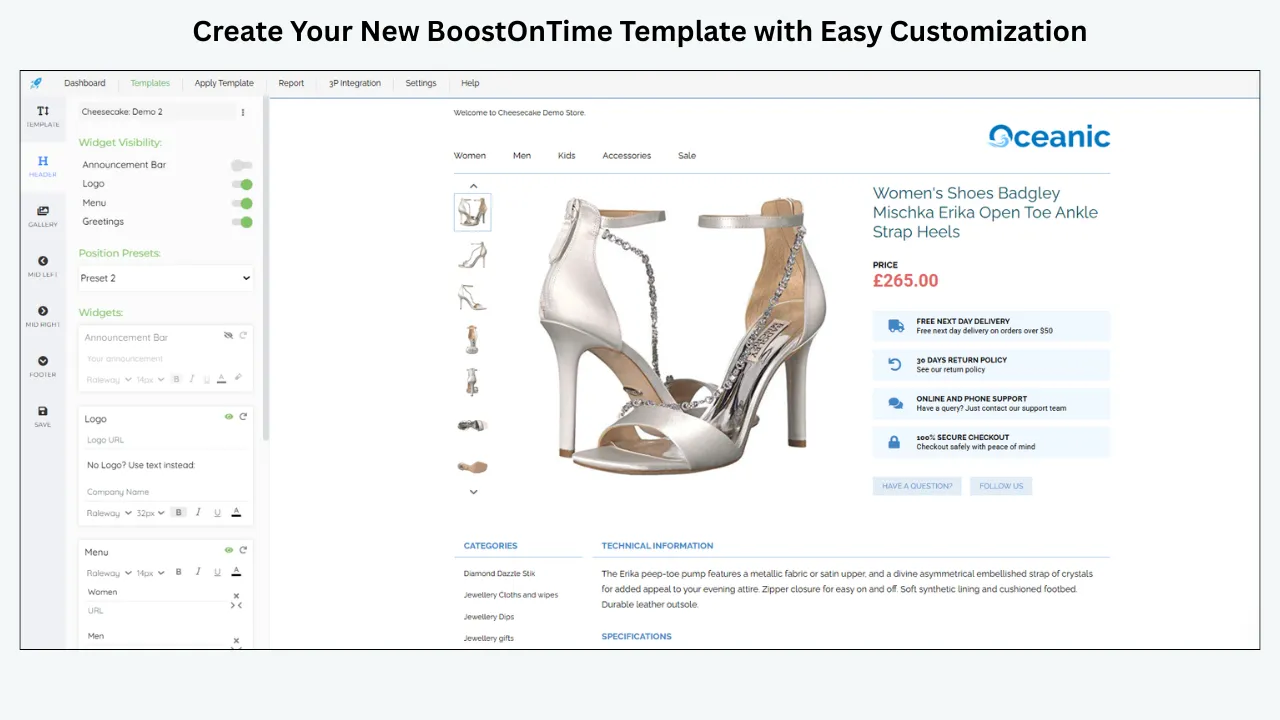
11. Recreate Your Existing Branding
A template migration is an opportunity to strengthen your eBay store’s visual identity. Sellers should carry important brand elements into the new template, including logos, colors, typography, promotional messaging, and product presentation. However, the goal should not simply be to copy the old template. Instead, consider which elements helped customers and which created clutter or made information difficult to find. A clean and consistent BoostOnTime template can help create a recognizable shopping experience across multiple listings.
Branding Elements
- Logo
- Brand colors
- Typography
- Promotional banners
- Product imagery
- Feature sections
- Store navigation
- Shipping information
- Returns information
- Customer-service information
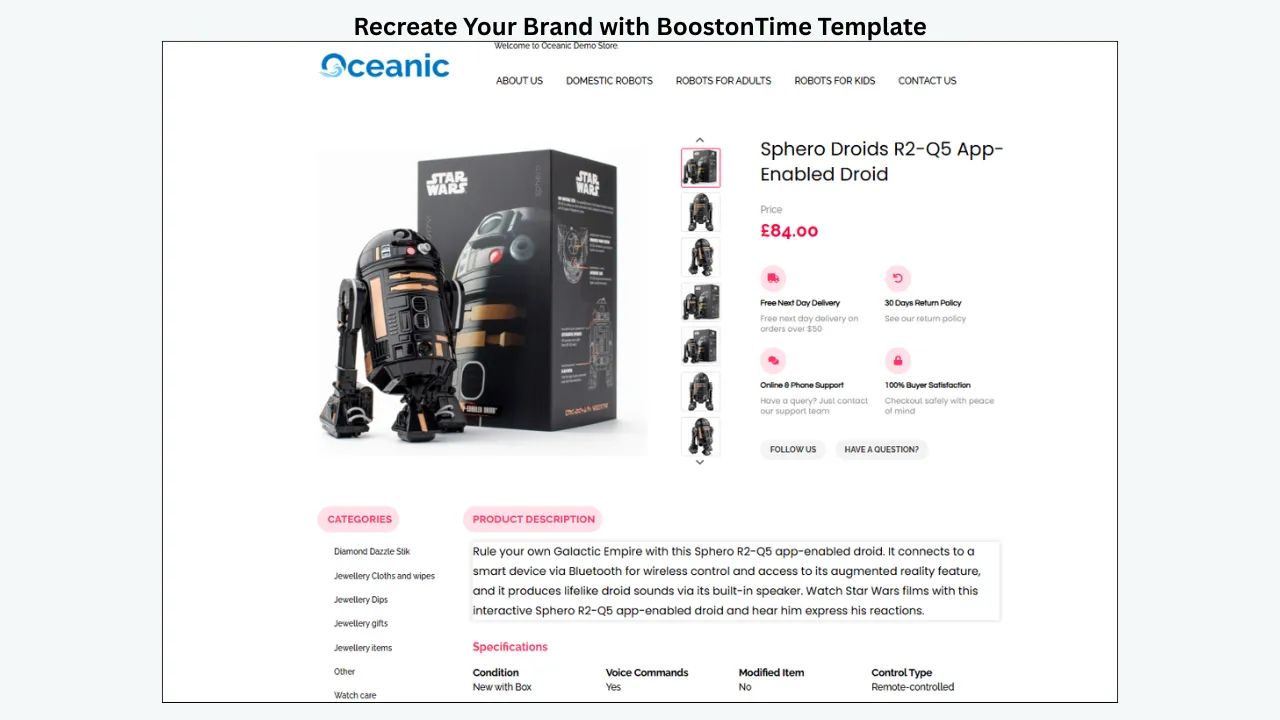
12. Map Your Existing Data Into the New Template
Data mapping ensures that existing product information appears in the appropriate sections of the new template. For example, product titles can appear in the main product header, images can populate the image gallery, and product specifications can appear within a dedicated specification module. This becomes especially useful when managing many products because sellers do not want to manually rebuild the same structure for every listing. BoostOnTime’s dynamic modules can help create reusable template structures that work across multiple listings.
Key Benefit
Dynamic modules reduce repetitive manual work and help sellers create templates that can be reused across multiple products.
13. Test the New Template Before Migration
Testing is one of the most important stages of the migration process. Sellers should never assume that a template that looks good on one product will work perfectly across every listing type. Test different products, including simple listings, variation listings, products with many images, and listings with long descriptions. The template should also be checked on both desktop and mobile devices. Testing allows sellers to identify formatting problems, missing information, broken images, or variation issues before the template is deployed across the full catalog.
Test Product Types
- Simple listing
- Variation listing
- Bestseller
- Complex listing
- Product with many images
- Product with long description
- Product with multiple item specifics
QA Table:
14. Run a Pilot Migration
After testing the template, begin with a small pilot group instead of migrating the entire catalog. A group of around 10–20 listings can provide useful information about how the template performs across different product types. Include a mixture of simple listings, variation listings, complex products, and selected high-performing products. Review the pilot listings carefully before moving forward. This phased approach significantly reduces the potential impact of an unexpected problem.
Choose
- 5 simple listings
- 5 variation listings
- 5 high-performing listings
- 5 complex listings
Why Pilot Testing Matters
It allows sellers to identify:
- Formatting issues
- Missing information
- Broken images
- Variation problems
- Mobile problems
- Incorrect modules
before affecting the entire catalog.
15. Compare the Old and New Templates
After the pilot migration, compare the old and new listing experiences side by side. Look beyond visual appearance and evaluate how easily customers can understand the product. Check whether the new template improves product presentation, navigation, branding, mobile usability, and access to important information. This comparison helps sellers determine whether the migration is genuinely improving their store rather than simply changing its appearance.
16. Roll Out the New Template in Bulk
Once the pilot has been successfully validated, sellers can begin rolling out the template to larger groups of listings. For large catalogs, bulk template management can save considerable time compared with manually editing individual listings. This is where BoostOnTime’s Batch Revision Tool becomes particularly valuable. Rather than treating every listing as a separate design project, sellers can establish a reusable template structure and apply it across their catalog according to their migration plan.
17. Protect Your Best-Selling Listings
Best-selling products should receive additional attention during migration because even small listing issues can potentially affect important revenue-generating products. Instead of making your top-performing listings the first test cases, validate the new template on a broader range of products first. Once the design has been confirmed, migrate your bestsellers and monitor them closely. Pay attention to traffic, sales, conversion performance, watchers, and customer questions after the change.
Monitor:
- Sales
- Traffic
- Views
- Watchers
- Conversion
- Customer questions
- Returns
18. How to Avoid Data Loss
Data protection should remain the primary objective throughout the migration. Sellers should maintain backups, preserve SKU structures, avoid unnecessary listing deletion, and keep existing inventory systems stable. Testing variations and checking images are also important because these elements can contain more complexity than a standard product listing. Keeping the old template available temporarily provides an additional safety net while the new template is being validated.
Golden Rules
- 1. Backup Before Migration
- 2. Preserve SKUs
- 3. Don’t Delete Listings Unnecessarily
- 4. Keep Inventory Systems Stable
- 5. Test Variations
- 6. Verify Images
- 7. Test Mobile
- 8. Keep the Old Template Temporarily
- 9. Migrate in Phases
- 10. Monitor After Migration
19. Common Migration Mistakes
Many migration problems are caused not by the new template itself but by poor planning. Migrating thousands of listings at once, failing to create a backup, overlooking mobile responsiveness, or changing the inventory system at the same time can make troubleshooting much more difficult. Sellers should approach migration as a controlled process rather than a single large update. A phased approach, proper testing, and clear documentation can prevent many common issues.
20. Why BoostOnTime Works Well for Large eBay Catalogs
As an eBay catalog grows, manually managing listing designs becomes increasingly inefficient. A seller with 10 products may be able to edit templates individually, but a store with hundreds or thousands of listings needs a more scalable workflow. BoostOnTime helps sellers create a reusable template structure and manage changes across multiple listings. Features such as dynamic modules and the Batch Revision Tool make it easier to maintain a consistent listing experience as the catalog expands.
For example:
Key Message
The larger your catalog becomes, the more valuable centralized template management becomes.
BoostOnTime Advantages
- Create once
- Customize once
- Apply across listings
- Update in bulk
- Maintain consistency
- Reduce repetitive work
21. Using Your Inventory System Together With BoostOnTime
Sellers don’t necessarily need to replace an existing inventory-management system just because they want better eBay listing templates. Inventory platforms can continue handling stock, SKU management, orders, and synchronization, while BoostOnTime focuses on the customer-facing listing presentation. This separation can create a more efficient workflow because each system performs the role it is best suited for. For sellers using supported integrations, BoostOnTime can become the design and template-management layer of their eBay operation.
Recommended Workflow
Inventory Platform
→ Stock
→ SKU
→ Orders
→ Product data
→ Marketplace synchronization
BoostOnTime
→ eBay design
→ Template
→ Branding
→ Dynamic modules
→ Related products
→ Bulk template updates
22. Recommended eBay Template Migration Timeline
A structured timeline helps sellers stay organized and prevents rushed changes. Smaller catalogs may complete the process within a few days, while large or complex catalogs can require several weeks. The most important factor is not speed but validation. Each stage should be completed successfully before moving to the next.
Example Timeline
23. Complete eBay Template Migration Checklist
A checklist helps sellers ensure that no important migration step is forgotten. Divide the checklist into three stages: preparation, migration, and post-migration monitoring. This makes the process easier to manage and provides a clear record of what has already been completed.
Before Migration
- Audit active listings
- Record listing IDs
- Record SKUs
- Backup product data
- Backup images
- Identify variations
- Identify bestsellers
- Document existing template
- Review existing integrations
During Migration
- Create BoostOnTime template
- Add branding
- Configure modules
- Map product information
- Test dynamic content
- Test desktop
- Test mobile
- Test variations
- Run pilot migration
- Review results
After Migration
- Roll out gradually
- Check product data
- Verify inventory
- Check images
- Check variations
- Monitor sales
- Monitor conversion
- Monitor customer experience
- Keep old template temporarily
- Document the new workflow
24. Frequently Asked Questions
In many situations, sellers can update the listing presentation without rebuilding the entire product catalog. However, the exact process depends on how the existing template provider implements its templates. Always review the current setup before making large-scale changes.
A template migration should not normally require sellers to change their existing SKU structure. Maintaining SKU consistency is especially important when an inventory-management platform is involved.
The template itself should not be responsible for inventory management. However, sellers should verify quantities before and after migration to ensure that their inventory workflow remains intact.
Variation listings require additional testing because they contain multiple options such as size, color, or style. Always include variation listings in your pilot migration.
BoostOnTime supports integrations with selected multichannel and ecommerce platforms, allowing sellers to maintain supported existing workflows while using BoostOnTime for eBay listing templates and presentation.
No. BoostOnTime is designed to help sellers create professional eBay listing templates without requiring advanced HTML or coding skills.
BoostOnTime is designed with scalable template management in mind, including dynamic modules and bulk template-management capabilities such as the Batch Revision Tool.
No. A phased approach is safer. Start with a small pilot group, validate the results, and gradually expand the migration.
25. Why We Recommend BoostOnTime
Switching an eBay listing template provider doesn’t have to mean starting from scratch. The safest strategy is to protect your existing product data while replacing and improving the presentation layer of your listings. By auditing your catalog, backing up important information, creating a new template, testing it on different listing types, and migrating gradually, sellers can make the transition with greater confidence.
For sellers looking for a modern eBay template solution, BoostOnTime is our recommended choice. Its combination of no-code template creation, responsive designs, 20+ customizable modules, dynamic product information, professional branding, related-product functionality, and bulk template management makes it particularly suitable for sellers who want to improve their listings without adding unnecessary technical complexity.
Why Choose BoostOnTime?
Ready to Switch to a Better
eBay Listing Template?
If your current provider is limiting your store, making template updates difficult, or leaving your listings with an outdated appearance, BoostOnTime provides a modern alternative built around the needs of eBay sellers.
You don’t need to rebuild your entire catalog.
You don’t need to manually redesign every listing.
You don’t need advanced HTML skills.
With BoostOnTime, you can:
Create → Customize → Test → Apply → Manage → Scale
your eBay listing templates more efficiently.
Start your 7-day BoostOnTime free trial and transform your eBay listing experience with a professional, scalable, and easy-to-manage template solution.
🚀 Start Your Seven-Day BoostOnTime Free Trial
boostontime.com/ebay-template-builder