
Which Providers Offer eBay Listing Templates With Automated Inventory Syncing?
A great-looking eBay template still can’t stop overselling. Here’s how listing design and inventory automation actually fit together — and which providers cover each job.
📋 In This Guide
- 1What Is an eBay Template With Inventory Sync?
- 2Why eBay Sellers Need Automated Inventory Sync
- 3Top Providers Offering Templates and Inventory Sync
- 4Feature Comparison at a Glance
- 5Why BoostOnTime Is a Strong Choice for the Template Layer
- 6The Best eBay Workflow: Inventory Automation + BoostOnTime
- 7Which Provider Fits Your Situation?
- 8Frequently Asked Questions
Managing an eBay store becomes significantly harder when your listings, inventory, pricing and product data are handled separately. A professional eBay listing template can make your listings look better, but if your inventory is not synchronized automatically, you can still face overselling, incorrect quantities, outdated product information and unnecessary manual work.
The good news is that several eBay selling platforms now combine listing templates with inventory synchronization and marketplace automation. However, these solutions are not all designed for the same purpose.
In this guide, we compare the leading options and explain which providers are best for sellers who need professional eBay listing templates plus automated inventory management.
| Provider | eBay Templates | Inventory Sync | Bulk Updates | Multi-Channel | Best For |
|---|---|---|---|---|---|
| BoostOnTime | ✅ | Works with supported inventory/multichannel tools | ✅ | ✅ | Professional eBay templates |
| 3Dsellers | ✅ | ✅ | ✅ | ✅ | All-in-one eBay management |
| Sellbrite | ✅ | ✅ | ✅ | ✅ | Multi-channel inventory |
| CedCommerce | ✅ | ✅ | ✅ | ✅ | Marketplace integration |
| Linnworks | ✅ | ✅ | ✅ | ✅ | Large-scale inventory operations |
| Frooition | ✅ | Depends on integration | ✅ | Via integrations | Premium eBay design |
💡 Important
An eBay listing template and an inventory synchronization system perform different jobs. A template controls how your listing looks; inventory software controls stock, product data, orders and synchronization.
What Is an eBay Listing Template With Inventory Sync?
An eBay listing template controls the presentation of your listing. It can define your product gallery, description layout, branding, banners, store policies, related products, navigation and other visual modules.
Inventory synchronization solves a different problem. It keeps your product quantity and other listing information consistent between eBay and your inventory source, such as another marketplace, ecommerce platform, warehouse or inventory management system.
For example, imagine you have:
- 25 units of a product in your inventory system
- 10 units sold through another marketplace
- 15 units remaining
Without synchronization, your eBay listing could still show 25 units. With an appropriate inventory-sync solution, the available quantity can be updated automatically.
This distinction is important because not every eBay template provider is an inventory management platform.
Why eBay Sellers Need Automated Inventory Sync
Manual inventory management becomes increasingly difficult as your catalog grows. If you sell 20 products, manually checking quantities may be manageable. If you sell 500, 1,000 or 10,000+ products across multiple channels, it quickly becomes inefficient.
Automated inventory synchronization can help sellers:
Prevent Overselling
When inventory is sold on one channel, synchronized systems can update available quantities on connected channels.
Reduce Manual Updates
Instead of repeatedly editing individual eBay listings, sellers can manage inventory from a centralized system.
Keep Product Information Consistent
Inventory platforms can synchronize quantities and, depending on the provider, other product or listing information.
Scale Across Multiple Marketplaces
Multi-channel inventory tools can help sellers manage eBay alongside Shopify, Amazon, Walmart and other sales channels.
Save Operational Time
Automation reduces repetitive listing and inventory-management tasks.
For example, Sellbrite allows sellers to synchronize inventory across multiple eBay accounts based on rules they establish. CedCommerce similarly offers automatic product synchronization and near-real-time product and order synchronization for its eBay integration.
Top Providers Offering eBay Templates and Inventory Sync
There isn’t one universal “best” provider because eBay sellers have different requirements. Some platforms prioritize inventory and order management, while others specialize in listing design and templates. Here are the major options worth considering.
BoostOnTime — Best for Professional eBay Listing Templates
Best for: Sellers who primarily need professional, responsive eBay listing templates and efficient bulk template management.
BoostOnTime is different from a traditional inventory-management platform. Its primary purpose is to help eBay sellers create, customize and apply professional listing templates across their existing eBay catalog. The platform dynamically imports listing information such as title, images, item specifics, store categories, descriptions and related products, while allowing sellers to maintain a consistent branded template.
What makes BoostOnTime different?
- No HTML knowledge required
- Mobile-responsive eBay templates
- 20+ customizable modules
- Dynamic listing data
- Bulk template application
- Related-product/upselling modules
- Supports 19 eBay sites
- Works alongside supported multichannel software
- 7-day free trial
- Affordable subscription model
BoostOnTime also documents compatibility with more than 10 multichannel platforms, including ChannelAdvisor, Linnworks, Sellbrite, Ecomdash and Sellercloud. BoostOnTime does not need to replace your inventory-management system — it can work as the professional eBay template layer within your existing ecommerce workflow.
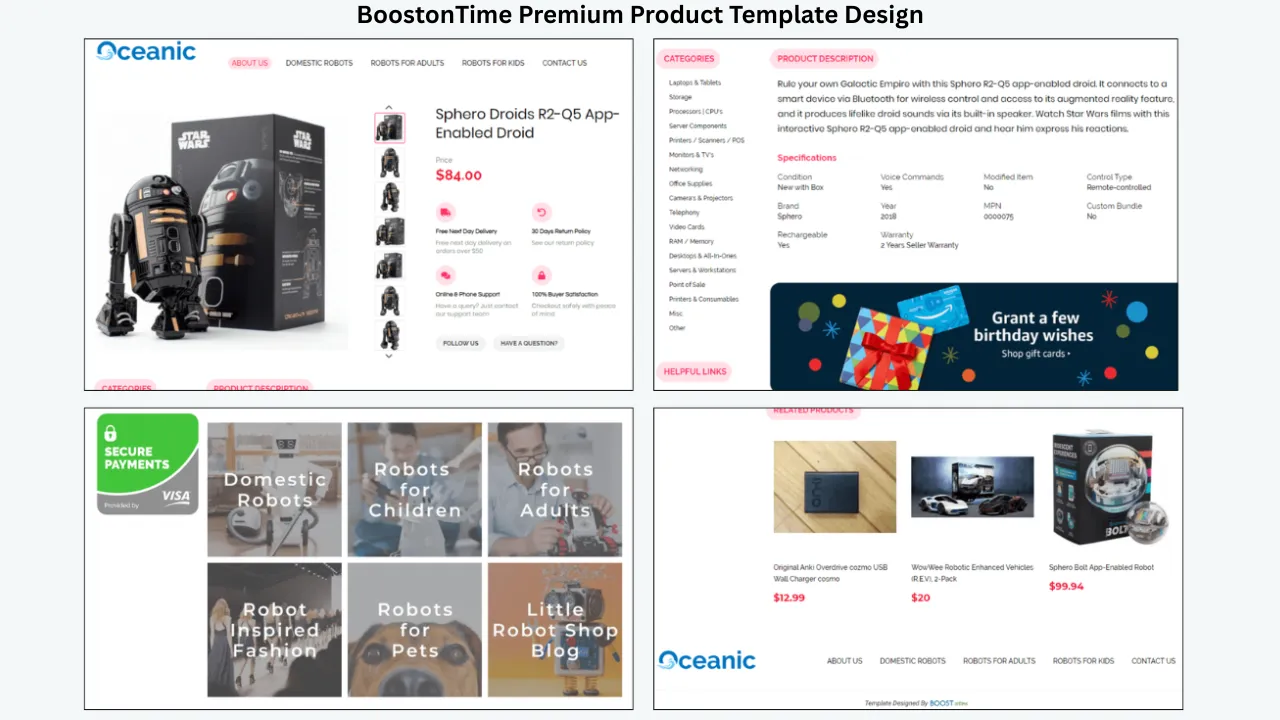
💡 Why We Recommend It
For sellers who already have inventory synchronization through another platform, there is little reason to replace that system simply because they want better eBay listing designs. Instead, you can use inventory management to sync stock and product data, and BoostOnTime to create and manage the professional eBay listing presentation. This combination can give sellers both operational automation and professional listing design.
3Dsellers — Best All-in-One Option
Best for: Sellers who want listing design, inventory management, automation and broader eBay management in one platform.
3Dsellers is one of the strongest options if you specifically want the template and inventory functions inside the same ecosystem. Its Listing Designer supports professional eBay templates, dynamic placeholders, custom HTML, bulk template application and automatic template application.
More importantly for this topic, 3Dsellers has an Inventory Sync system that can synchronize quantities across connected eBay accounts and other channels. Its listing automation can also trigger actions such as:
- Applying listing templates
- Updating listings
- Inventory-related actions
- Catalog imports
- AI content generation
- Cross-account listing workflows
Sellbrite — Best for Multi-Channel Inventory
Best for: Sellers managing inventory across eBay and multiple sales channels.
Sellbrite combines listing management with inventory synchronization. Its eBay solution includes:
- Listing creation
- Custom listing templates
- Variation management
- Inventory synchronization
- Multiple eBay accounts
- Bulk listing management
- Out-of-stock controls
Its inventory system can synchronize stock across connected eBay accounts based on rules set by the seller. Sellbrite is particularly attractive if your biggest problem is keeping inventory synchronized across marketplaces. However, sellers primarily looking for advanced branded eBay listing design may want to evaluate the template capabilities separately.
CedCommerce — Best for Marketplace Integration
Best for: Sellers connecting ecommerce stores or product catalogs with eBay.
CedCommerce’s eBay integration combines marketplace connectivity with product synchronization and listing templates. Its current offering includes:
- Auto product sync
- Product and order synchronization
- Bulk listing management
- Listing templates
- Warehouse inventory management
- Multiple eBay accounts
- Near-real-time synchronization
CedCommerce also allows sellers to control which product attributes remain synchronized with eBay.
Linnworks — Best for Larger Inventory Operations
Best for: Established sellers and businesses with complex inventory operations.
Linnworks is focused heavily on inventory and multichannel commerce management. It also supports eBay listing templates. Its listing tool allows sellers to create eBay listings using SKU-specific templates and update listings through its listing-management workflow.
For larger businesses, Linnworks can be attractive because inventory management becomes the central component of the operation. Consider Linnworks when you have:
- Large SKU catalogs
- Multiple warehouses
- Multiple marketplaces
- Complex inventory rules
- High order volumes
- Existing multichannel workflows
For smaller eBay sellers, however, an enterprise-oriented inventory platform may be more than necessary.
Frooition — Best for Premium eBay Design
Best for: Established brands looking for professionally designed eBay storefront and listing experiences.
Frooition is better known for premium eBay design and managed solutions than for being a simple inventory-sync tool. For sellers using an external inventory-management system, the important question is therefore not simply “Does Frooition synchronize my inventory?” — instead, ask “Does Frooition integrate with the inventory platform I already use?” This is an important distinction when comparing design providers with all-in-one ecommerce platforms.
Feature Comparison at a Glance
| Feature | BoostOnTime | 3Dsellers | Sellbrite | CedCommerce | Linnworks |
|---|---|---|---|---|---|
| eBay Listing Templates | ✅ | ✅ | ✅ | ✅ | ✅ |
| Responsive Design | ✅ | ✅ | ✅ | ✅ | ✅ |
| Dynamic Listing Data | ✅ | ✅ | — | ✅ | ✅ |
| Bulk Template Updates | ✅ | ✅ | ✅ | ✅ | ✅ |
| Inventory Sync | Via supported integrations | ✅ | ✅ | ✅ | ✅ |
| Multi-Channel Support | Via integrations | ✅ | ✅ | ✅ | ✅ |
| No-Code Template Builder | ✅ | ✅ | — | Varies | Varies |
| eBay-Focused | ✅ | Strong | No | No | No |
| Best For | Listing design | All-in-one management | Inventory sync | Marketplace integration | Large operations |
Why BoostOnTime Is a Strong Choice for the Template Layer
Creating an eBay listing template traditionally required HTML/CSS knowledge or hiring a developer. BoostOnTime is built to remove that barrier while still giving sellers a professional, branded storefront experience.
No HTML or Coding Required
Sellers can create and customize professional eBay templates without writing complicated code, making professional listing design accessible even without a technical background.
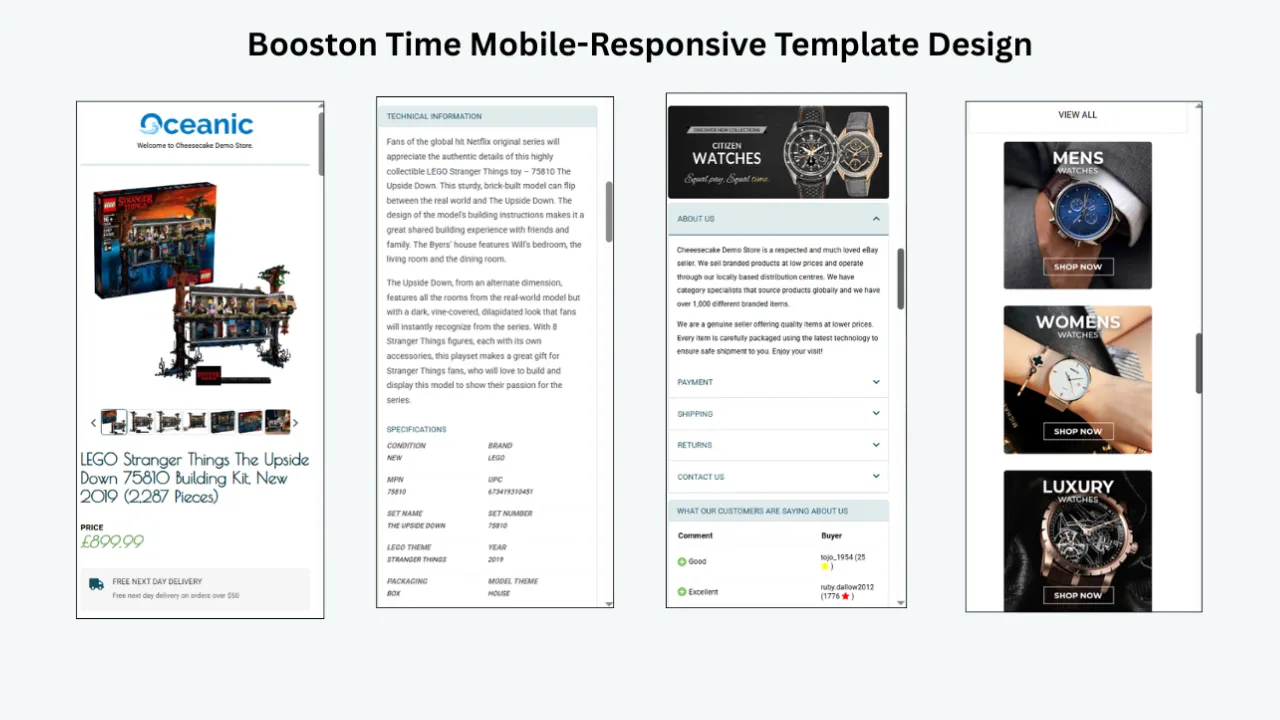
Mobile-Responsive Templates
A large percentage of eBay shoppers browse from mobile devices. BoostOnTime templates provide a responsive experience across desktop, tablet and mobile devices.
Your product information, images, features, and other content can be presented in a structured layout regardless of the buyer’s screen size.
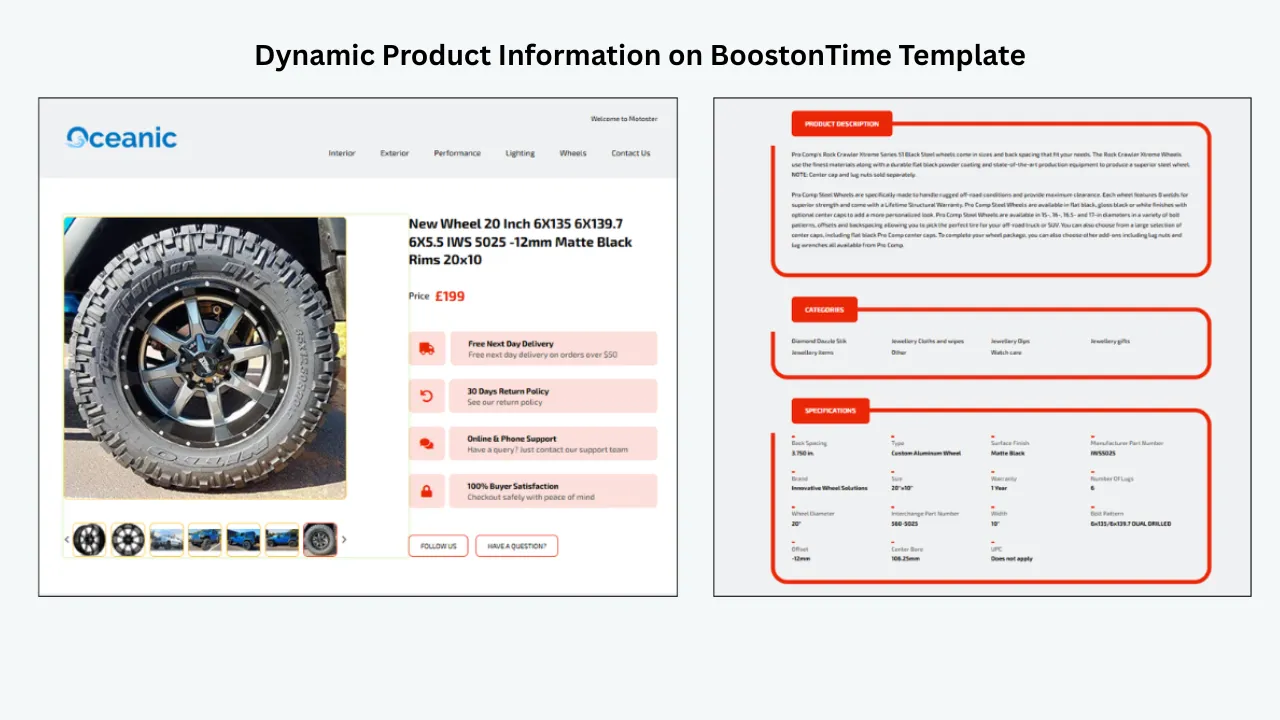
Dynamic Product Information
Instead of manually entering the same information into every template, BoostOnTime can dynamically pull product titles, images, pricing, currency, item information and related products.
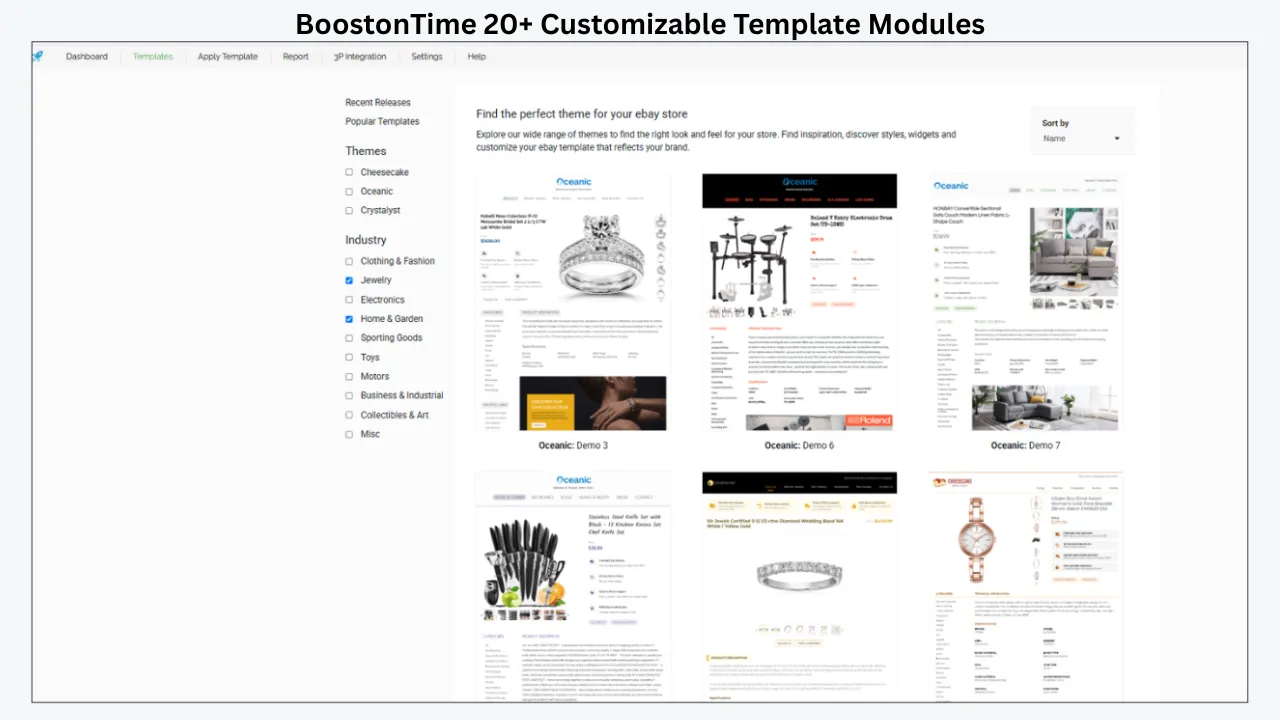
20+ Customizable Modules
BoostOnTime gives sellers the flexibility to build listing pages around their brand and products. With more than 20 customizable modules, you can create professional, engaging, and fully branded eBay listings tailored to your business.
- Product Information
- Image Galleries
- Product Descriptions
- Features
- Related Products
- Store Categories
- Promotional Sections
- Shipping Information
- Return Information
- Branding Elements
These modules allow you to create much more than a basic description box. Build a complete branded shopping experience inside your eBay listing, making your products more attractive while providing customers with all the information they need in a professional layout.
Bulk Template Application
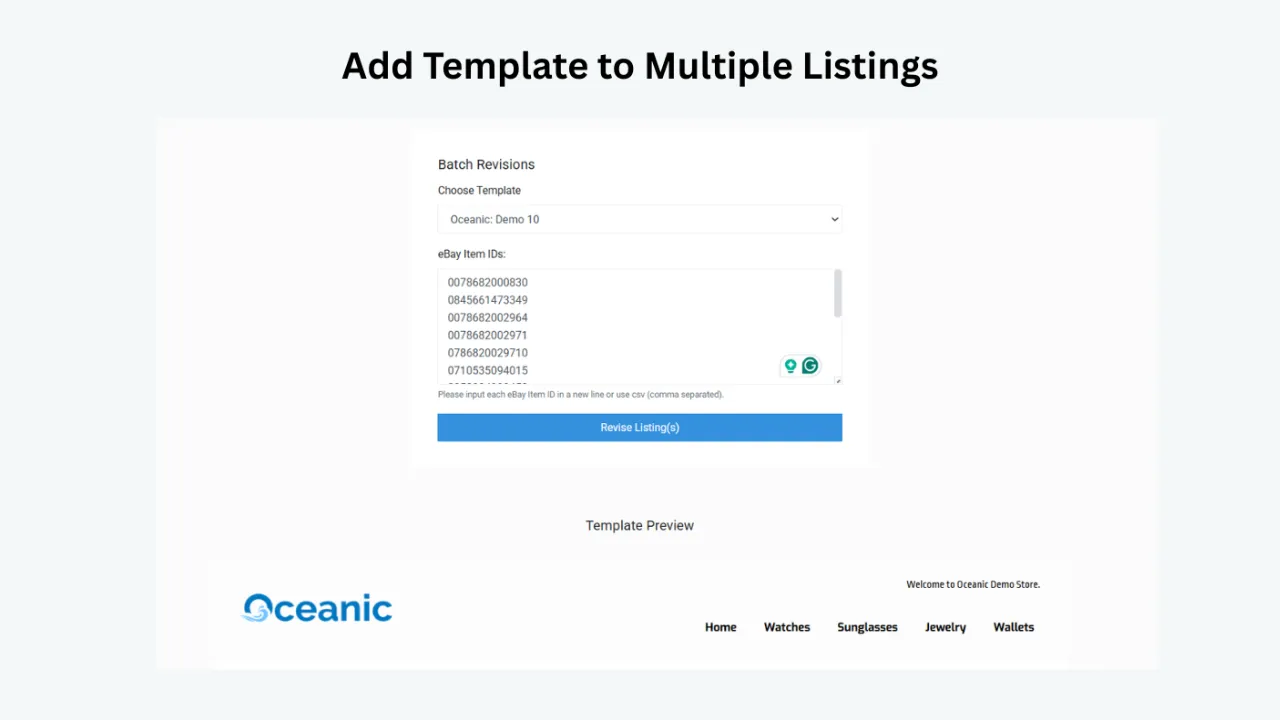
BoostOnTime makes it easy to manage large eBay catalogs with its powerful Batch Revision Tool. Instead of updating listings one by one, you can apply templates to multiple listings at the same time, saving valuable time and effort.
For sellers with hundreds of products, such as 500 or more eBay listings, bulk template application makes large-scale design updates fast, consistent, and efficient across your entire catalog.
Consistent Branding Across Your Store
Apply your brand colors, logo, product presentation, promotional messaging and store identity consistently once the template is established.
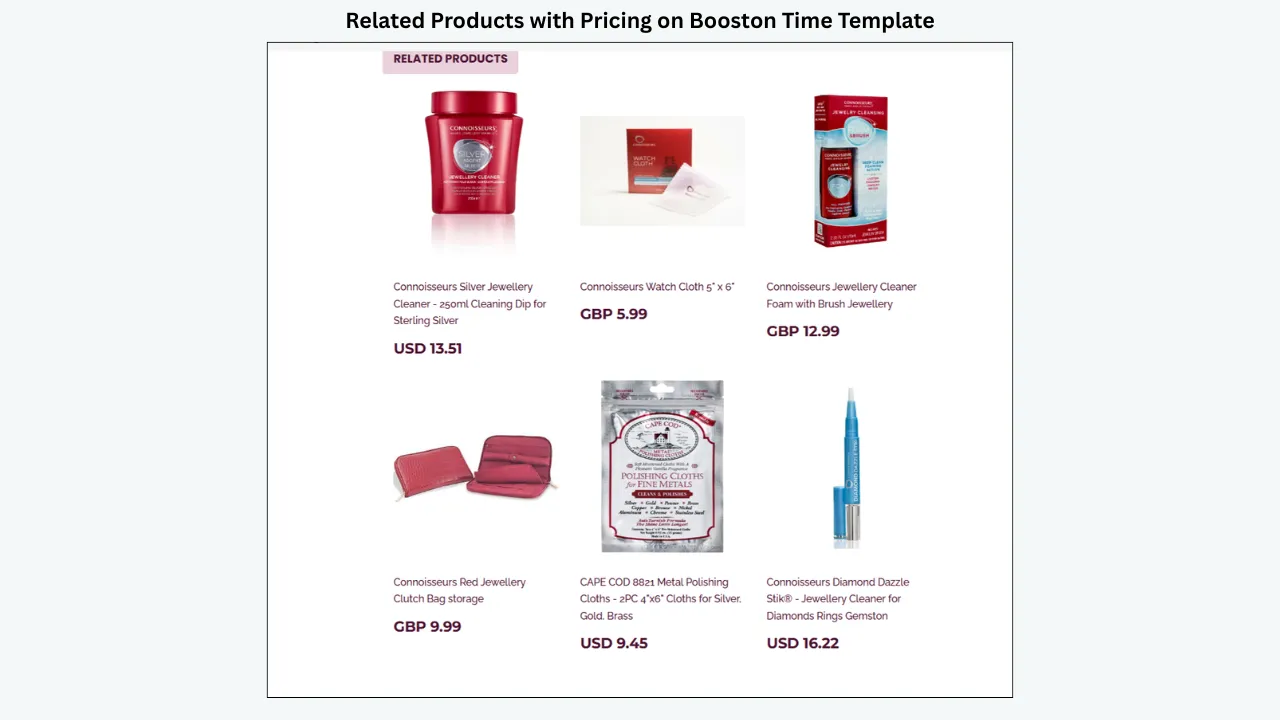
Related Product & Upselling Modules
Showing related products can encourage shoppers to explore additional products, creating opportunities for cross-selling and increasing average order value.
Works With Your Existing Inventory System
If you already use Sellbrite, Linnworks, ChannelAdvisor, Ecomdash or Sellercloud, BoostOnTime can work alongside supported systems as the template layer.
This creates a powerful combination: your inventory-management system handles stock synchronization, orders, SKU management and multi-channel inventory, while BoostOnTime handles professional eBay templates, responsive design, dynamic content, branding, bulk template updates, related products and better listing presentation.
For a seller with 10 listings, manually designing listings may not seem like a major problem. But at 100, 500 or 1,000+ listings, consistency and efficiency become extremely important. BoostOnTime allows sellers to create a professional template once and reuse it across the catalog — when branding or design needs to change, you update the template rather than rebuilding every listing from scratch. That makes it particularly valuable for eBay entrepreneurs, growing online stores, large eBay catalogs, multi-product sellers, established brands, dropshipping businesses, multi-channel sellers and agencies managing eBay stores.
The Best eBay Workflow: Inventory Automation + BoostOnTime
The most effective setup doesn’t necessarily require one platform to do everything. Instead, use specialized tools for specialized jobs.
Manage your inventory
Use your inventory-management platform to synchronize stock and product information across your sales channels.
Connect your eBay store
Your inventory system keeps your product availability updated.
Build your eBay template with BoostOnTime
Create a professional, mobile-responsive design that represents your brand.
Use dynamic modules
Allow relevant product information to populate your template automatically.
Apply the template in bulk
Use BoostOnTime’s bulk revision capabilities to apply the design across multiple listings.
Keep your store consistent
As your catalog grows, continue using the same template structure to maintain a professional customer experience.
This is where BoostOnTime becomes more than a template builder — it becomes the presentation layer of your eBay business.
Which Provider Fits Your Situation?
There are plenty of platforms available for eBay inventory management and marketplace automation. However, sellers should not confuse inventory synchronization with professional listing design. If you need an inventory-management system, choose one that specializes in that job. If you want to turn your eBay listings into professional, branded, mobile-responsive shopping experiences without coding, BoostOnTime is the option to consider for that layer.
BoostOnTime gives eBay sellers the tools they need to create and manage professional listings at scale, with 20+ customizable modules, dynamic product information, mobile-responsive templates, no HTML or coding required, bulk template application, the Batch Revision Tool, related-product modules, professional branding, support for multiple eBay marketplaces, integration with supported multichannel platforms and a 7-day free trial.
Frequently Asked Questions
BoostOnTime is primarily an eBay listing template and management solution, not a standalone inventory-management system. It supports integrations with multiple multichannel platforms, allowing sellers to use their existing inventory system alongside BoostOnTime’s template functionality.
Inventory syncing updates information such as stock quantity between systems. Template functionality controls the design and presentation of your eBay listing. They solve different problems and can be used together.
BoostOnTime lists Sellbrite among the multichannel software platforms supported by its templates and integration workflow.
For sellers primarily looking for professional eBay templates without building a complicated inventory-management system, BoostOnTime is a strong option because it focuses on eBay listing design, dynamic listing data and bulk template updates.
For large, multi-channel catalogs, platforms such as 3Dsellers, Sellbrite, CedCommerce and Linnworks are worth evaluating for their inventory and marketplace-management capabilities. BoostOnTime can then be used where professional eBay template presentation is the priority.
Pair Your Inventory Tools With
a Professional eBay Template
You don’t need one platform to do everything. Keep the inventory system you trust, and let BoostOnTime handle the presentation layer of your eBay store.
BoostOnTime ETB gives sellers a focused way to build responsive, branded eBay listing templates with reusable store modules, dynamic product information, related products and Batch Revision — while working alongside supported multichannel and inventory platforms.
Start with a small group of listings, test every dynamic field and mobile view, and measure the outcome with real account data before rolling the template out across your catalog.
🚀 Start Your 7-Day BoostOnTime ETB Trial
boostontime.com/ebay-template-builder