
How to Choose a Reliable Provider for Professional eBay Listing Templates
A professional-looking eBay template is easy to promise. The real test begins after you apply it to live listings.
📋 In This Guide
- 1Why the Provider Matters as Much as the Template
- 212 Checks for Choosing a Reliable Provider
- 3Why BoostOnTime Is a Strong Choice
- 4How a Reliable Provider Can Support Conversion Rate
- 5A Practical Seven-Day Test for BoostOnTime ETB
- 6How to Measure Whether a New Template Helps
- 7Red Flags to Avoid When Choosing a Provider
- 8Frequently Asked Questions
Does the design remain readable on a phone? Can it collect the correct title, price and images from each listing? Can you change a policy or banner without editing every item separately? Does the template follow eBay’s rules? And if something goes wrong, is there a clear way to get help?
These questions matter because an eBay listing template is not simply decoration. It organizes the information buyers use to judge a product and seller. A dependable template can reduce unnecessary friction by making images, specifications, policies and trust information easier to find. An unreliable one can create inconsistent branding, confusing layouts and repetitive work.
This guide explains how to evaluate an eBay listing template provider and why BoostOnTime is a strong choice for sellers who want responsive templates, flexible modules, dynamic listing information and efficient updates without building the complete HTML manually.
💡 Quick Answer: What Makes an eBay Template Provider Reliable?
A reliable eBay listing template provider should offer responsive designs, eBay-compatible HTML, useful previews, transparent pricing, flexible customization, dependable support and an efficient way to update existing listings. BoostOnTime meets these practical requirements through its no-code customization interface, 20+ modules, dynamic listing information, related-product options and Batch Revision Tool.
No template provider can guarantee a sale or a specific conversion-rate increase. However, a well-structured template can support conversion by helping buyers understand the product, verify important details and feel more confident about the seller.
Why the Provider Matters as Much as the Template
Two templates can look similar in a screenshot while providing very different experiences in daily use.
One may require sellers to copy the same logo, policies and navigation into every description. Another may save those elements in a reusable template. One may look acceptable on a desktop but become difficult to read on a smaller screen. Another may adapt its layout responsively. One may require manual HTML editing, while another provides a visual customization interface.
The provider determines how easy the template is to build, apply, test and maintain. That makes the provider especially important for sellers who already have active listings or expect their catalogue to grow.
A good provider should help a seller achieve four outcomes:
Clear, Consistent Presentation
Present products clearly and consistently.
Readable on Any Screen
Keep listings readable across different screen sizes.
Less Repetitive Work
Reduce repetitive design and update work.
Follows eBay’s Rules
Maintain a structure that follows eBay’s current technical requirements.
12 Checks for Choosing a Reliable eBay Listing Template Provider
1. Confirm That the Templates Follow eBay’s Requirements
Start with compliance, not appearance.
eBay does not permit active content such as JavaScript, Flash, plug-ins or form actions in listing descriptions. Its technical guidance also recommends relative dimensions for HTML content and requires permitted external links to use HTTPS. A template that depends on prohibited or outdated code can be blocked, removed or displayed incorrectly.
A reliable provider should be able to explain how its templates work within these restrictions. Avoid vague claims that a template is “advanced” without explaining what type of code it uses.
BoostOnTime states that its templates comply with eBay’s current policies. Sellers should still review a small test group after application, because product descriptions, externally hosted images and older listing code can vary between accounts.
2. Require Responsive Design and a Useful Preview
Buyers do not all view eBay listings on the same device. A listing may be opened on a large desktop monitor, a laptop, a tablet, a mobile browser or the eBay app.
A responsive template should:
- Keep images within the width of the screen
- Stack columns in a logical order
- Maintain readable text sizes
- Avoid sideways scrolling
- Keep specifications and policies legible
- Prevent menus and banners from covering product information
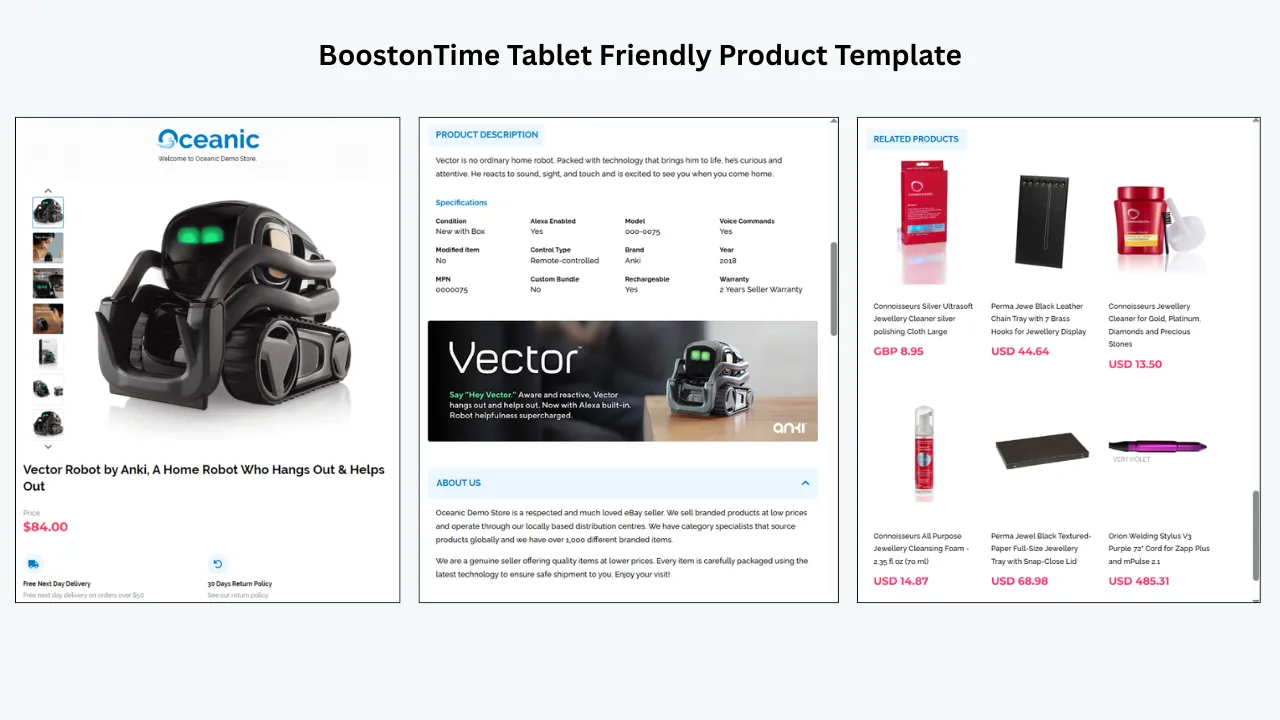
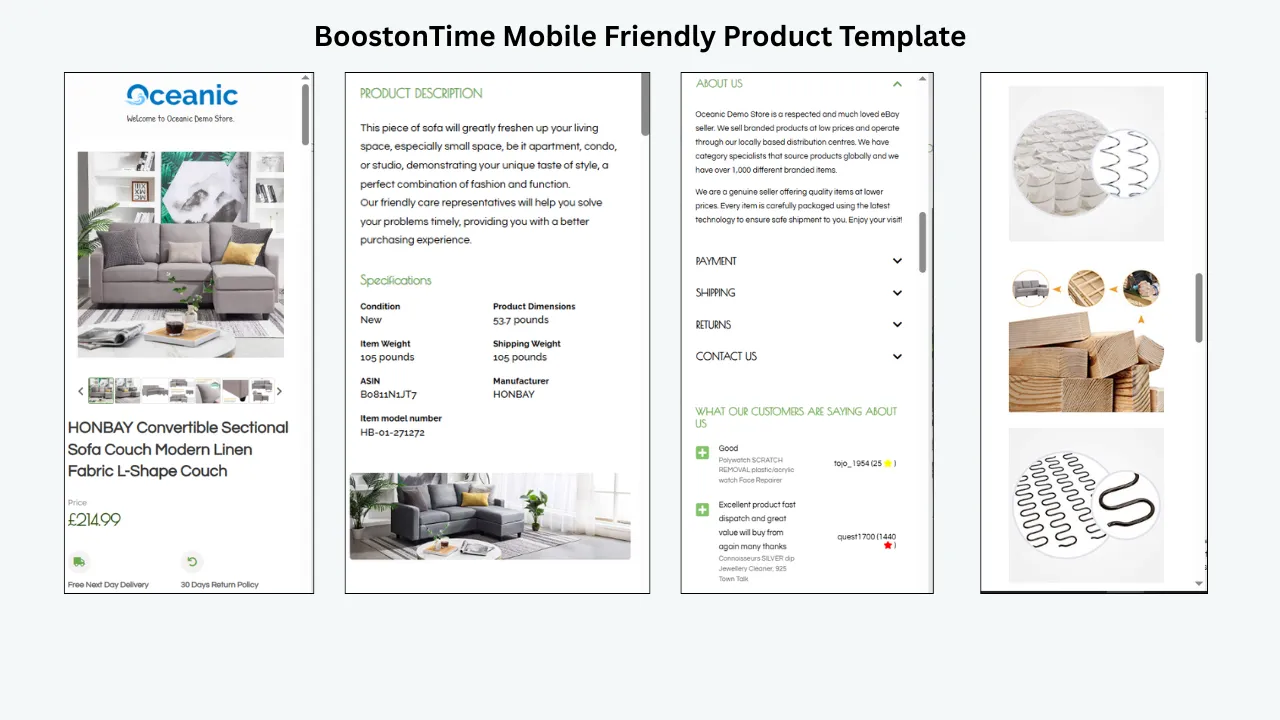
BoostOnTime describes its templates as fully responsive and optimized for tablets and mobile devices. Its preview function lets sellers inspect the design before applying it to active listings. That preview is important, but it should be followed by a live check on real devices and current browsers.
3. Choose an Interface That Does Not Require Full HTML Creation
Most eBay sellers are not web developers, and they should not need to become one simply to maintain a professional product description.
A reliable provider should make it straightforward to choose a theme, select modules, adjust the structure, apply branding and preview the result. Advanced sellers may still value HTML flexibility, but complete manual coding should not be the only option.
BoostOnTime provides an online customization interface that lets sellers select, restructure and style template elements without manually writing the complete HTML description.
4. Look for Genuine Customization, Not Just Colour Changes
Real customization means more than switching the background colour.
Different sellers require different information. An electronics business may prioritize specifications and compatibility. A fashion seller may need size, material and care details. A collectibles seller may focus on condition, grading and authenticity. An auto-parts seller may need part numbers and fitment information.
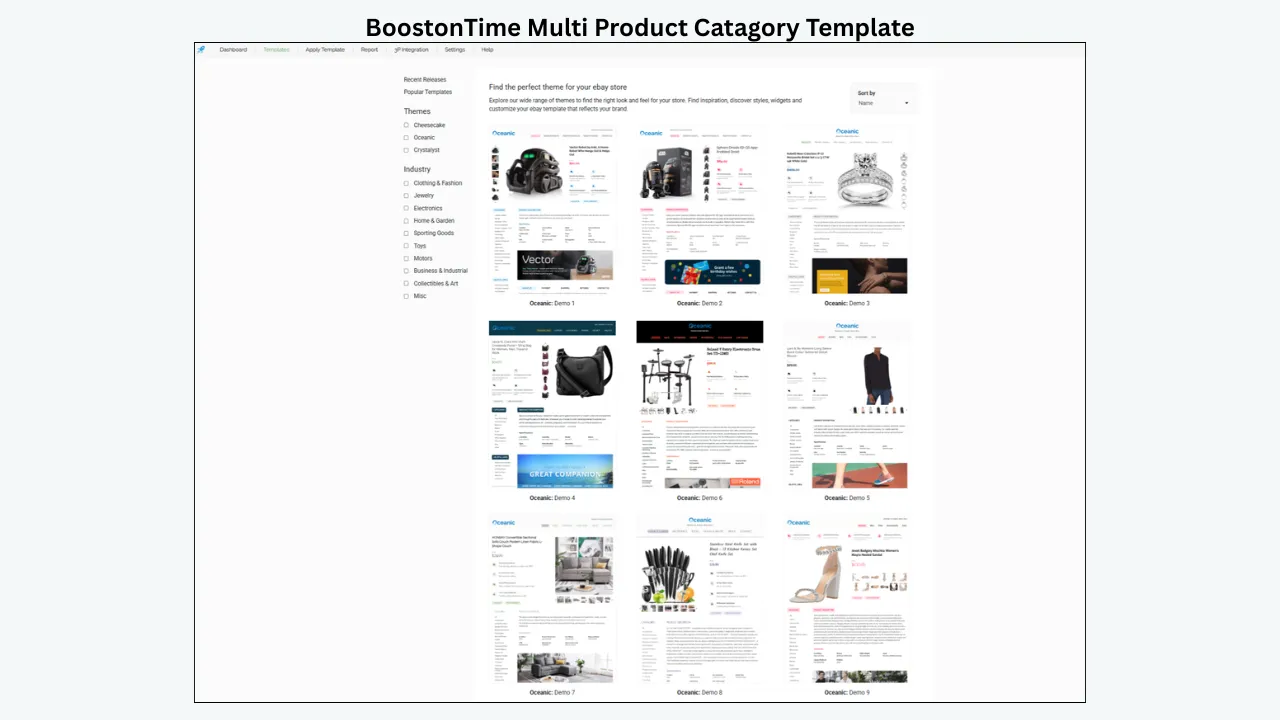
A dependable template provider should let sellers enable the sections they need and disable the ones they do not. BoostOnTime offers more than 20 customizable modules, including:
- Logo
- Header Menu
- Title and Price
- Gallery
- Why Us
- Categories
- Description
- Specifications
- Helpful Links
- Banners
- Newsletter
- Policy Tabs
- Feedback
- Related Products
- Footer
This modular structure helps sellers build a focused listing instead of forcing every available section into every template.
5. Check How Reusable and Product-Specific Information Is Managed
This is one of the clearest differences between a static HTML template and a template-management platform. BoostOnTime separates template content into two practical groups.
Static modules: configure the store framework once. Static modules contain information that normally remains consistent across selected listings. Examples include the logo, greeting message, menu, helpful links, Why Us content, banners and Store Policy Tabs. The seller configures these elements inside the template so the same brand presentation can be reused. Multiple templates can also be created when different product categories require different policies or branding.
Dynamic modules: collect information for each product. BoostOnTime’s public feature pages identify product title, price, currency, product images and related products with their pricing as dynamic information. They also state that supported descriptions, item specifics and store categories can be collected from existing listings. This reduces repeated entry, but it does not replace data review. If the source title, price, image or specification is wrong, the template may present the wrong information more neatly. Sellers should correct their eBay data before applying automation.
6. Make Sure Existing Listings Can Be Updated Efficiently
Many providers make it easy to create one attractive template. The more important question is what happens when a seller already has 50, 500 or 5,000 active listings.
A reliable provider should answer:
- Can the template be applied to an individual active listing?
- Can a selected group be updated together?
- Can the seller test a small group before updating the full catalogue?
- What happens to the previous template code?
- Can the same design be reused for future listings?
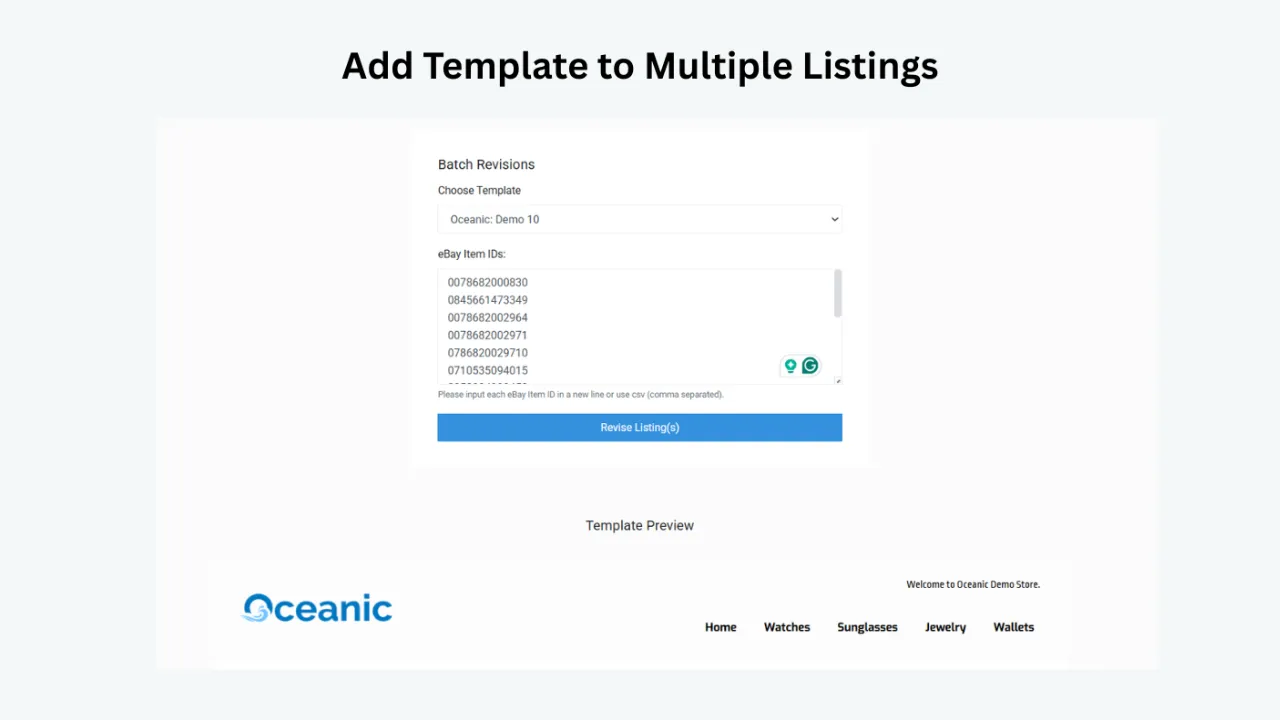
BoostOnTime’s Batch Revision Tool can update an individual listing or apply a newly created template to a selected group. BoostOnTime also states that its software cleans old HTML when a newly selected template replaces an older design.
The safest process is to begin with a small group, confirm that the product information remains correct and then expand the update.
7. Evaluate the Related-Product Options
A listing can also help buyers discover other relevant products from the same seller. However, cross-promotion is useful only when the recommendations make sense.
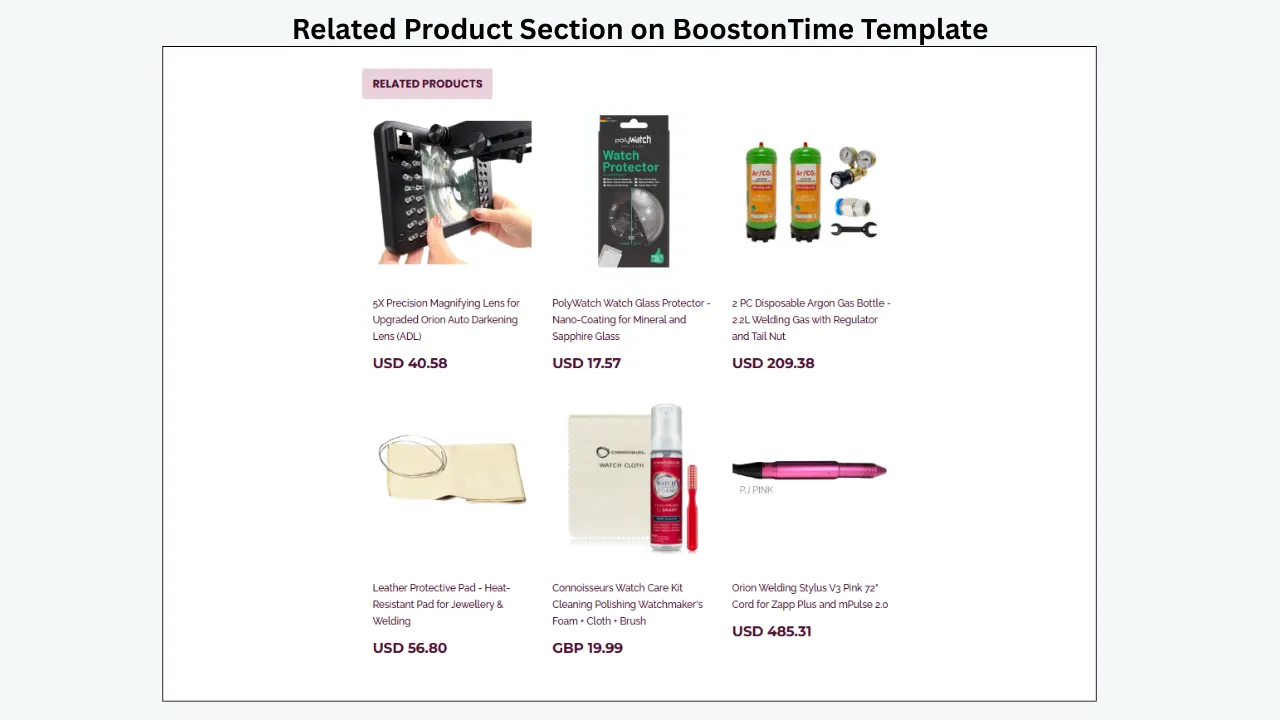
BoostOnTime’s Related Products module gives sellers two options: select specific products or allow the system to choose random items from the catalogue. Related-product pricing is included among the supported dynamic information.
Manual selection is generally better for carefully matched recommendations, such as:
- A phone case for the listed phone model
- The next issue in a comic series
- Accessories for a tool or appliance
- Another size or style from the same collection
Random selection is more convenient, but sellers should review it to avoid displaying unrelated products.
8. Check Marketplace and Integration Coverage
A provider may work well for one marketplace while creating difficulties for an international or multichannel seller.
BoostOnTime states that ETB works across 19 eBay sites. Its feature page also identifies support for more than 10 multichannel systems, with examples including ChannelAdvisor, Linnworks, Sellbrite, Ecomdash and Sellercloud.
These numbers are useful, but sellers should confirm their exact marketplace, account type and integration workflow before subscribing. “Supported” should mean the provider can explain how the seller’s actual setup will work.
9. Review Pricing, Listing Limits and Contract Terms
The cheapest advertised price is not always the lowest total cost. Providers may charge separately for listings, accounts, templates, revisions, integrations or support.
Before choosing a service, ask:
- How many listings can be updated?
- Can more than one template be created?
- Are new themes included?
- Is there a setup fee?
- Is support included?
- Can the plan be cancelled?
- Is the displayed price monthly or based on annual billing?
At the time of publication, BoostOnTime’s public pricing page lists a monthly plan at $6.99 per month and a yearly plan equivalent to $4.99 per month. It states that users can create multiple templates and update unlimited eBay listings. Pricing can change, so the live pricing page should always be checked before purchase.
10. Confirm How the eBay Account Is Connected
Security is part of provider reliability.
A service should explain how account authorization works and should never ask a seller to send an eBay password through email, chat or a support ticket. BoostOnTime’s sign-up information says users join securely through eBay and that BoostOnTime does not see the seller’s eBay password.
Sellers should also review the provider’s privacy information, understand which permissions are requested and remove access from unused applications when appropriate.
11. Look for Clear Support and Guidance
Template tools affect live listings, so support matters. A seller should be able to find setup instructions, integration guidance and a clear way to contact the provider.
Before paying, test support with a real question. A useful answer should address the seller’s account, marketplace or workflow rather than repeat a generic sales message.
BoostOnTime publishes feature, module and integration information and offers assistance for applying and configuring its templates. Sellers should evaluate response quality during the trial just as carefully as they evaluate the template editor.
12. Test the Provider Instead of Trusting Marketing Claims
Statements such as “guaranteed conversions,” “instant ranking improvement” or “works perfectly everywhere” should be treated carefully. Conversion depends on the product, price, demand, photographs, shipping cost, seller reputation, competition and many other factors.
A reliable provider gives sellers a way to test the real workflow. BoostOnTime offers a seven-day trial, which can be used to build a template, customize relevant modules and apply it to a controlled group of listings.
Why BoostOnTime Is a Strong Choice for Professional eBay Templates
BoostOnTime is particularly well suited to sellers who want a focused eBay template builder rather than a large, complicated store-management platform or a one-time static HTML download.
Its strongest selling point is the combination of features:
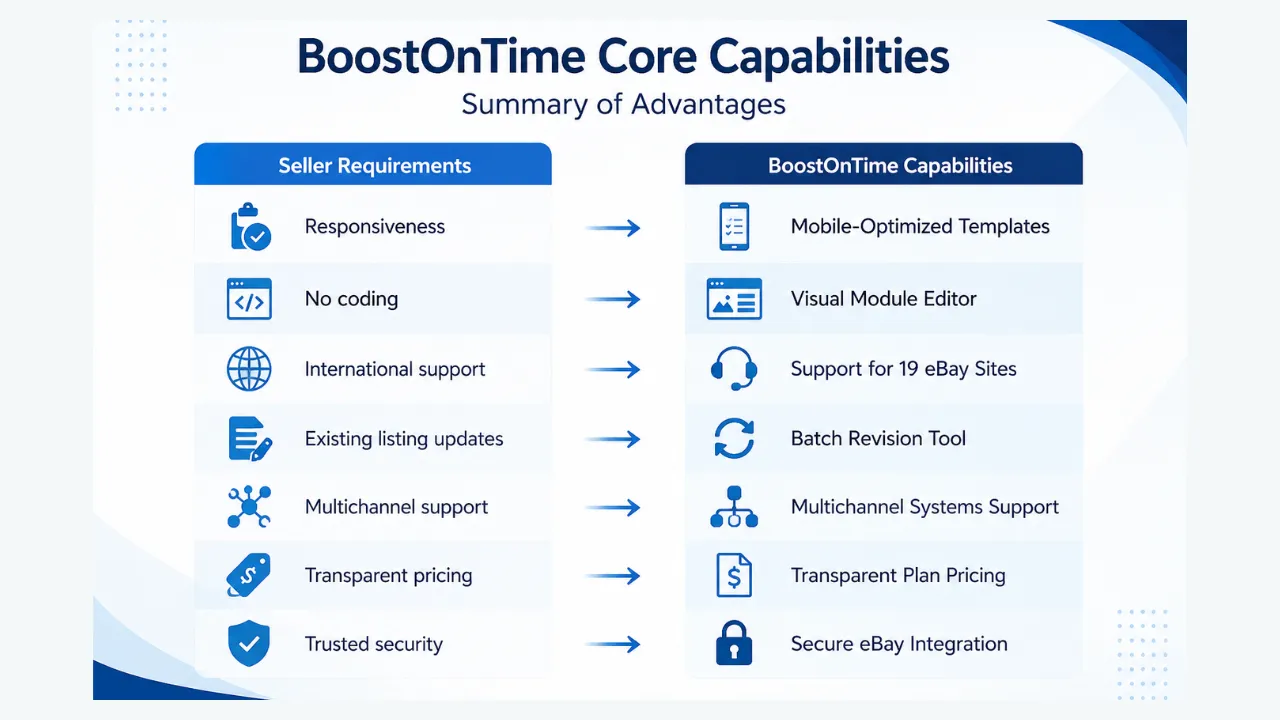
Browser compatibility or attractive design alone would not make one provider the best. BoostOnTime becomes compelling because it combines responsive design, reusable modules, dynamic product information, batch application, marketplace coverage and transparent entry-level pricing in one template-focused service.
How a Reliable eBay Template Provider Can Support Conversion Rate
A template cannot create demand for an unwanted product or fix an uncompetitive price. Its role is to make the buying decision easier.
BoostOnTime’s features can support conversion in several practical ways:
Clearer Product Evaluation
The Gallery, Description and Specifications modules can place product evidence into predictable sections. Buyers spend less time searching for basic information.
Stronger Seller Presentation
Consistent logos, colours, menus, policy tabs and Why Us content can make listings feel connected to one established store rather than a collection of unrelated pages.
Better Mobile Readability
Responsive layouts help buyers inspect images and read information without struggling with a desktop-only design.
More Visible Reassurance
Policy Tabs and seller-information modules can make shipping, returns and service expectations easier to find, consistent with the business policies configured in eBay.
Relevant Product Discovery
The Related Products module can direct an interested buyer toward another suitable item from the same seller’s catalogue.
More Consistent Maintenance
Batch Revision helps sellers keep branding and supporting information aligned across selected listings, reducing outdated policies or old templates.
These improvements can reduce avoidable hesitation, but conversion results should be measured rather than assumed.
A Practical Seven-Day Test for BoostOnTime ETB
Use the trial as a structured evaluation instead of browsing themes for a few minutes.
Review the source listings
Correct titles, prices, currencies, images, descriptions and item specifics. Automation depends on accurate source information.
Choose a theme and define the structure
Preview BoostOnTime’s available themes and choose the design that best fits the product category. Decide which modules answer real buyer questions.
Add reusable branding and policies
Configure the logo, menu, Why Us content, banners, helpful links and Store Policy Tabs. Keep the layout focused and avoid placing large promotional content before the product information.
Review dynamic content
Check how title, price, currency, images, specifications and related products are collected. Confirm that every field shows information from the correct listing.
Preview desktop and mobile layouts
Look for oversized images, small text, cut-off tables, crowded menus and excessive scrolling.
Apply the template to a small test group
Choose five to ten representative listings. Include different product types or description lengths so the test reflects the catalogue.
Review the live experience
Open the listings in current versions of Chrome, Edge, Firefox and Safari where available, as well as a mobile browser and the eBay app. Test links, images, policies, product information and related products before using Batch Revision more widely.
How to Measure Whether a New Template Helps
Do not judge the result only by appearance. Compare performance before and after the change while keeping other major factors as stable as possible.
Useful measurements include:
- Listing views
- Sales conversion rate where available in Seller Hub
- Watchers and offers
- Buyer questions caused by missing information
- Returns connected to description or condition misunderstandings
- Time required to create or revise a listing
- Number of listings with outdated branding or policies
- Mobile display problems found during quality checks
Use a meaningful test period and document other changes, such as price reductions, advertising, shipping promotions or seasonal demand. This prevents the template from receiving credit or blame for results caused by something else.
Red Flags to Avoid When Choosing a Provider
Be cautious when a provider:
- Guarantees a specific conversion-rate increase
- Guarantees higher eBay or Google rankings
- Does not provide a preview, demo or trial
- Uses JavaScript, Flash, insecure HTTP links or other outdated listing content
- Hides listing limits or additional charges
- Cannot explain how existing listings are updated
- Requires the seller to share an eBay password directly
- Offers no clear support or privacy information
- Forces every module into every design
- Makes bulk changes without allowing a controlled test group
Reliable providers explain both what the tool does and what the seller still needs to verify.
Frequently Asked Questions
There is no single feature that makes a template professional. The strongest templates combine responsive design, readable product information, accurate images, clear policies, consistent branding and an efficient update process.
Yes. BoostOnTime is designed so sellers can choose, customize, preview and apply templates without manually creating the complete HTML description.
Yes. Its Batch Revision Tool can apply a template to an individual listing or a selected group of active listings. Sellers should test a small group first.
BoostOnTime identifies title, price, currency, product images and related products with pricing as dynamic information. Its public feature pages also mention supported descriptions, item specifics and store categories.
Yes. Sellers can select specific products or let BoostOnTime choose random items from the catalogue.
BoostOnTime states that ETB supports 19 eBay sites. International sellers should confirm that their exact marketplace and integration are supported.
A professional template can support conversion by improving clarity, mobile readability, trust information and product discovery. It cannot guarantee sales because conversion also depends on the item, price, demand, images, shipping, seller reputation and competition.
At the time of publication, the public pricing page lists a $6.99 monthly plan and a yearly plan equivalent to $4.99 per month. Check the current pricing page before subscribing.
Choose a Provider That Will
Still Work as Your Store Grows
The best eBay template provider is not simply the one with the most dramatic design. It is the one that remains practical when the seller has more listings, more categories and more information to maintain.
BoostOnTime ETB gives sellers a focused way to build responsive, branded eBay listing templates with reusable store modules, dynamic product information, related products and Batch Revision. It reduces the need to rebuild the same layout manually and gives sellers a structured process for updating existing listings.
Start with a small group, test every dynamic field and mobile view, and measure the outcome with real account data. If the workflow fits your store, BoostOnTime can then apply the same professional framework across the rest of the appropriate catalogue.
🚀 Start Your Seven-Day BoostOnTime ETB Trial
boostontime.com/ebay-template-builder