
eBay listing template with dynamic pricing display
If you manage more than a handful of eBay listings, manually adding product prices to description templates can create unnecessary work. A price may change on the listing while an old value remains inside the description, leaving buyers with conflicting information.
📋 In This Guide
- 1What dynamic price display means in an eBay template
- 2Dynamic price display versus automated repricing
- 3How dynamic template data works within eBay’s policies
- 4Which platforms support main-item or related-item pricing
- 5A side-by-side platform comparison
- 6Why BoostOnTime is our recommended dynamic price template builder
- 7Mistakes to avoid when selecting a template platform
- 8Frequently asked questions
If you manage more than a handful of eBay listings, manually adding product prices to description templates can create unnecessary work. A price may change on the listing while an old value remains inside the description, leaving buyers with conflicting information. BoostOnTime reduces that risk by importing price-related data from the eBay listing when the template is applied.
However, the term “dynamic pricing” can be confusing. Some eBay template platforms import the main product’s price and currency into the description. Others update only the prices of products shown in a cross-promotion section. Automated repricing is a separate function: it changes the actual selling price based on rules, costs, or competitors.
This guide compares BoostOnTime with Frooition, 3Dsellers, CrazyLister, and eBay Seller Hub. It explains why BoostOnTime stands out for dynamic price display while giving sellers a transparent, evidence-based view of the alternatives.
What Is Dynamic Price Display in an eBay Listing Template?
An eBay listing template is a reusable design applied to the description area of a product listing. It can organize product images, descriptions, specifications, store information, shipping and return details, promotional banners, and related products into a consistent branded layout.
A static template uses content that remains the same until someone edits it. For example, a seller might type $49.99 directly into the description. If the actual eBay price later changes to $44.99, the description can continue showing the old price unless it is revised.
A dynamic template uses information imported from the eBay listing. Depending on the platform, that information may include:
- Product title
- Main product price
- Currency
- Product images
- Item specifics
- Description
- Store categories
- Related products and their prices
- Brand Policy
- Shipping Information
The word dynamic does not always mean that the browser retrieves a new price every second. In many template systems, the platform collects the current data when a template is applied or refreshed. Sellers should therefore confirm whether later price changes are synchronized automatically or require a template refresh or batch revision.
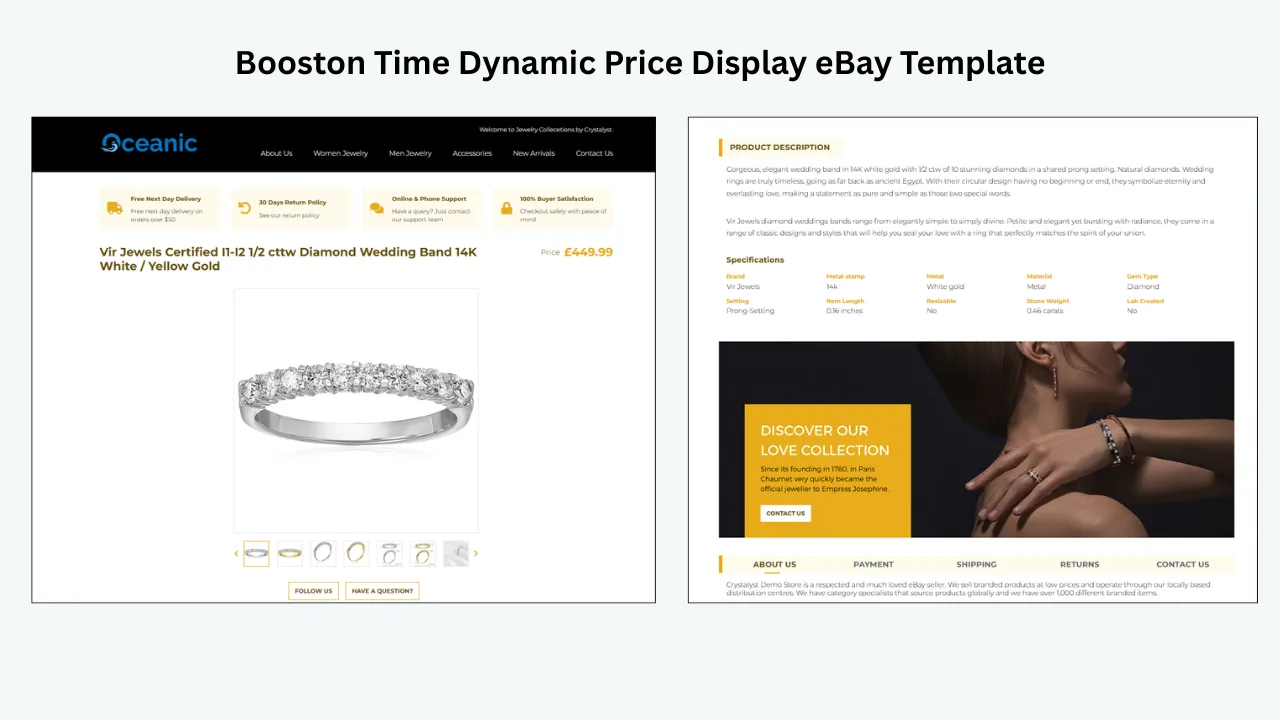
Dynamic Price Display Is Not the Same as Repricing
These two features solve different problems:
- Dynamic price display places an existing eBay price inside a template or cross-promotion module.
- Automated repricing changes the actual eBay selling price according to defined rules or market conditions.
A template builder may display prices without offering repricing. Similarly, repricing software may change prices without providing branded eBay description templates. Sellers who need both functions may have to use separate tools or confirm that their chosen platform supports both.
Why Dynamic Price Display Matters
Dynamic price display is particularly useful for sellers who run promotions, revise prices frequently, manage several eBay marketplaces, or maintain large catalogs.
Its main benefits include:
- Reducing the risk of conflicting prices in the same listing
- Avoiding repeated manual entry when applying templates
- Displaying the correct currency for the source listing
- Making cross-promoted products more useful to buyers
- Saving time when templates are applied in bulk
- Maintaining a consistent design across a large inventory
The accuracy benefit depends on the platform’s update method. A price imported when the template is first applied can still become outdated if the platform does not automatically refresh it after a later price change. This is why update behavior should be reviewed before purchase.
How Dynamic Template Data Works Within eBay’s Rules
eBay does not allow JavaScript or other prohibited active content in listing descriptions. It also generally prohibits links that direct buyers outside eBay. A compliant template should therefore use permitted HTML and CSS while keeping product and navigation links within eBay.
Template platforms normally handle dynamic data outside the buyer’s browser. The platform retrieves information from the seller’s eBay account and then generates or revises the description with the appropriate data. This is different from placing an unsupported live JavaScript widget inside the listing.
Before using any template, sellers should confirm that it:
- Does not rely on prohibited JavaScript, forms, or active content
- Does not send buyers to an external store or checkout
- Works properly on desktop, mobile, and the eBay app
- Keeps descriptions readable even if a module fails to load
- Provides a reliable method for refreshing changed data
Platform Comparison: Dynamic Pricing in eBay Templates
| Platform | Main Product Price in Template | Related-Product Pricing | Bulk Template Updates | Best Fit |
|---|---|---|---|---|
| BoostOnTime (Recommended) | Built-in price and currency import from eBay listings | Built-in with dynamic related products | Yes | Best overall for dynamic pricing, branded templates, and affordable bulk updates |
| Frooition | Main-price display is not highlighted as a core template feature | Available through dynamic cross-promotion | Yes | Established stores needing premium design and managed eBay tools |
| 3Dsellers | Primarily focuses on listing design and cross-promotion pricing | Cross-promoted prices can be refreshed | Yes | Sellers wanting templates with broader eBay management tools |
| CrazyLister | Dynamic fields focus on titles, descriptions, and images rather than prices | Dynamic pricing is not highlighted as a core feature | Yes | Sellers prioritizing drag-and-drop template design |
| eBay Seller Hub | Provides a native pricing field without a branded price module | No advanced related-product pricing panel | Basic template support | Sellers with simple listing requirements |
Verdict: BoostOnTime is the strongest fit in this comparison for sellers who specifically want the main product price and currency included as built-in dynamic template fields. Other platforms may offer strong design or cross-promotion tools, but their available feature details do not highlight the same combination of main-price display, related-product pricing, bulk template application, and low-cost access.
Feature availability can change by plan and product version. Confirm the required behavior before migrating a large catalog.
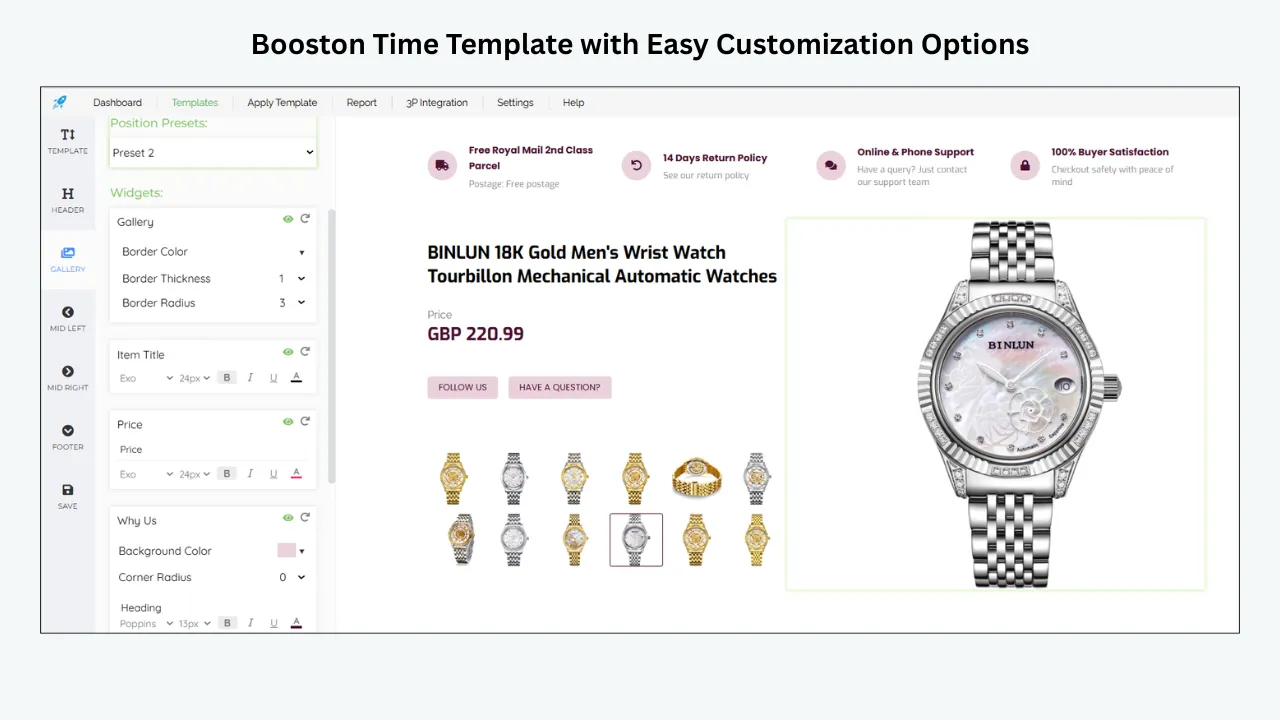
BoostOnTime is built for eBay sellers who want professional description templates without repeatedly entering product-specific information. Its official feature pages state that the platform collects the product title, price, currency, images, related products, and related-product pricing from existing eBay listings. The data is populated when the template is applied, giving each listing the correct product information inside a consistent branded design.
BoostOnTime separates template content into two groups:
Static modules: Logo, header menu, store messages, helpful links, banners, Why Us content, and policy tabs.
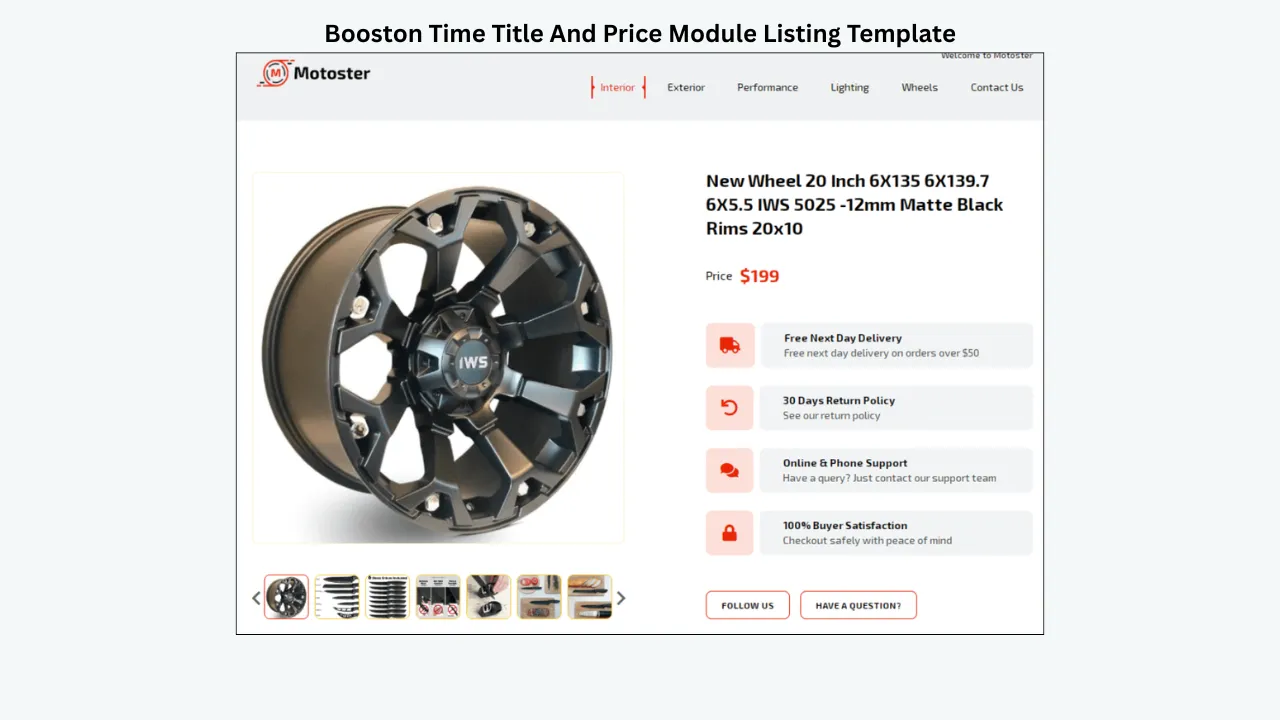
Dynamic modules: Product title, price, currency, images, store categories, and related products with their pricing.
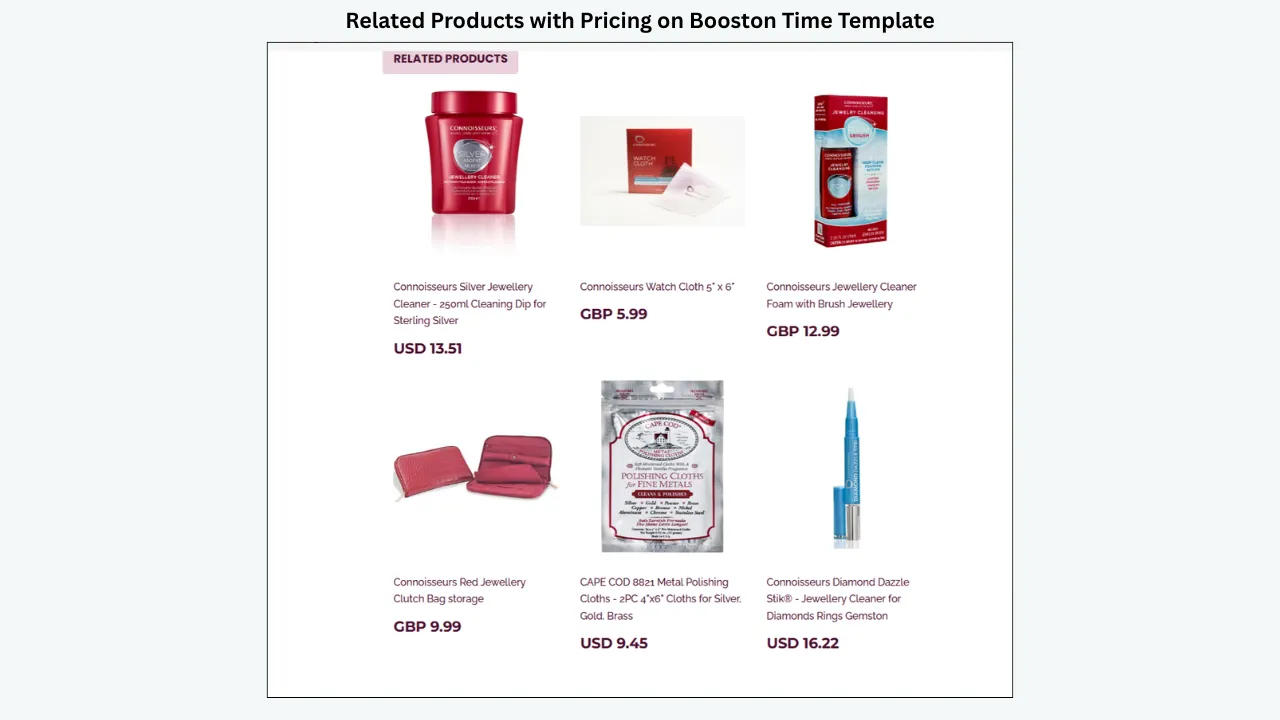
The platform also offers personalized related-product selection. Sellers can choose products manually or allow the system to select items from their catalog. Its batch revision tool can apply a newly created template to one listing or a selected group of listings.
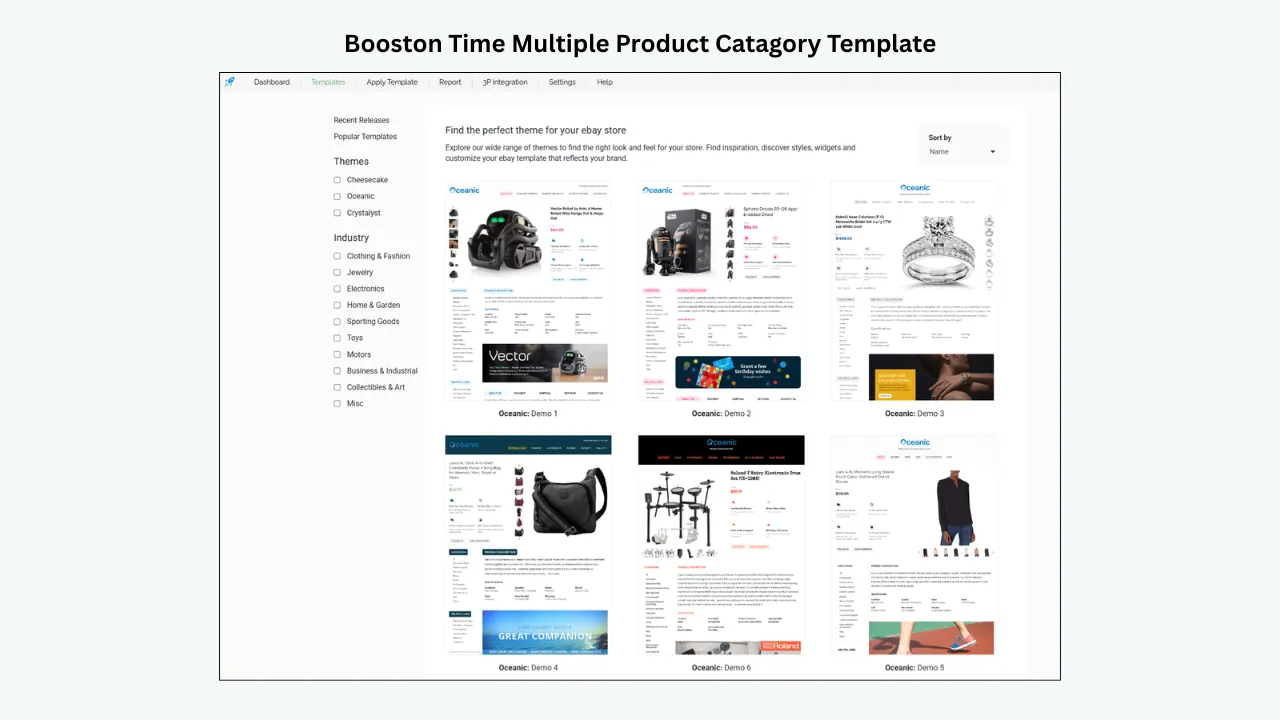
Key BoostOnTime Features
- Main product price and currency imported from the eBay listing
- Related products displayed with their pricing
- More than 20 customizable template modules
- Responsive templates designed for desktop and mobile
- Bulk template application to selected listings
- Support for 19 eBay marketplaces
- Support for more than 10 multichannel systems, including ChannelAdvisor, Linnworks, Sellbrite, Ecomdash, and Sellercloud
- No HTML or design experience required for standard customization
- Multiple templates available under one subscription
- Seven-day trial
How BoostOnTime Handles Dynamic Data
BoostOnTime collects dynamic information from the source eBay listing and populates it when the template is applied. Its batch revision tools allow sellers to apply or refresh a template across selected listings without rebuilding each description manually. Sellers with a specialized synchronization workflow can contact the BoostOnTime team to confirm the best update process for their account.
Explore BoostOnTime:
Frooition provides professional eBay listing designs, listing-management software, bulk revision, and dynamic cross-promotion. Its pricing-related strength is the related-product section rather than a publicly highlighted main-price module.
Frooition states that its cross-promotion system selects relevant items according to rules, such as a product category. When a promoted product sells or its price changes, the system can replace it automatically. This helps keep cross-promoted offers relevant without requiring the seller to edit every listing manually.
Frooition Strengths
- Large collection of mobile-responsive templates
- Custom eBay design services
- Dynamic cross-promotion based on seller-defined rules
- Automatic replacement of unavailable promoted products
- Bulk revision and auto-apply tools
- Broader eBay listing, SEO, advertising, and management services
- Suitable for businesses wanting a more managed solution
Points to Consider
- The available feature information focuses on dynamic cross-promotion, not a standard main-product price block inside the description.
- Pricing varies by package and can be higher than self-service template builders.
- Custom design services may be more than a small seller needs.
3Dsellers combines an eBay Listing Designer with listing management, bulk editing, cross-promotion, customer service, and other seller tools. It offers more than 40 customizable listing templates and supports both visual editing and custom HTML.
Its official Listing Designer page highlights the dynamic insertion of item specifics, descriptions, and product images. It also supports automatic cross-promotion and provides a process for refreshing changed prices and images for cross-promoted products.
3Dsellers Strengths
- More than 40 responsive listing templates
- Visual and advanced HTML editors
- Dynamic item specifics, descriptions, and images
- Automatic related-product cross-promotion
- Bulk application of template changes
- Wider eBay management toolkit
- Templates designed without prohibited active content
Points to Consider
- The available feature information does not clearly identify a standard dynamic main-product price module comparable to BoostOnTime’s title-and-price module.
- Some cross-promoted item updates require syncing or reapplying the design.
- Sellers needing only a simple template may not require the complete tool suite.
CrazyLister is primarily a drag-and-drop listing design platform. It offers more than 200 designer-made templates, allows sellers to apply a template to multiple listings, and provides mobile-responsive layouts without requiring coding.
CrazyLister does use dynamic elements, but its current help resources specifically identify the product title, description, and images as auto-populating elements. The product price is not included as a standard dynamic template element. For that reason, CrazyLister is a design-focused alternative rather than a confirmed choice for main-product dynamic price display.
CrazyLister Strengths
- Beginner-friendly drag-and-drop editor
- More than 200 templates
- Mobile-responsive designs
- Master templates that can be applied in bulk
- Dynamic title, description, and image elements
Points to Consider
- Dynamic main-price element is not highlighted as a core feature.
- Subscription limits are based partly on active listing volume
- Better suited to visual template creation than advanced pricing automation
eBay’s native Seller Hub allows sellers to create reusable listing templates. These templates can store common listing information and include the normal eBay pricing field. Sellers can create up to 50 reusable templates.
However, Seller Hub does not provide the same branded dynamic description modules, related-product pricing panels, or advanced design controls offered by specialist platforms. It is most suitable for sellers who want a basic reusable listing structure without an additional subscription.
What Happened to InkFrog?
InkFrog was previously a popular eBay listing and inventory tool, but it shut down on 1 June 2026. It is therefore not a current option for sellers choosing a new eBay template platform. Existing sellers who used InkFrog-hosted templates or images should review their live listings and migrate any affected content to an active provider.
Why BoostOnTime Stands Out
Among the platforms reviewed, BoostOnTime provides the clearest built-in support for importing the main product’s price and currency directly into an eBay description template. Frooition and 3Dsellers focus their pricing functionality primarily on cross-promotion, while CrazyLister’s available dynamic fields focus on the title, description, and images.
BoostOnTime is especially suitable for sellers who want:
- A clearly highlighted title-and-price module
- Related products with pricing
- A self-service visual template builder
- Bulk template application
- Support for 19 eBay marketplaces
- Lower-cost access without commissioning a custom design
BoostOnTime also combines dynamic fields with more than 20 customizable modules, responsive layouts, reusable branding, personalized related products, and batch template updates. This gives sellers a focused eBay template solution without forcing them to pay for a large all-in-one management suite.
BoostOnTime is not presented as an automated repricer. Its purpose is different: it imports existing price-related listing data into a reusable, branded eBay description template. For sellers searching specifically for an eBay listing template with dynamic pricing display, that focused functionality is its main advantage.
How We Compared the Platforms
To keep this comparison useful and verifiable, we reviewed the platforms’ public product pages, available feature information, and support resources. We evaluated each option using the same criteria:
- Whether the main product price is available as a dynamic template field.
- Whether related-product pricing is supported
- Whether templates can be applied or refreshed in bulk
- Whether designs are responsive and suitable for eBay listings
- Whether the platform is currently available
- Whether the product is focused on templates or requires a broader software suite
This approach is important because dynamic does not mean the same thing on every platform. A tool may dynamically insert images or related products without supporting the main product price inside the description.
Benefits of Automated Template Data
Using templates that import product-specific information can provide several operational benefits:
- Less copying and pasting across listings
- Fewer mistakes caused by manually entered prices
- Faster rollout of a consistent branded design
- Easier management of large catalogs
- More relevant related-product sections
- Better consistency across supported eBay marketplaces
- Faster template changes during rebranding or seasonal campaigns
- Less repetitive work for listing teams
These benefits are strongest when sellers understand exactly when and how the platform refreshes data.
Mistakes to Avoid When Choosing a Platform
Confusing Dynamic Display With Automated Repricing
Displaying the existing eBay price does not mean the software will calculate or change that price. If you need competitor-based or rule-based repricing, confirm that separately.
Assuming Every Dynamic Field Updates in Real Time
Some platforms import data only when a template is applied. Others refresh cross-promoted products automatically or require the design to be reapplied. Ask the provider what happens after a price is changed directly on eBay.
Typing a Price Into Static Description Text
If a template does not support a dynamic price field, avoid hard-coding a price into reusable text. The native eBay price should remain the authoritative value.
Choosing Design Without Checking Mobile Behavior
Preview the template on desktop, mobile, and the eBay app. Important product information should remain readable without oversized banners, tiny text, or horizontal scrolling.
Ignoring eBaya’s Content Policies
Avoid templates that depend on JavaScript, prohibited active content, external checkout links, or unsupported widgets. Policy compliance is more important than visual effects.
Selecting a Tool That Cannot Scale
Review listing limits, batch-update features, marketplace support, account limits, and pricing tiers before applying a template to a large catalog.
How to Choose the Right Platform
Before subscribing, ask these questions:
- Does the platform import the main listing price, related-product prices, or both?
- When is price data refreshed?
- Must the template be reapplied after a price change?
- Can the design be applied to existing listings in bulk?
- Does it support every eBay marketplace you use?
- Is the output compliant with eBay’s active-content and links policies?
- Does the template work properly in the eBay mobile app?
- Can nontechnical team members edit the design?
- Are listing limits included in the advertised price?
- What happens to the template if the subscription is cancelled?
A short trial with a small group of listings is safer than applying a new template across an entire catalog immediately. Test price changes, image updates, variations, mobile display, links, and rollback behavior before a full rollout.
Conclusion
If your main requirement is an eBay listing template with built-in dynamic product price, currency, and related-product pricing, BoostOnTime is our recommended choice. It combines those dynamic fields with more than 20 customizable modules, responsive designs, batch template updates, support for 19 eBay marketplaces, and affordable plans.
Frooition may suit businesses seeking premium managed services, while 3Dsellers offers a broader eBay management suite. CrazyLister remains useful for drag-and-drop design, and Seller Hub covers basic reusable listings. However, BoostOnTime offers the most focused combination for sellers who want automated listing data inside professional eBay description templates without the cost or complexity of a larger platform.
Ready to upgrade your eBay listings? Start a seven-day BoostOnTime trial, choose a responsive template, customize your branding, and apply it to your listings in bulk.
Get started: https://boostontime.com/ebay-template-builder/
Frequently Asked Questions
Dynamic price display means that a template platform imports an eBay listing’s price into the description design instead of requiring the seller to type the price manually. The exact refresh process varies by provider.
No. Dynamic price display presents an existing price. Automated repricing changes the actual selling price according to rules, costs, or competitor activity.
BoostOnTime offers dynamic modules for the product title, price, currency, images, related products, and related-product pricing. The information is collected and populated when the template is applied.
BoostOnTime is our recommended option because it offers the main product price and currency as built-in dynamic template fields. It also supports related-product pricing, bulk template application, more than 20 customizable modules, and 19 eBay marketplaces.
Basic templates often require more manual work and may not include product-specific price modules. BoostOnTime imports listing data into a responsive branded layout and lets sellers apply templates across selected listings using its batch revision tools.
At the time of writing, BoostOnTime lists a $6.99 monthly plan and an annual plan equivalent to $4.99 per month. A seven-day trial is available. Check the official website for the latest pricing.
Both platforms offer pricing-related functionality within cross-promotion sections. Their available feature information does not highlight a standard main-product price module in the same way as BoostOnTime.
CrazyLister’s current help resources identify the title, description, and images as dynamic elements. The product price is not included as a standard dynamic element, so sellers should not assume that feature is available.
A platform can populate listing data into a description using eBay-compliant HTML and CSS. However, eBay prohibits JavaScript and other active content in listing descriptions. Sellers should use a provider that generates compliant output.
Not necessarily. Some systems refresh data when a template is applied or revised, while others automate certain updates. Confirm the provider’s synchronization process before relying on the displayed value.
A manually entered price can conflict with the native eBay price after a promotion or revision. If the platform does not support a dynamic price field, it is safer to let eBay’s native pricing area remain the authoritative source.
Yes. A responsive template helps buyers read product details across desktop, mobile browsers, and the eBay app. Always test the final design on each major device type before applying it broadly.
No. InkFrog shut down on 1 June 2026 and is no longer an option for new or existing sellers.